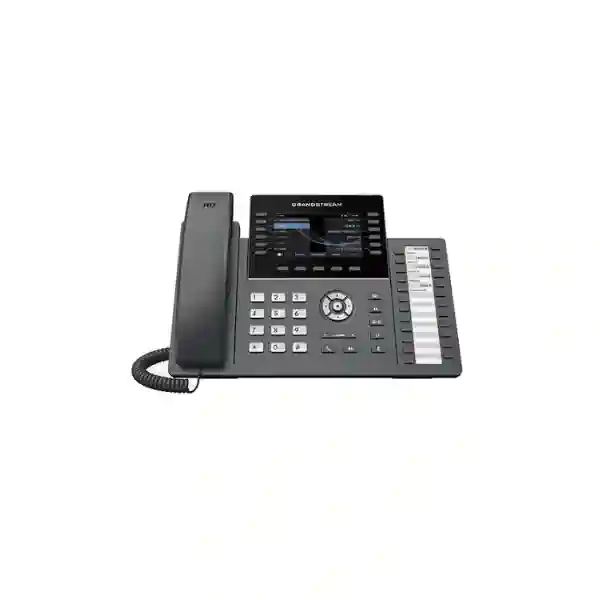
Grandstream GRP2636 Dubai: Professional 12-Line IP Phone for High-Activity Desks
The Grandstream GRP2636 Dubai is a professional carrier-grade SIP desk phone created for receptionists, team coordinators, executive assistants, supervisors and other users who need faster access to many call appearances, extensions and programmable actions from one desktop device. Grandstream’s current product page and March 2025 datasheet specify 12 lines, up to 16 SIP accounts, a 4.3-inch 480 × 272 colour TFT display, 24 multi-purpose extension keys, dual Gigabit Ethernet ports with integrated PoE, Bluetooth, 5-way audio conferencing, HD audio, Noise Shield technology and GDMS support. Current Grandstream material also specifies dual-band Wi-Fi 6 for hardware version 5.0 and above, so buyers planning wireless deployment should confirm the hardware revision before ordering.
For a Dubai business, the main reason to consider the GRP2636 is not simply that it has more keys than an ordinary office phone. Its value appears when a user needs to monitor colleagues, transfer calls quickly, handle multiple departments, manage shared lines, work with more than one SIP identity, or deploy the same endpoint profile across many desks. The phone combines physical line keys and a dedicated bank of MPK extension keys with centralized device management, which can reduce the amount of menu navigation required during busy call handling. The design therefore fits front desks, service counters, administrative teams, branch coordinators, hospitality operations, clinics, professional offices and enterprise reception areas where visible call-state information and one-touch actions matter.
Fourteck can help organisations evaluate the GRP2636 against their PBX, SIP trunk, VLAN, PoE, Wi-Fi, headset and provisioning requirements before a quotation is prepared. Availability, commercial terms, deployment scope and compatibility can vary by project, so they should be confirmed for the actual UAE requirement rather than assumed from a generic online listing.
Built for users who actively manage several call appearances and need dedicated line access.
Current Grandstream product and datasheet information lists up to 16 SIP accounts.
Dedicated multi-purpose extension keys support busy reception and monitoring workflows.
Two switched Gigabit Ethernet ports help keep a wired workstation simple and efficient.
Dual-band Wi-Fi 6 is specified for hardware version 5.0 and above; confirm revision for wireless projects.
Who should choose the GRP2636?
The GRP2636 makes the most sense when call handling is a real part of a user’s job. A desk that makes only a few calls per day usually does not need 12 line keys and a separate bank of MPKs. A receptionist, administrator or service coordinator can use those controls to see extension status, call a colleague, transfer a caller, access shared lines or trigger other configured functions with less searching through menus. The strongest buying case therefore starts with workflow: how many people must the user monitor, how many simultaneous calls arrive, how often are transfers performed, and how quickly must the user reach departments, queues or shared resources?
Reception & Front Desk
Useful where staff repeatedly answer, park, transfer and monitor extensions. The dedicated MPK area gives the operator a visual, labelled control surface rather than relying only on touchscreen menus or soft keys.
Executive Assistant
Suitable when one desk monitors managers, shared numbers or departmental lines and needs quick call routing, conferencing and headset operation throughout the day.
Team Supervisor
A supervisor can assign programmable keys to frequently used contacts and functions while keeping access to multiple SIP identities or line appearances.
Multi-Site Organisation
GDMS support helps administrators apply a consistent configuration approach across batches of Grandstream endpoints, which is useful for branches and distributed teams.
A buyer-first view: requirement → capability → business value
Technical specifications matter, but a procurement decision becomes easier when each specification is connected to an actual user requirement. The GRP2636 is positioned above basic staff phones because its control surface, line capacity, headset choices, networking and centralized management are designed for heavier communication roles. The table below shows how to translate common customer requirements into a practical decision.
| Customer requirement | Relevant GRP2636 capability | Practical benefit | Buying consideration |
|---|---|---|---|
| Monitor many extensions | 24 multi-purpose extension keys plus line keys | Faster access to BLF, speed dial and other provisioned functions. | Confirm PBX support and how your chosen platform maps BLF or programmable keys. |
| Reduce power adapters | Integrated IEEE 802.3af PoE | One Ethernet cable can carry network connectivity and power when connected to a suitable PoE switch. | Check switch PoE budget, cabling and VLAN configuration before rollout. |
| Flexible placement | Integrated Wi-Fi; Wi-Fi 6 on hardware version 5.0+ | Useful where a wired outlet is inconvenient or during workspace changes. | For critical reception roles, evaluate wireless coverage, roaming, interference and QoS rather than assuming Wi-Fi is equivalent to a well-designed wired path. |
| Long headset use | RJ9, EHS support, USB and Bluetooth options | Lets organisations select a headset style that suits operator mobility and comfort. | Confirm the exact headset model, cable/EHS requirement and firmware support before bulk purchase. |
| Central administration | GDMS plus supported provisioning methods | Standardized profiles, firmware management and remote monitoring can reduce per-desk setup effort. | Build a configuration policy first: accounts, VLANs, security, firmware, time zone, certificates, keys and failover settings. |
Verified GRP2636 specifications that matter in real deployments
For this page, Fourteck prioritizes Grandstream’s current product page and the March 2025 GRP2636 datasheet for product facts. Those sources list 12 lines and up to 16 SIP accounts, while some older launch material and portions of legacy documentation still reference six SIP accounts. Because a multi-account design may depend on firmware and hardware history, a project that genuinely requires more than six independent SIP registrations should confirm the exact revision and current firmware before purchase. This is especially important for service-provider or multi-tenant scenarios in which every account is part of the design rather than an unused specification.
| Lines / SIP accounts | 12 lines; current Grandstream product page and March 2025 datasheet list up to 16 SIP accounts |
|---|---|
| Display | 4.3-inch 480 × 272 TFT colour LCD |
| Programmable control | 24 MPK extension keys with paper slot, plus line keys and context-sensitive soft keys |
| Ethernet | Dual switched auto-sensing 10/100/1000 Mbps Gigabit Ethernet ports |
| Power | Integrated IEEE 802.3af Power over Ethernet; current datasheet also lists a 12V/1A adapter |
| Wi-Fi | Integrated dual-band 2.4 GHz / 5 GHz Wi-Fi 6 (802.11a/b/g/n/ac/ax) on hardware version 5.0 and above |
| Bluetooth | Integrated |
| Audio | HD handset and full-duplex HD speakerphone; dual microphone and Noise Shield functionality are listed by Grandstream |
| Headset interfaces | RJ9 headset port with EHS support for compatible deployments, USB headset support and Bluetooth connectivity |
| Conferencing | 5-way audio conferencing |
| Provisioning | GDMS, TR-069 and encrypted XML configuration methods are listed in current Grandstream documentation |
| Physical | Current datasheet: 220 × 210 × 82 mm; unit weight 880 g |
Grandstream explicitly qualifies Wi-Fi 6 as applying to hardware version 5.0 and above. If Wi-Fi 6 is part of the customer requirement, ask for confirmation of the hardware revision rather than assuming every historical GRP2636 unit has the same radio specification.
Why the 12 line keys and 24 MPKs matter more than the headline number
A specification such as “12 lines” can be misunderstood if it is treated as a simple count of telephone numbers. In a business deployment, line keys and SIP accounts are part of a wider call-control design. A user may have several call appearances, shared lines, queue-related functions or departmental identities, while programmable keys can be assigned to BLF monitoring, speed dial, call pickup or other PBX-supported actions. The exact behaviour depends on the SIP platform and provisioning profile, so the GRP2636 should be planned as an endpoint within a call-flow design, not as a standalone feature list.
The separate 24-key MPK area is particularly useful at a reception or administrative desk. A label can identify a person, department or function, and the corresponding key can provide a predictable action. That physical predictability matters when calls arrive quickly. It can be faster to reach a labelled key than to search a directory, change a screen or remember an extension. A clinic receptionist could dedicate keys to consultation rooms or service desks. A hotel or serviced-office reception could assign keys to operations, reservations, facilities and supervisors. A corporate front desk could monitor assistants, meeting-room support, security and departmental reception points. These are examples of workflow design; the PBX still determines which functions are available and how presence states are represented.
The 4.3-inch colour display is large enough to present call and menu information without turning the device into a touchscreen-centric phone. This is important for customers who prefer tactile controls. Some users work faster with fixed buttons because they can develop muscle memory. Others prefer a large touch display and may be better matched to a model such as the GRP2670. The GRP2636 sits between those approaches: it provides a colour screen for context but keeps the most frequently used call-handling functions on physical keys.
Before assigning MPKs, administrators should define naming conventions and key priorities. Put the most critical people or actions where they are easiest to reach, keep labels short, and use consistent layouts across similar job roles. If ten reception desks have different key maps, support becomes harder. If all ten follow a common template with only site-specific changes, training, troubleshooting and replacement are easier. This is where centralized provisioning becomes strategically important rather than merely convenient.
Wired Ethernet, PoE and Wi-Fi 6: choosing the right connection in Dubai offices
The GRP2636 includes two switched auto-sensing Gigabit Ethernet ports, which supports the common desk design in which the network cable connects to the phone and the user’s computer connects through the second Ethernet port. This can reduce the number of wall outlets required at a workstation, but it does not remove the need for correct VLAN and QoS planning. The voice VLAN, data VLAN, LLDP or manual VLAN settings, switch-port configuration and DHCP options should all be considered before a large rollout. Where the network supports integrated PoE, the phone can be powered through the LAN connection, helping reduce local adapters and simplify desk cabling.
Power over Ethernet should be checked at switch level, not only at phone level. An individual phone may support 802.3af, yet a switch serving dozens of phones still needs sufficient total PoE budget. Add phones, access points, cameras and other powered devices to the same switch and a design that looked fine per port can run short at system level. Fourteck therefore recommends calculating the complete PoE requirement with an allowance for growth and considering UPS support for the network core if voice availability during short power interruptions is important.
Wireless connectivity is useful when a desk location changes frequently, when temporary work areas are created, or when structured cabling is difficult. Current Grandstream information specifies integrated dual-band Wi-Fi 6 on hardware version 5.0 and above. Wi-Fi should still be engineered for voice. Signal strength alone is not enough: interference, channel utilization, roaming behaviour, access-point density, latency, packet loss and QoS all influence call quality. A fixed reception desk that handles every inbound call may still benefit from a wired path even if Wi-Fi is available, while a flexible administrative desk may value wireless placement more highly.
In high-density Dubai business environments, the 5 GHz band can offer useful capacity, but actual performance depends on the building and radio design. Glass partitions, reinforced walls, neighbouring networks, elevators and dense tenant occupancy can all affect RF behaviour. For this reason, a Wi-Fi-ready phone should not be treated as a substitute for wireless planning. If the GRP2636 will be used over Wi-Fi, validate the specific desk areas under expected business load and confirm the device hardware revision before the final order.
The practical selection rule is simple: use wired PoE for predictable fixed desks where cabling is available; use Wi-Fi where placement flexibility creates genuine value and the wireless network is designed for voice. The GRP2636 supports both strategies, which allows the same endpoint model to serve different workspace conditions without forcing a single connectivity method.
HD audio, Noise Shield and headset options for busy users
A receptionist or supervisor can spend several hours each day on calls, so audio design should be evaluated together with call-control features. Grandstream lists HD audio on the handset and full-duplex speakerphone, dual microphones and Noise Shield technology for the GRP2636. HD audio can improve clarity when the far-end device, codec selection, PBX and network path support wideband voice. Noise-reduction features can help reduce distraction, but they do not eliminate the need for sensible desk placement and acoustic planning in very noisy environments.
The phone offers several headset pathways: an RJ9 headset interface, EHS support for compatible headset deployments, USB headset support and Bluetooth connectivity. This flexibility is valuable because headset requirements differ. A stationary receptionist may prefer a dependable wired headset. A manager who frequently moves around a private office may prefer Bluetooth. A customer-service team may standardize on USB headsets that are also used with computers, subject to compatibility. EHS can allow remote answer/end-call workflows with supported equipment, but the exact headset model and cable combination should be checked before a bulk order.
For a procurement team, “supports Bluetooth” should not be the end of the headset discussion. Ask whether the user needs mono or stereo, wired or wireless, hearing protection features, long wear comfort, call-control buttons, charging docks, computer connectivity, acoustic isolation and replaceable ear cushions. Then confirm the chosen headset against the phone and firmware. A small compatibility test with one representative unit can prevent a much larger deployment problem.
The GRP2636 also supports 5-way local audio conferencing. That feature is useful for ad-hoc collaboration without immediately creating a separate meeting session, although organisations should decide whether local phone conferencing or a PBX/conferencing service is the preferred policy. For large or regularly scheduled meetings, a dedicated collaboration platform may provide better participant management and recording controls. For quick discussions among a handful of people, the phone’s local conferencing capability can be a practical tool.
GDMS, provisioning and security: the deployment story behind the desk phone
The GRP family is designed for managed deployments, and the GRP2636 supports Grandstream Device Management System (GDMS). Grandstream describes GDMS as a centralized platform for provisioning, configuration, management, monitoring, firmware operations and troubleshooting of supported devices. This matters when an organisation has more than a few phones. Manually configuring every endpoint can create inconsistent settings, forgotten passwords and slow replacement procedures. A centrally managed template allows administrators to treat the endpoint fleet as an operational system rather than a collection of individual appliances.
A strong deployment begins with a standard profile. Define account settings, SIP server addresses, transport protocol, time and NTP behaviour, VLANs, QoS, firmware channel, certificates, dial plan, directory integration, key assignments, screen preferences and security policy. Separate site-specific values from role-specific values. For example, a “Dubai Reception” template could inherit enterprise security and firmware settings while adding the local extensions and MPK map required by that location. A “Branch Manager” template could reuse the same baseline but expose different keys.
Grandstream’s current datasheet lists security capabilities including user and administrator password levels, AES-encrypted configuration, SRTP, TLS, 802.1X and secure boot. Security depends on how these controls are configured. A phone that supports TLS does not automatically mean every SIP session is encrypted; the PBX, certificates and provisioning must also be designed accordingly. The same applies to 802.1X, which needs network-side authentication infrastructure. Enterprises should coordinate voice endpoint settings with firewall, switching, identity and PBX policies instead of configuring phones in isolation.
Firmware management is another operational consideration. Avoid uncontrolled upgrades on all phones at once. Test a representative device, review release notes, confirm PBX and headset behaviour, then roll out in stages. Grandstream documentation also warns against power cycling the phone during boot or firmware upgrade. A staged process is especially valuable for reception phones because they are operationally important; a configuration change that is harmless on a standard desk phone can disrupt a front-desk workflow if line keys or BLF behaviour changes.
For service providers and multi-site businesses, zero-touch or centrally assisted provisioning can reduce deployment time. The real benefit is repeatability. A replacement GRP2636 can be brought into the approved configuration process rather than being rebuilt from memory. That improves support quality, auditability and consistency across Dubai, Abu Dhabi, Sharjah or remote branches.
PBX and SIP planning before you order
The GRP2636 is a SIP endpoint, so the phone is only one part of the communication solution. Before procurement, identify the PBX or hosted SIP service, the number of required registrations, expected simultaneous calls, call queues, ring groups, shared lines, voicemail, transfer rules, emergency calling requirements, external directory needs and survivability strategy. If the organisation is migrating from analog or digital phones, document the current workflows first. Users often depend on behaviours that are not obvious from the old configuration, such as one-touch pickup of a manager’s line or a specific park-and-page routine.
Interoperability with third-party SIP platforms is broad in the GRP family, but “SIP compatible” does not mean every vendor-specific feature behaves identically. Basic registration, calling, transfer and conferencing are standard requirements; BLF, shared call appearance, presence, remote directories, secure provisioning and advanced features can depend on the PBX implementation. Fourteck recommends a pilot when the project relies on a specific non-Grandstream PBX feature or a customized hosted-voice platform.
Network readiness also deserves attention. Check DHCP, DNS, NTP, firewall policy, SIP ALG behaviour, VLAN tagging, QoS and WAN resilience. For branch offices using a central PBX across VPN or SD-WAN, measure latency, jitter and packet loss. If the office uses a cloud PBX over public internet, consider secondary connectivity for locations where telephony availability is business-critical. Server redundancy and failover capabilities listed by Grandstream can support resilient designs, but the endpoint settings must match the architecture.
If you are planning a new phone system rather than replacing endpoints only, the handset mix should be role-based. A high-capacity GRP2636 at reception may be appropriate while ordinary staff use simpler phones such as the Grandstream GRP2604P or Grandstream GRP2603P. Wireless placement needs may point some users toward the GRP2602W. Role-based selection avoids paying for advanced keys on every desk while still giving high-activity users the tools they need.
Fourteck can also help connect endpoint selection with the wider IP PBX and business telephony design. The goal is not to force every user onto the same handset; it is to create a coherent phone system in which each role receives the right endpoint and every endpoint follows the same security, provisioning and support standards.
Grandstream GRP2636 Dubai deployment scenarios
Dubai organisations range from compact offices to large multi-tenant operations, so the same phone can solve different problems depending on the desk role. The scenarios below show where the GRP2636’s high-density key layout and managed deployment approach can be useful without assuming that every business needs the model.
Corporate reception in Business Bay or DIFC
A front-desk user may need direct keys for executives, assistants, departments, facilities and security. The 24 MPKs can create a labelled operational panel while line keys handle active call appearances. Wired PoE is usually attractive for a fixed desk, while a headset can support frequent call handling.
Trading, logistics or operations desk
A coordinator who repeatedly contacts warehouses, drivers, procurement, finance and management can use programmable keys to reduce dialling steps. Multiple SIP identities may also help separate departmental or branch-facing call flows where the PBX design supports them.
Clinic or medical reception
A reception team can map frequently used rooms, billing, pharmacy, nurses’ stations or administrative contacts to programmable keys. The network and privacy configuration should be coordinated with the organisation’s IT and compliance policies.
Hotel, serviced office or property management
Front desks often route callers to multiple operational teams. Physical MPKs can speed access to reservations, housekeeping, maintenance, security and management when integrated with the PBX call plan.
Branch administration
An administrator can combine branch and head-office contacts on one key map. GDMS-based management can help keep firmware, security and configuration consistent with the rest of the fleet.
Temporary or reconfigurable workspace
For hardware revision 5.0 and above, integrated dual-band Wi-Fi 6 can provide more placement flexibility. The wireless LAN still needs voice-ready coverage and should be tested in the actual location.
Dubai, Abu Dhabi, Sharjah, Ajman, Deira and Bur Dubai: local planning differences
Local SEO should reflect real deployment needs rather than repeating city names. A customer in a new Dubai office may be planning structured cabling, PoE switching and a fresh hosted PBX at the same time. A customer in Deira or Bur Dubai may be replacing an older phone system inside an established premises where cabling, switch capacity and rack space already exist. The GRP2636 can fit both projects, but the implementation questions are different. A replacement project starts with compatibility and migration; a new-office project starts with architecture and capacity planning.
In Abu Dhabi, multi-floor offices and institutional environments may prioritize centralized templates, security policy and consistent desk standards. In Sharjah or Ajman, a growing business may value the ability to standardize on Grandstream endpoints while scaling from a smaller PBX or cloud service. None of these locations changes the GRP2636’s core specifications, but the surrounding infrastructure—WAN links, PoE switches, access points, PBX location, SIP trunks and support model—determines whether the endpoint performs as intended.
For mixed-site UAE projects, create a location matrix. Record the number of phones per site, desk roles, wired ports, PoE availability, Wi-Fi coverage, PBX connectivity, VLAN IDs, emergency numbers, time settings and local support contacts. Then map GRP2636 units only to roles that benefit from the larger key surface. Standard users can be assigned more economical GRP models. This approach reduces cost while preserving a consistent management ecosystem.
Fourteck’s wider Grandstream UAE and IT services resources can support discussions that extend beyond the handset itself, including network readiness, IP telephony planning and multi-site deployment requirements. Scope and service availability should be confirmed for each project.
GRP2636 price in Dubai: what should a quotation include?
Customers searching for “GRP2636 price Dubai” often want a single number, but a business quotation can depend on more than the endpoint. Quantity, hardware revision, headset selection, wall-mount accessories, PBX integration, provisioning effort, delivery scope and support requirements can change the commercial package. Fourteck does not assume a live price, stock position or delivery time on this page. Request a current quotation with the exact quantity and project requirements so the offer can be matched to the intended deployment.
For a phone-only purchase, state the required quantity, destination and whether Wi-Fi 6 hardware revision 5.0+ is mandatory. For a project quotation, also provide the PBX platform, number of locations, expected SIP accounts, PoE availability, headset requirement and whether Fourteck should assist with configuration. If you are comparing supplier proposals, make sure they describe the same scope. A low hardware price may not include provisioning, compatibility testing or deployment assistance; a higher project price may include those services. Compare like with like.
State whether the requirement is one phone, a small batch or a multi-site rollout.
Confirm version 5.0+ when Wi-Fi 6 is a mandatory requirement.
Identify the system so account, BLF, directory and provisioning compatibility can be reviewed.
Include headset, EHS requirements, wall mounting and any network-side items needed for the project.
GRP2636 vs GRP2634, GRP2650 and GRP2670: which direction should you go?
A good comparison is based on user role, not on which model has the longest specification list. The GRP2636 is compelling when a physical bank of 24 programmable extension keys is central to the workflow. Other GRP models can be more suitable when the user needs fewer lines, a larger screen or expansion-module support.
| Model | Best-fit direction | Key distinction | When to consider instead |
|---|---|---|---|
| GRP2636 | Busy receptionist, administrator, supervisor | 12-line class, 4.3-inch colour display and 24 dedicated MPK extension keys | Choose when a dense physical key layout is a priority without moving to a large touch display. |
| GRP2634 | Professional user with fewer simultaneous call-control needs | Grandstream currently lists 8 lines, 12 SIP accounts and a 2.8-inch colour display, with built-in programmable key capabilities | Consider when the GRP2636 key density is unnecessary and desk space or budget favours a smaller professional endpoint. |
| GRP2650 | High-end professional or operator role needing expansion capability | Grandstream lists 14 lines, 16 SIP accounts, a 5-inch 1280 × 720 display and support for GBX20 expansion modules | Consider when the user needs more virtual keys or an external expansion-module strategy. |
| GRP2670 | Executive or busy user who prefers a large touch interface | 7-inch capacitive touch display with professional GRP-series call features | Consider when screen-driven interaction is more important than a dedicated paper-labelled MPK bank. |
For ordinary employees who do not need this class of line and key density, simpler endpoints may be more economical. See Fourteck’s pages for the GRP2602G, GRP2602P and GRP2601W for lower-complexity desk roles. A mixed-model deployment can remain easier to manage when models come from the same GRP family and share a common provisioning approach.
A practical GRP2636 rollout plan
For anything beyond a single desk, use a repeatable rollout process. The phone may be easy to configure, but project quality depends on discovery, network readiness, PBX design, user mapping and post-deployment validation. A staged rollout also helps identify documentation inconsistencies such as the historical SIP-account count before they affect a larger purchase.
- Classify users by role. Count receptionists, supervisors, executives, standard staff and shared desks. Assign the GRP2636 only where its line and MPK capacity solves a real workflow requirement.
- Confirm PBX and feature compatibility. Test registrations, transfer, hold, BLF, directory, voicemail indicators, conferencing, secure SIP and any non-standard features your users depend on.
- Audit the network. Verify PoE budget, VLANs, DHCP, DNS, NTP, firewall rules, QoS, WAN performance and Wi-Fi coverage where wireless will be used.
- Validate hardware revision. If Wi-Fi 6 is required, confirm hardware version 5.0 or later. If the deployment needs more than six independent SIP accounts, confirm the exact current revision and firmware against Grandstream’s latest product documentation.
- Build the provisioning template. Standardize security, firmware, time settings, accounts, keys, directories and network parameters. Keep site-specific values separate from the common baseline.
- Pilot with real users. Give the phone to a receptionist or supervisor who performs the actual workload. Observe whether the MPK layout and headset choice improve the process.
- Roll out in controlled batches. Avoid changing every critical desk at once. Migrate a manageable group, verify call quality and user behaviour, then expand.
- Document and hand over. Keep a record of firmware, provisioning profile, key map, network configuration and support contacts so replacements and troubleshooting remain consistent.
What to verify before a large multi-site or GCC/Africa deployment
Fourteck works across a network of regional technology sites, and the same GRP2636 model may be considered for UAE, Kuwait, Kenya, Uganda, Tanzania, Ghana or Nigeria projects. Regional deployment should not be reduced to copying a Dubai configuration. Each site can have different SIP providers, internet quality, VLAN design, power conditions, shipping requirements, PBX topology and local numbering plans. The endpoint can remain standardized while the surrounding configuration is adapted to the local environment.
For example, a UAE headquarters might host or control the main PBX, while branches connect over VPN, SD-WAN or cloud services. An East African branch may need additional consideration for WAN resilience or local SIP breakout. A Kuwait office may use a different carrier or numbering plan. The handset role can remain identical, but emergency calling, dial rules, time settings, NTP sources and failover paths may differ. Treat these variables as configuration data rather than reasons to create inconsistent endpoint standards.
When planning cross-border procurement, confirm model revision, power accessories, compliance requirements, delivery scope and support arrangements per destination. Do not assume stock, lead time, warranty handling or local certification based on another country’s listing. A controlled bill of materials and a site-by-site acceptance checklist are more reliable than a generic regional promise.
Common mistakes when buying a high-capacity IP phone
Choosing by specification count alone
More lines and more keys are not automatically better. Match the phone to the daily call-handling role.
Ignoring the PBX key map
The 24 MPKs create value only when they are provisioned around real workflows and supported functions.
Assuming every historical unit has Wi-Fi 6
Grandstream qualifies Wi-Fi 6 for hardware version 5.0 and above. Verify revision for wireless requirements.
Buying headsets without a compatibility check
RJ9, EHS, USB and Bluetooth offer choice, but the exact headset and call-control behaviour should be tested.
Skipping PoE budget calculation
Per-port support does not guarantee that the whole switch can power every endpoint and other PoE device at once.
Deploying without a pilot
A small real-world pilot validates call flows, audio, provisioning and user acceptance before scale amplifies mistakes.
Frequently asked questions about the Grandstream GRP2636
How many lines does the Grandstream GRP2636 support?
The GRP2636 is a 12-line professional IP phone. The line keys are intended for high-activity business users who need quick access to multiple call appearances and programmable workflows.
How many SIP accounts does the GRP2636 support?
Grandstream’s current GRP2636 product page and March 2025 datasheet list up to 16 SIP accounts. Some older launch material and portions of legacy documentation reference six accounts, so projects that depend on more than six independent registrations should confirm the exact hardware revision and firmware before purchase.
Does the GRP2636 support Wi-Fi 6?
Yes, current Grandstream documentation specifies integrated dual-band Wi-Fi 6 for hardware version 5.0 and above. If Wi-Fi 6 is mandatory for your project, confirm the device revision in the quotation or procurement process.
Does the GRP2636 support PoE?
Yes. Grandstream lists integrated IEEE 802.3af Power over Ethernet. The network switch must still provide adequate PoE capacity, and total switch power budget should be checked for multi-phone deployments.
Is the GRP2636 suitable for a receptionist?
It is well suited to reception and administrative roles that handle many calls and benefit from dedicated programmable keys. The 24 MPK extension keys can be mapped to extensions or supported PBX functions, while the line keys and 4.3-inch colour display provide additional call-control context.
Can I use a Bluetooth or USB headset with the GRP2636?
The GRP2636 includes integrated Bluetooth and USB headset support, and it also has an RJ9 headset interface with EHS support for compatible deployments. Confirm the exact headset model and call-control compatibility before a bulk purchase.
Can the GRP2636 be centrally managed?
Yes. The phone is supported by Grandstream Device Management System (GDMS), and Grandstream also lists additional provisioning methods such as TR-069 and encrypted XML configuration. Central management can simplify fleet configuration, firmware control and monitoring.
Does the GRP2636 have Gigabit Ethernet?
Yes. The current datasheet lists two switched auto-sensing 10/100/1000 Mbps Gigabit Ethernet ports. This supports a common desk layout in which the phone and a connected computer share the wired network path, subject to correct VLAN and QoS design.
What is the GRP2636 price in Dubai?
Price depends on the current commercial quotation, quantity and project scope. Hardware revision, accessories, headset requirements, provisioning and deployment services can affect the total. Request a current Fourteck quotation with the required quantity and destination rather than relying on an unverified static price.
Should I choose GRP2636 or a simpler GRP phone?
Choose the GRP2636 when the user needs a high-density physical key layout, frequent call handling and multiple programmable contacts or functions. For standard staff with lighter call activity, a simpler GRP model can be more cost-efficient while still supporting centralized management.
Request a GRP2636 Dubai quotation or compatibility check
If you are considering the Grandstream GRP2636 Dubai for reception, executive support, branch administration or a multi-site IP telephony rollout, send Fourteck the quantity, PBX or hosted voice platform, office locations, PoE availability, headset requirement and whether Wi-Fi 6 hardware version 5.0+ is mandatory. For complex projects, also include the number of SIP registrations, BLF/MPK requirement, expected simultaneous calls and any secure SIP or 802.1X policy.
This information allows the solution to be checked as a system rather than treating the phone as an isolated product. Fourteck can then discuss suitable endpoint mix, compatibility and deployment scope. Commercial availability, lead time and service coverage should be confirmed in the current quotation.
Technical verification resources
For revision-sensitive specifications, consult Grandstream’s current documentation and confirm the actual hardware supplied for your project.
Grandstream GRP2636 product page • Grandstream GRP2636 datasheet

Reviews
There are no reviews yet.