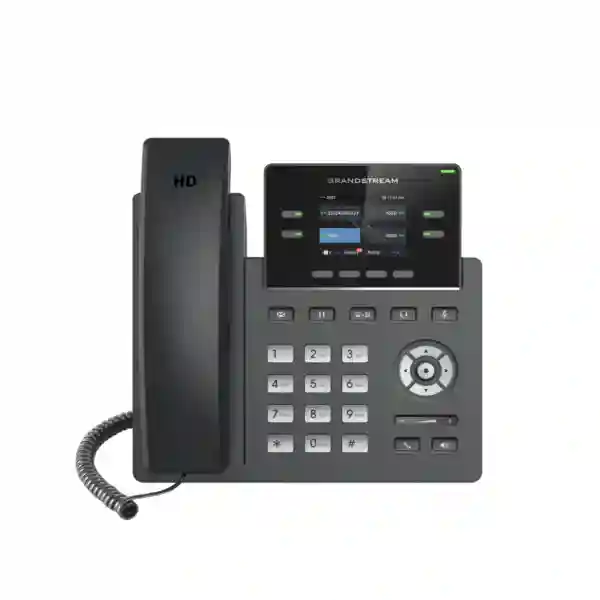
Grandstream GRP2612W Dubai – Dual-Band Wi-Fi Business IP Phone
The Grandstream GRP2612W Dubai is a professional SIP desk phone for organizations that need the familiarity of a fixed business handset with greater network-placement flexibility. The W variant combines integrated dual-band 802.11 a/b/g/n/ac Wi-Fi with IEEE 802.3af PoE, four line keys, up to four SIP accounts, a 2.4-inch 320×240 color display, HD audio, up to 16 digital BLF or speed-dial keys, and centralized provisioning through Grandstream Device Management System (GDMS). That combination can suit offices, branches, classrooms, reception-support positions, clinics, retail counters, temporary project spaces and other locations where a desktop phone is preferred but a dedicated data point is not always available.
Fourteck can help UAE organizations evaluate the GRP2612W as part of a complete voice deployment, including SIP/PBX compatibility checks, extension planning, VLAN and QoS considerations, Wi-Fi coverage, PoE or local-power decisions, provisioning workflow and user-role mapping. Availability, commercial terms and exact deployment scope should be confirmed at quotation stage rather than assumed from online listings.
Four multi-purpose line keys for multiple extensions, identities or monitored call appearances.
Integrated 2.4 GHz and 5 GHz 802.11 a/b/g/n/ac connectivity for flexible placement.
Integrated PoE plus a 5V power adapter for wireless-only locations.
320×240 TFT interface for call information and everyday navigation.
Why Choose a Wi-Fi Desk Phone?
Most IP phones assume an Ethernet cable is available at every desk. In many Dubai offices that is exactly the right design, especially where structured cabling and PoE switching are already installed. Other environments are different. A serviced office may restrict cable changes, a classroom may need a wall-mounted phone far from an existing data point, a retail counter may move during a store refresh, or a project team may occupy a temporary area for only a few months. The GRP2612W addresses those cases by adding integrated dual-band Wi-Fi to the GRP2612 desktop form factor.
Wi-Fi does not remove the need for power. When no Ethernet cable is used, the phone can use its supplied power adapter while voice traffic runs across the WLAN. Where structured cabling exists, the same handset can use Ethernet and integrated PoE. That makes the W variant useful for mixed environments where some positions are wired and others need wireless network access.
Wireless voice should still be treated as a real-time network service rather than a convenience feature. Coverage, interference, roaming design, QoS, security and WAN quality all affect the user experience. In offices where Ethernet is easy to provide, a wired PoE connection may remain the simplest choice. The GRP2612W is valuable because it gives project teams another deployment option without changing the user-facing phone family.
GRP2612W Technical Specifications
| Feature | Verified capability | Deployment relevance |
|---|---|---|
| SIP / lines | Up to 4 SIP accounts and 4 line keys | Supports users with multiple extensions, identities or monitored lines. |
| Wi-Fi | 802.11 a/b/g/n/ac on 2.4 GHz and 5 GHz | Allows network access without a dedicated Ethernet data run where WLAN quality is suitable. |
| Ethernet | Dual switched 10/100 Mbps ports | Supports normal wired use and PC pass-through, subject to Fast Ethernet speed. |
| Power | IEEE 802.3af PoE; 5V adapter supplied | Supports both switch-powered wired positions and adapter-powered wireless positions. |
| Display | 2.4-inch 320×240 TFT color LCD | Clear call-state visibility and color user interface. |
| Programmable keys | Up to 16 digital BLF / speed-dial keys | Useful for supervisors, reception-support users and frequent transfer destinations. |
| Audio | HD handset and speakerphone; G.722 and Opus among supported codecs | Supports wideband voice when the PBX, trunk and remote endpoint permit it. |
| Conference | 5-way audio conference | Enables small ad-hoc voice conferences from the phone. |
| Headset | RJ9 headset jack; EHS support for compatible Plantronics headsets noted by Grandstream | Confirm exact headset and EHS combination before ordering. |
| Provisioning | GDMS, TR-069 and encrypted XML methods | Supports repeatable rollout and centralized administration. |
| Security | Secure boot, dual firmware images, TLS, SRTP, 802.1X and encrypted configuration/data protections | Supports controlled enterprise security when configured correctly. |
Current Grandstream documentation is the reference point for this page. Exact behavior may depend on firmware, PBX platform, network settings and hardware revision; older reseller listings for the GRP2612 family may show different figures.
Customer Requirement → Capability → Practical Benefit
No data cable at the desk
Use the integrated Wi-Fi and local adapter, provided the business WLAN has suitable coverage, capacity and security for voice.
PoE available at some desks
Use the same W model on Ethernet with PoE, which can simplify standardization across mixed wired/wireless areas.
More than a basic two-line role
Four line keys, up to four SIP accounts and 16 digital BLF or speed-dial positions support multi-role users.
Many phones across branches
GDMS and supported provisioning methods can improve configuration consistency and reduce manual endpoint setup.
Wireless Voice Planning for Dubai and UAE Offices
A wireless desk phone is only as dependable as the WLAN carrying its traffic. A laptop may appear to work acceptably on a weak or congested network because web traffic can tolerate delay and retransmission. Real-time voice is more sensitive to packet loss, jitter, roaming delays and interference. A serious GRP2612W deployment should therefore begin with RF and network validation rather than assuming that an existing office SSID is automatically suitable.
Where practical, 5 GHz can provide more channel capacity and less interference than a crowded 2.4 GHz environment, although the best design depends on building materials, access-point placement and coverage goals. Glass partitions, reinforced concrete, metal shelving, lift cores and dense neighboring Wi-Fi networks can change actual RF behavior. Warehouses and education facilities may also have longer distances between access points and phones than normal office floors.
The network plan should consider SSID architecture, wireless security, voice VLAN strategy, DHCP, DNS, NTP, firewall policy, SIP signaling, RTP media, WMM/QoS and WAN performance. A cloud-hosted PBX adds the internet path to the voice chain; an on-premises PBX makes internal routing, switching and segmentation more prominent. The phone includes WMM support for wireless QoS and common Layer 2/Layer 3 QoS mechanisms for wired traffic.
For larger projects, separating endpoint selection from network validation is important. A suitable phone cannot compensate for poor RF coverage or an unstable WAN. The design question is not only whether the GRP2612W has Wi-Fi, but whether the complete network path can support consistent real-time voice.
Wi-Fi, Ethernet or PoE: Which Mode Should You Use?
Wi-Fi + power adapter
Best when a data cable is unavailable or inconvenient but mains power is present. Suitable for temporary desks, training rooms, serviced offices, classrooms and rearranged retail counters.
Ethernet + PoE
Best where structured cabling and PoE switching already exist. A wired link can simplify troubleshooting and centralize endpoint power, especially when switches are UPS-backed.
Choose another model
If Gigabit pass-through, a larger display, Bluetooth, more physical keys or expansion-module support is essential, compare another GRP model before standardizing.
Who Is the GRP2612W Designed For?
General office users and team coordinators
Users who need several line appearances, a color screen and direct access to frequently called colleagues can use the four line keys and digital BLF positions without moving to a much larger executive phone. Managers and supervisors can assign BLF, speed dial or feature functions based on their workflow.
Reception support
For light-to-moderate front-desk work, the 16 digital BLF or speed-dial positions can help with transfers and monitoring. A high-volume operator who needs continuous visibility of dozens of extensions may be better served by a higher-end endpoint with more dedicated keys or an expansion solution.
Schools, classrooms and training centers
Education projects often have rooms without convenient data outlets. Wi-Fi can simplify placement, while PoE remains available in wired administration areas. Emergency calling policy, paging integration, power availability, Wi-Fi coverage and wall-mount requirements should be considered as part of the design.
Retail, clinics and branch offices
Counters, consultation rooms and temporary branches can change layout more often than conventional offices. A Wi-Fi capable fixed phone can reduce dependence on a specific data point. Central provisioning is useful when the same model is repeated across several small locations.
SIP PBX and Hosted Voice Compatibility
The GRP2612W is a standards-based SIP endpoint. It can work with many IP PBX and hosted SIP environments, but “SIP compatible” should not be interpreted as a guarantee that every advanced function behaves identically on every platform. Basic registration and calling may be straightforward, while BLF, shared line appearance, directories, XML applications, hot-desking, feature codes and provisioning can depend on the PBX implementation.
Before a large rollout, validate SIP authentication, transport, codec order, DTMF, outbound proxy requirements, NAT behavior, voicemail, transfer, BLF subscriptions, emergency calling and remote provisioning. For an on-premises Grandstream UCM deployment, the phone can fit naturally into the same vendor ecosystem, but the network still needs correct VLAN, DHCP, DNS, firewall and routing configuration.
A pilot profile with representative users is a practical way to validate the actual PBX, network and workflow before mass deployment. It is much safer than assuming that a datasheet alone proves application-level compatibility.
HD Audio, Codecs and Call Quality
Grandstream specifies HD audio on the handset and speakerphone. The supported codec set includes G.722 and Opus for wideband voice, as well as common codecs such as G.711, G.729, G.726, G.723 and iLBC. The exact codec used on a call depends on PBX and trunk policy, the far-end device and any transcoding in the path.
Wideband audio can improve speech clarity, but the endpoint alone cannot guarantee an HD call. If the SIP provider restricts codec options or the remote endpoint does not support the same wideband codec, the call may use a narrowband format. Network delay, jitter and packet loss are equally important. Endpoint features such as echo cancellation, jitter buffering and packet-loss concealment help, but persistent network problems should be solved at the source.
For Wi-Fi deployments, test voice quality during normal business activity rather than only after hours. A WLAN that sounds excellent when empty may behave differently when meeting rooms, laptops and mobile devices are active.
Security and Central Device Management
Business phones are managed network endpoints. The GRP2612W includes security capabilities such as secure boot, dual firmware images, encrypted configuration/data storage, TLS, SRTP and 802.1X. Those features are valuable only when a deployment policy actually uses them. Administrators should apply unique credentials, restrict management access, use secure management protocols, segment voice traffic where appropriate, control firmware versions and disable unnecessary services.
GDMS provides a centralized interface for configuring, provisioning, managing and monitoring supported Grandstream endpoints. This becomes especially useful across branches because changes can be standardized rather than entered separately on every phone. A provisioning system itself should also be secured with appropriate administrator roles and access controls because it can affect many devices at once.
Firmware planning deserves attention on the GRP261x family because Grandstream documentation distinguishes hardware generations and upgrade paths. Before changing production firmware, identify the hardware revision, review the vendor guidance, back up configuration where appropriate and test the target version on a small group.
GRP2612W vs GRP2612, GRP2612P and GRP2612G
| Variant | Ethernet | PoE | Wi-Fi | Best fit |
|---|---|---|---|---|
| GRP2612 | 10/100 | No | No | Basic wired deployment with local power. |
| GRP2612P | 10/100 | Yes | No | Standard PoE-wired office. |
| GRP2612W | 10/100 | Yes | Dual-band 802.11ac | Mixed wired/wireless deployment where placement flexibility is important. |
| GRP2612G | Gigabit | Yes | No | Wired position where Gigabit pass-through matters more than Wi-Fi. |
The W version is not automatically the best member of the family; it is the best fit when Wi-Fi is a real deployment requirement. For fully wired offices, the P or G variants may be simpler. For Gigabit-dependent desktops, the G variant is worth considering.
Avoid Overbuying or Under-Specifying
The GRP2612W is positioned between basic entry-level phones and larger executive or operator endpoints. It can be ideal for a manager who needs several SIP identities and BLF targets, but a receptionist monitoring a much larger extension list may need more visible keys. An executive who expects Bluetooth headset integration or a larger screen may also need a higher model.
Network speed is another decision point. The GRP2612W has 10/100 Mbps Ethernet ports. If a workstation passes its network connection through the phone, the phone can become a Fast Ethernet link in the path. For users who require Gigabit desktop throughput, select a Gigabit-capable phone or avoid passing the PC connection through this model.
A good standardization plan maps models to personas—general user, manager, receptionist, executive and special-purpose location—then chooses the least complex model that fully meets each role. This reduces unnecessary cost without forcing users into endpoints that are too limited.
Provisioning the GRP2612W at Scale
Manual configuration may be acceptable for a few phones, but it becomes difficult to control across a larger fleet. The GRP2612W supports GDMS, TR-069 and encrypted XML provisioning. The appropriate method depends on PBX type, hosted provider, security policy and deployment scale.
A production profile may define account registration, display names, codec order, time zone, NTP, dial plan, voicemail, BLF keys, VLAN, QoS, administrator access, firmware policy, directories, screen behavior and user permissions. Wireless deployments add SSID and security information. Separating global defaults, site values and user-specific settings makes future changes easier to manage.
For branch rollouts, test the onboarding sequence after a factory reset, fallback behavior if the provisioning service is unavailable and the way firmware changes are staged. Central management is most effective when it is paired with change control and documented templates rather than frequent one-off edits.
A staged rollout—IT test, pilot department, feedback, profile refinement, wider deployment—usually creates fewer surprises than moving an entire organization in one step.
UAE Deployment Scenarios
Dubai & Deira
Mixed old and new office stock can create inconsistent cabling. The GRP2612W can standardize the handset while allowing some positions to use PoE Ethernet and others to use Wi-Fi. Dense commercial buildings still require RF validation.
Abu Dhabi
Enterprise and institutional environments often prioritize controlled security, repeatable profiles and documented changes. Pilot the phone with the actual PBX and access-control policy before a large rollout.
Sharjah & Ajman
SMEs, education facilities and warehouses may value flexible placement. Larger premises and metal-rich spaces should receive specific WLAN coverage checks.
Serviced and project offices
Frequently reconfigured layouts can benefit from wireless endpoints where adding data points is inconvenient. Confirm mains power availability for wireless-only positions.
Regional Deployment Considerations
Organizations using the same phone family across several countries should separate the endpoint standard from local network realities. The GRP2612W can be a practical common model because it supports both Wi-Fi and wired PoE, but every site still needs local connectivity and power assessment.
| Region | Planning focus | Fourteck resource |
|---|---|---|
| UAE | PoE, dense WLANs, hosted/on-prem PBX integration and structured cabling. | Fourteck UAE |
| Kuwait | Central configuration and consistency with regional voice standards. | Fourteck Kuwait |
| Kenya | WAN quality, cloud PBX path, power resilience and WLAN coverage. | Fourteck Kenya |
| Uganda | Branch connectivity, power design and practical SIP deployment. | Fourteck Uganda |
| Tanzania | Multi-site provisioning and wired/wireless site selection. | Fourteck Tanzania |
| Nigeria | Power resilience, segmentation, WAN path and central fleet administration. | Fourteck Nigeria |
Deployment Checklist Before Ordering
- Confirm the PBX or hosted SIP service. Test registration, BLF, voicemail, transfer, conferencing and provisioning.
- Decide whether each location is wired, wireless or mixed. Buy the W variant where Wi-Fi flexibility has real value.
- Check Ethernet speed requirements. The GRP2612W uses 10/100 Mbps ports.
- Validate the PoE budget. Check 802.3af capability and switch power across the planned ports.
- Assess Wi-Fi for voice. Check coverage, interference, channel planning, airtime use and roaming behavior.
- Plan VLAN and QoS. Ensure real-time traffic is treated appropriately on LAN, WLAN and WAN.
- Map programmable keys to roles. General users, managers and reception users normally need different BLF layouts.
- Confirm headset requirements. Check the exact wired headset and EHS combination.
- Choose a provisioning method. Decide how accounts, firmware and settings will be maintained.
- Run a pilot. Test real calls and everyday workflows before mass rollout.
Common Buying Mistakes
Treating Wi-Fi as a substitute for network design
Voice quality still depends on RF conditions and the end-to-end IP path. Wireless capability alone does not guarantee a reliable deployment.
Overlooking the 10/100 Ethernet ports
A PC connected through the phone may be limited to Fast Ethernet. Check user bandwidth needs.
Copying an old reseller specification
Older web listings can contain inconsistent account counts or family-level specifications. Use current Grandstream documentation and verify legacy hardware revisions when replacing existing phones.
Assuming every SIP feature is universal
Advanced PBX features can vary by platform. A compatibility pilot helps identify the exact behavior.
Buying one endpoint for every employee
A role-based model strategy often gives users a better fit and avoids paying for unused features.
Installation and Configuration Approach
Identify users, PBX, extensions, Wi-Fi coverage, switches, VLANs and power constraints.
Choose wired/wireless mode, voice policies, provisioning templates and user key layouts.
Validate registration, audio, transfer, conference, BLF, voicemail and Wi-Fi behavior.
Stage device onboarding, user handover and documentation.
Maintain firmware policy, backups, monitoring, inventory and controlled changes.
Package and Physical Deployment Notes
Grandstream’s current datasheet lists the phone, handset and cord, desk stand, network cable, quick installation documentation and a 5V power adapter for the GRP2612W. The stand supports two angle positions. The phone is also wall-mountable, but the wall mount is sold separately, so wall-based projects should include that accessory in planning.
The listed dimensions are approximately 203 mm × 193 mm × 52.1 mm, with a unit weight around 554 g. These details are useful when placing the phone on narrow counters or mounting it in compact rooms. Leave enough clearance for the handset, cable bend radius and headset connection.
A wireless-only location still needs AC power. A PoE deployment can centralize power at the switch, and a UPS-backed switching layer can help with short power events. Business continuity also depends on PBX, WAN and upstream network availability; the phone is one part of the total service.
Who Should Consider a Different Phone?
The GRP2612W is not the universal answer for every desk. A fully wired PoE office may not need Wi-Fi. Users requiring Gigabit PC pass-through should consider a Gigabit-capable model. High-volume reception operators may need more keys or expansion capability. Executives may want larger displays, Bluetooth or additional collaboration features. Highly mobile workers may be better served by a softphone or DECT solution depending on workflow.
Requirement-led selection prevents unnecessary cost and reduces early replacement. Fourteck can compare suitable GRP models against the actual user role, PBX, network and deployment environment.
Frequently Asked Questions
Does the Grandstream GRP2612W support Wi-Fi?
Yes. The GRP2612W includes integrated dual-band 802.11 a/b/g/n/ac Wi-Fi on 2.4 GHz and 5 GHz. It can connect to a suitable business WLAN without using Ethernet for network traffic.
Does the GRP2612W support PoE?
Yes. Grandstream lists integrated IEEE 802.3af PoE for the GRP2612W. The phone can also use its supplied 5V power adapter, which is useful for wireless-only placement.
How many SIP accounts does the GRP2612W support?
Current Grandstream product documentation lists support for up to four SIP accounts with four multi-purpose line keys. Older reseller listings may show different figures, so legacy replacement projects should be checked against the exact revision and firmware.
Does the GRP2612W have Gigabit Ethernet?
No. The GRP2612W has dual 10/100 Mbps Ethernet ports. The GRP2612G is the Gigabit variant in the same family.
Can the GRP2612W be managed through GDMS?
Yes. Grandstream supports the GRP2612 family through Grandstream Device Management System for centralized configuration, provisioning, management and monitoring.
Is the GRP2612W suitable for reception?
It can suit a light-to-moderate reception role because it offers four line keys and up to 16 digital BLF or speed-dial keys. A high-volume operator may need a model with more keys or expansion capability.
Does the GRP2612W support HD audio?
Yes. Grandstream specifies HD audio on the handset and speakerphone and supports wideband codecs including G.722 and Opus. End-to-end quality still depends on the PBX, trunk, remote endpoint and network.
Can the GRP2612W work with a third-party SIP PBX?
The phone uses standards-based SIP and can work with many SIP platforms. Advanced functions such as BLF, shared lines, directories and provisioning may vary by platform, so pilot testing is recommended.
Can the GRP2612W be wall mounted?
Yes. Grandstream lists the phone as wall-mountable, but the wall-mount accessory is sold separately.
What information should I provide for a GRP2612W quotation?
Provide the quantity, delivery location, PBX or hosted SIP platform, wired or Wi-Fi deployment method, headset needs, wall-mount requirements, configuration or installation scope and any multi-site details.
Plan Your Grandstream GRP2612W Dubai Deployment with Fourteck
Choose the GRP2612W when your business needs a professional SIP desk phone that can operate across both wired PoE and dual-band Wi-Fi environments. Its strongest use case is installation flexibility combined with centralized management, four SIP accounts, programmable BLF keys and familiar business-phone controls. A dependable deployment still requires the endpoint to be matched with the PBX, network, user role and power design.
Fourteck can assist with model comparison, compatibility validation, WLAN and network considerations, provisioning strategy, configuration and deployment planning for Dubai, Abu Dhabi, Sharjah and wider UAE projects. For related communications and IT requirements, visit IP Phone Fourteck or Fourteck UAE.

Reviews
There are no reviews yet.