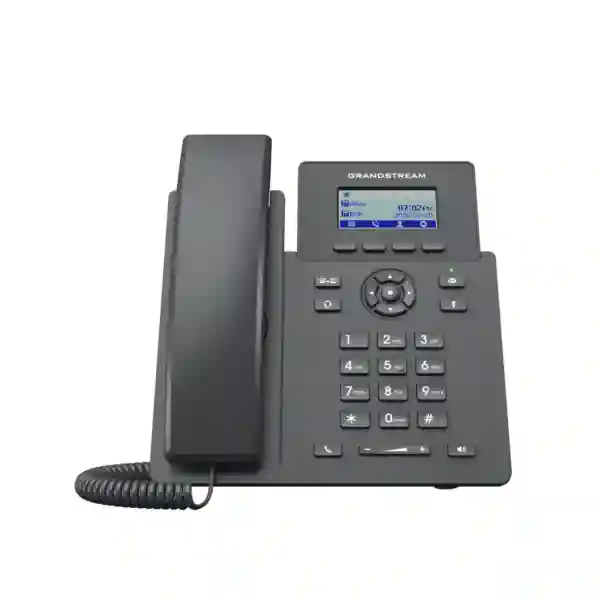
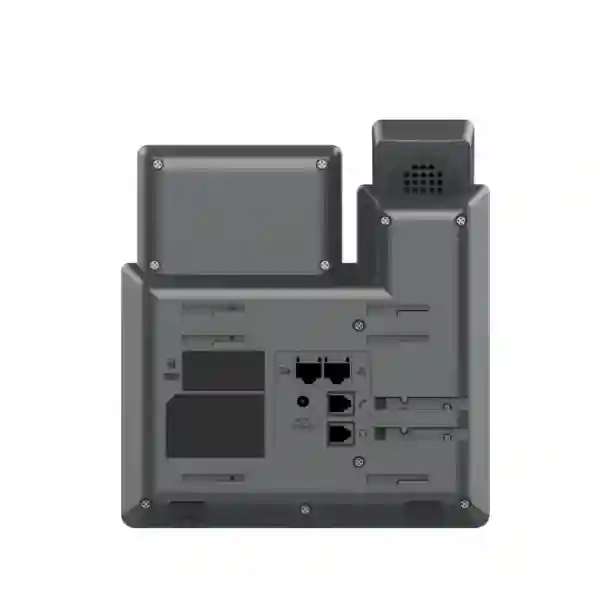
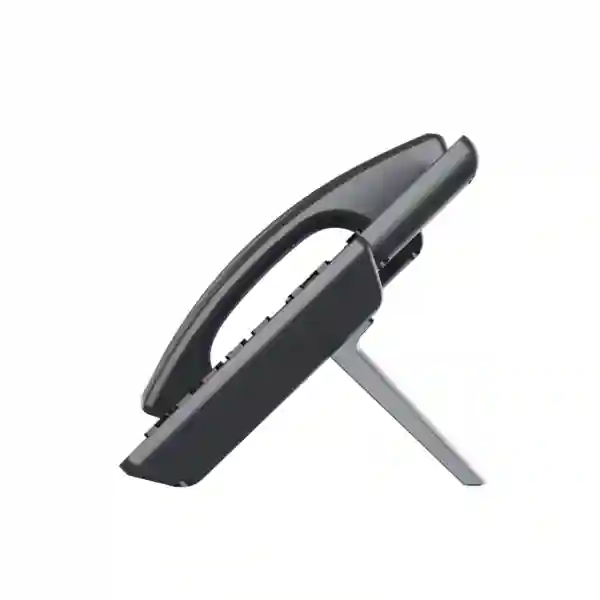
Grandstream GRP2601W Wi-Fi 6 IP Phone for Dubai & UAE Business
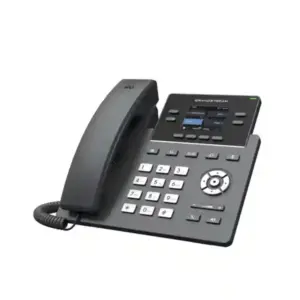
The Grandstream GRP2601W is a two-line essential business IP phone built for organizations that want a simple SIP desktop endpoint with wireless network flexibility and centralized management. Grandstream’s current product documentation identifies the GRP2601W as supporting 2 SIP accounts, 2 line appearances, 5-way audio conferencing, GDMS device management, enterprise-oriented security controls, headset EHS support, Noise Shield technology, and single-band 2.4 GHz Wi-Fi 6. That combination makes it particularly useful when a desk requires a fixed business phone but installing or relocating an Ethernet outlet is inconvenient.
For buyers evaluating Grandstream GRP2601W Dubai deployments, the key decision is not simply whether Wi-Fi is available. The network must provide stable 2.4 GHz coverage, suitable voice QoS, secure WLAN authentication, dependable SIP reachability, and consistent power at the desk. Fourteck can help customers compare the wireless GRP2601W with the PoE-focused GRP2601P and other GRP endpoints so the phone matches the actual user role, network design, PBX platform, headset requirement, and rollout scale.
Direct answer: who is the GRP2601W for?
The GRP2601W is best suited to essential desk-phone users who need reliable SIP calling, two accounts or lines, a compact graphical display, familiar transfer and speakerphone controls, basic conferencing, headset support, and centralized provisioning, while also needing the option to connect over Wi-Fi. Typical users include administrative staff, reception support positions with modest call handling, teachers, retail counters, clinic desks, small branch employees, hotel back-office teams, warehouse supervisors, temporary project offices, remote workers, and organizations standardizing a basic phone profile across many sites.
It is less suitable when a user needs a large color display, many line keys, a high number of SIP identities, integrated Bluetooth, Gigabit pass-through for a high-performance workstation, or dual-band Wi-Fi. In those cases a higher GRP model may be a better fit. The value of the GRP2601W is its controlled simplicity: it provides the functions many employees actually use every day while retaining deployment and security features designed for managed business environments.
Wi-Fi specification buyers should verify before ordering
A common source of confusion around this model is the wireless specification. Current Grandstream material identifies the GRP2601W as single-band 2.4 GHz Wi-Fi 6, using 802.11 b/g/n/ax on the 2.4 GHz band. This matters because a purchasing decision based on an assumption of 5 GHz or dual-band connectivity can create an avoidable deployment problem. If the intended office WLAN has aggressively reduced 2.4 GHz coverage, uses specialized authentication, or is heavily congested by legacy and IoT devices, the wireless design should be reviewed before a bulk phone rollout.
For voice, consistency is more important than a headline throughput number. A well-designed 2.4 GHz network can support business calling, but administrators should pay attention to channel reuse, co-channel interference, access-point placement, signal quality at the desk, VLAN design, DHCP, DNS, SIP reachability, firewall policy, QoS, and roaming behavior where phones may be moved. Wired Ethernet remains available on the phone as an alternative connectivity path, so the model can fit mixed environments where some desks use WLAN and others use cabling.
GRP2601W quick decision matrix
| Customer requirement | GRP2601W fit | Buying consideration |
|---|---|---|
| Two SIP identities or line appearances | Strong fit | Supports 2 SIP accounts and 2 lines. |
| Wireless desk placement | Strong fit | 2.4 GHz single-band Wi-Fi 6; confirm WLAN coverage and policy. |
| One-cable PoE installation | Not the primary fit | Consider GRP2601P where PoE is the main requirement. |
| Centralized fleet management | Strong fit | GDMS and supported provisioning methods simplify multi-device administration. |
| Headset operation | Good fit | RJ9 plus EHS support for compatible Plantronics, Jabra, and Sennheiser headsets. |
| High-end executive interface | Limited fit | Consider a higher GRP model for larger display, more keys, Bluetooth, or richer user interface. |
| Bulk essential-phone rollout | Strong fit | Standardize firmware, templates, PBX settings, security policy, and WLAN readiness before staging. |
Verified technical specifications
| SIP accounts / lines | 2 SIP accounts, 2 line appearances |
|---|---|
| Wireless | Single-band 2.4 GHz Wi-Fi 6, 802.11 b/g/n/ax |
| Ethernet | Dual switched auto-negotiation 10/100 Mbps Ethernet ports |
| Display | 132 × 48 graphical LCD |
| Conference | 5-way audio conferencing |
| Soft keys | 4 XML programmable context-sensitive soft keys plus navigation/menu controls and dedicated telephony keys |
| Voice codecs | G.729A/B, G.711 μ/a-law, G.726, G.722 wideband, G.723, iLBC, Opus and related voice-processing capabilities |
| Headset | RJ9 headset port with EHS support for compatible Plantronics, Jabra, and Sennheiser headsets |
| Provisioning / management | GDMS, TR-069, encrypted XML configuration and supported firmware upgrade methods |
| Security | Secure boot, encrypted configuration, TLS/SRTP support, 802.1X and enterprise-oriented device protections |
| Phonebook / call log | Downloadable XML/LDAP phonebook up to 2,000 items and call log up to 800 records |
| QoS | Layer 2 802.1Q/802.1P plus Layer 3 ToS, DiffServ, MPLS QoS support |
| Wall mounting | Supported with separately sold wall-mount hardware |
| Environment | Operating temperature 0°C to 40°C; storage -10°C to 60°C; 10% to 90% non-condensing humidity |
Specifications can change with hardware revision or firmware. Confirm the exact regional unit and current Grandstream documentation before final procurement.
Why a Wi-Fi desk phone can solve a real deployment problem
A desk phone is usually associated with structured cabling, a PoE switch, and a fixed user position. That design is excellent when the office has planned voice/data outlets at every seat. However, real projects often include reception overflow desks, training rooms, temporary counters, leased spaces, clinics with changing room use, warehouses with only partial cabling, retail stores where civil work is disruptive, and remote employees who need a dedicated business handset at home. In those situations, the GRP2601W gives the project team another option: keep the familiar dedicated SIP endpoint while using the existing 2.4 GHz wireless network for connectivity.
The practical benefit is not “wireless for the sake of wireless.” It is deployment flexibility. A phone can be staged, moved, and reassigned with less dependence on a new Ethernet drop. That can reduce the time needed to bring a temporary workstation into service, but only if the WLAN is engineered for voice. Wi-Fi does not remove the need for network planning; it changes the planning focus from cable path and PoE budget to RF coverage, interference, authentication, VLAN reachability, QoS, and stable power.
This distinction is particularly important for Dubai and UAE offices where fit-out changes, branch moves, serviced offices, retail reconfiguration, and mixed wired/wireless work areas can occur during the life of a telephony system. The GRP2601W gives IT teams a simple endpoint choice for these locations without moving users to a softphone-only workflow.
Call quality: codecs, speakerphone use, and noise management
The phone supports a broad set of SIP voice codecs including G.722 wideband and Opus, alongside common narrowband codecs used across business voice networks. Codec selection is normally controlled by the PBX, SIP trunk, remote endpoint, and phone configuration. For internal calls on a compatible platform, wideband codecs can provide a more natural voice experience than legacy narrowband calling. For external calls, the final audio path may be constrained by the SIP carrier, PSTN interconnect, remote device, transcoding policy, or network quality.
Grandstream also positions the GRP2601 family with Noise Shield technology, and current product information references AI noise reduction. These features can help reduce distracting background noise, but they should not be treated as a substitute for good desk placement or a suitable headset in very loud environments. A warehouse loading area, open call floor, reception desk near a lobby, or retail counter may still benefit from a compatible headset and careful microphone placement.
For troubleshooting, audio quality should be evaluated end to end. Useful checks include packet loss, jitter, latency, Wi-Fi signal quality, competing traffic, access-point utilization, codec negotiation, SIP ALG behavior, firewall session handling, PBX transcoding, and headset configuration. If voice issues appear only on Wi-Fi endpoints while wired phones are stable, start by reviewing RF conditions and WLAN policy before changing PBX settings.
SIP and PBX compatibility planning
The GRP2601W is a standards-based SIP endpoint, which makes it a candidate for Grandstream UCM systems and other SIP-compatible PBX or hosted voice platforms. Compatibility should still be verified rather than assumed. A phone can register successfully yet have incomplete functionality if features such as BLF behavior, directory integration, voicemail indication, transfer method, call park, provisioning, security certificates, NAT traversal, or codec policy are not aligned with the PBX.
For a new deployment, define the extension plan first. Decide whether each user needs one SIP account or both supported accounts, whether the second account represents another extension, department identity, branch service, or hosted-provider profile, and whether outbound caller ID restrictions are applied by the PBX or SIP provider. Then standardize dial plans, time settings, language, ringtone policy, DND behavior, call forwarding, voicemail access, emergency dialing, and corporate directory options.
When the phone is used outside the office, such as at a remote employee’s home, the security architecture becomes more important. Prefer secure and supportable remote-access methods approved for the PBX platform rather than simply exposing SIP services to the public internet. The exact design may use a hosted service, SBC, VPN, secure remote-connect method, or platform-specific mechanism. Confirm the PBX vendor’s recommended approach and test failover, emergency calling expectations, and support procedures before production rollout.
GDMS and zero-touch style fleet management
A major reason to consider the GRP series is manageability at scale. Grandstream Device Management System (GDMS) provides a centralized environment for supported device provisioning, configuration, management, and monitoring. Instead of treating every phone as an isolated endpoint, administrators can build a repeatable deployment process with templates, account settings, firmware policies, and device organization. This is particularly useful when dozens or hundreds of phones need to be staged for multiple branches or customer sites.
A practical rollout normally begins with a golden configuration rather than immediately importing every phone. Configure a small test group, validate SIP registration, inbound and outbound calling, transfer, voicemail, time synchronization, directory behavior, EHS headset operation, Wi-Fi stability, and firmware. Once the configuration is proven, apply it to a larger pilot group and then scale. This staged process reduces the risk of replicating a bad dial plan, incorrect certificate setting, wrong VLAN behavior, or unsuitable wireless profile across the full fleet.
For service providers and multi-site companies, centralized management also helps with lifecycle tasks. Administrators can maintain a consistent baseline, track configuration drift, coordinate firmware changes, and reduce the number of manual touch points required when users move between offices. The value increases when the organization has standardized naming, asset records, extension assignments, network documentation, and change-control procedures.
Security capabilities and deployment controls
Grandstream lists carrier-grade and enterprise-oriented security protections for the GRP2601 family, including secure boot, dual firmware images, encrypted data storage, encrypted configuration support, TLS, SRTP, and 802.1X. These capabilities give administrators useful building blocks, but secure operation still depends on how the phone, PBX, network, and management platform are configured.
For business deployments, change default or initial credentials, use unique administrative passwords, restrict management interfaces to trusted networks, use HTTPS where supported, keep firmware within the organization’s tested baseline, disable unused services, control access to provisioning servers, and apply certificate validation consistent with the PBX design. If 802.1X is used, coordinate endpoint credentials and certificates with the wired or wireless access-control design. If SRTP and TLS are required, verify that the PBX, SIP provider, certificates, and calling scenarios all support the selected security policy.
Security also includes operational controls. Maintain an inventory linking device identity to user, extension, office, and support owner. Remove or reset profiles when employees leave or phones are reassigned. Review management-platform permissions so help-desk staff have only the access required for their role. For large deployments, document a recovery process for failed firmware, lost credentials, unreachable devices, and replacement hardware.
Headset use and Electronic Hook Switch support
The GRP2601W includes an RJ9 headset interface and EHS support for compatible Plantronics, Jabra, and Sennheiser headsets. For users who spend significant time on calls, a headset can be more important to day-to-day productivity than adding more line keys. Reception support staff, help-desk users, sales coordinators, clinic administrators, branch operators, and remote workers may all benefit from hands-free calling while keeping a dedicated physical handset on the desk.
EHS compatibility should be checked by exact headset model and required cable or adapter. A brand name alone is not enough because headset families can use different interfaces, firmware, or accessory kits. Before a large purchase, test answer/end behavior, ring detection, volume, microphone level, mute, and any remote-hook functionality with the intended headset. If a wireless headset is required, remember that EHS support does not mean the phone itself has Bluetooth; the headset base and compatible EHS path perform the integration.
For noisy environments, prioritize microphone performance and physical ergonomics. For shared desks, establish a cleaning and assignment policy. For contact-center style use, verify whether the user’s workload really fits a two-line essential phone or whether a higher-key-count endpoint, softphone integration, or dedicated contact-center client would be more appropriate.
Important limitation: GRP2601W is not the PoE model
The letter suffix matters. The GRP2601P is the PoE-focused variant, while the GRP2601W is the Wi-Fi variant. If the office standard is “one Ethernet cable from a PoE access switch to every desk phone,” the GRP2601P may be the more natural choice. If the desk has dependable local power but no convenient Ethernet outlet, the GRP2601W can be the better fit. Buying the wrong suffix can create unnecessary adapters, cabling work, or project delays.
For the Wi-Fi model, confirm the current regional package contents and power accessories before ordering because packaging can vary by region or revision. The procurement list should also include any required wall mount, headset/EHS accessories, spare power supplies, network changes, and PBX or SIP service work. A complete quotation should be based on the deployment design, not just the handset model number.
GRP2601W vs GRP2601P vs GRP2601
| Item | GRP2601W | GRP2601P | GRP2601 |
|---|---|---|---|
| Primary connectivity advantage | 2.4 GHz Wi-Fi 6 | Integrated PoE | Standard wired essential phone |
| SIP accounts / lines | 2 / 2 | 2 / 2 | 2 / 2 |
| Typical choice | Desk without practical Ethernet | Structured-cabling office with PoE switch | Simple wired deployment with local power |
| Central management | GDMS supported | GDMS supported | GDMS supported |
| Conference | 5-way audio | 5-way audio | 5-way audio |
The three variants share the same essential user profile. The deciding factor is usually power and network access at the desk. For new offices with well-planned PoE cabling, the P model can simplify power delivery. For temporary, relocated, remote, or hard-to-cable desks, the W model may reduce dependency on new cabling. The base model is useful when wired Ethernet and local power are already available.
Best-fit business scenarios
Small and medium offices: The phone works well for employees who mainly answer, place, transfer, hold, and conference calls. Two accounts are enough for many administrative and general office roles, while GDMS helps maintain a common configuration across the company.
Retail and showrooms: A wireless desk phone can be useful at a counter or back-office position where adding an Ethernet point is inconvenient. The network team should ensure the retail WLAN has a suitable voice segment and is not overloaded by guest traffic, payment devices, cameras, and IoT equipment.
Clinics and healthcare administration: Front-desk and non-clinical office roles may need a fixed extension with simple transfer and directory access. Segmentation, privacy policy, emergency calling, and network resilience should be addressed by the broader communications design.
Schools and training centers: The phone can provide a consistent staff-room, reception, administration, or classroom-office endpoint. Centralized provisioning is useful when many phones share a common policy but need different extensions.
Hotels and hospitality back offices: The model can serve administrative desks, engineering offices, stores, or staff areas where a basic SIP endpoint is sufficient. Guest-room telephony has different workflow and management requirements, so the endpoint choice should be based on the hotel PBX design rather than assuming one phone fits every role.
Remote and temporary staff: A user who prefers a dedicated handset at home or in a temporary project office can connect the phone to an appropriate Wi-Fi network, subject to secure PBX access, stable local power, and support policy.
Dubai and UAE deployment considerations
A Grandstream GRP2601W Dubai rollout may involve very different sites: a high-rise office with managed enterprise Wi-Fi, a Deira retail branch with limited structured cabling, an Abu Dhabi corporate office standardized on PoE, a Sharjah warehouse with long RF distances, or an Ajman small business using a compact PBX. The same handset should not be deployed with the same assumptions in every location. Start with the physical site, network topology, user role, and calling requirement.
For dense offices, survey 2.4 GHz channel use and confirm the voice network does not depend on 5 GHz-only SSIDs. For warehouses and industrial spaces, test signal quality at the actual desk rather than near the access point. For serviced offices, confirm whether the tenant is allowed to create the required VLAN, SIP routes, firewall rules, or management tunnel. For remote users, document the support boundary between the employee’s home Wi-Fi and the company-managed phone configuration.
Organizations operating across multiple Emirates should standardize the configuration template while allowing site-specific network settings. A branch may use a different DHCP range, VLAN ID, DNS resolver, access-point vendor, SIP trunk path, or WAN failover policy. Keep the user experience consistent while keeping the network profile appropriate to each location.
Fourteck’s role in a project can include product selection, endpoint planning, PBX and SIP compatibility review, configuration guidance, staging, and deployment support based on the customer’s requirement. Availability, pricing, accessories, warranty terms, and project lead times should be confirmed at quotation stage rather than assumed from a static web page.
Network readiness checklist for Wi-Fi voice
Before placing phones on the WLAN, verify the network as a voice system rather than just checking whether a laptop can browse the internet. The following checks reduce avoidable troubleshooting after deployment:
- Confirm 2.4 GHz coverage at every planned phone location and measure signal quality during normal business hours.
- Review channel allocation, interference, airtime utilization, and the number of devices sharing each access point.
- Confirm DHCP, DNS, NTP, gateway, and SIP/PBX reachability from the phone network.
- Separate guest traffic from business voice and apply VLAN or segmentation policy appropriate to the organization.
- Apply QoS consistently across WLAN, access switching, WAN, VPN/SBC, and PBX paths where supported.
- Avoid unnecessary SIP ALG behavior if it conflicts with the PBX or provider design.
- Test inbound calls, outbound calls, hold, transfer, conference, voicemail, DTMF, and long-duration calls.
- Test WAN failover and power-loss behavior if the business requires resilience.
- Document SSID, authentication, certificate, and access-control dependencies so support teams can reproduce the configuration.
If the WLAN is not designed for real-time traffic, changing the phone will rarely solve the underlying issue. Conversely, a stable, properly segmented 2.4 GHz network can make the GRP2601W a flexible endpoint for desks that are difficult to cable.
Provisioning workflow for a controlled rollout
- Define the user profile. Decide which roles receive the GRP2601W and which require a higher-capability endpoint.
- Validate the network. Confirm 2.4 GHz Wi-Fi coverage, DHCP, DNS, PBX route, security policy, and local power.
- Build a baseline. Configure firmware, time zone, language, SIP server, codec policy, dial plan, voicemail, directory, QoS, and security controls.
- Test accessories. Validate the exact headset/EHS combination, wall mount if used, and any local power accessories.
- Pilot a small group. Include users with different calling patterns rather than only IT staff.
- Capture results. Record call quality, registration stability, Wi-Fi metrics, user feedback, and support issues.
- Scale through GDMS or the approved provisioning method. Apply the verified configuration rather than manually configuring every handset.
- Maintain lifecycle control. Standardize firmware updates, replacement workflow, extension reassignment, and decommissioning.
This process is especially important in multi-branch deployments because the phone configuration and network configuration are interdependent. A standard phone template can remain consistent while site-specific WLAN, VLAN, gateway, or SIP routing details are managed separately.
Telephony features that matter in daily use
The GRP2601W supports the core functions expected from a business SIP phone, including hold, transfer, call forward, call park, call pickup, call waiting, auto answer, off-hook auto dial, click-to-dial, hot desking, flexible dial plans, personalized ringtones, music on hold, and server redundancy/failover capabilities. These features are useful because essential users often need fast access to a small number of dependable operations rather than a large visual interface.
For a reception-adjacent user, transfer and pickup behavior may be the priority. For a warehouse supervisor, speakerphone and directory access may matter more. For a remote worker, secure registration and a predictable network profile may be the deciding factor. For a school office, call pickup groups and emergency contact dialing can be more important than advanced collaboration features. The PBX configuration should therefore reflect the real workflow of the assigned user.
Five-way audio conferencing can support quick team discussions without a dedicated meeting platform, although the feature should be tested with the deployed PBX. For larger meetings, scheduled collaboration, video, recording, or external participants, a dedicated conferencing platform may be more suitable. Use the phone’s conference feature for the scenarios it handles well rather than forcing it to replace a full collaboration system.
Directory, hot desking, and shared-phone use
Grandstream lists downloadable XML/LDAP phonebook support up to 2,000 items and call history up to 800 records for the GRP2601 family. A centralized corporate directory can reduce user dependence on printed extension lists and simplify branch-to-branch calling. The directory source, search behavior, refresh schedule, and access permissions should be tested against the organization’s directory service or PBX.
Hot-desking capability can help in shared offices, but a shared physical phone introduces operational questions. Decide how users authenticate, how quickly a device returns to a neutral state, whether local call history remains visible, how personal contacts are handled, and who owns the device when there is a hardware issue. A standardized reset or sign-out procedure is important in flexible seating environments.
For sites where the phone is assigned to a room rather than a person, use naming that reflects the function, such as “Training Room 2,” “Warehouse Desk,” or “Clinic Reception,” and keep those labels consistent in the PBX, GDMS, network inventory, and support documentation. This makes fault isolation and replacement faster when a user reports a problem.
When the GRP2601W is not the right choice
A good product page should also explain when to choose something else. The GRP2601W is an essential model, not an executive endpoint. Users who monitor many lines, require numerous programmable keys, manage heavy call queues, need a large visual directory, or frequently use advanced collaboration controls may benefit from a higher GRP model. Likewise, a desk that needs Gigabit Ethernet pass-through for a high-speed workstation should be evaluated against models with Gigabit interfaces rather than assuming the 10/100 ports will fit every network design.
The phone also lacks integrated Bluetooth according to Grandstream’s model comparison information. If the project requires direct Bluetooth headset pairing or mobile-device integration, choose an endpoint designed for that requirement. EHS headset support is useful but it is a different integration method.
Finally, if the site depends on a 5 GHz-only WLAN or the 2.4 GHz band is intentionally disabled, the GRP2601W is not a suitable wireless endpoint. You can still use Ethernet, but if the purchase decision is specifically for Wi-Fi placement flexibility, select a model whose wireless capabilities match the actual network policy.
Procurement checklist for project buyers
Confirm GRP2601W is required rather than GRP2601P or the base GRP2601.
Separate pilot, production, spare, training, and replacement quantities.
Confirm local power plan and current regional package contents before ordering.
List exact headset and EHS accessory models and test them with the phone.
State PBX platform, version, SIP provider, and remote-access architecture.
Confirm 2.4 GHz SSID, authentication, coverage, VLAN, and QoS readiness.
Define GDMS ownership, templates, firmware policy, permissions, and support process.
Identify desks requiring a wall mount or non-standard physical installation.
Common support symptoms and where to look first
Phone does not register: Check IP addressing, DNS, SIP server reachability, account credentials, transport, certificate requirements, firewall policy, and whether the extension is already locked or registered elsewhere.
Calls drop or audio becomes robotic: Review packet loss, jitter, wireless signal strength, access-point load, interference, WAN quality, QoS, and any firewall or NAT timeout behavior.
One-way audio: Investigate NAT, SBC, firewall, RTP port handling, SIP ALG, VPN policy, and PBX media routing rather than changing only the phone.
Headset hook switch does not work: Verify headset model, EHS cable, accessory compatibility, phone firmware, and configuration. Test basic analog audio independently from EHS control.
Wi-Fi connection is unstable: Confirm the phone is on the intended 2.4 GHz SSID, check signal strength and interference at the actual desk, review authentication and roaming configuration, and test wired Ethernet as a control comparison.
Feature behaves differently after an update: Compare firmware release notes, PBX interoperability, provisioning templates, and any server-side policy changes. Avoid rolling new firmware across the complete fleet until it has passed a representative pilot.
Regional use beyond the UAE
Organizations buying from the UAE may also be planning branches, subsidiaries, projects, or partner sites in Kuwait, Kenya, Uganda, Tanzania, Nigeria, Ghana, and other regional markets. A consistent GRP endpoint family can simplify user training and configuration standards, but regional network conditions and procurement requirements may differ. Do not assume that the same power accessories, SIP services, ISP behavior, warranty process, shipping arrangement, or wireless policy applies in every country.
For multi-country deployments, define a global phone profile and a local site profile. The global profile can contain user-interface standards, firmware baseline, security controls, codec preferences, button policy, and support procedures. The local profile can contain time zone, emergency numbers, SIP routes, WLAN settings, local DNS/NTP, WAN failover, and site-specific regulatory or operational requirements.
Fourteck’s network of regional sites can help buyers navigate product and solution information for different markets. For related communications and infrastructure planning, visit Fourteck IP Phone, Grandstream UAE, or Fourteck UAE. Final supply, compatibility, and service scope should be confirmed for the project location.
How to compare this phone with a higher GRP model
Do not compare phones only by price. Start with the user’s daily workflow. Count how many SIP identities are required, how many simultaneous line appearances must be visible, whether the user needs dedicated programmable keys, whether the desk PC shares the phone’s Ethernet path, whether Bluetooth is required, whether the WLAN is 2.4 GHz or dual-band, whether a color display adds practical value, and whether the user handles enough calls to justify a more advanced model.
For a general employee who makes and receives normal business calls, the GRP2601W can be an efficient fit. For a receptionist monitoring multiple extensions, an executive using a premium headset and many contacts, or a call-intensive supervisor who needs more programmable keys, a higher model may reduce operational friction. The best endpoint is the lowest-complexity model that fully satisfies the role without creating a near-term upgrade problem.
The same logic applies to network capability. If a site is already fully cabled with managed PoE switching, choosing Wi-Fi for every desk may add RF dependency without delivering a business benefit. Conversely, if a small branch or temporary workspace has stable wireless coverage but limited cabling, the W variant may materially simplify deployment. Match the transport method to the site, not to a generic preference.
Official documentation and specification verification
For technical planning, always verify against current Grandstream material because product firmware and hardware revisions can change behavior over time. The official GRP2601(P/W) product page provides the current product positioning and key features. The GRP260x administration guide contains configuration and technical detail for the series. The GRP2601/P/W quick installation guide is useful for installation and initial configuration steps.
If information on a reseller page conflicts with Grandstream’s current documentation, use the official vendor information as the primary technical reference. This is particularly important for the GRP2601W wireless capability: current Grandstream specifications identify single-band 2.4 GHz Wi-Fi 6 rather than a generic dual-band Wi-Fi description.
FAQ — Grandstream GRP2601W
1. Does the Grandstream GRP2601W support Wi-Fi 6?
Yes. Grandstream’s current GRP2601W specifications identify the wireless interface as single-band 2.4 GHz Wi-Fi 6 with 802.11 b/g/n/ax support. It is not a dual-band 5 GHz model, so the 2.4 GHz WLAN design and channel plan should be checked before deployment.
2. How many SIP accounts and lines does the GRP2601W support?
The GRP2601W supports 2 SIP accounts and 2 line appearances. This makes it suitable for essential desk-phone users who need a primary extension plus a second account, line, service, or calling identity.
3. Does the GRP2601W have built-in PoE?
No. Built-in PoE is associated with the GRP2601P variant, not the GRP2601W. The Wi-Fi model should therefore be planned with local power, and buyers should confirm the current regional package contents and power accessories before ordering.
4. Can the GRP2601W work with Grandstream UCM IP PBX systems?
Yes. The phone uses standard SIP and can be deployed with Grandstream UCM systems when the PBX, extension credentials, network, firmware, and security settings are configured correctly. It can also be considered for other SIP-based platforms subject to compatibility testing.
5. Can the GRP2601W be centrally managed?
Yes. Grandstream supports the GRP2601 family with GDMS for centralized provisioning, configuration, monitoring, and device management. The phone also supports provisioning methods such as TR-069 and encrypted XML configuration files.
6. Does the GRP2601W support headset use?
Yes. It includes an RJ9 headset interface and supports Electronic Hook Switch operation for compatible Plantronics, Jabra, and Sennheiser headsets. Exact headset and EHS compatibility should be confirmed for the chosen accessory model.
7. Is the GRP2601W suitable for bulk office rollouts?
It is designed for easy mass deployment and centralized management, making it a practical option for organizations that need a consistent essential desk-phone profile across many users, branches, classrooms, retail counters, clinics, hotel back offices, or service desks.
8. Does the GRP2601W support conference calls?
Yes. Current Grandstream product information specifies support for 5-way audio conferencing. Actual conference behavior can still depend on PBX policy, call routing, codec selection, and available network or SIP resources.
9. What is the main difference between GRP2601W and GRP2601P?
The GRP2601W is the wireless variant with 2.4 GHz single-band Wi-Fi 6, while the GRP2601P is the wired PoE variant. Both target essential two-line users, but the best choice depends on whether the desk needs wireless placement flexibility or one-cable Ethernet and PoE.
10. When should I choose another Grandstream model instead?
Choose another model when users need more SIP accounts, more programmable line keys, Gigabit Ethernet, integrated Bluetooth, dual-band Wi-Fi, a larger display, or a more advanced executive-phone experience. The GRP2601W is strongest when the requirement is a simple, centrally manageable two-line phone with 2.4 GHz Wi-Fi 6.
Plan the right GRP2601W deployment with Fourteck
If your requirement is a simple two-line SIP phone with centrally managed business features and 2.4 GHz Wi-Fi 6, the GRP2601W deserves consideration. Before quotation, share the number of users, office locations, PBX or hosted SIP platform, Wi-Fi design, headset requirement, wall-mount requirement, and whether the phones will be used at fixed offices, branches, remote desks, or temporary locations. That information allows the endpoint, accessories, network prerequisites, and deployment method to be matched to the project rather than selected in isolation.
For Grandstream GRP2601W Dubai enquiries, Fourteck can help compare the W, P, and other GRP variants, review compatibility requirements, and prepare a project-oriented quotation. Live stock, pricing, delivery timing, warranty scope, and accessory availability should be confirmed at the time of enquiry.

Reviews
There are no reviews yet.