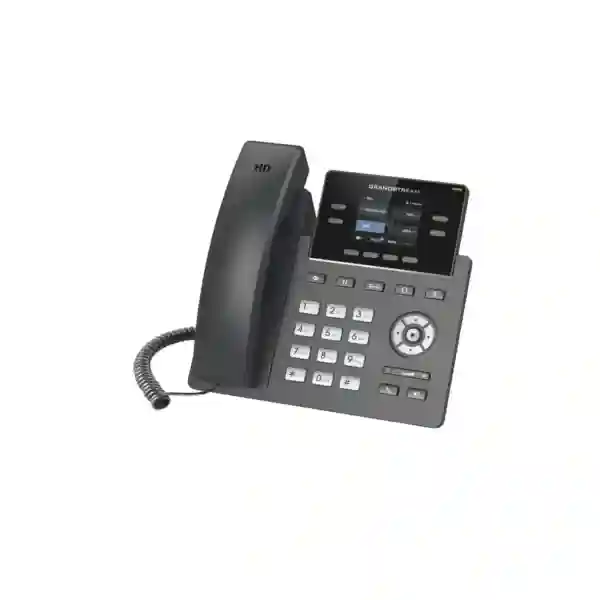
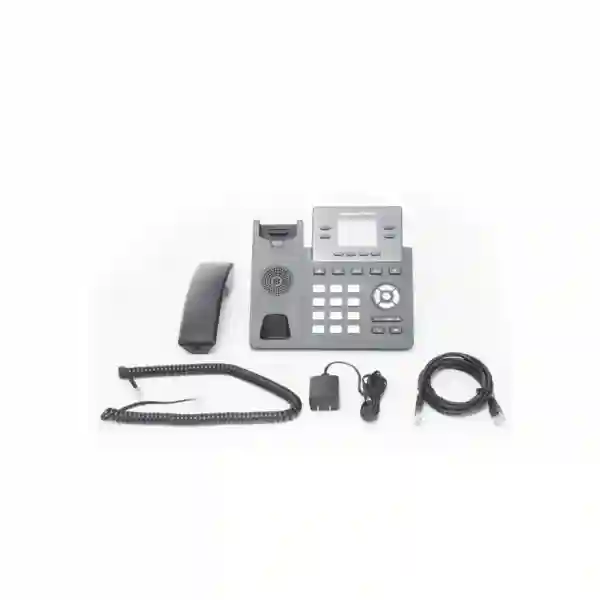
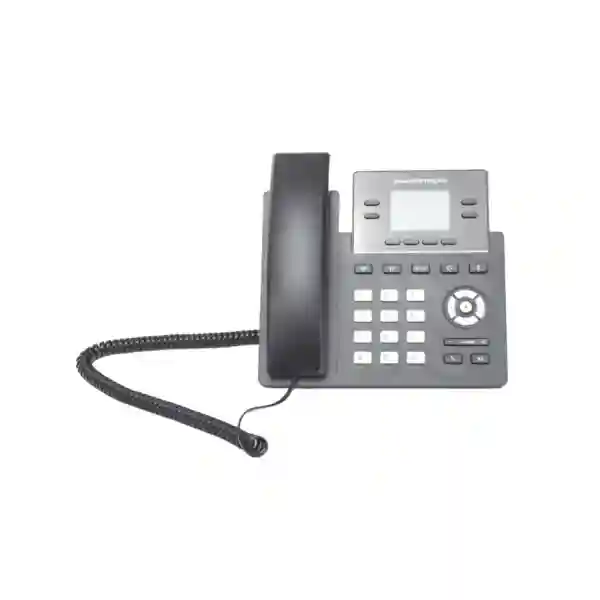
Grandstream GRP2612G Dubai: Gigabit PoE IP Phone for Business
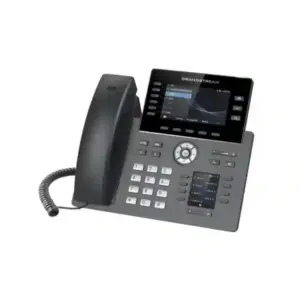
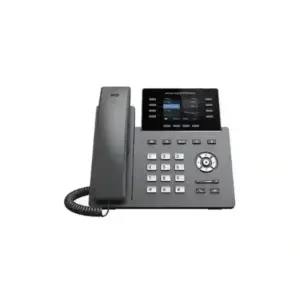
The Grandstream GRP2612G Dubai page is built for IT managers, business owners, system integrators, procurement teams and telecom administrators who need to decide whether this specific GRP2612 variant belongs on their desks. The GRP2612G combines four SIP accounts, four multi-purpose line keys, a 2.4-inch color display, HD audio, digital BLF capacity, centralized deployment features and integrated Power over Ethernet with the most important distinguishing capability of this model: dual switched 10/100/1000 Mbps Gigabit Ethernet ports. That makes it particularly relevant where a desktop PC shares the phone’s network pass-through and the organization does not want the handset to become a 100 Mbps bottleneck.
Fourteck can help buyers plan the phone as part of a complete SIP, PBX, switching and voice-VLAN design. This page focuses on verified capabilities, deployment logic, practical limitations, buyer checks and regional use cases rather than inventing stock, price, warranty or availability claims. Live commercial details should be confirmed at quotation time.
Four multi-purpose line keys support business users who need several SIP identities or line appearances.
The G variant adds dual switched 10/100/1000 Mbps Ethernet ports with integrated PoE.
A 320×240 color LCD presents line state, menus, contacts and common calling information.
Centralized provisioning and management can reduce manual configuration in multi-phone deployments.
The Fast Decision: When Does the GRP2612G Make Sense?
Choose the GRP2612G when you need a professional wired SIP phone and the desk network matters as much as the voice endpoint. In many offices a single structured-cabling outlet reaches the workstation. The Ethernet cable plugs into the phone, and the user’s computer connects to the phone’s second network port. In that layout, the speed of the phone’s internal Ethernet switch directly affects the PC path. The GRP2612G is the GRP2612-family option intended for buyers who want Gigabit Ethernet plus PoE rather than Fast Ethernet at that shared desk connection.
The phone is also a strong fit where IT wants repeatable deployment. Grandstream positions the GRP family for mass deployment and centralized management, and the GRP2612 family is supported by GDMS. An administrator can design a standard configuration for SIP accounts, network settings, firmware policy and user functions rather than treating every handset as an isolated appliance. That matters in offices with dozens or hundreds of endpoints, branch rollouts, service desks, educational campuses, hotels, clinics and distributed companies where consistent configuration reduces operational effort.
Do not select the model simply because “Gigabit” sounds better. If each phone has a dedicated voice-only network outlet and no PC will use the pass-through port, a Fast Ethernet sibling may still satisfy the traffic requirement. If the user needs built-in wireless connectivity, the GRP2612W is the family member to evaluate. If the user needs many more physical line keys, a larger display or a different executive feature set, compare a higher GRP model. The right choice is the one that matches the desktop topology, PBX design, role and management plan.
GRP2612G vs GRP2612, GRP2612P and GRP2612W
The model suffix is important. These phones share the same product family, but their connectivity is not identical. Buyers should confirm the suffix on the quotation, purchase order and delivered carton so the network capability matches the intended desk design.
| Variant | Ethernet | PoE | Built-in Wi-Fi | Best reason to consider it |
|---|---|---|---|---|
| GRP2612 | Dual 10/100 Mbps | No integrated PoE listed for this base variant | No | Straightforward wired desk deployment where Fast Ethernet is sufficient. |
| GRP2612P | Dual 10/100 Mbps | Yes | No | PoE-powered desks that do not require Gigabit PC pass-through. |
| GRP2612W | Dual 10/100 Mbps | Yes | Yes | Locations where integrated wireless connectivity is a core requirement. |
| GRP2612G | Dual 10/100/1000 Mbps | Yes | No | PoE plus Gigabit Ethernet for modern wired desktops and PC pass-through. |
The table is a selection guide, not a reason to assume every variant is interchangeable. The G variant is specifically attractive when the physical desk topology relies on a single cable drop and the connected workstation needs Gigabit LAN access. The W variant solves a different problem: wireless connectivity. The P variant solves the power problem without upgrading the Ethernet path to Gigabit. Understanding that distinction prevents overbuying and avoids receiving the wrong suffix for the actual project.
Why Gigabit Matters at the Desk
Voice traffic itself does not require anything close to a Gigabit link. The value comes from the topology around the phone. When a computer, thin client or other workstation reaches the LAN through the phone’s second port, a 100 Mbps phone can limit that workstation path even if the upstream access switch and building cabling support Gigabit Ethernet.
With the GRP2612G, the phone can sit in-line on a Gigabit-capable desk connection while the organization keeps a one-drop-per-desk layout. This can be useful for knowledge workers moving large files, cloud-heavy applications, ERP usage, backup traffic, video collaboration or other workloads where a Fast Ethernet ceiling would be noticeable.
Why PoE Matters to Operations
Power over Ethernet can reduce power adapters and simplify cable management, but its bigger operational value is central power design. When compatible access switches are protected by UPS power, PoE phones can remain powered during short utility interruptions according to the resilience of the switching and PBX infrastructure.
PoE also makes desk moves and standardized rollouts easier because the phone does not depend on a free electrical socket at each location. Before deployment, confirm the switch’s PoE standard, per-port capacity, total power budget and whether other powered devices compete for that budget.
Call Handling for Everyday Business Users
The GRP2612G is not built only around its network ports. It is a business calling endpoint with four line keys, support for up to four SIP accounts and a set of dedicated telephony keys for common actions. Grandstream lists hold, transfer, forwarding, call waiting, call park, call pickup, shared call appearance, bridged line appearance, auto answer, click-to-dial, hot desking and server redundancy/failover among the supported telephony functions. These features can map well to reception support roles, service counters, office teams, managers and users who routinely manage more than one call or identity.
Five-way conferencing can be useful for quick internal coordination without immediately moving every discussion to a separate meeting platform. The actual experience still depends on PBX configuration, codec policy, network quality and the way the organization has enabled conference behavior. Similarly, features such as shared line appearance or call pickup need to be designed on the PBX side rather than assumed to work automatically just because the handset includes the capability.
The four physical line keys can also support digital multi-purpose functions, with Grandstream advertising up to 16 digital BLF keys. For teams that monitor colleague extensions, shared resources or speed-dial destinations, those digital assignments can give the compact phone more flexibility than a simple four-button description suggests. If the role requires a large number of always-visible physical BLF keys, however, an administrator should compare a higher model or an expansion strategy rather than expecting a compact phone to behave like a receptionist console.
HD Audio, Noise Control and Codec Planning
Grandstream specifies HD audio on both the handset and speakerphone and supports major voice codecs including the wideband G.722 and Opus codecs. Wideband audio can improve intelligibility when both ends of a call and the intermediate voice platform allow it. The phone also supports common narrowband codecs for compatibility with a wide range of SIP environments. Codec selection should be treated as a PBX and network policy rather than a handset-only choice, especially where external SIP trunks, remote branches or bandwidth-constrained links are involved.
The GRP2612 family is also presented with Noise Shield technology intended to minimize background noise. That can be useful in active offices, front desks and shared work areas, although acoustic results always depend on the actual environment. Desk placement, room reverberation, speakerphone distance, headset choice and surrounding conversations can have as much impact as the phone’s processing. For noisy roles, a well-matched business headset may produce a more consistent experience than relying on speakerphone behavior alone.
From a network perspective, voice quality is protected through design discipline: stable LAN switching, correctly configured VLANs, sensible QoS, reliable WAN performance and a PBX that is sized for the expected call volume. A premium codec cannot compensate for packet loss, severe jitter, overloaded WAN links or misconfigured prioritization. Fourteck’s deployment approach should therefore treat the GRP2612G as one component of the complete communication path rather than as an isolated device.
Color Display and User Experience
The 2.4-inch 320×240 TFT color display gives users a clearer visual interface than a basic monochrome desk phone. It can present account state, caller information, soft-key context, menus, call history, directory entries and status information in a compact footprint. The screen size is still intentionally modest. This is a professional office handset rather than a large touchscreen video device, so buyers should match expectations to the role.
Four programmable context-sensitive soft keys and dedicated navigation controls help keep frequent actions accessible. The phone also supports a downloadable phonebook using XML or LDAP, allowing organizations to build more consistent directory behavior when the PBX or directory service supports it. For teams with structured internal contact lists, this can reduce dependence on manually saved personal numbers and make moves, adds and changes easier to administer.
Grandstream also highlights a swappable faceplate for logo customization. This can be useful for managed service providers, large enterprises, hospitality deployments or organizations that want standardized visual branding across a rollout. Branding should not be the main buying reason, but it is a practical operational detail for projects where endpoints are installed in customer-facing or multi-tenant environments.
Security: What the Phone Provides and What the Network Must Provide
The GRP2612 family includes security capabilities intended for enterprise deployments. Grandstream lists secure boot, dual firmware images, encrypted data storage, TLS, SRTP, 802.1X media access control, user and administrator credentials and encrypted configuration mechanisms. These features give administrators useful building blocks for device hardening, but security comes from configuration and operational policy rather than from a feature list alone.
A secure rollout should change default administrative credentials, use unique or centrally controlled authentication where supported, restrict management exposure, segment voice traffic appropriately, validate firmware sources, define an update process and avoid exposing device web interfaces directly to the public internet. SIP signaling and media security should align with the PBX, SBC or hosted platform. TLS and SRTP are most valuable when the end-to-end voice architecture has been designed to use them correctly.
802.1X can matter in enterprises that enforce port-based network access control. Before making it part of a deployment requirement, test the phone with the actual switching platform, RADIUS policy and voice VLAN behavior. Network authentication can interact with LLDP, VLAN assignment, boot timing and provisioning in ways that deserve validation in a pilot rather than assumptions made from a specification sheet.
Dual firmware images are also useful for resilience during updates, but they do not eliminate the need for firmware governance. IT teams should stage upgrades on a small pilot group, document a known-good baseline, check release notes and PBX compatibility, and schedule larger updates according to operational risk. The same discipline is especially important when hundreds of phones are centrally managed.
GDMS and Zero-Touch Thinking for Larger Rollouts
Grandstream Device Management System is one of the strongest operational reasons to consider the GRP family. Instead of manually logging into each handset, an administrator can use centralized workflows for configuration, provisioning and monitoring. The exact design depends on the organization’s security policy and deployment model, but the objective is consistent: make handset configuration repeatable and reduce the number of one-off device changes that become difficult to audit later.
For a 10-phone office, manual setup might appear manageable. For 100 or 500 phones distributed across multiple branches, it quickly becomes an operational burden. A centrally managed model can standardize SIP server details, time settings, network options, button assignments, firmware policy and other parameters. When an employee moves desks or a phone is replaced, the deployment process can be more predictable because the desired configuration already exists as a managed profile rather than as undocumented settings on an individual handset.
The GRP2612G also supports other provisioning approaches such as TR-069 and encrypted XML configuration. This matters because not every business uses the same management stack. Service providers may already have ACS-based processes, while an enterprise may prefer Grandstream’s own cloud management. The right provisioning method depends on ownership, scale, security controls, change management and whether the phone is deployed on a local PBX, hosted platform or managed service.
A good rollout starts with a pilot profile. Configure a small group, test registration, inbound and outbound calling, transfer, hold, conference behavior, voicemail indication, directory access, emergency dialing policy, VLAN assignment, QoS, headset operation and failover expectations. Only after those items are validated should the profile become the standard for mass deployment.
PBX Compatibility and Integration Planning
The GRP2612G is a standards-based SIP endpoint. It is a natural choice for Grandstream UCM deployments and can also be used with many third-party SIP systems, hosted platforms and service-provider environments. Standards compliance improves interoperability, but it does not mean every advanced feature behaves identically on every PBX. Basic registration and calling may be straightforward while BLF, shared lines, directory integration, provisioning, failover, call recording controls or vendor-specific feature codes require additional testing.
Before a project, identify the voice platform and version, extension authentication method, SIP transport, codec policy, voicemail behavior, dial plan, emergency-call requirements, NAT or SBC design and provisioning method. For hosted services, obtain the provider’s supported-device guidance and configuration template if available. For on-premises systems, make sure the PBX firmware and handset firmware are tested together before scaling the deployment.
If remote branches are involved, WAN design becomes part of the handset decision. Voice traffic may cross VPNs, SD-WAN overlays, MPLS, direct internet or a secure SBC path. Each architecture has different implications for NAT, QoS, resiliency and troubleshooting. The phone supports common SIP and network standards, but the overall call experience depends on the end-to-end design from handset to PBX or service platform.
Fourteck can use the model as part of a broader IP telephony plan that includes PBX sizing, SIP trunks, switches, PoE budgeting, VLAN segmentation, QoS, structured cabling and endpoint provisioning. Buyers who are replacing analog or legacy digital phones should plan the migration as a system project rather than assuming the new IP handset can simply be plugged into the old topology.
Network Design Checklist for the GRP2612G
The G suffix solves a specific network requirement, so the network should be validated before procurement. Start with the access switch. Confirm that it supports Gigabit Ethernet on the relevant ports and that the existing structured cabling can reliably negotiate at 1000 Mbps. Category cabling quality, patch leads, old couplers and damaged terminations can all reduce link speed even when both devices support Gigabit.
Next, check PoE. The phone supports IEEE 802.3af PoE, but the switch still needs enough total budget for every powered device. A 48-port switch serving phones, access points, cameras and other PoE equipment can reach its power ceiling before it reaches its port ceiling. Calculate the total design rather than checking only whether a PoE logo appears on the switch.
Voice VLAN design should be intentional. LLDP can help automate VLAN behavior in compatible environments, but the switch, phone and network policy need to agree. Decide whether the PC port remains on a data VLAN while the phone joins a voice VLAN, and confirm how tagging is handled. Then define QoS so voice signaling and media receive sensible treatment without blindly trusting markings from every endpoint.
If a PC connects through the phone, test the complete path. Verify Gigabit negotiation on both sides, DHCP behavior, DNS, internet access, internal application performance and any 802.1X requirements. This is especially important in environments using NAC, dynamic VLAN assignment or device profiling. A phone that works on an open lab switch can behave differently when placed behind the production security policy.
Finally, document the port configuration as a standard. When every phone port follows the same template, support becomes easier. When each desk has been manually adjusted over time, troubleshooting slows down and replacement phones can expose hidden dependencies. The GRP2612G works best when it is part of a standardized access-layer design.
Who Is the GRP2612G Best Suited For?
General Office Users
Employees who need a reliable SIP desk phone, several line appearances, clear audio and a PC pass-through can benefit from the balance of features without moving to a larger executive handset.
Branch Offices
Branches that want to standardize one centrally managed phone model can use the Gigabit and PoE combination to fit modern access-switch designs while keeping endpoint configuration consistent.
Service Desks
Support, reception-assist and service-counter users can use line keys, digital BLF assignments, transfer, park, pickup and headset capability where the number of monitored resources remains within the phone’s compact interface.
Managed Deployments
IT teams and service providers managing many endpoints can benefit from GDMS and other provisioning methods when configuration governance matters more than one-off manual setup.
Hotels and Education
Administrative offices, back offices and staff areas can use standardized SIP endpoints where PoE simplifies installation and centralized management helps maintain consistency across a larger property or campus.
Professional Services
Law firms, consultancies, clinics, accounting teams and other professional offices may value a compact desk phone that keeps Gigabit connectivity available to the workstation while supporting several SIP identities.
When the GRP2612G May Not Be the Right Choice
A useful product page should explain where a model does not fit. The GRP2612G does not include the built-in Wi-Fi feature of the GRP2612W. If the desk cannot use wired Ethernet, choosing the G model for its Gigabit ports will not solve the connectivity problem. Likewise, users who need a very large display, touchscreen workflows, integrated video or many dedicated physical line keys should evaluate a different class of endpoint.
The model is also unnecessary when Gigabit pass-through provides no practical benefit. A dedicated voice-only port carrying compressed audio uses very little bandwidth. If the phone is not in the workstation’s data path, a 100 Mbps phone can still handle voice traffic comfortably. The purchase decision should therefore reflect cabling topology and device-sharing requirements rather than a simple desire to select the highest numeric port speed.
A wall mount is possible, but Grandstream notes that the wall-mount accessory is sold separately. If a project includes corridors, workshops, kiosks or other wall-mounted positions, include the mounting accessory in the bill of materials. Similarly, headset deployments should be checked for the exact headset and EHS arrangement rather than assuming every electronic hook switch solution uses the same cable.
Finally, the phone cannot compensate for an undersized PBX, poor WAN quality, overloaded PoE switches, weak cabling or an inconsistent VLAN configuration. If those foundations need improvement, include them in the project plan. Treating the endpoint and network as one solution typically produces better results than replacing handsets while leaving infrastructure problems unresolved.
Headsets, Desk Ergonomics and Physical Installation
The GRP2612G includes an RJ9 headset jack and supports EHS functionality for compatible headset solutions. Call-heavy users such as customer service agents, coordinators, reception support staff and inside sales teams may prefer a headset for comfort and privacy. Before quantity deployment, test the actual headset model, cable and call-control behavior with the phone firmware and PBX environment.
The phone stand supports two angle positions, allowing administrators to choose a practical viewing angle for the 2.4-inch display. Desk depth, monitor stands, laptop docks and keyboard placement can affect whether the handset is comfortable to reach. Small ergonomic details matter when the same model is deployed across hundreds of workstations because a minor inconvenience gets repeated every day by every user.
Wall mounting is supported with a separately sold wall-mount accessory. For wall locations, check the cable exit path and whether the handset stays secure in the intended orientation. A neat installation should avoid tight bends in patch cables, exposed PoE injectors or power adapters hanging from the wall. Where possible, use structured cabling and a PoE switch so the finished installation remains serviceable.
Grandstream lists a physical size of approximately 203 mm × 193 mm × 52.1 mm and a unit weight of about 554 g in the published datasheet. These figures can help when planning tight counters, custom desks or storage for staged deployments, but final project drawings should still allow room for the handset cord, Ethernet cables and user movement.
A Practical Rollout Method for IT Teams
1. Define the user profiles. Separate ordinary desk users, managers, reception support, shared workstations, hot-desk users and call-heavy roles. Confirm whether four SIP accounts and the available programmable keys are sufficient for each group. One phone model does not need to serve every role if a mixed fleet produces a better outcome.
2. Validate the access network. Confirm Gigabit switching, cabling, PoE budget, VLAN policy, DHCP, DNS, NTP and QoS. If PCs connect through the phone, verify data performance through the pass-through port. Where 802.1X is required, test authentication and VLAN behavior with the production NAC policy.
3. Build the PBX template. Create the SIP registration profile, dial plan, voicemail behavior, transfer logic, BLF assignments, directory integration, time settings and any local feature codes. Decide which settings are global and which must remain user-specific.
4. Choose the provisioning model. Decide whether GDMS, TR-069, encrypted XML or another supported process will own device configuration. Restrict direct local changes where appropriate so managed settings do not drift over time.
5. Pilot before scale. Install several phones in real roles. Make internal and external calls, test caller ID, hold, transfer, conference, voicemail indication, BLF, directory lookup, headset behavior, speakerphone use, failover expectations and a PC’s network performance through the phone.
6. Document the baseline. Record firmware version, switch-port template, voice VLAN, PBX profile, provisioning URL or management profile and support procedure. This baseline becomes the reference for new installations and troubleshooting.
7. Stage the wider deployment. Roll out in manageable groups rather than changing every desk simultaneously. Monitor registration, failed provisioning, user feedback and network alarms. A staged plan makes it easier to isolate problems and correct the standard profile before they are repeated across the full estate.
Procurement Checklist: What to Put in the RFQ
A clear request for quotation helps the supplier return the correct model and reduces project delays. State Grandstream GRP2612G explicitly rather than writing only GRP2612. The family includes multiple network variants, and the G suffix is the part that identifies the Gigabit Ethernet version. Include quantity, required delivery destination, project timeline and whether the quote should include installation or only supply.
Add the PBX or hosted SIP platform, expected provisioning method and network environment. If the project needs PoE switches, structured cabling, voice VLAN design or PBX configuration, state those requirements so they can be scoped separately. For headset users, list the preferred headset models or ask for compatibility confirmation. For wall-mounted positions, request the appropriate wall-mount accessory as a separate line item.
For multi-site deployments, provide a quantity per branch and explain whether phones should be staged with configuration before delivery or provisioned after connection. If devices will be centrally managed through GDMS, define who owns the management account and long-term administration. Ownership is an operational issue that should be decided before deployment rather than after the phones are installed.
Do not rely on static web prices or old stock statements for project purchasing. Currency, inventory, freight, tax, quantity breaks, accessories and service scope can change. Ask Fourteck for a live quotation based on the exact quantity and deployment requirement. That keeps commercial information separate from technical guidance and prevents an outdated page value from being treated as a guaranteed project price.
Grandstream GRP2612G Dubai and UAE Deployment Context
For Grandstream GRP2612G Dubai projects, the most common design question is often not the handset’s voice bandwidth but the desk network. Modern Dubai offices frequently use one or two structured-cabling points per workstation, managed PoE switches and separate voice/data VLANs. Where a single outlet serves both the phone and a desktop computer, the G variant can preserve Gigabit access through the phone rather than placing a 100 Mbps device in the PC path.
In business districts such as Deira, Bur Dubai and the wider commercial areas of Dubai, deployments can range from a small professional office to multi-floor headquarters and customer service operations. A small office may value straightforward PoE and four SIP accounts, while a larger site may care more about GDMS, standardized templates, firmware control and staged replacement. The product stays the same, but the management requirement changes with scale.
Abu Dhabi organizations may prioritize branch standardization, government-style security controls, larger campus networks or structured change management. Sharjah and Ajman businesses may be upgrading from older analog systems, entry-level Fast Ethernet phones or mixed handset fleets. In each case, the GRP2612G should be selected because it fits the network and user role, not merely because it is part of a newer series.
UAE buyers should also confirm the complete bill of materials: handsets, PoE capacity, switches if needed, PBX licenses or subscriptions where applicable, SIP trunks, headsets, wall mounts, patch cords, installation, configuration and support. Fourteck can help connect these pieces into one deployment plan. For broader Grandstream information, visit Fourteck’s Grandstream UAE resource, and for IP telephony planning browse Fourteck IP Phone solutions.
Regional Project Considerations Beyond the UAE
Kuwait: In offices where structured cabling and managed PoE access switches already exist, the GRP2612G can fit a standardized wired desk design. Project planning should verify PBX hosting location, SIP trunk design, any inter-branch connectivity, central management ownership and whether the PC uses the phone’s Gigabit pass-through. For region-specific Fourteck resources, see Fourteck Kuwait.
Kenya: Multi-branch companies and service organizations may place more emphasis on WAN stability and remote support. A centrally managed handset can reduce site visits, but reliable DNS, NTP, SIP reachability and branch network design are essential. Where a branch uses constrained WAN links, codec and QoS planning should be validated rather than assuming the Gigabit LAN port solves a WAN limitation. See Fourteck Kenya for regional context.
Uganda: Businesses standardizing new IP telephony across Kampala or other locations should assess PoE switching, power resilience and central provisioning together. If the access switch and PBX are protected by appropriate backup power, PoE can simplify endpoint resilience compared with individual power adapters. Remote management can also help when branches are spread across multiple sites. See Fourteck Uganda.
Nigeria: Enterprise and branch projects may need careful consideration of power quality, WAN diversity, SIP security and support ownership. The phone’s PoE capability can be useful as part of a centrally backed network design, while Gigabit pass-through helps offices that use one cable drop per desk. Device management should be integrated with a clear firmware and replacement policy. See Fourteck Nigeria.
Tanzania: Hotels, professional offices, schools and multi-site businesses can evaluate the GRP2612G where a wired managed SIP phone is preferred. The key design checks are the same: PBX compatibility, PoE budget, VLANs, structured cabling, WAN behavior and provisioning. Branches with limited local IT staff benefit most when configuration is standardized centrally. See Fourteck Tanzania.
Technical Specifications That Matter Most
Technical values are based on Grandstream’s published GRP2612 family documentation. Firmware, hardware revision and regional packaging can change over time, so confirm project-critical details before ordering. Official reference: Grandstream GRP2612(P/W/G).
Buyer Questions Fourteck Uses to Size the Deployment
The fastest way to choose the right phone is to start with requirements rather than catalog pages. How many users need phones? How many are ordinary desk users, call-heavy users, managers or reception roles? Will each desk have one network point or separate voice and data points? Are computers connected through the phone? Does the access layer already support Gigabit and PoE? Is the PBX on-premises, hosted or cloud-managed? Which SIP trunk provider is involved? Is the organization standardizing on a specific codec or security profile?
Next comes operations. Who will manage firmware? Who owns the GDMS account if GDMS is used? Are phones preconfigured before they reach the branch? Is there a help-desk process for factory reset and replacement? Are user-level changes allowed, or should configuration be centrally locked? Does the organization require 802.1X, certificate-based controls or a dedicated voice VLAN? These questions influence the deployment just as much as the handset’s call features.
Finally, consider lifecycle and expansion. If the company expects rapid growth, choose a model strategy that can scale without creating many nearly identical configurations. Some roles may fit the GRP2612G perfectly while power users need a higher model. A good fleet can contain multiple models if the underlying provisioning, VLAN, security and PBX policies remain consistent.
Fourteck’s role is to translate those requirements into a bill of materials and deployment plan, not to force every buyer into the same endpoint. When the GRP2612G is selected for the right reasons—Gigabit pass-through, PoE, centralized management and a four-account professional desk role—it becomes a predictable component in the broader voice solution.
Frequently Asked Questions
1. What is the Grandstream GRP2612G?
The Grandstream GRP2612G is the Gigabit Ethernet version of the GRP2612 family. It is a professional four-line SIP desk phone designed for centrally managed business deployments, with four SIP accounts, four multi-purpose line keys, a 2.4-inch color display, HD audio, integrated Power over Ethernet and dual switched 10/100/1000 Mbps Ethernet ports.
2. What is the main difference between the GRP2612G and GRP2612P?
Both models support PoE, but the GRP2612G provides dual Gigabit Ethernet ports while the GRP2612P uses 10/100 Mbps Ethernet. The Gigabit model is generally the better fit when a desktop computer shares the phone’s network pass-through connection and the LAN design expects Gigabit speed at the desk.
3. Does the GRP2612G support Wi-Fi?
No. Built-in Wi-Fi is associated with the GRP2612W variant, not the GRP2612G. The GRP2612G is intended for wired Ethernet deployment and adds Gigabit Ethernet with PoE. If a site requires wireless desk-phone connectivity, the Wi-Fi variant should be evaluated instead.
4. Does the GRP2612G support Power over Ethernet?
Yes. Grandstream specifies integrated IEEE 802.3af Power over Ethernet for the GRP2612G. PoE can simplify desk deployment by carrying network connectivity and power through the Ethernet infrastructure, provided the connected switch or injector supplies compatible PoE.
5. How many SIP accounts does the GRP2612G support?
Grandstream’s current GRP2612 family documentation specifies support for up to four SIP accounts and four multi-purpose line keys. This makes the phone suitable for users who need several extensions, identities or line appearances on one business handset.
6. Can the GRP2612G be centrally managed?
Yes. The GRP2612 family is supported by Grandstream Device Management System, or GDMS, for centralized provisioning, configuration and monitoring. It also supports provisioning methods such as TR-069 and encrypted XML configuration, which can help IT teams standardize larger rollouts.
7. Is the GRP2612G suitable for a PC and phone sharing one network point?
Yes, this is one of the strongest reasons to consider the G variant. Its dual switched Gigabit Ethernet ports can support a common desk topology where the network connects to the phone and a desktop computer connects through the phone’s second Ethernet port. VLAN, QoS and security settings should still be planned correctly.
8. Does the GRP2612G support HD audio and conferencing?
Yes. Grandstream specifies HD audio on both the handset and speakerphone, including wideband codecs such as G.722 and Opus. The phone also supports five-way audio conferencing along with common business calling functions such as hold, transfer, forward, call park and call pickup.
9. Can I use a headset with the GRP2612G?
The phone includes an RJ9 headset interface and supports electronic hook switch functionality with compatible headset solutions. Headset model, EHS compatibility and any required cable or adapter should be checked before ordering for call-heavy roles.
10. Is the GRP2612G compatible with Grandstream UCM IP PBX systems?
The GRP2612G is a standards-based SIP phone and is a natural candidate for Grandstream UCM environments. It can also interoperate with many standards-based SIP platforms. Exact PBX features, provisioning behavior and firmware compatibility should be validated against the target system before a large rollout.
11. What security features are available on the GRP2612G?
Grandstream lists enterprise-oriented protections for the GRP2612 family including secure boot, dual firmware images, encrypted data storage, TLS, SRTP, 802.1X support, user and administrator credentials and encrypted configuration options. A secure deployment still depends on correct PBX, VLAN, switch, credential and firmware policies.
12. Is the GRP2612G wall mountable?
Yes. Grandstream lists the phone as wall mountable, but the wall-mount accessory is sold separately. For wall installation, confirm the mounting kit, cable routing, PoE design and handset position before deployment.
13. Is the GRP2612G a good choice for Dubai and UAE offices?
It can be a strong fit for UAE offices that want a centrally managed SIP phone with PoE and Gigabit desktop connectivity. It is particularly relevant where a PC shares the phone’s Ethernet pass-through, where standardized multi-site provisioning is important, or where four SIP accounts and business call features are sufficient.
14. What should I confirm before requesting a GRP2612G quotation?
Confirm handset quantity, PBX or hosted SIP platform, extension count, PoE switch capacity, VLAN and QoS design, whether PCs will connect through the phone, headset requirements, wall-mount requirements, desired provisioning method and any country-specific power or compliance needs. Stock, price and project lead time should be confirmed at the time of quotation.
Plan a GRP2612G Quote Around the Real Requirement
For a Grandstream GRP2612G Dubai quotation, send Fourteck the handset quantity, PBX or hosted SIP platform, delivery location, PoE switch status, whether PCs will connect through the phones, headset requirements, wall-mount requirements and whether configuration or installation support is needed. This allows the project to be sized around the full communication path rather than quoting an isolated handset without its network context.
Fourteck can also help compare the GRP2612G with another GRP2612 variant when Gigabit, PoE or Wi-Fi requirements are still being decided. Stock, pricing, delivery timing and commercial terms should be confirmed through a current quotation rather than inferred from a static web page.
Reviews
There are no reviews yet.