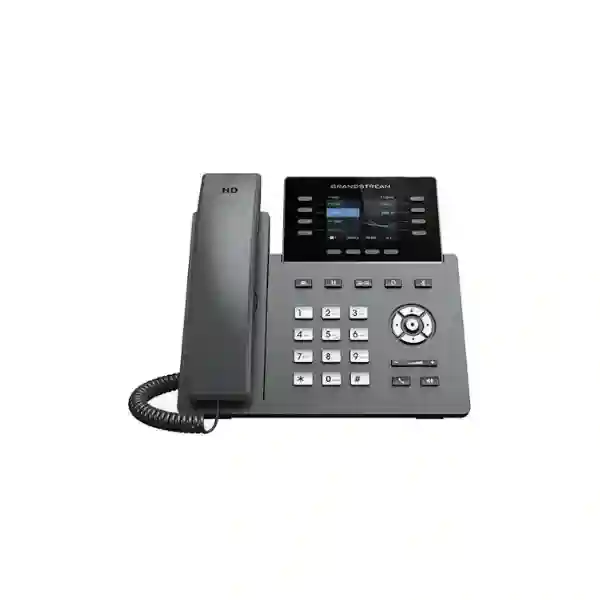
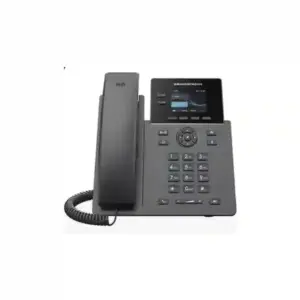
Grandstream GRP2624 Dubai – 8-Line Professional IP Phone for Busy Business Desks
The Grandstream GRP2624 Dubai is a professional 8-line carrier-grade IP phone built for users who handle a high volume of calls and need a desk endpoint that is easier to deploy, manage and scale than a basic office handset. Grandstream specifies up to 12 SIP accounts, a 2.8-inch 320×240 colour display, dual Gigabit Ethernet with integrated PoE, Bluetooth, USB headset support, HD audio, five-way conferencing, GDMS cloud provisioning and support for the GBX20 expansion module. Current Grandstream documentation also lists dual-band Wi-Fi, with Wi-Fi 6 support on hardware version 5.0 and above. That hardware-revision condition is important when preparing quotations or standardising a fleet.
For Dubai organisations, the GRP2624 is especially relevant for reception desks, customer-service coordinators, branch administrators, team leaders, office managers and other users who need multiple line appearances, programmable call-control keys and room to expand. Fourteck can help buyers evaluate endpoint quantity, PBX/SIP compatibility, PoE switching, VLAN and QoS design, headset requirements, GBX20 expansion and provisioning strategy before an order is finalised.
Designed for business users who need more call handling flexibility than an entry-level endpoint.
Useful where one desk must handle multiple identities, departments or service lines.
Supports a clean single-cable desk deployment when used with a suitable PoE network.
Up to four modules can provide as many as 160 additional programmable contacts/keys.
Quick answer: who is the GRP2624 for?
Choose the GRP2624 when the user needs a professional SIP desk phone with strong call-handling capacity, multiple programmable keys, modern headset options, Gigabit Ethernet, PoE and centralised provisioning. It is a practical fit for reception, administration, customer service, operations coordinators, executive assistants, shared service desks and managers who need to monitor more than one line or extension.
It is less suitable when the requirement is only one or two basic lines, when a cordless DECT/Wi-Fi handset is needed for mobility, or when the user requires a large touchscreen/video-collaboration interface. In those cases, selecting a simpler endpoint, a mobility solution or a different professional model may reduce cost or improve usability. The correct decision should be based on user role, call volume, PBX design, headset workflow, PoE availability and expansion needs rather than model number alone.
Why Dubai buyers consider the GRP2624 for high-call-volume desks
Many Dubai offices do not need every employee to have the same phone. A finance analyst, receptionist, sales coordinator and warehouse supervisor can all use SIP calling, yet their day-to-day call handling is very different. The GRP2624 sits in the professional part of Grandstream’s GRP range and is better understood as a role-specific endpoint than as a generic replacement for every handset. Its eight line keys, multiple SIP accounts, programmable soft keys and optional GBX20 expansion give administrators room to build a more deliberate call-control layout for people who regularly answer, park, transfer, monitor or redirect calls.
For a reception desk, the advantage is visibility and speed. Frequently used actions such as BLF monitoring, speed dial, call park, pickup, transfer or intercom can be mapped to programmable keys according to the PBX and provisioning design. For an executive assistant, separate identities or line appearances can help distinguish direct calls from department lines. For branch administration, the endpoint can combine normal calling with centralised provisioning so IT does not have to configure every phone manually at the desk.
Dubai businesses also tend to operate across mixed office environments: headquarters, showrooms, retail outlets, warehouses, clinics, schools, professional services offices and branch locations. That makes network and management choices as important as the phone itself. The GRP2624 supports integrated PoE, Gigabit Ethernet, 802.1Q/802.1P QoS, 802.1x, TLS/SRTP-related security functions and Grandstream Device Management System support. These capabilities matter when the organisation wants a repeatable endpoint standard rather than an isolated desk phone.
Fourteck’s recommendation is to begin with a user-role matrix. Identify who needs only standard calling, who needs BLF or line monitoring, who needs Bluetooth or USB headsets, who needs additional expansion keys and who requires multi-site or remote provisioning. That process helps prevent over-specifying ordinary desks while under-specifying the users who actually handle the business’s busiest call flows.
Verified GRP2624 specifications that matter in a business decision
| Area | Grandstream GRP2624 | Why it matters |
|---|---|---|
| Lines / SIP accounts | 8 line keys; up to 12 SIP accounts | Supports users who need multiple identities, line appearances or programmable call-control functions. |
| Display | 2.8-inch 320×240 TFT colour LCD | Provides a clear colour interface without moving into a large touchscreen class. |
| Ethernet | Dual 10/100/1000 Mbps Gigabit ports | Supports modern office LANs and convenient PC pass-through where the design permits. |
| Power | Integrated IEEE 802.3af PoE; 12V power adapter also supported | PoE can simplify desk cabling and centralise power through the network switch. |
| Wireless | Integrated dual-band Wi-Fi; Wi-Fi 6 on hardware version 5.0 and above | Useful where approved wireless voice deployment is required; hardware revision should be confirmed before ordering if Wi-Fi 6 is mandatory. |
| Bluetooth / USB | Integrated Bluetooth; USB support for compatible headsets | Provides more headset choices for reception, service and long-duration call users. |
| Audio | HD handset and full-duplex HD speakerphone; wideband codec support | Improves clarity when the PBX, network and far endpoint also support the required codec and bandwidth. |
| Conference | 5-way local audio conferencing | Allows quick ad-hoc voice collaboration without depending on a separate meeting room device. |
| Provisioning | GDMS, TR-069 and encrypted XML provisioning options | Supports standardised deployment and remote management at scale. |
| Expansion | GBX20; up to four modules / 160 contacts | Suitable for desks that need a larger programmable directory or monitoring surface. |
Specification note: features can depend on firmware, PBX support, network design, accessory compatibility and hardware revision. Confirm the required revision and accessories before procurement.
Eight line keys and up to 12 SIP accounts: what that means in practice
The numbers are useful, but the business value comes from how the lines and accounts are programmed. A SIP account can represent an extension, service identity or other PBX-defined account, while line keys and multi-purpose keys can be mapped to call handling functions. The exact behaviour depends on the PBX and provisioning profile, so buyers should not assume that every key equals a completely independent external telephone line. A well-designed deployment starts with the call flow and then maps the phone to it.
Consider a property-management reception desk. The user may need a personal extension, the main reception identity, a service-desk hunt group and a management line. The remaining keys can be assigned to BLF monitoring, speed dials, call parking or other functions supported by the phone and PBX. In a clinic, the layout may prioritise reception, appointment desk, billing and nurse station. In a logistics office, the user may need dispatch, customer service, warehouse and branch extensions. The same GRP2624 hardware can support very different workflows because the value is in programmable behaviour rather than a fixed button map.
This is also why procurement teams should involve the person responsible for the PBX before standardising the phone. Ask which SIP features the PBX supports, whether BLF subscriptions are enabled, how call park works, whether shared call appearance is required, how transfer and pickup groups are configured and how user profiles are provisioned. The phone can expose advanced functions, but the PBX determines how many of those functions are usable in a particular deployment.
For enterprise rollouts, create a small number of role-based templates instead of custom-configuring every handset. A reception template might have a dense BLF layout, while a manager template may reserve more keys for direct lines and conferencing. A branch template may emphasise speed dials and central helpdesk contacts. This keeps the user experience consistent and makes future moves, adds and changes easier to manage.
PoE and Gigabit Ethernet: build the desk around the network, not around extra adapters
The GRP2624 includes dual switched Gigabit Ethernet ports and integrated IEEE 802.3af PoE. In a properly designed office, PoE allows the network switch to power the phone through the same Ethernet cable that carries voice traffic. That can reduce power adapters under desks, make cable management cleaner and give IT a more central point for power control. It can also support resilience when the PoE switch and the PBX/network infrastructure are connected to suitable UPS power, although actual uptime still depends on the complete power and network design.
The second Gigabit port can be used for a connected workstation when the organisation’s network policy permits. That can be useful at desks where only one structured cable outlet is available, but it should not be treated as a universal design rule. Security teams may prefer separate ports or specific VLAN handling. Capacity planning should consider the data workload of the attached PC and any QoS policy used for voice. The phone supports Layer 2 and Layer 3 QoS functions, but those settings must align with the switch, router and WAN policy to deliver predictable results.
For new Dubai office deployments, Fourteck recommends verifying PoE budget as part of the bill of materials. A switch may advertise PoE support while still having an overall power budget that becomes insufficient when dozens of phones, access points and cameras are connected. Count the endpoints, reserve capacity for expansion and check whether other high-power devices share the same switch. This is especially important in converged networks where voice, wireless and security infrastructure use the same PoE platform.
VLAN design also deserves attention. Voice VLANs can help segment endpoint traffic and simplify QoS or policy application, but only when switching, DHCP, LLDP and PBX settings are correctly coordinated. An IP phone should not be installed as an isolated appliance; it is one part of the LAN, SIP and security architecture. A short pre-deployment network review can prevent troubleshooting later when the root cause is actually DHCP, DNS, firewall, NAT, cabling, PoE budget or QoS rather than the handset.
Bluetooth for headset-centric users
Integrated Bluetooth gives businesses another way to support users who spend significant time on calls. It can be helpful for managers, coordinators and reception staff who need to move within a limited desk area without holding the handset continuously. Bluetooth performance and accessory functions depend on the specific headset and environment, so compatibility should be confirmed before purchasing a large quantity.
USB and EHS options
Grandstream lists USB support for its GUV Series and other supported USB headsets, while the RJ9 headset interface supports EHS with compatible Plantronics headsets. The right choice depends on whether the user needs wired reliability, wireless mobility, call-control integration or a particular corporate headset standard.
Wi-Fi on the GRP2624: confirm the hardware revision when Wi-Fi 6 is a requirement
Grandstream’s current GRP2624 datasheet lists integrated dual-band 2.4 GHz and 5 GHz Wi-Fi and states that Wi-Fi 6, including 802.11ax, applies to hardware version 5.0 and above. This is a procurement detail that should be written into the requirement if Wi-Fi 6 matters to the project. A quotation that simply says “GRP2624” may not by itself communicate the required hardware revision, especially when stock can come from different production batches.
Wireless capability does not automatically mean wireless is the best choice for every desk. Where structured cabling and PoE are available, wired Ethernet often provides a straightforward path for predictable voice quality, power and troubleshooting. Wi-Fi can be valuable in flexible offices, temporary layouts, spaces where cabling is difficult or deployments where a wireless strategy has already been validated. The decision should follow the site survey and network policy, not convenience alone.
For wireless voice, check access-point coverage, roaming behaviour, interference, channel utilisation, security method, VLAN mapping and QoS. Voice is sensitive to latency, jitter and packet loss. A phone can have a strong feature list yet still deliver a poor user experience when the WLAN is overloaded or coverage is marginal. Dubai offices with dense wireless environments—shared commercial buildings, retail spaces, hospitality sites and multi-tenant floors—should pay particular attention to RF conditions.
If Wi-Fi 6 is not mandatory, buyers can focus on the broader endpoint requirements: number of SIP accounts, line handling, headset use, expansion keys, PBX compatibility and management. If Wi-Fi 6 is mandatory, specify “GRP2624 hardware version 5.0 or above” in the RFQ and ask the supplier to confirm the revision before order approval.
HD audio, Noise Shield and five-way conferencing
Call quality is not created by the handset alone. The GRP2624 supports HD audio on the handset and full-duplex speakerphone, wideband codecs such as G.722 and OPUS, and Grandstream’s Noise Shield technology. These capabilities can improve the listening experience when the complete call path supports them. The actual result depends on the PBX, SIP trunk, codec negotiation, WAN quality, headset, room acoustics and the far-end device.
Noise Shield can be useful in environments where background sound would otherwise distract the far party, but it should not be treated as a replacement for good workspace design. A reception desk positioned beside a busy entrance, open collaboration zone or equipment room may still benefit from an appropriate headset and physical acoustic planning. For users who frequently place calls on speaker, the location of the phone and nearby reflective surfaces also affect perceived quality.
The phone supports five-way local audio conferencing, which can be convenient for quickly bringing several parties into the same voice conversation. That is different from a scheduled conferencing platform or a PBX-based conference bridge. Local conferencing is useful for short ad-hoc discussions, while larger meetings, recording, moderation, dial-in access and cross-device collaboration may be better handled by the organisation’s UC or meeting platform.
When testing a pilot unit, do not judge audio quality only on internal extension-to-extension calls. Include the real calling paths the user will use: inbound PSTN/SIP trunk calls, outbound customer calls, branch-to-branch calls, remote-worker calls and headset calls. A practical pilot exposes codec, NAT, firewall, QoS and provider issues before the endpoint is deployed to dozens or hundreds of desks.
GBX20 expansion: when a receptionist or coordinator needs more keys
The GRP2624 supports Grandstream’s GBX20 extension module. Each module offers 20 programmable buttons across two pages for up to 40 contacts or functions, and Grandstream states that up to four modules can be connected to reach as many as 160 programmable contacts. The GBX20 is an additional accessory rather than part of the standard phone package, so it should be included explicitly in a quotation when required.
This expansion path is most relevant where the user needs to monitor or reach many extensions quickly. A receptionist may want visual BLF status for departments and key staff. A customer-service coordinator may need speed dials for supervisors and escalation contacts. An executive assistant may support several executives and shared lines. The module can make these functions faster to access than navigating through a directory or on-screen menu.
However, an expansion module should solve a real workflow problem. If the organisation is using 80 or 120 keys simply because the PBX has many extensions, the layout can become difficult to learn and maintain. Grouping by department, floor, role or priority is usually more useful than exposing every extension. IT should document the intended key map before deployment and provide a standard labelling or provisioning method.
The physical desk also matters. Multiple modules increase the footprint and cable complexity around the user. Check desk space, monitor placement, ergonomic reach and headset charging accessories. For a busy reception environment, the best setup is the one that reduces clicks and cognitive load while keeping the workspace manageable. Fourteck can help determine whether the base GRP2624 is sufficient, whether one GBX20 is appropriate or whether a different endpoint architecture would be better.
GDMS and zero-touch style provisioning for multi-phone deployments
One of the important reasons to consider the GRP professional family is manageability. Grandstream supports the GRP2624 through GDMS, its Device Management System, for centralised configuration, provisioning, monitoring and management. The phone also supports other provisioning methods including TR-069 and encrypted XML configuration. The appropriate method depends on the organisation, service provider and security policy.
Central provisioning becomes valuable as the number of endpoints grows. Configuring a single phone manually is manageable; configuring 50 phones manually creates inconsistency and consumes unnecessary technician time. A template can define SIP accounts, time settings, codecs, dial plan behaviour, VLAN parameters, button assignments, firmware policy and other supported options. Devices can then receive a repeatable configuration rather than relying on one-off keypad changes.
For Dubai companies with multiple offices, centralised management can also simplify moves and branch rollouts. IT can prepare the endpoint configuration before deployment and apply a standard policy across locations. That does not eliminate the need for site readiness: DHCP, DNS, firewall, SIP reachability, VLAN configuration and PoE still need to be correct. It does reduce the amount of local handset administration required after the network is ready.
Security should be built into the provisioning process. Grandstream lists secure boot, dual firmware images, encrypted data storage/configuration features, SRTP, TLS and 802.1x-related capabilities. Which of these are used depends on the PBX, network infrastructure and enterprise policy. Avoid enabling security features in isolation without testing interoperability. A secure deployment is one where the phone, provisioning system, PBX, certificate handling, switches, firewalls and operational procedures are designed together.
PBX and SIP compatibility: questions to answer before buying
The GRP2624 is a standards-based SIP phone with broad interoperability, but “SIP compatible” does not mean every PBX feature behaves identically on every platform. Before procurement, confirm the PBX vendor, current software version, supported provisioning method, required codecs, BLF behaviour, call park method, directory integration, voicemail notification, transfer workflow, shared call appearance needs and any vendor-specific features.
If the business uses a Grandstream UCM platform, deployment can be planned within the Grandstream ecosystem. If it uses 3CX, an operator SIP platform, a hosted PBX or another vendor, validate the supported endpoint profile and provisioning path. If the service is managed by an ITSP, ask whether the provider officially supports the model and whether it supplies its own firmware or configuration template. A lab test with one or two units is advisable when the environment is complex or when call-control functions are business critical.
Also confirm NAT and firewall requirements for remote or hosted PBX use. One-way audio, failed registration and intermittent calling are often network issues rather than phone defects. SIP ALG, blocked ports, incorrect NAT rules, DNS problems and unstable WAN links can all affect service. The exact design should follow the PBX or provider’s documented requirements.
Directory requirements deserve their own check. The phone supports downloadable phonebook options and LDAP-related functionality, but the directory source, field mapping and refresh behaviour must be designed. For a receptionist, a well-structured directory can be as important as programmable keys. Define whether contacts come from the PBX, LDAP, XML provisioning or another approved method before rollout.
A practical deployment blueprint for Dubai offices
Separate basic users, managers, receptionists, customer-service desks and expansion-module users. Do not apply one endpoint profile to every role.
Confirm SIP registration, provisioning, BLF, transfer, voicemail, directory and conference behaviour with the actual PBX version.
Check PoE budget, VLANs, DHCP, DNS, QoS, firewall policy, WAN quality and wireless readiness where Wi-Fi will be used.
Create role-based profiles for account settings, keys, codecs, security and firmware rather than programming phones one by one.
Test internal, inbound, outbound, transfer, conference, headset and failover scenarios with real users before a full rollout.
Record extension mapping, button templates, firmware policy, support contacts and replacement procedures for ongoing operations.
Reception deployment: design for speed, visibility and fewer mistakes
A reception phone is not simply a phone with more buttons. It is part of a live workflow where the user must identify callers, understand who is available, transfer accurately and recover quickly when a call is returned or parked. The GRP2624 can support this type of role through multiple line keys, programmable functions, call park/pickup capabilities, directory options and GBX20 expansion, but the configuration should be designed with the receptionist rather than imposed after installation.
Start by observing the current call flow. How many incoming numbers feed reception? Are departments reached directly or through a main number? Does the receptionist announce calls before transfer? Are calls parked centrally or transferred immediately? Which employees are contacted most often? Is there a backup receptionist? Does the desk require a wireless headset? These answers determine which keys and screens are important.
Next, reduce clutter. Frequently used contacts should be easy to reach, but not every employee needs a dedicated key. Use groups or directory search for lower-frequency contacts. Reserve visible keys for high-value functions such as the main line, priority departments, call park slots, security desk, facilities, management and common service teams. If a GBX20 is used, organise the pages consistently so the receptionist does not have to remember an arbitrary map.
Finally, test busy scenarios. Place multiple inbound calls, transfer while another call is waiting, use the headset, recover a parked call, check voicemail indication and test after-hours routing. A configuration that works during a quiet demonstration may fail under peak conditions if the key map is confusing. The objective is to reduce handling time and error rate, not merely to activate every available feature.
Executive assistant, office manager and team-lead use cases
Not every high-feature phone sits at reception. Executive assistants may need to monitor several managers, handle shared line appearances and transfer calls rapidly while keeping a personal extension separate. Office managers may coordinate suppliers, facilities, reception and internal departments. Team leads may handle their own calls while monitoring a service or escalation line. The GRP2624’s combination of SIP capacity, programmable keys, Bluetooth/USB headset support and central provisioning makes it relevant to these hybrid roles.
For an executive assistant, key placement should follow priority rather than alphabetical order. Senior contacts, direct lines and assistant-to-executive intercom functions should be immediately accessible. Secondary contacts can move to a directory or expansion page. For an office manager, speed dials may focus on building management, security, facilities, reception, IT support and procurement. For a customer-service lead, the layout might prioritise queue supervisors, escalation teams and branch contacts.
Headset selection is especially important for these users because they may need to type, search CRM records or manage a calendar while talking. The phone supports Bluetooth and USB headset paths in addition to the traditional headset interface. The business should standardise a tested accessory set rather than allowing a wide range of unverified headsets that create inconsistent support issues.
When several such users exist across branches, provisioning templates should reflect their roles. A “team lead” profile and an “executive assistant” profile can each define line behaviour, key assignments and permitted settings. This makes onboarding faster and helps ensure that a replacement phone can be restored to a familiar state without rebuilding it manually from memory.
When the GRP2624 may be more phone than the user needs
A professional model should be justified by the role. If a desk needs one extension, occasional internal calls and no BLF, expansion, headset or multi-line workflow, a simpler business phone may deliver the same user outcome at lower cost and with less interface complexity. Standardising the GRP2624 everywhere can be tempting for procurement, but over-specification increases the number of unused features and may consume budget that would be better invested in switching, Wi-Fi, UPS, headsets or PBX licensing.
The model may also be the wrong category when the user is mobile. Warehouse supervisors, roaming retail staff, hospitality teams and field personnel may benefit more from DECT or Wi-Fi handsets depending on coverage and operational requirements. Likewise, a user who needs video, app integration or a large touch interface may need a video/Android endpoint rather than a traditional professional SIP desk phone.
Another case is a reception environment that requires an exceptionally large always-visible key field. The GRP2624 can expand through GBX20 modules, but the organisation should compare the ergonomics, screen size and native programmable-key layout of other professional models before committing. The right answer is not always “add more modules.”
Fourteck can help buyers classify endpoints by role so that the GRP2624 is used where its capabilities create a real operational benefit. This role-based approach also reduces cannibalisation between similar product choices and gives procurement a clearer reason for each model in the bill of materials.
How to compare the GRP2624 with nearby Grandstream professional models
Model comparison should begin with the user requirement, not with a single headline specification. Within Grandstream’s professional GRP range, nearby choices may offer different balances of display size, programmable keys, SIP capacity, expansion support and desk ergonomics. Instead of asking which model is “better,” ask which model reduces friction for the person using it.
| Requirement | GRP2624 fit | What else to compare |
|---|---|---|
| Busy desk with several monitored lines | Strong fit | Compare the number and placement of native programmable keys on adjacent professional models. |
| Needs external key expansion | Supports GBX20 | Compare desk footprint, module cost and whether another model provides enough built-in keys without expansion. |
| Needs a larger visual interface | 2.8-inch display | Compare larger-display or touch-oriented models if visual navigation is a priority. |
| Needs simple everyday calling only | Can be over-specified | Compare Essential-series or lower-complexity models for ordinary desks. |
| Requires Wi-Fi 6 specifically | Hardware v5.0+ requirement | Confirm hardware revision in writing and compare models with clearly documented Wi-Fi 6 capability. |
The comparison should include accessories and deployment effort as well as the handset. A model that appears cheaper can become more expensive if it requires additional modules, power adapters or more complex support. Conversely, a higher-capability model may be unnecessary when the user only needs basic SIP calling. A role-based bill of materials usually provides better value than a one-model-for-everyone policy.
Security considerations for enterprise GRP2624 deployments
Grandstream lists security capabilities including secure boot, dual firmware images, encrypted data storage/configuration options, TLS, SRTP, administrator/user passwords and 802.1x-related controls. These are valuable building blocks, but endpoint security is a system property. A phone with security features can still be exposed if default credentials are mishandled, provisioning is left open, firmware is unmanaged, the voice VLAN has weak access controls or the PBX is publicly exposed without an appropriate architecture.
Begin with credential policy. Use unique or centrally managed administrator credentials where supported, protect provisioning credentials and restrict who can access the phone’s web interface. Where 802.1x is part of the organisation’s access-control strategy, validate certificates and switch behaviour in a pilot because authentication failures can prevent a phone from joining the network.
For signalling and media encryption, confirm PBX and provider compatibility before enforcing TLS or SRTP. Encryption settings must match on both ends. Some deployments use internal encryption while others depend on provider capabilities or SBC design. The correct policy should come from the voice/security architecture rather than from turning on every option independently.
Firmware management is equally important. Define who approves updates, how they are tested, how quickly security releases are applied and how devices are rolled back or recovered if an issue occurs. Central provisioning can help maintain a consistent firmware baseline, but change control still matters. For larger fleets, keep an inventory of model, hardware revision, firmware version, MAC address, extension assignment and physical location so support teams can diagnose incidents quickly.
Dubai and UAE procurement checklist for the GRP2624
When requesting a quotation, provide enough information for the supplier to quote the complete solution rather than only a handset quantity. This is particularly important when the project includes different hardware revisions, headsets, expansion modules or network upgrades.
- Required quantity and deployment locations: Dubai, Deira, JLT, Business Bay, Abu Dhabi, Sharjah, Ajman or other UAE sites.
- PBX or hosted SIP platform name and current version.
- Whether Wi-Fi is required and whether Wi-Fi 6 specifically requires GRP2624 hardware version 5.0 or above.
- PoE switch availability, model, free ports and remaining PoE budget.
- Number of users who require Bluetooth, USB or EHS headset operation.
- Number of GBX20 modules required per user, if any.
- Need for wall mounting; Grandstream states the wall mount is sold separately.
- Provisioning method: GDMS, PBX auto-provisioning, service-provider provisioning or another approved process.
- Required languages, directory integration and programmable-key layout.
- Any VLAN, 802.1x, TLS/SRTP or other enterprise security requirements.
Price should be treated as a project variable rather than a fixed specification. Quantity, hardware revision, accessories, exchange rate, supplier stock, configuration services and project scope can affect the quotation. Fourteck does not recommend publishing an unverified “best price” for a model whose commercial conditions can change. Request a current quote against a defined bill of materials instead.
Configuration planning: from unboxed phone to production desk
A disciplined rollout separates device preparation from live user migration. Start with the PBX profile and network policy. Confirm the extension credentials, SIP server or outbound proxy, codec preference, voicemail settings, line keys, time zone, NTP, VLAN, QoS, directory and security requirements. Build these into a provisioning template where possible rather than typing settings manually.
Next, prepare the network. Verify switch port configuration, LLDP/voice VLAN behaviour if used, DHCP options where applicable, DNS resolution, NTP reachability, PoE delivery and firewall/SBC rules. If the phone is expected to connect over Wi-Fi, test the SSID, authentication method, roaming and RF coverage separately from the SIP configuration so network and telephony faults are not confused.
During staging, label the phone with the intended user or location, record identifiers for inventory and confirm the correct hardware revision. Apply the approved firmware, provision the profile and then test registration. Place an outbound call, receive an inbound call, transfer, hold, resume, access voicemail, test BLF/park/pickup functions, verify the headset and confirm emergency or special dial plans according to the organisation’s policy.
When moving the phone to the production desk, test again on the real switch port. A device can pass in the staging area and fail at the desk because of a different VLAN, cable, PoE policy or firewall path. Provide the user with a short role-specific guide rather than a generic manual. For reception, that guide might focus on park, transfer, BLF and headset use. For a manager, it may focus on conference, Bluetooth and line selection.
Finally, record the change. Good documentation should include extension number, user, location, MAC/serial information as appropriate, hardware revision, firmware, provisioning profile, headset model and any expansion module. This makes future support significantly easier.
Troubleshooting logic for common GRP2624 deployment issues
When a new phone does not work as expected, troubleshooting should follow layers. First confirm power and physical link. If PoE is used, verify the switch port is delivering power and that the cable is good. If the device powers but has no network address, inspect VLAN, DHCP and switch configuration. If it receives an address but cannot register, check DNS, SIP server reachability, credentials, time/certificate conditions, firewall rules and provider requirements.
For one-way audio or calls that connect without media, investigate NAT, firewall and SBC behaviour before replacing the handset. SIP signalling and RTP media may follow different paths. An endpoint can register successfully while audio packets are blocked. For intermittent audio, check packet loss, jitter, WAN congestion and Wi-Fi conditions. If the phone is connected through a PC pass-through arrangement, confirm that the data device is not creating an unexpected network bottleneck or loop.
For BLF or programmable keys that do not behave as expected, verify both the phone configuration and PBX support. BLF generally relies on SIP subscriptions and PBX-side configuration. A key can be correctly programmed on the phone but still show no status if the PBX does not allow or recognise the subscription.
For Bluetooth or USB headset problems, test with a supported accessory, update firmware if appropriate and verify whether call-control buttons are expected to work or only audio. Headset interoperability can vary by model. For Wi-Fi 6-related questions, verify the GRP2624 hardware revision rather than assuming every unit has the same radio capabilities.
For repeated configuration loss, inspect the provisioning system. The phone may be receiving a template that overwrites local changes after reboot or scheduled resynchronisation. In managed deployments, the provisioning template should be treated as the source of truth. Change the template first, then reprovision, instead of repeatedly editing the handset locally.
Regional deployment thinking beyond a single Dubai office
Many organisations buying phones in Dubai also manage branches elsewhere in the UAE or support regional operations. A standard endpoint such as the GRP2624 can be useful when the same PBX, provisioning model and support process are shared across Dubai, Sharjah, Abu Dhabi and other sites. The benefit is not the city name on the product; it is the ability to create a repeatable configuration and support model.
For branch offices, WAN quality becomes more important. If the PBX is centralised or cloud-hosted, test latency, packet loss, jitter and failover at each location. A branch with excellent LAN cabling can still deliver poor voice if the WAN path is unstable. Consider local Internet resilience, SD-WAN or SBC design where the business impact justifies it.
Where a Dubai headquarters supports teams in markets such as Uganda, Kenya, Tanzania, Ghana or Nigeria, consistent provisioning can simplify endpoint management, but local connectivity, power, regulation and supplier conditions differ. Avoid assuming that a deployment design proven in the UAE can be copied unchanged. Use the same role-based endpoint standard where appropriate, then adapt network, power and service-provider details to each region.
Fourteck’s broader technology network can support organisations that want to plan IP telephony as part of a larger infrastructure project. For general UAE technology requirements, visit Fourteck UAE. For Grandstream-focused UAE solutions, see Grandstream UAE by Fourteck. For regional IT planning, Fourteck also maintains country-focused resources for Uganda, Kenya and Tanzania.
What Fourteck can help you verify before you order
A product quotation is more useful when it confirms the complete requirement. Fourteck can help map the Grandstream GRP2624 to user roles, PBX/SIP compatibility, PoE switching, Wi-Fi requirements, headset standards, GBX20 expansion, provisioning and deployment scope. We can also help separate users who need a professional multi-line phone from users who would be better served by a simpler endpoint or a mobility solution.
Validate PBX compatibility
Plan PoE & VLANs
Choose headset / GBX20
Prepare deployment scope
Use IP Phone Fourteck to discuss a Dubai or UAE business requirement and request a current quotation based on quantity, accessories and deployment needs.
Frequently asked questions about the Grandstream GRP2624 Dubai
How many lines and SIP accounts does the GRP2624 support?
Grandstream specifies 8 line keys and up to 12 SIP accounts for the GRP2624. The way those accounts and keys are used depends on the PBX and provisioning design. They can support multiple identities and programmable functions, but buyers should map the required call flow before deciding how the keys will be assigned.
Does the GRP2624 support Power over Ethernet?
Yes. The GRP2624 has integrated IEEE 802.3af PoE and dual Gigabit Ethernet ports. A 12V power adapter is also supported. For PoE projects, confirm that the switch has enough ports and remaining power budget for the full number of phones and other PoE devices.
Does the Grandstream GRP2624 have Wi-Fi 6?
Current Grandstream documentation lists integrated dual-band Wi-Fi and states that Wi-Fi 6 support applies to hardware version 5.0 and above. If Wi-Fi 6 is a project requirement, specify the hardware revision in the RFQ and ask the supplier to confirm it before ordering.
Can I use a Bluetooth or USB headset with the GRP2624?
The GRP2624 includes integrated Bluetooth and a USB port for supported headsets. It also has an RJ9 headset interface with EHS support for compatible Plantronics headsets. Confirm the exact headset model and required call-control functions before standardising a large deployment.
Which expansion module works with the GRP2624?
Grandstream lists the GBX20 as the compatible extension module. Each module provides up to 40 contacts/functions across two pages, and the GRP2624 supports up to four modules for as many as 160 programmable contacts. The GBX20 is an additional accessory and should be quoted separately when required.
Is the GRP2624 suitable for a Dubai reception desk?
Yes, it can be a strong fit for reception and other high-call-volume desks when the user needs multiple line appearances, BLF, call park/pickup, transfer, headset operation and optional expansion keys. The final suitability depends on the PBX call flow, number of monitored extensions and the receptionist’s actual workflow.
Does the GRP2624 work with hosted PBX or third-party SIP systems?
The GRP2624 is a standards-based SIP endpoint designed for broad interoperability. However, feature behaviour such as auto-provisioning, BLF, shared lines, directories and call park can differ by platform. Validate the exact PBX or hosted-service profile before a large rollout.
Can the GRP2624 be centrally managed?
Yes. Grandstream supports the GRP2624 through GDMS for centralised configuration, provisioning, management and monitoring. The phone also supports other provisioning approaches such as TR-069 and encrypted XML configurations, depending on the deployment.
What should I include in a GRP2624 price request in Dubai?
Provide the quantity, site locations, PBX platform, required hardware revision, headset needs, GBX20 quantity, PoE/network readiness and whether configuration or installation services are required. This produces a more accurate quotation than asking for a handset-only price without the project context.
Should I use Ethernet or Wi-Fi for the GRP2624?
Where structured cabling and PoE are available, wired Ethernet can offer a straightforward, predictable deployment. Wi-Fi is useful when the site design requires it, but wireless voice quality depends on RF coverage, interference, roaming, authentication and QoS. Choose the connection method based on the site rather than convenience alone.
Decision summary
The Grandstream GRP2624 Dubai is best treated as a professional role-based endpoint for busy users rather than a default phone for every desk. Its combination of 8 line keys, up to 12 SIP accounts, Gigabit Ethernet, integrated PoE, Bluetooth, USB headset support, dual-band Wi-Fi, GDMS provisioning, HD audio, five-way conferencing and GBX20 expansion makes it well suited to reception, administration, customer-service coordination and other high-call-volume positions.
The two most important buying checks are compatibility and revision. Confirm that the PBX supports the required call-control functions, and confirm the hardware revision when Wi-Fi 6 is mandatory because Grandstream ties Wi-Fi 6 support to hardware version 5.0 and above. Also verify the PoE budget, headset model, expansion-module need, wall-mount requirement and provisioning plan.
For a current Dubai/UAE quotation, provide Fourteck with the user count, PBX platform, office locations, headset/GBX20 requirements and network details. That allows the phone to be quoted as part of a usable business communication solution rather than as an isolated device.
Reviews
There are no reviews yet.