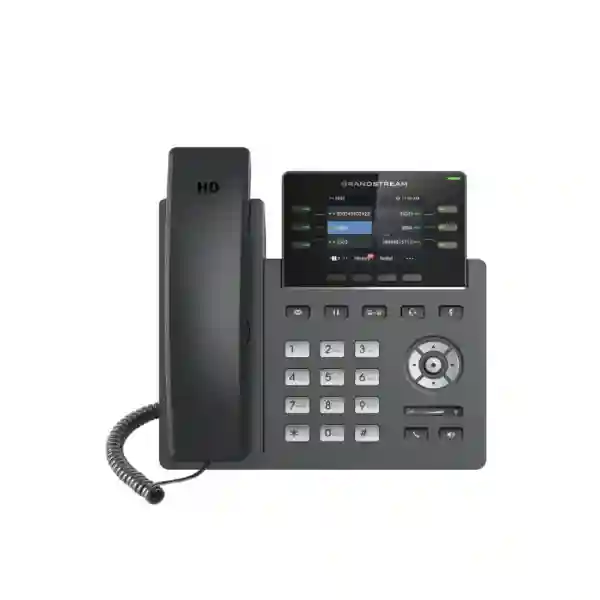
Grandstream GRP2613W Dubai – Wi-Fi 6 Professional IP Phone for Managed Business Voice
The Grandstream GRP2613W Dubai is a six-line professional IP phone designed for organizations that want a manageable, secure and flexible desktop voice endpoint without being restricted to an Ethernet-only desk position. Grandstream equips the GRP2613W with integrated dual-band Wi-Fi 6, Bluetooth, dual Gigabit Ethernet ports with PoE, support for up to six SIP accounts, six multipurpose line keys, up to 24 digital BLF keys, a 2.8-inch color display, HD audio, Noise Shield technology and centralized device management through GDMS. That combination makes the phone particularly useful for reception desks, managers, operations teams, service counters, branch offices, hotels, schools, clinics, professional offices and multi-site businesses that need reliable SIP calling together with easier mass deployment.
Fourteck can help customers evaluate the GRP2613W as part of a complete IP telephony requirement, including PBX compatibility, SIP account planning, PoE switching, VLAN and QoS design, Wi-Fi coverage, headset requirements, provisioning and deployment. Availability, commercial terms, PBX compatibility and accessories should be confirmed for the specific project before ordering.
The buying question: when does the GRP2613W make sense?
The GRP2613W is best understood as a professional SIP desk phone for organizations that need more than basic extension calling but do not necessarily need a very large executive touch display or a physical expansion module. Its strongest differentiator inside the GRP2613 family is the integrated Wi-Fi 6 and Bluetooth capability. That matters in real projects because many modern offices have desks, counters, temporary work areas, kiosks and meeting support points where a network drop is unavailable, inconvenient or expensive to add. A Wi-Fi capable SIP phone can give the deployment team more flexibility, provided the wireless network has been designed properly for voice traffic.
The phone also suits environments where an administrator wants a consistent endpoint that can be provisioned and managed centrally. Grandstream’s GDMS support, zero-touch provisioning approach, encrypted configuration capability and standard SIP support reduce the amount of manual desk-by-desk work that can otherwise become a problem in larger rollouts. For a small office, those same features can make future growth easier. For a larger enterprise or service provider, they support repeatable deployment standards across departments or branches.
Choose the GRP2613W when you need a professional multi-line SIP endpoint with Wi-Fi 6, Bluetooth, Gigabit Ethernet, PoE, centralized management and flexible BLF access. Choose a different endpoint class if your priority is an integrated video interface, a much larger touch display, or hardware expansion modules. The correct decision should follow the user role, call volume, PBX platform, network design and future growth plan rather than model number alone.
Verified GRP2613W technical facts
Grandstream’s current product information and datasheet identify the GRP2613W as the wireless variant of the GRP2613 platform. The table below focuses on specifications that directly influence a business deployment. These facts should still be checked against the latest firmware, regional documentation and project requirements at the time of purchase.
| Area | GRP2613W specification | Why it matters |
|---|---|---|
| Lines / SIP | 6 lines, up to 6 SIP accounts, 6 multipurpose line keys | Supports several identities, departments or call-handling functions on one phone. |
| Wireless | Dual-band Wi-Fi 6, 2.4 GHz and 5 GHz, 802.11a/b/g/n/ac/ax; integrated Bluetooth | Adds deployment flexibility and wireless accessory options. |
| Ethernet | Dual switched autosensing 10/100/1000 Mbps Gigabit Ethernet | Suitable for modern wired desks and PC pass-through designs. |
| Power | Integrated IEEE 802.3af PoE; datasheet also lists a 5 V power adapter | Allows single-cable wired desk deployment when a suitable PoE switch is used. |
| Display | 2.8-inch 320 × 240 TFT color LCD | Clear navigation for calls, contacts, menus and programmable functions. |
| BLF / keys | Up to 24 digital BLF keys / virtual multi-purpose keys | Useful for busy users monitoring extensions, speed dials or feature access. |
| Audio | HD handset and speakerphone; G.722 and Opus wideband support; Noise Shield | Improves voice clarity when the network and remote endpoint support appropriate codecs. |
| Conference | 5-way audio conferencing | Supports small ad-hoc group calls directly from the endpoint. |
| Headset | RJ9 headset jack; datasheet notes EHS support with compatible Plantronics headsets | Relevant for reception, support and frequent-call users. |
| Management | GDMS, TR-069 and encrypted XML provisioning options | Helps standardize configuration across many phones. |
| Security | Secure boot, encrypted data/configuration capabilities, TLS, SRTP, 802.1X and dual firmware image protection | Supports stronger endpoint governance when configured correctly. |
| Expansion module | No extension module support listed | Important for users who expect a large external physical key expansion panel. |
Wi-Fi 6 changes where a business phone can be deployed
Traditional IP phone projects often assume that every desk has an Ethernet outlet connected to a voice-ready switch. In new offices that may be easy to plan. In renovated spaces, temporary offices, hospitality counters, clinics, education facilities or expanding warehouses, the reality can be different. The GRP2613W’s integrated dual-band Wi-Fi 6 gives the project team an additional connection method when a wired data point is unavailable or when furniture layouts change frequently.
That flexibility should not be confused with “plug the phone into any Wi-Fi network and voice will always be perfect.” Voice remains sensitive to latency, jitter, packet loss, roaming behavior and congestion. A well-designed deployment should confirm access-point coverage, signal quality, channel planning, SSID design, client density, VLAN strategy, QoS treatment and the path from the wireless network to the PBX or SIP service. In many business environments, 5 GHz can be preferable for capacity and reduced interference, but actual performance depends on site conditions. The phone also supports 2.4 GHz, which can be useful where range or infrastructure design makes that band appropriate.
For fixed desks with available cabling, Gigabit Ethernet and PoE may still be the most predictable choice because power and network connectivity can travel through the same cable. For mobile desk layouts or difficult-to-cable positions, Wi-Fi can reduce installation effort. Many organizations will use both methods across the same project: wired PoE for standard workstations and Wi-Fi for locations where structured cabling is impractical. The value of the GRP2613W is that the model supports both approaches rather than forcing every desk into one architecture.
Six SIP accounts and 24 virtual keys for real call workflows
A specification such as “six SIP accounts” becomes useful only when it maps to an actual call-flow requirement. A SIP account can represent an extension, a service identity or another PBX registration depending on the platform. On the GRP2613W, support for up to six SIP accounts creates room for users who manage more than one identity or who need separate registrations for different functions. A manager may have a personal extension and a department line, a reception user may handle a front-desk identity plus an overflow destination, or a branch office may use different registrations for specific business units.
The six multipurpose line keys and up to 24 digital BLF keys are especially relevant for users who monitor colleagues or frequently access telephony functions. BLF behavior depends on PBX support and configuration, but in a compatible system it can help a receptionist see extension status, speed up transfers or reach commonly used destinations. Instead of treating the phone as a simple handset with a dial pad, the business can design a role-specific key layout. Reception may prioritize executives, departments and pickup groups. An operations desk may prioritize branch lines and escalation contacts. A manager may use fewer BLF entries and more speed dials or feature shortcuts.
This is where provisioning becomes important. Manually programming key layouts on many phones can create inconsistency and support overhead. A standardized profile can make the user experience more predictable. The organization should document which buttons are fixed, which are user-changeable, how labels are presented and which PBX features each programmed key invokes. When users move desks or phones are replaced, a centrally managed approach can help recreate the intended configuration with less manual work.
HD audio, Noise Shield and conferencing
Call quality is one of the most noticeable parts of an IP telephony system. The GRP2613W supports HD audio on the handset and speakerphone and includes wideband codecs such as G.722 and Opus. Wideband audio can deliver clearer speech than narrowband calling when the full communication path supports it. That includes the phone, PBX or service platform, network policy and the remote endpoint. Codec selection may also be influenced by WAN bandwidth, interoperability rules, trunk requirements and geographic connectivity.
Grandstream also includes Noise Shield technology to reduce distracting background noise. That can be valuable in open offices, reception areas, shared service counters and other spaces where conversations occur near printers, movement, nearby staff or general room noise. Noise handling is not a substitute for acoustic planning, but it can improve the practical experience for users who do not work in isolated private offices.
The phone’s speakerphone can support hands-free conversations and the platform supports five-way audio conferencing. For teams that regularly hold large or formal meetings, a dedicated conferencing solution may still be better. For quick internal coordination, supplier calls or small group discussions, integrated conferencing can reduce the need to move to another device. Organizations should also consider headset use for frequent-call staff. The GRP2613W provides an RJ9 headset interface and integrated Bluetooth, giving the project team more options when matching user roles with accessories. Exact headset compatibility and call-control features should be confirmed before bulk procurement.
Centralized provisioning with GDMS
One phone is easy to configure manually. Fifty phones across multiple departments are not. Hundreds of phones across branches can become a serious operational task unless the deployment process is standardized. The GRP2613W supports Grandstream Device Management System (GDMS), a centralized platform for provisioning, configuration, management and monitoring of Grandstream endpoints. The value is not simply convenience; centralized device management can improve consistency.
A project team can define settings for SIP registration, time, firmware policy, phonebook sources, feature keys, security parameters and other endpoint behavior, then apply controlled profiles to the relevant devices. The exact workflow depends on the environment and administrative model, but the objective is the same: reduce desk-side configuration and lower the risk that different phones end up with different settings because they were installed by different people at different times.
The datasheet also lists TR-069 and AES-encrypted XML configuration options. That matters for enterprises and service providers that already have provisioning infrastructure or that need an alternative management architecture. Zero-touch concepts are especially useful when phones are shipped to branches or remote offices. Instead of requiring a highly skilled engineer at each destination, the endpoint can be prepared for a controlled provisioning process, subject to the chosen system design and security policy.
Management planning should include ownership of credentials, administrator roles, firmware approval, configuration backups, change documentation, device naming, site tags and decommissioning. A phone that is easy to provision should also be easy to remove securely when it leaves service. Fourteck can help customers define the endpoint side of that workflow as part of a wider telephony rollout.
Security should be designed, not assumed
The GRP2613W includes security capabilities relevant to enterprise deployments: secure boot, encrypted data storage, dual firmware images, 256-bit AES encrypted configuration files, TLS, SRTP and 802.1X support are identified in Grandstream’s documentation. These features can strengthen an endpoint architecture, but simply owning a phone with security capabilities does not automatically secure the voice system. The PBX, SIP trunk, LAN, wireless network, management platform and administrator practices must all be configured coherently.
For example, TLS can protect SIP signaling when supported and correctly configured across the communication path, while SRTP can protect media. 802.1X can help with network access control where the switching or wireless environment supports the required authentication design. VLAN separation can help keep voice devices logically organized, while firewall policy can limit unnecessary exposure. Strong administrator passwords, controlled provisioning, firmware governance and disabling unused services also matter.
Organizations should decide whether phones sit on a dedicated voice VLAN, how remote branches reach the PBX, whether a session border controller is required, which DNS and NTP services the phones can access, and how firmware is distributed. The answer will vary between an on-premises PBX, a hosted SIP service and a hybrid deployment. The GRP2613W supplies endpoint capabilities; the security outcome depends on how those capabilities are integrated into the complete system.
PBX and SIP compatibility planning
The GRP2613W uses SIP and supports a broad set of standard networking and telephony functions, which makes it suitable for many SIP-based environments. However, “SIP compatible” should not be interpreted as a guarantee that every advanced feature works identically on every PBX. Basic registration and calling may be straightforward, while BLF, directory integration, hot-desking, feature codes, secure signaling, provisioning templates or remote-management behavior can vary by platform.
Before purchasing a large quantity, the project team should validate the exact PBX version, firmware, provisioning method and user features required. A pilot phone is often useful when the deployment includes complex call queues, receptionist workflows, LDAP directories, custom dial plans, failover, remote extensions or security controls. The validation process should test inbound and outbound calls, transfer, hold, conference, voicemail access, caller ID, DTMF, BLF, call pickup, call park, directory lookup, time synchronization and recovery after network interruption.
Grandstream’s datasheet lists common telephony functions including hold, transfer, forward, call park, call pickup, shared call appearance or bridged line appearance, call waiting, downloadable phonebook, XML and LDAP support, click-to-dial, flexible dial plan, hot-desking and server redundancy or failover. Whether and how each function is used depends on the PBX. The correct question is not only “Does the GRP2613W have this feature?” but “Does this feature work in the way our PBX and workflow require?”
Which employees are a good fit for the GRP2613W?
Different users create different demands on a desk phone. A basic extension user may need only one account and a few call functions. A front desk may monitor many colleagues. A service team may spend hours on calls with a headset. A manager may need several identities and quick access to assistants or departments. The GRP2613W has enough programmable capacity to serve several of these roles, but it should be assigned according to workflow rather than deployed universally without analysis.
Reception and front desk
The six line keys and digital BLF capacity can support frequent transfer and extension-monitoring workflows. Bluetooth and wired headset options can reduce handset fatigue. Validate PBX BLF, pickup and transfer behavior before standardizing the layout.
Managers and team leaders
Multiple SIP accounts can separate personal, departmental or branch identities. Programmable keys can provide rapid access to assistants, teams or common call features.
Operations and customer service
HD audio, Noise Shield, headset support and programmable keys are useful where users handle frequent calls and need repeatable access to colleagues or service functions.
Branches and remote offices
GDMS support and wireless connectivity can simplify remote rollout, especially where branch IT support is limited and a central team wants consistent profiles.
GRP2613W vs GRP2613: the important difference
The two model names are close enough that buyers can easily order the wrong variant. Grandstream’s documentation distinguishes the GRP2613W from the standard GRP2613 in two especially important ways. First, the GRP2613W includes integrated dual-band Wi-Fi 6 and Bluetooth, while those capabilities are identified as specific to the W variant. Second, the GRP2613W supports up to six SIP accounts, whereas the GRP2613 is listed with up to four SIP accounts. Both models are presented as six-line professional phones with Gigabit Ethernet, PoE, HD audio, digital BLF capability, security features and GDMS management.
For a wired office that never expects wireless deployment and needs fewer SIP registrations, the standard model may be sufficient depending on the project. For a business that values placement flexibility, wireless connectivity, Bluetooth accessories or the additional SIP account capacity, the GRP2613W is the more natural fit. The price difference should be evaluated against the cost of adding network cabling, changing desk layouts or supporting external accessory requirements. Fourteck can compare the two variants against the actual site plan rather than treating the “W” suffix as a minor naming detail.
Network design: PoE, VLAN, QoS and Gigabit pass-through
IP phones sit directly on the data network, so their performance depends heavily on switching and routing design. The GRP2613W includes two switched autosensing Gigabit Ethernet ports. In a common desk layout, one port connects toward the LAN and the second can be used for a computer or another supported endpoint design. Because the ports are Gigabit, the phone is less likely to become an unnecessary speed bottleneck in a modern office than a phone limited to Fast Ethernet.
Integrated 802.3af PoE allows the phone to receive power from a suitable network switch when operating through Ethernet. This can simplify cable management and make centralized power protection easier if the PoE switch is connected to a UPS. Organizations should still calculate the PoE budget across the switch. The GRP2613W datasheet lists maximum consumption of 3.8 W on PoE, which can be useful during planning, although final switch sizing should include headroom and the requirements of all connected devices.
Voice VLANs are commonly used to separate and organize phone traffic. The GRP2613W supports Layer 2 QoS with 802.1Q and 802.1P and Layer 3 QoS mechanisms including ToS and DiffServ. Those endpoint capabilities can support a broader quality-of-service design, but the switch, router, firewall and WAN must honor the policy appropriately. Marking voice traffic on the phone does not help if upstream devices ignore or overwrite the markings.
For branch connectivity, businesses should examine WAN latency, VPN architecture, SIP-aware firewall behavior, internet resilience and failover. A high-quality desk phone cannot compensate for an unstable WAN. Where telephony is business critical, dual internet links, SD-WAN, SIP trunk redundancy or local survivability may be worth considering depending on the PBX architecture.
Dubai and UAE deployment scenarios
Businesses in Dubai often combine headquarters, branches, warehouses, retail counters and remote staff within one communications environment. A phone such as the GRP2613W can serve as a consistent endpoint across those locations while allowing the connection method to vary. A head office desk may use Gigabit PoE. A temporary sales desk may use Wi-Fi. A reception point may use Bluetooth or a wired headset. The model remains the same while the deployment method changes according to site conditions.
In office towers and managed business centers, structured cabling changes may require landlord or facilities coordination. Integrated Wi-Fi can help in selected cases, but it should not be used as a shortcut around poor wireless design. A site survey and capacity review are especially useful in dense environments where many neighboring wireless networks operate. For a new fit-out, Fourteck can help customers decide where wired voice remains preferable and where wireless endpoints provide genuine project value.
In Deira and Bur Dubai, some businesses operate from established premises where adding new cabling can be disruptive. A wireless-capable desk phone can help when a desk moves or when an additional service counter is created. In JLT, Business Bay and other office-heavy districts, organizations may prioritize flexible layouts, hot desks and centralized management. In industrial and warehouse environments, Wi-Fi coverage may already be designed for scanners or mobile devices, but voice performance still needs separate validation because a data application can tolerate conditions that a live call cannot.
For Abu Dhabi corporate offices and multi-site organizations, centralized configuration can be as important as the endpoint itself. An IT team may want consistent firmware, directory settings and key layouts across locations. In Sharjah and Ajman, SMEs may value the ability to start with a manageable number of phones and expand without changing the endpoint family. The correct architecture depends on the PBX, network and support model, not simply the city.
Regional projects beyond the UAE
Organizations that standardize telephony across several countries often want the same user experience even when local connectivity and infrastructure differ. The GRP2613W can be considered for multi-country SIP deployments because it supports standard networking, central management and both wired and wireless connectivity. A company with branches in the UAE, Kuwait, Kenya, Uganda, Nigeria or Tanzania may use a common endpoint policy while adapting PBX connectivity, ISP design, QoS and support to each site.
In a Kampala or Nairobi branch, the key decision may be WAN resilience and local support rather than the number of phone features. In Kuwait, the focus may be office standardization and secure centralized provisioning. In Tanzania or Nigeria, a multi-site organization may need to consider varying internet quality between locations and whether local failover is required. None of those regional factors changes the basic GRP2613W specifications, but they change how the phone should be integrated.
Fourteck’s wider regional network can support customers evaluating communication and IT infrastructure across multiple markets. For UAE projects, the primary commercial and deployment conversation should remain focused on the local requirement, while regional standardization can be addressed as a separate design layer. This avoids the common mistake of copying a Dubai configuration to every branch without checking local networking, PBX access and operational needs.
Installation workflow for a controlled GRP2613W rollout
- Define the user profile. Document whether the person is a standard employee, receptionist, manager, support agent, branch administrator or shared-desk user. Identify required SIP accounts, BLF entries, directory access, headset type and call features.
- Validate the PBX. Confirm registration, codecs, DTMF, BLF, transfer, conference, voicemail, call pickup, directories and any platform-specific features with a pilot unit.
- Choose wired or wireless connectivity. For Ethernet, verify switch port, PoE budget, VLAN and cabling. For Wi-Fi, verify SSID, security, signal level, capacity, roaming conditions and voice quality.
- Create the provisioning profile. Standardize administrator settings, time, firmware policy, SIP parameters, phonebook sources, key assignments and security options.
- Apply security controls. Use strong credentials, approved transport and media security where supported, controlled management access and network segmentation consistent with policy.
- Test the user journey. Make internal and external calls, transfer between departments, test hold and conference, check voicemail, inspect BLF updates and confirm caller ID and DTMF behavior.
- Document and hand over. Record device ownership, extension, inventory identifier, site, profile and support process. Give users a concise role-based guide.
- Monitor after rollout. Review user feedback, firmware status, call-quality complaints and recurring support issues. Adjust templates centrally where appropriate.
Headsets, Bluetooth and desk ergonomics
Users who spend much of the day on calls often care more about headset behavior than about the visual appearance of the phone. The GRP2613W provides integrated Bluetooth and an RJ9 headset port. That creates flexibility for wireless accessories and traditional wired headsets, but compatibility should be checked at the model level. Bluetooth establishes the wireless connection method; it does not guarantee that every headset exposes every call-control function exactly as a user expects. Answer, end-call, volume, mute and hook control can vary by accessory.
The datasheet specifically notes that the RJ9 headset jack allows EHS with compatible Plantronics headsets. If an organization already owns a large headset fleet, testing those accessories can protect the investment and prevent surprises. If new headsets are being purchased, the user role should guide the choice. A receptionist may need all-day comfort and remote call control. A manager may value mobility. A standard employee who makes occasional calls may prefer the handset or speakerphone.
The phone stand supports two angle positions and the datasheet identifies wall mounting with a separate wall mount. Those details can matter at reception counters, security desks, clinics, workshops and other non-standard workspaces. A site survey should consider cable access, screen visibility, handset reach and whether the phone could be bumped or exposed to unsuitable environmental conditions.
Directories, call history and everyday productivity
The GRP2613W supports downloadable phonebooks using XML and LDAP, with Grandstream’s datasheet listing up to 1,000 phonebook items and a call log of up to 2,000 records. Directory integration can save users from memorizing extensions or maintaining separate personal lists, especially in companies with many employees. However, a useful directory requires good data ownership. Names, departments, mobile numbers and extensions must be maintained centrally, and users need a predictable search format.
LDAP integration can be particularly useful in organizations that already maintain a corporate directory, while XML phonebooks may suit environments where the PBX or management platform publishes a controlled list. The best method depends on the existing infrastructure. A directory with outdated entries can frustrate users more than a smaller, accurate list, so responsibility for updates should be clear.
Hot-desking support is also listed among the telephony features. In a shared-office environment, hot-desking can align with flexible seating, but the implementation depends heavily on the PBX. The user should be able to sign in and receive the correct extension behavior without exposing another employee’s credentials or history. This is another area where a pilot test is more valuable than relying on a feature checklist.
What to check before requesting a GRP2613W quotation
A useful quotation starts with requirements, not only quantity. The phone itself is one part of the business voice solution. The project may also require PoE switches, network configuration, PBX licenses or subscriptions, SIP trunks, headsets, wall mounts, cabling, Wi-Fi improvements, installation, provisioning and user training. Those items should be identified early so that procurement can compare complete project options rather than only unit prices.
- Required quantity and deployment locations.
- PBX or hosted SIP platform and current firmware/version.
- Number of wired PoE desks versus Wi-Fi desks.
- User roles such as reception, management, support, branch staff or shared desks.
- Headset models, accessory requirements and wall-mount needs.
- Required services: supply only, configuration, installation, migration, support or training.
Fourteck should confirm current availability, lead time, project pricing, accessories and any region-specific package details at the time of quotation rather than relying on static web claims. That approach is especially important for business procurement, where stock and commercial terms can change.
Common planning mistakes with Wi-Fi business phones
Selecting Wi-Fi to avoid all network planning
Wireless eliminates a physical data cable at the desk, not the need for network engineering. Voice requires reliable coverage, capacity and low packet loss. A weak access point or congested channel can turn a feature advantage into a support problem.
Assuming every SIP feature is universal
SIP provides broad interoperability, but advanced behavior such as BLF, hot-desking, directory integration and secure provisioning depends on the PBX and configuration. Test the workflow that users actually need.
Ignoring PoE budgets
A PoE switch can run out of available power before it runs out of ports. Check the total power budget for phones, access points, cameras and other powered devices on the same switch.
Buying one endpoint for every user
Standardization is helpful, but not every employee has the same workflow. Some users may need a simpler model, while a high-volume operator may need a different interface or expansion capability. Standardize by role, not by convenience alone.
Treating security features as automatic security
Secure boot, TLS, SRTP and encrypted configuration are valuable capabilities, but administrators still need credential policy, network controls, firmware governance and monitored management access.
Why endpoint standardization matters for growing companies
Many organizations begin with a handful of extensions, then add users gradually. Without an endpoint standard, the environment can become a mix of phone models, firmware versions, button layouts and provisioning methods. Every support request then starts with a discovery exercise: which phone is this, which firmware is it running, how was it configured and what features does it support? A managed GRP deployment can reduce that variation.
The GRP2613W is especially interesting for standardization because it can operate in wired and wireless scenarios. That means IT can keep one familiar endpoint for several physical desk conditions. Standardization can simplify user guides, spare-unit planning, firmware testing and help-desk troubleshooting. It can also make moves, adds and changes easier because a replacement phone can be brought into the same management framework.
However, standardization should not become rigidity. An executive who needs a larger display, a conference room that needs a dedicated speakerphone, a contact center agent with softphone requirements or a receptionist who requires a physical expansion console may need another endpoint. A sensible device policy typically defines a small set of approved profiles rather than forcing one product on every role. The GRP2613W can be one of those profiles for professional users who benefit from Wi-Fi 6, Bluetooth, six SIP accounts and programmable BLF capacity.
Firmware and lifecycle management
Firmware is part of the phone’s operational lifecycle, not an installation-time detail. Grandstream maintains firmware resources for the GRP2613W, and IT teams should establish a controlled update policy. Automatically installing every new release immediately may be inappropriate for a large business, while never updating phones can leave compatibility fixes and security improvements unapplied. A balanced process normally includes release-note review, pilot testing and scheduled rollout.
Before changing firmware across a fleet, test the functions that matter to the organization: SIP registration, BLF, directory integration, headsets, provisioning, secure transport, VLAN behavior and any PBX-specific templates. Keep documentation of the approved version and know how the organization will respond if a new release causes an unexpected issue. The GRP series design includes dual firmware image protection, which is relevant to resilience, but change control is still important.
Firmware policy should also account for hardware revisions where relevant. Grandstream’s firmware resources distinguish legacy GRP261x hardware from later revisions for some models. The GRP2613W appears in the supported GRP261x firmware family, but administrators should follow current Grandstream guidance and identify the exact hardware before applying firmware at scale. For procurement, this reinforces the value of centralized inventory and consistent sourcing.
How the GRP2613W supports a migration from older phones
A company replacing older analog phones, legacy proprietary IP handsets or first-generation SIP devices should treat the project as a communications migration, not a simple hardware swap. The GRP2613W can be an appropriate endpoint in a modern SIP architecture, but the migration should begin with existing call flows. Which extensions are direct-dial? Which departments use hunt groups or queues? Which users monitor managers? Which numbers are published externally? Which phones sit in reception areas, security rooms or emergency locations? Those details determine whether each old device can be replaced one-for-one.
Network readiness is another key area. Analog phones did not require PoE budgets, voice VLANs or switch-port configuration. Older IP systems may have used different QoS rules or proprietary provisioning. A new GRP deployment should verify switch capacity, DHCP, DNS, NTP, firewall policy and WAN quality. If Wi-Fi will be introduced for some desks, wireless design becomes part of the telephony migration.
User training should focus on tasks rather than features. Most employees need to know how to answer, transfer, hold, access voicemail, use contacts and reach support. Reception staff need more detailed BLF and transfer instructions. Administrators need provisioning and recovery procedures. This role-based approach can make a migration easier than distributing a long feature manual to everyone.
Frequently asked questions about the Grandstream GRP2613W
Does the Grandstream GRP2613W support Wi-Fi 6?
Yes. Grandstream specifies integrated dual-band Wi-Fi 6 for the GRP2613W, covering 2.4 GHz and 5 GHz with 802.11a/b/g/n/ac/ax support. Business voice quality still depends on the design and condition of the wireless network.
How many SIP accounts does the GRP2613W support?
The GRP2613W supports up to six SIP accounts and six multipurpose line keys. The standard GRP2613 is listed with up to four SIP accounts, so buyers should confirm they are ordering the correct variant.
Does the GRP2613W have Bluetooth?
Yes. Integrated Bluetooth is a GRP2613W feature. Exact headset compatibility and remote call-control behavior should be tested with the accessory model planned for the project.
Can the GRP2613W be powered by PoE?
Yes. The phone supports integrated IEEE 802.3af Power over Ethernet. The network switch must provide suitable PoE and have enough total power budget for all connected devices.
How many BLF keys are available?
Grandstream lists up to 24 digital BLF keys or virtual multipurpose keys. The practical behavior of BLF, pickup and monitored extensions depends on the PBX and provisioning.
What display does the GRP2613W use?
The GRP2613W uses a 2.8-inch 320 × 240 TFT color LCD. The faceplate is swappable, which Grandstream positions as useful for logo customization.
Does it support HD audio?
Yes. Grandstream specifies HD audio on the handset and speakerphone, with wideband codec support including G.722 and Opus. End-to-end HD quality depends on codec negotiation and the wider voice path.
Can the GRP2613W be managed centrally?
Yes. It is supported by Grandstream Device Management System for centralized provisioning and management. The datasheet also lists TR-069 and encrypted XML provisioning methods.
Does the GRP2613W support secure SIP deployments?
The phone includes capabilities such as TLS, SRTP, secure boot, encrypted configuration and 802.1X. A secure deployment still requires matching PBX, certificate, network and administrator configuration.
Can I use the GRP2613W without an Ethernet cable?
Yes, the integrated Wi-Fi 6 capability allows network connectivity without Ethernet. The phone still requires power, and the wireless network should be validated for voice quality, capacity and security.
Is the GRP2613W suitable for reception use?
It can be a good fit for many reception desks because of its six line keys, up to 24 digital BLF keys, headset options and multi-account support. If the user needs a large physical expansion console, another endpoint may be more suitable.
How can I get a GRP2613W quotation in Dubai?
Provide Fourteck with the required quantity, PBX or hosted SIP platform, user roles, wired or Wi-Fi requirements, headset needs, branch locations and whether installation or configuration is required. Fourteck can then confirm compatibility considerations and current commercial availability.
Plan your GRP2613W deployment with Fourteck
A successful IP phone project connects the endpoint to the right PBX, network, provisioning and user workflow. Fourteck can help evaluate the Grandstream GRP2613W Dubai for new installations, extensions, branch rollouts, device standardization or migration from older phones. The discussion can cover SIP compatibility, Wi-Fi 6 deployment, PoE switching, voice VLANs, QoS, GDMS provisioning, BLF layouts, headsets and rollout planning.
For an accurate proposal, share your phone quantity, PBX platform, office locations, user types and whether you need supply only or configuration and installation support. Current stock, price, lead time, accessories and package details should be confirmed at quotation stage.
Technical reference summary
The page above is based on Grandstream’s GRP2613(W) product information and datasheet, including the GRP2613W-specific Wi-Fi 6, Bluetooth and six-SIP-account capabilities. Firmware, accessory compatibility, regional package contents, PBX interoperability and commercial availability can change, so project-specific validation is recommended before procurement. Fourteck does not present static website pricing or stock claims as a substitute for a current quotation.

Reviews
There are no reviews yet.