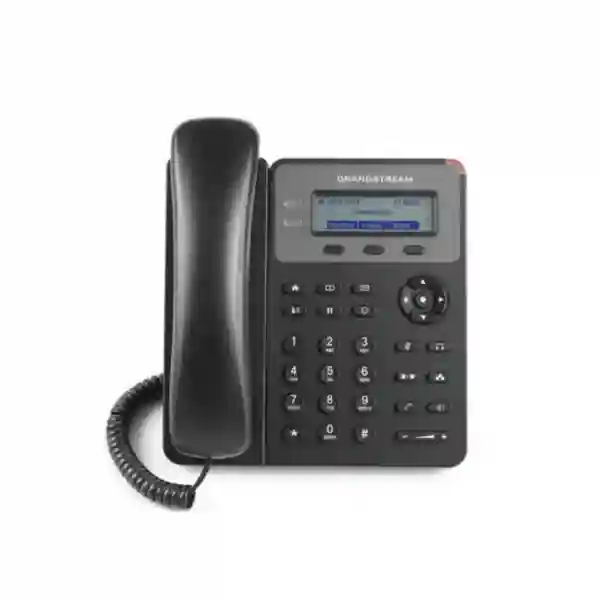
Grandstream GXP1610 Dubai – Simple IP Phone for Everyday Business Calling
The Grandstream GXP1610 Dubai is an entry-level wired SIP desk phone for organisations that need straightforward, dependable business calling without the cost or complexity of an executive endpoint. It fits basic office extensions, back-office desks, retail counters, workshops, storerooms, security desks, small branches and light-duty reception positions. The phone combines a 132 × 48 graphical LCD, dual switched 10/100 Mbps Ethernet ports, dedicated call-control keys, three XML programmable context-sensitive soft keys, three-way conferencing, an RJ9 headset interface and central provisioning options. The standard GXP1610 itself does not provide integrated PoE, so buyers should plan for its power adapter or choose a PoE-capable variant/model when single-cable power is a requirement.
For Dubai projects, the important question is not simply whether the phone can register to SIP. The extension role, network design, PBX platform, headset requirement, call volume, power method and desktop bandwidth all need to match the endpoint. Fourteck can help businesses compare the GXP1610 with PoE-capable and higher-capacity Grandstream alternatives before requesting a quotation or planning a larger rollout.
Should you choose the GXP1610 for a Dubai office?
Choose the GXP1610 when a user needs dependable basic telephony rather than many programmable keys, a colour screen, integrated Wi-Fi or Bluetooth, Gigabit Ethernet or advanced multi-line handling. That distinction matters because many Dubai businesses use different phone tiers for different roles. Executives, receptionists and contact-centre agents may need more line appearances, busy-lamp fields, expansion options or richer headset control, while a store room, workshop, cashier back desk, warehouse supervisor or ordinary office extension often needs only a clear dial pad, speakerphone, transfer, hold, forwarding and a reliable SIP registration.
The GXP1610 can therefore be a sensible fit when a project contains many low-complexity extensions and the goal is to standardise routine calling. It is also relevant when an organisation operates a Grandstream UCM IP PBX and wants an endpoint family that works with Grandstream provisioning methods. However, the phone should not be selected only because it is a basic model. Network power, VLAN design, PBX compatibility, codec policy, security requirements, desktop bandwidth and the required number of call appearances still need to be checked.
A common buying error is to assume that every phone in the GXP1610/GXP1610P/GXP1615 group has the same power method. The standard GXP1610 does not include integrated 802.3af PoE. Grandstream identifies PoE on the GXP1610P and GXP1615 variants. If your switch already provides PoE and you want a clean one-cable installation, compare the correct variant before ordering. If the standard GXP1610 is appropriate, plan an electrical socket near the phone and use the specified power supply.
Grandstream GXP1610 quick decision guide
| Customer requirement | Fit | Buying consideration |
|---|---|---|
| Basic SIP desk calling | Strong | Confirm SIP/PBX interoperability and required account behaviour. |
| Simple call handling and two call appearances | Suitable | Current Grandstream quick-start information describes one SIP account with up to two call appearances. |
| PoE-only desk deployment | Not the right standard variant | Evaluate GXP1610P, GXP1615 or another PoE model. |
| PC and phone sharing one wall data point | Possible | Dual 10/100 Mbps ports are available; verify desktop bandwidth needs. |
| Busy receptionist with many BLF keys | Limited | Choose a phone with more programmable keys or expansion support. |
| Gigabit desktop passthrough | No | Use a Gigabit-capable phone or separate data connection. |
| Simple wired headset use | Suitable | RJ9 and documented EHS support are available; confirm exact headset compatibility. |
Verified GXP1610 specifications that matter in a real deployment
A useful product page should explain why a specification matters instead of simply repeating a datasheet. The GXP1610 belongs to Grandstream’s basic GXP1600 family and focuses on practical desk calling. Its feature set is deliberately modest. That can be an advantage where the user does not need complex screen-driven functions or a large number of programmable keys, because training and daily operation remain simple.
| Display | 132 × 48 graphical LCD. Grandstream’s current user documentation notes that the GXP1610-family display is not backlit. |
|---|---|
| Ethernet | Dual switched auto-sensing 10/100 Mbps Ethernet ports. |
| PoE | Not integrated on the standard GXP1610; Grandstream specifies 802.3af PoE for GXP1610P/GXP1615. |
| Call handling | Hold, transfer, forwarding, call waiting, three-way conferencing, call park/pickup and other standard telephony functions. |
| Soft keys | Three XML programmable context-sensitive soft keys plus navigation and dedicated function keys. |
| Directory & history | Downloadable XML/LDAP phonebook up to 1,000 items and call history up to 200 records in Grandstream documentation. |
| Headset | RJ9 headset jack with documented EHS support for compatible Plantronics headsets. |
| Provisioning | TR-069 and encrypted XML configuration methods; Grandstream UCM systems support Zero Config workflows. |
| Security | TLS, SRTP, HTTPS, 802.1X and encrypted configuration-file support are documented. |
| Installation | Two stand angles and wall-mount capability support different desk and wall positions. |
Grandstream’s public materials are not perfectly consistent on SIP-account count in this family. The current GXP Series Basic IP Phones page and the 2026 quick installation guide describe the GXP1610/GXP1610P/GXP1615 as supporting a single SIP account with up to two call appearances, while some other Grandstream family documentation and an older datasheet show two SIP accounts. If independent account capacity is important, Fourteck recommends confirming the exact model, firmware and deployment requirement rather than relying on a copied reseller specification.
PoE or power adapter: the most important GXP1610 planning decision
Power is a small specification with a large effect on installation cost. In a modern IP phone rollout, many businesses expect a PoE switch to provide both network connectivity and electrical power over one Ethernet cable. The standard GXP1610 does not meet that expectation. It uses its external power supply, while GXP1610P and GXP1615 are the documented PoE-capable variants in this family. A company replacing analogue phones or older VoIP phones should therefore survey desk power before selecting the standard model.
For one desk, an adapter may be perfectly acceptable. For 50, 100 or 300 phones, the difference can affect cable management, UPS strategy, workstation layout and resilience. A PoE switch backed by a UPS can keep compatible phones powered during a short mains interruption, while locally powered phones need protected desk power if continuity is required. This does not automatically make a PoE model better; it means the power design should match the project.
If a Dubai office already has managed PoE switches, compare the PoE-capable models before ordering the GXP1610. If the network uses non-PoE switching and desks already have suitable outlets, the standard model may remain a logical entry-level choice. Fourteck can review switch ports, VLANs, UPS availability and extension count as part of an IP telephony requirement discussion.
Network design: 10/100 Mbps is enough for voice, but check the attached PC
Voice traffic itself does not require Gigabit Ethernet, so the GXP1610’s 10/100 Mbps interfaces are capable of carrying ordinary SIP and RTP traffic. The practical question is what else shares the phone’s Ethernet path. In many offices, one wall outlet feeds the phone, and the phone’s second Ethernet port feeds a desktop computer. If that computer routinely transfers large files, performs high-speed cloud synchronisation or depends on a Gigabit LAN, placing it behind a 10/100 phone can create an unnecessary bottleneck.
For a front desk that mainly uses email, browser-based CRM and light office software, 100 Mbps may be sufficient. For design teams, media departments, engineering workstations or high-throughput endpoints, use a dedicated data port or choose a phone with Gigabit passthrough. Endpoint selection should therefore follow the workstation role rather than treating every desk identically.
Voice VLAN and QoS
Grandstream documents Layer 2 and Layer 3 QoS functions for this family, including 802.1Q/802.1P and traffic-prioritisation mechanisms. In a managed network, these features allow the phone to participate in a voice VLAN and help administrators prioritise voice traffic. A voice VLAN can improve segmentation, simplify addressing and reduce unnecessary broadcast exposure. QoS is most effective when matching policy exists on the access switch, router, firewall and WAN edge.
DHCP, DNS, NTP and reachability
The phone supports standard services such as DHCP, DNS and NTP. During rollout, make sure the voice subnet can reach the PBX, provisioning server, DNS service and time source it requires. If a hosted PBX sits outside the office, the firewall should follow the provider’s documented signalling and media design. Avoid opening broad port ranges without need, and follow the PBX vendor’s NAT, security and session recommendations.
PBX, SIP service and Grandstream UCM compatibility planning
The GXP1610 is a SIP endpoint, so it can be used in many standards-based VoIP environments when the PBX or hosted service supports the required registration, codecs and call features. In practice, “SIP compatible” is only the first step. Administrators should confirm registrar or proxy details, authentication, outbound proxy requirements, NAT behaviour, DTMF mode, codec policy, time zone, dial plan and any TLS/SRTP requirements before deploying a large batch.
With a Grandstream UCM IP PBX, this family is particularly relevant because Grandstream provides Zero Config workflows for supported endpoints. Central provisioning reduces repetitive manual entry and can make extension deployment, template changes and replacement more consistent. In mixed-brand PBX environments, XML configuration or other supported provisioning approaches may be used depending on the platform.
Businesses moving from analogue extensions should separate the phone decision from the trunk decision. The GXP1610 is an IP endpoint; it does not replace the PBX, SIP trunk, gateway or internet connection. A complete system can include an IP PBX or cloud PBX, SIP trunks, LAN switching, firewall rules, structured cabling, voice VLAN, QoS and UPS protection. Fourteck can map these layers so the phone is purchased as part of a working communications design rather than as an isolated device.
Configuration items to confirm
- Extension credentials and the correct server/registrar.
- Preferred codecs and whether G.722 wideband is allowed end to end.
- DTMF method required by IVR, voicemail and external applications.
- NAT traversal and firewall policy for on-premises or hosted PBX designs.
- TLS/SRTP policy if encrypted signalling and media are required.
- Voice VLAN, QoS and LLDP-MED behaviour on the access switch.
- Provisioning method, firmware policy and administrator credentials.
Call handling, audio and day-to-day user experience
For most GXP1610 users, call quality and familiar controls matter more than the size of the feature list. The phone provides dedicated keys for common functions such as hold, transfer, conference, mute, headset, speakerphone, message and redial. That physical layout can reduce training time for staff who make ordinary office calls and do not want to navigate a large touchscreen. Three context-sensitive XML soft keys allow the interface to present functions according to call state and configuration.
Grandstream documents a full-duplex hands-free speakerphone with acoustic echo-control features for this family, together with support for common codecs such as G.711, G.722, G.723, G.726, G.729 and iLBC in its product datasheet. Actual voice quality still depends on codec negotiation, LAN quality, WAN latency, jitter, packet loss, handset or headset condition and the far-end network. A wideband-capable endpoint cannot produce wideband audio if the call path is forced through a narrowband codec.
Three-way conferencing is useful for quick ad-hoc conversations when a user needs to add a colleague, customer or supplier. It is not a substitute for a full conference bridge or collaboration platform. Organisations that routinely host larger meetings should use conferencing resources in the PBX or a dedicated meeting solution.
Directory and call history
The phone supports downloadable XML/LDAP directory functions, and Grandstream documents a phonebook capacity of up to 1,000 entries with call history of up to 200 records. Central directories are useful when staff share an organisation-wide contact list. Before depending on LDAP, confirm directory format, access controls, search attributes and integration design. A small monochrome screen has limited display space, so the directory should be structured for practical searching.
Headsets, EHS and user-role fit
The GXP1610 includes an RJ9 headset jack, and Grandstream documents Electronic Hook Switch support for compatible Plantronics headsets. That makes the phone usable for staff who prefer a headset for routine calls. Headset compatibility should still be treated as a system choice, not an assumption. Connector type, EHS cable and remote answer/end-call support can differ by headset model, so confirm the exact combination before buying a large quantity.
For occasional headset users such as reception backup, store managers or supervisors, the GXP1610 may be sufficient. For full-time contact-centre agents, evaluate whether the organisation needs richer headset integration, more programmable keys, USB headset support, softphone control or tighter CRM/contact-centre integration. The lowest-cost handset is not always the lowest-cost workstation if agents lose time switching between call controls and applications.
A practical GXP1610 deployment workflow for Dubai businesses
Identify whether the phone belongs to a basic user, reception backup, warehouse, security desk, retail counter or branch office. Role mapping prevents over- or under-specifying endpoints.
Confirm whether each desk has an AC outlet. If the project expects PoE from the access switch, select a PoE-capable model instead of the standard GXP1610.
Verify cabling, switch ports, VLAN capability, QoS policy and whether a PC will sit behind the phone’s 10/100 Ethernet passthrough.
Create extension policy, authentication, codec, dial-plan and security settings. Decide how phones will be provisioned and managed.
Test inbound/outbound calls, caller ID, transfer, hold, voicemail, DTMF, headset operation, VLAN behaviour and any business-specific call flow before mass deployment.
Use controlled templates, firmware and documented PBX/network settings so replacements and new extensions can be deployed consistently.
A pilot is especially valuable when the organisation uses a hosted PBX, custom firewall rules, unusual VLAN tagging or legacy SIP infrastructure. The goal is to validate the complete call path, not just prove that one phone can register. A successful rollout should also include administrator password control, firmware policy, backup documentation and a process for extension moves or replacements.
Where the Grandstream GXP1610 fits in Dubai and the UAE
Dubai SMEs and professional offices
Small and medium businesses often have a mix of communication roles. Management may need richer phones, while finance assistants, filing rooms, operations desks and general office staff may need only standard calling. The GXP1610 can fill those basic extension positions when the network and power arrangement suit the model. Companies in Business Bay, Deira, Bur Dubai, Al Quoz and other Dubai business areas can use the same decision logic: start with user requirements, then check PBX, cabling and power.
Retail counters and service desks
Retail and service environments often need an uncomplicated desk phone for supplier calls, customer follow-up, internal extension dialing and escalation to a manager. A small display and dedicated physical buttons can be easier for a shared station than a complex personal handset. If the counter is part of a high-volume customer-service operation, however, a more capable phone or contact-centre solution may be more appropriate.
Warehouses, workshops and back-office locations
In warehouses and workshops, a phone may be used mainly for internal coordination, gatehouse calls, logistics queries or supplier communication. The GXP1610 can suit these straightforward indoor extension roles. For dusty, humid, outdoor or harsh industrial locations, evaluate environmental protection separately; a standard office IP phone should not be treated as an outdoor or ruggedised device.
Abu Dhabi, Sharjah and Ajman branches
For multi-emirate organisations, consistency is often more important than a single phone feature. Standardised extension templates, naming, dial plans, VLAN design and firmware policy make support easier across branches. A GXP1610 deployment can participate in that standardisation where basic phones are needed, while higher-tier endpoints can be assigned to roles that require additional line keys, PoE, Gigabit connectivity or wireless features.
For broader communications planning, buyers can also review Fourteck’s UAE technology portfolio at Fourteck UAE, Grandstream-focused information at Grandstream UAE, and IP phone resources at IP Phone Fourteck.
GXP1610 price in Dubai: what should a quotation include?
Searches for Grandstream GXP1610 price Dubai often show a simple unit price, but business procurement should consider the complete deployment. Project cost can depend on quantity, supplier source, current market availability, power accessories, PBX configuration, structured cabling, switching, installation, remote provisioning, on-site testing and support. Fourteck does not need to publish an unverified price or stock claim to help a buyer make a better decision.
When requesting a quotation, provide the required quantity, office location, PBX or hosted SIP platform, whether Ethernet points already exist, whether desks require PoE, whether PCs will connect through the phone and whether installation/configuration is needed. If the requirement is still being designed, include the total extension count and user roles. A mixed-model proposal can be more economical than assigning the same phone to every employee.
GXP1610 vs GXP1610P, GXP1615 and other GXP basic phones
The best alternative depends on the feature missing from the GXP1610. If the only issue is power, a PoE-capable sibling may solve the problem. If the user needs more SIP registrations, Gigabit Ethernet or more programmable keys, moving higher in the range is usually more sensible than forcing an entry-level model into a demanding role.
| Model / family | Network / power | Typical reason to choose it | Consideration |
|---|---|---|---|
| GXP1610 | 10/100; no integrated PoE | Simple locally powered desk extension | Check desk power and account requirements. |
| GXP1610P | 10/100; integrated PoE documented | Similar basic role where PoE is required | Confirm current regional supply and exact variant. |
| GXP1615 | 10/100; integrated PoE documented | Basic small-business extension with PoE | Verify detailed account/firmware needs. |
| GXP1620/GXP1625 | 10/100; PoE on GXP1625 | Users needing two SIP accounts and a step up in capability | Choose 1625 when PoE is required. |
| GXP1628 | Gigabit Ethernet and PoE | Higher desktop throughput and more active office roles | Better fit where 10/100 passthrough is limiting. |
| GXP1630 | Gigabit Ethernet and PoE | More SIP accounts/line handling than entry models | Also compare suitable GRP options for new standards. |
Grandstream also offers its GRP professional carrier-grade series. For a new deployment, compare an appropriate GRP model when central device management, a newer endpoint standard, PoE, wireless functions or a broader long-term platform matters. The right choice depends on project requirements rather than model age alone.
Security and administration considerations
An IP phone is a network endpoint and should be managed with the same discipline as other business devices. Grandstream documents TLS and SRTP capabilities, HTTPS management, 802.1X and encrypted configuration files for this family. Whether those capabilities are actually used depends on the PBX, provisioning method and network policy. A phone configured with default credentials, outdated firmware or broad internet exposure creates unnecessary risk even if the hardware supports strong security functions.
A business rollout should change administrator credentials, limit management access to trusted networks, use HTTPS where practical, protect provisioning credentials, follow the PBX vendor’s SIP security guidance and maintain an approved firmware process. Avoid directly exposing phone web interfaces to the public internet. For hosted PBX deployments, follow the provider’s supported registration and security architecture rather than improvising firewall rules.
802.1X can be relevant in organisations that authenticate devices at the network edge. Voice VLANs can also help separate phone traffic from ordinary client traffic. Security architecture should be tested before mass deployment because authentication, certificate and VLAN mistakes can stop a phone from obtaining network access even when its SIP configuration is correct.
Firmware and configuration control
Do not treat firmware upgrades as a casual action during working hours. Grandstream’s installation guidance warns against power cycling while firmware is being written. For larger deployments, test firmware on a small controlled group, verify calling and provisioning behaviour, then roll it out according to a maintenance plan. Keep the phone powered and connected throughout the process. Protect configuration backups and templates because they may contain server information or credentials.
When the GXP1610 is not the best choice
A good buying guide should make it clear when to select something else. The GXP1610 is intentionally basic. Do not choose it for a role that depends on many monitored extensions, numerous independent SIP registrations, integrated Wi-Fi or Bluetooth, high-speed Gigabit desktop passthrough, a large colour display, touchscreen applications or a PoE-only standard. A more capable phone can reduce operational friction even if its purchase price is higher.
It may also be a poor fit for a full-time receptionist who needs extensive BLF monitoring and rapid call distribution. Receptionists often benefit from more programmable keys or an expansion option. Contact-centre agents may need richer headset integration, software control and stronger CRM/contact-centre integration than a basic handset provides.
For greenfield projects, compare current Grandstream GRP options as well as GXP models. The goal is to choose an endpoint standard that matches the expected support life, management platform, network design and user experience. Fourteck can help evaluate the GXP1610 as one option rather than forcing it into every extension role.
Procurement checklist before ordering Grandstream GXP1610 Dubai
- Confirm the exact model: GXP1610, GXP1610P, GXP1615 or another alternative.
- Confirm the number of independent SIP registrations and call appearances the user genuinely needs.
- Check whether every desk has AC power or requires PoE from the network switch.
- Check whether a PC will connect through the phone and whether 10/100 Mbps passthrough is sufficient.
- Identify the PBX or hosted SIP service and confirm registration, codecs, DTMF and security requirements.
- Confirm voice VLAN, QoS, DHCP, DNS and NTP requirements.
- Confirm headset model and EHS accessory where hands-free operation matters.
- Plan provisioning: manual, Grandstream UCM Zero Config, XML, TR-069 or another supported method.
- Define firmware and administrator-password policy before bulk deployment.
- Pilot call flow, voicemail, transfer, conference and IVR/DTMF before large orders.
- Ask the supplier to distinguish product availability from installation or project lead time.
- Do not assume pricing, stock, warranty or regional supply remains constant; confirm at quotation stage.
This checklist is useful for procurement teams comparing several Grandstream models. It turns the purchase from a model-name exercise into a requirements-based decision, reducing later changes in switches, adapters, headsets and user assignments.
Frequently asked questions about the Grandstream GXP1610
Does the Grandstream GXP1610 support PoE?
No. Grandstream documentation specifies integrated 802.3af PoE for GXP1610P and GXP1615, not for the standard GXP1610. The standard model therefore needs its external power supply. If your office standard requires phones to receive power from a PoE switch, compare the PoE-capable variant or another Grandstream phone before ordering.
How many SIP accounts does the GXP1610 support?
Grandstream’s current GXP basic-series page and 2026 quick installation guide describe the GXP1610 family as supporting one SIP account with up to two call appearances. Some other Grandstream family documentation and an older datasheet show two SIP accounts, so organisations that need multiple independent registrations should confirm the exact model and firmware requirement before procurement.
Is the GXP1610 suitable for a small business in Dubai?
Yes, when the user needs straightforward wired VoIP calling and the office can provide local power for the phone. It can suit basic extensions, shops, small offices, workshops, warehouses and branch users. It is less suitable for roles that need many programmable keys, Gigabit passthrough, integrated wireless connectivity or advanced call handling.
Can the GXP1610 connect a PC through the phone?
Yes. The phone has dual switched 10/100 Mbps Ethernet ports, so one port can connect to the network and the second can provide network passthrough to a desktop device. Check whether 100 Mbps is sufficient for the attached computer. Users who need Gigabit desktop connectivity should use a Gigabit-capable phone or a separate data connection.
Does the GXP1610 support a headset?
Yes. The GXP1610 family includes an RJ9 headset interface, and Grandstream documents Electronic Hook Switch support for compatible Plantronics headsets. Confirm the exact headset and any required EHS cable before purchasing a large quantity because physical connection and remote call-control compatibility can vary by model.
Can I use the GXP1610 with a Grandstream UCM IP PBX?
Yes. Grandstream positions the GXP1610 family for use with UCM systems and documents Zero Config provisioning support. A UCM deployment can simplify extension provisioning and template control. PBX, firmware, extension policy, VLAN and network settings should still be planned and tested before bulk rollout.
Can the GXP1610 work with a hosted PBX?
It can work with standards-based SIP services when the provider supports the required registration, codecs, DTMF, NAT and security settings. Hosted-PBX compatibility should be verified with the service provider or during a pilot. Do not assume that every provider supports every endpoint feature or automatic provisioning method.
Does the GXP1610 support three-way conference calls?
Yes. Grandstream documents three-way audio conferencing for the GXP1610 family. This is useful for quick ad-hoc calls among a small number of participants. For larger scheduled meetings, use conferencing resources in the PBX or a dedicated collaboration platform.
Is the GXP1610 display backlit?
Grandstream’s current GXP16xx user documentation states that the 132 × 48 graphical LCD on the GXP1610-family models does not support backlighting. That is acceptable in normally lit office environments, but buyers wanting a brighter or more modern display should compare higher models.
What is the difference between GXP1610 and GXP1610P?
The key deployment difference is power. Grandstream specifies integrated 802.3af PoE on the GXP1610P, whereas the standard GXP1610 relies on an external power supply. This matters in offices where phones are expected to run from PoE switches and UPS-backed network power.
Is the GXP1610 a good phone for reception?
It can suit a low-volume reception or backup reception position where calls are simple. It is usually not the best choice for a busy receptionist who monitors many extensions or handles many simultaneous calls. In that case, compare phones with more programmable keys, BLF capacity, expansion options and stronger multi-line handling.
How do I request the current GXP1610 price in Dubai?
Request a project quotation with the required quantity, delivery location, PBX platform and whether configuration, installation, cabling or support is required. Current price and availability should be confirmed at quotation time rather than inferred from an older online listing.
Request a Grandstream GXP1610 Dubai quotation or compatibility review
If your requirement is a basic business IP phone, Fourteck can help confirm whether the GXP1610 matches the extension role and existing network. Share the required quantity, Dubai/UAE site location, PBX or hosted VoIP platform, switch type, PoE requirement, headset needs and whether a PC will connect through the phone. This makes it easier to compare the standard GXP1610 with GXP1610P, GXP1615, GXP1620/GXP1625, GXP1628, GXP1630 or suitable GRP-series options without overspecifying the project.
For organisations planning multiple sites, Fourteck can also review voice VLANs, QoS, provisioning, extension templates and rollout workflow so endpoint selection supports the wider communications architecture. Request a quote, confirm compatibility or plan a pilot before bulk deployment.

Reviews
There are no reviews yet.