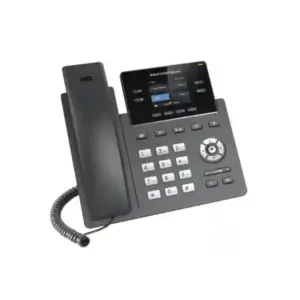
Grandstream GRP2603 3-Line IP Phone for Dubai, UAE and Business VoIP Deployments
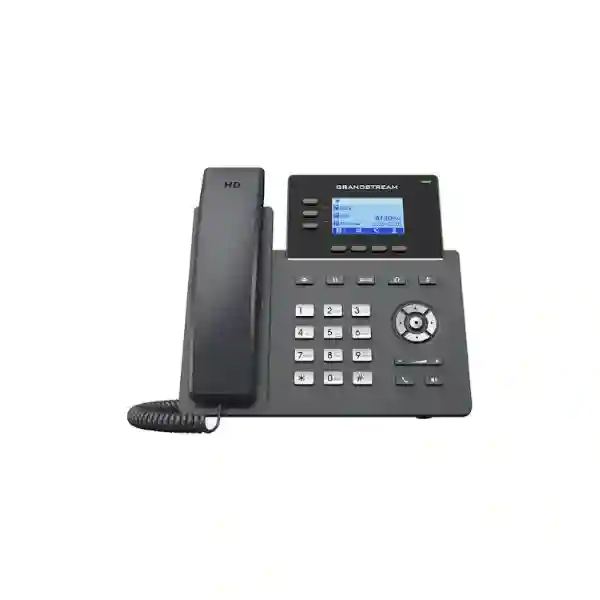
The Grandstream GRP2603 is a 3-line essential IP phone built for organizations that want a practical desktop endpoint with more SIP-account capacity and Gigabit Ethernet without moving into a high-end executive-phone category. Grandstream positions the GRP2603 within its carrier-grade GRP family for easy mass deployment and centralized management. The phone supports 6 SIP accounts, 3 line keys, dual switched 10/100/1000 Mbps Gigabit Ethernet, a 132 × 64 backlit graphical LCD, HD audio, noise-reduction features, 5-way audio conferencing, headset connectivity through an RJ9 port with EHS support, and management through Grandstream Device Management System (GDMS). For buyers in Dubai and across the UAE, it is especially relevant when users need more account flexibility than a basic two-line desk phone while still keeping the endpoint straightforward to deploy, train and manage.
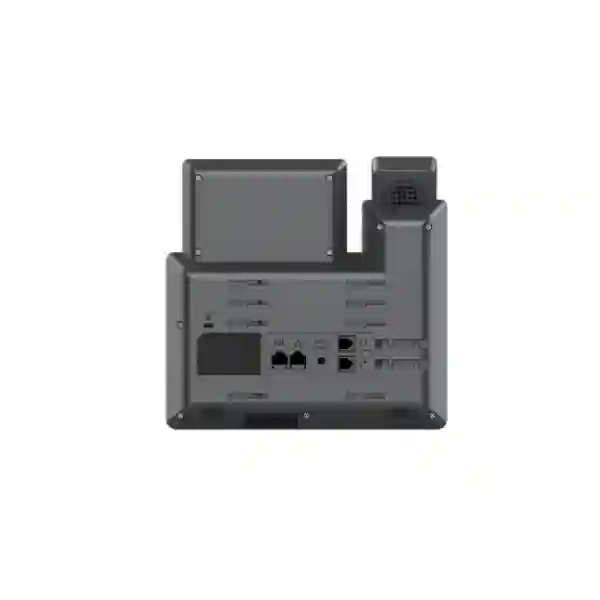
The standard GRP2603 is powered through its supplied 5V DC adapter. If a deployment needs Power over Ethernet, the closely related GRP2603P is the PoE variant and supports IEEE 802.3af Class 1 power. This distinction matters during quotation and network planning: the GRP2603 and GRP2603P share the core voice, line, display, Gigabit Ethernet, provisioning and management capabilities, but the power method is different. Fourteck can help businesses compare the two variants, review PBX and SIP compatibility, map user requirements, plan VLAN/QoS settings and prepare a deployment-oriented quotation without assuming stock, price or compatibility before confirmation.
Three physical line keys support practical call handling for users working across multiple SIP identities or call appearances.
Up to six SIP accounts provide flexibility for extensions, departments, service lines and multi-system environments.
Dual switched auto-negotiating 10/100/1000 Mbps ports support phone-and-PC desk connectivity.
Built-in 5-way audio conferencing supports quick collaboration without requiring a separate conference device for basic voice meetings.
Who should consider the Grandstream GRP2603?
The GRP2603 fits the middle ground between entry-level two-line phones and more feature-dense executive endpoints. It is a strong candidate for general office users who need dependable SIP calling, several account identities and Gigabit network passthrough but do not need a large color touchscreen, Bluetooth or built-in Wi-Fi. That makes it suitable for many reception support positions, branch-office staff, customer service desks, administrative teams, sales coordinators, hotel back-office users, clinics, education offices, retail management desks and distributed organizations that want the same endpoint standard across many locations.
Its six SIP accounts can be useful when a user must register more than one extension or service identity. For example, a branch administrator could have an internal extension, a main office line identity and another account linked to a service queue or secondary PBX. The exact registration design depends on the PBX, SIP service and dial plan, but the endpoint gives the network administrator room to organize more than a single identity. Because the phone also supports server redundancy and failover functions, it can participate in resilience designs when those features are configured correctly on the telephony platform.
The GRP2603 is also useful for organizations that place a desktop computer behind the phone. Its two Gigabit Ethernet interfaces let the phone connect to the LAN and pass network access to a PC, reducing the need for a separate wall port in many desk layouts. Whether this topology is appropriate depends on VLAN design, bandwidth expectations, switch configuration and security policy. For a typical office workstation, however, Gigabit passthrough is a practical advantage over older Fast Ethernet-only endpoints.
Buyer decision in one minute
Choose the GRP2603 when you want 3 line keys, up to 6 SIP accounts, Gigabit Ethernet, HD audio, GDMS management, 5-way conferencing and adapter-based power. Choose the GRP2603P when you need the same core endpoint profile but want integrated PoE from a compatible network switch or injector. Consider another GRP model when your requirement depends on built-in Wi-Fi, Bluetooth, more programmable keys, a larger display, color UI, advanced executive features or integrated video. A correct selection should begin with the user role and network design rather than model number alone.
Verified GRP2603 technical highlights
| Item | GRP2603 capability | Why it matters |
|---|---|---|
| Lines / accounts | 3 line keys, 6 SIP accounts, up to 3 call appearances | Provides more account flexibility than basic two-account endpoints while retaining a simple physical interface. |
| Display | 132 × 64, 2.7-inch backlit graphical LCD | Supports readable call-state, menu and directory interaction without the cost and complexity of a touchscreen. |
| Network | Dual switched 10/100/1000 Mbps Ethernet | Useful where the user PC shares the desk network path through the phone. |
| Power | GRP2603: 5V DC adapter; GRP2603P: IEEE 802.3af Class 1 PoE | Variant selection should match the switch design and cabling strategy. |
| Audio | HD handset and full-duplex HD speakerphone; wideband codec support including G.722 and Opus | Helps deliver natural voice quality when the PBX, provider, network and far-end path also support suitable codecs. |
| Conference | 5-way audio conferencing | Useful for ad-hoc team discussions and small multi-party voice sessions. |
| Headset | RJ9 headset port with EHS compatibility for supported Plantronics, Jabra, Sennheiser and other compatible headsets | Supports hands-free workflows; exact EHS accessory and headset compatibility should be checked before ordering. |
| Management | GDMS, TR-069 and encrypted XML provisioning options | Helps administrators standardize configuration and manage larger fleets. |
| Security | Secure boot, dual firmware images, encrypted data storage, TLS/SRTP support and 802.1X support | Provides endpoint controls that can support a broader secure voice architecture when correctly configured. |
GRP2603 vs GRP2603P: the power decision
The most important purchasing distinction is power. The GRP2603 uses a DC power adapter. The GRP2603P adds integrated PoE and is designed to receive both network connectivity and electrical power over Ethernet from a compatible PoE source. In a new office or a centrally managed voice deployment, PoE can simplify desk cabling and can make it easier to keep phones powered through a UPS-backed network switch. In a small office with existing non-PoE switching, the standard GRP2603 may be perfectly practical because its adapter provides local power without requiring PoE-capable infrastructure.
Do not treat PoE as a universal requirement. A user with one or two phones and nearby power outlets may gain little from replacing otherwise suitable network equipment just to power the endpoint through Ethernet. By contrast, a multi-floor office with dozens of phones may benefit considerably from centralized switch power, simplified cable management and a consistent shutdown/recovery strategy. During planning, confirm the number of phones, switch PoE budget, switch-port speed, VLAN requirements, UPS coverage and whether the desk PC will also connect through the phone.
| Requirement | GRP2603 | GRP2603P |
|---|---|---|
| 3 lines / 6 SIP accounts | Yes | Yes |
| Dual Gigabit Ethernet | Yes | Yes |
| Integrated PoE | No | Yes, IEEE 802.3af Class 1 |
| Local adapter | Used for power and included in the standard package | PoE-oriented deployment; confirm package and regional supply before ordering |
Why six SIP accounts can matter in a business phone
A SIP account is not the same thing as a physical telephone line. In an IP telephony system, an account generally represents a registration or identity that connects the phone to a SIP server, PBX or service. The GRP2603 can support up to six SIP accounts while presenting three line keys and up to three call appearances. This gives administrators room to design the phone around the user role. A receptionist assistant, for example, may require an individual extension plus one or more shared or departmental identities. A branch user might register to a local PBX and a secondary service, depending on the architecture.
The practical limit is not simply the number shown in the specification. Administrators should consider how users will select accounts, how inbound calls will be presented, how caller ID rules work, whether shared-call appearance is required and how voicemail, BLF or queue functions are implemented on the PBX. The GRP2603 includes support for features such as hold, transfer, forwarding, call park, call pickup, shared-call appearance/bridged-line appearance, call waiting, hot desking and server redundancy/failover, but the availability and behavior of these functions can depend on the telephony platform and its configuration.
For office users
The straightforward keypad, dedicated function keys, display and familiar handset design reduce the learning curve for users moving from traditional office telephony to SIP. Dedicated keys for message, transfer, hold, headset, mute, redial, speakerphone and volume keep common operations accessible.
For IT teams
GDMS, TR-069 and encrypted XML provisioning options support repeatable configuration. This is especially useful when administrators want to stage many phones, standardize templates, manage firmware and reduce manual configuration at each desk.
For multi-site organizations
A standard endpoint model can simplify support across branches. The value comes from consistent configuration, naming, firmware policy, QoS, security, directory integration and user training rather than from the handset alone.
HD audio, codecs and real-world voice quality
Grandstream specifies HD audio on the handset and speakerphone. The GRP2603 supports multiple voice codecs including G.711, G.722 wideband, G.729A/B, G.726, G.723.1, iLBC and Opus. The presence of a codec on the phone does not automatically mean every call will use it. Codec negotiation depends on the PBX, SIP trunk, service provider, network path and remote endpoint. For internal calls between compatible endpoints on a well-managed LAN, wideband audio can provide a noticeably more natural experience than narrowband telephony. External calls may use a different codec because of provider or interconnect requirements.
The phone also includes audio processing functions such as voice activity detection, echo cancellation, comfort noise generation, packet-loss concealment, automatic gain control and adaptive jitter buffering. These mechanisms help the endpoint cope with normal voice-network conditions, but they cannot compensate for severely congested or unstable networks. Good voice quality still depends on adequate bandwidth, low latency, controlled jitter, minimal packet loss, correct duplex negotiation, suitable cabling and prioritization where needed.
Noise Shield and AI noise-reduction features are useful in open offices where keyboard noise, nearby conversations or ambient sounds can interfere with calls. The degree of improvement varies by environment, microphone position and noise type, so buyers should view noise reduction as an aid rather than a replacement for good acoustic design. For consistently noisy roles such as service counters or shared workspaces, a compatible professional headset may offer a better user experience than speakerphone operation.
Headset planning: RJ9 and EHS support
The GRP2603 includes an RJ9 headset port and supports Electronic Hook Switch integration with compatible Plantronics, Jabra and Sennheiser headsets. EHS can allow supported headset users to answer or end calls remotely without physically lifting the handset. This matters for customer service, reception, sales and administrative roles where the employee moves around a desk or needs both hands free.
Compatibility should be confirmed using the exact headset model, EHS accessory and phone firmware combination. The phrase “EHS supported” does not mean every headset connects directly without an adapter. Some professional headsets need a vendor-specific EHS cable, while others use a base station connected to the phone. The GRP2603 does not include built-in Bluetooth, so buyers who require native Bluetooth headset pairing should evaluate a different endpoint or a compatible external headset solution.
Network design: Gigabit switching, voice VLANs and QoS
The dual Gigabit Ethernet ports are one of the GRP2603’s most useful practical upgrades for modern desks. In a common layout, one port connects to the access switch and the second port provides Ethernet connectivity to the user’s computer. This can reduce cable runs, but it also means the phone becomes part of the PC’s physical network path. IT teams should therefore configure switching, VLANs and security deliberately rather than simply connecting devices and hoping the default behavior matches policy.
The phone supports Layer 2 QoS mechanisms including 802.1Q and 802.1p, as well as Layer 3 QoS mechanisms such as ToS and DiffServ. These features are valuable only when the network is configured end to end to recognize and prioritize appropriate voice traffic. A useful deployment process is to define the voice VLAN, assign or discover it using the supported network method, confirm DHCP and DNS, verify NTP, ensure the PBX and provisioning servers are reachable, then run test calls while monitoring latency, jitter and packet loss.
For PoE deployments using the GRP2603P, check not just whether the switch is labeled PoE but whether it has sufficient power budget for the total endpoint count. The phone’s published PoE specification is IEEE 802.3af Class 1 at 3.84 W. When many endpoints share one switch, include all powered devices in the budget calculation, consider switch redundancy and UPS capacity, and leave sensible headroom. The standard GRP2603 avoids PoE dependency by using its adapter, but then desk power availability and local power backup become part of the availability plan.
Provisioning with GDMS and centralized management
A large phone deployment becomes expensive when every device requires manual login and one-by-one configuration. The GRP2603 is designed with centralized provisioning in mind. Grandstream’s Device Management System provides a cloud interface for configuring, provisioning, managing and monitoring compatible Grandstream devices. The phone also supports TR-069 and encrypted XML configuration methods, giving service providers and enterprise administrators multiple ways to automate rollout.
A well-planned template can include SIP-server parameters, account behavior, time settings, display preferences, codecs, feature keys, VLAN information, security settings, directory options and firmware policy. Administrators should avoid placing secrets carelessly in unprotected configuration files. Where encrypted provisioning is used, protect the encryption keys and control access to the provisioning platform. Before mass deployment, test the template on a small pilot group and confirm that the phone receives the intended settings after factory reset and after firmware upgrades.
For remote offices, centralized management can reduce support travel, but connectivity to the management platform must still be considered within the organization’s security rules. Some environments allow outbound cloud management, while others require tightly controlled egress or prefer an on-premises provisioning approach. The correct design depends on compliance, network architecture and administrative policy.
Security considerations for a SIP endpoint
Grandstream lists enterprise-oriented protection such as secure boot, dual firmware images and encrypted data storage for the GRP2603 series. The current datasheet also identifies TLS support, SRTP options, HTTPS web access, 802.1X media access control and modern authentication algorithms. These features can strengthen an endpoint deployment, but security depends on configuration across the entire solution: phone, PBX, SIP trunk, management platform, switch, firewall, remote-access method and administrator practices.
Businesses should change default or device-specific administrative credentials during deployment, restrict access to the phone’s management interface, use secure provisioning methods, disable unnecessary services, keep firmware under controlled update management and segment voice devices appropriately. SIP over TLS and SRTP can protect signaling and media when the rest of the platform supports them, but encryption settings must be planned carefully to avoid breaking interoperability with older systems or provider trunks.
The dual-firmware design is useful for resilience during upgrades, but firmware should still be tested. Grandstream’s current GRP260x documentation includes hardware-version-specific downgrade cautions for certain firmware versions. That means administrators should record hardware revisions, review release notes and avoid assuming that any older image can always be restored after an upgrade. A managed change process is particularly important when hundreds of phones share the same configuration template.
PBX and SIP platform compatibility checklist
The GRP2603 is a standards-based SIP phone, but a standards label alone does not guarantee that every proprietary PBX feature will work identically. Before purchasing a fleet, confirm registration, inbound and outbound calling, attended and blind transfer, hold, voicemail notification, directory functions, DTMF behavior, call pickup, park, conferencing, shared lines, hot desking, failover and any required softkey behavior on the intended PBX.
- Account design: decide how many SIP registrations each user actually needs and whether extensions are individual, shared or role-based.
- Codec policy: confirm which codecs the PBX and SIP provider permit, and put preferred codecs in an order appropriate to bandwidth and quality needs.
- DTMF: verify RFC2833/telephone-event, SIP INFO or in-band behavior as required by IVR and provider systems.
- NAT and remote use: design remote registration around the PBX vendor’s recommended security architecture rather than exposing phones directly to the Internet.
- Directory integration: the phone supports XML and LDAP phonebook functionality; validate directory schema and access policy before rollout.
- Firmware baseline: test one approved firmware version with the PBX before broad deployment and document the version.
Deployment scenarios in Dubai and the UAE
In Dubai, the GRP2603 can suit small and mid-sized offices, professional-service firms, trading companies, logistics operations, hospitality administration teams, education offices and multi-branch businesses that rely on SIP-based calling. A common requirement is to provide a consistent desk phone across a main office and multiple satellite locations while keeping user training simple. The six-account capacity gives administrators flexibility to map extensions and service identities without moving every user to a more expensive executive endpoint.
For offices in Deira and Bur Dubai, network infrastructure can range from newly built structured cabling to older mixed environments. The GRP2603’s adapter power can be useful where PoE switching is not available, while the GRP2603P can be a better fit when the access network has managed PoE switches. Before deployment, check cable category and condition, switch capability, DHCP, voice VLANs, PBX reachability and Internet quality for hosted voice services.
In Abu Dhabi, organizations with centralized IT often prioritize standard endpoint configuration, security controls and predictable support processes. GDMS or another approved provisioning method can help maintain templates across departments and remote sites. Where voice devices are placed on dedicated VLANs, coordinate switch policy, firewall rules, NTP and DNS before phones are installed so that rollout becomes a repeatable process rather than a desk-by-desk troubleshooting exercise.
In Sharjah and Ajman, many growing businesses need cost-conscious communications that can expand with new users. The GRP2603 is well suited when the requirement is a business-class SIP desk phone with Gigabit connectivity and multiple accounts rather than touchscreen applications. A phased deployment can start with key departments, validate call quality and provisioning, then extend the same standard to additional users.
Regional deployment perspective: Kuwait, Uganda, Kenya, Nigeria and Tanzania
The same endpoint can play different roles depending on regional infrastructure. In Kuwait, enterprise and branch deployments often benefit from structured voice VLANs, centrally managed switching and standardized endpoints. The GRP2603P may be attractive where PoE is already part of the network standard; the GRP2603 remains relevant where adapter power is preferred.
In Uganda, including Kampala-area deployments, planning should account for local power resilience, ISP quality and whether the PBX is on-premises, hosted or located in another region. A phone with adapter power can be paired with local backup power, while a PoE design can centralize phone power through a UPS-backed switch. The right option depends on the site’s actual resilience strategy. For businesses operating between the UAE and East Africa, consistent endpoint templates and SIP dial plans can simplify support across branches.
In Kenya, branch offices and service organizations may value the Gigabit desk topology where phone and PC share one access point. Validate VLAN tagging and switch behavior carefully, especially when a mixed environment includes managed and unmanaged switches. For larger deployments, centralized provisioning reduces the workload of local technicians and helps maintain consistent settings.
In Nigeria, organizations with distributed offices should pay close attention to WAN variation and failover design. The phone supports mechanisms that can participate in server redundancy, but application resilience also depends on PBX and network architecture. For cloud PBX services, test call quality across primary and backup Internet links and confirm NAT/firewall behavior under failover.
In Tanzania, businesses in Dar es Salaam and other commercial centers can use the GRP2603 as part of a structured SIP migration where traditional extensions are replaced gradually. A staged approach allows teams to test dialing rules, inbound numbering, voicemail, directories, headset behavior and user acceptance before replacing an entire estate.
How the GRP2603 fits common customer requirements
Requirement: several SIP identities
The phone supports up to six SIP accounts. This can support users who need multiple registrations or service identities. Confirm how the PBX maps those accounts to line keys and call appearances.
Requirement: Gigabit desk connectivity
Two Gigabit Ethernet ports allow a common phone-to-PC topology. Check VLAN policy and whether the user’s data traffic should pass through the phone.
Requirement: remote device management
GDMS support helps administrators configure and monitor compatible Grandstream endpoints centrally. Review organizational policy before using cloud management.
Requirement: headset workflow
RJ9 headset connectivity and EHS support can suit busy calling roles. Verify the headset and EHS cable combination before purchase.
Requirement: small voice conferences
Five-way audio conferencing enables ad-hoc collaboration without a separate bridge for simple multi-party discussions, subject to call-path capacity.
Requirement: branding
The series supports a swappable faceplate for logo customization. Confirm accessory availability and production requirements when branding is part of the project.
When the GRP2603 may not be the best choice
A good product page should also identify limitations. The GRP2603 is not a Wi-Fi phone and does not include built-in Bluetooth. It is designed as a wired Ethernet desk endpoint. If a user cannot receive Ethernet at the desk, another Grandstream model with integrated Wi-Fi may be more appropriate. If the requirement involves Bluetooth headsets without an external base or adapter, choose a model specifically designed for that workflow.
The display is monochrome graphical rather than a large color touchscreen. That is an advantage for buyers who want simplicity, but it is not suitable for users who need application-style navigation, video, rich visual directories or executive-level screen features. Likewise, the three-line-key layout may not satisfy power users who constantly monitor many extensions or require numerous dedicated programmable keys. Those users may need a higher-tier GRP endpoint or an expansion-capable model.
Finally, the standard GRP2603 does not provide integrated PoE. If the project standard requires single-cable power and data, select the GRP2603P or another PoE-capable phone. This variant decision should be made before quotation so that switch, adapter and UPS planning remain consistent.
GRP2603 compared with nearby GRP Essential models
Within the essential GRP2600 family, the GRP2603 stands out for combining three line keys, six SIP accounts and Gigabit Ethernet. The GRP2601 family is aimed at simpler two-line use. The GRP2602 family provides two line keys and up to four SIP accounts, with different variants adding PoE, Wi-Fi or Gigabit connectivity. The GRP2603 moves up to three line keys and six accounts while keeping a non-touchscreen design. Grandstream also offers GRP2604 variants in the same general essential tier. Exact feature differences can change with hardware or firmware revisions, so compare current datasheets when the choice is close.
The correct upgrade path depends on the customer requirement, not just a higher model number. A basic employee who needs one extension may be fully served by a lower model. A role that needs several registrations, Gigabit passthrough and conferencing can justify the GRP2603. An executive or receptionist who needs many programmable keys, Bluetooth or a richer screen may be better served by a different phone family entirely.
Installation and first-boot planning
For the standard GRP2603, connect the handset, connect the 5V DC power adapter, then connect the LAN port to the network. For the GRP2603P, a compatible PoE connection can provide power and network connectivity, so a local adapter may not be needed. After startup, the device obtains network information through DHCP unless a static configuration is used. Administrators can access the phone’s embedded web interface using the device IP address and the unit’s administrative credentials.
Before installing many phones, prepare a site checklist: switch port, VLAN assignment, DHCP scope, DNS, NTP, SIP/PBX reachability, provisioning URL or GDMS assignment, firmware target, extension details, emergency-dialing policy where applicable and user label or asset tag. For each pilot endpoint, confirm inbound and outbound calling, hold, transfer, conference, voicemail indication, directory access, caller ID, time/date, headset function and PC passthrough if used.
Avoid interrupting power during firmware upgrades. Maintain a documented firmware policy and review vendor notes before rolling a new release into production. When remote workers use the phone outside the office, follow the PBX provider’s recommended remote-access method rather than forwarding SIP ports directly to the device from the public Internet.
Procurement checklist before requesting a quote
A useful quotation should be based on deployment requirements rather than quantity alone. To avoid ordering the wrong variant or missing accessories, provide the following information when requesting a Grandstream GRP2603 quotation from Fourteck:
- Required quantity and deployment locations.
- Whether you need GRP2603 adapter-powered units or GRP2603P PoE units.
- Existing PBX or hosted SIP platform and, where useful, software version.
- Number of SIP accounts and expected user roles.
- Switch model, available PoE budget and VLAN design for PoE projects.
- Headset brand/model and whether EHS remote call control is required.
- Need for provisioning, pre-configuration, installation, user training or remote support.
- Any compliance, security or encryption requirements that must be validated with the PBX and SIP provider.
Price and availability can vary by quantity, region, supply conditions and commercial terms, so this page does not invent a fixed price or stock status. Request a current quotation for the exact variant and project scope.
Practical deployment workflow for IT teams
Document user roles, account count, call features, headset requirements, power method and PBX platform.
Configure switch ports, voice VLAN, DHCP, DNS, NTP, QoS, PBX extensions and provisioning policies.
Deploy a small group, test real calls, transfers, conferences, voicemail, directory and headset behavior.
Lock the firmware and configuration baseline, document exceptions and build a repeatable template.
Deploy in manageable batches, monitor registration and call quality, then hand over user guidance.
Frequently asked questions about Grandstream GRP2603
How many SIP accounts does the Grandstream GRP2603 support?
The GRP2603 supports up to six SIP accounts, three line keys and up to three call appearances. The way accounts are presented to users depends on the configuration and PBX design.
Does the GRP2603 support PoE?
The standard GRP2603 does not include integrated PoE and is powered by a 5V DC adapter. The GRP2603P variant adds IEEE 802.3af Class 1 PoE.
Does the GRP2603 have Gigabit Ethernet?
Yes. The GRP2603 includes dual switched auto-negotiating 10/100/1000 Mbps Ethernet ports, which can support a common desk setup where the phone connects to the network and a PC connects through the phone.
Can the GRP2603 connect to Wi-Fi?
No. The GRP2603 is a wired Ethernet phone and does not include built-in Wi-Fi. If Wi-Fi is required, compare a GRP variant that explicitly includes wireless connectivity.
Does the GRP2603 support Bluetooth headsets?
The phone does not include built-in Bluetooth. It provides an RJ9 headset port and supports EHS with compatible professional headsets and accessories.
What is GDMS and why is it useful with the GRP2603?
GDMS is Grandstream’s Device Management System. It provides a centralized interface to configure, provision, manage and monitor supported Grandstream devices, which can reduce manual work in larger deployments.
Can the GRP2603 be used with a third-party SIP PBX?
The GRP2603 is a SIP standards-based endpoint and can work with many SIP platforms, but organizations should validate their exact PBX, firmware, registration method and required call features before a bulk purchase.
How many participants can join a conference from the GRP2603?
Grandstream’s current product information specifies support for 5-way audio conferencing. Actual call setup can still depend on the SIP service and available call paths.
Is the GRP2603 suitable for call-centre or customer-service users?
It can be suitable for moderate call-handling roles that need multiple SIP accounts, a headset, HD audio and familiar desk-phone controls. High-volume contact-centre users may require a different endpoint or softphone workflow with more programmable functions, so the user role should be reviewed first.
What should I confirm before buying GRP2603 phones in Dubai?
Confirm the required quantity, GRP2603 versus GRP2603P power method, PBX/SIP platform, extension count, network/VLAN design, headset compatibility, provisioning method and any installation or configuration services. Ask for current price and availability rather than relying on static online claims.
Why discuss the GRP2603 requirement with Fourteck?
Selecting a business IP phone is not only about matching a datasheet to a budget. A successful deployment needs the endpoint, PBX, SIP service, switching, VLANs, QoS, power design, headsets, firmware and provisioning workflow to operate as one system. Fourteck can help translate user requirements into an endpoint choice, compare GRP2603 and GRP2603P deployment options, review network prerequisites and prepare a project quotation for UAE and regional deployments.
For related business communications and IT infrastructure information, visit Fourteck IP Phone Solutions or the main Fourteck UAE site. For regional projects, Fourteck also maintains dedicated resources for Uganda, Kenya, Kuwait, Tanzania and Nigeria.
Technical references
Technical characteristics on this page are based primarily on current Grandstream product documentation and the GRP2603/GRP2603P datasheet. Features can vary with firmware, hardware revision, PBX configuration and regional packaging. Before procurement, confirm the latest vendor documentation and the exact product variant.
Grandstream GRP2603(P) product page | Grandstream GRP260x User Guide

Reviews
There are no reviews yet.