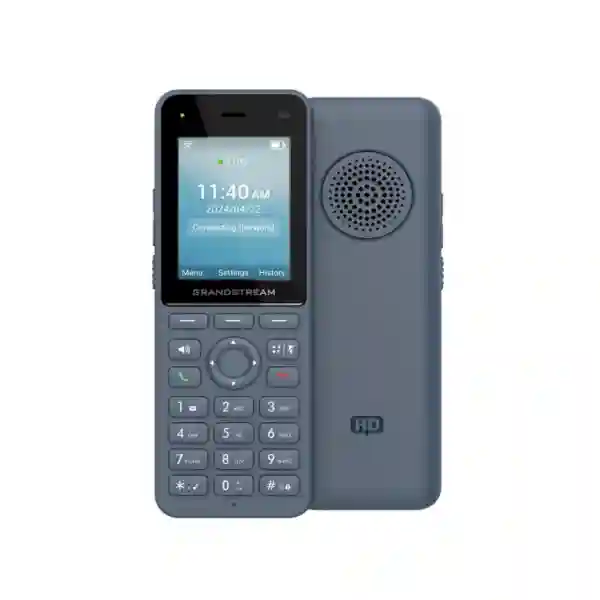
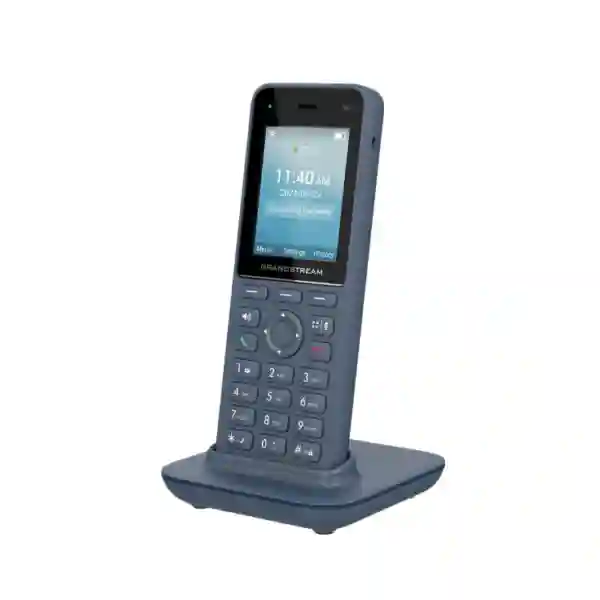
Cordless business mobility · Wi‑Fi 6 · SIP voice
Grandstream WP826 Dubai – Wi‑Fi 6 Cordless IP Phone for Mobile Teams
The Grandstream WP826 is designed for employees who need to move around a workplace without giving up business-grade SIP calling. It combines dual-band Wi‑Fi 6, enterprise roaming support, three SIP accounts and three lines, Bluetooth, HD voice, push-to-talk, a 2.4-inch colour display, four-way audio conferencing, and a 3000mAh rechargeable battery rated by Grandstream for up to 12 hours of talk time and 240 hours of standby under laboratory conditions.
For businesses in Dubai and across the UAE, the important question is not simply whether the handset can make a SIP call. The practical decision is whether the Wi‑Fi design, PBX platform, roaming behaviour, security policy, headset requirements, shift pattern, user density and charging workflow support reliable mobile voice. Fourteck helps customers evaluate those factors before ordering so that the WP826 is matched to the actual communication environment rather than selected from a feature list alone.
Dual-band Wi‑Fi 6
Bluetooth
12-hour rated talk time
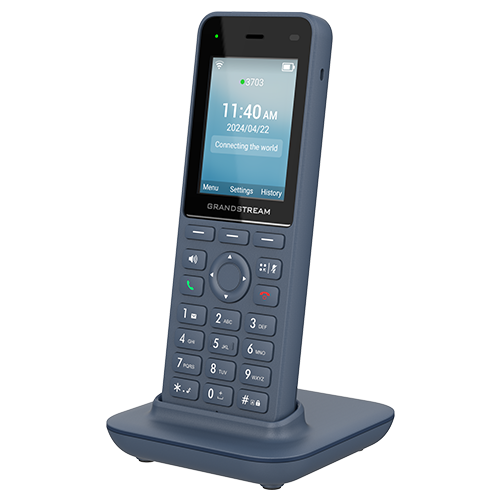
Grandstream WP826 product image
Best fit
Mobile staff inside managed Wi‑Fi environments
Network priority
Coverage, roaming, QoS and WLAN security
Voice priority
SIP registration, codec policy and call continuity
Buying priority
Confirm compatibility before quantity ordering
What is the Grandstream WP826?
The WP826 is a cordless SIP handset that uses a Wi‑Fi network instead of a dedicated DECT radio system. That distinction matters in projects where employees already move through a managed wireless LAN and the organization wants voice devices to operate within the same general Wi‑Fi infrastructure. Grandstream positions the model for enterprise and vertical applications including offices, retail, logistics, healthcare and security. Its design combines a conventional phone keypad with a portable handset form factor, making it familiar to users who need fast access to calling functions without carrying a desk phone or depending on a personal smartphone for every work call.
The handset supports integrated dual-band Wi‑Fi 6 across 2.4GHz and 5GHz and supports 802.11k/r/v roaming features. In a correctly designed wireless environment, these capabilities can help the handset move between access points with less disruption than a device that lacks enterprise roaming support. Roaming results still depend on the WLAN architecture, access-point configuration, RF conditions, channel plan, authentication method and client behaviour. A Wi‑Fi 6 label alone does not guarantee seamless calls across a building.
The WP826 supports three SIP accounts and three lines, which can be useful when a user needs separate extensions, service identities or line appearances. It also supports four-way audio conferencing, integrated Bluetooth for compatible headsets, a configurable push-to-talk function, Type-C charging with fast-charging support, an accelerometer and proximity sensor, and a 2.4-inch 240×320 colour LCD. These capabilities make it a middle-to-upper choice within Grandstream’s cordless Wi‑Fi portfolio for organizations that want stronger battery capacity and more line flexibility than entry-level models without moving to a larger rugged or Android smart-device design.
WP826 quick technical facts for buyers
| Product type | Cordless Wi‑Fi SIP IP phone |
|---|---|
| Wi‑Fi | Integrated dual-band Wi‑Fi 6, 802.11 a/b/g/n/ac/ax, 2.4GHz and 5GHz |
| Roaming support | 802.11k/r/v supported; actual roaming performance is WLAN-design dependent |
| SIP capacity | 3 SIP accounts, 3 lines |
| Display | 2.4-inch 240×320 colour LCD |
| Audio | HD voice, dual microphones, AEC, Noise Shield technology and Opus support |
| Bluetooth | Integrated Bluetooth for compatible headsets |
| Conference | 4-way audio conferencing |
| Battery | 3000mAh rechargeable battery; up to 12 hours talk time and 240 hours standby in Grandstream laboratory data |
| Charging | USB Type-C charging interface with fast-charging support and charging base |
| Management | Web configuration plus supported mass-provisioning methods including GDMS/TR-069 and encrypted configuration workflows |
| Typical environments | Offices, retail, logistics, healthcare, hospitality support areas, security teams and mobile operations |
Specifications can change with firmware or product revisions. Confirm the deployment baseline and required interoperability before procurement.
Start with the customer requirement, not the handset
A WP826 project works best when the communication requirement is defined before the device quantity is selected. For example, a warehouse supervisor may need to receive extension calls while moving between storage aisles, use push-to-talk for rapid coordination, and keep the handset active through most of a shift. A retail floor manager may need a lightweight phone that can roam between sales areas, stock rooms and service counters. A clinic administrator may need a device that keeps staff reachable without using personal mobiles. Each scenario uses the same handset, but the network, charging pattern, headset choice, PBX configuration and call-flow requirements can be very different.
Fourteck therefore treats the WP826 as part of a communication system rather than an isolated endpoint. The solution can involve the IP PBX or hosted SIP platform, access points, VLANs, SSIDs, authentication, QoS, DHCP, DNS, firewall policy, SIP transport, codec selection, provisioning, user permissions and support procedures. If any of those layers are unstable, the handset can appear to be the problem even when the real issue is RF coverage, roaming configuration, overloaded access points, packet loss or inconsistent network policy.
This requirement-first approach also helps prevent overbuying. Some users may be better served by a fixed desk phone. Others may need a more rugged device, a larger display, additional SIP accounts, barcode scanning or a smartphone-style interface. The WP826 is strongest when the user needs voice mobility within a controlled Wi‑Fi environment and values long battery life, SIP flexibility and familiar keypad operation.
Why Wi‑Fi design determines the real user experience
Portable voice is more sensitive to wireless instability than ordinary background data. A laptop can often recover from a brief delay without a user noticing, while a voice call exposes jitter, packet loss, roaming delay and congestion immediately. That is why a Wi‑Fi handset should be evaluated together with the WLAN rather than added to an unknown network and expected to behave like a wired desk phone.
The WP826 supports both 2.4GHz and 5GHz. In many business environments, 5GHz can provide more channel capacity and can be preferable for voice when coverage is designed correctly. However, band choice should follow the site survey and access-point layout. A handset that is forced onto a weak 5GHz signal may perform worse than one allowed to use a stronger 2.4GHz connection. Conversely, a crowded 2.4GHz environment with overlapping channels can create avoidable voice problems. Automatic band selection can be useful, but enterprise deployments should still validate behaviour in the exact site.
Roaming support through 802.11k/r/v can help the handset discover and move between access points efficiently, but both client and infrastructure configuration matter. The WLAN should be checked for consistent SSID configuration, compatible security settings, suitable minimum data rates, transmit power balance, channel allocation and realistic cell overlap. Too much access-point power can be as harmful as too little because a client may remain attached to a distant AP even when a closer AP is available.
For larger Dubai offices, logistics sites, hospitals, campuses and multi-floor facilities, a voice-focused wireless validation is advisable before a large rollout. Testing should include walking calls through common routes, lifts and stairwell transitions where permitted, loading areas, long corridors, back offices and known RF problem zones. The objective is to find weak points before users depend on the phone in daily operations.
HD voice, Noise Shield and call handling
The WP826 supports a broad SIP voice codec set including Opus and G.722 wideband audio along with commonly used narrowband codecs. Codec availability on the handset does not automatically mean that every call will use the highest-quality option. The actual codec is negotiated with the PBX, SIP service or remote endpoint, and bandwidth, transcoding policy and trunk configuration can influence the result. For internal calls on a compatible system, wideband audio can provide clearer speech. For external calls, the end-to-end path determines what quality is preserved.
Grandstream includes dual microphones, acoustic echo cancellation and Noise Shield technology. These are useful in environments where background sound is part of daily work, such as stock rooms, retail floors, loading areas or busy offices. Noise reduction can improve intelligibility, but it cannot replace good operating practice. Users should still be trained on microphone placement, appropriate call volume and when to move away from extremely noisy machinery or airflow.
The handset supports common business telephony functions such as hold, transfer, forwarding, call waiting, call park, auto answer and server redundancy or failover features supported by the configuration. It also supports four-way audio conferencing, which can be useful when a mobile user needs to bring several colleagues into a discussion without returning to a meeting room or desk phone. As with all SIP features, exact behaviour should be tested against the chosen PBX because feature codes, transfer methods and conferencing implementations vary between platforms.
The configurable push-to-talk button adds another practical workflow for teams that need rapid communication. Whether push-to-talk behaves as expected depends on the application and configuration method used, so organizations should define user groups, paging logic and permissions before deployment rather than leaving every handset with an ad hoc configuration.
Where the WP826 fits best
Retail and showrooms
Floor managers, inventory teams and supervisors can stay reachable while moving between sales areas, stock rooms and customer service points. Three SIP accounts can help where separate operational identities or queues are required, while Bluetooth can support users who prefer a headset during repetitive calls.
Warehousing and logistics
The WP826 suits controlled indoor logistics areas where the Wi‑Fi design is strong and staff need portable voice. For harsh environments, frequent drops, water exposure or chemical cleaning, compare the ruggedized WP836 rather than assuming the WP826 offers the same protection.
Healthcare administration
Mobile administrative and support personnel may benefit from a dedicated business handset that separates work calling from personal smartphones. Network security, authentication, privacy requirements and cleaning procedures should be reviewed with the organization before deployment.
Security and facilities
Supervisors and mobile facilities teams can use SIP calling and push-to-talk while moving through a property. For critical lone-worker, emergency or rugged requirements, assess the exact feature set and compare WP836 or specialized safety devices rather than treating a standard IP handset as a certified safety platform.
Hotels and hospitality operations
Engineering, housekeeping coordination, service supervisors and back-of-house teams can use Wi‑Fi handsets where reliable coverage already exists. Call groups, room-service workflows, extension plans and roaming across guest and staff areas should be planned carefully.
Offices and campuses
Managers, IT staff, reception support and roaming operational users can keep one business extension while moving through a floor or campus. The WP826 is most useful where movement is frequent enough that a desk phone alone becomes restrictive.
WP816 vs WP826 vs WP836 – choose by requirement
Grandstream’s current Wi‑Fi 6 cordless range gives buyers several nearby choices. The WP826 is not automatically the best model for every user. A comparison should focus on line requirements, battery expectations, display size and environmental durability.
| Decision point | WP816 | WP826 | WP836 |
|---|---|---|---|
| SIP accounts / lines | 2 / 2 | 3 / 3 | 3 / 3 |
| Display | Smaller colour display | 2.4-inch 240×320 | 2.8-inch 240×320 |
| Rated talk time | Up to 6 hours | Up to 12 hours | Up to 10 hours |
| Standby | Up to 120 hours | Up to 240 hours | Up to 240 hours |
| Rugged protection | Standard portable handset | Standard portable handset | IP67 ruggedized design |
| Best buying logic | Lower line and battery demand | Balanced mobility, battery and SIP capacity | Harsh or rugged environments |
The WP826 is particularly attractive when users need three SIP accounts, a larger screen than the entry model and longer battery capacity, but do not require the IP67 rugged construction of the WP836. Organizations should avoid paying for ruggedization if the device stays in clean office or retail spaces, while industrial and harsh-site users should avoid choosing a standard handset simply to reduce initial cost.
PBX and SIP compatibility planning
The WP826 is a standards-based SIP endpoint, but “SIP compatible” should not be treated as a guarantee that every PBX feature will behave identically on every platform. Registration is only the first stage. A proper deployment should validate inbound and outbound calls, attended and blind transfer, hold and resume, voicemail access, caller ID, call waiting, DND, conference behaviour, BLF or feature-code expectations where relevant, codec negotiation, DTMF method, NAT handling, TLS/SRTP requirements and failover behaviour.
Organizations using Grandstream UCM systems can usually align handset provisioning with a broader Grandstream environment, while third-party IP PBX, hosted PBX and SIP trunk deployments may need profile-specific settings. The correct approach is to identify the exact PBX version and endpoint policy, then test a small number of handsets before a broad rollout. This is especially important when an organization has custom dial plans, contact directories, call queues, security certificates or non-standard SIP ports.
Three SIP accounts can support useful designs, but more accounts are not always better. Many users need only one extension. Additional accounts should be assigned when there is a defined operational reason, such as separate branch identities, dedicated service lines or controlled role-based registrations. Unused accounts increase configuration complexity and can complicate troubleshooting.
For hosted voice deployments, confirm the provider’s supported transport and provisioning method. For on-premises PBX environments, review firewall rules, voice VLAN reachability, DNS, NTP and certificate requirements. For branch-to-head-office deployments, evaluate WAN quality and failover because strong local Wi‑Fi cannot compensate for unstable wide-area connectivity.
Provisioning, management and lifecycle control
A handful of handsets can be configured manually, but manual configuration becomes inefficient and inconsistent as quantity grows. Grandstream supports several provisioning approaches for the WP826, including web-based administration, firmware delivery methods and centralized provisioning options such as GDMS and TR-069. The best method depends on the customer’s infrastructure, management policy and security model.
For larger deployments, administrators should define a baseline template covering SIP server information, account naming, codec priorities, Wi‑Fi profiles, time settings, provisioning intervals, security options, user restrictions and firmware policy. A controlled template reduces variation between devices and makes replacement handsets easier to deploy. It also helps support teams compare a problematic handset with the approved configuration instead of troubleshooting an unknown one-off setup.
Firmware management deserves its own plan. New firmware can address security, interoperability and stability, but updates should be validated before being pushed to every device. A pilot group allows IT teams to test calling, roaming, Bluetooth, provisioning and PBX features under the exact local conditions. Production rollout can then follow an approved maintenance process.
Directory management is another practical consideration. The WP826 supports downloadable phonebook methods such as XML and LDAP according to Grandstream documentation. Whether a centralized directory is appropriate depends on the customer’s PBX, directory service and privacy requirements. A managed directory can improve usability for reception, facilities, warehouses and support teams that regularly call internal departments.
Security should be designed with the WLAN and voice platform
The WP826 supports SIP and network security mechanisms that can be integrated into a broader business policy, including protected management access, supported Wi‑Fi encryption options, 802.1X-related enterprise authentication scenarios, TLS for SIP signalling and SRTP for media where the PBX and deployment support them. The presence of a feature does not mean it is enabled by default or compatible with every server profile, so security settings should be planned as a complete system.
A sensible deployment separates voice devices from untrusted guest traffic. Many organizations use a dedicated corporate SSID or controlled device network with appropriate segmentation, firewall policy and QoS. Authentication should be strong enough for the business risk while remaining supportable for the handset fleet. Certificate-based enterprise WLAN authentication can provide stronger control, but it also introduces certificate issuance, renewal and troubleshooting requirements that must be owned operationally.
Administrators should also change default credentials, limit management exposure, use secure provisioning where available and keep firmware within the approved support baseline. Remote management should not be exposed unnecessarily to the public internet. If the PBX is hosted externally, firewall and DNS policies should permit only the required services and destinations.
For regulated environments, handset selection is only one part of compliance. Call recording, retention, data privacy, emergency calling, user authentication and network logging may be governed by organizational or legal policy. Those requirements should be reviewed with the relevant customer stakeholders rather than assumed from the endpoint specification.
Battery life, charging and shift planning
Grandstream specifies a 3000mAh rechargeable battery with up to 12 hours of talk time and 240 hours of standby for the WP826 under laboratory conditions. Real-world battery duration varies with Wi‑Fi signal quality, call volume, screen activity, Bluetooth usage, roaming, firmware, battery age and environmental conditions. Buyers should therefore treat the published figures as planning guidance rather than a guaranteed shift duration.
For normal office use, the charging base can support an easy overnight routine. For warehouses, hotels, hospitals or security operations with overlapping shifts, the charging workflow should be documented. Teams need to know where handsets are assigned, where they are returned, how damaged or low-capacity batteries are identified and how replacement devices are tracked. A phone with strong technical features can still fail operationally if it begins a shift with a partially charged battery.
USB Type-C fast-charging support improves convenience, but organizations should still use appropriate approved power accessories and follow vendor battery guidance. Battery condition should be reviewed over the service life of the handset. If a device that once lasted a full shift no longer does so, the issue may be battery aging rather than network or firmware performance.
Procurement teams should include spare-device strategy in larger deployments. A small pool of configured replacements can reduce downtime when a handset is lost, damaged or awaiting repair. The replacement workflow is easier when centralized provisioning and asset records are already in place.
Deployment checklist before placing a larger order
- Define mobile user roles. Identify who genuinely needs a portable handset, their working areas, shift length, call volume and whether they use a headset.
- Confirm PBX compatibility. Record the PBX or hosted platform, version, SIP registration model, codec policy and security requirements.
- Review Wi‑Fi coverage. Confirm 2.4GHz and 5GHz design, AP density, channel plan, roaming settings, security mode and areas where calls must remain active.
- Validate voice QoS. Review WLAN and wired-network QoS, congestion points, WAN links and voice VLAN architecture where used.
- Plan provisioning. Decide whether handsets will be configured manually, by templates, through GDMS, TR-069 or another approved method.
- Test a pilot. Run real calls while walking through the normal user routes. Include transfers, voicemail, conference, Bluetooth and push-to-talk workflows where required.
- Document charging. Assign charging locations, responsibilities, spare-device procedures and battery checks.
- Train users. Cover basic call handling, roaming expectations, charging, headset pairing, push-to-talk and how to report a problem accurately.
- Scale only after validation. Use pilot results to adjust the WLAN, PBX profile or user workflow before ordering the full quantity.
Grandstream WP826 Dubai and UAE deployment considerations
Dubai businesses often combine open-plan offices, glass-partitioned meeting areas, retail units, warehouses and multi-floor commercial buildings. Those environments create different RF challenges. Glass, concrete, metal shelving, lifts and dense neighboring WLANs can all affect portable voice. A WP826 deployment in a small office in Business Bay may require a very different wireless design from a logistics operation near Jebel Ali or a retail site in Deira. Fourteck therefore recommends evaluating the actual site rather than applying one access-point count or signal threshold to every customer.
In Abu Dhabi, larger corporate offices, campuses, healthcare environments and distributed facilities may place more emphasis on centralized management, security policy and controlled provisioning. In Sharjah and Ajman, mixed office-and-warehouse environments can require careful transition between front-office and operational zones. Bur Dubai and Deira customers may also operate in buildings with high surrounding Wi‑Fi density, which makes channel planning and interference analysis important for voice stability.
For multi-emirate organizations, standardization becomes valuable. A consistent WP826 configuration can simplify user training and support, but the Wi‑Fi profile still needs to respect each site’s RF environment. Central management should not lead to blindly copying access-point power, channel or roaming settings from one branch to another.
Fourteck can support the buyer journey from requirement review and handset comparison to PBX compatibility checks, Wi‑Fi planning, deployment assistance and post-installation troubleshooting. Product availability, exact commercial terms, delivery timing and warranty handling should be confirmed at the time of quotation rather than assumed from a generic web page.
Regional procurement for GCC and Africa projects
Organizations operating across the GCC and Africa may want one cordless SIP handset standard across multiple countries. That can simplify training, templates and spare-device management, but the project should still account for local network design, power standards, import requirements, carrier and SIP-provider differences, and support logistics. A handset configuration that works in a Dubai headquarters may need changes for a branch in Kuwait, Kampala, Nairobi, Lagos or Dar es Salaam because the PBX topology, internet path and WLAN environment can differ.
For Kuwait projects, buyers may prioritize centralized control across offices, retail operations and service teams. In Uganda, Kenya and Tanzania, branch connectivity and WAN resilience can be as important as the handset itself, especially where voice traffic crosses internet links to a central PBX. In Nigeria, large multi-site organizations may need stronger provisioning governance and clear escalation procedures because distributed fleets are harder to support manually.
Fourteck’s regional network can help organizations coordinate related requirements across Kuwait, Uganda, Kenya, Nigeria and Tanzania. These links are provided for regional planning context; exact product supply and service scope should be confirmed for each country and project.
A useful multi-country strategy is to standardize what should be common—naming, provisioning logic, security baseline, user training and support documentation—while allowing site-specific WLAN and WAN engineering. That balance reduces administrative overhead without ignoring the physical realities of each branch.
When the WP826 may not be the right choice
The WP826 is a strong portable voice endpoint, but good procurement includes knowing when to choose something else. If the user works mainly at a desk, a fixed IP phone may provide a larger screen, more programmable keys and simpler wired reliability. If the operating environment is exposed to water, heavy dust, drops, harsh cleaning or industrial abuse, the WP836’s rugged IP67 design may be more appropriate. If the user needs Android applications, a large touch display or barcode scanning, another device class such as the WP856 may fit better.
The WP826 also should not be treated as a solution for poor Wi‑Fi. If a site has dead zones, overloaded access points, weak backhaul or inconsistent authentication, adding a Wi‑Fi phone can reveal those weaknesses rather than solve them. In some buildings, a DECT solution may be a better architectural choice, particularly where dedicated cordless voice coverage and predictable roaming are preferred over using the enterprise WLAN.
Finally, do not select the handset solely because it supports three SIP accounts or long standby time. The best endpoint is the one that matches the user role, network design, management model and lifecycle cost. A short proof-of-concept is often more valuable than a long specification comparison because it tests the exact PBX, Wi‑Fi and workflows that users will rely on.
Procurement questions to answer before requesting a quote
Installation and configuration approach
A typical WP826 rollout can be divided into discovery, pilot configuration, network validation, user acceptance and scaled deployment. During discovery, the project team identifies the PBX, extension plan, WLAN architecture, security requirements, user roles and physical coverage area. During the pilot stage, a small number of handsets are provisioned and tested against normal call flows. The network-validation stage checks roaming paths, signal quality, call continuity and congestion behaviour. User acceptance confirms that employees can perform the tasks they actually need, not just place a basic call.
Once the pilot is stable, configuration can be standardized. Handset naming conventions, SIP profiles, Wi‑Fi settings, button behaviour, time zone, directories and update policy should be documented. Devices can then be deployed in batches, with each batch validated before moving to the next area or branch. This reduces the operational impact of a configuration mistake and creates a clear rollback path.
Post-deployment support should distinguish endpoint problems from network problems. A useful incident report records the handset identity, time of issue, location, AP or SSID where possible, call direction, remote party, whether the user was moving, and whether the problem affected one handset or many. That information dramatically improves troubleshooting compared with a generic complaint such as “the phone dropped.”
Fourteck can assist with planning and configuration around the endpoint, but the exact scope should be agreed for each project. Some customers need supply only; others need PBX integration, WLAN review, staging, rollout and support. Defining the scope at quotation stage prevents gaps between the device purchase and the operational outcome.
Why businesses consider Fourteck for WP826 projects
Fourteck approaches IP phone procurement as a systems decision. Instead of treating the WP826 as a box with a fixed list of features, the discussion can include user mobility, wireless coverage, SIP platform, call flows, security, provisioning, headset requirements and regional rollout. That is useful for customers who want fewer surprises after devices are deployed.
For UAE customers, the project may involve a single office, several Dubai branches or a broader deployment across Abu Dhabi, Sharjah and other emirates. For regional customers, Fourteck can align the handset conversation with wider communications and infrastructure requirements through its network of country and service properties. You can also review broader UAE technology capabilities at Fourteck UAE and IP telephony context at IP Phone Fourteck.
Fourteck does not assume price, stock, delivery time or warranty terms on this page. Those commercial details can vary by quantity, market, project scope and procurement timing. Request a current quotation with the required quantity, site, PBX platform and service scope so the response can reflect the actual project.
Grandstream WP826 FAQ
Does the Grandstream WP826 support Wi‑Fi 6?
Yes. The WP826 supports integrated dual-band Wi‑Fi 6 using 802.11 a/b/g/n/ac/ax on 2.4GHz and 5GHz. It also supports 802.11k/r/v roaming features. Actual call continuity while roaming depends on the wireless infrastructure and configuration.
How many SIP accounts does the WP826 support?
The WP826 supports three SIP accounts and three lines. Whether a user needs all three depends on the PBX design and operational requirement.
What is the WP826 battery life?
Grandstream rates the 3000mAh battery for up to 12 hours of talk time and 240 hours of standby in laboratory data. Real duration varies with signal strength, call activity, Bluetooth use, screen usage, roaming, firmware, battery age and other conditions.
Does the WP826 support Bluetooth headsets?
Yes. The handset includes integrated Bluetooth for compatible headsets. Test the intended headset model and call workflow before a large accessory order.
Can the WP826 roam between access points?
Yes, the handset supports enterprise roaming features including 802.11k/r/v. Seamless roaming still depends on access-point design, compatible security settings, RF coverage, channel planning and client behaviour, so walking-call tests are recommended.
Is the WP826 waterproof or IP67 rated?
The WP826 should not be confused with the WP836. Grandstream positions the WP836 as the rugged IP67 model. If waterproof, dustproof or drop-resistant operation is a requirement, compare the WP836 or another suitable rugged device.
Does the WP826 support push-to-talk?
Yes. The WP826 includes a configurable button that can be used for push-to-talk and related paging workflows depending on the configuration. The operational design should be tested with the intended PBX or application.
Can the WP826 work with third-party PBX systems?
The handset is standards-based SIP, so it can be used with many compatible PBX and hosted voice platforms. Exact features, provisioning and security behaviour vary, so compatibility should be verified against the specific PBX version and service profile.
Is the WP826 suitable for warehouses?
It can be suitable for controlled indoor warehouse and logistics environments with good Wi‑Fi coverage. If the handset may be exposed to frequent drops, water, heavy dust or harsh cleaning, compare the rugged WP836 instead.
Can Fourteck help with WP826 deployment in Dubai?
Yes. Fourteck can discuss product selection, compatibility, Wi‑Fi considerations, PBX integration, configuration and deployment scope for Dubai and UAE projects. Exact service scope and commercial terms should be confirmed for the specific project.
How do I request a WP826 quotation?
Provide the required quantity, delivery country or emirate, PBX platform, current Wi‑Fi infrastructure, number of mobile users, headset requirements and whether you need supply only or deployment assistance. Fourteck can then prepare a project-specific response without relying on generic price or stock assumptions.
Plan your Grandstream WP826 deployment with Fourteck
If your team needs cordless SIP calling over business Wi‑Fi, the WP826 can be a strong fit when the network, PBX and user workflow are aligned. Share your site, quantity, PBX platform, Wi‑Fi environment and mobility requirements so Fourteck can help you compare the WP826 with suitable alternatives and define the deployment scope.
Next action: request a current quotation or discuss compatibility before a larger order. Product availability, lead time, commercial terms and service scope are confirmed at quotation stage.
Technical basis: Grandstream WP826 product information, datasheet, user guide and administration documentation. Specifications and supported behaviour may change with firmware, region or product revision; confirm critical requirements before procurement.
Reviews
There are no reviews yet.