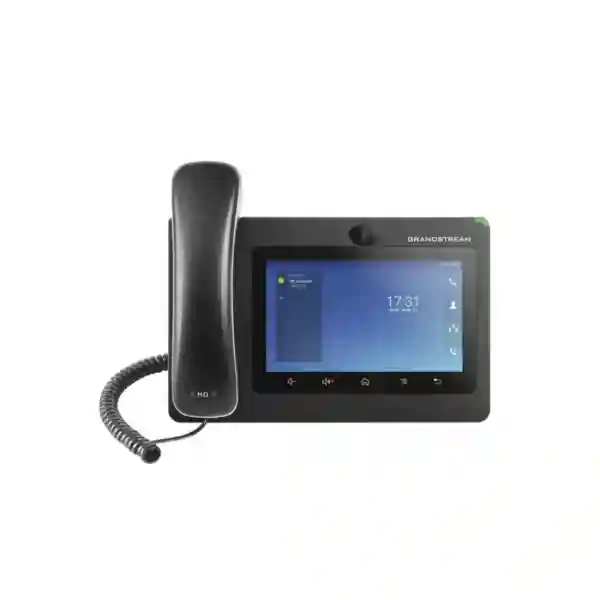
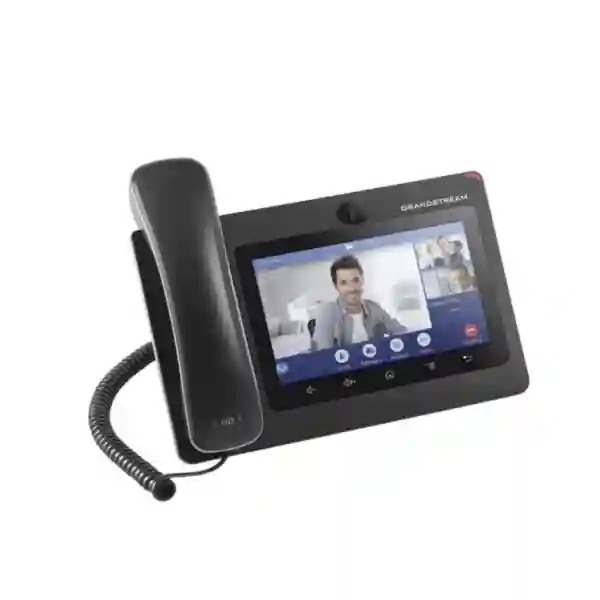
Grandstream GXV3370 Dubai – Android IP Video Phone for Business
The Grandstream GXV3370 Dubai is designed for business users who need more than a conventional desk phone. It combines a 16-line SIP endpoint, a 7-inch touch interface, an integrated camera, HD voice, desktop video conferencing, Wi-Fi, Bluetooth, Gigabit Ethernet and Android-based application flexibility in one device. That combination makes it especially relevant for executives, reception teams, managers, collaboration-heavy desks, branch coordinators and customer-facing roles where voice and video need to sit on the same endpoint.
Fourteck approaches the GXV3370 as part of a complete communications design rather than as a stand-alone handset. The right deployment depends on your PBX or hosted SIP platform, switch and PoE design, VLAN and QoS policy, security standards, Wi-Fi conditions, headset requirements, video use, provisioning method and future growth. This page explains how to evaluate the phone, where it fits, what its verified capabilities mean in practice, and what to confirm before procurement in Dubai, Abu Dhabi, Sharjah and the wider UAE.
Up to 16 SIP accounts for users who manage multiple identities, lines or services.
1024×600 capacitive five-point touch TFT LCD for call control and applications.
Also supports 3-way 720p video conferencing up to 30 fps.
Dual-switched 10/100/1000 Mbps ports with integrated PoE/PoE+ support.
Decision summary: who should shortlist the GXV3370?
Shortlist the GXV3370 when the user needs a desk-based SIP phone with built-in video, a larger touch interface and flexible connectivity rather than a simple key-driven voice handset. Its best fit is typically an employee who handles many calls, needs visual call handling, may participate in video sessions, works with multiple SIP accounts, or benefits from a richer Android-style interface.
Do not choose it only because it has more features. If a desk mainly needs basic voice, a simpler SIP phone can be easier to administer and more economical. If an organization requires a newer Android generation, very high-resolution video, a larger collaboration display or application support tied to a specific current software stack, compare the GXV3370 with newer alternatives before standardizing. The buying decision should follow user role, platform compatibility and lifecycle planning.
What the Grandstream GXV3370 actually combines
The GXV3370 is not simply an IP phone with a camera attached. Its design combines several endpoint roles. First, it is a SIP desk phone with up to 16 accounts and normal business calling features such as hold, transfer, call forwarding, call park and pickup, call waiting, auto answer, hot desking, shared call appearance and dial-plan support. Second, it provides a touch-based user interface on a 7-inch display. Third, its tiltable megapixel camera supports 720p video calling and its local conferencing capability includes 3-way HD video conferencing. Fourth, integrated Wi-Fi and Bluetooth add deployment and accessory flexibility. Finally, Android 7.0 and SDK support make it possible to run supported applications and create controlled custom workflows.
This matters because enterprise phone selection should be based on the complete role of the endpoint. A manager who needs multiple SIP identities, Bluetooth headset use, visual contacts, occasional video calls and local conferencing has a very different requirement from a warehouse extension or hotel room phone. In many Dubai offices, the more useful comparison is therefore not “which phone has the most features?” but “which endpoint removes friction for this user role while remaining supportable by IT?”
Verified GXV3370 capabilities and what they mean for buyers
| Capability | Verified detail | Practical buying relevance |
|---|---|---|
| Lines / SIP accounts | 16 lines, up to 16 SIP accounts | Useful for users handling multiple extensions, services, branches or identities. |
| Display | 7-inch 1024×600 capacitive five-point touch TFT LCD | Supports visual call handling, contacts, applications and touch-driven workflows. |
| Camera | Tiltable megapixel CMOS camera with privacy shutter, 720p at 30 fps | Suitable where desktop video calling is genuinely required and privacy control matters. |
| Conferencing | 7-way audio and 3-way 720p video conferencing | Enables local collaboration without forcing every small discussion onto a separate room system. |
| Network | Dual-switched 10/100/1000 Mbps Ethernet | Supports Gigabit desk connectivity and common phone-plus-PC cabling designs. |
| Wireless | Dual-band 2.4/5 GHz Wi-Fi and Bluetooth 4.0 + EDR | Useful for compatible wireless networking, mobile synchronization and Bluetooth headsets. |
| Power | PoE 802.3af and PoE+ 802.3at support; power adapter also supported | Allows cleaner desk deployment when the access switch has the required PoE budget. |
| Security | TLS, SRTP, HTTPS, 802.1X and encrypted configuration support | Relevant to organizations that need encrypted signaling/media and controlled network access. |
| Management | TR-069, encrypted XML provisioning and GDMS support | Important for repeatable multi-phone rollout, configuration control and remote administration. |
| Peripheral ports | RJ9 headset, 3.5 mm headset, USB, SD and HDMI-out | Broadens accessory and workflow options, subject to the chosen headset/application design. |
Customer requirement first: where GXV3370 features create real value
Executive and management desks
Executives and managers often need a communications endpoint that can handle several lines, provide fast access to contacts, support a headset and move between audio and video without changing devices. In this situation the GXV3370’s touch display, 16 SIP accounts, Bluetooth, HD audio and integrated camera can reduce desk clutter. The practical value is not simply that video exists, but that a manager can keep communication on a familiar desk device rather than launching a laptop for every face-to-face conversation.
The limitation is application and platform fit. A business should confirm exactly how its chosen PBX, SIP service and video workflow operate with the phone. If a team relies heavily on a particular modern collaboration application, validate that workflow before standardizing hardware. Android 7.0 is part of the GXV3370 design, so current application requirements should be checked rather than assumed.
Reception, front office and customer-facing roles
Reception users may need to see multiple lines, perform transfers quickly, identify incoming callers, coordinate with departments and sometimes interact with video door or security systems. The GXV3370 can fit this role because it combines a large touch screen, SIP flexibility, video capability and support for Grandstream’s wider ecosystem. A reception design can also benefit from call park/pickup, shared call appearance, LDAP or XML contacts and headset support.
However, the phone should be evaluated alongside the actual receptionist workflow. If dozens of simultaneous visual keys or expansion-module functions are essential, validate the interface design before purchase. If the site uses a door station, confirm SIP/video interoperability and network policy. Reception is operationally critical, so an endpoint should be chosen for speed, consistency and supportability rather than appearance alone.
Branch coordinators and multi-site teams
A user coordinating Dubai, Abu Dhabi, Sharjah or overseas branches may benefit from multiple SIP registrations, centralized provisioning and quick access to audio/video conferencing. The GXV3370 can be part of that design, but the larger requirement is the communications architecture connecting the sites. WAN quality, QoS, SIP trunking, PBX redundancy, VPN policy, DNS/NTP availability and failover planning can affect the user experience more than the endpoint specification.
Professional services and consultation desks
Legal, consulting, engineering, design, healthcare administration and other professional service roles often value high-quality desk audio, a camera, flexible account handling and a clear touch interface. For these users the GXV3370 can function as an all-in-one desktop communications terminal. Where confidentiality is important, the physical camera privacy shutter is a useful design element, while TLS/SRTP support can contribute to a secure SIP architecture. Security still depends on the full system configuration, not on the phone alone.
Before buying: six design checks that prevent the wrong deployment
- PBX and SIP compatibility: confirm account registration, codecs, BLF or shared-line requirements, provisioning method, video support and any platform-specific features needed by the user.
- Network and PoE design: verify switch capability, available PoE budget, VLAN architecture, QoS, LLDP-MED policy, DHCP/DNS/NTP services and cabling quality.
- Application expectations: distinguish between standard SIP calling, web/app workflows and third-party Android applications. Validate required applications against Android 7.0 and the intended firmware.
- Video requirement: confirm whether 720p desktop video and 3-way local video conferencing meet the real use case. Users needing room-scale collaboration may require a different endpoint category.
- Accessories: identify wired or Bluetooth headset needs, EHS expectations, USB usage, HDMI-out requirements and whether the chosen accessory is supported.
- Lifecycle and standardization: decide whether the organization is adding a few compatible endpoints to an existing estate or starting a new long-term standard. New standards should include lifecycle and replacement planning.
SIP, PBX and call-control planning
The GXV3370 supports SIP RFC3261 and is intended to operate with SIP-based platforms. That gives organizations flexibility, but open SIP does not mean every advanced feature behaves identically on every PBX. Basic registration and calling are only the starting point. A professional deployment should confirm transfer behavior, caller ID, voicemail access, call park and pickup, busy lamp or line-monitoring expectations, shared call appearance, phonebook integration, conferencing, DTMF method, failover and any custom dial plan.
For an on-premise PBX, the phone may register directly to the local system over the voice VLAN. For a hosted PBX, registration may traverse the internet and require secure signaling, NAT handling and service-specific configuration. In either case, the endpoint should receive correct DNS and NTP settings and use the organization’s approved firmware and provisioning profile. If the phone is part of a Grandstream UCM environment, administrators can design the endpoint and PBX together; if it is used with another SIP platform, platform-specific testing becomes more important.
Fourteck can help organizations map desk requirements to the wider IP telephony design. Businesses planning or upgrading an IP PBX can also review the broader Fourteck IP PBX Dubai resource when the requirement extends beyond handsets to trunks, extensions, call routing and system architecture.
Network design: Gigabit ports, PoE, VLANs and QoS
Two switched Gigabit Ethernet ports let the GXV3370 fit common desk layouts where the phone connects to the access switch and a computer connects through the phone. This can reduce cabling, but it makes the phone part of the desktop network path. The switch port should therefore be configured intentionally. Many businesses place phones on a dedicated voice VLAN while the attached computer remains on the data VLAN. LLDP-MED, 802.1Q VLAN tagging and DHCP options may be used depending on the network design.
Power is another practical consideration. The device supports 802.3af PoE and 802.3at PoE+. PoE simplifies installation because power and network connectivity can come through the Ethernet cable, but switch capacity must be calculated across all connected endpoints. If dozens of video phones are planned, the aggregate PoE budget matters. Grandstream’s specification also notes that USB is enabled only when the phone is powered by the supplied power adapter or PoE+, which is relevant if a USB peripheral is part of the deployment.
QoS should be designed end to end. The phone supports Layer 2 and Layer 3 QoS mechanisms, yet simply enabling QoS on the handset does not guarantee call quality. The access switch, uplinks, WAN edge, routers, SD-WAN or firewall and service provider path must preserve the intended treatment. Where offices experience congestion, voice and video should be monitored separately because video consumes more bandwidth and can reveal WAN limitations that voice alone does not.
Video calling: what 720p means in a business environment
The GXV3370 camera supports up to 720p at 30 frames per second and includes autofocus, auto exposure and anti-flicker capabilities. The phone also supports H.264 profiles and local 3-way video conferencing. For a desk user, that can be enough for person-to-person discussions, quick team check-ins, branch coordination or visual confirmation with compatible SIP video systems.
Desktop video should still be treated as a complete experience. Camera angle, user distance, lighting, desk placement, network bandwidth and far-end compatibility all affect quality. A 7-inch screen is practical for personal video but it is not a substitute for a meeting-room display. If several people need to sit around a table, a dedicated conference system may be a better choice. The GXV3370 is strongest when video is a personal communications feature attached to an individual workspace.
The physical privacy shutter is important in executive, healthcare, finance, legal and other privacy-conscious environments because it gives the user a visible physical control over the camera. Organizations should combine that physical control with appropriate account security, firmware management and network policy.
Audio quality, conferencing and headset workflow
The GXV3370 includes an HD handset and HD speakerphone with a wideband acoustic design, echo cancellation and double-talk performance. It supports common codecs including G.711, G.722, G.726, iLBC, Opus and G.729A/B. Codec selection should follow the PBX and network environment. G.722 or Opus can provide wideband speech where both ends and the platform support it, while bandwidth or interoperability requirements may drive other choices.
Local 7-way audio conferencing can be useful for ad-hoc discussions, especially where a user needs to bridge several callers without scheduling a separate meeting. This is different from an enterprise conferencing platform that offers recording, participant management, meeting links, analytics or large meeting capacity. Buyers should decide whether they need simple local conference capability or a broader collaboration service.
For headset users, the device provides RJ9 and 3.5 mm headset interfaces and supports Bluetooth. The specification also references EHS support with certain Plantronics headsets. Because headset portfolios and compatibility change, confirm the exact headset model and desired functions such as answer/end control before purchase. Contact-centre or high-volume calling users may prefer a standardized tested headset bundle rather than a mix of user-supplied devices.
Android 7.0 and application flexibility: useful, but verify the workflow
One reason buyers consider the GXV3370 is its Android-based architecture. The phone runs Android 7.0, includes local applications and supports third-party Android applications and SDK-based development. This can be valuable for organizations that want a phone to participate in a controlled business workflow rather than act only as a dial pad. Examples may include directory access, browser-based internal resources, specialized communication applications or custom-developed integrations.
Application capability should never be interpreted as a guarantee that every current Android app will install or remain supported. Android application requirements evolve, and many vendors set minimum operating-system versions or device-specific conditions. Before procurement, identify the exact application, version and business function, then validate it against the intended GXV3370 firmware and security policy. Where the core requirement is standard SIP telephony, the Android layer can remain secondary. Where a third-party app is mission critical, application verification becomes a primary buying gate.
IT teams should also control application deployment. Consumer-style unmanaged app installation can introduce support and security issues. A business phone should remain a managed corporate endpoint with a defined configuration baseline.
Security architecture for GXV3370 deployments
The phone supports TLS for signaling, SRTP for media encryption, HTTPS, 802.1X network access control, administrator/user passwords and encrypted configuration files. These are useful building blocks, but endpoint security depends on implementation. Organizations should avoid default credentials, restrict management interfaces, use approved firmware, segment voice traffic where appropriate, control provisioning access and document who can change SIP credentials.
For internet-facing hosted deployments, never treat the phone as an isolated appliance. Review firewall policy, SIP exposure, NAT behavior, remote provisioning and whether a session border controller, VPN or provider-specific secure architecture is required. SIP credentials should be protected because compromised credentials can lead to unauthorized calling or service disruption. Where 802.1X is used, confirm the certificate or credential workflow before mass rollout.
Security policies must also account for the Android application layer. If third-party applications are enabled, define who can install them and how they are updated. If they are not required, a controlled configuration can reduce variability. The objective is a predictable, supportable endpoint rather than maximum feature exposure.
Provisioning and GDMS: why management matters more than manual setup
Configuring one phone by hand may be acceptable for a lab test. Configuring 20, 50 or 200 phones individually is a different operational problem. The GXV3370 supports firmware upgrade through TFTP, HTTP and HTTPS, mass provisioning through TR-069 and encrypted XML configuration files, and Grandstream Device Management System (GDMS). A proper rollout uses a consistent configuration method so every endpoint receives the correct SIP settings, network policy, security parameters and firmware baseline.
Centralized management also improves support. When a user reports a problem, administrators can compare the device against the approved profile rather than relying on undocumented local changes. For branch rollouts, this can reduce travel and speed replacement. A spare unit can be prepared to retrieve the correct configuration once connected, subject to the organization’s provisioning design.
Before deployment, create a configuration standard that covers account naming, dial plan, time zone, language, NTP, VLAN, QoS, security, phonebook source, screen settings, firmware channel and allowed applications. Pilot the profile with representative users, then scale. This process usually delivers more value than manually optimizing every handset after installation.
Physical deployment and desk usability
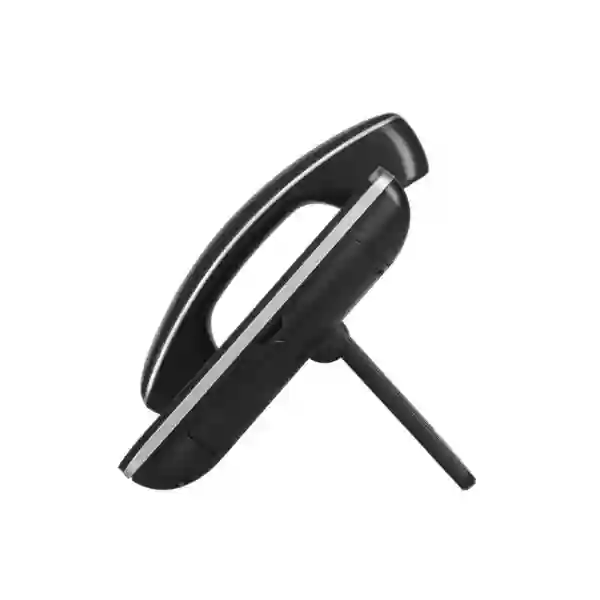
The GXV3370 includes a built-in stand with adjustable angles and is wall mountable. That gives installers flexibility, but placement should follow the user’s actual workflow. A camera phone should be positioned so the user can look naturally at the screen without excessive glare or backlighting. The handset cord, headset cable, Ethernet lead and optional power adapter should be routed cleanly to avoid clutter. If HDMI-out or USB is part of the design, allow enough space and ensure the power mode supports the required peripheral.
The 7-inch touch screen changes how users interact with the phone compared with a traditional keypad-heavy design. Some users adapt quickly to visual controls, while others rely on muscle memory from physical programmable keys. During a pilot, test common tasks such as answer, transfer, hold, park, conference, contact search and voicemail. A premium phone is successful only when common actions are fast for the role using it.
Deployment patterns in Dubai and the UAE
Dubai headquarters
A headquarters deployment may reserve GXV3370 units for senior managers, reception, board-office support and teams that regularly coordinate with branches. Standardize VLAN, PoE, provisioning and headset models before scale-up.
Abu Dhabi enterprise office
Large offices can treat the GXV3370 as one endpoint tier inside a wider phone standard, assigning it only where integrated video and touch workflows provide operational value.
Sharjah multi-department site
For mixed departments, avoid deploying the same premium endpoint everywhere. Match phone class to job role and use centralized provisioning to keep administration consistent.
Deira and Bur Dubai commercial offices
Space-conscious offices can use PoE and the phone’s switched Ethernet layout to simplify cabling, provided switch power capacity and VLAN policy are planned correctly.
Regional procurement beyond the UAE
Organizations headquartered in Dubai often standardize communications across several countries. The GXV3370 can be evaluated as part of that strategy, but a regional standard should account for network quality, local SIP services, power design, support capability, replacement logistics and regulatory or platform requirements in each market. A configuration that works well in one office should not simply be copied to another without validating connectivity and PBX design.
For East African deployments, Fourteck’s regional resources can support broader planning through Fourteck Uganda, Fourteck Kenya and Fourteck Tanzania. For West African requirements, organizations can review Fourteck Nigeria and Fourteck Ghana. Gulf projects can also be aligned through Fourteck Kuwait. These links are useful when the handset decision is part of a wider multi-country infrastructure requirement.
How to decide between GXV3370 and another phone class
The right alternative depends on the missing or unnecessary requirement. If the user does not need a camera, Android applications or a large touch interface, a voice-focused SIP phone may be simpler. If the user needs video but also requires a newer application environment, a different generation of Android video phone may be more appropriate. If the requirement is team collaboration in a meeting room, compare dedicated conference or room systems. If mobility is the priority, a Wi-Fi or DECT handset may serve the workflow better.
When comparing models, use a requirement matrix rather than a feature count. Include SIP accounts, screen type, camera and video resolution, conferencing, Ethernet speed, PoE, Wi-Fi, Bluetooth, headset support, operating-system requirements, management platform, lifecycle status, PBX compatibility and user role. Weight each item according to the business need. This prevents a high-spec phone from being selected for a desk that gains no value from its advanced features.
Businesses reviewing the broader Grandstream portfolio can use Fourteck’s Grandstream UAE resource as part of product-family planning, while Fourteck UAE covers wider IT infrastructure requirements.
Procurement checklist for Grandstream GXV3370 Dubai projects
- Confirm the user role and why built-in video or Android functionality is needed.
- Confirm the PBX or hosted SIP service and required advanced call features.
- Confirm number of SIP accounts per user and any shared-line requirements.
- Confirm switch model, PoE/PoE+ capability and total power budget.
- Confirm voice VLAN, QoS, DNS, NTP and DHCP design.
- Confirm whether wired Ethernet or Wi-Fi will be the primary network path.
- Confirm headset model and whether Bluetooth, RJ9, 3.5 mm or EHS functionality is required.
- Confirm any USB, SD or HDMI-out use and the required power method.
- Confirm camera/video expectations and remote-end compatibility.
- Confirm provisioning and GDMS strategy for multi-device rollout.
- Confirm required third-party applications against Android 7.0 and target firmware.
- Confirm lifecycle, support, replacement and standardization strategy before bulk procurement.
Installation and rollout approach for business environments
A reliable rollout usually begins with a small pilot. Select users who represent the final deployment: for example, one manager, one receptionist, one heavy headset user and one branch coordinator. Configure the PBX accounts, firmware, VLAN, QoS, phonebook, security and provisioning profile. Then test ordinary calls, transfers, holds, conferencing, voicemail, directory lookup, headset behavior, video calls, failover expectations and any required application.
After the pilot, convert successful settings into the standard provisioning profile. Document switch-port configuration and PoE assumptions. Define the firmware version or approved update policy. Prepare user guidance for the tasks that matter most. A short role-specific guide is often more useful than a complete product manual because users mainly need repeatable steps for answer, transfer, park, conference, voicemail and video.
During deployment, label devices and associate them with users or locations in the management system. Avoid storing SIP passwords in uncontrolled spreadsheets. Keep spare units for critical roles if business continuity requires rapid replacement. Finally, monitor help-desk tickets during the first weeks to identify training or network issues. Many apparent “phone problems” are actually VLAN, switch, PBX, WAN or user-workflow issues, so troubleshooting should cover the full path.
Troubleshooting considerations before escalating a GXV3370 issue
If a phone does not register, verify network reachability, VLAN assignment, IP address, DNS, time synchronization, SIP server address, authentication ID, password and transport settings. If calls connect with no audio, inspect RTP routing, firewall/NAT policy, codec negotiation and VLAN/QoS configuration. If video fails, confirm both endpoints support compatible SIP video and H.264 settings and that the network path has enough bandwidth.
For intermittent quality, collect evidence rather than guessing. Check packet loss, latency, jitter, switch errors and WAN congestion. Compare the problem with another endpoint on the same network. If only one device is affected, review its local configuration and physical connection. If many devices show the same symptoms, investigate the network or PBX. Centralized management is valuable because it lets administrators compare configuration state quickly.
For application issues, determine whether the problem is with the phone firmware, Android version, application version or server-side service. Because the GXV3370 runs Android 7.0, some modern third-party application versions may have requirements beyond the device’s operating environment. Validate support before treating an application failure as a hardware defect.
Why businesses choose Fourteck for GXV3370 planning
Fourteck’s role is to help align the endpoint with the business requirement. That can include model selection, PBX/SIP compatibility review, network-readiness checks, PoE and VLAN planning, headset and accessory considerations, provisioning strategy, regional rollout design and comparison with other Grandstream options. This is more useful than treating the phone as an isolated SKU because the endpoint experience depends on the surrounding communications system.
For a Grandstream GXV3370 Dubai requirement, provide the number of users, current PBX or hosted service, location, user roles, switch model if known, headset requirement, whether video is required and whether the project is a new system or an expansion. That information makes it easier to recommend a suitable design and identify compatibility checks before procurement.
Frequently asked questions about the Grandstream GXV3370
Is the GXV3370 a SIP phone?
Yes. The GXV3370 is a SIP-based IP video phone and supports up to 16 SIP accounts. Advanced feature behavior can depend on the PBX or hosted SIP platform, so platform-specific requirements should be validated.
How many lines and SIP accounts does the GXV3370 support?
Grandstream specifies 16 lines with up to 16 SIP accounts. This is useful for users who manage multiple extensions, services, branches or identities from one desk.
Does the GXV3370 support video calling?
Yes. It has a tiltable megapixel camera with a privacy shutter and supports video up to 720p at 30 frames per second. Grandstream also specifies 3-way 720p HD video conferencing.
Does the GXV3370 have Wi-Fi?
Yes. It includes integrated dual-band 2.4 GHz and 5 GHz Wi-Fi using 802.11a/b/g/n. For fixed enterprise desks, wired Ethernet may still be preferred where predictable network performance is important.
Does the GXV3370 support Bluetooth headsets?
The phone includes Bluetooth 4.0 + EDR and can connect compatible Bluetooth devices, including headsets. Exact headset compatibility and call-control features should be confirmed for the chosen model.
Can the GXV3370 be powered by PoE?
Yes. It supports 802.3af PoE and 802.3at PoE+. The switch must have sufficient available PoE budget. Grandstream notes that USB is enabled only when the phone uses the supplied power adapter or PoE+.
What operating system does the GXV3370 use?
The GXV3370 runs Android 7.0. This enables Android-based functionality and supported third-party applications, but application compatibility should be verified because modern apps can require newer operating-system versions.
Can the GXV3370 connect a PC through the phone?
Yes. The device has dual-switched Gigabit Ethernet ports, making it suitable for common phone-plus-PC desk cabling designs. VLAN and switch-port configuration should follow the organization’s network policy.
Does it support HD audio?
Yes. Grandstream specifies HD audio on the handset and speakerphone and supports wideband codecs including G.722 and Opus. Actual wideband quality depends on end-to-end codec negotiation and the connected platform.
How many participants can use local audio conferencing?
The GXV3370 supports up to 7-way audio conferencing, including the host. This is local phone conferencing and should not be confused with the larger capacity or management features of a hosted meeting platform.
Does the GXV3370 support secure SIP communications?
It supports TLS and SRTP along with HTTPS, encrypted configuration files and 802.1X. These features can form part of a secure deployment, but security depends on the PBX, network and provisioning configuration as well.
Can the GXV3370 be centrally provisioned?
Yes. Grandstream documents firmware upgrade through TFTP, HTTP and HTTPS, mass provisioning with TR-069 and encrypted XML configuration files, plus support for GDMS device management.
Is the GXV3370 suitable for reception desks?
It can be suitable where reception needs multiple SIP accounts, visual call handling, video capability, directory access and headset support. The exact receptionist workflow should be tested, especially if many programmable line keys are required.
Is the GXV3370 suitable for meeting rooms?
It is primarily a personal desktop video phone. For a small desk-based discussion its local conferencing can be useful, but rooms with several participants often benefit from a dedicated conference or room system with a larger display and room-focused audio/video coverage.
Can the GXV3370 run Microsoft Teams or other Android apps?
Grandstream documentation references third-party Android applications and gives Microsoft Teams as an example. However, application requirements change over time, so current application compatibility must be verified against Android 7.0, the device firmware and the application version before purchase.
What should I provide when requesting a GXV3370 quotation in Dubai?
Provide the required quantity, user roles, PBX or hosted SIP platform, office location, switch/PoE details if known, headset requirement, whether video is essential, and whether installation or configuration support is required. Fourteck can then evaluate the requirement without assuming stock, price or compatibility.
Plan your GXV3370 deployment with the system around it
The strongest Grandstream GXV3370 Dubai deployment is one where the phone matches the user role, SIP platform, network, security policy, headset requirement and management strategy. Use the model for desks that genuinely benefit from integrated video, a touch interface and multi-account SIP flexibility, and use simpler endpoint classes where those features are unnecessary.
For a requirement review, share your quantity, current or planned PBX, office locations and user roles. Fourteck can help you compare suitable Grandstream endpoints, confirm design considerations and prepare a practical deployment approach for Dubai and the wider UAE.
Reviews
There are no reviews yet.