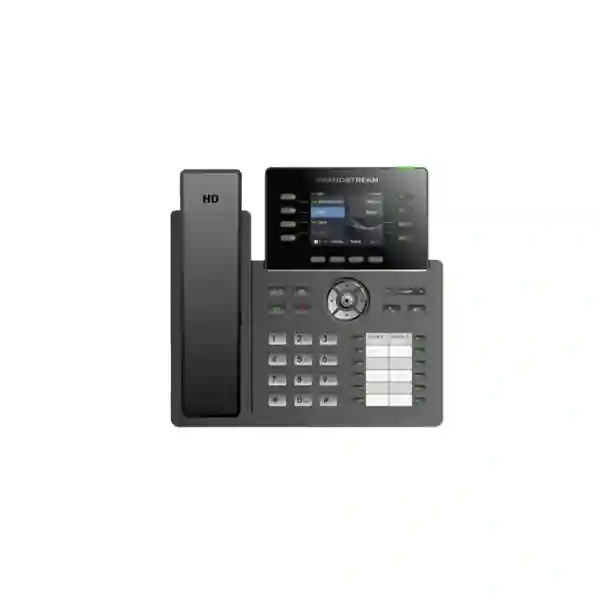
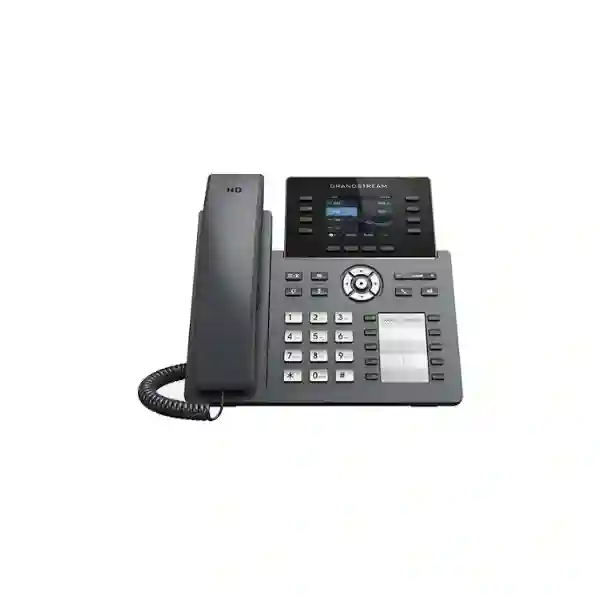
Grandstream GRP2634 Dubai – 8-Line Professional IP Phone for Busy Business Desks
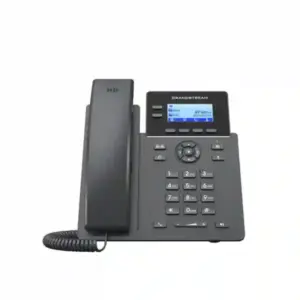
Grandstream GRP2634 Dubai is a practical choice for organizations that need more call-handling capacity than a basic office phone without moving immediately to a large touch-screen executive endpoint. The current GRP2634 platform combines eight line keys, support for up to twelve SIP accounts, ten physical multi-purpose keys, thirty-two virtual multi-purpose keys, Gigabit Ethernet with Power over Ethernet, integrated Bluetooth, HD audio, 5-way voice conferencing and centralized Grandstream Device Management System support. On current hardware version 5.0 and above, Grandstream also specifies integrated dual-band Wi-Fi 6. That mix makes the phone especially relevant for reception counters, service desks, branch administrators, sales coordinators, operations teams and managers who need quick access to multiple extensions, shared lines and frequently used call functions.
For a Dubai buyer, the important question is not simply whether the GRP2634 has a long specification list. The real decision is whether its programmable key layout, SIP account capacity, network options, headset support and centralized provisioning approach fit the way staff actually work. Fourteck therefore positions this page as a buyer and deployment guide rather than a catalogue-only description. It explains where the GRP2634 fits, what to verify before ordering, how it can be prepared for Grandstream UCM or third-party SIP environments, and when a nearby GRP model may be more appropriate.
The fastest way to decide whether the GRP2634 fits your desk
Choose the GRP2634 when a user regularly handles multiple calls, extensions or shared lines and benefits from dedicated programmable keys. A receptionist who watches team availability, a service coordinator who transfers calls across departments, a branch administrator who handles several SIP identities, or a sales desk that uses call park and pickup can use the physical key surface more effectively than someone who only makes occasional outbound calls. The phone is also a strong candidate where the IT team wants standardized provisioning through GDMS and prefers PoE-powered desk endpoints connected to a managed voice VLAN.
Look at alternatives when the requirement is fundamentally different. If the user only needs a few accounts and very light call handling, a simpler GRP model may offer better value. If the operator needs a much larger number of visible programmable keys, the GRP2624 can be relevant because it supports the GBX20 extension module, whereas Grandstream lists the GRP2634 as not supporting an extension module. If the user needs a larger 4.3-inch screen and a higher line/key profile, the GRP2636 is a logical step upward. The right model is therefore driven by workflow, not by the highest number in the product name.
Grandstream’s current March 2025 GRP2634 datasheet lists Wi-Fi 6 for hardware version 5.0 and above. Older product material and older reseller pages can show Wi-Fi 5-era specifications or different SIP-account figures. For projects where wireless capability matters, confirm the hardware revision and current datasheet before purchase.
Verified GRP2634 technical profile
| Phone class | Professional carrier-grade SIP IP phone designed for easy mass deployment and management |
|---|---|
| Lines / SIP accounts | 8 line keys with up to 12 SIP accounts |
| Display | 2.8-inch 320 × 240 TFT color LCD |
| Programmable keys | 10 MPK extension keys with paper slot and 32 virtual multi-purpose keys |
| Network | Dual switched auto-sensing 10/100/1000 Mbps Gigabit Ethernet ports with integrated PoE |
| Wireless | Integrated Bluetooth; dual-band 2.4 GHz and 5 GHz Wi-Fi 6 on hardware version 5.0 and above |
| Audio | HD handset and full-duplex HD speakerphone, dual microphone and noise-shield technology |
| Conference | 5-way audio conferencing |
| Headsets | RJ9 headset jack with EHS support and USB support for Grandstream GUV Series and other compatible USB headsets |
| Management | GDMS, TR-069 and encrypted XML provisioning options |
| Security | Secure boot, encrypted data/configuration support, TLS, SRTP and 802.1X capabilities |
| Extension module | Not supported according to the current GRP2634 datasheet |
Why the programmable-key layout matters more than a headline line count
A phone can support several SIP accounts and still be inefficient at a busy desk if users cannot reach the functions they need quickly. The GRP2634 addresses that problem with a combination of line keys, ten physical multi-purpose keys and virtual multi-purpose keys. In practical terms, administrators can map frequently used functions such as BLF monitoring, speed dial, call park, shared call appearance or other supported functions according to the PBX and provisioning design. This is especially useful for employees who spend much of the day routing calls rather than simply answering their own extension.
Consider a reception desk serving a twenty-five-person office. The receptionist may need to watch the availability of senior staff, transfer incoming calls, park calls, retrieve parked calls, call security or facilities quickly, and reach common external numbers. A phone with sufficient programmable access reduces the number of menu steps and can make the call flow easier to learn. It also helps standardize the desk: when every receptionist sees the same key order and labels, shift handover is easier and support teams can document the configuration consistently.
The limitation is equally important. Ten physical MPK fields are useful, but they are not the same as a large expansion console. If a hotel switchboard, large clinic, contact-heavy executive assistant or central reception team needs dozens of always-visible BLF keys, the design should be evaluated against models that support an external expansion module or a larger native key surface. Choosing the GRP2634 because “it supports many keys” without mapping the actual call-handling workflow first can create avoidable compromises.
Network design: PoE first, Wi-Fi where it genuinely solves a problem
For a permanent desk phone, wired Ethernet with PoE is usually the most predictable enterprise design. The GRP2634 provides dual Gigabit Ethernet interfaces, so the phone can connect to the network while a nearby computer can use the switched PC port. When connected to a suitable PoE switch, power and data can share the network cable, reducing the need for a local power socket and simplifying UPS-backed voice continuity. This is valuable in Dubai offices where structured cabling, managed switches and centralized UPS systems are already part of the IT infrastructure.
Wi-Fi becomes useful in different situations. A temporary project office may need to deploy phones before all desk outlets are complete. A renovated reception area may have power but no convenient Ethernet drop. A branch may need a limited number of endpoints in locations where additional cabling is difficult. On hardware version 5.0 and above, the current GRP2634 supports dual-band Wi-Fi 6, providing a modern wireless option. Wireless voice, however, should not be treated as a shortcut around proper network planning. Coverage, roaming behavior, channel utilization, interference, authentication and QoS all influence voice quality.
For business-critical deployments, Fourteck recommends deciding per desk whether wired or wireless connectivity is the primary path. Do not assume a phone should use Wi-Fi merely because the feature is available. A wired PoE connection is often simpler to monitor and troubleshoot, while wireless deployment makes sense when it solves a real physical or operational constraint. If Wi-Fi 6 is a procurement requirement, confirm that the supplied units are hardware revision 5.0 or later before approving the order.
Voice quality, speakerphone behavior and headset workflows
Grandstream specifies HD audio on both the handset and speakerphone, a full-duplex speakerphone and noise-shield technology for the GRP2634. Those features matter in open offices because a desk phone is often used in more than one mode during the same day. A user may begin a call on the handset, move to a headset during data entry, and use the speakerphone for a short collaborative discussion. The endpoint therefore needs to support clear audio while the network and PBX preserve suitable codecs and QoS.
The headset interfaces broaden the deployment options. The phone includes an RJ9 headset connection and supports EHS with compatible Plantronics devices, while USB connectivity supports Grandstream GUV Series headsets and other compatible USB headsets. Integrated Bluetooth can also support wireless accessories depending on the exact accessory profile and compatibility. For a call-heavy role, headset selection should be treated as part of the endpoint design rather than a later add-on. The team should verify wearing style, microphone noise rejection, wireless range, call-control requirements and desk-sharing needs before standardizing a headset model.
Audio performance also depends on the system around the phone. Packet loss, jitter, overloaded WAN links, poor Wi-Fi coverage, incorrect QoS and mismatched codec settings can degrade even a well-designed endpoint. During deployment, test real calls between branches, to PSTN/SIP trunks, to mobile networks and across any VPN or SD-WAN path used by the business. That gives a more realistic result than testing only extension-to-extension calls on the same LAN.
GDMS and zero-touch thinking for multi-phone deployments
The GRP family was built with mass deployment in mind, and that is one of the strongest reasons to consider the GRP2634 for a standardized business rollout. Grandstream Device Management System provides a centralized interface for provisioning, configuring, monitoring and managing Grandstream endpoints. Instead of treating each desk phone as a one-off manual configuration task, the IT team can build a repeatable profile, apply settings by group or site, and manage firmware and configuration changes more systematically.
This becomes increasingly valuable as the number of endpoints grows. Ten manually configured phones may seem manageable, but fifty or several hundred devices across Dubai, Abu Dhabi and remote branches become difficult to maintain consistently without a centralized method. A standard template can define SIP behavior, network parameters, time zone, language, programmable keys, security controls and other supported settings. Site- or role-specific profiles can then override only what needs to change. That reduces configuration drift and makes troubleshooting easier because technicians know what “normal” should look like.
Central management does not remove the need for change control. Firmware should still be tested on a representative group before a large rollout, especially if the phone connects to a third-party PBX, call-recording platform, contact-center solution or unusual SIP trunk environment. Likewise, administrators should maintain records of the approved firmware train, PBX template, VLAN configuration and headset compatibility. GDMS is most effective when it sits inside a disciplined endpoint-management process rather than being treated simply as a remote login tool.
SIP accounts, PBX compatibility and what “12 accounts” really means
The current GRP2634 documentation supports up to twelve SIP accounts and eight lines. That does not mean every installation should configure twelve independent accounts. In many offices, a user may need only one personal extension plus one or two shared service identities. In other environments, a front desk may register several business units, branch numbers or queue-related accounts. The value is flexibility: the phone can participate in more complex SIP designs without forcing every user into that complexity.
The GRP series is designed for broad SIP interoperability, so the GRP2634 can be considered for Grandstream UCM deployments and many standards-based third-party SIP platforms. Compatibility should still be verified at the feature level. Basic registration and calling are only the first layer. Organizations may also rely on BLF, attended transfer, call park, shared line appearance, corporate directories, LDAP, voicemail indication, server redundancy, hot desking, provisioning, SRTP, TLS or other platform-specific features. A test plan should validate the functions that matter to the user, not just whether the phone can place a call.
For cloud-hosted PBX projects, confirm the provider’s approved device list and provisioning method. Some providers offer a dedicated GRP profile; others may use generic SIP configuration. If the provider requires a particular firmware release or disables local administrative access, that should be known before a bulk purchase. For on-premises or private-cloud PBX systems, confirm VLAN design, DHCP options if used, DNS/NTP access, firewall policy, outbound SIP/RTP behavior and remote provisioning reachability as part of the deployment scope.
Security capabilities are useful only when the deployment uses them
Grandstream lists secure boot, dual firmware images, encrypted data storage/configuration capabilities, TLS, SRTP and 802.1X among the GRP2634 security features. These are meaningful building blocks for a business endpoint, but the presence of a feature does not automatically make a deployment secure. The phone still needs an appropriate administrator password policy, controlled provisioning, trusted firmware, segmented network access and a PBX security configuration that matches the organization’s threat model.
A practical enterprise baseline is to place voice endpoints on a dedicated voice VLAN where the network architecture supports it, restrict management access, use authenticated provisioning, keep firmware under change control, disable unused services where practical, and use encrypted signaling/media when supported end to end by the PBX and service provider. If 802.1X is part of the access-control design, validate the exact authentication method and certificate workflow before a large rollout. Security settings that are technically available but operationally untested can create support problems during deployment.
Remote workers and branch offices need additional consideration. If phones register across the public internet, through VPN, via SBC infrastructure or through a hosted PBX provider, the signaling path, NAT behavior and certificate requirements should be documented. Avoid exposing phone web interfaces directly to the public internet. Where possible, use provider-supported secure provisioning and management methods and keep endpoint configuration aligned with the PBX vendor’s guidance.
Which business roles gain the most from the GRP2634?
| Role | Why it can fit | What to verify |
|---|---|---|
| Reception / front desk | Physical MPK keys, VPKs, transfer, park/pickup and multi-line handling | Whether ten physical MPKs are enough for the number of monitored extensions |
| Sales coordinator | Multiple identities, frequent transfers, headset support and quick-dial access | CRM / click-to-dial workflow and PBX integration |
| Branch administrator | Centralized management, shared lines and high call-handling flexibility | WAN resilience, server failover and branch QoS |
| Customer service desk | Headset options, HD audio and programmable call controls | Queue features, call recording and supervisor requirements |
| Operations manager | Multiple SIP identities and shortcut keys without a large touch display | Whether a larger-screen executive model is preferred |
| Hot-desk environment | Supported hot-desking features and centralized provisioning can simplify shared workspaces | PBX login behavior, user profile handling and headset hygiene/storage policy |
A practical deployment blueprint for a Dubai office
Start with the call workflow, not the device count. Identify which users truly need the GRP2634 and which can use simpler phones. Reception, office managers, service coordinators and team leaders may need richer key layouts, while occasional phone users may not. This role-based approach controls project cost and creates a more consistent user experience. It also avoids buying advanced endpoints that are never configured beyond one extension and a basic dial tone.
Next, map the network. Confirm PoE capacity on access switches, available switch ports, voice VLAN configuration, DHCP/DNS/NTP availability, WAN bandwidth and failover. If wireless endpoints are planned, conduct a coverage and capacity assessment rather than assuming normal laptop Wi-Fi performance guarantees voice quality. Where a PC will connect through the phone, confirm VLAN tagging behavior and any security policy that distinguishes voice and data traffic. If 802.1X is used, include certificate or credential enrollment in the rollout plan.
Then define the PBX profile. Decide which SIP accounts each role receives, how line keys are mapped, which BLF targets are visible, how call park is presented, what transfer method is expected, and whether users need LDAP or XML directories. Define codec preferences, time zone, language, ring tones, voicemail access, emergency dialing rules and any feature codes. Build a pilot profile in GDMS or the chosen provisioning platform and test with a small user group before expanding the deployment.
Finally, document handover. Users need a short role-specific guide that explains the functions actually configured on their phones. Help-desk staff need the approved firmware, reset/provisioning process, PBX registration template, network prerequisites and escalation path. The result should be a repeatable deployment package rather than a collection of independently configured desk phones.
Dubai, Abu Dhabi and wider UAE deployment considerations
Dubai: Multi-tenant offices, business centers, retail groups, logistics companies and professional services firms often need fast moves, adds and changes. The GRP2634 works well where IT teams want a standardized professional phone that can be reprovisioned between users and sites. In Deira and Bur Dubai trading offices, front desks may benefit from physical programmable keys and multi-account flexibility. In JLT, Business Bay or larger corporate environments, PoE and VLAN integration may be more important because voice is part of a managed campus network. The design should match the building network and PBX architecture rather than relying on a one-size-fits-all template.
Abu Dhabi: Enterprises and institutional environments may place greater emphasis on controlled firmware, security policy, structured handover and multi-site standardization. The GRP2634’s centralized management options can support this approach when combined with tested configuration templates and network access controls. If a project spans headquarters and remote facilities, verify WAN resilience, SBC/VPN design, numbering plans and failover behavior before bulk deployment.
Sharjah and Ajman: Cost-sensitive business environments can benefit from assigning the GRP2634 only to roles that genuinely need its key density and account capacity, while using simpler endpoints elsewhere. This mixed-model approach is often more sensible than standardizing every desk on the same high-feature phone. What matters is maintaining a common provisioning framework, similar button logic and compatible accessories across the fleet.
Across the UAE: For distributed branches, establish a common firmware baseline, naming convention, device inventory and support workflow. If a branch relies on Wi-Fi, confirm hardware revision 5.0 or later when Wi-Fi 6 is required and validate local wireless performance. If the design relies on PoE, calculate switch power budgets and UPS runtime. For procurement, request the exact model and hardware revision details when they affect the specification.
Regional projects outside the UAE: what changes and what stays the same
The same GRP2634 can serve offices in Uganda, Kenya, Kuwait, Nigeria and Tanzania, but deployment priorities can differ. In Kampala or Nairobi branch environments, internet stability and branch power design may influence whether the PBX is local, cloud-hosted or reached through a resilient WAN. In Kuwait, centralized enterprise standards and hosted communications may drive provisioning and security choices. In Lagos or Dar es Salaam, multi-site organizations may place greater emphasis on WAN failover, remote management and the ability to support endpoints without frequent on-site visits.
The endpoint decision should therefore be separated from the system design. The GRP2634 provides a capable SIP desk interface, but the quality of the overall solution depends on the PBX platform, carrier or SIP trunk, LAN switching, internet/WAN, power continuity and support model. A branch with unreliable WAN connectivity may need local survivability or a different architecture even if the desk phone itself is appropriate. A branch with strong connectivity but no structured cabling may value Wi-Fi support more highly.
Fourteck’s regional network can be used to coordinate broader ICT requirements where appropriate. UAE buyers can start at Fourteck UAE, while organizations with East African or West African operations can review the relevant Fourteck regional properties such as Fourteck Uganda, Fourteck Kenya, Fourteck Tanzania and Fourteck Nigeria. The regional page should be used for project context; exact stock, delivery, warranty and commercial terms must be confirmed at quotation time.
GRP2634 vs GRP2624 vs GRP2636: choose by operator workflow
| Decision point | GRP2624 | GRP2634 | GRP2636 |
|---|---|---|---|
| Primary fit | Busy desk needing 8-line class with optional expansion capability | Busy desk wanting built-in MPK fields without an expansion module | Higher-capacity professional desk needing more lines and a larger screen |
| Lines | 8 | 8 | 12 |
| SIP accounts | Up to 12 in current documentation | Up to 12 in current documentation | Up to 16 in current datasheet |
| Screen | 2.8-inch color LCD | 2.8-inch color LCD | 4.3-inch color LCD |
| Expansion module | GBX20 supported | Not supported | Evaluate current model documentation for project need |
| Best question to ask | Will this user need a large external key field? | Are ten physical MPKs plus VPKs enough? | Does the user need more lines, accounts and screen space? |
Model documentation evolves, so comparison decisions should use current datasheets at the time of quotation. The practical distinction is not simply “good, better, best.” GRP2624 can be attractive when external expansion is important; GRP2634 offers a built-in key field that suits many busy desks without an add-on module; GRP2636 moves upward in line count, account capacity and display size. Matching the phone to the operator’s real workflow prevents overspending and reduces user frustration.
Procurement checklist before requesting a GRP2634 quotation
A useful quotation request gives enough information to confirm the right model, accessories and deployment scope. Before requesting pricing, collect the following project details. This reduces back-and-forth and helps prevent mismatches between the phone and the PBX or network.
- Quantity and user roles: state how many phones are for reception, managers, sales, service desks or general staff.
- PBX platform: identify Grandstream UCM, hosted PBX, 3CX, Yeastar, Asterisk-based platform or another SIP system where known.
- Connectivity: confirm whether each phone will use PoE Ethernet, local power adapter, Wi-Fi or a mixture.
- Wi-Fi revision requirement: if Wi-Fi 6 is mandatory, request hardware version 5.0 or above and confirm it before order acceptance.
- Headsets: specify USB, RJ9/EHS or Bluetooth preference and whether call-control compatibility is required.
- Programmable keys: estimate how many BLF, park, shared-line and speed-dial positions each key user needs.
- Provisioning: explain whether you need GDMS onboarding, PBX registration, role templates or on-site staging.
- Locations: list Dubai, Abu Dhabi, Sharjah or other branch sites and note whether configuration differs by site.
- Network readiness: identify PoE switch availability, voice VLAN requirements, WAN links and any 802.1X policy.
- Commercial confirmation: request current price, availability, delivery, warranty and hardware revision at quotation time rather than relying on static web listings.
Installation and staging: a repeatable process for business rollouts
A professional rollout should begin before the phones reach users’ desks. Record device identifiers, assign each unit to a site or role, confirm the target firmware and create the provisioning template. For a staged deployment, technicians can predefine the PBX server, account placeholders, time settings, network behavior, button layout and security controls. The goal is for a phone to arrive at the desk with minimal manual work and a predictable configuration state.
At the desk, verify physical connectivity, PoE negotiation where used, VLAN assignment, IP address, DNS/NTP reachability and PBX registration. Test inbound and outbound calls, transfer, hold, voicemail, BLF, call park/pickup, headset operation and any shared lines. For reception or service users, test the exact high-frequency workflow, including multiple simultaneous calls. For Wi-Fi installations, test at the actual desk during busy periods and confirm that the phone remains stable on the intended band and SSID.
After acceptance, lock down administrative access according to policy and capture the final template as the approved baseline. Maintain a small spare pool for larger deployments so failed or damaged phones can be swapped quickly. If the environment uses GDMS, assign devices consistently to organizations, sites and groups so future updates can be targeted accurately. If the PBX provider has its own provisioning platform, decide which system is authoritative and avoid competing configuration sources.
Installation quality affects the support experience long after the initial project. A phone with an undocumented local configuration is harder to replace, while a centrally managed and well-documented endpoint can often be swapped and reprovisioned in minutes. The GRP2634’s mass-deployment orientation is most valuable when the organization adopts that repeatable operating model.
Common deployment mistakes to avoid
Buying from an old specification listing: older GRP2634 material can show earlier wireless or account details. Use current Grandstream documentation and confirm hardware revision where Wi-Fi 6 matters. The current datasheet specifically associates Wi-Fi 6 with hardware version 5.0 and above.
Assuming Wi-Fi removes the need for network planning: voice is sensitive to latency, jitter and loss. A phone can support Wi-Fi 6 and still perform poorly on a congested, weak or badly designed wireless network. Use Wi-Fi because the physical deployment requires it, not simply because the feature is available.
Ignoring the key-count requirement: ten physical MPK fields may be ideal for one receptionist and insufficient for another. Count the extensions and functions that need always-visible access. If the user needs a very large BLF field, evaluate a model with expansion-module support or a larger programmable surface.
Testing only basic calls: a SIP phone can register successfully while advanced workflows fail because of PBX template differences. Validate transfer, BLF, park, pickup, directory, voicemail, headset call control, failover and security features that are actually part of the design.
Deploying without a rollback plan: firmware and configuration changes should be piloted. Keep a known-good configuration and approved firmware reference so the team can recover quickly if a bulk change causes an interoperability issue.
When the GRP2634 is a strong fit — and when it is not
Strong fit
Choose it for busy professional desks that need several SIP identities, physical programmable keys, HD audio, headset flexibility, Gigabit PoE, centralized management and a conventional desk-phone interface. It is particularly sensible when ten physical MPKs plus virtual keys cover the user’s monitoring and shortcut requirements without needing an external expansion module.
Consider another model
Look elsewhere when the role needs only one or two basic extensions, when a large external BLF expansion panel is mandatory, when a much larger display or touch interface is central to the workflow, or when the PBX provider does not support the required GRP feature set. A cheaper or different endpoint can be the better engineering choice even if the GRP2634 is technically capable.
GRP2634 for reception: a realistic call-flow example
Imagine a professional services office with one main published number, twenty internal extensions and two receptionists covering staggered shifts. The reception role needs to answer the main line, see the status of key staff, transfer calls, park a caller when the destination is uncertain, retrieve parked calls, reach facilities and security quickly, and occasionally place a 5-way conference call. In that environment, the GRP2634’s value comes from how the button map is designed. Ten physical MPKs can be reserved for the most important BLF targets or shared functions, while VPKs handle additional programmable actions.
The PBX template should be role-based rather than user-based. Both receptionists should receive the same button positions, labels and transfer behavior. If one receptionist moves to another branch, the profile can be reproduced. Training should focus on the exact sequence for answer, hold, transfer, park and retrieve. A printed key legend is useful when the physical MPK area uses paper labels. The organization should also decide whether missed calls, voicemail and directory access are part of the reception role or handled elsewhere.
If the office later grows from twenty to sixty monitored extensions, the original design should be revisited. The GRP2634 may still work if only a subset of staff needs visible BLF, but a larger expansion-oriented model could become more efficient. This is why endpoint selection should consider the expected two- or three-year workflow rather than only today’s user count.
GRP2634 for managers and team leaders
Managers often need fewer visible extensions than receptionists but more communication flexibility than a standard desk user. A team leader may monitor a handful of direct reports, use one corporate extension plus a departmental line, join conference calls, alternate between handset and headset, and need quick access to voicemail or a shared call park. The GRP2634 can fit this middle ground well because it provides a professional key surface and multiple accounts without requiring a large touch-screen device.
The display is a 2.8-inch color LCD, so buyers should be realistic about screen expectations. It is suitable for menus, caller information and normal phone operation, but it is not intended to provide the visual workspace of a large executive touch phone. If the manager expects extensive on-screen directory browsing, video, application integration or a large visual BLF field, another class of device may be more appropriate. If the priority is fast physical call control and dependable SIP functionality, the GRP2634 remains a strong candidate.
For hybrid work, consider whether the desk phone stays assigned to one user or becomes part of a shared office. Hot-desking support can help in some PBX environments, but the login, personal directory and account behavior should be tested on the actual platform. A managed headset pool, sanitization process and consistent button template can make shared desks easier to support.
GRP2634 for service desks, retail and branch operations
Service desks and branch counters often combine public-facing calls with internal coordination. Staff may answer customer enquiries, transfer to specialist teams, contact warehouse or delivery staff, and manage multiple queue or departmental numbers. Here, quick-dial and BLF access can reduce repetitive navigation. A wired PoE deployment is attractive when the counter has structured cabling, while Wi-Fi can help in temporary counters or locations where cabling is impractical, provided wireless performance is validated.
Retail groups with many branches can benefit from standardized provisioning. A central IT team can define a base template for all branches, then adjust only the local extension, branch number and a few location-specific keys. This lowers the risk that one store uses different transfer behavior or firmware from another. If a branch phone fails, a replacement can be assigned to the same profile and brought online with less local technical work.
For branch environments, power continuity deserves attention. PoE endpoints backed by a central UPS can continue operating during short power interruptions if the switch, router, firewall and PBX path are also protected. A phone powered by PoE is not automatically resilient if the upstream network loses power. Treat the complete communications path as one service chain.
Directory, call history and everyday usability
Grandstream documents support for downloadable phonebooks using XML and LDAP, with up to 2,000 phonebook items, as well as call history up to 2,000 records. For organizations with a central directory, LDAP or supported XML directory integration can be more maintainable than manually storing contacts on individual phones. The PBX or directory design should define which source is authoritative and how often changes are synchronized.
Call history is useful for routine callback work, but it should not be confused with a CRM or call-detail reporting system. If sales or customer service teams need structured records, call outcome tracking or analytics, integrate the PBX with the appropriate application rather than depending on local phone history. Likewise, personalized ringtones and screen customization can improve usability, but they should not distract from standardized support requirements.
The phone’s swappable faceplate can support organizational branding in suitable deployments. This may be useful for service providers, hospitality or enterprise standardization, but any custom branding should be planned as a procurement item. Do not assume custom faceplates are automatically included with a standard unit; confirm options and commercial terms when required.
Power, mounting and physical installation details
The current GRP2634 datasheet specifies integrated 802.3af Power over Ethernet and also lists a universal 12V power adapter in the package contents. Maximum power consumption is specified as 9.5W using the power adapter or 10.8W with PoE. For a large rollout, PoE switch power budgeting should include the phone load plus appropriate headroom for other powered devices on the same switch. If switches are UPS-backed, calculate runtime using the full network load rather than the phone wattage alone.
The phone stand supports two angle positions, and Grandstream indicates wall mounting is possible with a wall mount sold separately. This matters for security desks, small counters or wall-mounted operational areas where normal desk placement is not ideal. Measure the installation location and verify cable routing before ordering mounting accessories. The physical dimensions in the current datasheet are approximately 220 mm × 210 mm × 82 mm, with a unit weight around 880 g.
Environmental limits should also be respected. Grandstream specifies operation from 0°C to 40°C and 10% to 90% non-condensing humidity. The GRP2634 is an indoor business endpoint, not an outdoor or industrialized telephone. Warehouses, guard houses or hot utility rooms may require environmental assessment before using a standard office phone.
What Fourteck can scope around the GRP2634
A phone purchase can be handled as a simple endpoint supply requirement, but many business customers need a broader deployment scope. Fourteck can discuss the GRP2634 as part of an IP telephony project that may include phone selection, PBX compatibility review, extension planning, SIP trunk coordination, PoE switching, VLAN/QoS design, provisioning approach, headset selection and rollout support. The exact scope should be defined from the customer environment rather than assumed from the phone model alone.
For a new office, the project may begin with user counts and call flow. For an existing office, the priority may be migration from older phones while preserving extension numbers and PBX features. For a multi-site organization, centralized management and common configuration templates may be the main concern. For a reception upgrade, the key question may be whether ten physical MPKs are enough or whether an expansion-oriented model is needed. These are different projects even though they all involve the GRP2634.
To discuss a requirement, share the current PBX or hosted service, number of users, branch locations, headset needs, preferred network connection and the functions used most often. Fourteck can then help narrow the endpoint choice and identify any compatibility checks that should happen before ordering. Visit the Fourteck IP Phone site for related business phone solutions.
Frequently asked questions about the GRP2634
How many SIP accounts does the Grandstream GRP2634 support?
Grandstream’s current GRP2634 datasheet lists eight line keys with support for up to twelve SIP accounts. Older product material may show a lower account count, so current documentation should be used for procurement and deployment planning.
Does the GRP2634 support Wi-Fi 6?
Yes, the current Grandstream datasheet specifies integrated dual-band Wi-Fi 6 for hardware version 5.0 and above. If Wi-Fi 6 is a project requirement, confirm the hardware revision before ordering.
Does the GRP2634 have PoE?
Yes. The phone has dual switched Gigabit Ethernet interfaces with integrated 802.3af Power over Ethernet, allowing a suitable PoE switch to provide network connectivity and power over the Ethernet cable.
Can the GRP2634 use Bluetooth or USB headsets?
The GRP2634 includes integrated Bluetooth, an RJ9 headset jack with EHS support and USB support for Grandstream GUV Series and other compatible USB headsets. Exact accessory and call-control compatibility should be verified before standardizing a headset.
How many programmable keys are available?
Grandstream specifies ten physical multi-purpose extension keys and thirty-two virtual multi-purpose keys. The exact functions available depend on the provisioning design and PBX feature support.
Can I connect an external expansion module to the GRP2634?
No. The current GRP2634 datasheet lists extension-module support as “No.” If a large external BLF/extension panel is required, consider a model designed to support an expansion module, such as the GRP2624 with GBX20 support.
Is the GRP2634 suitable for a receptionist?
It can be a strong choice for reception when ten physical MPKs plus virtual keys cover the required BLF, park, pickup, shared-line and speed-dial functions. For very large extension-monitoring requirements, an expansion-capable model may be more efficient.
Does the GRP2634 work with Grandstream UCM PBX systems?
The GRP2634 is part of Grandstream’s SIP endpoint portfolio and is a natural candidate for Grandstream UCM deployments. The final template should still be validated for firmware, programmable keys, security settings, directories and any site-specific call flow.
Can the GRP2634 work with third-party SIP platforms?
The GRP series is designed for broad SIP interoperability. Basic and advanced features should be tested against the exact third-party PBX or hosted provider, because provisioning methods and feature support can vary.
What screen does the GRP2634 use?
The current datasheet specifies a 2.8-inch 320 × 240 TFT color LCD. Buyers who need a larger visual interface should compare the GRP2634 with higher models such as the GRP2636.
Does the GRP2634 support 5-way conference calls?
Yes. Grandstream specifies support for 5-way audio conferencing. PBX or service-provider policy may still affect how conference features are used in a specific deployment.
Is Grandstream GRP2634 Dubai pricing fixed on this page?
No. Price, availability, delivery, warranty and hardware revision can change. Request a current Fourteck quotation with the required quantity, deployment location and accessory needs so the commercial offer matches the actual project.
Request a GRP2634 quotation or compatibility check
If you are planning Grandstream GRP2634 Dubai deployment for reception, management, sales, service or branch users, send Fourteck the quantity, PBX platform, preferred connectivity, branch locations, headset requirement and number of programmable keys each role needs. We can help you confirm whether the GRP2634 is the right fit or whether another GRP model provides a better match for the workflow.
Recommended next action: request a current quote and confirm the required hardware revision, especially when Wi-Fi 6 is part of the project specification. Static web prices and old reseller specification tables should not be treated as final procurement confirmation.
Technical source note
Core technical specifications on this page are based on Grandstream’s current GRP2634 product information and the GRP2634 English datasheet, version 2 dated March 2025. For project-critical specifications, firmware behavior, accessories and hardware-revision-dependent features, confirm the latest documentation at the time of purchase. Official references: Grandstream GRP2634 product page and GRP2634 datasheet.

Reviews
There are no reviews yet.