Grandstream GBX20 Dubai: Extension Module for High-Volume Call Handling
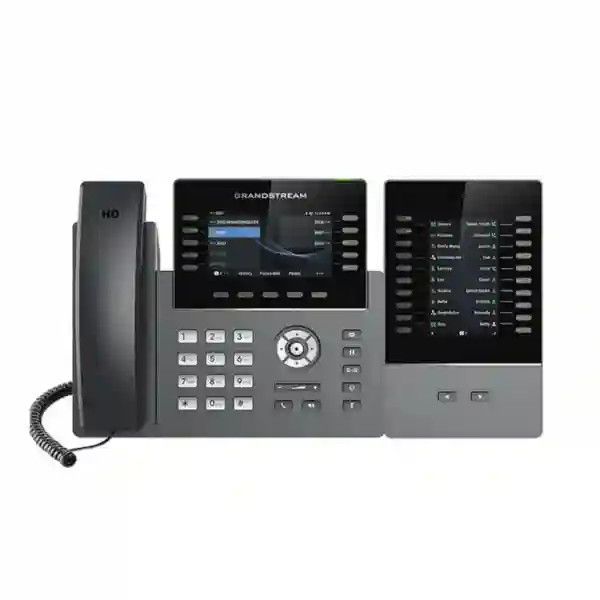
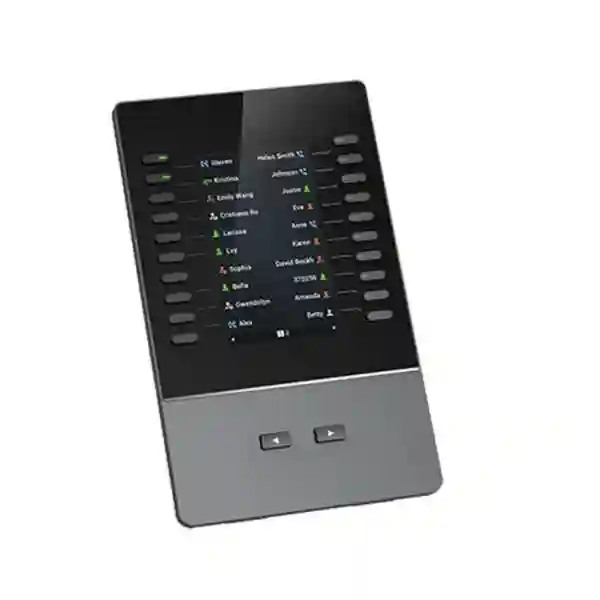
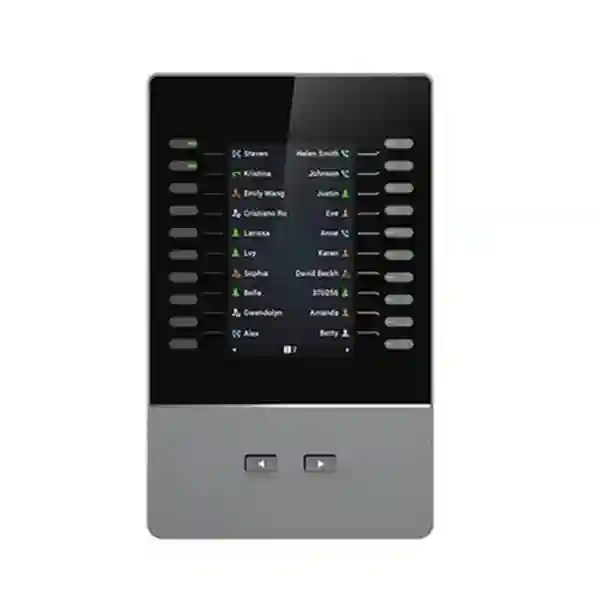
The Grandstream GBX20 is a color-display extension module for selected Grandstream GRP professional IP phones and GXV video phones. It is designed for receptionists, executive assistants, supervisors, dispatch desks and other users who need faster access to monitored extensions and call-handling functions than the host phone alone can conveniently expose. Grandstream currently specifies a 4.3-inch TFT color LCD, 20 programmable keys per page, two pages per module for up to 40 contacts or assignments, and support for daisy-chaining as many as four modules for up to 160 contacts. For Dubai and UAE organisations, the practical value is not simply more buttons; it is a clearer operator workflow for BLF monitoring, call park and pickup, speed dial, presence, intercom, conference, transfer and forward functions on compatible endpoints.
The buying decision in one minute
Choose the GBX20 when the person using the phone spends a meaningful part of the day watching extension status, transferring callers, retrieving parked calls, reaching frequently used contacts or coordinating several departments. A normal desk phone can be perfectly adequate for an employee who handles a small number of direct calls. A receptionist or operator desk is different: every extra screen change, menu step or memorised extension adds friction. The GBX20 moves frequently used actions onto a dedicated side module so the user can see and act on more destinations at once.
Before ordering, confirm the exact host phone. Grandstream currently lists the GBX20 with the GRP2615, GRP2624, GRP2650, GRP2670, GXV3350 and GXV3450. It is not a universal accessory for every Grandstream phone. If the existing handset is outside that list, the correct buying decision may be a different host phone, a different extension module, or a redesign of the operator position rather than forcing an incompatible accessory into the project.
Twenty programmable positions are visible on each page, helping keep important people and functions within direct reach.
Two page-switch keys allow one module to provide up to forty contacts, extensions or supported functions.
Supported installations can daisy-chain up to four GBX20 modules for a larger attendant-style control surface.
With four modules and two pages on each, the operator can reach up to 160 configured contacts or positions.
Who actually benefits from a GBX20?
The strongest use case is a role where call flow is part of the job rather than an occasional task. In a Dubai corporate reception, the operator may need to see whether finance, sales, HR, management and meeting-room contacts are available before transferring a caller. In a clinic, the front desk might monitor reception, billing, laboratory, nurse station and consultation rooms. In a hotel or serviced residence, an operator may need rapid access to departments and frequently used service positions. In each case, the GBX20 can reduce navigation between menus and place important call-control actions in a more visible, repeatable layout.
The module can also suit executive assistants, branch coordinators, customer-service supervisors, security or dispatch desks, and managers who monitor a large group of colleagues. It is less compelling for a user who only needs a handful of speed dials or rarely transfers calls. The right question is not only whether the phone supports GBX20, but whether the user has enough recurring call-control activity to justify a dedicated expansion surface.
Verified Grandstream GBX20 specifications
| Product type | Extension module for selected Grandstream professional IP and video phones |
|---|---|
| Display | 4.3-inch TFT color LCD, 480 × 272 pixels |
| Programmable positions | 20 per page; two pages; up to 40 contacts or assignments per module |
| Expansion | Up to four daisy-chained modules for up to 160 contacts/extensions |
| Supported functions | BLA/SCA, BLF, call park and pickup, speed dial, SIP presence, intercom, conference, transfer and forward, subject to host/PBX configuration |
| Connection | Connects through the compatible host phone EXT interface using the supplied USB connection |
| Firmware handling | Module firmware is handled through the host-phone firmware process |
| Dimensions | 210 × 124 × 33.5 mm |
| Unit weight | 360 g |
| Operating conditions | 0°C to 40°C; 10% to 90% non-condensing humidity |
For an existing installation, reconfirm the host phone, firmware level and current Grandstream compatibility guidance before procurement.
Current compatible host phones
Grandstream currently identifies six compatible host models. The following published Fourteck pages can help buyers compare the GRP options already available on the site:
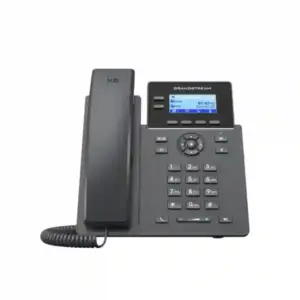
Grandstream GRP2624
Grandstream GRP2650
Grandstream GRP2670
Compatible IP video phone
Compatible IP video phone
How the GBX20 changes a receptionist workflow
A front-desk phone can become inefficient even when the PBX itself is working perfectly. The problem is often interface density. A receptionist may know exactly where a caller should go, but still needs to search a directory, change a display page, remember an extension number, or check presence elsewhere before transferring. The GBX20 addresses that interface problem by moving a larger set of programmable targets into a dedicated adjacent display.
BLF is one of the most useful examples. When the PBX and endpoint configuration support it, the operator can monitor the state of selected extensions and make a better transfer decision. Call park and pickup assignments can help teams that routinely place callers into shared parking positions. Speed dial can be useful for frequently contacted internal or external destinations. Presence, intercom, conference, transfer and forward functions can also be mapped where they make operational sense.
The best design organises the module around the user’s real workflow. Put the highest-frequency or highest-value contacts on the first page, group departments logically, reserve consistent locations for park or pickup functions, and keep similar labels across operator desks. A carefully planned twenty-key first page can be more usable than a poorly organised 160-key deployment.
Power planning for multiple modules
Power is easy to overlook in an accessory quote. Grandstream documentation states that a single GBX20 can be powered by the supported host-phone arrangement, while a setup with two or more GBX20 units requires the additional module arrangement to use a 12V/1A power supply. This is why a multi-module attendant position should be treated as a small deployment rather than a simple accessory add-on.
For a Dubai reception redesign, Fourteck can help confirm the host phone model, number of required monitored positions, desk space, module count, power requirement and key layout before procurement. This prevents a common project error: buying sufficient programmable capacity without planning the physical and electrical details needed to operate it properly.
Capacity planning by operator requirement
| Requirement | Likely approach | Planning note |
|---|---|---|
| Up to 20 high-priority positions | 1 module, first page | Keeps the most important entries visible without page switching. |
| 21–40 contacts/functions | 1 module, two pages | Use page one for frequent actions and page two for secondary destinations. |
| 41–80 positions | 2 modules | Plan external power and departmental grouping. |
| 81–120 positions | 3 modules | Check desk width and whether every monitored contact needs a dedicated key. |
| 121–160 positions | 4 modules | Treat this as a full attendant layout with documented key taxonomy and user training. |
Configuration and firmware workflow
The GBX20 is controlled from the host phone. Grandstream documentation states that GRP2615, GRP2624, GRP2650 and GRP2670 users configure the extension board from the phone web interface under extension-board settings, while GXV3350 and GXV3450 use the programmable-key area for GBX20 settings. The sidecar therefore belongs to the endpoint administration workflow rather than operating as a separate independently managed device.
Administrators should document which keys are BLF subscriptions, which are call-park positions, which are static speed dials, and which belong to priority internal contacts. When a receptionist changes role or a department is reorganised, the GBX20 layout should be updated as part of the phone configuration standard. Treating the key plan as managed configuration data makes support easier across multiple offices.
Grandstream also documents extension-module firmware as part of the host-phone firmware process. There is no need to treat the GBX20 as an isolated device with an unrelated upgrade path. Administrators should keep the host phone on an approved firmware level, review release information before production maintenance and verify attached modules after changes.
GBX20 versus GXP2200EXT
Grandstream maintains two extension-module families for different phone generations. The GBX20 is the match for the supported GRP2615, GRP2624, GRP2650, GRP2670, GXV3350 and GXV3450 list. The GXP2200EXT is associated with older compatible models such as GXP2140, GXP2170 and GXV3240. Both approaches can provide 20 positions per page, two pages per module and daisy-chain expansion, but they are not interchangeable accessories for every Grandstream phone.
For a replacement or upgrade project, identify the handset first and choose the extension module second. If a business is moving from an older GXP operator phone to a newer GRP or supported GXV model, do not assume the existing sidecar can be reused. A host-phone upgrade is the right moment to review extension-monitoring needs, BLF count, desk layout and PBX configuration.
Deployment patterns for Dubai and UAE organisations
Corporate reception
Use page one for directors, sales, finance, HR and common transfer destinations, while page two holds meeting rooms, facilities, branches and secondary contacts.
Clinic or medical centre
Group reception, appointments, billing, nurse stations, consultation areas and laboratory contacts so routine callers can be routed with fewer navigation steps.
Hotel operator desk
Front office, housekeeping, engineering, reservations, food and beverage, security and management can be grouped for quick access during guest and internal calls.
Executive assistant
Executives, assistants, boardrooms, key customers and internal stakeholders can be organised by priority rather than left in a long directory.
Service or dispatch desk
Frequently contacted teams, escalation points and operational groups can be placed on visible keys when the PBX supports the desired presence and BLF behaviour.
Multi-branch coordination
A central office can dedicate positions to important branch extensions when the PBX and inter-site dialing plan support those destinations.
Dubai, Abu Dhabi, Sharjah and wider UAE planning
For Dubai offices, the GBX20 can fit a receptionist refresh, PBX migration, new branch opening or expansion of a compatible Grandstream endpoint estate. Whether the site is in Deira, Bur Dubai, Business Bay, JLT, Dubai Internet City, JAFZA or another commercial area, the same design questions matter: which host phone is used, how many destinations need active monitoring, which PBX functions are available, how many modules are genuinely useful, and who will maintain the key plan after staff changes.
In Abu Dhabi, larger head-office and institutional environments may require a more structured naming and provisioning standard because operator desks interact with many departments. Sharjah, Ajman and other emirates may have smaller branch or front-office deployments where one GBX20 is enough to solve the visibility problem. Fourteck can design around the user role rather than recommending the maximum number of modules by default.
Availability, project lead time and commercial pricing can change, so they should be confirmed at quotation stage instead of being assumed from a static web page. A useful procurement request includes the host phone model, required quantity, number of GBX20 modules per phone, current PBX or hosted SIP platform, and whether configuration assistance is required.
Regional use beyond the UAE
The GBX20 is also relevant to organisations standardising Grandstream operator positions across Uganda, Kenya, Tanzania, Ghana, Nigeria, Kuwait and other regional markets. A head office or hospitality group may want a familiar receptionist layout at several properties while central IT maintains common naming and provisioning standards. The hardware capability remains the same, but the useful key map should follow each site’s extension plan and call flow.
Cross-border projects should not assume every office is identical. PBX topology, SIP service, extension numbering, WAN design, support model and user roles can differ by country. Fourteck can treat the extension module as one element of the endpoint and PBX design rather than as a standalone accessory with a universal configuration.
When not to buy a GBX20
Do not add an extension module simply because it is compatible. If the user handles only a few calls, rarely transfers, and already has enough virtual or physical keys on the host phone, the GBX20 can add desk clutter without meaningful efficiency. If the current phone is not one of the supported host models, the module is not a workaround for incompatibility.
A very large monitoring requirement also deserves design review. The GBX20 can scale to four modules and 160 positions, but that does not automatically make 160 entries the best interface. At higher scale, decide which destinations truly need real-time visibility and which can remain in the phone directory, PBX console, soft client or another workflow.
The GBX20 also does not create PBX features that the telephony platform does not provide. BLF subscriptions, presence, park positions, shared appearances and transfer behaviour depend on the host phone, account and PBX configuration. Physical compatibility is necessary, but it is only one layer of a successful deployment.
Grandstream GBX20 Dubai procurement checklist
- Confirm the exact host phone model and current compatibility.
- Count the monitored extensions and call-control functions the user genuinely needs.
- Decide which entries belong on page one versus secondary pages.
- For more than one module, plan the 12V/1A power requirement and desk space.
- Confirm the PBX supports the intended BLF, presence, park, pickup or shared-line functions.
- Document a clear key naming convention.
- Check the host phone firmware policy before deployment.
- Define who will maintain the key layout after staff or extension changes.
- Request current pricing and lead time at quotation stage.
- Include configuration assistance if the operator position is part of a wider PBX rollout.
Why Fourteck treats the GBX20 as a workflow project
A useful GBX20 deployment starts with the operator’s job. Fourteck can map frequent transfers, monitored extensions, park positions and priority contacts, then match that requirement to a supported host phone and the right number of modules. This avoids under-sizing the operator console so the user still spends the day searching, or over-sizing it with a large collection of keys that becomes difficult to navigate.
For new Grandstream projects, the module can be planned with the compatible phone, PBX, SIP accounts, LAN, voice VLAN, QoS, PoE for the phone where applicable, provisioning and support process. For existing installations, Fourteck can first confirm whether the current handset and firmware path are suitable before recommending an accessory.
Frequently asked questions
What is the Grandstream GBX20?
The Grandstream GBX20 is an extension module for selected Grandstream GRP professional IP phones and GXV video phones. It provides a 4.3-inch color display and additional programmable positions for BLF, call park and pickup, speed dial, presence, intercom, conference, transfer and forward.
Which phones are compatible with the GBX20?
Grandstream currently lists the GRP2615, GRP2624, GRP2650, GRP2670, GXV3350 and GXV3450 as compatible host phones. Reconfirm compatibility before ordering for an existing installation.
How many extensions can one GBX20 handle?
One module provides 20 programmable positions per page and two pages, allowing up to 40 contacts or assignments per GBX20.
How many GBX20 modules can be connected?
Grandstream supports daisy-chaining up to four GBX20 modules on compatible host phones, providing capacity for up to 160 contacts or extension assignments.
Does the GBX20 need a separate power adapter?
A single GBX20 can be powered through a compatible host-phone arrangement. For two or more modules, Grandstream documentation specifies external 12V/1A power for the additional module setup.
Can the GBX20 show BLF status?
Yes. Grandstream lists BLF among the supported programmable functions. Actual BLF behaviour depends on correct host-phone, SIP-account and PBX configuration.
Is the GBX20 useful only for receptionists?
No. It can also suit executive assistants, supervisors, dispatch desks, branch coordinators and other high-volume users who benefit from direct access to many monitored destinations.
How is the GBX20 configured?
The extension module is configured through the compatible host phone. Supported GRP models expose extension-board settings in the phone web interface, while supported GXV models use the GBX20 programmable-key settings area.
Does the GBX20 have independent firmware?
Grandstream documentation indicates that extension-module firmware is handled through the host-phone firmware process rather than through a separate standalone GBX20 firmware file.
Can Fourteck quote the GBX20 in Dubai and the UAE?
Yes. Fourteck can prepare a current quotation based on quantity, compatible host phone, number of modules per operator position and any configuration or deployment assistance required. Price, stock and lead time should be confirmed at quotation stage.
Plan the operator desk before you order
For a Grandstream GBX20 Dubai quotation, provide the host phone model, number of operator desks, approximate number of monitored extensions, required call-control functions and whether the project needs configuration support. Fourteck can then confirm whether one module is enough or whether a multi-module layout is justified.

Reviews
There are no reviews yet.