Hospitality VoIP • Wi-Fi Room Phone • UAE Deployment Guide
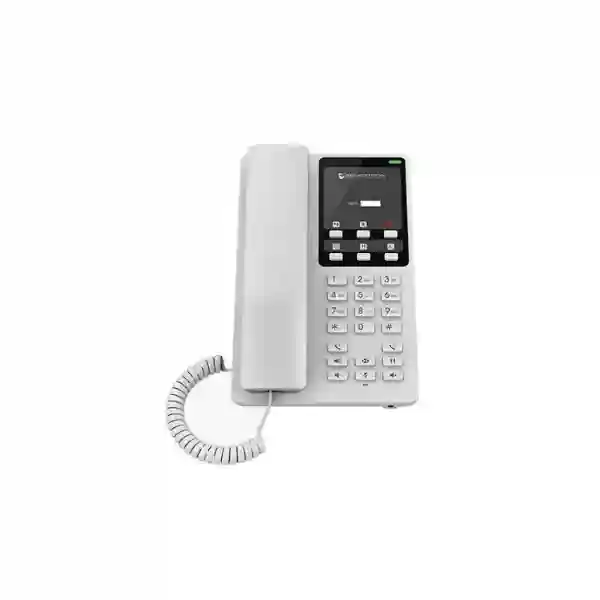
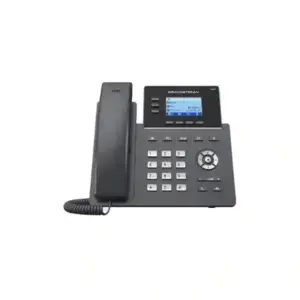
Grandstream GHP620W Dubai Wi-Fi Hotel IP Phone
Grandstream GHP620W Dubai is a compact, screen-free hotel IP phone built for guest rooms and other spaces where people need simple calling rather than a complex office-phone interface. The model combines two SIP accounts and two lines, six programmable keys, speed-dial capability, HD handset audio, three-way conferencing, centralized Grandstream Device Management System management and integrated dual-band wireless connectivity. Current Grandstream documentation identifies Wi-Fi 6 support on hardware version 5.0 and above, while power and PoE behavior can vary by hardware revision, so the exact unit revision should be confirmed during procurement.
For hotels, serviced apartments, hospitals, dormitories and managed accommodation in Dubai and the wider UAE, the most important question is not simply whether the phone has Wi-Fi. A successful deployment also depends on room coverage, PBX registration, VLAN and QoS design, guest-service key mapping, provisioning, firmware policy, power method, labeling and support procedures. This page is structured as a buyer and deployment guide so technical teams can evaluate the GHP620W against the actual communication workflow before ordering.
Quick answer: who should choose it?
Choose the GHP620W when you need a white, compact hotel-style SIP phone with wireless networking, direct service-key access and centralized device management. It is particularly useful for renovations, guest rooms with limited spare Ethernet ports, serviced apartments, healthcare rooms and deployments where a full graphical desk-phone display is unnecessary.
Confirm before ordering: hardware revision, required power method, Wi-Fi standard expected at the site, PBX compatibility, quantity, mounting plan, faceplate labeling and whether wired Ethernet will also be used.
2 SIP accounts
Two SIP accounts and two lines support a straightforward room-extension design and flexible call routing.
Dual-band Wi-Fi
The W variant adds 2.4 GHz and 5 GHz wireless connectivity; current hardware documentation lists Wi-Fi 6 on revision 5.0 and above.
6 programmable keys
Service shortcuts can be planned around reception, housekeeping, dining, security, operator or other internal destinations.
GDMS management
Central provisioning and monitoring can simplify multi-room and multi-site administration for Grandstream endpoints.
Start with the room requirement, not the feature list
Hotel phones are normally selected because a guest, patient, resident or staff member needs a small number of actions to work every time: call reception, reach housekeeping, contact security, request assistance, call another room, retrieve voicemail or make an approved outside call. A conventional enterprise desk phone can deliver these functions, but it may introduce a larger display, more menus and more keys than the room actually needs. The GHP620W takes the opposite approach. It keeps the user interface compact and physical, allowing the property to define a predictable set of direct-access functions.
That simplicity is valuable only when the backend design is equally clear. Each phone still needs an IP network path, SIP account, authentication policy, dial plan, time settings, firmware strategy, emergency-calling policy, and a known destination behind every programmed key. Before procurement, create a room matrix that identifies the location, room number, extension, VLAN, SSID if wireless, expected power method, button labels and PBX call permissions. For a 20-room boutique property the matrix may be small; for a multi-floor hotel or healthcare facility it becomes the foundation for repeatable provisioning and support.
Fourteck can help customers use that requirement-first approach when evaluating Grandstream GHP620W Dubai deployments. The objective is to avoid buying a wireless phone merely because wireless sounds convenient. Instead, the phone should be chosen because its physical form, network options, management model and guest-service workflow match the site.
Verified Grandstream GHP620W capabilities
Grandstream’s current product datasheet and GHP6xx documentation describe the GHP620W as part of the GHP620/GHP621 compact hotel-phone family. The specifications below are useful for planning, but firmware, hardware revisions and regional package contents can change. For a project quote, confirm the exact hardware revision and included accessories on the units being supplied rather than assuming every historical revision behaves identically.
| Area | Verified planning detail | Why it matters |
|---|---|---|
| SIP / lines | 2 SIP accounts and 2 lines | Supports room-extension registration and simple multi-line call handling. |
| Wireless | Integrated 2.4 GHz and 5 GHz Wi-Fi; current datasheet lists 802.11 a/b/g/n/ac/ax and Wi-Fi 6 on hardware version 5.0 and above | Useful where room placement cannot depend entirely on a spare Ethernet outlet. |
| Ethernet | One auto-negotiating 10/100 Mbps Ethernet port; current datasheet lists integrated PoE Class 2 | Allows a wired design where required; confirm revision-specific power behavior. |
| Programmable keys | 6 programmable keys | Can map frequent service destinations to physical buttons. |
| Speed dial | 10 speed-dial positions associated with the 0–9 digit keys through configuration | Adds direct calling options without a graphical menu. |
| Audio | HD handset audio, wideband support and full-band Opus among supported codecs | Helps deliver clear speech when the PBX and network path are configured correctly. |
| Conference | Up to 3-way audio conferencing | Useful for quick internal coordination without a dedicated conference endpoint. |
| Management | GDMS, TR-069 and encrypted XML provisioning options | Supports repeatable rollout and lifecycle administration. |
| Security | Secure boot, unique device certificates, administrator passwords, AES-encrypted configuration, TLS, SRTP and 802.1X support | Gives IT teams building blocks for a more controlled endpoint deployment. |
| USB | USB Type-C charging port for external devices, 500 mA maximum | Adds a limited convenience charging option at the room phone. |
| Mounting | Desktop or wall-mount use | Supports bedside, desk, reception or wall placement depending on the room plan. |
| Color | White for GHP620/GHP620W; GHP621/GHP621W are black variants | Allows property teams to choose the family variant that suits room finishes. |
Hardware-revision note: confirm Wi-Fi and power details on the quoted units
Grandstream documentation has evolved across GHP6xx hardware revisions. The current GHP620/GHP621 datasheet states that the GHP620W and GHP621W provide dual-band Wi-Fi 6 on hardware version 5.0 and above and lists a 10/100 Mbps Ethernet port with integrated PoE Class 2. Grandstream’s updated GHP6xx user guidance also notes that PoE support applies across models on newer hardware revisions, while earlier W-model revisions relied on the supplied power adapter. Because distributors can have inventory from different manufacturing periods, the safest procurement practice is to record the hardware version and expected power method in the quotation or project BOM.
This matters in renovations. A property may choose the W variant because it wants wireless data connectivity, yet still expect PoE for power. If the quoted revision does not match that assumption, the installer may need an adapter at every room. Conversely, if the phone is powered by PoE and also uses Wi-Fi for data, the cabling and switch design may still need review. Treat “Wi-Fi phone” and “wire-free phone” as different concepts: Wi-Fi removes the need for Ethernet as the data path, but the device still needs electrical power.
A hospitality phone is a workflow endpoint
In a guest room, the value of six programmable keys is not the number six. The value is the ability to reduce service requests to recognizable actions. A hotel might map keys to reception, concierge, housekeeping, restaurant, security and operator. A hospital may use nurse station, reception, pharmacy, security, transport and facilities. A serviced apartment may prefer reception, maintenance, housekeeping, property management, emergency assistance and local operator. The correct labels depend on the organization, and the PBX destinations behind them must be stable.
Before programming the keys, identify which destinations are truly available 24 hours, which are internal extensions, which are hunt groups or queues, and which should never be exposed as direct external numbers. If a department changes extension later, it is usually better to update a PBX alias or centralized provisioning profile than to reconfigure hundreds of individual phones manually. The faceplate should use simple words that a guest can understand without a manual, and the labels should match the language policy of the property.
The digit-key speed dials provide another layer of flexibility. They can support less frequently used destinations while preserving the dedicated programmable keys for the most important services. However, too many memorized shortcuts can make a room phone confusing. For guest environments, consistency across rooms is usually more valuable than maximizing every configurable option.
Wi-Fi planning for GHP620W rooms
Integrated Wi-Fi is the main reason many buyers compare the GHP620W with the wired GHP620. In a retrofit project, guest-room Ethernet ports may already be occupied by TVs, IPTV equipment, access points, controllers or other systems. Running an additional cable may require wall work, ceiling access or room downtime. A wireless phone can reduce that cabling dependency, but the site still needs a voice-ready WLAN rather than ordinary best-effort guest Wi-Fi.
Start with signal and capacity. Test coverage at the exact bedside table, desk or wall location where the phone will sit; do not assume that a strong corridor signal guarantees good in-room performance. Building materials, mirrored surfaces, bathrooms, service risers, wardrobes and reinforced walls can change radio behavior. In multi-floor properties, access-point placement and channel planning should be reviewed with voice roaming and interference in mind even though the room phone itself is usually stationary.
Keep the voice device network separate from public guest access where practical. A dedicated SSID or controlled enterprise WLAN can make security policy, QoS, troubleshooting and credential rotation easier. Confirm whether the chosen authentication model is supported by the endpoint and the site. Avoid publishing long-lived shared credentials where a more manageable security design is available. DNS, NTP and PBX reachability should work without captive portals or interactive web authentication, because a hotel phone must register automatically after power-up.
Finally, decide what happens if Wi-Fi service degrades. The GHP620W should be treated as one component in the property’s communications continuity plan. Depending on the project, the answer may include redundant access points, resilient switching, UPS-backed network infrastructure, alternative staff communications and tested emergency procedures. The phone cannot compensate for an unreliable WLAN by itself.
Power and cabling decisions: Wi-Fi does not remove the power requirement
The GHP620W package documentation includes a universal power adapter for the Wi-Fi model, and newer hardware documentation also lists PoE capability. That gives project teams options, but those options should be designed intentionally. An adapter-powered installation needs a suitable AC outlet near the phone and a cable-management plan that keeps the guest room tidy. A PoE-powered installation depends on structured cabling, switch PoE budget and the exact hardware revision. In either case, record the chosen method in the room build sheet so maintenance teams know what to expect.
For large properties, power consistency affects support. If half the rooms use adapters and half use PoE without documentation, a future fault can take longer to diagnose. Standardize where practical. If the property is already wiring every room for IP devices, a wired GHP620 may be simpler. If the project goal is to avoid running a new data cable but AC power is already available at the bedside, the GHP620W can make more sense. If the room has Ethernet and PoE available but also needs Wi-Fi for resilience or placement flexibility, confirm the supported configuration for the exact unit revision.
The phone’s USB Type-C port is specified for charging external devices up to 500 mA. Treat it as a convenience feature rather than a replacement for a high-power guest charging station. Modern smartphones, tablets and laptops can expect substantially higher charging power, so the property should not advertise the phone’s USB port as a fast charger unless the intended device has been tested.
SIP, PBX and call-flow integration
The GHP620W is a SIP endpoint, so it should be evaluated as part of the PBX environment rather than as a standalone room appliance. The PBX may be an on-premises IP PBX, a hosted SIP platform or a broader unified communications system that supports standard SIP registration. Before rollout, confirm registration method, authentication, transport, codec policy, DTMF behavior, extension numbering, voicemail, transfer requirements and any restrictions placed on guest phones.
A hotel room phone usually needs a different call-permission profile from an executive office phone. It may allow internal service destinations and selected outbound calling while blocking administrative features or sensitive extensions. The property should decide how room-to-room calls are handled, whether external dialing needs a prefix, whether international calls are blocked or billed through another system, how emergency dialing is presented, and what happens after checkout. These are PBX and operational policy decisions; the phone provides the endpoint controls but does not define the hotel’s business rules by itself.
Grandstream documentation lists support for SIP over common transports, TLS, SRTP, IPv4 and IPv6, 802.1X, LLDP and multiple provisioning methods. Use the strongest practical configuration supported across the PBX, network and endpoint estate. In mixed-vendor environments, validate interoperability with a test unit before buying the full quantity. A successful registration test should include more than “the phone rings”: verify inbound and outbound calls, hold, transfer, mute, speakerphone, voicemail behavior, service keys, caller ID, DTMF to IVR systems, recovery after reboot and registration after network interruption.
For properties already using Grandstream UCM systems, GDMS and Grandstream provisioning can simplify lifecycle management, but the same planning discipline still applies. Endpoint templates, extension naming, room identifiers and call permissions should be documented so a replacement phone can be deployed without recreating configuration from memory.
GDMS and centralized provisioning for multi-room projects
Centralized management becomes more important as room count grows. Manually opening a web interface on every phone may be manageable for a small test deployment, but it does not scale well to dozens or hundreds of endpoints. Grandstream Device Management System support allows administrators to organize devices, apply configuration, manage firmware and monitor endpoints through a centralized workflow. TR-069 and encrypted XML provisioning are also listed in Grandstream documentation for environments that use other provisioning architectures.
A good provisioning design separates global settings from room-specific settings. Global parameters might include time zone, NTP, codecs, firmware channel, security policy, SIP transport and general key behavior. Room-specific values include extension credentials, room label, account name and any location-specific speed dial. Keeping that separation makes it easier to change one shared setting without overwriting room identity. It also helps when a device is replaced: the replacement can receive the common profile plus the correct room-specific assignment.
Use naming conventions that operations teams can understand. Instead of device names based only on MAC addresses, map the inventory to building, floor and room. For example, an internal naming structure can identify Property A, Floor 08, Room 0814 and the corresponding extension. Maintain the relationship in the asset register and provisioning platform. This reduces confusion when the front desk reports that “room 814 phone is not working.”
Firmware should be managed deliberately. A hotel should not discover a new firmware release by allowing every phone to update automatically in the middle of guest operations. Test relevant firmware on a small group, review vendor release notes, confirm that SIP registration and keys still behave as expected, then schedule broader deployment in an appropriate maintenance window. The current Grandstream firmware page can be used to check available releases before a project, but the exact version is intentionally not hard-coded into this page because it will change over time.
Security design for a guest-facing voice endpoint
A room phone is physically accessible to guests, visitors, patients or residents, so endpoint security should be part of the project plan. Grandstream lists secure boot, random default passwords, a unique security certificate per device, administrator-level passwords, AES-encrypted configuration, TLS, SRTP and 802.1X among the security capabilities of the GHP620/GHP621 family. Those capabilities are useful only when the deployment enables and manages them appropriately.
Start by changing or centrally managing administrative credentials and restricting access to the phone’s management interfaces from untrusted networks. Provisioning URLs and files should not expose SIP passwords in clear text. Where the PBX supports it, consider TLS for SIP signaling and SRTP for media, while accounting for certificate lifecycle and troubleshooting requirements. Put the phone in a network segment with only the access it needs, rather than placing room endpoints on the same unrestricted network as servers or staff workstations.
802.1X can be relevant in enterprise environments that require port-based network access control, but the full switch, RADIUS, certificate and device workflow must be tested. For Wi-Fi, use an authentication design appropriate to managed endpoints and avoid captive-portal guest WLANs. Disable unnecessary services where the platform allows, keep firmware maintained, and review logs or management alerts for unusual registration or connectivity events.
Physical access also matters. Wall-mounted installations should be secure and cabling should not invite accidental disconnection. In public or semi-public spaces, consider whether exposed network connections can be misused. The goal is not to turn a hotel phone into a high-security appliance; it is to apply normal enterprise endpoint controls so the room device does not become the weakest part of the voice network.
Voice quality, codecs and QoS
Grandstream lists G.711, G.722, G.723.1, G.726, G.729A/B, iLBC and full-band Opus among supported voice codecs for the family, together with acoustic echo cancellation, packet-loss concealment, automatic gain control and adaptive jitter buffering. The product literature also highlights an advanced jitter-resilience algorithm designed to tolerate packet loss. These capabilities can improve voice robustness, but call quality still depends on the complete path between the phone and the far-end party.
On a hotel LAN, latency, jitter, packet loss, congestion and Wi-Fi contention should be measured instead of guessed. Grandstream documents Layer 2 and Layer 3 QoS mechanisms, including 802.1Q/802.1p and DSCP-style prioritization. The switch, access point, firewall, WAN and PBX must preserve or correctly map voice traffic for QoS to have value. Marking packets at the phone does not guarantee priority if downstream devices ignore or rewrite the markings.
Codec selection should follow PBX compatibility and bandwidth policy. Opus can deliver excellent quality and resilience where supported end to end. G.722 offers wideband voice in many business environments. G.711 is widely interoperable but uses more bandwidth than compressed codecs. Avoid enabling every codec without a reason; define a tested order that matches the PBX and carrier path. If transcoding is required, account for PBX capacity and potential quality effects.
For a hospitality deployment, test voice under realistic conditions. Make calls while guest Wi-Fi or IPTV traffic is active, test rooms at the edge of WLAN coverage, and verify quality during busy periods. A successful bench test next to an access point does not prove that room 1724 behind a concrete wall will perform the same way.
Physical design, wall mounting and room presentation
The GHP620W uses a compact hotel-phone form factor and does not use a conventional LCD display. The datasheet lists physical dimensions of approximately 210 mm × 132 mm × 89.8 mm with handset and base stand. The white enclosure makes it suitable for many light-colored room interiors, while the related GHP621W provides the black family variant. A swappable faceplate allows property branding and key labeling to be planned around the room service workflow.
The phone can be placed on a desk or wall-mounted. When wall mounting, decide the height and orientation based on the actual user group. A bedside hotel phone, a hospital room phone and a corridor service phone may require different placement. Keep the handset cord accessible, avoid sharp bends in power or network cables and confirm that the mounting position does not block housekeeping access or furniture movement. Grandstream’s quick installation documentation should be followed for the mounting method and spacing.
Hearing Aid Compatibility is listed for the family, which can be an important accessibility consideration. However, property-wide accessibility requirements extend beyond the handset. Consider button labeling, contrast, room instructions, emergency procedures and whether alternative communication options are needed for users who cannot use a standard voice phone.
The antimicrobial casing statement in the datasheet references testing arranged to ISO 22196:2011. This should not be interpreted as a substitute for the property’s cleaning and infection-control procedures. Housekeeping teams should follow device-safe cleaning guidance and avoid liquids or chemicals that could damage the enclosure, keypad or handset.
Where the GHP620W fits best
Hotels and resorts
Guest rooms that need a compact phone for reception, housekeeping, dining, concierge and emergency service access, especially where a new Ethernet run is undesirable.
Serviced apartments
Managed residences that need a dedicated property communication endpoint without giving guests access to a complex business desk-phone interface.
Healthcare rooms
Patient rooms or clinical spaces where direct access to nurse station, reception, pharmacy, security or facility teams is more important than a large display.
Dormitories and staff housing
Rooms that require a managed voice endpoint for reception, security, maintenance and internal communication without exposing an employee-class phone.
Reception and service desks
Small service points with limited call complexity where a compact SIP phone, direct keys and centralized management are sufficient.
Retail or managed facilities
Back-office or help-point locations that need consistent internal calling and service shortcuts rather than full UC applications.
When not to choose the GHP620W
The GHP620W is not the right endpoint for every room. If users need a large contact directory, visual call handling, presence information, video, application integration or frequent multi-line office workflows, a more capable business desk phone may be more appropriate. If the property already has structured cabling and PoE at every bedside, the wired GHP620 can reduce dependence on WLAN coverage and may simplify standardization. If room aesthetics require a black phone, the GHP621W is the closely related wireless color variant.
Do not choose Wi-Fi simply to avoid all infrastructure planning. A wireless endpoint still needs managed RF coverage, security, power and a reliable route to the PBX. In very dense deployments, wired endpoints can reduce pressure on the WLAN. In buildings with difficult radio conditions, a new cable may be more reliable than trying to compensate for weak coverage with additional access points after the phones are installed.
Also consider the user experience. A screen-free phone is excellent when the service model is simple and physical labels are clear. It is less suitable when users need on-screen prompts, visual menus or extensive call history. The best endpoint is the one that matches the task, not the one with the longest specification list.
GHP620W vs GHP620 vs GHP621W
These closely related models share the compact hotel-phone concept, two SIP accounts, service-oriented keys, HD audio and centralized management. The practical purchasing differences are mainly connectivity and enclosure color. The comparison below stays within verified family distinctions rather than making unsupported claims about pricing, stock or regional package contents.
| Model | Wireless | Color | Best decision context |
|---|---|---|---|
| GHP620W | Yes, dual-band; current revision documentation lists Wi-Fi 6 | White | Choose when a white compact hotel phone needs wireless data connectivity and flexible room placement. |
| GHP620 | No integrated W-variant Wi-Fi | White | Choose when wired Ethernet/PoE is already part of the room infrastructure and WLAN dependence is unnecessary. |
| GHP621W | Yes, dual-band; same W-family concept | Black | Choose when the wireless function is needed but the room design calls for the black family variant. |
For a verified Fourteck UAE reference on the same model, see Grandstream GHP620W Dubai on Fourteck UAE. If the project is primarily wired, compare it with the Grandstream GHP620 Dubai wired model.
Deployment workflow for hotels and managed properties
1. Define the communication model. Record room count, room numbers, reception and service destinations, outside-call policy, emergency dialing, voicemail expectations and whether room-to-room calling is allowed.
2. Validate network design. Confirm whether each phone will use Wi-Fi, Ethernet or a combination supported by the chosen hardware revision. Test 2.4 GHz and 5 GHz coverage where appropriate, review VLANs, DHCP, DNS, NTP, QoS, firewall policy and PBX reachability.
3. Confirm power. Decide whether the project uses the supplied adapter, PoE on supported revisions or another approved design. Verify outlets, PoE switch budget, UPS coverage and cable management.
4. Create the provisioning template. Separate common settings from room-specific credentials. Define firmware policy, administrator access, security settings, SIP transport, codec order, time settings, key mapping and recovery behavior.
5. Build a pilot. Deploy a small number of phones in representative rooms, including at least one difficult RF location. Test calling, service keys, voicemail, reboot recovery, registration after network interruption, quality under load and wall/desk placement.
6. Roll out by floor or zone. Use an asset list that ties MAC address or device ID to property, floor, room and extension. Label packaging and installation records to reduce assignment errors.
7. Handover and support. Provide the property with the device list, provisioning method, firmware baseline, support contacts, replacement procedure and a simple troubleshooting flow. Train the front desk or help desk to identify whether a problem is power, Wi-Fi, registration, PBX routing or handset-related before escalating.
Pre-purchase checklist for procurement teams
Model identity
Confirm GHP620W, white enclosure, required regional pack, hardware revision and whether the quotation refers to the exact wireless model.
Power method
Record adapter versus PoE expectation and verify the chosen hardware revision supports the planned method.
Wireless standard
Confirm the quoted revision supports the Wi-Fi generation expected by the design and that the hotel WLAN supports the required security model.
PBX compatibility
Pilot the phone on the real PBX or hosted SIP platform and test all required call flows.
Faceplate and labels
Define the six primary service buttons, language, room branding and any digit-key speed-dial instructions before mass deployment.
Support lifecycle
Plan spare units, firmware testing, provisioning access, credential ownership and the replacement process after handover.
Grandstream GHP620W Dubai and UAE deployment context
Dubai hospitality projects range from compact city hotels and holiday apartments to large resorts, staff accommodation and mixed-use towers. The building type changes the phone design. In a newly constructed property, structured cabling and PoE may already be specified, making a wired room phone attractive. In an operating hotel renovation, opening walls or closing rooms for new cabling may be disruptive, which makes a wireless model such as the GHP620W more interesting. The decision should be tied to the actual site survey and room technology plan.
Dubai Marina and JLT properties may have dense RF environments because of neighboring networks and high-rise floor layouts. Business Bay and Downtown projects may combine hospitality, residential and office networks in the same building. Deira and Bur Dubai renovations can involve older cabling or mixed infrastructure. Jebel Ali, Dubai South and staff-accommodation environments can prioritize operational simplicity and centralized management across many rooms. These are not reasons to choose one model automatically; they are examples of why room-by-room infrastructure should be checked before procurement.
Across Abu Dhabi, Sharjah, Ajman, Ras Al Khaimah, Fujairah and Umm Al Quwain, the same principles apply. A resort may prioritize guest-room aesthetics and centralized provisioning. A clinic may focus on direct service buttons and extension reliability. A university residence may need a standardized internal-calling endpoint across hundreds of rooms. A serviced-apartment operator may need reception and maintenance shortcuts with minimal user training. In each case, Wi-Fi coverage, power, PBX call permissions and support ownership should be documented.
Fourteck can assist UAE buyers with requirement review, model comparison, quantity planning, SIP/PBX compatibility checks, network readiness discussion and deployment guidance. Availability, commercial terms and delivery timing should be confirmed for the actual quotation rather than assumed from a generic product page.
Regional projects beyond the UAE
The GHP620W can also be evaluated for hospitality and managed-room projects across the GCC and Africa. The technical design remains similar, but local connectivity, site support, regulatory expectations, PBX hosting location and procurement logistics can differ. A Kuwait serviced apartment project may have a different network standard from a Kampala hotel, a Nairobi clinic, a Lagos staff residence or a Dar es Salaam resort. Avoid copying a Dubai design without checking local site conditions.
For regional rollouts, standardization can reduce operational load. A group operating properties in multiple countries may define one approved hardware family, one provisioning baseline, one button-label standard and one support workflow, then adapt extensions and network settings per property. This can make spare management and staff training easier. However, firmware, WLAN security, PBX reachability and power should still be validated in each site.
Fourteck’s network includes regional properties such as Fourteck Kuwait, Fourteck Kenya, Fourteck Uganda, Fourteck Tanzania, Fourteck Nigeria and Fourteck Ghana. These links can help regional buyers continue the discussion in the context of their market rather than treating every country as the same deployment.
Technical specification reference
The following condensed reference is based on Grandstream’s GHP620/GHP621 datasheet. Use the vendor’s latest datasheet, user guide and quick installation guide for final project validation, especially where a hardware-revision distinction affects power or Wi-Fi behavior.
| Specification | Detail |
|---|---|
| Protocols / standards | SIP RFC3261, TCP/IP/UDP, RTP/RTCP, RTCP-XR, TLS, SRTP; IPv4/IPv6, HTTP/HTTPS, ARP, ICMP, DNS, DHCP, SSH, TFTP, NTP, STUN, LLDP, TR-069 and 802.1X among documented protocols. |
| Network interface | One 10/100 Mbps auto-negotiating Ethernet port; current datasheet lists integrated PoE Class 2. |
| Wi-Fi | GHP620W/GHP621W dual-band 2.4 GHz and 5 GHz; current datasheet lists 802.11 a/b/g/n/ac/ax and Wi-Fi 6 on hardware version 5.0 and above. |
| Keys | 26 keys in the family specification, including 6 programmable keys, digit keys, function keys and volume/mute controls. |
| Function keys | Flash, redial, hands-free, voicemail and hold, plus volume up/down and mute. |
| Voice | HD handset, 2 SIP accounts/lines, up to 3-way conference, wide range of narrowband and wideband codecs including full-band Opus. |
| Telephony | Dial, answer, redial, flash, hands-free, voicemail with server support, transfer, conference, hold/unhold, mute/unmute, flexible dial plan and speed dial. |
| Advanced functions | Multicast paging, E911 support, GDS door-opening integration and advanced jitter-resilience support are documented for the family. |
| QoS | Layer 2 802.1Q/802.1p and Layer 3 QoS mechanisms including ToS/DiffServ/MPLS references in the datasheet. |
| Provisioning | Firmware upgrade via FTP/TFTP/HTTP/HTTPS, GDMS/TR-069 and AES-encrypted XML configuration support. |
| Power adapter | For GHP620W/GHP621W, datasheet lists universal input 100–240 VAC, 50–60 Hz and output 12 V / 0.5 A (6 W). |
| Operating environment | Operating 0°C to 40°C; storage -10°C to 60°C; humidity 10% to 90% non-condensing. |
| Dimensions | Approximately 210 × 132 × 89.8 mm with handset and base stand. |
What information should be included in a quote request?
A useful quote request should include more than “price for GHP620W.” Provide the quantity, country and city, property type, required delivery stage, current PBX platform, whether the phones will use Wi-Fi or Ethernet, expected power method, room count, preferred color, and whether configuration or installation support is required. If the project is a renovation, mention whether existing Ethernet is available at the bedside and whether AC outlets are already present.
For larger projects, share a room list or sample floor plan when appropriate. The goal is not to expose confidential building information unnecessarily; it is to identify deployment patterns. A property with 120 identical guest rooms and 10 suites may need two endpoint profiles. A hospital may need different profiles for patient rooms, nurse stations and administrative areas. A serviced apartment operator may need separate profiles for long-stay and short-stay units.
If the buyer wants phones preconfigured, provide the PBX extension plan and service-button destinations through a secure process. Do not send SIP passwords through informal channels without an agreed secure method. Define who owns the final credentials and provisioning account after handover so the customer can maintain the system independently or through a documented support agreement.
Useful vendor resources for project validation
Technical specifications and revision details should be checked against Grandstream’s current documentation before final procurement. Useful sources include the Grandstream GHP620(W) / GHP621(W) product page, the GHP6xx user guide, and the GHP62x quick installation guide. These are preferable to third-party product listings when a technical detail conflicts.
Third-party pages can be useful for understanding buyer language and common deployment questions, but they may contain old or inaccurate specifications. For example, some reseller pages describe the GHP620W display incorrectly or simplify PoE behavior without noting revision differences. For that reason, Fourteck’s product guidance should prioritize vendor documentation and confirm the exact supplied hardware before committing to project-specific power or Wi-Fi assumptions.
Why Fourteck for GHP620W planning?
A hotel-phone project crosses product selection, IP networking, Wi-Fi, SIP/PBX configuration, labeling, security, provisioning and support. Fourteck approaches the GHP620W as part of that system rather than as an isolated device. The practical objective is to help the buyer choose the right model, confirm compatibility, avoid revision-related surprises and prepare a repeatable deployment plan.
For a small property, that may mean confirming the PBX and configuring a clear set of service buttons. For a larger hotel, it may involve room mapping, WLAN validation, VLAN and QoS review, bulk provisioning, firmware policy, floor-by-floor rollout and a handover document. For regional projects, it may also involve deciding which elements can be standardized across properties and which must change by country or site.
Fourteck does not need to turn every requirement into the same architecture. If the site already has reliable PoE cabling, the wired GHP620 may be the better decision. If users need a graphical interface, another endpoint family may fit better. The value is in choosing against the requirement and documenting the reason.
Frequently asked questions about Grandstream GHP620W Dubai
Does the Grandstream GHP620W have Wi-Fi?
Yes. The GHP620W is the wireless variant in the family and supports integrated 2.4 GHz and 5 GHz Wi-Fi. Grandstream’s current datasheet lists Wi-Fi 6 / 802.11ax support on hardware version 5.0 and above, so the hardware revision should be confirmed when that capability is a project requirement.
Does GHP620W support PoE?
Current Grandstream datasheet and updated GHP6xx guidance list PoE support on newer hardware, while earlier W-model revisions were adapter-powered. Confirm the revision and expected power method on the exact units being quoted instead of assuming all historical GHP620W units are identical.
How many SIP accounts does GHP620W support?
It supports two SIP accounts and two lines. That is normally sufficient for a hotel or managed-room endpoint, but the PBX call-flow and permissions should be designed around the property’s actual service model.
How many programmable service keys are available?
Grandstream’s datasheet lists six programmable keys. These can be mapped to destinations such as reception, housekeeping, dining, concierge, security or operator according to the property’s PBX design.
Does the GHP620W have a display?
It is a screen-free compact hotel phone rather than a conventional LCD business desk phone. The faceplate and physical keys are used to keep guest operation simple.
Can it be wall mounted?
Yes. Grandstream documents desktop and wall-mount installation for the GHP620/GHP621 family. Placement should still be checked for user accessibility, cabling, Wi-Fi signal and housekeeping access.
Can GHP620W work with a third-party SIP PBX?
The phone is a standards-based SIP endpoint and can be evaluated with compatible SIP platforms. Interoperability should be tested on the actual PBX for registration, DTMF, transfer, voicemail, codecs, security and the required service-key call flows before a large purchase.
What is GDMS used for?
Grandstream Device Management System provides centralized configuration, provisioning, monitoring and firmware-management capabilities for supported Grandstream endpoints. It is especially useful when many room phones need consistent settings.
Is GHP620W suitable for serviced apartments and hospitals?
Yes, the product family is positioned for hotels and similar environments, including apartments, dormitories, hospitals and retail. The exact suitability depends on call-flow requirements, accessibility policy, network design and local operational procedures.
What is the difference between GHP620W and GHP620?
The GHP620W adds integrated wireless connectivity, while the standard GHP620 is the wired family model. Both share the compact hotel-phone concept. Choose according to room cabling, Wi-Fi design, power strategy and support standardization.
Can the phone charge a mobile device?
The datasheet lists a USB Type-C port for external-device charging up to 500 mA. That is a limited convenience output and should not be marketed as a modern fast-charging replacement.
How should I request a UAE quotation?
Share the quantity, city, property type, PBX platform, Wi-Fi or Ethernet plan, preferred power method, required configuration scope and deployment timeline. Fourteck can then review the model fit and prepare project-specific commercial guidance without relying on generic stock or price assumptions.
Plan the GHP620W around the real property
For Grandstream GHP620W Dubai projects, the strongest procurement brief is one that states the room count, PBX, wireless environment, power plan, service-button requirements and support expectations. Fourteck can help compare the wireless GHP620W with the wired GHP620, validate technical assumptions and prepare a rollout approach for Dubai, Abu Dhabi, Sharjah and wider UAE requirements.
Reviews
There are no reviews yet.