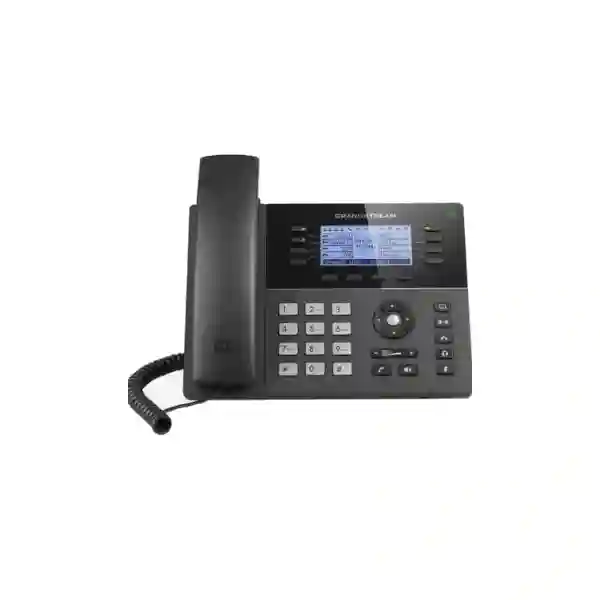
Grandstream GXP1760W Dubai – Mid-Range Wi-Fi HD IP Phone for Business Voice
The Grandstream GXP1760W is a mid-range SIP desk phone designed for organisations that need a traditional business handset with integrated dual-band Wi-Fi, multiple line appearances, HD audio, programmable keys, Power over Ethernet and secure provisioning. Grandstream documents the model with 6 lines, 3 SIP accounts, 6 dual-colour line keys, 4 programmable context-sensitive soft keys, a 3.3-inch 200 × 80 backlit LCD, dual 10/100 Mbps Ethernet ports and integrated 802.11 a/b/g/n/ac wireless networking. For offices in Dubai and across the UAE, the value of the GXP1760W is not only its feature list: the integrated Wi-Fi can be useful when a desk cannot be cabled easily, while PoE remains available for structured wired deployments.
Important lifecycle note: Grandstream currently lists the GXP1760W in its product archive. That means buyers should treat it as a legacy model and confirm availability, firmware requirements, spare-unit strategy and compatibility before ordering. Fourteck can help organisations evaluate whether continuing with the GXP1760W is sensible for an existing estate or whether a newer GRP-series model is a better long-term choice.
Six line keys with support for up to three SIP accounts.
Integrated 2.4 GHz and 5 GHz 802.11 a/b/g/n/ac wireless connectivity.
Wideband audio through the handset and full-duplex speakerphone.
Built-in five-way audio conferencing for collaborative calls.
Is the GXP1760W still a good choice?
It can still be a practical choice when the requirement is to match an existing GXP1760W installation, replace a failed handset with the same user interface, preserve established provisioning templates, or deploy a limited number of legacy-compatible endpoints. The built-in Wi-Fi also remains useful in locations where adding a new Ethernet outlet is inconvenient. However, a new greenfield deployment should be evaluated carefully because the phone is now archived by the manufacturer. Newer Grandstream GRP models provide a more current platform, modern device-management options, Gigabit networking on many models, improved security architecture and broader enterprise deployment features.
Good fit when
- You already operate GXP1760W phones and want model consistency.
- Three SIP accounts and six line keys are sufficient for the user role.
- Dual-band Wi-Fi is important at the desk.
- 10/100 Mbps pass-through networking is acceptable.
- You have a defined lifecycle and spare-unit plan.
Reconsider when
- You are building a new long-term enterprise voice standard.
- Your PC requires Gigabit Ethernet through the phone.
- You need current central cloud management across large fleets.
- You require more SIP identities or a colour-display workflow.
- You want a model with a longer forward lifecycle.
Verified GXP1760W technical specifications
The following summary is based on Grandstream product documentation and the current GXP17xx administration/user documentation. Exact behaviour can depend on firmware, PBX configuration, provisioning policy and network design.
| Category | GXP1760W capability |
|---|---|
| Lines / SIP accounts | 6 lines, 6 dual-colour line keys, up to 3 SIP accounts |
| Display | 3.3-inch backlit LCD, 200 × 80 pixels |
| Programmable controls | 4 XML programmable context-sensitive soft keys and up to 24 digitally programmable BLF / fast-dial functions |
| Ethernet | Dual switched auto-sensing 10/100 Mbps Ethernet ports |
| Power | Integrated IEEE 802.3af PoE; universal power adapter documented; maximum power consumption 5 W |
| Wi-Fi | Integrated dual-band 802.11 a/b/g/n/ac, 2.4 GHz and 5 GHz |
| Audio | HD handset and HD full-duplex speakerphone with wideband-audio support |
| Codecs | G.729A/B, G.711 µ-law / A-law, G.726, G.722 wideband, G.723, iLBC and Opus; DTMF in audio, RFC2833 and SIP INFO |
| Conference | 5-way audio conferencing |
| Directory / call history | Downloadable XML / LDAP phonebook up to 2,000 entries; call history up to 500 records |
| Headset / auxiliary | RJ9 headset interface with documented EHS support for compatible Plantronics headsets; USB port; dedicated EHS interface |
| Security | TLS, SRTP, 802.1X, password controls, AES-encrypted configuration files and Kensington security slot support |
| Provisioning | TFTP / HTTP / HTTPS firmware upgrade and mass provisioning using TR-069 or AES-encrypted XML configuration files |
Why integrated Wi-Fi changes the deployment decision
The “W” in GXP1760W matters because the phone includes dual-band wireless connectivity rather than relying only on Ethernet. In practical UAE office projects, this can solve a specific problem: the user needs a permanent desk phone but the workspace does not have a convenient network outlet. That may occur in temporary project offices, meeting rooms, executive spaces, refurbished offices, retail counters, training rooms or layouts where adding new structured cabling is disruptive.
Wi-Fi should not automatically replace wired Ethernet, however. Voice traffic is sensitive to latency, jitter, packet loss and roaming behaviour. A well-designed wired VLAN with PoE is usually easier to make deterministic. When Wi-Fi is used, the 5 GHz band may offer cleaner spectrum and higher capacity in many office environments, but actual performance depends on access-point placement, channel design, interference, client density and security settings. The phone supports 2.4 GHz and 5 GHz bands, so the deployment team can choose the band that best matches site conditions.
For a new installation, Fourteck normally recommends treating wireless voice as a network-design decision rather than simply entering an SSID and password. Validate signal strength at the desk, test call quality during peak traffic, confirm DHCP and DNS behaviour, confirm PBX reachability, verify QoS strategy and make sure firmware and provisioning remain reliable over the chosen network path.
Wired PoE or Wi-Fi: which should you use?
| Requirement | Wired Ethernet + PoE | Wi-Fi connection |
|---|---|---|
| Predictable call quality | Usually preferred because bandwidth and physical path are controlled. | Can perform well with strong RF design and low interference. |
| No data outlet at desk | Requires new cabling or nearby switch. | Often the more practical option. |
| Power | PoE can power the phone through the network cable. | A local power adapter is normally needed because Wi-Fi carries data, not power. |
| Voice VLAN design | Straightforward on managed switching with VLAN and QoS policies. | Requires WLAN segmentation and compatible wireless security/QoS policies. |
| Desk relocation | Depends on available structured cabling. | More flexible where wireless coverage is already validated. |
SIP accounts, line keys and everyday call handling
The GXP1760W supports up to three independent SIP accounts and provides six physical line keys. Those line keys can represent line appearances or functions defined by the PBX and provisioning profile. This matters for users who handle more than one identity, department or inbound route. A front-desk user, for example, may have a personal extension plus a general-office identity and another service line, depending on how the PBX is configured.
The phone also supports common business calling functions such as hold, transfer, forward, call waiting, call park, call pickup, shared call appearance / bridged line appearance, auto answer, hot desking, off-hook auto dial, flexible dial plans, server redundancy and failover. Whether all functions are available in exactly the same way depends on the SIP platform and configuration. Buyers should therefore think beyond “does the phone register?” and validate the specific workflow used by reception, sales, support or management teams.
If the user requires only one or two basic extensions, the GXP1760W may be more capable than necessary. If the user requires many simultaneous identities, large colour displays, dozens of visible contacts or extensive expansion modules, a more modern GRP or higher-tier model may provide a better fit.
24 digital BLF / fast-dial positions: why they matter
Grandstream documents up to 24 digitally programmable and customisable BLF / fast-dial functions on the GXP1760W. In a business setting, BLF functions can help users monitor extension status, reach colleagues quickly and reduce the time spent dialling frequent numbers. This is especially useful for reception staff, team coordinators, branch administrators and customer-facing users who regularly transfer calls.
The practical value depends heavily on PBX support. BLF subscriptions, feature codes and monitored extensions must be configured correctly on the voice platform. For that reason, procurement should include a provisioning plan rather than treating programmable keys as a standalone phone feature. When many phones are deployed, consistent templates help ensure that the same key location performs the same role for comparable users.
HD audio, speakerphone and conference calling
The GXP1760W supports HD wideband audio on the handset and speakerphone. Wideband voice can make calls sound more natural when the PBX, SIP trunk, remote endpoint and codec negotiation all support it. Grandstream lists G.722 among the supported wideband codecs and also documents Opus support in the current GXP17xx technical specifications, along with G.711, G.729, G.726, G.723 and iLBC.
The phone includes a full-duplex hands-free speakerphone with acoustic echo cancellation and supports five-way audio conferencing. This can be useful for quick internal collaboration without a dedicated conference system. It should not be confused with a purpose-built meeting-room audio solution: room size, microphone pickup distance, acoustic treatment and the number of participants can make a dedicated conference device a better choice.
For users who spend much of the day on calls, headset selection may be just as important as the desk phone. The GXP1760W includes an RJ9 headset interface and documented EHS support for compatible Plantronics headsets. Headset compatibility should be checked against the exact headset model, cable/EHS accessory and required call-control functions before purchase.
Security features for business voice networks
Business IP phones are network endpoints and should be included in the organisation’s security design. Grandstream documents TLS and SRTP support on the GXP1760W, along with 802.1X network access control, administrator and user passwords, AES-encrypted configuration files and secure provisioning options. These features can help protect signalling, media and device configuration when the surrounding PBX, certificates, network policies and provisioning infrastructure are configured appropriately.
Security is not automatic simply because the phone supports the necessary protocols. A deployment should define who can access the phone’s web interface, whether management traffic is restricted to an administration VLAN, how passwords are generated, which provisioning protocol is allowed, whether configuration files are encrypted, how firmware is maintained and whether unused services are disabled. Organisations with compliance requirements should also document the voice network as part of their endpoint and asset-management process.
Use TLS where supported by the PBX and required by policy.
Use SRTP when end-to-end platform compatibility allows encrypted voice media.
Protect administrator credentials and restrict management access.
Prefer secure provisioning workflows and controlled firmware sources.
Provisioning and administration for multi-phone deployments
The GXP1760W can be configured through its keypad and embedded web interface, but manual setup does not scale well. Grandstream supports mass provisioning using TR-069 or AES-encrypted XML configuration files, and firmware upgrades can be delivered through TFTP, HTTP or HTTPS. This allows an administrator to standardise SIP accounts, dial plans, codecs, time settings, programmable keys, security parameters and other options across a group of phones.
For organisations using Grandstream UCM IP PBX systems, the GXP family can also participate in Grandstream’s zero-configuration ecosystem. The exact process depends on the PBX generation, firmware versions and network topology, so the implementation should be verified against the installed UCM environment. Third-party SIP platforms can also work with the phone because it is SIP based, but advanced feature behaviour should be tested before a large rollout.
A sensible provisioning design normally separates global settings from role-specific settings. Global settings may include NTP, DNS, VLAN, QoS, security, firmware path and regional preferences. Role templates may define extension keys, BLF targets, hotline behaviour and call-forward options. Device-specific values then include SIP credentials and user identity. This separation makes changes easier and reduces configuration drift.
Network design: VLAN, QoS and 10/100 Mbps limitations
The GXP1760W has dual switched 10/100 Mbps Ethernet ports. One port connects to the LAN and the second can pass network connectivity to a PC. For typical voice traffic, 100 Mbps is more than sufficient for the phone itself. The main limitation appears when a user’s computer, docking station or workstation is connected through the phone and requires Gigabit throughput. In that case the phone’s Fast Ethernet switch can become a bottleneck for the attached device.
That difference matters in modern offices where staff work with large cloud files, local servers, high-resolution media, virtual desktop traffic or data-heavy applications. If a desk already requires Gigabit Ethernet, use a separate switch port for the PC or select a phone with Gigabit pass-through. Newer Grandstream GRP models such as the GRP2614 and GRP2616 use Gigabit Ethernet and may be better suited to new installations.
The phone supports Layer 2 QoS mechanisms including 802.1Q / 802.1p and Layer 3 QoS such as ToS and DiffServ. These capabilities allow voice traffic to be classified and prioritised, but end-to-end QoS requires matching policy on switches, routers, firewalls, WAN links and any managed service path. A phone-side setting alone cannot guarantee quality across a congested network.
Best-fit business roles
Reception and front office
Six line keys, BLF / fast dial and multiple SIP accounts can support call answering, transfers and frequently contacted extensions. Confirm whether 24 digital BLF positions are enough for the site size.
Managers and supervisors
Suitable where a user needs several identities, HD audio, speakerphone conferencing and quick access to team members without requiring a large colour screen.
Branch office users
Can fit branch deployments where Wi-Fi helps reach desks without new cabling and central SIP registration is available through a secure WAN or VPN design.
Shared and hot desks
Hot-desking support can be useful for shared workspaces when the PBX and provisioning design support the intended login/logout workflow.
Retail and service counters
Useful for fixed counters that need a physical handset, speakerphone and quick-dial functions where network cabling may be limited.
Existing GXP fleets
Often the strongest use case because identical models simplify user familiarity, existing templates and spare-device handling during a controlled legacy lifecycle.
Industry deployment examples
Hotels and hospitality: The GXP1760W can serve administration, reservations, back office and supervisory roles where multiple lines and transfer functions are more important than guest-room simplicity. Wi-Fi may be helpful in temporary desks or offices, but hotel voice networks should be segmented from guest Wi-Fi and validated for QoS and security.
Professional offices: Law firms, consultancies, trading companies and corporate service providers may use the phone for reception, managers and general office users. LDAP or XML directories can simplify calling between staff when directory data is maintained centrally.
Education: Administrative offices, faculty areas and security desks may benefit from predictable physical handsets and quick access to extensions. Campus WLAN design should be evaluated carefully before relying on wireless voice at scale.
Healthcare and clinics: Reception, billing and administrative staff may need quick transfers, multiple lines and reliable fixed phones. Network segmentation, uptime and access control should be aligned with the organisation’s broader IT policies.
Warehouses and logistics: Fixed desks in dispatch, administration and security areas may use the phone, but rugged or cordless devices could be more appropriate for mobile warehouse staff. The correct endpoint should match the user’s actual movement pattern.
PBX compatibility: what should be checked before ordering?
Because the GXP1760W is a SIP endpoint, it can register to many SIP-based PBX and hosted voice platforms. Compatibility should still be validated at the feature level. Basic registration and calling are only the first test. Businesses may also depend on BLF, call pickup, shared lines, voicemail indicators, transfer behaviour, corporate directories, paging, hot desking, encryption, failover, remote provisioning and emergency-call rules.
- Confirm SIP registration: verify proxy/server, outbound proxy if required, authentication ID, password, transport and NAT settings.
- Confirm codec policy: ensure the PBX and trunk support the codecs required for normal and fallback calling.
- Test DTMF: IVR and voicemail navigation depend on correct DTMF method selection.
- Validate BLF and pickup: these can be platform-specific even when standard SIP is used.
- Check provisioning: confirm that the deployment method can securely deliver settings and firmware.
- Check remote-user design: do not expose phone management interfaces directly to the internet; use the PBX vendor’s recommended secure architecture.
- Test failover: if the organisation relies on secondary SIP servers or WAN redundancy, confirm actual recovery behaviour.
Dubai deployment considerations
Dubai offices range from conventional structured-cabling environments to serviced offices, retail units, warehouses and rapidly changing project spaces. The GXP1760W can be attractive where an existing Grandstream voice system needs additional handsets without changing the user interface, or where a fixed Wi-Fi phone avoids adding a new data outlet. In established offices with managed PoE switching, however, wired deployment may still provide the most predictable voice path.
Before deployment, document the user count, extension plan, SIP trunk or PBX platform, number of concurrent calls, required BLF targets, VLAN design, PoE budget, Wi-Fi coverage and failover requirements. If the phone will share its Ethernet connection with a workstation, check whether Fast Ethernet is acceptable. Modern Dubai offices commonly use Gigabit access switching, so the 10/100 Mbps pass-through can be a meaningful design limitation.
For procurement, confirm whether the requirement is a same-model replacement or a new standard. That single question often determines whether the GXP1760W or a current GRP-series phone is the better answer.
Abu Dhabi, Sharjah and other UAE sites
Abu Dhabi: Multi-site organisations often need consistent extension templates across headquarters, branch offices and project locations. For a legacy GXP deployment, configuration consistency and central documentation are especially important. If branches connect to a central PBX, WAN quality and resilience should be tested along with normal endpoint configuration.
Sharjah and Ajman: SMB offices, trading companies, workshops and warehouses may value a cost-conscious SIP endpoint with physical keys and optional Wi-Fi. The decision should still account for lifecycle, network speed and long-term replacement availability rather than focusing only on initial handset cost.
UAE-wide rollouts: Large fleets benefit from a standard model list, defined firmware baseline, approved provisioning template, spare-unit policy and a tested replacement path. If the estate is expected to grow for several years, a current GRP standard may be easier to maintain than expanding an archived GXP model.
Legacy GXP1760W versus newer Grandstream GRP choices
A newer model should not be selected only because it is newer; it should match the user role and deployment plan. The GRP2614 and GRP2616 are examples of current professional Grandstream models with integrated Wi-Fi, Gigabit Ethernet, modern security architecture and Grandstream Device Management System support. They are not presented here as exact one-to-one replacements, because feature counts and interfaces differ.
| Decision point | GXP1760W | GRP2614 | GRP2616 |
|---|---|---|---|
| Product positioning | Archived GXP mid-range model | Current professional GRP model | Current professional GRP model |
| Ethernet | 10/100 Mbps | Gigabit | Gigabit |
| Wi-Fi | Integrated dual-band 802.11 a/b/g/n/ac | Integrated dual-band Wi-Fi; current hardware documentation also lists Wi-Fi 6 on supported hardware revisions | Integrated dual-band Wi-Fi; current hardware documentation also lists Wi-Fi 6 on supported hardware revisions |
| Display approach | 3.3-inch monochrome backlit LCD | Colour main display plus secondary display | Larger colour main display plus secondary display |
| Central device management | Traditional provisioning tools | GDMS support | GDMS support |
| Best reason to choose | Match an existing GXP1760W estate or a defined legacy requirement | Modern professional desk with Wi-Fi, Gigabit and enterprise management | Higher-capacity professional deployment with Wi-Fi, Gigabit and broader key/display capability |
Migration planning from GXP1760W to GRP-series phones
Organisations do not always need to replace every archived phone immediately. A staged migration can be more practical. Start by identifying the number of GXP1760W units, user roles, firmware levels, PBX dependencies, programmed keys, headset types and network connections. Separate users into groups: simple extension users, reception/BLF users, managers, shared desks and special-function endpoints. Then select a current model for each group based on actual needs.
Provisioning templates should be rebuilt and tested rather than copied blindly. Newer phones may support different key models, account counts, security features and management systems. Test dial plan, caller ID, transfer, conference, hold, voicemail, BLF, pickup, directory, paging, emergency calling and failover. Where users rely on physical key positions, prepare a short adoption guide so the workflow remains familiar.
A sensible migration also defines what happens to surviving GXP1760W units. Some may remain in low-risk roles, some may become spares, and others may be retired. The plan should consider lifecycle risk, supportability and security rather than treating replacement as a cosmetic refresh.
Installation workflow for a controlled deployment
Confirm design
Document PBX, extension, VLAN, PoE, Wi-Fi and provisioning requirements before unboxing devices.
Connect network
Use wired Ethernet or configure the approved wireless SSID. For wired deployment, confirm the switch port and PoE policy.
Apply configuration
Provision SIP identities, time, codecs, dial plan, security settings and keys using the approved template.
Test calls
Test inbound, outbound, transfer, hold, DTMF, voicemail, BLF, conference and emergency-call behaviour as applicable.
Validate quality
Observe latency, jitter and packet loss. For Wi-Fi, test during realistic office load rather than only during an empty-site installation.
Document and hand over
Record device identity, extension, location, template version, firmware baseline and support path.
Common deployment problems and what they usually indicate
| Symptom | Possible areas to check |
|---|---|
| Phone does not register | SIP server, authentication, transport, DNS, firewall/NAT, account enablement and provisioning values. |
| One-way audio | NAT, SIP ALG, RTP firewall policy, PBX external-address configuration and VPN routing. |
| Poor Wi-Fi call quality | Signal level, interference, access-point load, roaming, channel plan, latency, jitter and packet loss. |
| BLF does not update | PBX BLF subscription support, monitored extension format, permissions and provisioning syntax. |
| IVR keys fail | DTMF method mismatch between phone, PBX and SIP trunk. |
| PC link is slow | Remember that the GXP1760W provides 10/100 Mbps Ethernet, not Gigabit pass-through. |
| Configuration resets unexpectedly | Check the provisioning server, periodic configuration download, template precedence and local-change policy. |
GXP1760W quotation and procurement checklist
A useful quotation request should describe the environment, not just the model number. That helps determine whether the GXP1760W is genuinely the right endpoint and reduces surprises during installation.
- Required quantity and whether units are replacements, expansion units or a new deployment.
- Existing PBX or hosted SIP platform and software/firmware version where known.
- Number of SIP accounts needed per user and typical simultaneous-call requirement.
- Number of BLF / speed-dial functions needed for reception and team users.
- Wired PoE or Wi-Fi connection preference for each location.
- Whether a PC will connect through the phone and whether 100 Mbps is acceptable.
- Headset make/model and whether remote electronic hook switching is required.
- Security requirements such as TLS, SRTP, 802.1X and secure provisioning.
- Installation, configuration, user training or migration assistance required.
- Desired long-term replacement path if the GXP1760W is unavailable or unsuitable.
Why Fourteck for GXP1760W compatibility and migration guidance?
Buying an archived IP phone should be a technical decision rather than a catalogue decision. Fourteck can help customers evaluate the GXP1760W against the PBX, SIP trunk, network, PoE environment, Wi-Fi coverage, user role and long-term lifecycle plan. That may result in continuing with the GXP1760W for a specific replacement requirement, or it may point to a newer Grandstream model for a fresh deployment.
For UAE projects, the useful outcome is a consistent voice solution: correct endpoint model, tested SIP registration, predictable call quality, secure provisioning, documented keys and a clear support path. Customers can also explore broader technology and communication solutions through Fourteck UAE, Grandstream-focused information at Grandstream UAE by Fourteck, and additional IP phone resources on IP Phone Fourteck.
Because product lifecycle and stock conditions can change, availability should be confirmed at quotation stage. Fourteck does not treat an archived model as automatically available and can propose suitable current alternatives when required.
Frequently asked questions about Grandstream GXP1760W
Is the Grandstream GXP1760W a Wi-Fi phone?
Yes. Grandstream documents integrated dual-band 802.11 a/b/g/n/ac Wi-Fi on 2.4 GHz and 5 GHz. The phone can therefore connect to a suitable wireless network when Ethernet is not practical.
How many SIP accounts does the GXP1760W support?
The GXP1760W supports up to three independent SIP accounts and has six line keys. Actual line behaviour depends on how the SIP accounts and keys are configured.
Does the GXP1760W support PoE?
Yes. The technical specifications list integrated IEEE 802.3af Power over Ethernet. This allows a compatible PoE switch or injector to provide power over the Ethernet cable during a wired deployment.
Does it have Gigabit Ethernet?
No. The GXP1760W uses dual auto-sensing 10/100 Mbps Ethernet ports. If a workstation is connected through the phone and needs Gigabit speed, consider a separate network connection or a phone with Gigabit pass-through.
Can the GXP1760W work with a Grandstream UCM PBX?
Yes, it is part of the Grandstream SIP ecosystem and Grandstream documents zero-configuration integration with UCM appliances. Exact compatibility and provisioning behaviour should be confirmed against the installed UCM model and firmware.
Can it work with third-party SIP PBX systems?
The phone uses SIP and can work with many SIP-based systems, but businesses should test the features they rely on, including BLF, pickup, directories, voicemail, transfer, encryption, provisioning and failover.
Does it support HD voice?
Yes. Grandstream specifies HD audio for the handset and speakerphone with wideband codec support, including G.722. End-to-end call quality also depends on the PBX, SIP trunk, remote endpoint and network.
How many contacts can it store?
Grandstream documents an XML / LDAP phonebook capacity of up to 2,000 entries and a call history of up to 500 records.
Is the GXP1760W discontinued?
Grandstream currently places the GXP1760W in its product archive, so it should be treated as a legacy model. Customers should confirm availability and consider a current GRP-series alternative for new long-term deployments.
Which newer Grandstream phones can be considered instead?
The GRP2614 and GRP2616 are examples of current professional Grandstream models with integrated Wi-Fi, Gigabit Ethernet and modern fleet-management capabilities. The best replacement depends on the required line keys, SIP accounts, display, BLF capacity, headset needs and deployment size.
Can Fourteck help migrate existing GXP1760W users?
Yes. A migration can include requirement review, model mapping, SIP/PBX compatibility checking, provisioning planning, network review, staged user replacement and testing. The scope should be matched to the existing voice platform and number of endpoints.
Need a GXP1760W replacement, expansion unit or migration plan?
Share your PBX platform, required quantity, user role, current phone models and whether the desk will use PoE or Wi-Fi. Fourteck can help confirm whether the Grandstream GXP1760W still fits the requirement or recommend a more suitable current Grandstream model for Dubai and UAE deployments.

Reviews
There are no reviews yet.