Grandstream GXP1630 Dubai – 3-Line Gigabit HD IP Phone for Business Desks
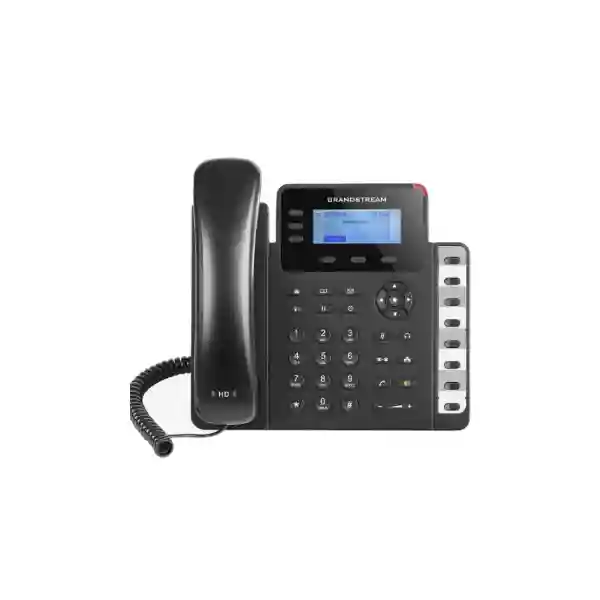
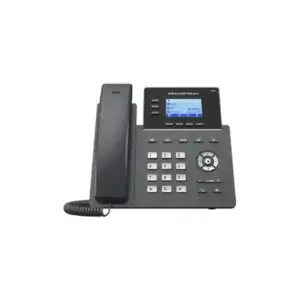
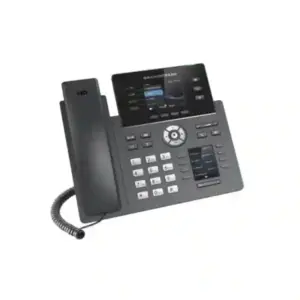
The Grandstream GXP1630 Dubai is a practical desk IP phone for businesses that need more call-handling flexibility than a basic one-line or two-line handset without moving into a high-end executive endpoint. Grandstream specifies three SIP accounts, three line keys, eight dual-colour BLF/speed-dial keys, four-way audio conferencing, HD audio on the handset and speakerphone, dual switched Gigabit Ethernet ports and integrated Power over Ethernet. That combination makes the GXP1630 especially relevant for reception support, office administration, sales desks, branch staff, supervisors and other users who need fast access to multiple extensions or monitored lines while keeping the desk setup simple.
8 BLF / speed-dial keys
Dual Gigabit Ethernet
Integrated PoE
HD audio
4-way conferencing
Quick answer: who should choose the GXP1630?
Choose the GXP1630 when the user needs an economical wired SIP desk phone with three independent SIP accounts, physical line keys, visible BLF/speed-dial access, Gigabit pass-through networking and PoE. It is a strong fit for organizations that already use a SIP PBX, including Grandstream UCM deployments, and want a familiar physical phone rather than a touchscreen or application-centric device. It is also suitable where a PC shares the same desk network point, because its dual switched Gigabit interfaces can support the phone and a connected workstation while preserving Gigabit-capable wired connectivity.
Do not select the GXP1630 only because the model is familiar. Check the real user requirement first. If the desk needs integrated Wi-Fi, Bluetooth, a colour display, a larger programmable-key surface, a more modern centralized endpoint-management workflow or advanced executive functions, a different Grandstream family may be a better long-term fit. Fourteck can help compare the GXP1630 with suitable alternatives based on user role, PBX platform, SIP account count, switch/PoE design, headset requirement, branch topology and expansion plan.
GXP1630 at a glance
| Phone class | Wired small-business Gigabit HD SIP desk phone |
|---|---|
| SIP / line capacity | 3 SIP accounts and 3 line keys |
| Programmable access | 8 dual-colour BLF/speed-dial keys plus 3 XML programmable context-sensitive soft keys |
| Display | 132 × 64, 2.98-inch backlit graphical LCD |
| Network | Dual switched auto-sensing 10/100/1000 Mbps Ethernet ports |
| Power | Integrated IEEE 802.3af PoE; power adapter is also specified in the package content |
| Audio | HD handset and full-duplex speakerphone with wideband audio support |
| Conference | Up to 4-way audio conferencing |
| Headset | RJ9 headset jack with EHS support for compatible Plantronics headsets |
| Provisioning / security | Grandstream UCM Zero Config support, TR-069, encrypted XML provisioning, TLS, SRTP, HTTPS and 802.1X-related security capabilities |
Why the three-account design matters in a real office
The specification “three SIP accounts” is useful only when it maps to how the employee works. A receptionist assistant may use one account for the main extension, a second for a departmental identity and a third for a secondary branch or service line. A salesperson may separate a direct extension from a shared sales queue or project line. A branch coordinator may use different call identities or PBX registrations where the communication platform allows it. The correct configuration depends on the PBX, dial plan, permissions and call-routing policy, so the phone should be selected as part of the communication design rather than treated as an isolated handset.
The three physical line keys also give users a clearer visual and tactile way to move between active call appearances. This matters for staff who frequently answer, place calls on hold, transfer, conference or switch between calls. In offices where one employee handles only occasional calls, that extra line capacity may be unnecessary; in a busier role, it can reduce reliance on menu navigation and make routine call control faster.
Eight BLF keys: small detail, large workflow benefit
The eight dual-colour BLF/speed-dial keys are one of the GXP1630’s most useful differentiators for office roles. BLF, or Busy Lamp Field, can let a user monitor the state of selected extensions when the PBX supports and permits the function. That can be useful for reception, administrative teams and supervisors who frequently transfer calls to a known set of colleagues. The same physical keys can also support speed-dial style workflows, depending on the configuration.
A good BLF layout is based on call flow, not alphabetical order. For example, a front-desk user may need quick visibility of the sales manager, accounts, technical support, warehouse and meeting room extensions. A branch administrator may need the branch manager, head office reception and two operational teams. A supervisor may prefer frequently contacted staff or pickup targets. Planning the eight keys around actual call behavior makes the phone more effective than loading every key with an arbitrary extension.
BLF behavior depends on PBX support, SIP subscription settings, permissions and provisioning. Therefore, businesses migrating from a different PBX should confirm interoperability and extension-state behavior before mass rollout. Fourteck can help test a representative phone with the intended PBX and call-flow design before standardizing a larger deployment.
Gigabit Ethernet and PoE for cleaner desk deployments
Shared desk network point
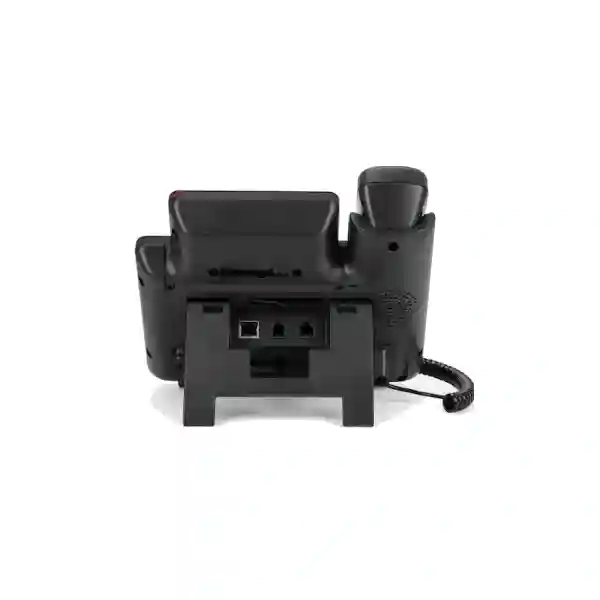
The GXP1630 has dual switched 10/100/1000 Mbps Ethernet ports. In a common office design, one port connects to the network switch and the second can pass network connectivity to the user’s PC. This can reduce the need for a second wall data outlet, although network policy and performance requirements should still be considered.
Power over Ethernet
Integrated PoE lets a compatible PoE switch provide both data connectivity and power over the Ethernet cable. This can simplify desk cabling and make centralized UPS-backed power strategies easier when the switch infrastructure is protected appropriately.
Voice VLAN and QoS planning
Grandstream specifies Layer 2 QoS support using 802.1Q/802.1P and Layer 3 QoS capabilities. In practical deployments, VLAN design, DSCP policy, switch configuration and WAN quality all influence call quality. The handset alone cannot correct an overloaded or poorly engineered network.
HD audio, speakerphone and everyday call quality
Grandstream lists HD audio on both the handset and speakerphone, with support for wideband audio. The published codec list includes G.722 as well as commonly used narrowband codecs such as G.711 and G.729 variants. In a real deployment, the audible result depends on the complete voice path: the local phone, PBX, SIP trunk or carrier, remote endpoint, codec negotiation, network latency, packet loss and jitter. A phone may support HD audio while a particular external call is still carried in narrowband because another part of the call path does not support the same codec.
The full-duplex speakerphone is useful for short desk conversations, call checking, small impromptu discussions and hands-free operation. It should not be confused with a purpose-built conference-room system. Meeting rooms with several participants, wider pickup requirements, echo-control challenges or hybrid video meetings normally need dedicated conferencing equipment.
For headset users, the RJ9 headset interface and EHS support can be useful in reception, sales and support roles. Compatibility should be confirmed against the exact headset model, EHS adapter requirements and firmware/configuration before procurement, especially when reusing headsets from another phone platform.
Customer requirement → capability → practical outcome
“I need one phone to handle several business identities.” The GXP1630 supports three SIP accounts. The practical benefit is that one desk endpoint can register more than one account where the PBX design requires it. The limitation is that registration and routing depend on the PBX and service configuration, so account count alone should not drive the design.
“Our receptionist needs quick extension visibility.” Eight BLF/speed-dial keys can provide direct monitored-extension or shortcut access when the PBX supports the required functions. The practical benefit is fewer menu steps. The limitation is the finite number of physical BLF keys, so larger attendant roles may need a different endpoint or console approach.
“We have only one data outlet at each desk.” Dual Gigabit Ethernet ports can support phone-plus-PC cabling. The practical benefit is simpler desk connectivity. The limitation is that network architecture, VLAN assignment, security policy and switch-port configuration still need to be correct.
“We want fewer power adapters.” Integrated PoE allows a compatible PoE switch to power the phone. The practical benefit is cleaner cabling and centralized power. The limitation is that PoE capacity, switch budget and UPS strategy must be sized correctly across the whole deployment.
Where the Grandstream GXP1630 fits best
Reception support and office administration
Three line keys and eight BLF keys make the GXP1630 useful for staff who answer, hold and transfer calls among a defined group of colleagues. It is best where the number of monitored extensions remains manageable and the attendant workflow does not require a large expansion module or dedicated console.
Sales and customer-service desks
Users who handle several calls and need fast access to team members can benefit from physical line and BLF keys. For intensive contact-centre roles, however, evaluate headset requirements, queue controls, call recording policy, CRM integration and supervisor features before choosing a basic desk-phone class.
Branch offices and multi-site operations
The phone can be used as part of a centrally managed SIP deployment where routing, VPN/security design, QoS and provisioning are handled correctly. Grandstream UCM users can also take advantage of the vendor’s Zero Config ecosystem for compatible deployments.
Managers and supervisors with straightforward needs
A manager who needs three SIP identities, BLF shortcuts, Gigabit connectivity and reliable wired voice may find the GXP1630 sufficient. Users who expect a colour display, Bluetooth, Wi-Fi or a more premium interface should compare other models before standardization.
GXP1630 vs GXP1628: the practical buying difference
The GXP1628 is a close family reference point because it also offers dual Gigabit ports, integrated PoE, HD audio and eight BLF/speed-dial keys. The important distinction is call/account capacity: Grandstream lists the GXP1628 with two SIP accounts and two line keys with three-way conferencing, while the GXP1630 provides three SIP accounts, three line keys and four-way conferencing. That makes the GXP1630 more appropriate for a user who genuinely needs an extra registered account or more simultaneous call-handling flexibility.
| Decision point | GXP1630 | GXP1628 |
|---|---|---|
| SIP accounts | 3 | 2 |
| Line keys | 3 | 2 |
| Audio conference | 4-way | 3-way |
| BLF / speed dial | 8 keys | 8 keys |
| Wired network | Dual Gigabit | Dual Gigabit |
| Best fit | Users needing an additional SIP identity and stronger multi-call handling | Users who need BLF and Gigabit but only two SIP accounts |
If the organization is refreshing an older fleet rather than extending an existing GXP16xx installation, it is also sensible to compare current Grandstream GRP series options. The best replacement depends on requirements such as SIP account count, Wi-Fi/Bluetooth needs, provisioning model, display preference, programmable keys, security policy and lifecycle planning rather than on model numbering alone.
PBX compatibility and SIP deployment planning
The GXP1630 is a standards-based SIP endpoint, but successful deployment requires more than entering a username and password. The PBX must provide compatible SIP registration, dial-plan behavior, codec choices, DTMF handling, time synchronization and the supplementary features the business expects. Features such as BLF, call park, shared call appearance, directory access or server-side recording can depend on the PBX and its configuration.
Grandstream specifically promotes compatibility with its UCM IP PBX family and Zero Config provisioning. In a Grandstream UCM environment, compatible endpoints can be discovered and provisioned using the vendor’s ecosystem, which can reduce repetitive manual configuration. For third-party SIP platforms, the GXP1630 can still be deployed using standard SIP methods, but administrators should validate the intended feature set rather than assuming every PBX implements optional SIP behavior in the same way.
Before a multi-phone rollout, test at least the following: inbound and outbound calling, caller ID, transfer, attended transfer, blind transfer, hold/resume, DTMF to IVRs, voicemail access, BLF, call pickup, conferencing, codec negotiation, emergency or special-number routing where applicable, VLAN assignment, DHCP options, NTP, firmware policy and failover behavior. If the phone will be used across branches, test WAN impairment scenarios and confirm how registration recovers after connectivity interruptions.
A pilot also helps expose user-experience issues. For example, the technical design may support three accounts, but staff may find the account labeling unclear unless line keys are named consistently. BLF keys may work but be mapped to people the user rarely calls. Provisioning may succeed but local time may be wrong because NTP or timezone settings were overlooked. These are small configuration details that strongly influence acceptance after deployment.
Security should be configured, not merely listed
Grandstream lists TLS, SRTP, HTTPS, 802.1X media-access control, administrator/user access controls and encrypted configuration-file capabilities for the GXP1630. Those are useful building blocks, but they do not secure a deployment automatically. Security depends on which services are enabled, whether the PBX and SIP provider support the same methods, certificate handling, password policy, management-network exposure, provisioning design, firewall policy and firmware maintenance.
For office deployments, avoid exposing phone web-management interfaces directly to the public internet. Separate voice traffic logically where the network design requires it, control management access, use strong administrative credentials, disable unused services and review provisioning paths. If remote phones register over the internet, use the PBX vendor’s supported secure remote-access design rather than improvising port-forwarding rules without a security review.
Organizations with compliance or sensitive communications requirements should review the entire voice architecture, including PBX hardening, SIP trunk security, call recording, retention, remote administration and logging. Endpoint encryption features are only one part of that system.
Provisioning options for one phone or hundreds
For a single desk, manual web-interface configuration may be acceptable. For ten, fifty or several hundred phones, manual configuration quickly becomes inconsistent and expensive to maintain. The GXP1630 supports automated provisioning methods including TR-069 and encrypted XML configuration files, while Grandstream UCM deployments can use Zero Config. This enables administrators to standardize SIP accounts, codecs, time settings, VLAN behavior, BLF assignments, firmware and user preferences.
A good provisioning template separates global settings from user-specific settings. Global values might include NTP, timezone, preferred codecs, VLAN, syslog, firmware policy and security parameters. User-specific values include extension credentials, display name, account labels and BLF mappings. Separating these layers reduces mistakes and makes moves, adds and changes easier to manage.
Provisioning should also include a rollback and testing process. A mass firmware or configuration change can affect every phone at once, so test updates on a small group first. Keep change records, verify endpoint behavior after updates and avoid interrupting power while a device is booting or applying firmware. Grandstream’s installation guidance specifically warns against power-cycling the phone while LEDs flash during boot or firmware upgrade.
Network design checklist before ordering
PoE budget: confirm the switch has sufficient PoE capacity for the total number of phones plus any other PoE devices such as access points and cameras. Grandstream lists the GXP1630 as IEEE 802.3af Class 2.
Switch ports: confirm the switch port configuration supports the planned voice/data VLAN architecture, LLDP-MED or manual VLAN settings as required, QoS policy and the desired security controls.
DHCP and DNS: the phone must reliably obtain addressing and resolve required hostnames. Branch deployments should consider what happens if local DHCP or DNS fails.
WAN quality: measure latency, jitter and loss, especially between branches or to hosted SIP services. Bandwidth alone is not a guarantee of voice quality.
Firewall/NAT: use the PBX and SIP provider’s recommended design. Avoid random SIP ALG behavior, broad inbound exposure or port-forwarding configurations that have not been validated.
Power resilience: when phones rely on PoE, a UPS-protected switch can keep phones powered during short utility interruptions, but the PBX, router, firewall, ISP termination and any required upstream equipment must also remain available for calling to continue.
Dubai and UAE deployment guidance
For Dubai offices, the GXP1630 can fit conventional wired-IP-telephony deployments in business centres, professional offices, trading companies, logistics operations, hospitality back offices, clinics, schools, showrooms and branch environments. The most important buying question is not “Does the phone work in Dubai?” but “Does it match the PBX, network and user workflow in this specific site?” Office layouts, available structured cabling, PoE switch capacity, internet connectivity, extension design and support expectations vary significantly between a small office in Deira and a multi-floor corporate site in Business Bay or JLT.
In Abu Dhabi, Sharjah, Ajman and other UAE locations, multi-site organizations should standardize configuration while allowing for local network differences. A central template can keep extension behavior, security policy and firmware consistent, while site-specific settings handle VLAN IDs, WAN paths, local survivability or branch-specific BLF layouts. That approach is more maintainable than configuring each handset independently.
For procurement, confirm the exact model, required quantity, power method, headset requirements, PBX platform, extension count and delivery location before requesting a quotation. Price can vary with quantity, sourcing, services and associated infrastructure, so this page does not publish an invented or stale price. Fourteck can provide quotation guidance after the deployment requirement is defined.
Businesses planning a wider communications project can also coordinate the phone deployment with PBX, PoE switching, structured cabling, firewall, SIP trunk and support planning. For UAE infrastructure and related business technology, visit Fourteck UAE. For IP PBX-focused requirements in Dubai, see Fourteck IP PBX Dubai.
Regional rollout considerations beyond the UAE
Uganda: organizations deploying phones in Kampala or branch locations should pay particular attention to stable LAN design, power resilience, WAN reliability and centralized provisioning. Where connectivity between branches and the central PBX is variable, test registration recovery, codec behavior and call-quality thresholds before a large rollout. For broader Uganda technology projects, Fourteck maintains regional coverage at uganda.fourteck.com.
Kenya: multi-branch offices can benefit from a consistent endpoint template while keeping site-specific VLAN, QoS and dialing settings. If the GXP1630 is used with a hosted or centralized PBX, verify WAN path quality from each branch rather than relying on a single headquarters test. Regional information is available from Fourteck Kenya.
Tanzania: deployment planning should include PoE switch capacity, local power continuity, cabling quality and remote support. Standardized provisioning is particularly useful where technical staff are not present at every site. See Fourteck Tanzania for regional technology coverage.
Nigeria and Ghana: organizations with distributed offices should evaluate voice quality per location, centralize firmware and configuration control, and document the process for replacing a failed endpoint. Regional Fourteck resources include Nigeria and Ghana.
Kuwait: for office refresh projects, compare the GXP1630 against current requirements rather than automatically repeating a previous model. Existing wiring, PoE, PBX compatibility and user training may make the GXP1630 practical, while greenfield projects may justify comparing newer endpoint families. Visit Fourteck Kuwait for related regional information.
A practical user-role matrix
| User role | Why GXP1630 may fit | What to confirm first |
|---|---|---|
| Reception assistant | BLF keys, multiple line keys, transfer and conference controls | Number of monitored extensions and need for an attendant console |
| Sales executive | Three SIP accounts, headset support, speed dial, Gigabit network pass-through | CRM integration, recording policy and headset compatibility |
| Office administrator | Fast access to common extensions, call handling and directory features | BLF map, shared lines and voicemail workflow |
| Branch manager | Straightforward wired desk phone with multiple account capacity | Need for Wi-Fi, Bluetooth, colour display or executive functions |
| Warehouse desk | PoE, wired reliability and physical keys | Environmental conditions, cabling and whether cordless mobility is actually needed |
| Call-centre agent | Can handle standard SIP calling and headset use | Queue controls, wallboard/CRM integration, supervisor features and high-call-volume ergonomics |
Technical specification detail
According to Grandstream’s published GXP1630 datasheet, the phone supports SIP RFC3261 together with common IP and management protocols including TCP/IP/UDP, RTP/RTCP, HTTP/HTTPS, DHCP, NTP, STUN, LLDP-MED, LDAP, TR-069 and 802.1X. The dual network interfaces are auto-sensing 10/100/1000 Mbps Ethernet ports with integrated PoE. The display is a 132 × 64 graphical backlit LCD measuring approximately 2.98 inches.
Feature keys include three dual-colour line keys, three XML programmable context-sensitive soft keys, navigation controls, eight BLF keys and dedicated function keys for operations such as mute, headset, transfer, conference, redial, speakerphone, volume, phonebook, message, hold, page/intercom, record and home. Actual behavior of some functions depends on PBX support and configuration.
The published codec support includes G.711 µ-law/A-law, G.722 wideband, G.723, G.726-32, G.729 A/B and iLBC, along with common DTMF methods. Telephony features listed by Grandstream include hold, transfer, forwarding, park/pickup, four-way conferencing, shared call appearance / bridged line appearance, downloadable XML/LDAP phonebook, call waiting, call history, off-hook auto-dial, auto-answer, click-to-dial, flexible dial plan, hot desking and server redundancy/failover.
Grandstream specifies a phonebook capacity of up to 1,000 items and call history of up to 200 records in the current datasheet and documentation. The headset connection is RJ9, and Grandstream documents EHS support for compatible Plantronics headsets. The base supports two angled positions and the phone can be wall mounted, which can be useful in reception counters, corridors, compact offices or shared service areas where desk depth is limited.
For power, the datasheet lists IEEE 802.3af Class 2 PoE with a stated range of 3.84 W to 6.49 W, along with an external universal power supply specification of 100–240 VAC input and 5 VDC, 600 mA output. Physical dimensions are approximately 222.5 mm × 208.5 mm × 76.2 mm with handset, with unit weight around 0.8 kg and package weight around 1.2 kg.
Operating temperature is listed from 0°C to 40°C, storage from -10°C to 60°C and humidity from 10% to 90% non-condensing. These limits matter for deployments in warehouses, guard rooms, poorly conditioned spaces or locations exposed to heat. An indoor desk phone should be installed within its specified environmental range rather than placed in harsh outdoor or industrial conditions.
What is included in the package?
Grandstream’s datasheet lists the GXP1630 phone, handset with cord, base stand, universal power supply, network cable, Quick Installation Guide, brochure and GPL license in the package content. Packaging can vary by region or distribution channel, so confirm the exact commercial package before ordering rather than assuming every shipment includes identical accessories.
For project procurement, the phone itself may be only one part of the bill of materials. Depending on the site, the complete solution may also require PoE switches, patch cords, structured cabling, rack equipment, PBX licenses or appliances, SIP service, headsets, UPS systems, firewall configuration and installation/support services. Defining the full requirement avoids a situation where phones arrive before the network or PBX is ready.
Deployment workflow Fourteck can support
Requirement check
Confirm user roles, extension count, SIP accounts, BLF needs, headset use, PBX platform and branch topology.
Network readiness
Review switch capacity, PoE budget, VLAN/QoS, DHCP, DNS, cabling, firewall and WAN quality.
Pilot configuration
Register a representative endpoint and test calls, transfer, BLF, voicemail, conferencing and recovery behavior.
Provisioning template
Standardize firmware, account, security, time, directory and key mappings for repeatable rollout.
Rollout and validation
Deploy in controlled batches, verify user behavior and document changes, credentials and support ownership.
Buying guide: when GXP1630 is the right choice, and when it is not
Choose it when: the user needs three SIP accounts; physical BLF/speed-dial keys are important; the desk is wired; Gigabit pass-through is useful; PoE is available or planned; the business wants HD audio and standard SIP functions; and the current PBX/provisioning method is compatible with the endpoint.
Compare alternatives when: the user needs integrated Wi-Fi or Bluetooth, a colour or touch display, more than eight direct monitored keys, a very large contact-centre control surface, video calling, an expansion module, mobile-first working or a specific modern endpoint-management feature not covered by the GXP1630.
For existing GXP1630 fleets: continuity may be valuable because users already understand the interface and provisioning templates may already exist. Before adding more units, check availability, firmware policy, organization-wide lifecycle plans and whether a newer model should be adopted for future standardization.
For new offices: do not decide from price alone. Compare user roles, expected service life, PBX platform, headset and wireless requirements, security policy and management approach. The cheapest handset can become expensive if it lacks a required feature and must later be replaced.
Common configuration mistakes to avoid
Using identical admin passwords across every endpoint: standardization is useful, but shared weak credentials increase exposure. Use a controlled credential strategy appropriate to the environment.
Skipping VLAN and QoS planning: voice can appear fine during a quiet test and degrade later when data traffic increases. Plan the network before deployment.
Assuming every SIP feature works on every PBX: basic registration may work while BLF, pickup, SCA or special key behavior differs. Test the exact workflows users need.
Manually configuring large fleets: this causes inconsistent settings and support difficulty. Use supported provisioning where possible.
Ignoring firmware governance: random firmware levels complicate troubleshooting. Establish a tested version policy and controlled update process.
Choosing a phone before defining the role: a phone for a warehouse counter, receptionist and senior executive may all need different features. User-role mapping should come before model selection.
Frequently asked questions about Grandstream GXP1630
How many SIP accounts does the GXP1630 support?
Grandstream specifies three SIP accounts and three line keys for the GXP1630. The way those accounts are used depends on the PBX and the organization’s dial plan.
Does the GXP1630 support Power over Ethernet?
Yes. The GXP1630 includes integrated PoE, and Grandstream’s datasheet specifies IEEE 802.3af Class 2. The connected switch must provide compatible PoE with sufficient total power budget.
Does the GXP1630 have Gigabit Ethernet?
Yes. It has two switched auto-sensing 10/100/1000 Mbps Ethernet ports, which can support a network uplink and a connected PC in a typical desk deployment.
How many BLF keys are available?
The phone has eight dual-colour BLF/speed-dial keys. BLF operation requires compatible PBX support and correct configuration.
Can the GXP1630 be used with a Grandstream UCM PBX?
Yes. Grandstream documents compatibility with its UCM series and supports Zero Config provisioning in compatible UCM deployments.
Can it work with a third-party SIP PBX?
The GXP1630 is a SIP phone and can be used with compatible third-party SIP platforms. However, advanced functions such as BLF, pickup, directory integration and shared-line behavior should be tested with the specific PBX.
Does the GXP1630 support headsets?
It includes an RJ9 headset jack and Grandstream documents EHS support for compatible Plantronics headsets. Confirm the exact headset and any required EHS accessory before ordering.
Does it support HD voice?
Yes. Grandstream specifies HD audio on the handset and speakerphone and includes G.722 wideband codec support. End-to-end HD quality still depends on the PBX, carrier, remote endpoint and network.
Is the GXP1630 suitable for a receptionist?
It can suit a receptionist or office administrator who needs three line keys and up to eight BLF/speed-dial keys. A busier front desk that must monitor many more extensions may be better served by a model or console with greater programmable-key capacity.
What is the GXP1630 price in Dubai?
Pricing depends on quantity, sourcing, associated services and project requirements. Rather than publishing an unverified price, Fourteck recommends requesting a current quotation with the required quantity, PBX platform, location and any installation or configuration scope.
Should a new deployment choose GXP1630 or a newer GRP model?
That decision should be based on the user role and lifecycle plan. Existing GXP environments may value continuity, while greenfield projects should compare current GRP options for management, wireless, display and feature requirements. Fourteck can compare suitable models against the actual requirement.
Technical references
Technical specifications on this page are based on Grandstream’s official GXP1630 product information, datasheet and current documentation. Because firmware and deployment behavior can change over time, confirm firmware-dependent settings and compatibility before a new rollout.
Official Grandstream GXP1630 product page
Plan your GXP1630 deployment with Fourteck
If you are evaluating the Grandstream GXP1630 Dubai for a new office, branch rollout, PBX upgrade or replacement project, start with the user requirement rather than the handset alone. Share the number of phones, user roles, PBX platform, SIP account needs, BLF requirements, headset preference, office locations and available PoE/network infrastructure. Fourteck can help determine whether the GXP1630 is the right fit or whether another endpoint better matches the project.
Next step: request a current quotation and compatibility review for the required quantity and deployment scope. Availability, commercial terms and project services should be confirmed at the time of enquiry.
Reviews
There are no reviews yet.