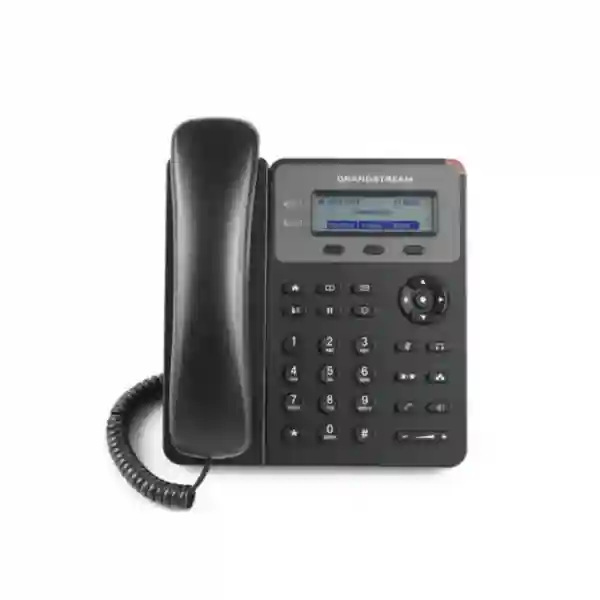
Grandstream GXP1610P Dubai – PoE VoIP Desk Phone for Practical Business Extensions
The Grandstream GXP1610P Dubai is designed for organizations that need a straightforward SIP desk phone with integrated Power over Ethernet, familiar physical keys, essential call handling and centralized provisioning options. It fits especially well where the requirement is not a large colour display or a long list of programmable keys, but rather a dependable wired endpoint for everyday calling at reception support desks, back offices, small branches, service counters, warehouses, classrooms, staff rooms and other general-purpose extensions. Grandstream’s current product information describes the GXP1610P alongside the GXP1610 and GXP1615, with a 132 × 48 LCD, up to two call appearances, programmable soft keys, dual 10/100 Mbps Ethernet interfaces, 3-way conferencing, EHS headset support and built-in IEEE 802.3af PoE on the GXP1610P variant.
For Dubai and UAE buyers, the strongest reason to choose the GXP1610P over the basic GXP1610 is deployment simplicity when a PoE switch is already available. A single Ethernet connection can carry network connectivity and power, reducing desk-side adapters and making larger rollouts easier to standardize. The right buying decision still depends on the PBX platform, SIP account requirements, network design, headset needs, future expansion and current model availability. Fourteck can help evaluate those points before quotation or deployment rather than treating the phone as an isolated device.
Who should consider the GXP1610P?
The GXP1610P is best considered as a cost-conscious, wired business endpoint for users whose daily work is primarily answering, placing, transferring and occasionally conferencing calls. It is not positioned as an executive productivity phone with a large colour screen, integrated Wi‑Fi, Bluetooth or a large bank of line and BLF keys. That distinction is important in procurement: selecting the simplest phone that genuinely fits each role can lower endpoint complexity, while assigning richer models only to staff who will actually use advanced features.
Typical candidates include small offices with a limited number of extensions, branch sites with standardized PoE switching, reception overflow positions, warehouse administration desks, retail back offices, schools, clinics, workshops, service counters and hotel operational areas. A small business may use the GXP1610P for most ordinary users and reserve more advanced Grandstream models for supervisors, receptionists or teams that need more programmable keys, larger displays or higher-speed network pass-through. This role-based approach is often more useful than buying one expensive model for every desk.
The phone can also make sense during phased VoIP migrations. When a company is replacing analog extensions, the GXP1610P provides familiar physical controls while moving users onto SIP. However, the PBX configuration, VLANs, DHCP options, QoS, provisioning server, emergency dialing policy and security settings should be planned centrally rather than configured desk by desk.
Verified GXP1610P technical facts at a glance
| Display | 132 × 48 pixel, 2.95-inch LCD |
|---|---|
| Call / account capability | Grandstream’s current datasheet lists two SIP accounts and up to two call appearances |
| Ethernet | Dual switched auto-sensing 10/100 Mbps Ethernet ports |
| Power | Integrated IEEE 802.3af PoE, Class 2 on GXP1610P |
| Conference | 3-way audio conferencing |
| Audio codecs | G.711 µ/a, G.722, G.723, G.726-32, G.729 A/B and iLBC as listed by Grandstream |
| Headset | RJ9 headset jack with EHS support for supported Plantronics headsets |
| Phonebook / history | Downloadable XML/LDAP phonebook up to 1,000 entries; call history up to 200 records |
| QoS | Layer 2 802.1Q/802.1P and Layer 3 ToS/DiffServ/MPLS QoS support |
| Security | TLS, SRTP, HTTPS, 802.1X and AES-encrypted configuration support |
| Provisioning | TFTP, HTTP, HTTPS, FTP/FTPS, TR-069 and encrypted XML configuration methods |
| Mounting | Two stand angles and wall-mountable design |
| Dimensions | 209 × 184.5 × 76.2 mm with handset |
Specifications should always be checked against the latest Grandstream documentation and the exact device/firmware being purchased. In particular, account wording has varied across some Grandstream documentation over time, so organizations for which multiple registered SIP identities are a strict requirement should confirm that behavior before a bulk order.
Why PoE matters in a Dubai office rollout
Power over Ethernet is the main practical differentiator of the GXP1610P. In a properly designed office network, a PoE access switch can provide both network connectivity and power to the phone through one Ethernet cable. This can reduce the number of AC adapters at desks, make cable management cleaner and centralize power protection when PoE switches are connected to UPS systems. Centralized power also gives the IT team more control during planned maintenance because phone power can be managed from the network side rather than requiring physical access to every desk.
PoE does not remove the need for network planning. The access switch must have enough available PoE budget for all connected phones and other powered devices such as wireless access points or cameras. The switch ports should also be configured correctly for any voice VLAN, QoS policy, 802.1X requirement or LLDP-MED behavior used by the organization. For branch deployments, power resilience should be considered at the switch and UPS level. A desk phone cannot remain available during a local power outage if the PoE switch itself loses power.
Grandstream identifies the GXP1610P as an IEEE 802.3af Class 2 device. The current datasheet lists a PoE power range of 3.84 W to 6.49 W. This relatively modest endpoint demand can be helpful when estimating switch capacity, but total design should still include every powered device on the switch and an appropriate margin. Fourteck can help size the switching and telephony layers together rather than considering the phone and network as separate purchases.
What daily call handling does the GXP1610P support?
For ordinary office users, productivity usually depends less on an impressive feature list and more on whether the phone handles common tasks quickly. The GXP1610P includes dedicated function keys and supports the core workflows expected from a SIP desk phone: hold, transfer, unconditional forwarding, no-answer forwarding, busy forwarding, call waiting, auto answer, redial, mute, speakerphone, message access, call park/pickup and 3-way conferencing. Those functions cover many small-office and general-extension requirements without forcing users through a complex touchscreen interface.
The downloadable XML and LDAP phonebook capability is useful when an organization wants a shared directory rather than expecting staff to maintain contacts locally on each phone. Grandstream lists support for up to 1,000 phonebook items and up to 200 call-history records. The actual user experience will depend on how the PBX, directory and provisioning infrastructure are configured. A centrally managed directory is usually preferable in multi-user environments because employee changes can be reflected consistently across deployed phones.
Three XML programmable context-sensitive soft keys provide some interface flexibility. They do not replace the larger programmable-key capacity found on higher-tier phones, so organizations with heavy BLF, speed-dial or shared-line requirements should assess a richer Grandstream endpoint. Matching each user role to the right key capacity avoids later frustration and prevents a basic model from being pushed beyond its intended use.
Audio, speakerphone and codec considerations
Grandstream describes the GXP1610P family as supporting a full-duplex hands-free speakerphone with acoustic echo cancellation and wideband audio capability. The current datasheet lists G.711 µ-law/A-law, G.722, G.723, G.726-32, G.729 A/B and iLBC. Codec availability alone does not guarantee a wideband call from end to end. The PBX, SIP trunk, remote endpoint, network conditions and transcoding policy all influence what users finally hear.
For internal calls between compatible endpoints on a correctly configured network, G.722 can support wideband voice. External PSTN or mobile calls may still be narrowband depending on the carrier path. Organizations should therefore avoid treating “HD audio” as a universal guarantee across every call type. The more useful engineering goal is consistent speech intelligibility, proper QoS, adequate bandwidth, suitable codec policy and a well-configured PBX.
The built-in speakerphone is useful for brief hands-free conversations, but the GXP1610P should not be treated as a substitute for a purpose-built conference-room endpoint. For users who spend much of the day on calls, an approved wired headset may improve comfort. Grandstream lists an RJ9 headset interface with EHS support for Plantronics headsets; exact headset/EHS compatibility should be checked before procurement because headset ecosystems and adapter requirements can change.
Network design: voice VLANs, QoS and 10/100 Ethernet
The GXP1610P uses dual switched 10/100 Mbps Ethernet ports. One port connects the phone to the network; the second can be used to pass network connectivity to a nearby computer where that topology is appropriate. For ordinary voice traffic, Fast Ethernet provides far more bandwidth than a single VoIP conversation needs. The more important question is whether a user’s downstream computer or workflow requires Gigabit Ethernet. If staff routinely move large files, use high-bandwidth applications or connect through the phone’s PC port to a high-speed corporate network, a newer Gigabit-capable endpoint may be a better fit.
Grandstream’s specification includes Layer 2 QoS with 802.1Q and 802.1P as well as Layer 3 QoS mechanisms. In a managed network, these features can help separate voice traffic into a VLAN and prioritize latency-sensitive packets. QoS must be implemented end to end; merely enabling a setting on the phone is not enough. Switches, routers, WAN edges, firewalls and the PBX environment should share a coherent policy.
Dubai offices using converged networks should also consider DHCP scope design, DNS/NTP reachability, provisioning-server access and any firewall rules required for SIP, RTP and management traffic. A site with multiple branches may need additional controls around VPN connectivity, NAT handling and SIP trunk routing. Fourteck can assess these dependencies as part of a wider IP telephony deployment.
Security capabilities and what they mean in practice
The GXP1610P includes several features relevant to secure enterprise voice deployments, including TLS, SRTP, HTTPS, 802.1X network access control, administrator/user access levels and AES-encrypted configuration files. These capabilities allow the phone to participate in a stronger security architecture, but they still need to be configured correctly. A phone with security features left at permissive defaults does not automatically create a secure VoIP environment.
Organizations should use strong administrator credentials, restrict management access to trusted networks, enable encrypted signaling and media when supported by the PBX/SIP provider, keep firmware aligned with vendor guidance and control access to provisioning files. Where 802.1X is part of corporate access control, certificate or credential management should be tested before mass deployment. Voice VLAN isolation can reduce unnecessary exposure between endpoints and other user networks.
Provisioning servers should be protected because configuration files can contain account and infrastructure information. Grandstream supports encrypted XML configuration, which is preferable to exposing sensitive configuration in clear text. HTTPS should be used where practical. Security requirements differ between a small standalone office and a regulated or multi-site organization, so the deployment baseline should follow the customer’s own policies rather than a generic checklist.
Provisioning and lifecycle management
Manual configuration can be acceptable for a very small installation, but it becomes inefficient as the number of phones grows. The GXP1610P supports firmware upgrade and configuration methods including TFTP, HTTP, HTTPS, FTP/FTPS, TR-069 and XML configuration files. This gives administrators several ways to standardize SIP accounts, time settings, dial plans, network parameters and other device policies.
Grandstream also promotes Zero Config integration with its UCM series IP PBXs. In a compatible Grandstream UCM environment, this can reduce repetitive work when discovering and provisioning endpoints. The exact workflow depends on UCM model, software version, phone firmware and network topology, so deployments should be validated in a controlled pilot before hundreds of handsets are rolled out. A successful pilot confirms provisioning, calling, transfer, voicemail, directory, emergency dialing and firmware behavior under the same conditions used in production.
Lifecycle management should include a firmware policy rather than one-time installation. Administrators need to know who approves firmware changes, how updates are tested, what rollback plan exists and how configurations are backed up. When many sites are involved, consistency matters more than individual customization. Centralized templates can reduce drift and make fault isolation easier.
PBX compatibility: what to check before ordering
The GXP1610P is a SIP endpoint, so it can be considered for standards-based IP PBX and hosted VoIP environments. Compatibility should never be reduced to “supports SIP.” Businesses should confirm whether their PBX vendor or service provider has tested the model, whether auto-provisioning templates are available, which SIP features are supported, and whether the required firmware version is approved. Registration may work even when advanced behaviors such as BLF, directory synchronization, voicemail indication or transfer semantics are not fully aligned.
With Grandstream UCM systems, the vendor’s Zero Config ecosystem is a natural fit. In third-party PBX environments, administrators may use vendor templates or manual provisioning. For 3CX or other platforms, verify the current support matrix rather than relying on an old installation guide. Hosted providers may also have device restrictions or require specific provisioning URLs.
Before procurement, Fourteck recommends confirming at least these points: number of SIP identities needed, expected concurrent call behavior, codecs, DHCP/VLAN method, PoE availability, headset type, PC port speed requirements, remote-site connectivity, emergency dialing, directory requirements, encrypted SIP/RTP requirements and mass-provisioning method. A five-minute compatibility review can prevent a larger replacement problem after hardware arrives.
Role-based deployment examples
Small office general users
For staff who mainly place and receive calls, transfer to colleagues, access voicemail and occasionally join a three-way conversation, the GXP1610P can provide the required controls without unnecessary complexity. PoE keeps desk installation clean when a managed switch already supplies power.
Warehouse and operations desks
Operational areas often need a fixed wired phone that remains easy to use for shift-based teams. A wall-mountable form factor, physical keypad and PoE can be practical. Network cabling, dust exposure, physical protection and local environmental conditions still need to be assessed; the phone is not presented by Grandstream as a ruggedized industrial handset.
Schools and training centers
Administration rooms, staff offices and reception support points may only need basic extensions. Central provisioning can make it easier to keep dial plans and settings consistent across many rooms. Emergency and safeguarding call flows should be designed at the PBX level.
Retail back offices and service counters
Retail locations can use basic SIP phones for internal coordination and supplier calls. A centralized template is especially useful across multiple branches. For noisy front-of-house areas or mobile employees, other endpoint types may be more suitable.
Grandstream GXP1610P Dubai: local deployment considerations
Dubai businesses commonly deploy IP phones as part of a wider network refresh, office relocation, PBX upgrade or branch expansion. In those projects, the handset should be selected alongside the switching, firewall, internet connectivity, structured cabling and PBX architecture. The GXP1610P is particularly logical where the site already uses PoE access switches and employees do not need Gigabit pass-through or a large programmable-key field.
For a new Dubai office, a practical sequence is to confirm the number and type of users, build a floor/extension plan, identify PoE switch capacity, define the voice VLAN, test SIP trunking or hosted service connectivity, configure the PBX, prepare a phone template, and then pilot a small number of endpoints. Only after successful testing should the same configuration be scaled. This avoids using mass deployment as the first compatibility test.
Organizations moving between Dubai offices should also distinguish between phone configuration and number/service portability. SIP trunk numbers, DID routing and carrier migration may involve separate lead times and documentation. The phones themselves are only one layer of the communications project. Fourteck can coordinate endpoint selection with IP PBX planning in Dubai and broader IT infrastructure services.
Abu Dhabi, Sharjah, Ajman and wider UAE use cases
In Abu Dhabi, the GXP1610P may suit branch offices, professional services teams, education facilities and administrative areas where central IT wants repeatable provisioning and PoE-powered endpoints. Larger organizations should standardize a firmware baseline and verify security controls before expanding across multiple locations. Where WAN connectivity connects branches back to a centralized PBX, latency, QoS and failover design become as important as the handset specification.
Sharjah customers often balance cost and simplicity across offices, trading companies, warehouses, schools and light industrial operations. A basic PoE desk phone can be a sensible fit at fixed workstations, while supervisors or receptionists may need a higher-tier phone. Ajman and northern-emirate branch locations can benefit from the same standard model when central support teams want consistent hardware and configuration.
For multi-emirate organizations, procurement should focus on a standard bill of materials and documented exceptions by role. Rather than selecting a different model for each location, define endpoint classes such as “basic user,” “power user,” “reception,” “executive,” “wireless/DECT” and “conference room.” The GXP1610P can occupy the basic-user class where its display, key count, Ethernet speed and SIP functionality meet the requirement.
GXP1610 vs GXP1610P vs GXP1615: why the suffix matters
Grandstream groups the GXP1610, GXP1610P and GXP1615 closely, but procurement teams should pay attention to the exact model. The GXP1610P specifically includes integrated PoE. Grandstream’s quick-installation material also indicates that the GXP1610P package does not include the same external power adapter supplied with the non-PoE GXP1610/GXP1615 package. That is not a disadvantage when the intended installation uses PoE; it simply means the power design must be correct before the phone is deployed.
The safest purchasing practice is to write the exact model number into the quotation and purchase order. Similar model names can create mistakes when multiple variants are stocked by distributors. The requirement should state whether PoE is mandatory, whether an external adapter is needed, and whether the deployment will use the phone’s PC pass-through port. Model verification is especially important during bulk orders or replacement projects where the new units must match an existing standard.
If the organization is deciding between these older basic GXP models and newer Grandstream product families, compare operational requirements rather than only upfront hardware cost. Newer models may provide different provisioning, network, audio, key and security capabilities that can be valuable for long-term standardization. Fourteck can help compare suitable alternatives before quotation.
When the GXP1610P may not be the right choice
A useful buying guide should also explain where a product does not fit. The GXP1610P may be too basic for receptionists who monitor many extensions, managers who need a large colour display, users who require integrated Wi‑Fi or Bluetooth, staff who depend on Gigabit pass-through, or contact-center agents who need deeper headset and application integration. The 10/100 Ethernet interface can also be a constraint where the connected PC is expected to use the phone as a pass-through device on a Gigabit network.
Organizations should also look beyond the individual phone when planning a long-term platform. If an existing environment is being standardized around a newer Grandstream series, mixing generations may increase firmware, template and support complexity. A lower hardware cost does not always reduce total support effort.
None of these points make the GXP1610P unsuitable; they simply define its intended role. It remains a sensible endpoint where requirements are basic and PoE is valued. The right question is not “Is this phone good?” but “Does this model fit this exact user profile and network architecture?” Fourteck can compare the GXP1610P against newer entry-level alternatives when future lifecycle and standardization are important.
Procurement checklist for a GXP1610P quotation
Before requesting a quote, prepare a short requirement summary. This makes the response more accurate and reduces back-and-forth. Start with the number of handsets, office locations and expected user roles. Confirm whether every desk has a PoE switch port or whether PoE injectors will be required. Specify the PBX or hosted voice platform, SIP provider if relevant, and whether the project is a new deployment, expansion or replacement.
Include any headset requirement, wall-mount requirement, voice VLAN design, remote-site connectivity and security standards. If multiple SIP registrations are needed on the same handset, state that explicitly so current firmware/variant support can be confirmed before ordering. If PCs will connect through the phone, identify whether 10/100 Mbps pass-through is acceptable.
Do not assume price, stock, warranty terms or delivery time from an old web listing. Those are commercial details that should be confirmed in the current quotation. Product availability can change, particularly for established models that have been on the market for several years. Fourteck’s role is to match the requirement to a suitable model and confirm current procurement details at the time of request.
Deployment checklist for IT teams
Confirm PoE budget, switch ports, VLANs, DHCP, DNS, NTP and routing.
Create extension policy, SIP credentials, dial plan, voicemail and call routing.
Set strong admin credentials, restrict management, and enable encryption where supported.
Build and test a standard configuration template before scaling.
Test inbound/outbound calls, transfer, hold, conference, voicemail, directories and emergency dialing.
Document extension mapping, firmware baseline, support process and spare-device procedure.
A small pilot is strongly recommended. It is easier to identify a VLAN, SIP, provisioning or headset issue on five phones than after a building-wide deployment. Once the pilot passes, the same template and acceptance criteria can be reused across batches.
How the GXP1610P fits a complete business phone system
An IP phone is one endpoint inside a larger system. A complete business voice solution may include the PBX or cloud service, SIP trunks, DIDs, gateways, firewalls, PoE switches, cabling, UPS, remote-access design, call queues, IVR, voicemail, recording policies and monitoring. The GXP1610P can serve as the desk endpoint, but overall call quality and resilience depend on the whole architecture.
For example, intermittent audio may be caused by WAN packet loss, incorrect NAT, SIP ALG behavior, overloaded links or poor QoS rather than the phone itself. Registration failures may come from DNS, firewall, credential or provisioning problems. Troubleshooting should therefore start with the call path and logs, not just by replacing handsets.
Organizations planning a new PBX can review Fourteck IP PBX resources, while broader Grandstream requirements can be considered through Fourteck’s Grandstream UAE coverage. For endpoint-focused navigation, visit IP Phone Fourteck.
Migration from analog phones to GXP1610P SIP extensions
Moving from analog phones to SIP endpoints changes more than the handset. Analog extensions often rely on PBX ports and building copper, whereas the GXP1610P becomes an IP device that depends on Ethernet switching, addressing, PoE and network reachability to the PBX. This shift can improve flexibility and centralized administration, but it also creates dependencies that should be planned.
A migration project should map every current extension, identify special devices such as fax machines, door phones, lifts or alarm lines, and separate them from ordinary user handsets. Do not assume every analog device can be replaced by an IP phone. Some legacy equipment may need gateways or dedicated services. For ordinary desk users, the SIP phone can often be deployed with the same extension number while the backend platform changes.
User training can remain simple. Most staff need to know how to answer, transfer, place on hold, access voicemail and use the directory. The GXP1610P’s physical keypad and dedicated function keys can make the transition familiar. A short laminated guide or intranet page is often more effective than a long manual.
Multi-site businesses and centralized management
For organizations with branches in Dubai, Abu Dhabi, Sharjah or other emirates, standardization has major operational value. If every branch uses the same basic endpoint class and configuration template, the IT team can simplify provisioning, spares, user guides and troubleshooting. The GXP1610P can be used as that basic class where its feature set matches the user profile.
Centralization should be balanced with resilience. A branch that depends entirely on a remote PBX or cloud service needs stable WAN connectivity. Consider whether local survivability, alternate routing, mobile fallback or a secondary internet path is required. The handset cannot compensate for a failed WAN path. QoS should also be applied consistently between branch LANs and WAN edges.
Provisioning across sites requires secure reachability to the management platform. Avoid exposing administrative interfaces directly to the public internet. Use controlled management networks, VPNs or secure provisioning methods. Device inventory should record model, MAC address, extension, site, user and firmware version so that support teams can quickly identify the affected endpoint.
Frequently asked questions about Grandstream GXP1610P Dubai
Does the Grandstream GXP1610P support PoE?
Yes. Grandstream specifies integrated IEEE 802.3af Power over Ethernet on the GXP1610P. This allows a compatible PoE switch or injector to provide both network connectivity and power through the Ethernet cable. The switch must have sufficient PoE capacity.
Does the GXP1610P include a power adapter?
Grandstream’s current quick-installation documentation states that a power adapter is not supplied with the GXP1610P package. The normal deployment is therefore PoE. Confirm package contents with the current quotation before ordering.
How many SIP accounts does the GXP1610P support?
Grandstream’s current product page and datasheet list two SIP accounts and up to two call appearances. Some older or alternate Grandstream documentation has used different wording, so if multiple registered identities are essential, confirm the exact firmware/variant behavior before a bulk purchase.
Does it have Gigabit Ethernet?
No. Grandstream lists dual 10/100 Mbps Ethernet ports. This is adequate for voice, but users who pass a high-speed desktop connection through the phone may prefer a Gigabit-capable model.
Can the GXP1610P work with Grandstream UCM IP PBXs?
Yes. Grandstream promotes compatibility with its UCM series and Zero Config provisioning. Exact behavior depends on UCM and phone software versions, so test the intended configuration before mass deployment.
Can it work with third-party SIP PBX systems?
The phone uses SIP, but platform support should be confirmed against the PBX vendor’s current device matrix and provisioning options. Basic registration does not guarantee every advanced feature or management function.
Does the GXP1610P support three-way conference calls?
Yes. Grandstream lists 3-way audio conferencing. For larger meetings or room-based collaboration, use a dedicated conference service or conference-room endpoint.
Can a headset be connected?
Yes. The phone has an RJ9 headset interface and Grandstream lists EHS support for Plantronics headsets. Confirm exact headset and EHS accessory compatibility before purchase.
Is the GXP1610P suitable for reception?
It can work for a simple reception position with limited call handling, but busy receptionists often benefit from more programmable keys, BLF capacity and a larger display. Select the endpoint according to call volume and monitoring needs.
Can Fourteck provide installation and configuration guidance?
Fourteck can assist with requirement assessment, model selection, PBX compatibility, PoE/network planning, provisioning strategy and deployment guidance. Commercial details such as current price, stock and lead time should be confirmed at quotation stage.
Why choose Fourteck for GXP1610P planning and procurement?
Fourteck approaches an IP phone request as part of the customer’s communications environment rather than simply as a hardware SKU. The objective is to confirm that the handset matches the PBX, network, user role and future operating model. That means checking practical questions such as PoE readiness, SIP compatibility, provisioning, extension count, headset needs, call-flow requirements, security controls and whether the user would be better served by a different model.
This is especially valuable for multi-device projects where a basic phone may be appropriate for most staff but not every role. A mixed endpoint strategy can provide better usability without overspending. Reception, management and call-intensive teams can receive richer models, while ordinary users receive a straightforward endpoint such as the GXP1610P.
Fourteck supports customers across the UAE and can also connect wider regional requirements through the Fourteck network, including Fourteck UAE, Uganda, Kenya, Kuwait, Tanzania and Nigeria. Regional pages should still be treated according to local availability, compatibility and project conditions.
Request a Grandstream GXP1610P Dubai quotation or compatibility review
Share your required quantity, PBX platform, office location, PoE switch details and user profile. Fourteck can help confirm whether the GXP1610P is a suitable basic SIP endpoint, identify any deployment dependencies and compare alternatives where a different network speed, key layout or feature set would better match the project.
Before ordering: confirm current model availability, package contents, warranty terms, firmware expectations and any required accessories in the live quotation. No price, stock or delivery claim on this page should replace current commercial confirmation.

Reviews
There are no reviews yet.