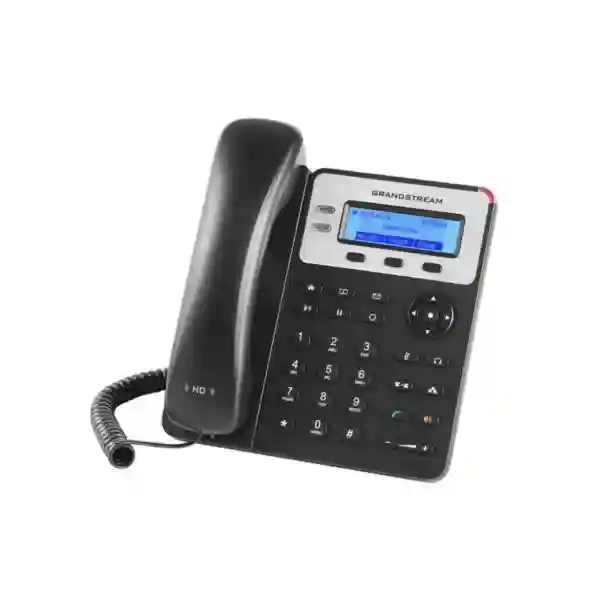
Grandstream GXP1615 Dubai – PoE IP Phone for Practical Business VoIP
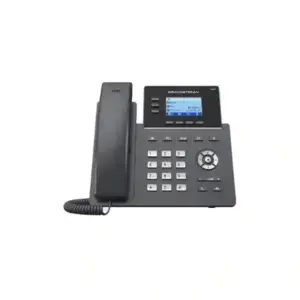
The Grandstream GXP1615 Dubai is best understood as a straightforward desk IP phone for organisations that want dependable SIP calling, integrated Power over Ethernet, familiar physical keys and uncomplicated day-to-day operation without paying for a large colour screen, Wi-Fi, Bluetooth or a high number of programmable line keys. That makes it especially relevant for reception overflow positions, back-office users, retail counters, warehouses, small offices, classrooms, service desks and branch locations where the telephone has one clear job: provide reliable access to the company’s VoIP or IP-PBX environment.
Grandstream positions the GXP1610/GXP1610P/GXP1615 family as a simple small-business IP phone platform. For the GXP1615 specifically, the practical differentiator is built-in IEEE 802.3af PoE, allowing power and network connectivity to be delivered over the Ethernet connection when a compatible PoE switch is available. Grandstream’s current product datasheet also lists dual 10/100 Mbps Ethernet ports, a 132 × 48 LCD, two line keys, 3-way audio conferencing, three XML programmable context-sensitive soft keys, an RJ9 headset connection with EHS support, automated provisioning options and SIP security features such as TLS and SRTP.
For UAE buyers, the important question is not whether the GXP1615 has the longest feature list. It does not. The useful question is whether its feature set matches the extension role, PBX platform, PoE design, user expectations and lifecycle plan. Fourteck approaches the GXP1615 as a fit-for-purpose endpoint: suitable where a basic wired SIP phone is genuinely enough, but not automatically the best choice for users who need Gigabit passthrough, a backlit or colour display, integrated wireless connectivity, large BLF fields or a modern carrier-grade management experience.
Basic office, branch, counter, support and shared-desk voice roles where wired SIP calling and PoE matter more than advanced endpoint features.
Integrated 802.3af PoE simplifies cabling when the network already provides PoE and helps keep desks free from extra power adapters.
The phone uses 10/100 Ethernet and a compact non-backlit 132 × 48 LCD, so buyers should check workstation-network and visibility requirements.
Grandstream’s current documents are not completely consistent on SIP-account count; multi-account use should be confirmed for the exact hardware and firmware before ordering.
Is the GXP1615 the right phone for your requirement?
A useful endpoint decision starts with the job performed at the desk rather than with a model number. The GXP1615 is designed around essential voice workflows, so it tends to make the most sense when users place and receive ordinary business calls, transfer calls, put callers on hold, join a small three-party conference, consult a directory and occasionally use a headset. It is less appropriate when the desk phone itself must become a rich collaboration terminal or a large key-field console.
| Customer requirement | GXP1615 fit | Why it matters | Check before purchase |
|---|---|---|---|
| Basic SIP desk calling | Strong fit | Physical call-control keys, line keys and a simple LCD suit users who need a conventional office-phone experience. | PBX registration details, supported codecs, dial plan and provisioning method. |
| PoE desk deployment | Strong fit | GXP1615 includes IEEE 802.3af PoE, reducing separate desk power requirements when the switch supports PoE. | Available PoE budget, switch standard, patching and UPS strategy. |
| PC connected through phone | Conditional fit | Dual 10/100 ports can support phone-plus-PC desk topologies. | Whether 100 Mbps passthrough is acceptable for the workstation and application workload. |
| Headset-based calling | Useful for basic roles | RJ9 headset connectivity and EHS support are listed by Grandstream for compatible headsets. | Exact headset and EHS compatibility before buying accessories in quantity. |
| Large BLF/key-field requirements | Weak fit | This is not intended to be a receptionist-class expansion-key endpoint. | Consider a higher model with dedicated programmable keys or expansion support. |
| Wi-Fi or Bluetooth | Not the target use case | The GXP1615 is best planned as a wired Ethernet desk endpoint. | Select a wireless-capable model when structured cabling is unavailable or Bluetooth is required. |
Verified GXP1615 technical facts that affect real deployments
Specifications matter most when they change a design decision. For the GXP1615, the headline facts are not simply marketing bullets; they determine cabling, switch selection, user workflow, PBX configuration, headset planning and whether the endpoint is appropriate for a particular desk. The table below focuses on information confirmed in Grandstream’s product datasheet and current documentation rather than on reseller assumptions.
| Product family | Grandstream GXP16xx basic/small-business IP phone family. |
|---|---|
| Display | 132 × 48 (2.95-inch) LCD. Grandstream’s GXP16xx user documentation notes that the GXP1610/GXP1610P/GXP1615 display is not backlit. |
| Network interfaces | Dual switched auto-sensing 10/100 Mbps Ethernet ports. |
| Power over Ethernet | Integrated IEEE 802.3af PoE on the GXP1615; the datasheet identifies PoE Class 2 with 3.84 W–6.49 W. |
| Line/call controls | Two line keys with dual-colour LEDs, three XML programmable context-sensitive soft keys, navigation/menu controls and dedicated function keys for common calling tasks. |
| Local conferencing | 3-way audio conferencing. |
| Headset | RJ9 headset jack with EHS support listed by Grandstream for compatible Plantronics headsets; confirm exact accessory compatibility before procurement. |
| Phonebook and history | Downloadable phonebook support including XML/LDAP, up to 1000 entries, plus call history up to 200 records according to the datasheet. |
| Voice codecs | Vendor documentation lists G.711 μ-law/A-law, G.722, G.723, G.726-32, G.729 A/B and iLBC, with standard voice-processing features including echo cancellation and packet-loss concealment. |
| Security | TLS, SRTP, HTTPS, 802.1X, user/admin access controls and AES-encrypted configuration file support are listed by Grandstream. |
| Provisioning | Grandstream lists TFTP, HTTP/HTTPS and FTP/FTPS firmware methods, plus TR-069 and encrypted XML configuration options for automated deployment. |
| Physical size | 209 mm × 184.5 mm × 76.2 mm with handset; unit weight listed at 0.74 kg. |
These details make the GXP1615 a very specific type of endpoint: a wired, PoE-capable desk telephone intended to sit comfortably inside a structured LAN and SIP environment. It is not a replacement for every modern IP phone category, but in a properly matched role it can keep the deployment simple and predictable.
The PoE advantage: why GXP1615 is different from a basic non-PoE desk phone
Power over Ethernet is often the most practical reason to choose the GXP1615. In a conventional non-PoE desk-phone setup, every phone normally needs both an Ethernet cable and a local power source. In a PoE deployment, a compatible network switch can deliver power over the network cable. This can reduce the number of adapters under desks, make moves and changes cleaner, and allow the telephony layer to participate in a central UPS strategy when the PoE switch itself is backed by suitable power protection.
That does not mean PoE automatically makes the whole system resilient. The complete call path still depends on the PoE switch, LAN, router or firewall, PBX or hosted SIP service, WAN connectivity where applicable and any supporting infrastructure. For a Dubai office that wants desk phones to continue through short local power interruptions, for example, the design should consider the switch and network edge rather than assuming PoE alone is a backup-power solution.
The GXP1615 datasheet identifies IEEE 802.3af Class 2 PoE. Before rollout, an IT team should check the available PoE budget across the access switch, not simply whether the switch has ports labelled PoE. This becomes more important when the same switch is also powering wireless access points, CCTV cameras, door controllers or other PoE devices. A desk phone usually represents a modest load, but multiplying the requirement across dozens of extensions can still affect switch sizing and redundancy decisions.
For small sites, PoE can simplify installation. For larger sites, it contributes to a more centrally managed power architecture. In both cases, the correct question is whether the network design supports the endpoint properly. Fourteck can help map extension count, PoE ports, VLAN design and PBX requirements before a bulk purchase rather than treating the phone as an isolated device.
Important documentation note: SIP account count should be confirmed for multi-account deployments
Grandstream’s currently available documents are not completely consistent on the number of SIP accounts for the GXP1615. The product datasheet, current GXP16xx administration guide, user guide and Grandstream GXP16xx FAQ describe the GXP1615 as supporting two SIP accounts or two independent SIP accounts. However, Grandstream’s current GXP1610(P)/GXP1615 Quick Installation Guide describes the same family as having a single SIP account with up to two call appearances.
For a normal deployment where the phone registers one employee extension and uses the second line appearance for another call, this documentation difference may not affect the practical use case. It becomes important when the requirement specifically depends on two independently configured SIP identities, separate SIP servers, separate outbound identities or a multi-account workflow.
Fourteck recommendation: if two independent SIP accounts are a mandatory requirement, confirm the exact hardware revision, firmware level and intended configuration before committing to quantity. This is preferable to relying on a reseller bullet point when the manufacturer’s own current documents differ. The page therefore avoids presenting multi-account operation as an unconditional procurement guarantee, while still reflecting the capability described in Grandstream’s principal datasheet and administration documentation.
Where the GXP1615 works well inside a Dubai business
Back-office extension
Finance, administration and operations staff who mainly need one desk extension, transfer, hold, voicemail access and occasional conferencing can benefit from the phone’s conventional layout without unnecessary endpoint complexity.
Retail or service counter
A wired PoE phone can suit fixed counters where the handset stays in one position, calls are brief and the business wants stable Ethernet rather than dependence on wireless coverage.
Warehouse or dispatch desk
For a protected desk area with structured cabling, the GXP1615 can provide a straightforward voice endpoint. Environmental suitability should still be checked because the phone is an office device rather than a rugged industrial handset.
Small branch office
A branch with a few users can standardise on PoE desk phones while registering to an on-premises PBX, central PBX or supported hosted SIP service, subject to the service provider’s configuration requirements.
Education and training rooms
Staff rooms, administration desks and classrooms that need a simple internal/external extension can use a conventional handset without the distraction or administration overhead of more feature-rich endpoints.
Shared or hot-desk scenarios
Grandstream documents public-mode/hot-desking functions in the GXP16xx family. Organisations considering this should test the intended login, provisioning and security workflow with their PBX before large-scale adoption.
Network design: the 10/100 Mbps detail matters more than many buyers expect
The GXP1615 has dual 10/100 Mbps Ethernet ports. In a simple phone-only connection, this is normally more than sufficient for voice traffic. The important consideration appears when a desktop computer is connected through the phone’s PC port. In that topology, the phone becomes part of the workstation’s network path, so the 100 Mbps interface can become the effective upper limit of that connection even if the upstream access switch is Gigabit.
For an employee using web applications, email and ordinary office tools, 100 Mbps may still be acceptable. For users regularly transferring large files, working with local high-performance storage, handling media assets, using bandwidth-heavy virtual desktop environments or relying on fast LAN access, placing the PC behind a Fast Ethernet phone may be undesirable. In those cases, either provide a separate network outlet for the PC or choose an endpoint with Gigabit passthrough.
Voice quality also depends on more than raw bandwidth. VLAN separation, Layer 2 and Layer 3 QoS, switch configuration, WAN conditions, SIP/RTP path, firewall behaviour and PBX settings all influence user experience. Grandstream lists 802.1Q and 802.1p Layer 2 QoS along with Layer 3 mechanisms such as ToS and DiffServ. Those capabilities become useful only when the broader network is configured consistently.
A sensible Dubai office design therefore treats the GXP1615 as one component inside the LAN. During planning, map each desk’s phone and PC connection, decide whether voice and data use separate VLANs, check the PoE power budget, confirm DHCP and DNS behaviour, and verify that firewall policies allow the required SIP signalling and RTP media path for the selected PBX architecture.
PBX, SIP and provisioning considerations
The GXP1615 is based on standard SIP and is intended for use with SIP-based telephony environments. Grandstream documents SIP RFC3261 along with common supporting protocols and features such as secondary SIP server configuration, NAT-related settings, LDAP, LLDP-MED, 802.1X, TR-069, server redundancy and encrypted provisioning. That gives administrators several deployment paths, but actual interoperability still depends on the PBX or hosted platform and the configuration used.
With Grandstream UCM systems, the vendor highlights Zero Config provisioning as a streamlined option. For other SIP platforms, deployment may use manual registration, vendor provisioning templates, XML configuration, DHCP options, an HTTP/HTTPS provisioning server or service-provider-specific methods. A small five-phone office may tolerate manual setup; a site with dozens of endpoints benefits from a repeatable provisioning model that controls account settings, dial plan, time zone, firmware, VLAN, codecs, security and phonebook behaviour centrally.
Before buying, collect the PBX information that determines compatibility: SIP registrar or server address, transport requirements, authentication method, number of required extensions, codec policy, DTMF method, VLAN requirements, certificate expectations, provisioning method, voicemail integration and any special feature codes. If the business uses hosted telephony, confirm that the service provider accepts third-party SIP endpoints and that it can provide the credentials or provisioning mechanism needed for the GXP1615.
Open SIP support is valuable because it reduces dependency on a single proprietary handset ecosystem, but it does not remove the need for testing. Features such as presence, BLF behaviour, remote directory access, transfer semantics, call recording controls and hot desking can vary by PBX. A pilot extension is often the safest method before a larger rollout.
Security and firmware: treat the desk phone as a managed network endpoint
An IP phone is connected to the data network and should be managed with the same discipline applied to other networked devices. Grandstream lists security functions for the GXP1615/GXP16xx platform including user and administrator access controls, TLS, SRTP, HTTPS, 802.1X and AES-encrypted configuration files. These controls can protect signalling, media and configuration when they are implemented correctly, but simply owning a phone that supports them does not mean the deployment is automatically secure.
Administrators should change default or factory credentials where applicable, restrict management access, prefer secure provisioning transport when supported, maintain sensible VLAN and firewall policies, control remote exposure, use strong SIP credentials and keep firmware aligned with the vendor’s current guidance. Where certificates are used, time synchronisation and certificate-validation behaviour also become important because TLS depends on correct trust and system time.
Grandstream’s firmware page currently lists version 1.0.7.81 for the GXP1610/1615 family, and the corresponding 2026 release notes include security-vulnerability fixes. Firmware availability can change, so procurement and rollout teams should always check the live Grandstream firmware page rather than hard-coding one version into a long-term standard. Also note that Grandstream documents upgrade-path restrictions for certain hardware revisions, so older installed phones should be reviewed before forced firmware changes.
For multi-site environments, a formal endpoint policy is useful: approved firmware, provisioning source, admin-password rules, VLAN assignment, SIP transport, certificate policy, remote-management access and retirement procedure. This turns a group of inexpensive phones into a manageable fleet rather than a collection of individually configured devices.
GXP1615 versus GXP1610 and GXP1610P: choose by power design, not by name alone
The GXP1610, GXP1610P and GXP1615 share a common basic-phone platform, so buyers can easily assume that all three are interchangeable. The most visible purchasing difference is power. Grandstream’s datasheet lists integrated PoE for the GXP1610P and GXP1615, while the plain GXP1610 relies on its power adapter. In practical terms, the right choice depends on whether the access network is designed to power phones centrally.
| Decision point | GXP1610 | GXP1610P | GXP1615 |
|---|---|---|---|
| Integrated PoE | No | Yes | Yes |
| Basic GXP16xx desk-phone workflow | Yes | Yes | Yes |
| Best purchasing logic | Choose where local power is acceptable and PoE is not required. | Choose where the GXP1610-style workflow is required with PoE. | Choose where PoE is required and the GXP1615 model is the specified endpoint. |
For new projects, model selection should also consider the organisation’s expected support horizon and whether a more recent Grandstream GRP-series endpoint better matches lifecycle, provisioning and feature requirements. The GXP1615 remains documented and Grandstream still lists current firmware for the GXP1610/1615 family, but that does not mean every new deployment should default to it. Existing-fleet consistency and replacement projects may have different priorities from greenfield rollouts.
When should you avoid choosing the GXP1615?
A product page is more useful when it explains where the product does not fit. The GXP1615 should not be selected merely because it is an inexpensive Grandstream desk phone. If the user needs a bright backlit or colour display, native Wi-Fi, Bluetooth, Gigabit Ethernet passthrough, a large number of programmable feature keys, expansion modules, richer visual directories or a modern executive-phone experience, a different model is likely to be more appropriate.
It is also a questionable choice for desk positions where the connected PC genuinely requires Gigabit LAN throughput through the phone. The dual 10/100 switch is entirely adequate for voice, but the workstation requirement can change the endpoint decision. Similarly, a busy receptionist who needs many BLF keys should not be forced onto a basic two-line-key interface simply because it can technically make and transfer calls.
For wireless-first sites, using a wired GXP1615 can create cabling work that defeats the intended design. For mobile or hybrid workers, a softphone, wireless handset or a richer Wi-Fi/Bluetooth desk model may align better with how the employee actually works. For call-centre agents, headset integration, provisioning, queue controls and supervisor features should be tested with the contact-centre platform rather than assumed from generic SIP compatibility.
The goal is to avoid false economy. A phone that is cheaper but mismatched to the desk creates support calls, adapters, workarounds and user frustration. A well-matched GXP1615 can be a sensible basic endpoint; a poorly matched one can become a constraint.
Grandstream GXP1615 Dubai deployment checklist
Before ordering or rolling out the GXP1615, use the following checklist to convert a model choice into a deployment plan. It is intentionally broader than the phone specification because successful VoIP depends on the surrounding infrastructure.
- Confirm extension role. Identify whether the user needs basic calls, transfer, hold, conference, directory and headset functions, or whether the role requires BLF fields, wireless connectivity or advanced collaboration.
- Confirm PBX compatibility. Verify SIP registration, authentication, transport, DTMF, codecs, voicemail and any required feature codes with the PBX or hosted service.
- Resolve the SIP-account requirement. If two independent SIP accounts are mandatory, confirm the exact GXP1615 hardware/firmware behaviour because current vendor documents differ.
- Check PoE capacity. Confirm 802.3af support and available switch power budget across all planned endpoints and other powered devices.
- Review Ethernet speed. Decide whether a PC will connect through the phone and whether 10/100 Mbps passthrough is acceptable for that desk.
- Plan voice VLAN and QoS. Align switch, DHCP, LLDP-MED, VLAN and QoS settings with the rest of the network design.
- Confirm headset compatibility. Verify the exact RJ9/EHS headset combination if remote answer or a particular headset model is part of the requirement.
- Define provisioning. Choose manual, UCM Zero Config, XML, TR-069 or another supported method appropriate to the size and PBX platform.
- Set a firmware policy. Check current Grandstream release guidance and hardware-revision notes before mass upgrading devices.
- Test one pilot phone. Validate incoming/outgoing calls, transfer, hold, conference, voicemail, directory, headset, caller ID, NAT behaviour and any PBX-specific functions.
- Document the standard. Record firmware, provisioning URL, VLAN, configuration template, admin-access rules and replacement process for the support team.
- Confirm commercial details separately. Stock, price, lead time, warranty terms and included accessories can vary; request a current quotation rather than relying on static web assumptions.
Dubai, Deira and Bur Dubai: common buying scenarios
Dubai businesses often mix new offices, renovated floors, retail outlets, warehouses and older structured cabling. The GXP1615 can work well when the site already has Ethernet at each desk and the access switches provide PoE. In this case, the main planning questions are PBX registration, voice VLAN, PoE capacity and whether the user’s PC can accept 100 Mbps passthrough if it is connected through the phone.
In Deira and Bur Dubai, smaller trading, service and retail businesses may prioritise simple extension calling and low endpoint complexity. A GXP1615 can suit these environments when the requirement is primarily incoming and outgoing business calls, internal extensions and transfers. However, businesses should avoid choosing a model solely from a price list. A receptionist or sales coordinator who needs many monitored extensions may need a different phone even if most back-office users can use the GXP1615 comfortably.
For office relocations, review the telephony design before moving existing GXP1615 units. New switches may use different VLAN, LLDP or security settings, and hosted-PBX connectivity may depend on the new firewall or ISP. A tested migration plan is more reliable than connecting all phones on move day and troubleshooting registration afterwards.
Abu Dhabi, Sharjah and Ajman: standardising basic extensions across multiple sites
For organisations with offices in Abu Dhabi, Sharjah and Ajman as well as Dubai, endpoint standardisation can simplify support. If the majority of users need only essential SIP calling, a common basic-phone profile can reduce the number of configuration templates and spare models held by the IT team. The GXP1615 can participate in that model when its PoE, display and network-speed characteristics fit the requirement.
Multi-site design should still separate endpoint standardisation from network standardisation. Each branch may have different WAN connectivity, firewall rules, PoE switches, VLAN numbering or local survivability requirements. If all extensions register to a central PBX, consider what happens during WAN failure. If the PBX is hosted, assess internet resilience and whether backup connectivity is part of the voice-service design.
A branch template should define more than the phone model: switch port profile, voice VLAN, QoS, DHCP options, DNS, NTP, provisioning path, firmware, emergency-contact procedures and support escalation. That is how a simple desk phone becomes easy to manage across the UAE.
Regional procurement for GCC and African operations
Fourteck works with customers whose communication requirements extend beyond a single Dubai office. For groups managing UAE, Kuwait, Uganda, Kenya, Tanzania, Ghana or Nigeria operations, the important value is often a repeatable endpoint standard rather than a one-off handset purchase. A basic model such as the GXP1615 may suit selected roles across several countries, but the supporting network, SIP provider, PBX, power design and import/procurement conditions can differ by location.
For Uganda, Kenya, Tanzania and Nigeria deployments, pay particular attention to branch connectivity, power resilience, central versus local PBX registration and the practicality of remote provisioning. For Kuwait and other GCC locations, the same principles apply, but service-provider and enterprise-network policies may differ. Avoid assuming that a configuration tested in one country can simply be copied to every site without validation.
Fourteck’s regional sites can help customers navigate related infrastructure and local requirements: Fourteck Uganda, Fourteck Kenya, Fourteck Tanzania, Fourteck Nigeria, Fourteck Ghana and Fourteck Kuwait. For UAE IT procurement and broader infrastructure, visit Fourteck UAE.
A practical regional bill of materials should identify the phone model, quantity, PoE-switch requirement, PBX platform, accessories, spare ratio, provisioning method and any country-specific items. Commercial availability should be confirmed at quotation time; this page does not claim current stock, fixed price, delivery timing or warranty terms.
What administrators should test during a GXP1615 pilot
A pilot converts specification confidence into operational confidence. Connect one phone to the intended switch port, apply the planned VLAN and provisioning method, register it to the real PBX or hosted service, and run through the same tasks the eventual user performs. This is particularly important when the endpoint will be installed in quantity or across multiple branches.
Call handling
Test inbound and outbound calls, hold, attended and blind transfer, call waiting, redial, caller ID, three-way conference and voicemail access.
Audio path
Test handset, speakerphone and headset modes, including echo, one-way audio, clipping and DTMF behaviour on external calls.
Network
Check PoE negotiation, DHCP, DNS, NTP, VLAN, QoS markings, switch-port behaviour and PC-port performance if a computer will be connected through the phone.
Provisioning
Factory-reset the pilot and verify that the selected method can restore the correct configuration without manual rebuilding.
Security
Confirm admin-access controls, secure transport where required, certificate handling, remote-management exposure and password policy.
User acceptance
Let a representative user operate the phone for real calls and confirm that the display, keys, volume and workflow are appropriate for the role.
Lifecycle and replacement planning
The GXP1615 belongs to Grandstream’s established GXP16xx generation. Grandstream continues to host the product page, documentation and firmware for the GXP1610/1615 family, including a general firmware release listed in 2026. That is useful evidence that administrators can still find vendor documentation and firmware resources. It is not, however, a substitute for a procurement lifecycle decision.
If an organisation already operates a large installed base of GXP1615 phones, replacing a failed unit with the same model can reduce user retraining and configuration differences, subject to availability and hardware compatibility. If the organisation is designing a new five-year endpoint standard, it may be sensible to compare the GXP1615 against current Grandstream GRP models and other modern endpoints before committing to a large quantity.
A lifecycle plan should answer four questions: how long the business expects to keep the phones, how firmware and security updates will be managed, which replacement model is approved if the same unit becomes unavailable, and whether configuration templates can be migrated. These questions matter more than the purchase price of a single handset because endpoint estates often remain in service for years.
Fourteck can help with replacement planning for mixed Grandstream fleets, including mapping existing GXP roles to suitable current alternatives based on user count, PoE, Ethernet speed, display, key requirements, headset use, wireless needs and PBX compatibility.
Buying GXP1615 for an existing phone system
When the purpose is to add one or more phones to an existing PBX, start by identifying a working endpoint already on the system. Record the PBX platform, current firmware, provisioning method, VLAN, SIP transport, codec preferences and any custom feature codes. If the existing phones use a managed template, confirm whether the GXP1615 has an appropriate template or supported configuration path.
For Grandstream UCM environments, verify the UCM firmware and endpoint provisioning options. For third-party systems, check the PBX vendor or service provider’s endpoint policy. A phone can support standard SIP while still requiring manual work for vendor-specific features. The safest procurement statement is therefore “SIP-compatible subject to platform configuration,” not a blanket promise that every PBX function will work identically.
If the existing network uses PoE, confirm the switch still has available power and ports. If the current desk phone provides Gigabit passthrough to the user’s PC, replacing it with a GXP1615 can unintentionally reduce the workstation link speed. If the old phone uses a headset, validate the connector and EHS method rather than assuming the accessory can be moved across unchanged.
For replacement projects, the endpoint itself may be the smallest part of the work. Configuration consistency, user expectations and LAN design usually determine whether the change feels seamless.
Buying GXP1615 for a new VoIP project
For a new office or a migration from analogue telephony, do not select the phone before defining the system. Determine the number of users, simultaneous external calls, SIP trunks, PBX location, branch requirements, reception workflow, conference needs, call recording policy, voicemail, auto attendant, remote users and resilience expectations. Once the communication architecture is clear, the GXP1615 can be assigned to the desks where a basic wired PoE endpoint is appropriate.
The access-switch design should reserve sufficient PoE ports and budget, and the structured-cabling plan should place network outlets where phones will actually be installed. If PCs share the phone’s network connection, revisit the 10/100 limitation. If every desk already receives two data outlets, it may be cleaner to connect phone and PC separately. If the phone is expected to remain powered during a building power event, the switch, PBX/network edge and internet equipment may all need UPS support.
A new project is also the right time to define naming conventions, extension numbering, DHCP reservations if needed, provisioning URLs, NTP source, firmware policy and admin credentials. These details are much harder to standardise after dozens of phones have been configured independently.
Fourteck can support the endpoint-selection stage alongside broader IP telephony and infrastructure planning. For Grandstream-specific UAE information, customers can also review Fourteck’s Grandstream UAE resource, while IP Phone Fourteck covers additional IP-phone models and deployment topics.
Questions to include in a GXP1615 quotation request
A better quotation starts with a better requirement. Instead of asking only for “GXP1615 price in Dubai,” include enough information for the supplier or consultant to identify hidden compatibility and deployment issues. Useful details include the quantity, delivery location, whether the phones are for replacement or a new PBX, PoE-switch availability, required accessories, headset model if any, PBX or hosted platform, and whether configuration or installation support is expected.
For larger quantities, state whether all users have the same role. It may be more efficient to use GXP1615 units for basic extensions while assigning different endpoints to receptionists, managers or users who need wireless connectivity, Gigabit passthrough or more keys. A mixed endpoint plan can be better than forcing one model onto every desk.
If the request depends on two independent SIP accounts, mention that explicitly so the exact device behaviour can be checked against the intended hardware/firmware. If the project uses a third-party PBX, share the platform name and version where possible. If phones will be remotely deployed, explain how they are expected to receive configuration and whether the network permits the required provisioning path.
Fourteck does not use this page to present a permanent price, stock promise, delivery time or warranty statement because those are commercial details that can change. Request a current quotation for the required quantity and scope.
Grandstream GXP1615 Dubai FAQ
Does the Grandstream GXP1615 support PoE?
Yes. Grandstream’s official datasheet lists integrated IEEE 802.3af PoE for the GXP1615. This allows a compatible PoE switch to provide network connectivity and power over the Ethernet connection, subject to normal PoE budgeting and network design.
How many Ethernet ports does the GXP1615 have?
The GXP1615 has dual switched 10/100 Mbps Ethernet ports. If a computer is connected through the phone, confirm that Fast Ethernet throughput is suitable for that workstation.
How many SIP accounts does the GXP1615 support?
Grandstream’s current datasheet, administration guide, user guide and GXP16xx FAQ describe two SIP accounts for the GXP1615, while the current quick installation guide describes one SIP account with up to two call appearances. If two independent SIP identities are required, confirm the exact hardware and firmware before ordering.
Does the GXP1615 have a backlit screen?
No backlight is listed for the GXP1615 display in Grandstream’s current GXP16xx user documentation. The phone uses a 132 × 48 LCD, so buyers who need a brighter backlit or colour display should consider another model.
Can the GXP1615 be used with a headset?
Yes. Grandstream lists an RJ9 headset jack and EHS support for compatible headsets. Confirm the exact headset/EHS combination before purchasing accessories in quantity.
Can the GXP1615 handle a conference call?
Yes. Grandstream documents 3-way audio conferencing for the GXP1615, which is suitable for small ad-hoc voice conferences.
Is the GXP1615 suitable for reception?
It can suit a light-duty reception position, but a busy receptionist who must monitor many extensions or use many programmable keys will usually need a higher-feature endpoint. Match the phone to the number of monitored users and the reception workflow.
Does the GXP1615 support Gigabit Ethernet?
No. Grandstream lists dual 10/100 Mbps Ethernet ports for the GXP1615. This is adequate for voice, but it can affect a PC connected through the phone if that user expects Gigabit LAN performance.
Can the GXP1615 work with Grandstream UCM IP PBXs?
Yes. Grandstream specifically documents compatibility with UCM features and highlights Zero Config provisioning with Grandstream UCM systems. The exact feature set depends on the UCM model, firmware and configuration.
Can the GXP1615 work with a third-party SIP PBX?
The phone uses standard SIP, so it can be considered for third-party SIP PBXs and hosted platforms. Confirm registration, provisioning and any platform-specific features with the PBX vendor or service provider before rollout.
What firmware is currently listed for the GXP1610/1615 family?
At the time this page was prepared, Grandstream’s firmware page listed general firmware 1.0.7.81 for the GXP1610/1615 family. Administrators should always check Grandstream’s live firmware page before upgrading because versions and upgrade guidance can change.
Where can I request a GXP1615 quotation in Dubai?
You can contact Fourteck with the required quantity, PBX platform, PoE environment, location and any configuration or installation requirement. Fourteck can then help confirm product fit and provide current commercial information without relying on static price or stock claims.
Discuss your GXP1615 requirement with Fourteck
Choose the Grandstream GXP1615 Dubai when the requirement genuinely calls for a simple wired SIP desk phone with integrated PoE, physical call-control keys and a compact office-friendly design. Before ordering, confirm PBX compatibility, PoE capacity, workstation Ethernet needs, headset requirements, firmware policy and—where relevant—the exact SIP-account behaviour required by your application.
Fourteck can help with model selection, quotation, PBX compatibility review, PoE/network planning, configuration strategy and multi-site deployment. For a useful response, share your quantity, location, current or planned PBX, PoE-switch details and the user roles the phones will support.
Reviews
There are no reviews yet.