Grandstream GRP2670 Dubai – 12-Line Touchscreen IP Phone for Executives and High-Volume Desks
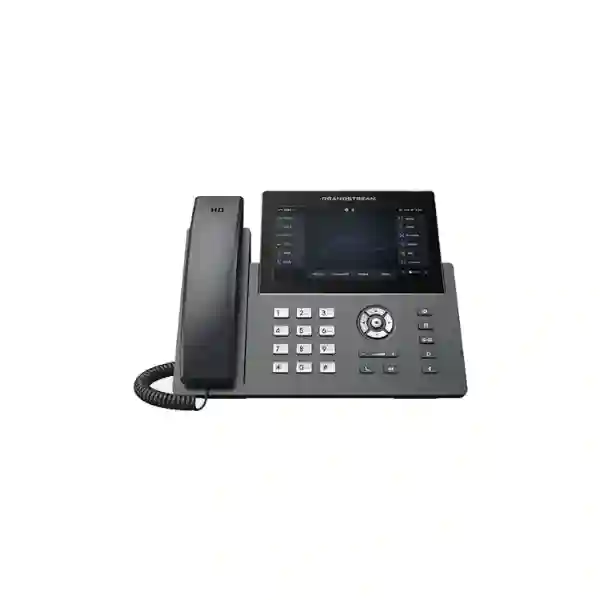
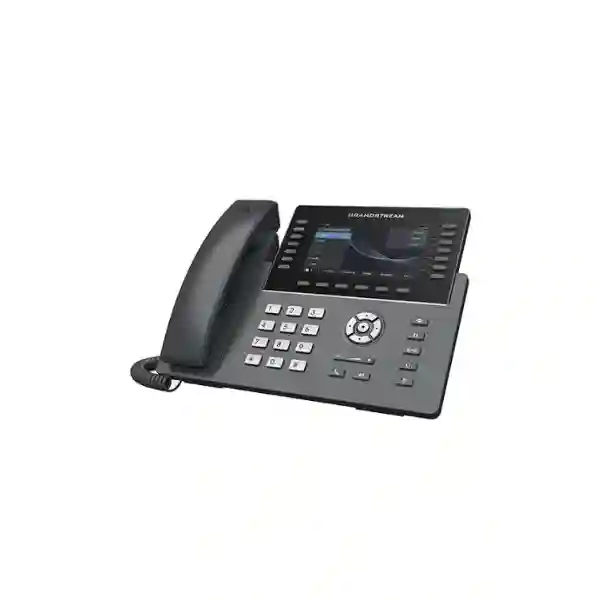
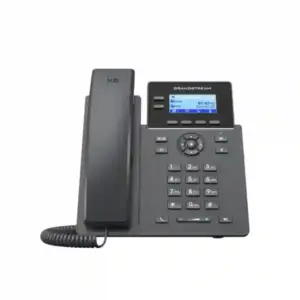
The Grandstream GRP2670 is a professional carrier-grade SIP desk phone built for executive users, reception teams, supervisors, contact-heavy departments, and multi-site organizations that need a large touch display, substantial line capacity, secure provisioning, and flexible headset and network options. Current Grandstream product information lists 12 lines, up to 16 SIP accounts, a 7-inch 1024 × 600 capacitive touchscreen, 48 virtual multi-purpose keys, dual Gigabit Ethernet with integrated PoE, Bluetooth, 5-way audio conferencing, HD audio, Noise Shield technology, and centralized management through Grandstream Device Management System (GDMS). Newer hardware revision 5.0 and above also adds dual-band Wi-Fi 6 support. For Dubai and UAE buyers, the GRP2670 is especially relevant where one desk handles many extensions, repeated transfers, BLF monitoring, direct-dial contacts, conference calls, and a mix of wired and wireless connectivity.
Buyer note: older GRP2670 datasheets and reseller listings may show 6 SIP accounts, 64 VPKs, and 802.11ac Wi-Fi. Grandstream’s current product page and newer datasheet list 16 SIP accounts, 48 VPKs, and Wi-Fi 6 on hardware version 5.0+. Because these differences are revision-dependent, confirm the exact hardware revision and required capabilities before ordering for a standardized rollout.
Is the GRP2670 the right phone for your desk?
The GRP2670 makes the most sense when the user spends a meaningful part of the day managing calls rather than simply making occasional extensions. A large screen and many programmable virtual keys help people who need immediate visibility of colleagues, queues, lines, speed dials, transfers, or frequently used functions. That includes executive assistants, receptionists, office managers, operations coordinators, department heads, sales managers, customer service leads, and users who supervise distributed teams.
It can also be a strong choice for businesses standardizing endpoints across multiple branches. Grandstream designed the GRP series for mass deployment and centralized management, and GDMS can be used to configure, provision, manage, and monitor supported devices. This matters when the IT team wants consistent account settings, firmware management, templates, security policies, and repeatable onboarding rather than configuring each desk phone manually.
| Customer requirement | GRP2670 capability | Practical business value | Check before buying |
|---|---|---|---|
| High call volume | 12 lines, multiple SIP accounts, 48 VPKs | More direct access to lines, BLF and shortcuts | Confirm PBX programming and account plan |
| Executive usability | 7-inch capacitive touch display | Fast access to contacts and call controls | Confirm user workflow and desired screen layout |
| Flexible office networking | Gigabit Ethernet, PoE, integrated Wi-Fi; Wi-Fi 6 on HW v5.0+ | Supports wired and selected wireless deployment models | Confirm hardware revision and wireless design |
| Hands-free work | Bluetooth, RJ9/EHS and USB headset support | More headset choices for intensive calling | Validate exact headset/EHS compatibility |
| Centralized rollout | GDMS and zero-touch provisioning workflow | Simplifies repeat deployments and remote administration | Plan templates, firmware policy and change control |
Current GRP2670 specifications that matter in real deployments
For procurement, the important question is not simply whether the phone has a long feature list. The key is whether its current specification matches the user’s role, the PBX design, the network, and the deployment standard. Grandstream’s current product material identifies the GRP2670 as a 12-line professional IP phone with support for up to 16 SIP accounts. The phone uses a 7-inch 1024 × 600 capacitive touchscreen and provides 48 virtual multi-purpose keys. Those virtual keys can be used in ways that support extension monitoring and frequent actions, depending on PBX and provisioning configuration.
Connectivity includes two auto-sensing 10/100/1000 Mbps Gigabit Ethernet interfaces and integrated Power over Ethernet. This means a suitably configured PoE switch can provide network connectivity and power through the Ethernet infrastructure, reducing desk-side power adapters where the network design supports it. The phone also includes integrated Bluetooth. For wireless LAN use, current Grandstream information states dual-band Wi-Fi 6 on hardware version 5.0 and above, while older hardware and documentation may refer to 802.11ac. That revision distinction should be documented in any project where Wi-Fi capability is a mandatory requirement.
For audio, the GRP2670 supports HD audio on the handset and speakerphone, a full-duplex speakerphone, and Noise Shield technology intended to reduce background noise. It supports 5-way audio conferencing, allowing smaller collaborative calls without relying on a separate conference endpoint. Headset connectivity is flexible: Grandstream documents an RJ9 headset jack with electronic hook switch support for compatible Plantronics headsets and integrated USB headset support, while Bluetooth provides an additional wireless headset path. Exact headset support can depend on model, firmware, and accessory behavior, so test the chosen headset in the intended configuration before a large rollout.
Understanding the hardware revision: why some GRP2670 pages disagree
A buyer comparing several websites may notice conflicting specifications. That is not something to ignore. Early GRP2670 launch material commonly described 12 lines, 6 SIP accounts, 64 VPKs, and dual-band 802.11ac Wi-Fi. Grandstream’s current product page and newer datasheet now describe 12 lines, 16 SIP accounts, 48 VPKs, and Wi-Fi 6 support on hardware version 5.0 and above. Older inventory, archived datasheets, cached reseller pages, and earlier product catalogues can therefore show different capabilities.
For an enterprise rollout, specify the requirement rather than ordering only by model name. If you require 16 SIP accounts, Wi-Fi 6, or a particular VPK behavior, ask for confirmation that the supplied hardware revision supports that requirement. If the project is Ethernet-only and uses a smaller number of SIP registrations, an older unit may still meet the technical need, but the decision should be deliberate. Fourteck can help translate the user requirement into a procurement checklist so that the product revision, PBX configuration, network plan, headset choice, and expansion needs are considered together.
12 lines and multiple SIP accounts: what this means for a business user
Line capacity and SIP accounts are related but not identical concepts. A SIP account normally represents a registration or identity on a SIP platform, while line appearances and programmable keys define how calls and functions are presented to the user. The GRP2670’s capacity is valuable when one desk needs to interact with multiple direct numbers, departments, shared lines, branch identities, or role-based extensions. A receptionist may monitor several destinations and move calls quickly. An executive assistant may handle an executive line plus departmental and personal calls. A manager may require local and branch identities on the same device.
The correct design starts with the PBX. Determine how many SIP registrations are actually needed, which functions will be delivered by the PBX, how BLF and presence should be arranged, whether shared call appearance is required, and which keys need to be visible on the primary screen. More accounts do not automatically create a better user experience. A carefully designed profile with fewer registrations and clear BLF groups can be easier to operate than a heavily loaded phone with no workflow logic.
For multi-site organizations, account design should also consider failover, dialing plans, branch numbering, SIP trunk architecture, and security boundaries. The GRP2670 supports common SIP and network standards and is designed for interoperability with standards-based SIP environments, but specific platform features should be validated against the PBX or hosted service being used.
Touchscreen and 48 VPKs
The 7-inch capacitive touchscreen is one of the biggest reasons to choose the GRP2670 over a simpler desk phone. It provides a larger workspace for high-volume call handling and access to programmable functions. Current Grandstream product material lists 48 VPKs. In practical terms, the screen can support a cleaner workflow for users who need frequent access to extensions, speed dials, call functions, shared lines, or monitored contacts. The benefit depends on how the PBX administrator structures the configuration. A useful deployment normally groups keys by role or department rather than filling every available slot without priority.
GBX20 expansion for very busy desks
Grandstream documentation for the professional GRP series identifies the GRP2670 as compatible with the GBX20 extension module. A GBX20 can add more visible programmable contacts or functions for roles such as large reception desks, dispatch, operations, hospitality front offices, and executive support. Grandstream documentation indicates support for up to four GBX20 modules, providing up to 160 additional contacts or extensions across the modules. Before specifying expansion modules, confirm the user’s real monitoring requirement and desk layout; a well-designed touchscreen profile may eliminate the need for expansion in many roles.
HD audio, Noise Shield and conference calling
Audio quality has a direct effect on user productivity, especially for roles that spend hours on calls. The GRP2670 supports HD audio on the handset and speakerphone and includes a full-duplex speakerphone. Full duplex is important in natural two-way conversation because both sides can speak without the interaction feeling like a one-direction-at-a-time speakerphone. Grandstream also includes Noise Shield technology, which is intended to minimize background noise and make voice communication clearer in active office environments.
The phone supports 5-way audio conferencing. That is useful for ad-hoc discussions among colleagues, suppliers, customers, and remote participants without requiring a dedicated meeting room device for every small conference. For larger meetings, video collaboration, recording, advanced moderator control, or formal conference services, organizations may still choose a dedicated unified communications or conferencing platform. The desk phone’s conference function is best viewed as a practical collaboration tool for voice-centric workflows.
Network design: Gigabit Ethernet, PoE and Wi-Fi
The GRP2670 includes dual switched auto-sensing Gigabit Ethernet ports. In a typical office deployment, the LAN port connects to the network and the secondary Ethernet interface can support a workstation connection where that design is permitted. Integrated PoE allows power and data to be delivered from a compatible PoE switch, which can simplify cable management and centralize power protection. In a managed network, voice VLANs, QoS, switch configuration, DHCP options, DNS, NTP, and firewall policies should be planned as part of the phone rollout rather than treated as afterthoughts.
Wireless connectivity adds flexibility, but it should not be used simply because it is available. Newer hardware revision 5.0 and above supports dual-band Wi-Fi 6 according to Grandstream’s current product page. Wi-Fi can be useful for temporary desks, selected executive rooms, spaces where new data cabling is impractical, or staged deployments. However, voice performance depends on signal quality, roaming behavior, interference, capacity, authentication, and LAN design. For fixed high-volume desks, a properly designed wired Ethernet connection with PoE is often the most predictable architecture. Where Wi-Fi is required, perform a proper wireless assessment and confirm the hardware revision before deployment.
Headset choices for reception, sales and executive users
High-call-volume roles often work more efficiently with a headset. The GRP2670 supports several connection paths: an RJ9 headset interface, EHS support for compatible Plantronics headsets, a USB port for supported USB headsets, and integrated Bluetooth. This flexibility helps organizations match the phone to different working styles, from wired contact-center-style headsets to wireless executive headsets.
Headset procurement should still be treated as a compatibility decision. Check whether hook control, answer/end, mute, volume, ringtone signaling, and range operate as expected with the exact headset and firmware combination. For a large deployment, validate one complete workstation profile before buying headsets in quantity. That profile should include the GRP2670 hardware revision, phone firmware, PBX platform, headset model, EHS cable or USB connection where applicable, and any call-control software used by the organization.
Enterprise security features
Grandstream positions the GRP series as carrier-grade and includes security controls designed for managed deployments. The GRP2670 product information identifies secure boot, dual firmware images, and encrypted data storage. Grandstream documentation also lists secure configuration and signaling/media options including TLS, SRTP, 802.1X support, and AES-based configuration protection. These features give administrators tools to build a stronger endpoint posture, but they must be configured as part of the complete voice security design.
A secure deployment should also cover unique administration credentials, controlled provisioning access, firmware governance, VLAN segmentation where appropriate, certificate handling, restricted management interfaces, secure SIP settings, firewall policy, logging, and removal of unused services. Endpoint security is strongest when the PBX, LAN, identity, remote management, and operational processes are designed together.
GDMS and zero-touch provisioning for multi-phone deployments
One of the strategic reasons to choose the GRP2670 is centralized management. Grandstream Device Management System provides a centralized interface for supported Grandstream endpoints. For an IT team, this can reduce the operational burden of configuring phones individually, especially when the business has multiple offices, remote branches, frequent staff moves, or standardized extension templates.
A structured rollout can use templates for account parameters, codec preferences, network settings, programmable keys, firmware policy, and other supported settings. New phones can then be onboarded with a repeatable process. This is particularly useful for service providers, system integrators, and organizations that want consistency across dozens or hundreds of endpoints. The value is not simply “cloud management”; it is the ability to turn phone deployment into a controlled lifecycle: prepare configuration, assign device, provision, validate, monitor, update, troubleshoot, and retire according to policy.
Before implementation, define ownership of GDMS administration, role-based access, naming conventions, device groups, firmware rings, template hierarchy, and change approval. Good governance matters because centralized tools can affect many endpoints at once.
Where the GRP2670 fits in a complete IP telephony solution
The phone is only one element of a business voice system. A successful project also considers the PBX or hosted SIP platform, SIP trunks, extension plan, switching, PoE budget, VLANs, internet resilience, firewall behavior, remote branches, call recording requirements, voicemail, IVR, queues, call routing, failover, and user training. The GRP2670 can work with Grandstream UCM platforms and broadly with standards-based SIP platforms, but feature behavior can vary by PBX implementation.
For a new office, begin with user roles. Decide which people actually need a large touchscreen and many programmable keys. Not every employee needs the same endpoint. A mixed deployment can be more cost-effective: high-volume desks receive the GRP2670, while standard users receive simpler SIP phones. This also reduces complexity because advanced endpoints are reserved for roles that will use their features.
For an existing office, check the available PoE budget and switch port capacity, voice VLAN design, DHCP/DNS readiness, SIP registration limits, codec policy, and firewall rules. If the organization is migrating from an older PBX, map existing line appearances, BLFs, hunt groups, queues, reception functions, and executive-assistant workflows before cutover. The objective is to preserve the business process, not merely replace handsets.
Role-based deployment examples
Executive desk
An executive may need a large, clear interface, a personal line, an assistant or shared line, important speed dials, conference calling, Bluetooth headset support, and reliable speakerphone audio. The GRP2670’s touchscreen and programmable keys can make frequent actions easier to reach without turning the desk into a bank of physical keys.
Reception and front office
A receptionist often needs to identify callers quickly, park and retrieve calls, transfer to multiple departments, monitor extension status, reach frequently called contacts, and manage several lines. This is one of the strongest GRP2670 use cases. If the number of monitored extensions is very high, GBX20 expansion can be considered after the touchscreen key layout has been optimized.
Sales manager or customer service lead
Managers who supervise busy teams may require access to personal and departmental identities, conferencing, BLF monitoring, call queues, and a quality headset. The GRP2670 supports the physical endpoint side of that workflow, while the PBX must provide the queue, routing, monitoring, recording, or analytics functions required by the business.
Multi-site operations
Organizations with branches can standardize a high-end endpoint for managers and reception users while using GDMS to improve configuration consistency. The project should document branch numbering, local emergency calling requirements, WAN failover, time zones, provisioning access, and support ownership.
GRP2670 deployment checklist for IT teams
Grandstream GRP2670 Dubai: practical planning for UAE offices
Dubai offices often combine headquarters functions, customer-facing teams, sales operations, shared reception, meeting spaces, warehouses, and remote branches. In that environment, the GRP2670 is most useful at desks where call handling is central to the role. A front office in Business Bay, Deira, JLT, Bur Dubai, Dubai South, or a free-zone office may value fast BLF access and a large screen, while a senior manager may prioritize Bluetooth, HD speakerphone audio, and a clean executive interface. The correct deployment should follow the role rather than the building location.
For UAE projects, the LAN design is particularly important because voice often shares switching and internet infrastructure with cloud applications, Wi-Fi, CCTV, access control, and other business systems. Keep voice VLAN, QoS, PoE budgeting, firewall configuration, and internet resilience in the project scope. If the phone will use Wi-Fi rather than Ethernet, confirm the GRP2670 hardware revision and validate the wireless environment in the actual office area.
Fourteck can help buyers compare endpoint requirements across Dubai, Sharjah, Abu Dhabi, Ajman, and other UAE locations without assuming every desk needs the same device. For wider UAE IT procurement and infrastructure context, visit Fourteck UAE. For Grandstream-focused UAE requirements, see Grandstream UAE solutions.
Regional procurement for GCC and Africa deployments
Organizations operating across the Gulf and Africa frequently want a common telephony standard while still dealing with different branch sizes, WAN quality, local IT support capability, and procurement cycles. A GRP2670 can serve as the high-end role profile within that standard, especially for country managers, reception desks, administrators, and operation teams. The key is to standardize the configuration logic while allowing the network and support model to match each location.
For Kuwait, confirm the local PBX or hosted SIP platform, branch connectivity, PoE availability, and whether centralized GDMS administration is permitted under the organization’s IT policy. For Kenya, Uganda, Nigeria, Tanzania, and Ghana, branch resilience may be especially important where WAN performance varies by location. Document how the phone behaves during internet loss, whether the PBX is local or cloud-hosted, how failover works, and who owns first-line support.
Fourteck maintains regional technology properties that can support a broader buyer journey: Fourteck Kuwait, Fourteck Kenya, Fourteck Uganda, Fourteck Nigeria, Fourteck Tanzania, and Fourteck Ghana. Availability, commercial terms, local support scope, and delivery conditions should always be confirmed for the specific country and project rather than assumed from the model name.
How to decide between the GRP2670 and a simpler IP phone
The GRP2670 is not automatically the best choice for every employee. Its value comes from the combination of a large touchscreen, many programmable keys, substantial line/account capacity, headset flexibility, centralized management, and enterprise security features. A user who takes only a few calls per day may be equally productive on a simpler device. A receptionist or executive assistant, by contrast, can benefit every hour from faster access to monitored extensions and call controls.
Ask five questions. First, how many extensions or contacts must the user monitor? Second, does the role need several SIP identities or shared lines? Third, will the user regularly operate the phone through a headset or speakerphone? Fourth, is a large touch interface important for speed and visibility? Fifth, does the IT team need centralized configuration and lifecycle management? The more of these answers are “yes,” the stronger the case for the GRP2670.
If the requirement is primarily a standard employee phone, consider a lower-tier GRP model rather than paying for capabilities that will remain unused. If the requirement is an extremely busy attendant console, assess the GRP2670 with GBX20 expansion and compare that design with dedicated receptionist or soft-console workflows. The right endpoint is the one that fits the operational process.
Procurement questions to send with your quotation request
A useful quotation request should do more than state “GRP2670 price.” Include the number of phones, target locations, PBX or hosted SIP platform, required SIP account count, expected line/BLF usage, preference for Ethernet or Wi-Fi, PoE availability, headset model if already selected, requirement for GBX20 modules, provisioning method, and any installation or configuration scope. This reduces the risk of receiving a price for hardware that does not match the deployment.
If Wi-Fi 6 is mandatory, state that the project requires hardware revision 5.0 or above as identified by current Grandstream material, subject to supplier confirmation. If the business needs 16 SIP accounts, state that requirement explicitly as well. For a mixed office rollout, send the number of executive/reception phones separately from standard employee phones so the endpoint mix can be optimized.
Do not base enterprise procurement only on a web price. Total project cost can include PoE switching, headsets, extension modules, PBX licensing or subscriptions where applicable, SIP trunks, installation, configuration, structured cabling, migration work, user training, and ongoing support. Fourteck can scope these elements according to the actual environment rather than presenting an unsupported universal bundle.
Common implementation mistakes to avoid
Buying from an old specification
Because GRP2670 documentation has changed across revisions, do not assume every unit in every market has identical SIP-account and Wi-Fi capabilities. Match the exact project requirement to the hardware revision.
Using Wi-Fi without a voice-ready wireless design
A phone can support Wi-Fi and still perform poorly on an overloaded or badly designed WLAN. Validate signal, interference, roaming, capacity, and authentication before making Wi-Fi the default for fixed high-volume desks.
Ignoring PoE budget
Integrated PoE simplifies deployment only when the switch has enough compatible PoE capacity. Check per-port capability, total switch power budget, uplink capacity, and UPS design.
Overloading programmable keys
More keys do not automatically improve productivity. Group BLFs and shortcuts around the user’s real workflow. Keep the most frequent actions easiest to reach and avoid clutter that forces users to search the screen.
Skipping headset validation
Do not assume every Bluetooth, USB, or EHS headset behaves identically. Test the selected headset with the actual phone firmware and PBX call flow.
Treating provisioning as a one-time task
Plan the full endpoint lifecycle: initial provisioning, configuration backups or templates, firmware updates, credential changes, moves/adds/changes, monitoring, troubleshooting, and secure decommissioning.
Frequently asked questions about the Grandstream GRP2670
How many lines does the GRP2670 support?
The GRP2670 supports 12 lines. Current Grandstream product information also lists support for up to 16 SIP accounts.
Does the GRP2670 have a touchscreen?
Yes. It has a 7-inch 1024 × 600 capacitive touchscreen, making it suitable for users who need a larger interface for call control, contacts, and programmable functions.
Does the GRP2670 support Wi-Fi 6?
Current Grandstream information states that integrated dual-band Wi-Fi 6 is supported on hardware version 5.0 and above. Older hardware or older documentation may show 802.11ac Wi-Fi, so confirm the revision when Wi-Fi 6 is a project requirement.
Can the GRP2670 be powered by PoE?
Yes. It includes dual Gigabit Ethernet ports with integrated PoE, allowing a compatible PoE network switch to provide power and network connectivity.
What headset options are available?
The GRP2670 supports an RJ9 headset interface, EHS with compatible Plantronics headsets, USB headset connectivity, and Bluetooth. Exact accessory compatibility should be checked for the selected headset and firmware.
Can the GRP2670 use expansion modules?
Yes. Grandstream documents compatibility with the GBX20 extension module. Professional-series documentation indicates support for up to four GBX20 modules, providing up to 160 additional contacts or extensions across the modules.
Is the GRP2670 suitable for reception desks?
Yes, particularly when the receptionist manages many extensions, transfers, BLFs, shared lines, and frequent contacts. The 7-inch screen, programmable keys, headset options, and optional GBX20 expansion make it well suited to high-volume call handling.
Can Fourteck help with GRP2670 deployment in Dubai?
Fourteck can assess the endpoint requirement together with PBX compatibility, network design, PoE, provisioning, headset needs, and regional deployment scope. Product revision, commercial availability, and project-specific service scope should be confirmed at quotation stage.
Request a GRP2670 compatibility and deployment review
If you are considering the Grandstream GRP2670 Dubai for executives, reception, management, or a multi-site deployment, send Fourteck your required quantity, PBX platform, office locations, headset preference, number of monitored extensions, network/PoE details, and whether Wi-Fi 6 is mandatory. The response can then be based on the real requirement rather than a generic model description.
For wider IP phone planning and related product information, continue through Fourteck IP Phone. For business technology and infrastructure requirements in the UAE, visit Fourteck UAE.
Specification source note: Technical facts are based on current Grandstream GRP2670 product information, datasheet, and documentation available during page preparation. Some earlier GRP2670 documentation lists different SIP-account, VPK, and Wi-Fi specifications. Confirm the supplied hardware revision and required features before procurement. Product availability, pricing, warranty, service scope, and delivery terms are not assumed on this page.

Reviews
There are no reviews yet.