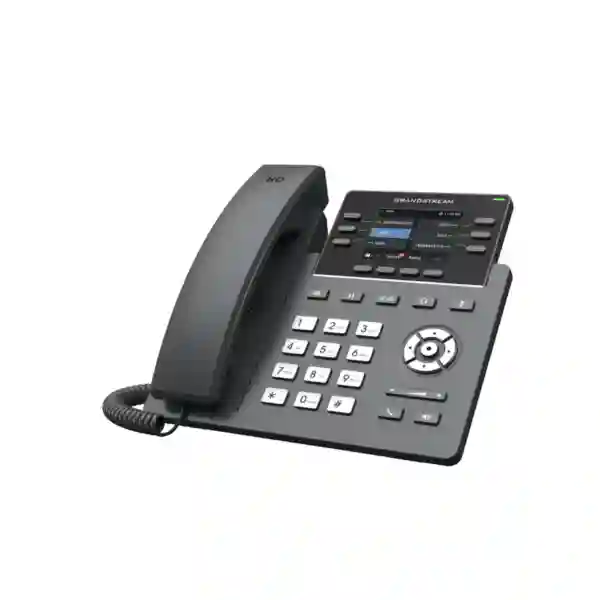
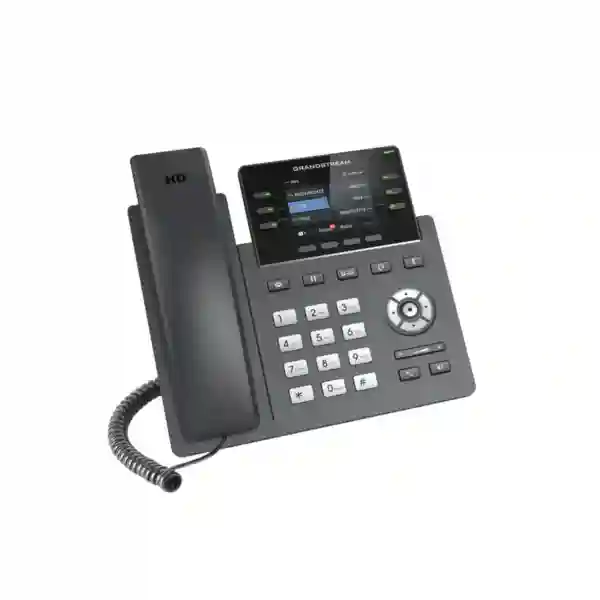
Grandstream GRP2615 Dubai – High-Capacity Professional IP Phone for Business
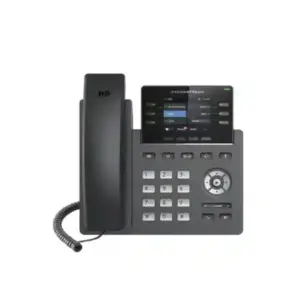
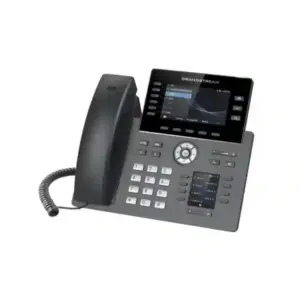
The Grandstream GRP2615 Dubai is a professional SIP desk phone built for users who handle many calls, extensions and communication workflows during the business day. Grandstream positions the GRP2615 as a 10-line professional IP phone for mass deployment and centralized management. It supports up to 16 SIP accounts, provides a 4.3-inch color LCD, 40 built-in digital multi-purpose keys, dual Gigabit Ethernet with integrated PoE, Bluetooth, dual-band Wi-Fi, HD audio and Grandstream Device Management System support. For enterprises in Dubai, Abu Dhabi, Sharjah and the wider UAE, its practical value is not simply the number of features: it is the ability to give receptionists, executive assistants, supervisors, managers and high-volume desktop users faster access to line status, speed dial, transfer and other programmable functions while keeping rollout and administration manageable.
Up to 16 SIP accounts
40 digital MPKs / BLF
Gigabit + PoE
Wi-Fi + Bluetooth
GDMS management
Is the GRP2615 the right phone for your requirement?
Choose the GRP2615 when the desk user needs more than a basic office handset. It is particularly relevant where staff must monitor many colleagues, departments or shared lines, switch quickly between call functions, work with several SIP identities, or connect through either wired Ethernet or office Wi-Fi. A typical deployment can include reception, front-office administration, an executive assistant, a team supervisor, a service coordinator, a branch manager or another role where visibility and one-touch access are important. The 40 digital MPKs can be assigned for BLF, speed dial and supported telephony functions, reducing the need to navigate through menus during busy periods.
It may be more phone than a light-duty user needs. Staff who only make occasional calls and use one SIP account can often be served by a simpler endpoint. Conversely, a very large operator console or specialist contact-center requirement may benefit from a different endpoint, additional expansion modules, softphone tools or an application-led workflow. Fourteck can help map the phone to the user role rather than selecting a model only from a feature list.
GRP2615 quick decision snapshot
Busy office users, reception, supervisors, managers, executive support, branch teams and multi-account SIP environments.
High programmable-key capacity combined with a large color screen and flexible wired or wireless network connectivity.
Grandstream GDMS, mass provisioning options and security features support standardized business rollouts.
Confirm PBX/SIP compatibility, headset needs, switch PoE budget, Wi-Fi hardware version, BLF design and whether GBX20 expansion is required.
What makes the Grandstream GRP2615 useful in a busy office?
10 line keys and up to 16 SIP accounts
The GRP2615 is designed for multi-line business calling. Up to 16 SIP accounts allow one physical endpoint to register multiple identities where the PBX or service design requires them. This can help a manager who needs separate departmental identities, a shared-service desk that receives calls for multiple functions, or a branch office that uses several account registrations. The actual account design should still be planned around the PBX and operational workflow; more accounts do not automatically create a better user experience. A clean account plan, meaningful labels, ring rules and routing logic are essential.
40 built-in digital multi-purpose keys
The built-in digital MPKs are a major reason to consider this model. They can give users faster access to monitored extensions, speed dials and supported programmable functions. For a receptionist, a well-designed BLF layout can show whether selected colleagues are available or engaged. For a service team, MPKs can place frequently used contacts or functions within quicker reach. For executive support, they can reduce the time required to reach assistants, managers and shared resources. The value depends on how the keys are programmed, so deployment should include a consistent naming and page layout rather than leaving every phone configured differently.
4.3-inch color display
The 4.3-inch 480×272 TFT color LCD gives the GRP2615 more visual space than entry-level desk phones. Users can view account information, call details, menus and programmable-key pages more comfortably. Grandstream also supports swappable faceplates, which can be useful in large deployments where companies want a consistent branded appearance. Branding should be treated as a deployment detail rather than the primary reason to select the phone; the screen, key layout and call-handling capacity are the more important day-to-day factors.
HD audio and noise-reduction features
Grandstream specifies HD audio on the handset and speakerphone with wideband-audio support. The current datasheet also lists noise shield technology. Real-world call quality still depends on the complete voice path: headset or handset choice, LAN quality, WAN performance, SIP provider, codec negotiation, QoS policy and remote network conditions. For UAE offices migrating from legacy telephony to IP communications, call quality planning should therefore include the network and PBX, not only the handset.
Verified GRP2615 technical specifications
| Model | Grandstream GRP2615 |
|---|---|
| Positioning | Professional / carrier-grade IP phone for mass deployment and management |
| Lines / SIP accounts | 10 line keys; up to 16 SIP accounts |
| Display | 4.3-inch 480×272 TFT color LCD |
| Programmable keys | 40 built-in digital BLF / multi-purpose keys |
| Ethernet | Dual switched auto-sensing 10/100/1000 Mbps Gigabit Ethernet |
| PoE | Integrated 802.3af Power over Ethernet |
| Wireless | Integrated dual-band Wi-Fi; current Grandstream information notes Wi-Fi 6 on hardware version 5.0 and above |
| Bluetooth | Integrated Bluetooth |
| Audio | HD handset and speakerphone with wideband-audio support; codecs include G.722 and OPUS among others |
| Local conferencing | 3-way audio conference |
| Headset / auxiliary | RJ9 headset jack with supported EHS options, plus USB |
| Expansion | Supports GBX20; Grandstream states up to four GBX20 modules for a total of 160 additional contacts/extensions |
| Management | Grandstream Device Management System (GDMS), plus standards-based provisioning options |
| Security highlights | Secure boot, dual firmware images, encrypted data storage/configuration support, TLS/SRTP and 802.1X capabilities |
Technical capabilities can vary by hardware revision, firmware, PBX configuration and deployment design. Confirm the required hardware/firmware combination before standardizing a large rollout.
Wired Ethernet, PoE and Wi-Fi: choose the network path deliberately
For permanent office desks, wired Ethernet with PoE is often the cleanest deployment method because a compatible PoE switch can carry data and power over the same Ethernet cable. This simplifies desk cabling and gives network teams a predictable connection path. The GRP2615 includes dual Gigabit Ethernet ports, so it can fit into common desk topologies where a PC shares the phone’s network path. VLAN and QoS design should be planned with the switching environment so voice traffic receives appropriate treatment without weakening security segmentation.
Integrated Wi-Fi provides another deployment option. It can be useful in offices where Ethernet cannot be extended conveniently, in temporary executive rooms, renovated spaces, flexible seating zones or specific locations where cabling work is undesirable. However, Wi-Fi should not be treated as automatically equivalent to a well-designed wired voice network. Coverage, roaming, channel utilization, interference, SSID design, authentication and power availability still matter. If the phone uses Wi-Fi, it still requires local power unless another arrangement is provided.
Grandstream’s current GRP2615 datasheet notes dual-band Wi-Fi 6 support on hardware version 5.0 and above, while older product information can describe 802.11ac capability. Organizations standardizing wireless deployments should therefore verify the hardware revision supplied for the project rather than assuming every unit in circulation has identical wireless specifications.
PBX, SIP and provisioning considerations
The GRP2615 is a SIP endpoint. Before procurement, confirm how it will integrate with the organization’s PBX, hosted voice service or unified communications environment. The phone supports SIP and common network/security protocols, but successful deployment depends on the PBX feature set and configuration. Functions such as BLF, shared call appearance, call pickup, transfer behavior, directory integration, voicemail access, hot desking and advanced call routing should be validated against the target platform.
For a small installation, manual configuration may be manageable. For tens, hundreds or more endpoints, centralized provisioning becomes much more important. Grandstream supports GDMS for cloud-based configuration, provisioning, management and monitoring. The device also supports other provisioning methods such as HTTP/HTTPS, TFTP/FTP-family methods, TR-069 and encrypted XML configuration files as documented by Grandstream. A rollout plan should define firmware policy, configuration templates, extension assignment, emergency changes, credential handling, phone replacement procedures and post-deployment monitoring.
Zero-touch or low-touch deployment is valuable only when the configuration model is disciplined. Fourteck recommends treating the phone configuration as part of an overall voice design: naming standards, VLAN, QoS, time/NTP, DNS, SIP server redundancy, BLF subscriptions, user permissions, directory settings and security policy should be aligned before phones are distributed to end users.
How the 40 digital BLF keys can improve daily call handling
Programmable keys become valuable when they reflect a real workflow. At a reception desk, a first page might monitor senior staff and key departments, while another page could hold frequently dialed external services. An executive assistant might prioritize the executive team, meeting rooms and internal support. A technical support supervisor could monitor team extensions and escalation contacts. A branch manager might use them for department shortcuts and inter-branch contacts. Because the GRP2615 provides 40 digital MPKs, the design can be organized around the user’s actual tasks instead of forcing every user into the same generic key map.
BLF functionality depends on PBX support and subscription configuration. A phone can have programmable keys but still deliver a poor experience if the underlying PBX does not expose the expected presence state or if the extension plan is inconsistent. During commissioning, test the visual states, pickup behavior and key labels with the real PBX. This is especially important for reception desks, where users often rely on rapid visual feedback and muscle memory.
If the built-in capacity is not enough, the GRP2615 supports the Grandstream GBX20 extension module. Grandstream states that up to four GBX20 modules can be connected, providing up to 160 additional contacts/extensions. Expansion modules are not automatically necessary; they are most useful for roles that genuinely need a wider visual field of monitored users or many one-touch functions.
Security and device-management planning
Business voice endpoints sit on the network and should be included in the organization’s security model. Grandstream lists security features for the GRP2615 that include secure boot, dual firmware images, encrypted data storage and support for security mechanisms such as TLS, SRTP and 802.1X. These capabilities provide a useful foundation, but they still need to be configured correctly. Secure transport, certificate handling, admin-password policy, network segmentation, firmware maintenance and access control should be defined according to the organization’s PBX and IT security requirements.
GDMS can help administrators manage fleets of Grandstream endpoints from a centralized interface. This is useful for multi-site organizations in Dubai and the UAE, managed service environments, and branch deployments where sending an engineer to every desk is inefficient. Centralized management can standardize configuration and simplify troubleshooting, but administrators should still use role-based access, credential controls and change-management practices appropriate to their environment.
Best-fit roles and business scenarios
Reception and front desk
A receptionist may need to monitor key extensions, transfer calls quickly, reach departments, manage multiple accounts and handle peak inbound traffic. The large display and digital MPKs make the GRP2615 a strong candidate when the PBX workflow is designed correctly.
Executive assistant
Executive support roles often need direct access to several managers, meeting rooms and important contacts. Programmable keys and multiple SIP registrations can support these workflows without turning routine tasks into repeated menu navigation.
Team supervisor
A supervisor can use BLF and shortcuts for team visibility, escalation paths and frequent contacts. The phone is useful where the supervisor remains desk-based but handles a high volume of internal and external communications.
Branch manager
Multi-site businesses can standardize a professional endpoint for managers while using centralized provisioning to keep configurations consistent across offices, subject to WAN, PBX and network design.
Hotel, clinic or service desk
High-touch service environments often need fast transfer, internal extension visibility and reliable desk communications. The GRP2615 can support these needs when integrated with the correct PBX call flows and directories.
Power user
Managers, coordinators and project teams who use multiple SIP identities or many one-touch functions can benefit from the higher key capacity without moving immediately to a large touch-console endpoint.
Grandstream GRP2615 deployment planning for Dubai and the UAE
Dubai businesses often operate across a mixture of headquarters, branch offices, warehouses, retail locations, customer-service points and hybrid workspaces. A successful GRP2615 deployment starts by identifying which users truly need the model. Reception, administration and managers may need the 40 digital MPKs and multi-account capacity, while ordinary staff may be better served by a simpler phone from the same ecosystem. Role-based endpoint selection reduces unnecessary cost and keeps training easier.
In Deira and Bur Dubai, established offices may have legacy structured cabling and older PoE switching. Before replacing analog or earlier IP phones, check cable condition, switch capacity, VLAN design and PoE budget. In newer office areas such as JLT, Business Bay and other managed commercial towers, the challenge may be coordinating with building IT, managed Internet services or existing cloud PBX providers. The phone should be tested with the actual network path rather than assumed to work identically across every site.
Abu Dhabi organizations with multiple departments can benefit from standardized configuration templates and centralized management, particularly when offices are spread across different locations. Sharjah and Ajman businesses upgrading from traditional PBX systems may use the GRP2615 for high-traffic desks while deploying simpler endpoints for general staff. The correct model mix depends on user roles, extension count, call flow, SIP trunk design, switching, bandwidth, support model and future expansion.
For organizations sourcing from Dubai for wider GCC or African projects, confirm hardware revision, power requirements, PBX interoperability, firmware policy, logistics and local support arrangements for the destination. Fourteck can help prepare a bill of materials covering phones, PoE switching, PBX components, headsets, gateways and related network requirements where these are part of the project.
Network checklist before rolling out the GRP2615
- Confirm PBX support: validate SIP registration, BLF, transfer, conference, directory, voicemail and any special feature codes your users require.
- Plan voice VLANs: decide whether phones and workstations share access ports, how VLAN assignment will work and how DHCP options or LLDP will be used.
- Check PoE capacity: confirm the access switch has enough PoE budget for the number of endpoints and any other powered devices on the switch.
- Review WAN quality: latency, jitter, packet loss, congestion and firewall/NAT behavior can affect voice performance even when the desk phone is configured correctly.
- Set QoS policy: prioritize voice appropriately across LAN and WAN segments where supported, while keeping the policy consistent with the wider network design.
- Standardize firmware: validate a known firmware version with the PBX and accessories before broad deployment, then manage upgrades through a controlled process.
- Design BLF layouts: assign keys according to roles and departments instead of copying one oversized template to every user.
- Test headsets: confirm wired, EHS, USB or Bluetooth headset requirements using the appropriate compatibility information.
- Protect administration: use secure credentials, restricted management access and the relevant encrypted signaling/media options supported by the PBX.
- Document handover: provide users with short instructions for transfer, hold, conference, voicemail, BLF and frequently used programmed keys.
Headsets, Bluetooth and flexible working
The GRP2615 supports integrated Bluetooth and includes an RJ9 headset interface. The datasheet also lists USB as an auxiliary interface. This gives organizations several headset and accessory paths, but compatibility should be checked for the specific headset model and feature set. A headset that can deliver audio may not automatically provide every remote-hook or call-control feature a user expects. For reception and service roles, test answer/end, mute, volume, call switching and range before purchasing at scale.
Bluetooth is also useful for users who prefer a wireless desk experience, but the office radio environment and headset battery policy still matter. In high-density spaces, many wireless peripherals and Wi-Fi clients compete for spectrum. IT teams should treat wireless accessories as part of workspace design, not as isolated consumer devices.
For hybrid workers, the phone can fit fixed home-office desks or satellite locations if the SIP/PBX platform permits secure remote registration and the network is properly designed. Where users move continuously between laptop, mobile and desk-phone workflows, it may be worth comparing the GRP2615 against softphone-led or unified communications options before standardizing.
When should you add a GBX20 extension module?
The built-in 40 digital MPKs are sufficient for many users. Add a GBX20 only when the user genuinely needs more visible contacts, extensions or programmable actions. Typical examples include a hotel operator, corporate reception, medical front desk, executive assistant supporting a large leadership team, or a dispatcher coordinating many internal users. Grandstream states that the GRP2615 can work with up to four GBX20 modules, for a total of 160 additional contacts/extensions.
Before adding multiple modules, review whether the workflow would be better served by a software attendant console, contact-center client or another interface. Physical expansion is excellent for tactile, glanceable access, but very large organizations may need richer presence, search and queue information than an expansion module alone provides.
Buying the GRP2615: information to include in your quotation request
A useful quotation request should communicate more than a phone quantity. Share the number of GRP2615 units required, delivery location, whether the project is new or an upgrade, the PBX or hosted voice platform, the number of users, PoE availability, headset requirements, need for Wi-Fi, whether GBX20 modules are required, and any installation or configuration service expected. If the project includes multiple offices, provide site counts and approximate user roles so the endpoint mix can be reviewed.
For larger projects, also identify whether you need pre-configuration, extension labeling, staged delivery, firmware standardization, VLAN/QoS assistance, PBX integration or post-deployment support. Stock, price, lead time and exact commercial terms can change, so they should be confirmed at the quotation stage rather than embedded as permanent claims on a product page.
Fourteck can assist organizations that need a complete communication solution rather than handset-only procurement. Depending on the requirement, that discussion can cover Grandstream IP phones, compatible PBX architecture, PoE switching, headsets, gateways, SIP connectivity planning, network readiness and endpoint provisioning.
How to compare the GRP2615 with another IP phone
Do not compare business phones only by display size or line count. Start with the user’s workload. Ask how many SIP accounts are actually needed, how many colleagues must be monitored with BLF, whether a dedicated expansion module is likely, whether wired or wireless network connectivity is required, what headset type users prefer, and how the phone will be managed. Then confirm PBX interoperability and provisioning options. A phone with fewer headline features can be the better choice for a general office user, while a higher-capacity phone becomes worthwhile for users who actively exploit its programmable keys and account flexibility.
Within the Grandstream professional phone family, model selection should therefore be role-based. A reception desk may justify a higher key count and expansion support. A standard employee may need only a few line appearances. A senior manager may value a larger display, Bluetooth and Wi-Fi. A contact-center agent may care more about headset workflow and desktop software integration. Fourteck can compare suitable Grandstream models against these requirements instead of recommending the most expensive option by default.
If your existing environment uses another vendor, include the current PBX, phones, headsets and network design in the assessment. This helps identify whether the migration can be staged, whether feature behavior will change, and whether new provisioning or user training is required.
Deployment examples for UAE organizations
Corporate reception in Dubai
A corporate reception desk may use the GRP2615 to register the main reception identity, monitor selected departments through BLF, store speed dials for security and facilities, and transfer calls using consistent keys. If the number of monitored users grows beyond the built-in digital MPKs, a GBX20 can extend the visible contact field. The design should be tested with the actual PBX transfer and pickup behavior before go-live.
Executive floor in Abu Dhabi
Executive assistants can use programmable keys for leadership contacts, meeting rooms and priority internal services. Bluetooth or wired headset options can support hands-free work, while Gigabit Ethernet and PoE keep the desk installation simple. Central provisioning can ensure that multiple executive-area phones share a controlled and documented configuration.
Multi-branch retail or service organization
A UAE business with branches in Dubai, Sharjah, Ajman and Abu Dhabi can use centralized templates for common settings while adapting account and BLF assignments by location. The branch WAN, firewall and SIP architecture must be designed for reliable voice, and each location should have an escalation procedure if connectivity is interrupted.
Hotel or clinic front office
Front-office users often need fast internal calling, transfers and repeated access to key extensions. The GRP2615 can provide a structured physical interface for these operations. Integration requirements should be reviewed carefully if the organization expects hotel PMS, healthcare workflow, recording, paging or other specialized applications beyond standard SIP telephony.
Fourteck support for GRP2615 projects
Fourteck can support the planning stage by identifying which users need the GRP2615 and which users can use a simpler endpoint. This role-based method is important in medium and large deployments because one phone model rarely fits every employee equally well. We can also discuss PBX integration, extension planning, PoE switching, VLAN/QoS requirements, headset compatibility, provisioning and rollout sequencing.
For organizations replacing existing analog or IP phones, the assessment can include current extension numbering, SIP trunk or PBX environment, existing cabling, switching and endpoint dependencies. A staged migration may reduce disruption where an immediate organization-wide cutover is not practical. For new offices, the phone plan can be coordinated with the structured cabling, switching and PBX design from the beginning.
If you are evaluating the Grandstream GRP2615 Dubai for a specific project, provide the user count, PBX platform, branch locations, call-handling requirements and expected expansion. Fourteck can then help confirm whether the model is suitable and prepare a requirement-based quotation without relying on unsupported assumptions about stock, pricing or configuration.
Frequently asked questions about the Grandstream GRP2615
How many SIP accounts does the Grandstream GRP2615 support?
Grandstream’s current product information lists up to 16 SIP accounts and 10 line keys for the GRP2615. The practical number of accounts you should configure depends on the PBX design and the user’s role.
Does the GRP2615 support Wi-Fi?
Yes. The GRP2615 includes integrated dual-band Wi-Fi. Grandstream’s current datasheet notes Wi-Fi 6 capability on hardware version 5.0 and above, so the hardware revision should be confirmed for projects that specifically require Wi-Fi 6.
Does the GRP2615 support Bluetooth?
Yes. Integrated Bluetooth is listed by Grandstream. This can support compatible wireless accessories, but headset functions should be validated with the exact accessory model before a large purchase.
Can the GRP2615 be powered by PoE?
Yes. It has dual Gigabit Ethernet ports with integrated 802.3af Power over Ethernet. The access switch must have sufficient PoE budget for the total number of powered devices.
How many BLF or programmable keys are built into the GRP2615?
Grandstream lists 40 built-in digital BLF / multi-purpose keys. Their exact function depends on phone and PBX configuration.
Does the GRP2615 work with the GBX20 extension module?
Yes. Grandstream lists GBX20 support and states that up to four modules can be connected, providing up to 160 additional contacts/extensions.
Is the GRP2615 suitable for a receptionist?
It can be a strong fit for reception because of its high programmable-key capacity, multi-account support, large display and expansion-module option. The final choice should consider the number of extensions to monitor, PBX BLF behavior and whether a software attendant console is also required.
Can Fourteck help configure and deploy GRP2615 phones in Dubai?
Fourteck can discuss project requirements covering endpoint selection, PBX/SIP integration, provisioning, network readiness, PoE, VLAN/QoS, user roles and rollout planning. The exact service scope should be confirmed for the project.
How do I request a GRP2615 quotation for the UAE?
Share the quantity, delivery location, PBX platform, headset requirement, need for Wi-Fi or GBX20 expansion, and whether you require configuration or installation assistance. Fourteck can use this information to prepare a requirement-based quotation.
Discuss your Grandstream GRP2615 requirement with Fourteck
Planning a new office, reception desk, executive deployment or multi-site VoIP refresh in Dubai or elsewhere in the UAE? Share your user count, PBX platform, locations and call-handling requirements. Fourteck can help evaluate the GRP2615, compare suitable endpoint options and plan the surrounding network and provisioning requirements.
Reviews
There are no reviews yet.