Cordless business voice · Wi‑Fi 6 mobility · Dubai & UAE
Grandstream WP816 Dubai – Wi‑Fi 6 Cordless IP Phone for Mobile Teams
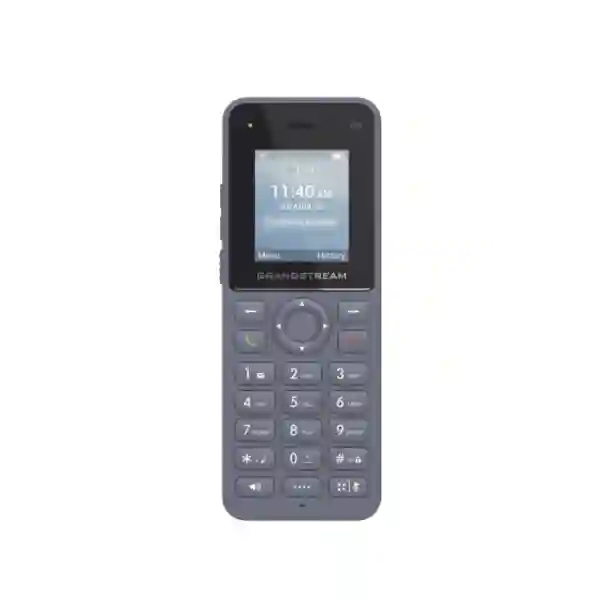
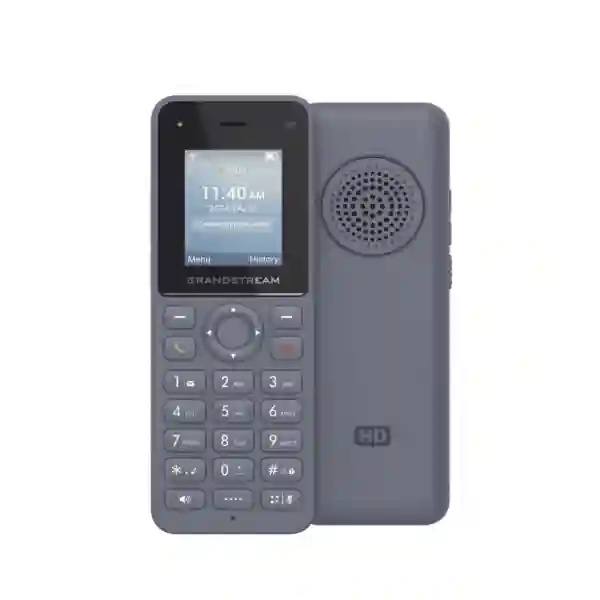
The Grandstream WP816 Dubai is a compact cordless SIP phone designed for people who need to move through a workplace without losing access to business voice. Instead of relying on a separate DECT radio network, the WP816 uses an organization’s Wi‑Fi infrastructure and supports dual-band Wi‑Fi 6, 802.11k/r/v roaming, two SIP accounts, integrated Bluetooth, a 3.5 mm headset interface, push-to-talk functionality, HD voice technologies, USB Type‑C charging, and centralized provisioning through Grandstream management options. That combination makes it useful for retail floors, clinics, warehouses, hotels, schools, offices, security teams, service departments, logistics operations, and other environments where staff are not tied to a desk.
This page is written as a deployment and buying guide rather than a simple feature list. It explains where the WP816 fits, what your Wi‑Fi and SIP environment should provide, which limitations to consider, how it compares with nearby Grandstream cordless models, and what information Fourteck needs to prepare a suitable quotation or rollout plan.
Quick answer: who should choose the Grandstream WP816?
Choose the WP816 when users need a business SIP handset that can move across an existing or planned enterprise Wi‑Fi network. The strongest use cases are staff who spend much of the day away from a fixed desk but still need extension dialing, transfer, hold, call waiting, phonebook access, push-to-talk, headset connectivity, and centralized administration. The handset supports two SIP accounts and two lines, which is enough for many operational roles without adding the complexity of a larger multi-line desktop device.
WP816 verified feature profile
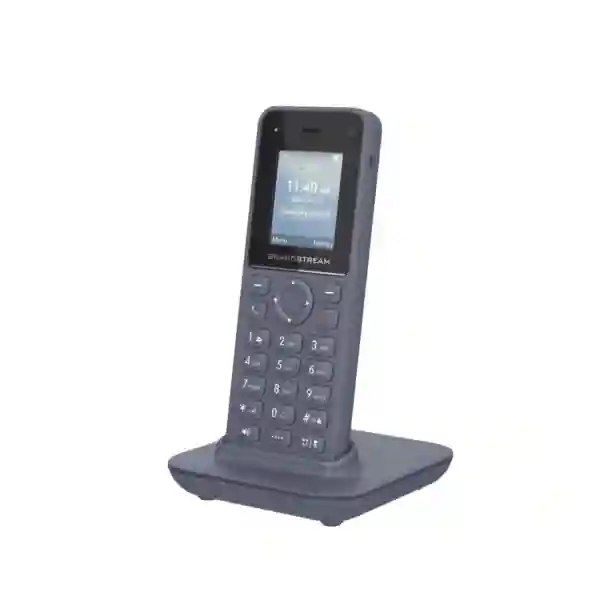
Grandstream positions the WP816 as a cordless Wi‑Fi IP phone for enterprise and vertical-market mobility. The current product documentation lists integrated dual-band 802.11a/b/g/n/ac/ax connectivity on 2.4 GHz and 5 GHz, support for 802.11k/r/v roaming, Bluetooth 5.0, a 1.77-inch 128×160 color LCD, a rechargeable 1500 mAh lithium-ion battery, USB Type‑C charging, a 3.5 mm headset interface, a configurable push-to-talk function, an accelerometer, proximity sensor, vibration, and a charger base that can be wall mounted. Grandstream lists up to 6 hours of talk time and 120 hours of standby time under laboratory conditions.
| Area | WP816 capability | Why it matters |
|---|---|---|
| SIP | 2 SIP accounts, 2 lines | Suitable for common mobile extension roles and separate line/account requirements. |
| Wireless | Dual-band Wi‑Fi 6, 802.11k/r/v roaming | Designed for voice users moving between enterprise access points. |
| Audio | Opus, G.722 and other business voice codecs; dual microphones; AEC; Noise Shield technologies | Supports intelligible calls across varied network and acoustic conditions. |
| Accessories | Bluetooth 5.0 and 3.5 mm CTIA headset jack | Gives users wired and wireless headset options. |
| Battery | 1500 mAh; up to 6 hours talk / 120 hours standby in lab data | Appropriate for many shift patterns when charging habits are planned. |
| Management | GDMS, TR-069 and encrypted XML provisioning options | Helps scale handset deployment and keep configuration consistent. |
| Security | TLS/SRTP support, 802.1X, modern SIP authentication options and WPA-family wireless security | Supports enterprise security designs when configured correctly. |
Note: Grandstream documentation has changed over time and some documents differ on specific conference-call limits and security details. If a particular feature is contractual or project-critical, confirm it against the firmware and documentation version planned for deployment.
Why Wi‑Fi 6 matters for a cordless business phone
A Wi‑Fi cordless phone is only as good as the wireless network carrying the call. Voice traffic is sensitive to delay, jitter, packet loss and roaming interruptions, so simply seeing a strong Wi‑Fi icon does not prove that an area is ready for reliable voice. The WP816 supports Wi‑Fi 6 and both 2.4 GHz and 5 GHz bands, giving network designers flexibility to place voice devices on an appropriate WLAN while taking advantage of newer access-point capabilities.
For many UAE offices, hotels, clinics and warehouses, 5 GHz will be the preferred band where coverage has been engineered properly because it usually offers more usable channel capacity and less interference than crowded 2.4 GHz environments. However, the correct design depends on building materials, floor layout, shelving, cold rooms, elevators, glass partitions, RF interference, user density and the number and placement of access points. A warehouse with high metal racks has very different RF behavior from a low-density office in Dubai Internet City or a clinic with many small rooms.
The practical buying point is that WP816 deployment should be treated as a voice-over-Wi‑Fi project, not just a handset purchase. If staff are expected to walk continuously during calls, a pre-deployment Wi‑Fi assessment, sensible AP overlap, controlled transmit power, channel planning, appropriate security settings and roaming validation can be more important than the handset specification itself.
Roaming: what 802.11k, 802.11r and 802.11v can do
Grandstream lists support for 802.11k/r/v on the WP816. These standards are commonly used to improve how Wi‑Fi clients discover candidate access points and move between them. In a voice deployment, that matters because a user may start a call at a reception desk, walk down a corridor, enter a storeroom and move to another floor while the session remains active. Poor roaming can create clipped audio, several seconds of silence or a dropped call even when every area individually has usable signal strength.
The standards do not guarantee perfect roaming on their own. Access points need consistent SSID and security configuration, suitable cell overlap and a controller or network design that behaves well with the handset. Very large AP cells can make a handset stay attached to a distant AP for too long, while overly small cells can force unnecessary handoffs. High transmit power is not automatically better, because the phone must also be heard by the AP in the return direction.
When Fourteck helps plan a Grandstream WP816 Dubai deployment, useful inputs include floor plans, current AP models, controller platform, SSIDs, authentication method, VLAN design, expected concurrent calls, known dead zones and whether users must keep calls active while moving. These details help determine whether the requirement is mainly handset supply or whether wireless optimization should be part of the project.
SIP and PBX compatibility planning
The WP816 is a standards-based SIP endpoint. That makes it suitable for many IP PBX, hosted SIP and unified communications environments, but “SIP compatible” should not be treated as a promise that every proprietary feature of every platform will work identically. Basic registration, extension-to-extension calling and common telephony functions are usually straightforward when the PBX supports standard SIP endpoints. More advanced features such as directory behavior, presence, specific call-center functions, custom XML services, BLF behavior or platform-specific security methods should be validated against the chosen system.
For Grandstream UCM deployments, the handset can fit naturally into a Grandstream voice environment and may be centrally provisioned through supported management methods. For third-party platforms such as 3CX, Yeastar, Asterisk-based systems, hosted SIP services or service-provider environments, the correct approach is to confirm supported authentication, transport, codec policy, NAT handling, provisioning model and any required feature codes before rollout.
Two SIP accounts can be useful when one user needs separate identities, departments or call paths. However, if a user needs many appearances, intensive BLF monitoring or a large number of programmable keys, a desk phone may be a better primary endpoint. The WP816 is strongest when mobility is the first requirement and the user still needs normal business telephony rather than a large desktop console.
Audio quality: codec support is only part of the result
Grandstream lists wideband codecs including Opus and G.722 along with common narrowband codecs. The handset also includes dual microphones, acoustic echo cancellation and Noise Shield-related technologies. These features can improve intelligibility, especially for users working around moderate background activity, but actual call quality depends on the complete path: microphone placement, headset quality, Wi‑Fi health, LAN congestion, PBX codec policy, SIP trunk behavior and the far-end network all matter.
Opus is particularly useful where both endpoints and the voice platform support it because it is designed to deliver good quality across a range of network conditions and bitrates. In many business deployments, however, external trunks may still use G.711 or another codec. The correct codec policy should therefore be built around compatibility and available bandwidth rather than selecting the largest list of codecs.
For noise-sensitive jobs, test the handset in the real working area. A clinic corridor, hotel back office, retail floor and loading bay each create different acoustic challenges. If the user must keep both hands free, a validated Bluetooth or wired headset can be as important as the handset itself. Fourteck can help include headset compatibility checks in the project scope when the requirement is operational rather than simply device supply.
Bluetooth, wired headsets and hands-free workflows
The WP816 combines integrated Bluetooth 5.0 with a 3.5 mm CTIA headset interface. That gives organizations two practical accessory paths. Bluetooth is convenient for supervisors, retail staff, technicians and hospitality teams who need wireless freedom around the handset. A wired headset can be preferable where organizations want a simpler accessory standard, fewer batteries to charge, lower accessory cost or a predictable physical connection.
Not every headset behaves identically, so large projects should validate the exact headset model before purchasing at scale. Check call answer/end behavior, microphone level, sidetone, volume steps, comfort, wearing style and charging workflow. For all-day users, comfort and replaceable ear cushions may matter more than small differences in published audio specifications.
The handset also has a speaker key, but a cordless phone speakerphone should not be treated as a replacement for a dedicated conference-room endpoint. Its role is quick hands-free communication and mobility. When meetings, huddle spaces or group calls are the main requirement, a conference device or room system is usually the more suitable endpoint.
Battery planning for real shifts
Grandstream states a 1500 mAh rechargeable lithium-ion battery with up to 6 hours of talk time and 120 hours of standby time under laboratory conditions. Real battery life will vary according to signal conditions, call duration, screen use, Bluetooth use, roaming activity, battery age, temperature, firmware and user behavior. That means the right question is not simply “How many hours does the battery last?” but “How will this role use the handset during a shift?”
A hotel supervisor who makes short calls and returns the handset to its cradle between rounds may be comfortable with the WP816. A warehouse user making long, continuous calls for a 10- or 12-hour shift may need more deliberate charging practices or a model with a larger battery. Organizations should also decide where charging cradles will be located, whether handsets are assigned to individuals or shared, and how spare devices will be handled during heavy-use periods.
Battery planning becomes especially important in healthcare, security and logistics because a flat handset can interrupt a critical workflow even when the network is perfectly designed. For these environments, Fourteck recommends defining charging responsibility, shift handover and spare-device policy as part of the deployment plan rather than leaving them to users after installation.
Push-to-talk for operational teams
A configurable push-to-talk function is one of the features that separates a mobility-focused handset from a basic cordless office phone. In environments such as retail, warehouses, security, hospitality and facilities management, staff often need short operational messages rather than a traditional one-to-one phone conversation. A correctly configured push-to-talk workflow can reduce dialing steps and help teams coordinate routine activities quickly.
The usefulness of push-to-talk depends on the PBX and configuration design. Decide who should be in each paging or communication group, whether messages should reach all users or a department, how priority should be handled and whether an emergency function is required. Avoid creating one large group that interrupts everyone for every message. Department-based or role-based groups usually produce a better user experience.
If emergency or alarm behavior is business-critical, document the expected behavior and test it on the exact firmware and platform before go-live. The handset includes sensors and configurable functions, but organizations should not assume that a telephone feature substitutes for a certified life-safety, nurse-call, fire-alarm or emergency-response system.
Security considerations for enterprise Wi‑Fi voice
A mobile SIP endpoint touches both the wireless network and the voice platform, so security should be designed across both layers. Current Grandstream documentation lists WPA-family Wi‑Fi security options, 802.1X capabilities, TLS for SIP signaling, SRTP-related media protection, modern authentication algorithms and encrypted provisioning mechanisms. The exact features available can depend on firmware and configuration, so organizations with strict compliance requirements should validate the planned release before rollout.
A common enterprise design is to place voice devices on a dedicated SSID or controlled network segment, apply appropriate VLAN policy, restrict access to required PBX, DNS, NTP, provisioning and management services, and prevent unnecessary lateral communication. QoS should be coordinated with that segmentation so voice packets are prioritized correctly without weakening security controls.
Administrator credentials should be changed from factory defaults, firmware should be maintained through a controlled process, provisioning should use secure transport where supported, and unused services should be reviewed. Organizations should also define what happens when a handset is lost: credentials, extension registration and management access should be removable quickly.
For public-facing environments in Dubai, Abu Dhabi or other busy locations, physical loss is a realistic operational risk. A small cordless handset can leave the site more easily than a desk phone, so asset labeling, inventory records and rapid deprovisioning procedures are worth including in the project.
Centralized provisioning and lifecycle management
Hand-configuring one phone can be acceptable for a pilot. Hand-configuring dozens or hundreds becomes an operational problem. Grandstream supports centralized provisioning options for the WP816, including GDMS, TR-069 and encrypted XML configuration workflows. These can help administrators standardize SIP accounts, firmware versions, dial plans, network settings and device policies across a fleet.
A good rollout starts with a configuration baseline. Define account naming, extension assignment, Wi‑Fi profiles, time settings, NTP, allowed codecs, transport, directory sources, soft-key behavior, push-to-talk mapping, upgrade policy and administrator access. Create a pilot group, confirm behavior in the real network, then scale the configuration after the pilot is stable.
For multi-branch organizations, centralized management can reduce site visits and make moves, adds and changes easier. It also creates a more consistent support model because technicians can compare a problem handset against a known configuration baseline. Fourteck can scope device supply only, pre-configuration, PBX integration, WLAN validation or a broader rollout depending on what the customer already has in place.
Deployment scenarios: where WP816 makes practical sense
Retail floor
Supervisors, stock-room staff and customer-service employees can stay reachable while moving between shelves, counters and back-office areas. Push-to-talk can support quick coordination when the PBX and paging design are configured appropriately.
Clinic and healthcare operations
Administrative and non-life-safety staff can use mobile extensions across reception, consultation corridors and support areas. WLAN coverage and device cleaning policies should be reviewed for the actual facility.
Warehouse and logistics
Team leaders and operations staff can carry an extension through pick, pack, dispatch and receiving areas. High racks and metal structures make RF validation especially important.
Hotels and hospitality
Housekeeping supervisors, engineering, security and duty managers can remain connected while moving through guest floors and service areas, provided roaming coverage is designed correctly.
Education and campuses
Facilities, administration and support teams can use the same enterprise WLAN footprint to carry voice extensions between offices, corridors and common areas.
Corporate mobility
IT, office services and roaming managers can keep a business extension while moving through meeting rooms, reception areas, labs and shared workspaces without relying on a personal mobile number.
Dubai and UAE deployment considerations
UAE deployments often combine high-density indoor Wi‑Fi, modern IP PBX platforms, multi-site operations and a mixture of local and international calling requirements. A Dubai office may need only a small number of WP816 handsets for facilities staff, while a hotel, clinic, retail chain or logistics operator may need dozens across multiple sites. In each case, the purchasing decision should consider network readiness, PBX capacity, SIP trunk design, extension numbering, support ownership and the expected user workflow.
In Dubai and Sharjah warehouses, RF behavior around metal racking and loading areas can dominate voice performance. In Abu Dhabi offices and institutional buildings, security and centralized management may be the larger concern. In hospitality environments, guest Wi‑Fi and staff voice should generally be treated as separate services with appropriate segmentation and priority rather than placing cordless voice devices on an uncontrolled guest network.
Fourteck can prepare a quotation based on handset quantity, required accessories, PBX platform, configuration needs, deployment locations and whether Wi‑Fi validation or implementation support is needed. Price should be confirmed for the actual project rather than inferred from consumer marketplace listings, because business quotations may include configuration, support, accessories and quantity-dependent requirements.
Wi‑Fi network checklist before ordering
- Confirm that the intended coverage areas have business-grade Wi‑Fi and that signal quality has been measured where users actually walk and work.
- Identify whether 5 GHz, 2.4 GHz or a controlled dual-band policy will be used for voice clients.
- Confirm consistent SSID, authentication and VLAN policy across access points used for roaming.
- Review channel utilization, co-channel interference and AP transmit power rather than increasing power blindly.
- Validate 802.11k/r/v behavior on the chosen WLAN platform if seamless mobility during calls is important.
- Define QoS marking and switching policy from handset WLAN through the LAN and voice platform.
- Ensure DNS, NTP, PBX, provisioning and management destinations are reachable from the voice network as required.
- Test real calls while walking through roaming boundaries, elevators, stairwells, stock rooms and other difficult areas.
- Document acceptable call quality and dead-zone remediation before scaling from pilot to full deployment.
WP816 vs WP810, WP820, WP825 and WP826
Grandstream offers several cordless Wi‑Fi phones, and the right choice is mainly about wireless generation, battery requirements, ruggedness, user interface and account capacity. The WP816 sits in a practical middle position for organizations that want Wi‑Fi 6, Bluetooth, USB Type‑C charging and a compact handset without moving to a larger or rugged model.
| Model | Wireless | Accounts / lines | Battery focus | Best-fit reason |
|---|---|---|---|---|
| WP810 | Dual-band Wi‑Fi 5 class | 2 / 2 | 6h talk / 120h standby listed | Basic compact Wi‑Fi cordless requirement where Bluetooth is not essential. |
| WP820 | Older dual-band Wi‑Fi generation | 2 / 2 | Longer than WP816 in vendor listing | Android-app support and established WP-series deployments. |
| WP816 | Dual-band Wi‑Fi 6 + 802.11k/r/v | 2 / 2 | 6h talk / 120h standby listed | Modern compact Wi‑Fi 6 option with Bluetooth and Type‑C charging. |
| WP825 | Dual-band Wi‑Fi 5 class | 2 / 2 | 8h talk / 200h standby listed | Ruggedized choice for harsher environments. |
| WP826 | Dual-band Wi‑Fi 6 + 802.11k/r/v | 3 / 3 | 12h talk / 240h standby listed | Better fit for longer shifts, more accounts and a larger-screen requirement. |
If the only reason for considering WP826 is “newer is better,” the WP816 may still be the more economical and appropriate choice for a two-account mobile user. Conversely, if staff regularly exceed the WP816’s realistic charging window, moving to a longer-battery model can reduce support issues. For harsh environments that require water, dust or drop resistance, select a rugged model based on the exact environmental requirement rather than assuming the WP816 has an IP rating; Grandstream does not position WP816 as weatherproof.
When WP816 is not the right endpoint
A good procurement page should explain when not to buy the product. The WP816 is not a rugged outdoor handset, not a replacement for a smartphone, not a desk phone with dozens of programmable keys, and not a life-safety communication system. It is designed primarily for mobile SIP voice over enterprise Wi‑Fi.
Choose another device if users require a large touchscreen, Android business applications, barcode scanning, camera workflows, cellular connectivity, very long continuous talk time, IP-rated environmental protection or many visible line/BLF keys. If the organization has poor Wi‑Fi coverage and does not plan to improve it, a DECT architecture may be more appropriate in some buildings because DECT uses its own radio infrastructure rather than depending on the data WLAN.
The goal should be endpoint fit, not feature count. A properly matched WP816 on a well-designed wireless network can be more useful than a more expensive handset whose capabilities are unnecessary. The opposite is also true: buying the least expensive handset for a 12-hour, high-call-volume warehouse shift may create battery and usability problems that cost more than the initial saving.
Practical rollout method for 10, 50 or 200 handsets
Phase 1 – requirements: identify user groups, extension count, PBX platform, WLAN design, buildings, call patterns, headset needs, push-to-talk groups, security policy and charging expectations. This prevents the handset quantity from becoming the only project requirement.
Phase 2 – pilot: configure a small number of devices, test registration, incoming and outgoing calls, transfer, hold, voicemail access, directories, roaming, headset use, battery behavior, push-to-talk and recovery after Wi‑Fi interruption. Test during real operating hours when the WLAN is under normal load.
Phase 3 – standardize: create a known configuration baseline and use centralized provisioning where appropriate. Record firmware version, account template, wireless configuration, button behavior and support procedures.
Phase 4 – deployment: assign assets, label chargers, distribute quick user guidance, confirm charging locations and validate every important roaming zone. Larger sites should deploy in controlled batches rather than changing all users at once.
Phase 5 – support: monitor user feedback, call-quality complaints, battery issues and dead zones. Distinguish handset problems from WLAN problems; replacing a phone will not fix a congested or poorly designed access point cell.
PBX, VLAN and QoS design for WP816 projects
A cordless SIP phone should be treated as an endpoint in the broader voice architecture. The PBX must have sufficient extension and simultaneous-call capacity, the LAN must carry voice traffic reliably, and the WLAN should map devices into the correct network segment. If the organization already uses voice VLANs for wired phones, Wi‑Fi voice may be placed in an equivalent controlled segment through the SSID and access-point infrastructure.
QoS can protect voice during periods of network congestion, but it only works when markings are preserved and trusted through the relevant network path. Access points, switches, routers, firewalls and WAN links may each affect how traffic is treated. For a single-site office with light utilization, the design can be simple. For a multi-site company using VPN or SD-WAN, the voice path may cross several policy domains and should be validated end-to-end.
If remote branches register to a central PBX, consider WAN latency, jitter, packet loss, failover and DNS behavior in addition to local Wi‑Fi quality. Server redundancy and failover options on the endpoint can support resilient designs, but the complete architecture should be tested rather than assumed. Fourteck can discuss endpoint configuration alongside PBX, switching, wireless and firewall requirements where the project spans multiple layers.
Directories, call handling and everyday usability
Mobile staff still need common business phone functions. Grandstream documentation lists call hold, transfer, forwarding, call park, waiting, auto answer, click-to-dial support, flexible dial plans, call logs and downloadable phonebook capabilities. These are important because a cordless phone should not force users to sacrifice basic office telephony just to gain mobility.
Directory design deserves planning in larger organizations. A downloadable phonebook or LDAP-based directory can reduce the need to memorize extensions, but naming conventions should be consistent. Use department, location and role information in a way that makes sense on a small handset display. A 1.77-inch screen is suitable for normal navigation, but it is not designed for long records or visually complex applications.
Dial plans should also match the user group. Warehouse or retail users may need short extension dialing and a few service codes; office managers may need external caller ID behavior and transfer options; hotel operations may have department extensions and paging groups. Simplifying the handset experience often improves adoption more than enabling every available feature.
Troubleshooting: common symptoms and what they usually mean
| Symptom | Possible causes | First checks |
|---|---|---|
| Audio drops while walking | Roaming delay, coverage gaps, sticky client behavior, interference | Walk-test RSSI, AP overlap, channels, roaming settings and handoff points. |
| Phone shows Wi‑Fi but cannot register | PBX reachability, DNS, firewall, credentials, SIP transport mismatch | Confirm IP settings, DNS, PBX address, port/transport and account credentials. |
| One-way audio | NAT, RTP policy, firewall or routing issue | Inspect RTP path, firewall rules, NAT settings and PBX media configuration. |
| Battery runs down too quickly | Heavy call use, weak signal, Bluetooth use, aged battery, screen activity | Compare real call hours, signal levels, battery age and charging routine. |
| Choppy audio at busy times | RF congestion, LAN/WAN saturation, insufficient QoS | Check channel utilization, packet loss, jitter, WAN use and QoS handling. |
| Headset sounds poor | Accessory mismatch, level settings, RF interference, headset battery | Validate exact headset model, pairing, microphone level and test with another accessory. |
Procurement checklist for Grandstream WP816 Dubai
For an accurate business quotation, provide more than the product code. The most useful information includes quantity, deployment city, PBX platform, number of SIP accounts per user, whether the WLAN already exists, accessory requirements, desired configuration support, target deployment date and whether devices will be used at one site or distributed across branches.
- Quantity: pilot quantity and expected final quantity.
- Location: Dubai, Sharjah, Abu Dhabi, Ajman, other UAE emirates or export destination.
- PBX: Grandstream UCM, 3CX, Yeastar, Asterisk, hosted SIP or another platform.
- Wi‑Fi: AP vendor/model, controller, number of floors and known coverage concerns.
- User role: office mobility, hotel operations, warehouse, retail, security, clinic or other workflow.
- Accessories: wired/Bluetooth headsets, charging locations and spare-device requirements.
- Services: supply only, provisioning, installation, WLAN validation, PBX configuration, testing or ongoing support.
This information helps avoid under-specifying the project. For example, a requirement for 30 handsets in a warehouse may lead to a very different design discussion than 30 handsets distributed across five office branches.
Regional deployment beyond the UAE
The WP816 is also relevant for organizations standardizing SIP mobility across multiple countries. Fourteck’s wider regional project context can include Uganda, Kenya, Tanzania, Nigeria, Ghana and Kuwait as well as the UAE. The handset features remain the same, but deployment conditions can differ significantly by site: internet quality, power stability, local support coverage, PBX hosting model, branch firewall design and available Wi‑Fi infrastructure can all change the architecture.
For Kampala or Nairobi branches, a customer may prefer a central PBX with VPN connectivity to branch networks. For Tanzania or Nigeria, WAN resilience and local failover may be a bigger design concern. In Kuwait, dense office Wi‑Fi and enterprise security policies may drive the project. A standardized endpoint can simplify support across regions, but only if the network and provisioning model are documented consistently.
Where a customer operates in several countries, Fourteck can discuss a common configuration template with site-specific network settings. This can reduce support variation while still allowing each branch to use the correct SSID, VLAN, extension range and local routing policy.
Useful Fourteck network resources
A WP816 purchase often sits inside a broader voice and network project. For related requirements, customers can explore Fourteck’s wider technology resources and regional sites:
IP Phone Fourteck for business telephony and endpoint content; IPBX Dubai for PBX-related solutions; Fourteck UAE for wider IT infrastructure; and regional resources for Uganda, Kenya, Tanzania, Ghana, Nigeria and Kuwait.
Why businesses ask Fourteck for WP816 projects
A cordless IP phone project crosses several technical areas at once: endpoint choice, SIP configuration, Wi‑Fi behavior, LAN design, security, QoS, user workflow and ongoing support. Fourteck’s role can be scoped around the customer’s actual requirement rather than assuming every buyer needs the same package. Some organizations only need a hardware quotation. Others need assistance selecting between WP816, WP826, WP825 or another endpoint. Larger projects may need provisioning, PBX integration, network review, pilot testing and rollout support.
The advantage of a requirements-led approach is that product selection can be justified. If battery life is the limiting factor, choose around battery. If ruggedness is essential, choose around environmental protection. If two SIP accounts and compact Wi‑Fi 6 mobility are the main goals, the WP816 is a strong candidate. If the WLAN is the problem, correct the wireless design rather than blaming the endpoint.
Fourteck does not need to make unsupported claims about stock, price or authorization to help a buyer make a sound decision. Availability, commercial terms and project scope can be confirmed at quotation time based on quantity, destination and required services.
Frequently asked questions about Grandstream WP816
Does the WP816 support Wi‑Fi 6?
Yes. Grandstream lists integrated dual-band 802.11a/b/g/n/ac/ax Wi‑Fi, covering 2.4 GHz and 5 GHz, with 802.11k/r/v roaming support.
How many SIP accounts does the WP816 support?
The WP816 supports two SIP accounts and two lines, making it suitable for common mobile business-extension roles.
What is the WP816 battery life?
Grandstream lists a 1500 mAh battery with up to 6 hours of talk time and 120 hours of standby time under laboratory conditions. Real results vary with usage, signal quality, Bluetooth activity, battery age and configuration.
Can the WP816 roam between access points during a call?
The handset supports 802.11k/r/v roaming features, but successful call roaming also depends on access-point placement, WLAN configuration, RF coverage, security settings and the network platform.
Does the WP816 have Bluetooth?
Yes. Current Grandstream documentation lists integrated Bluetooth 5.0, allowing compatible Bluetooth headset use.
Can I connect a wired headset?
Yes. The phone includes a 3.5 mm CTIA headset interface in addition to Bluetooth support.
Does the WP816 support push-to-talk?
Yes. Grandstream provides a configurable push-to-talk function that can be useful for paging and operational team communication when the voice platform is configured appropriately.
Is the WP816 waterproof or rugged?
No IP-rated weatherproof claim is listed for WP816. For harsh, wet, dusty or high-drop-risk environments, consider a rugged Grandstream model based on the required protection level.
Can WP816 work with Grandstream UCM?
Yes, it is a SIP endpoint and is a natural fit for Grandstream UCM deployments. The exact provisioning and feature configuration should be planned for the UCM version and project design.
Can WP816 work with 3CX, Yeastar or other SIP PBX systems?
The WP816 uses standard SIP and can be used with compatible third-party SIP platforms. Validate registration, codecs, transport, provisioning and any platform-specific features before a large rollout.
Is WP816 better than WP826?
Not automatically. WP816 is a compact two-account Wi‑Fi 6 handset. WP826 is better suited when the project needs more SIP accounts, a larger display or substantially longer listed battery life. The correct choice depends on user workflow and budget.
Should I choose WP816 or WP825 for a warehouse?
Choose based on environmental conditions as well as wireless needs. WP825 is positioned as a ruggedized model, while WP816 provides Wi‑Fi 6 in a compact non-weatherproof design. For high-drop, wet or dusty areas, ruggedness may be the deciding factor.
Does WP816 use a charging cradle?
Yes. The package documentation lists a charger base, and the base supports wall installation. The handset also uses a Type‑C charging interface that supports fast charging.
Can Fourteck supply only the handsets without installation?
A project can be scoped for hardware supply only or can include configuration and deployment support. Confirm the required quantity, destination and services when requesting a quotation.
What information should I send for a WP816 quotation?
Send quantity, city/country, PBX platform, deployment type, headset needs, configuration requirements and whether WLAN or installation support is required. This produces a more useful project quotation than model number alone.
Plan your Grandstream WP816 deployment with Fourteck
If you are evaluating Grandstream WP816 Dubai for an office, clinic, warehouse, hotel, retail operation, school or multi-site organization, share the number of users, PBX platform, Wi‑Fi environment and intended workflow. Fourteck can help compare the WP816 with nearby Grandstream models, confirm the technical fit, define configuration requirements and prepare a project quotation without guessing about stock or unsupported features.
Next step: request a WP816 quotation or compatibility review with your quantity, location, PBX and Wi‑Fi details.
Reviews
There are no reviews yet.