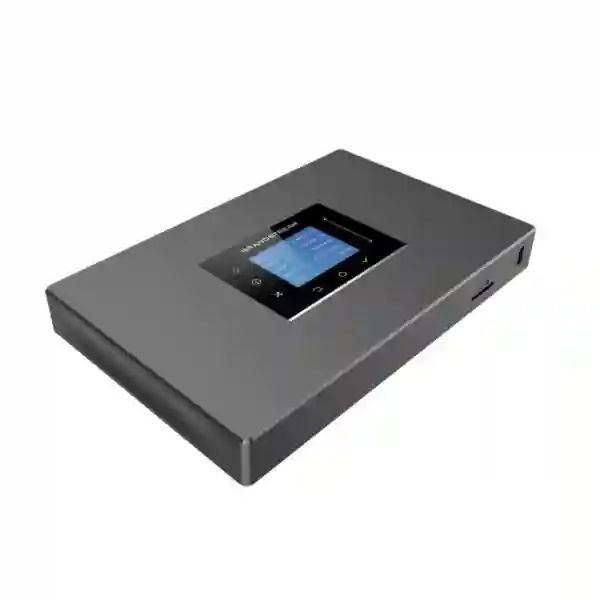
Grandstream UCM6301 Dubai: 500-User Unified Communications IP PBX
The Grandstream UCM6301 Dubai is a compact on-premise IP PBX designed for organizations that need substantially more than basic office telephony without moving into an oversized enterprise platform. Grandstream specifies support for up to 500 users, up to 75 concurrent G.711 calls, and up to 50 concurrent SRTP calls. That makes the model especially relevant to small and medium businesses, growing multi-department offices, professional services firms, education environments, hospitality operations, clinics, retail groups, warehouses, and branch networks that want centralized voice, video, meetings, mobility, call queues, IVR, SIP trunking and endpoint management.
Fourteck approaches the UCM6301 as a communications platform rather than a box-only purchase. Correct results depend on extension count, busy-hour call volume, SIP trunk capacity, analog requirements, WAN design, VLAN and QoS policy, remote-user requirements, recording needs, endpoint mix, branch connectivity and growth expectations. The sections below explain where the UCM6301 fits, where a larger UCM model may be more suitable, and what buyers in Dubai and the wider UAE should verify before ordering or deployment.
75 G.711 concurrent calls
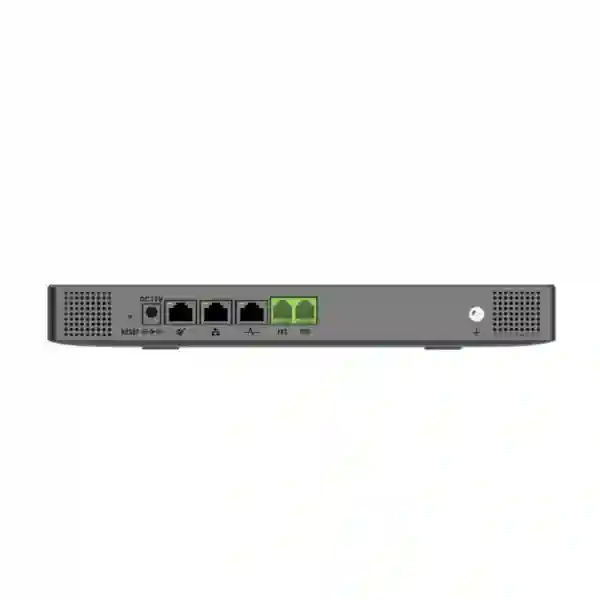
1 FXO + 1 FXS
Wave collaboration
GDMS compatible
Suitable when the extension database can grow well beyond the active staff count while remaining inside the model’s verified limit.
Up to 75 concurrent G.711 calls; up to 50 concurrent SRTP G.711 calls. Encryption policy matters during sizing.
Useful for a PSTN line and an analog device requirement; larger analog estates usually need gateways or a larger UCM.
Three self-adaptive Gigabit network ports support switched, routed or dual-mode designs with PoE+ support.
Is the UCM6301 the right PBX for your office?
The model number alone should not determine the purchase. A 100-person company can place more simultaneous calls than a 300-person company, while a 400-extension organization may have relatively light external traffic. The useful question is therefore not simply “How many users does the UCM6301 support?” but “How many users, simultaneous calls, encrypted sessions, queues, meetings, remote users, trunks and analog resources will the system need at the same time?”
The UCM6301 is a strong starting point when an organization expects fewer than 500 registered users, needs no more than 75 simultaneous G.711 calls, and can work with one native FXO and one native FXS interface. It becomes particularly attractive when the business wants Grandstream endpoint provisioning, an integrated meeting environment, Wave clients for mobile and desktop collaboration, call-center functions, IVR, voicemail, recording and API-based integration in one appliance.
A larger UCM should be considered when expected busy-hour traffic approaches the model ceiling, when encryption reduces the usable concurrent-call budget for the planned workload, when multiple native analog trunks or extensions are required, or when the organization expects rapid growth. Planning headroom is normally preferable to choosing a platform that operates near its maximum from day one.
Verified UCM6301 technical profile
The following values are model-specific UCM6301 figures from Grandstream documentation rather than the higher maximum figures published for the UCM6300 family as a whole. This distinction matters because some online product listings mix family capacity with individual model capacity.
| Area | UCM6301 specification | Planning relevance |
|---|---|---|
| Maximum users | 500 | Defines extension/account scale, not simultaneous external call volume. |
| Concurrent calls | 75 with G.711 | Busy-hour traffic and trunk sizing should stay below this verified ceiling. |
| Concurrent SRTP calls | 50 with G.711 | Important when encrypted media is mandatory for many simultaneous calls. |
| FXS | 1 RJ11 port | Useful for an analog endpoint or compatible analog use case; larger needs may require a gateway. |
| FXO | 1 RJ11 port | Allows a native PSTN line connection where required. |
| Network interfaces | 3 self-adaptive Gigabit ports | Supports switched, routed or dual-mode network designs and PoE+ support. |
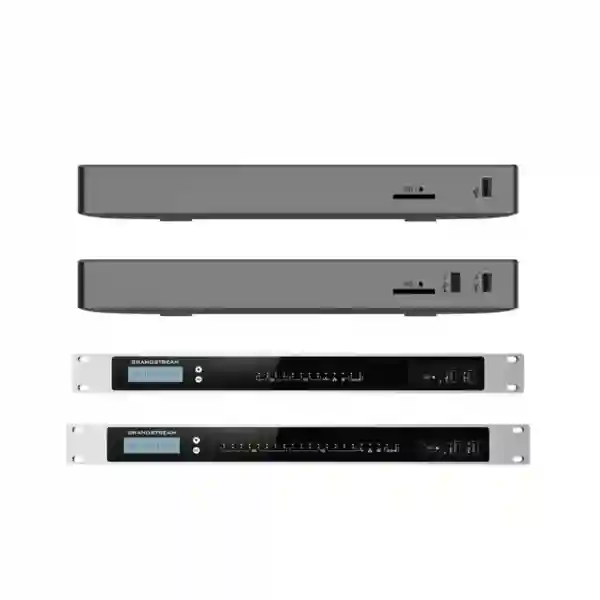
| Peripheral interfaces | USB 3.0 and SD card interface | Useful for supported storage and maintenance workflows, subject to configuration guidance. |
| Display | 320×240 color touch LCD | Provides local status and shortcut interaction. |
| Mounting | Desktop or wall mount | Convenient for SMB communications rooms and structured IT spaces. |
| Dimensions | 270 × 175 × 36 mm | Compact form factor for offices where rack space is limited. |
What the UCM6301 can unify for a business
The value of a modern IP PBX comes from how many communication workflows it can simplify. The UCM6301 can become the central point for SIP extensions, inbound and outbound call routing, IVR, voicemail, call queues, ring groups, paging and intercom, call recording, conferencing, mobility and supported integrations. This is useful for organizations trying to reduce dependence on separate systems for each communications function.
Front desk and customer service
Build inbound routes, IVR choices, ring groups and queues so callers reach the right team. Call handling can be designed around reception, sales, support, accounts, logistics or after-hours requirements rather than a single shared phone line.
Managers and mobile staff
Wave clients can extend communication to supported desktop, web and mobile environments. This can help users remain connected to their business extension when they are working away from the desk or between locations.
Internal collaboration
Built-in meeting capabilities can support audio and video collaboration without requiring the PBX to be limited to voice calling alone. Meeting design should still be validated against current firmware, participant type, bandwidth and media requirements.
Application integration
Grandstream provides API capabilities for third-party integration, including CRM and PMS use cases. Integration scope depends on the target application and should be confirmed before promising screen pops, records synchronization or workflow automation.
Capacity planning: 500 users does not mean 500 simultaneous calls
A frequent PBX sizing mistake is treating registered users and concurrent calls as the same number. They measure different things. The UCM6301 can support up to 500 users, but its verified concurrent call capacity is up to 75 G.711 calls, with up to 50 concurrent SRTP G.711 calls. A company may therefore have hundreds of extensions while only a fraction of those users are on calls at the same instant.
For a Dubai office, a realistic design should estimate busy-hour concurrency. Sales floors and contact teams can have a higher ratio of simultaneous calls than administrative departments. A school may have hundreds of extensions but low external concurrency, while a reservation team or support desk may drive a much heavier call load. SIP trunk channel count must also match the external traffic requirement; a PBX with 75-call capacity does not automatically create 75 carrier channels.
Encryption also changes planning. If SRTP is part of the security baseline, the 50-call SRTP figure should be treated as an important model-specific constraint. For organizations expecting sustained encrypted concurrency near that level, moving up to a larger UCM platform can provide healthier operating headroom.
SIP trunks, FXO and FXS: plan each connection for a reason
The UCM6301 supports IP-based telephony while retaining one FXO and one FXS port. This mix is useful for businesses transitioning from traditional telephony or keeping a specific analog requirement. The FXO interface can connect a compatible PSTN line to the PBX. The FXS interface can serve a supported analog endpoint requirement. Grandstream documents lifeline capability on the analog ports, which can be valuable in the right design.
For larger analog estates, it is usually better to count the required ports before purchase rather than assume the appliance can absorb every legacy connection directly. Grandstream notes that analog capacity can be expanded by peering with FXS or FXO gateways. That lets a project keep the UCM6301 as the communications core while placing analog gateway resources where they are actually needed.
SIP trunks are typically the more scalable route for external calling. Before implementation, the business should verify provider credentials, channel count, inbound DID requirements, caller-ID rules, emergency dialing, codec support, NAT considerations and failover expectations. Fourteck can use those inputs to determine whether the UCM6301 is appropriately sized and how the dial plan should be structured.
Remote work and Wave: where the UCM6301 becomes more than an office PBX
Grandstream’s UCM6300 ecosystem includes Wave for desktop, web and mobile communication. For organizations with field staff, executives, hybrid employees or multiple sites, this can reduce the gap between the office extension and the remote worker. Users can participate in UCM-hosted communication workflows from supported clients, while administrators retain centralized control through the PBX environment.
Remote connectivity should still be designed with security and network quality in mind. Voice and video are sensitive to latency, jitter, packet loss and unstable Wi-Fi. A remote user with poor last-mile connectivity can have an unsatisfactory experience even when the PBX itself is correctly configured. For that reason, remote deployment planning should cover firewall policy, NAT traversal, DNS, certificates, authentication, codec selection and user guidance.
UCM RemoteConnect is part of Grandstream’s broader ecosystem for remote connectivity and NAT traversal. Service availability, plan terms and deployment requirements can change, so current options should be confirmed for the project rather than assumed from an older installation. This protects buyers from designing around a commercial or service condition that may not match the current Grandstream offering.
Meetings and conferencing: useful capacity with practical limits
The UCM6301 includes a meeting and conferencing platform as part of its unified communications role. Grandstream’s current datasheet lists unlimited meeting-room creation with up to four simultaneous public rooms, a maximum of 75 simultaneous participants across rooms combined, and up to nine video feeds per room. This is a meaningful capability for an appliance in this segment, but it should not be interpreted as unlimited high-definition video for every participant at once.
For management meetings, internal training, supplier discussions and distributed branch collaboration, the integrated platform can be valuable because users do not need a completely separate PBX for voice and another appliance for basic collaboration. Where the organization depends on large all-hands video sessions or heavy multimedia usage, the design should validate current firmware, meeting mode, endpoint capabilities, screen sharing, codec behavior and WAN bandwidth before treating the PBX as the sole collaboration platform.
A sensible procurement conversation therefore distinguishes between “we need occasional integrated meetings” and “video conferencing is a mission-critical workload for very large audiences.” The first may fit the UCM6301 well; the second may call for a larger UCM model, dedicated meeting services or a hybrid architecture.
Security and network design should be decided before the phones arrive
A PBX project is also a network-security project. Grandstream documents secure boot, unique certificates and randomized default passwords at the UCM6300 family level, while the platform supports technologies such as SRTP, TLS, HTTPS, SSH and 802.1X. These features are valuable only when the implementation actually uses them appropriately. Leaving default network structure, permissive firewall rules or weak administrative practices in place can undermine an otherwise capable platform.
For most business installations, Fourteck recommends planning a voice VLAN where appropriate, applying QoS consistently through switching and routing, controlling management access, using secure SIP/media options when supported by the carrier and endpoints, maintaining firmware, and documenting administrator credentials and recovery procedures. Remote management exposure should be minimized and intentional.
The UCM6301 provides Layer 2 and Layer 3 QoS capabilities, but QoS must also be supported end-to-end by the network path to be useful. A PBX cannot compensate for an overloaded WAN circuit, an unmanaged switch loop, poor Wi-Fi design or an ISP path with persistent latency and packet loss. Voice quality troubleshooting should therefore examine the entire call path rather than the PBX alone.
Grandstream ZeroConfig and GDMS: deployment efficiency for larger phone counts
When dozens or hundreds of endpoints are involved, manually configuring every phone becomes expensive and difficult to maintain. The UCM6301 supports Grandstream ZeroConfig provisioning for compatible Grandstream SIP endpoints, allowing administrators to standardize extensions, account settings and device configuration more efficiently. This is especially useful when a business has repeated phone models across departments or multiple office areas.
The UCM6300 family is also compatible with Grandstream Device Management System (GDMS) for supported cloud setup, management, monitoring and troubleshooting workflows. The practical benefit is not “cloud PBX replacing the UCM”; rather, GDMS can help centralize lifecycle tasks around supported Grandstream infrastructure while the UCM remains the communications platform.
For mixed-vendor endpoint estates, standards-based SIP interoperability may still be possible, but provisioning depth and feature integration should be tested for the exact handset and firmware combination. A project should not assume that every third-party SIP endpoint will behave exactly like a Grandstream endpoint under ZeroConfig.
UCM6301 vs UCM6302: when should you move up?
The UCM6302 is the nearest step up in the same UCM6300 family. It is not automatically “better” for every deployment; it offers more capacity and analog interfaces. If the UCM6301 leaves comfortable room for growth, buying a larger system may not create meaningful business value. If the UCM6301 would start near its capacity ceiling, the UCM6302 can be a more sensible foundation.
| Decision point | UCM6301 | UCM6302 |
|---|---|---|
| Maximum users | 500 | 1,000 |
| G.711 concurrent calls | 75 | 150 |
| G.711 SRTP concurrent calls | 50 | 100 |
| FXO ports | 1 | 2 |
| FXS ports | 1 | 2 |
| Maximum simultaneous meeting participants across rooms | 75 | 150 |
Choose the UCM6301 when the forecast remains comfortably below its limits and one FXO/FXS pair is sufficient. Consider the UCM6302 when extension growth, concurrent calls, encrypted calls, meetings or native analog port requirements justify the additional capacity. For larger requirements, the UCM6304 or UCM6308 may be more appropriate after a proper sizing exercise.
Who typically benefits from the UCM6301?
Professional offices
Law firms, consultancies, finance teams, engineering companies and other office environments can combine receptionist workflows, direct extensions, voicemail, meetings and remote users in one system.
Hotels and serviced facilities
Properties with front desk, administration and back-office requirements can use SIP and analog integration, while PMS integration possibilities should be verified against the exact third-party platform.
Clinics and healthcare offices
Reception, appointment teams, internal extensions, paging and department routing can be structured around patient-facing workflows, subject to the organization’s privacy and compliance requirements.
Schools and training centers
Administration, reception, staff rooms, security points and remote management can share a centralized telephony platform with extension numbering and controlled inbound routing.
Retail and multi-site businesses
Head office and branches can plan consistent extension policies and SIP connectivity, with the precise branch architecture selected according to WAN reliability and survivability requirements.
Customer-service teams
Configurable queues, ACD functions, recordings and reporting can support structured inbound teams, provided the expected concurrent call and agent load remains inside the model’s sizing envelope.
Dubai and UAE deployment considerations
For a Grandstream UCM6301 Dubai project, the local buying decision is usually connected to more than the PBX itself. Offices in Deira, Bur Dubai, Business Bay, JLT, Al Quoz and other commercial areas may have different ISP arrangements, structured cabling conditions, switch generations and legacy telephone lines. A new PBX should therefore be planned around the existing network instead of assuming a clean-slate installation.
In Abu Dhabi and Sharjah, the same sizing principles apply, but multi-site organizations should pay particular attention to inter-branch routing, WAN resilience and centralized versus distributed survivability. Ajman and other emirates can be supported within a UAE communications design when the network and carrier services are known. Fourteck does not treat the city name as a substitute for engineering; the extension count, trunk design and network quality still determine the correct solution.
If the project includes broader IP PBX planning, buyers can also review Fourteck’s IP PBX Dubai resource, explore Grandstream UAE product context, or use Fourteck IT Services UAE for related network and infrastructure planning.
Regional branch expansion across GCC and Africa
A UAE head office may also need to connect or standardize communications with branches outside the country. The UCM6301 can be part of that conversation, but branch design should reflect local internet quality, SIP-provider availability, numbering plans, power reliability, support capability and security policy rather than assuming every country should use an identical topology.
For a Kuwait branch, procurement and voice-service options may differ from the UAE even if the endpoint standard remains Grandstream. In Kenya, Uganda, Tanzania, Ghana or Nigeria, connectivity quality and branch size can make local survivability, gateway placement and remote-management strategy more important. Some organizations may prefer a UCM at each major location; others may centralize services where WAN quality and business continuity requirements allow.
Fourteck maintains regional resources for Kuwait, Kenya, Uganda, Tanzania, Ghana and Nigeria. These links can help multinational buyers continue planning by geography while keeping the UCM6301 page focused on the product decision.
A practical UCM6301 deployment workflow
Inventory users and call flows
Count desk phones, soft clients, common-area phones, reception positions, meeting spaces, analog endpoints, paging interfaces and remote users. Document who needs direct inward dialing, queues, ring groups and voicemail.
Estimate busy-hour concurrency
Estimate how many simultaneous internal and external sessions the business can produce at peak time. Do not size only from employee count. Include expected SRTP use where secure media is required.
Confirm carrier and analog requirements
Identify SIP trunks, DIDs, channel count, caller ID requirements, PSTN fallback, fax or other analog needs, and whether the single native FXO/FXS pair is sufficient.
Validate network readiness
Review switches, VLANs, PoE budgets for phones, DHCP, DNS, firewall rules, QoS, WAN performance, cabling and Wi-Fi coverage for mobile or wireless endpoints.
Build and test the dial plan
Configure extensions, inbound and outbound routes, IVR, queues, schedules, emergency behavior, voicemail, recording rules and permissions. Test normal, failure and after-hours scenarios.
Provision endpoints and hand over documentation
Use appropriate provisioning methods, confirm firmware and feature behavior, train reception and administrators, and document backups, credentials, trunk settings, extension plans and support procedures.
What should be included in a UCM6301 quotation?
The hardware price alone rarely represents the complete communications project. A useful quotation should separate the UCM6301 appliance from the endpoint, network and service requirements so buyers can see what is included and what is optional. Fourteck does not assume stock, delivery time, warranty terms, carrier fees or licensing conditions without confirming the current requirement and supply position.
- UCM6301 appliance and applicable power accessories.
- Required Grandstream or third-party SIP phones, conference devices and soft-client requirements.
- PoE switching, VLAN or network upgrades where the existing LAN is not ready for voice.
- FXS/FXO gateways when one native port of each type is not enough.
- SIP trunk coordination and DIDs from the selected service provider.
- Installation, configuration, migration, testing, training and documentation scope.
- Ongoing support, maintenance or remote-management requirements when requested.
Common buying mistakes to avoid
Using the UCM6300 family maximum as the UCM6301 capacity
The UCM6300 family includes models with much higher capacity, but the UCM6301 itself is specified for up to 500 users and 75 concurrent G.711 calls. Product pages that show 3,000 users and 450 calls against the UCM6301 are using family-level figures rather than the model-specific limits.
Ignoring encrypted-call capacity
If SRTP is a firm requirement, the 50 concurrent SRTP G.711 call limit should be included in the sizing calculation. A design that assumes 75 encrypted calls would not be aligned with the documented UCM6301 figure.
Treating one FXO and one FXS port as unlimited analog support
The built-in analog interfaces are useful but limited. Count analog trunks, fax devices and analog extensions before purchase. Add gateways or select another model when the native ports are insufficient.
Buying phones before confirming the network
An IP PBX depends on the LAN and WAN. PoE capacity, cabling, VLANs, QoS, DHCP, DNS and firewall policy can affect the outcome more than the handset model. Network readiness should be verified before mass endpoint deployment.
Choosing a PBX with no growth headroom
If forecast concurrency or users already approach the UCM6301 ceiling, the apparent saving of the smaller model can disappear when an early upgrade is required. Growth planning should cover at least the realistic expansion horizon defined by the business.
Why buyers use Fourteck for UCM6301 planning
Fourteck’s role is to translate a customer requirement into a workable communications design. For the UCM6301, that means checking whether the appliance is correctly sized, determining what surrounding infrastructure is required, and identifying any constraint before implementation rather than after users are moved onto the system.
A requirement discussion can cover user count, call concurrency, SIP trunks, remote staff, call queues, IVR, recording, meetings, analog devices, phone models, VLANs, PoE switching, firewall policy and branch architecture. This is especially useful for companies migrating from an old analog PBX, replacing an unsupported IP system, consolidating multiple small PBXs, or opening a new office in Dubai or elsewhere in the UAE.
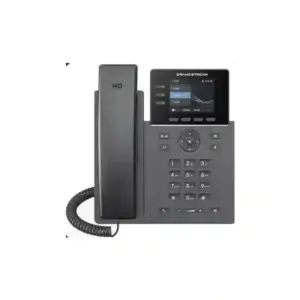
For endpoint research and related business-phone options, visit IP Phone Fourteck. A final equipment list should be based on the actual project scope rather than a generic bundle.
Grandstream UCM6301 FAQ
How many users does the Grandstream UCM6301 support?
Grandstream specifies the UCM6301 for up to 500 users. User capacity should be considered together with concurrent-call, meeting, encryption and analog-interface requirements rather than used as the only sizing figure.
How many concurrent calls can the UCM6301 handle?
The current Grandstream datasheet specifies up to 75 concurrent calls with G.711 and up to 50 concurrent SRTP calls with G.711 for the UCM6301.
Does the UCM6301 have FXO and FXS ports?
Yes. The UCM6301 has one RJ11 FXO port and one RJ11 FXS port. If a project needs more analog ports, compatible gateways or a larger UCM model can be considered.
Can the UCM6301 be used with SIP trunks?
Yes. SIP trunking is a core use case for an IP PBX such as the UCM6301. The carrier’s SIP details, channel count, codecs, DIDs, routing and firewall requirements should be verified during configuration.
Does the UCM6301 support remote workers?
The UCM6300 ecosystem supports Wave clients for desktop, web and mobile communication, and Grandstream provides remote-connectivity options within the ecosystem. The exact remote-work design should be checked against current service options, security policy and internet quality.
Does the UCM6301 support video meetings?
Yes. Grandstream’s current datasheet lists up to four simultaneous public meeting rooms, up to 75 simultaneous participants across rooms combined, and up to nine video feeds per room. Real deployment should still account for bandwidth, firmware and endpoint capabilities.
Can the UCM6301 provision Grandstream IP phones?
Yes. It supports Grandstream ZeroConfig provisioning for compatible Grandstream SIP endpoints, helping administrators standardize and accelerate phone deployment.
Is the UCM6301 suitable for a call center?
It includes configurable call queues and ACD capabilities, so it can support customer-service and smaller call-center workflows. The number of agents, concurrent calls, recording, reporting and peak traffic should be assessed before confirming fit.
What is the difference between UCM6301 and UCM6302?
The UCM6302 increases capacity to up to 1,000 users and 150 concurrent G.711 calls and provides two FXO and two FXS ports. It is a logical step up when the UCM6301’s capacity or analog interfaces do not provide enough headroom.
Can I get a UCM6301 quotation for Dubai or the UAE?
Yes. Fourteck can prepare a requirement-based quotation after confirming the PBX quantity, phone models, user count, trunks, analog interfaces, network requirements, installation scope and support expectations. Current price, stock and delivery details should be confirmed at quotation time.
Plan the UCM6301 around your call traffic, not a generic bundle
If your organization is evaluating the Grandstream UCM6301 Dubai, send Fourteck the number of users, expected concurrent calls, SIP trunk details, analog requirements, preferred IP phone models, remote-user count, branch locations and any queue or integration requirements. That information is enough to determine whether the UCM6301 is the right fit or whether a UCM6302/UCM6304-class design would provide better headroom.
Reviews
There are no reviews yet.