
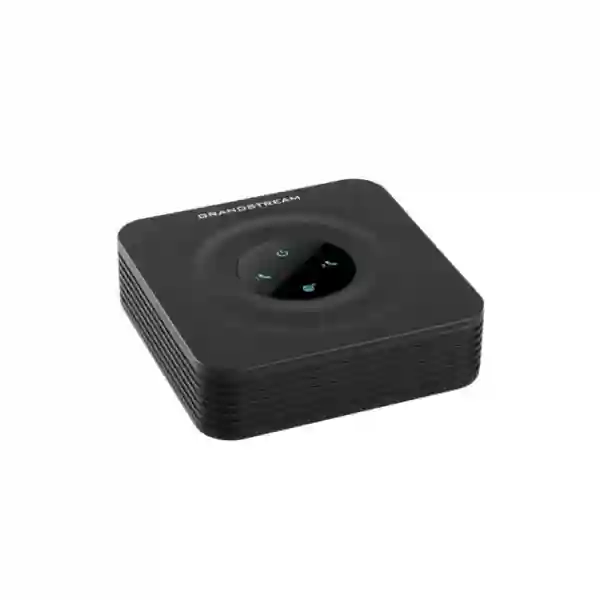
Grandstream HT802 2-Port Analog Telephone Adapter for Dubai and UAE Deployments
The Grandstream HT802 is a compact two-port analog telephone adapter designed to connect compatible analog telephones, fax equipment, and similar analog endpoints to a SIP-based VoIP environment. It provides two RJ11 FXS interfaces, supports two SIP profiles, and connects to the IP network through one 10/100 Mbps Ethernet interface. For organizations that still depend on selected analog devices while moving call control to an IP PBX, hosted SIP service, or managed VoIP platform, the HT802 provides a focused migration point without requiring every analog endpoint to be replaced at once.
For buyers in Dubai, Abu Dhabi, Sharjah, Ajman, and other UAE locations, the important decision is not simply whether the unit has two phone ports. The project should confirm port type, SIP service requirements, fax behavior, network design, security, provisioning, firmware generation, and analog line characteristics. Fourteck can help review these requirements before quotation or deployment. Price, stock, lead time, warranty terms, hardware revision, included accessories, and regional availability should be confirmed at the time of ordering.
When the HT802 is the right kind of ATA
The HT802 is most useful when an organization has one or two analog endpoints that should remain in service while the telephony platform moves to SIP. Typical examples include two legacy desk phones, an analog telephone and fax machine, a small branch that needs two analog extensions, or specialized equipment that still expects a traditional FXS line. In these situations, a larger multi-port gateway can add unnecessary capacity, while a one-port ATA can leave no room for the second device.
It is also well suited to staged migrations. A business may already use a SIP trunk, cloud PBX, or Grandstream UCM-series IP PBX but still have a small number of analog endpoints that cannot immediately be retired. The HT802 bridges those analog devices into the IP voice environment. Each FXS interface can be associated with SIP configuration, allowing the organization to preserve existing endpoints while centralizing call routing and control on an IP platform.
The HT802 is not automatically the best choice for every two-line requirement. If the site needs Gigabit network interfaces, built-in NAT routing, more than two FXS ports, an FXO interface for an analog public telephone line, or a specific newer hardware generation, another Grandstream ATA or gateway may be a better fit. The original HT802 and HT802 V2 should be treated as distinct hardware generations for procurement, firmware, and support planning.
Good fit
Two analog endpoints need access to a SIP service or IP PBX and the site already has a stable Ethernet network.
Migration fit
Selected analog phones or fax equipment must remain while the wider voice environment moves to IP.
Check alternatives
The project needs FXO, more FXS ports, integrated routing, Gigabit interfaces, or a specific new-generation platform.
Verified HT802 quick facts
| Product role | Two-port analog telephone adapter for connecting analog endpoints to SIP/VoIP services. |
|---|---|
| Telephone interfaces | Two RJ11 FXS ports. |
| SIP profiles | Two SIP profiles. |
| Network | One 10/100 Mbps auto-sensing Ethernet port. |
| Fax | T.38 Group 3 fax relay up to 14.4 kbps and automatic switch to G.711 fax pass-through. |
| Conferencing | Three-way voice conferencing. |
| Security | SRTP media security with TLS/SIPS/HTTPS controls, deployment dependent. |
| Provisioning | HTTP, HTTPS, SSH, TFTP, TR-069, secure automated provisioning, and syslog. |
| Ring load | 2 REN with up to 1 km on 24 AWG wiring, subject to installation conditions. |
| Power | 5.0 V DC / 1.0 A output requirement. |
| Dimensions | 100 × 100 × 29.5 mm. |
| Weight | 114 g without package. |
These values are based on Grandstream documentation for the original HT802. Confirm the exact hardware generation and current documentation before procurement or a large deployment.
Understanding the two FXS ports
FXS is the interface that provides the analog telephone-side service to a standard analog endpoint. The HT802 has two RJ11 FXS ports, so two compatible analog devices can connect to the adapter. The HT802 then converts the analog signaling used by those endpoints into SIP signaling and RTP media on the IP side.
This distinction matters because FXS and FXO are not interchangeable. A project that needs to connect analog phones or a compatible fax device usually needs FXS. A project that needs to bring an incoming analog PSTN line into an IP PBX usually needs an FXO interface instead. The HT802 is an FXS ATA, not an FXO gateway. Defining this correctly before purchase prevents one of the most common mistakes in analog-to-VoIP projects.
The two ports create several practical deployment patterns. Both ports can serve analog telephones, or one can serve a telephone while the other serves a compatible fax device. The SIP configuration should be designed around the actual extension, account, and routing requirements. Registration behavior, outbound dialing, inbound ringing, caller ID, transfer functions, and emergency call policy depend on the PBX or SIP service as well as the ATA.
For smaller offices, the two-port format can be easier to deploy than a large gateway. The adapter can be installed near the analog devices and connected to a suitable Ethernet switch port. That can reduce unnecessary analog cabling and allow the business to keep selected legacy endpoints while the broader voice environment becomes IP based.
Two SIP profiles in real deployments
Grandstream specifies two SIP profiles through the two FXS ports. In a basic deployment, each analog phone may have its own extension or SIP identity. A reception handset can use one account while a second analog device uses another. In a remote or small-office environment, the two ports can support separate service identities when the upstream platform allows it.
SIP profile design should be deliberate. Confirm the registrar or proxy address, authentication ID, password, transport method, registration timers, local and remote SIP ports, outbound proxy requirements, NAT traversal behavior, DTMF method, codec priority, and failover server configuration. A device may be physically connected correctly but still fail to make reliable calls if these settings do not match the service.
The HT802 supports a failover SIP server so that a configured secondary server can be used if the primary server loses connection. This is useful when the telephony platform has a designed primary/secondary architecture. It is not a complete business-continuity solution by itself because resilience also depends on LAN switching, WAN connectivity, DNS, power, PBX availability, firewall design, and carrier service.
For multi-site organizations, configuration consistency is often more important than any single feature. A standard template should define secure administration, firmware policy, SIP settings, VLAN and QoS requirements, logging, naming, and recovery steps. That turns each ATA into a manageable endpoint rather than an isolated device that is difficult to support later.
Voice features and codec planning
The HT802 supports common telephony functions including caller ID display or block, call waiting, flash, blind or attended transfer, call forward, hold, do not disturb, and three-way conferencing. The attached analog handset and the upstream PBX or SIP provider also influence how these functions behave. Hook-flash timing, feature codes, transfer methods, and voicemail access should be tested as part of commissioning.
Grandstream documentation lists G.711, G.722, G.723.1, G.729A/B, G.726-32, iLBC, and Opus among the supported codecs, together with a dynamic jitter buffer and advanced line echo cancellation. Codec priority should be coordinated with the PBX or carrier. The presence of a codec on the ATA does not mean the remote service will accept it, and transcoding elsewhere in the call path can affect quality or capacity.
Voice quality depends on the network. Packet loss, excessive jitter, latency, bad duplex negotiation, congested WAN circuits, incorrect QoS policies, and NAT or SIP ALG behavior can all cause poor audio. The ATA can compensate for some network variation, but it cannot turn an unstable network into a reliable voice path. Business deployments should therefore evaluate the LAN, firewall, WAN, and internet path together.
Caller ID support includes Bellcore Type 1 and 2, ETSI, BT, NTT, and DTMF-based formats. The selected format must match the attached analog device. If caller ID does not display, check the handset standard, regional settings, PBX presentation, and the actual calling number delivered to the ATA.
Fax over IP with T.38
Fax remains one of the strongest reasons for retaining analog interfaces. The HT802 supports T.38 Group 3 fax relay up to 14.4 kbps and can switch to G.711 fax pass-through. That makes it relevant to offices that still need a compatible analog fax device connected to a SIP-based voice platform.
T.38 support should not be treated as a universal guarantee of fax success. Fax reliability depends on the ATA, PBX or SIP server, carrier path, codec negotiation, network quality, and remote fax endpoint. Some hosted platforms require T.38 to be explicitly enabled, while other routes work better with G.711 pass-through. Packet loss, NAT handling, transcoding, and provider interconnection can affect results.
Before a business-critical fax number is migrated, test sending and receiving in both directions and use multi-page documents rather than only one-page tests. Confirm number formatting, inbound routing, outbound dial plans, caller ID, registration, and provider support. Keep a rollback method until the new configuration is proven under normal operating conditions.
It is also worth reviewing whether a physical fax machine still serves the business process. Electronic faxing may be easier in some organizations, while compliance, workflow, user familiarity, or equipment integration may justify retaining the analog endpoint. The HT802 is valuable when the decision is to keep that analog device and bridge it into the IP environment.
Security, encryption, and administration
Grandstream documents SRTP for media and TLS/SIPS/HTTPS for control and secure communications. These features can strengthen a deployment when the upstream SIP platform is configured to use them. Security must be compatible end to end. Enabling encryption on the ATA does not help if the PBX, certificates, firewall, or SIP provider does not support the same design.
Administrative security is equally important. Default or weak passwords should not remain in production. Management access should be limited to trusted networks where practical, and remote administration should be enabled only when a secure method has been defined. Configuration backups should be protected because they may contain SIP credentials and network information.
The HT802 supports Layer 2 and Layer 3 QoS-related mechanisms including 802.1Q VLAN, 802.1p priority, ToS, DiffServ, and MPLS-related signaling options documented by Grandstream. These settings should match the switching, firewall, router, and WAN architecture. Randomly enabling QoS values on the ATA without a matching network policy rarely produces a predictable result.
Firmware management belongs in the security and lifecycle plan. Review the current Grandstream documentation before upgrading, identify whether the unit is original HT802 or HT802 V2, back up the configuration, and test representative call flows after changes. Instructions and firmware intended for one hardware generation should not be assumed to apply to the other.
Provisioning and fleet management
The HT802 supports provisioning and management through methods including HTTP, HTTPS, SSH, TFTP, and TR-069. Grandstream also documents secure automated provisioning using AES encryption and syslog support. A single unit can be configured through the web interface, but manual administration becomes inefficient and inconsistent as the number of branches or devices grows.
A scalable deployment begins with a standard configuration baseline. Separate settings that are common to all devices from values that are unique per extension. Define how credentials are delivered, which firmware versions are approved, how logs are collected, how devices are named, and how a factory reset or replacement is handled. Secure provisioning transport should be used where the platform supports it.
Grandstream documentation references Zero Configuration provisioning with UCM-series IP PBXs. In a UCM-centered environment, that can simplify the relationship between endpoint provisioning and PBX configuration. Actual behavior depends on UCM model, PBX firmware, ATA firmware, network discovery, and the profile assigned to the device.
For service-provider or multi-branch use, maintain an inventory containing model, hardware generation, MAC address, location, assigned extension, SIP service, firmware, configuration owner, and support status. This becomes valuable during migrations, replacements, audits, and incident response.
Network design around one 10/100 Mbps Ethernet port
The original HT802 has one 10/100 Mbps auto-sensing Ethernet interface. The two RJ11 ports are analog FXS interfaces, not Ethernet ports. The adapter therefore needs a suitable switch connection and stable IP connectivity. Voice traffic from two analog endpoints is modest, but the network still needs to be engineered correctly for SIP signaling and RTP media.
The device may use DHCP or a planned address reservation/static method according to the operating standard. DNS and NTP should be reliable. The firewall must permit the required SIP and RTP behavior, and NAT traversal should be configured according to the SIP provider or PBX. Depending on the environment, STUN, keepalive behavior, outbound proxy settings, or VPN routing may be relevant.
SIP ALG on routers and firewalls can help in some environments and cause problems in others. If registration works but calls have one-way audio, failed inbound ringing, incorrect contact addresses, or random drops, SIP ALG should be evaluated as part of troubleshooting. Change one factor at a time and document the result instead of making multiple unrelated changes simultaneously.
QoS works only when it is consistent through the path. Marking voice packets at the ATA will not help if switches remove the marking or the WAN router ignores it. For UAE sites connected by broadband, leased circuits, MPLS, SD-WAN, VPN, or mixed links, the voice policy should match the actual transport architecture.
A practical HT802 deployment workflow
1. Confirm the analog requirement
Identify exactly what will connect to Phone 1 and Phone 2. Record whether each endpoint is a telephone, fax machine, analog PBX interface, or another compatible device. Confirm caller ID, ringing, dialing method, and any special supervision requirements.
2. Confirm the SIP platform
Document the PBX, SIP registrar, or hosted service. Collect server addresses, account credentials, transport settings, codec policy, DTMF method, outbound proxy requirements, and encryption expectations. If the platform maintains a device compatibility list, review it before rollout.
3. Prepare the network
Confirm the switch port, VLAN, IP addressing method, DNS, NTP, firewall rules, QoS policy, and WAN path. Make sure the ATA will receive stable power and be installed within the supported environmental range.
4. Configure and secure the ATA
Load the approved configuration, replace default administrative credentials, restrict management access, apply the chosen SIP and media security settings, and confirm that the firmware is appropriate for the hardware generation.
5. Test real call flows
Test outbound and inbound calls, two-way audio, DTMF to IVRs, caller ID, transfers where required, call waiting, voicemail access, and branch dial plans. If fax is used, test both directions with representative documents.
6. Document and hand over
Record port assignments, extension numbers, MAC address, IP method, firmware, support owner, and recovery steps. User-facing instructions should be simple, while administrator credentials remain controlled.
Dubai and UAE deployment considerations
Dubai businesses frequently operate mixed voice environments: IP PBX or hosted telephony at the core with a small number of analog endpoints still in use. This pattern can appear in offices, retail sites, hotels, clinics, schools, warehouses, reception areas, and branch locations. The HT802 is relevant where the analog requirement is limited to two ports and the network is already ready for SIP traffic.
For Abu Dhabi enterprise projects, procurement teams may need to standardize devices across multiple sites. The bill of materials should state clearly whether the requirement is the original HT802 or HT802 V2. A quotation should also identify quantity, intended SIP platform, configuration service, delivery location, power requirements, and any installation or testing scope.
Sharjah, Ajman, and Northern Emirates customers may use the same adapter at smaller sites, but network conditions can differ considerably. A branch connected through standard internet, enterprise internet, VPN, or SD-WAN may produce different voice behavior even if the ATA configuration is identical. Network readiness should therefore be checked at each site.
For regional projects, Fourteck maintains technology properties serving multiple markets, including Fourteck UAE, Fourteck Uganda, Fourteck Kenya, Fourteck Tanzania, and Fourteck Kuwait. Each deployment should still account for the local SIP carrier, internet service, dialing plan, support model, and power environment.
HT802 compared with nearby Grandstream choices
| Model | Analog role | Best-fit decision | Verify before buying |
|---|---|---|---|
| HT801 | Single FXS ATA | Use when only one analog endpoint is required. | One port is sufficient for current and future needs. |
| HT802 | Two FXS ATA | Use for two analog endpoints with one 10/100 Mbps network connection. | Original hardware generation, firmware, SIP platform, and analog requirements. |
| HT802 V2 | Newer-generation two FXS ATA | Consider when the project explicitly requires the V2 generation. | Do not mix firmware or lifecycle guidance with original HT802. |
| HT812 | Two FXS ATA with a different networking/router design | Consider when two analog ports plus integrated routing/network functions are required. | Current generation, interface speeds, routing requirements, and support documentation. |
This comparison is requirements guidance rather than a substitute for current vendor datasheets. Product generations change, so final selection should always be checked against current Grandstream documentation.
Using HT802 with Grandstream UCM IP PBXs
Grandstream documents use of the HT802 with its UCM-series IP PBXs and references Zero Configuration provisioning. In a UCM deployment, the analog ports can become extensions or endpoint connections within the wider PBX dial plan. This is useful when analog phones or fax equipment must coexist with IP phones, soft clients, and other SIP endpoints.
Planning should begin with call flow rather than registration alone. Decide which extension is assigned to each port, which outbound routes are permitted, which inbound DID or trunk destination should ring the analog endpoint, whether voicemail is required, and what restrictions apply to international, mobile, local, or service numbers.
If the UCM is reached over a VPN or WAN, confirm latency, routing, and firewall behavior. If it is on the same LAN, review VLAN and provisioning requirements. When using a non-Grandstream PBX, the HT802 can be evaluated as a standards-based SIP ATA, but platform-specific interoperability and provisioning should be tested.
Fourteck provides broader voice-system planning through IP PBX services in Dubai and product-focused information through Fourteck IP Phone. A mixed analog/IP environment should be designed across the ATA, PBX, SIP trunk, switching, firewall, and user requirements rather than as separate purchases.
Analog line load, cabling, and legacy endpoints
Grandstream documents a 2 REN ring load for the HT802 and up to 1 km on 24 AWG wiring. REN, or Ringer Equivalence Number, helps describe the electrical load presented by connected analog equipment. Real installations still depend on cable quality, joints, connectors, environmental conditions, and the characteristics of the endpoint.
Do not treat a long analog run like an Ethernet cable run. The FXS side and network side are different systems. Place the ATA where it has reliable power and Ethernet, then assess whether the analog wiring from the adapter to the endpoint is suitable. Existing building copper should be inspected before being relied upon for critical service.
The HT802 documentation includes DTMF and pulse dialing as well as disconnect methods such as busy tone, polarity reversal/wink, and loop current. These details can matter when integrating old phones, analog PBX equipment, or specialist devices. If an endpoint depends on unusual analog behavior, test it explicitly rather than assuming compatibility.
Label the adapter, FXS cables, switch port, power supply, and associated extension numbers. Clear labeling can save significant time when a technician later investigates a fault or replaces a device.
Common mistakes to avoid
Confusing FXS and FXO
HT802 provides FXS ports for analog endpoints. If the project is bringing an analog PSTN line into a PBX, evaluate an FXO-capable gateway instead.
Assuming two ports means two network ports
The two RJ11 ports are FXS interfaces. The original HT802 has one 10/100 Mbps Ethernet RJ45 interface.
Treating HT802 and HT802 V2 as the same hardware
They serve a similar role but are separate generations. Firmware, lifecycle, troubleshooting, and procurement records should identify the exact version.
Ignoring the upstream SIP platform
The ATA cannot compensate for invalid credentials, blocked RTP, incompatible transport settings, or an incorrect PBX dial plan. Validate the entire call path.
Assuming fax works solely because T.38 is listed
Fax is an end-to-end service. Real send/receive testing is required before decommissioning an old line.
Leaving management exposed
Use strong credentials, restrict administration, protect backups, and use secure management methods where supported.
Stopping testing after registration
A registered SIP account does not prove two-way audio, DTMF, transfers, caller ID, or fax behavior. Test actual business scenarios.
Troubleshooting typical HT802 symptoms
| Symptom | Check | Reason |
|---|---|---|
| No SIP registration | IP address, DNS, registrar, credentials, SIP transport, firewall, account status. | The ATA must reach and authenticate with the SIP service. |
| One-way audio | NAT, firewall, RTP range, SIP ALG, VPN routes, contact addresses. | Signaling can succeed even when the media path is broken. |
| DTMF fails | RFC2833, in-audio, SIP INFO, codec selection, PBX policy. | IVRs need compatible DTMF transport. |
| Caller ID missing | Caller ID standard, handset compatibility, PBX presentation, regional settings. | The analog endpoint and ATA must agree on signaling format. |
| Fax unreliable | T.38, G.711 pass-through, packet loss, jitter, carrier support, transcoding. | Fax is highly sensitive to end-to-end behavior. |
| Calls drop | Registration timers, session timers, NAT timeout, WAN stability, firewall state, provider logs. | Session refresh or network state may fail after call setup. |
Good troubleshooting is evidence based. Record the time of the problem, calling and called numbers, port used, registration state, and whether the fault affects all calls or only certain destinations. PBX logs, SIP traces, firewall logs, and packet captures can substantially reduce guesswork.
Power, environment, and physical installation
The HT802 measures approximately 100 × 100 × 29.5 mm and weighs about 114 g without package. Grandstream lists an operating range of 0°C to 40°C, storage from -10°C to 60°C, and 10–90% non-condensing humidity. In the UAE, this matters because telecom equipment is sometimes installed in ceiling spaces, cabinets, guard rooms, or other locations that can exceed normal office temperatures.
Install the unit in a clean, ventilated indoor location unless the enclosure and environment are specifically designed otherwise. Keep it away from moisture, excessive heat, dust accumulation, and places where cables or power can be accidentally disturbed.
The documented power output requirement is 5.0 V DC at 1.0 A. Use the correct power adapter for the unit and region. For critical voice services, consider UPS protection for the full service path, including the ATA, switch, router, firewall, PBX, and connectivity. Powering only the ATA does not keep calls working if the rest of the network is unavailable.
During firmware changes, avoid interrupting power. Schedule upgrades appropriately and verify the device after maintenance, especially when it supports reception, fax, or another important operational line.
Procurement checklist for an HT802 quotation
- Confirm whether the requirement is original HT802 or HT802 V2.
- State the required quantity and delivery location.
- Identify what will connect to Phone 1 and Phone 2.
- Identify the SIP platform, hosted provider, or IP PBX.
- Confirm whether configuration, installation, testing, or remote support is required.
- State any security requirements such as TLS/SRTP, VLAN, VPN, or restricted administration.
- If fax is required, confirm whether the SIP platform supports T.38 and whether migration testing is needed.
- For larger deployments, request confirmation of hardware generation, firmware baseline, and provisioning approach.
- Confirm current price, availability, lead time, warranty terms, and included accessories at quotation stage.
A requirement-based quotation reduces the chance of ordering a product that is technically similar but wrong for the intended analog interface, network design, or hardware generation.
Who should choose HT802, and who should choose another model?
Choose HT802 when: the project requires two FXS ports, the attached analog endpoints are known, one 10/100 Mbps Ethernet interface is sufficient, the SIP platform supports the required configuration, and the original HT802 generation is appropriate for the procurement plan.
Consider a one-port ATA when: there is only one analog endpoint and no realistic need for a second port.
Consider a larger FXS gateway when: the site has several analog devices and centralized cabling, power, provisioning, and inventory would be easier than deploying multiple small ATAs.
Consider an FXO-capable device when: the requirement is an incoming analog telephone line rather than an analog phone or fax endpoint.
Consider a model with integrated routing or faster network interfaces when: those features are part of the network architecture rather than simply available on a more expensive device.
Consider HT802 V2 when: the organization specifically requires the newer hardware generation and has validated its firmware, documentation, lifecycle, and platform compatibility.
Lifecycle and replacement planning
An ATA is often deployed because an analog endpoint cannot yet be retired. Record why the analog device remains, who owns the business process, and what would trigger replacement. A fax machine may eventually move to an electronic fax service, while specialized analog equipment may need to remain much longer.
Review the ATA during PBX upgrades, SIP-provider changes, office relocations, network refreshes, security audits, and major firmware changes. If the upstream platform changes authentication or encryption requirements, confirm that the ATA still fits the design.
Support records should distinguish original HT802 from HT802 V2. A ticket that says only “HT802” may not be enough when firmware packages and hardware behavior differ. Record model generation, MAC address, firmware, site, port assignments, and extension numbers.
The correct replacement should be selected from requirements rather than name alone. Count ports, identify FXS versus FXO, confirm fax needs, review network interfaces, and validate PBX compatibility. In some cases another two-port ATA is right; in others the site may be ready to remove analog interfaces entirely.
Technical specifications reference
| Telephone interfaces | 2 × RJ11 FXS |
|---|---|
| Network interface | 1 × 10/100 Mbps auto-sensing Ethernet RJ45 |
| LEDs | Power, Internet, Phone 1, Phone 2 |
| Voice codecs | G.711, G.722, G.723.1, G.729A/B, G.726-32, iLBC, Opus, dynamic jitter buffer, advanced line echo cancellation |
| Fax | T.38 Group 3 fax relay up to 14.4 kbps and G.711 fax pass-through |
| Caller ID | Bellcore Type 1 and 2, ETSI, BT, NTT, DTMF-based CID |
| Dial methods | DTMF and pulse |
| DTMF | In-audio, RFC2833, SIP INFO |
| Network protocols | TCP/IP/UDP, RTP/RTCP, HTTP/HTTPS, ARP/RARP, ICMP, DNS, DHCP, NTP, TFTP, SSH, Telnet, STUN, SIP, SIP over TCP/TLS, SRTP, SNMP, TR-069, IMS/3GPP, IPoE |
| QoS | 802.1Q VLAN, 802.1p, ToS, DiffServ, MPLS |
| Provisioning | HTTP, HTTPS, SSH, TFTP, TR-069, secure automated provisioning with AES, syslog |
| Media security | SRTP |
| Control security | TLS/SIPS/HTTPS |
| Power | Input 100–240 VAC, 50–60 Hz; output 5.0 V DC / 1.0 A |
| Operating | 0°C to 40°C; 10–90% non-condensing humidity |
| Dimensions / weight | 100 × 100 × 29.5 mm; 114 g without package |
Frequently asked questions
What is the Grandstream HT802?
The Grandstream HT802 is a two-port analog telephone adapter that connects compatible analog telephones, fax devices, or similar analog endpoints to a SIP/VoIP environment through two RJ11 FXS ports and one 10/100 Mbps Ethernet connection.
How many SIP profiles and analog ports does HT802 support?
Grandstream documents two SIP profiles through two FXS ports on the original HT802. This makes it suitable for deployments that need up to two analog endpoints connected to a SIP-based phone system or service.
Can HT802 be used for fax over IP?
Yes. The HT802 supports T.38 Group 3 fax relay up to 14.4 kbps and can switch to G.711 fax pass-through. End-to-end fax reliability still depends on the PBX, SIP provider, carrier path, network quality, and remote endpoint, so real fax testing is recommended.
Does HT802 have an FXO port for an analog telephone line?
No. HT802 provides two FXS ports for analog endpoints. If the requirement is to connect an incoming analog PSTN line to an IP PBX, an FXO-capable gateway should be evaluated instead.
Can HT802 work with a Grandstream UCM IP PBX?
Yes. Grandstream documents use of the HT802 with its UCM-series IP PBXs and references Zero Configuration provisioning. Exact behavior depends on the UCM model, firmware, network design, and the configuration profile used.
Is HT802 the same as HT802 V2?
No. HT802 and HT802 V2 should be treated as separate hardware generations. They have a similar two-port ATA purpose, but procurement, firmware, lifecycle, and support documentation should identify the exact model generation.
Does HT802 support secure SIP and media?
Grandstream documents TLS/SIPS/HTTPS controls and SRTP media security for the HT802. These features must also be supported and correctly configured on the PBX or SIP service to provide an end-to-end secure design.
What network connection does the original HT802 use?
The original HT802 has one 10/100 Mbps auto-sensing Ethernet RJ45 interface. The two RJ11 ports are analog FXS interfaces and should not be confused with network ports.
How should I request HT802 pricing in Dubai or UAE?
Provide the quantity, delivery location, required hardware generation, SIP or PBX platform, analog endpoint type, and whether configuration or installation is needed. Fourteck can then prepare a requirement-based quotation without assuming stock, price, or lead time.
Request an HT802 quotation or compatibility review
For a reliable purchasing decision, confirm what will connect to each analog port, which SIP platform will be used, whether fax is required, and whether the requirement is specifically for the original HT802. Fourteck can help evaluate the deployment and prepare a quotation based on quantity, location, configuration scope, and integration requirements.
For broader UAE IT, voice, network, and infrastructure requirements, visit Fourteck or Fourteck UAE. For IP phones, gateways, PBX endpoints, and related voice products, visit Fourteck IP Phone.
Technical specifications should be verified against current Grandstream documentation before procurement. Price, stock, delivery time, warranty, included accessories, and regional availability are intentionally not assumed.
Official product reference
Grandstream maintains current HT802 product information and documentation at Grandstream HT802. Use the vendor’s current documentation for firmware, compliance, support, and revision-specific guidance.

Reviews
There are no reviews yet.