
Grandstream HT801 v2 Analog Telephone Adapter for Practical VoIP Migration
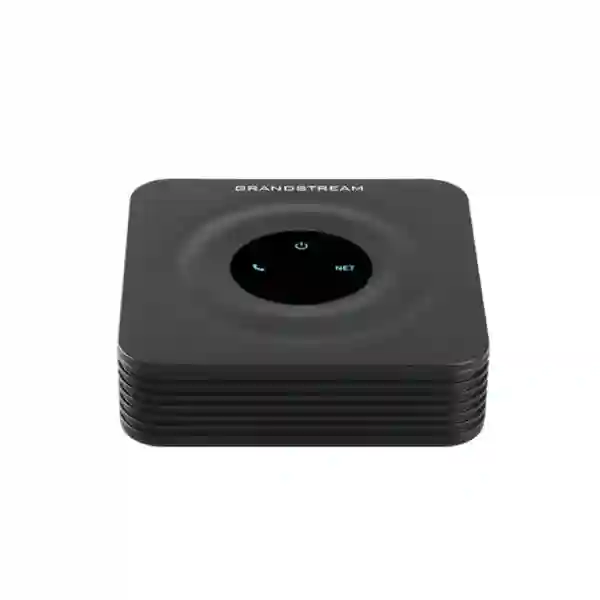
The Grandstream HT801 v2 is a compact one-port analog telephone adapter designed for organizations and individual users that need to connect a conventional analog telephone or compatible fax workflow to a SIP-based VoIP platform. It provides one FXS telephone interface, one 10/100 Mbps Ethernet network port and support for one SIP profile, making it a focused choice for a single analog endpoint that needs to participate in an IP telephony environment without replacing the endpoint immediately.
For buyers, the important question is not simply whether the HT801 v2 is an ATA. The more useful question is whether a one-line ATA is the right migration tool for the intended device, PBX, network and operational model. This page therefore approaches the HT801 v2 as a deployment decision: what it connects, where it fits, what it does not replace, which security and provisioning functions matter, how fax should be assessed, and when a higher-port Grandstream ATA may be the better procurement decision.
A direct buying answer: when does the HT801 v2 make sense?
Choose the HT801 v2 when the requirement is to retain one analog endpoint while moving call control to SIP. Common examples include a familiar analog desk phone in a small office, a specialist analog handset that still serves a useful operational purpose, a legacy device that cannot register directly to SIP, or a fax workflow that is being evaluated for T.38 or G.711 pass-through. It is also useful in service-provider and managed-voice scenarios where a compact, remotely provisionable adapter is preferable to replacing every analog device at once.
Do not choose it merely because it is inexpensive or compact. Start with the endpoint count and the required call identity. If two analog devices must operate as separate lines, a two-port model is usually a cleaner design. If the branch needs multiple analog extensions, integrated routing, additional Ethernet interfaces or higher port density, another member of the Grandstream HT or GXW family may fit better. The HT801 v2 is strongest when the scope is deliberately small: one analog line, one SIP profile and a straightforward Ethernet connection to an existing router or switching environment.
If the project requirement can be written as “keep this one analog endpoint, register it to this SIP service or IP PBX, and manage it securely on the existing LAN,” the HT801 v2 is a logical candidate. If the sentence includes multiple analog lines, routing functions or branch-scale port density, compare a higher-capacity model before ordering.
What the HT801 v2 actually connects
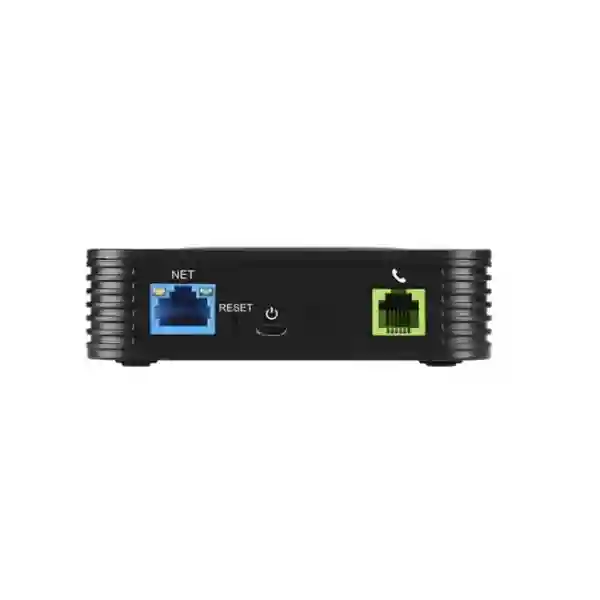
The FXS port is the interface that supplies the analog telephone side of the connection. In practical terms, the analog telephone connects to the HT801 v2 using an RJ11 cable, while the ATA connects to the local IP network using Ethernet. The SIP account is then configured on the ATA so the analog device can make and receive calls through the VoIP platform according to the PBX or service-provider configuration.
This distinction matters because the HT801 v2 is not an IP phone and it is not a PBX. It does not turn the analog endpoint into a feature-rich SIP desk phone with a colour display, programmable line keys or native UC applications. Instead, it acts as a protocol and media bridge between an analog line interface and an IP voice system. The experience available to the analog user therefore depends on both the capabilities of the connected analog device and the features exposed by the SIP platform.
The single Ethernet interface is intended to connect the adapter to the existing router, modem or switched LAN. Grandstream documentation for the HT801 v2 and HT802 v2 identifies one 10/100 Mbps Ethernet port and notes that these models do not provide the routing functionality found on some HT81x family devices. That makes network planning simple, but it also means the ATA should be treated as an endpoint on an existing LAN rather than as the device responsible for routing the branch network.
Verified technical specification snapshot
| Telephone interface | One FXS port |
|---|---|
| SIP profile | One SIP profile |
| Network interface | One 10/100 Mbps auto-sensing Ethernet port (RJ45) |
| Telephony functions | Caller ID display/block, call waiting, flash, blind or attended transfer, forwarding, hold, do not disturb and three-way conferencing, subject to platform and configuration support |
| Voice codecs | G.711, G.722, G.723.1, G.729A/B, G.726-32, iLBC and Opus, plus dynamic jitter buffer and line echo cancellation |
| Fax over IP | T.38 Group 3 fax relay up to 14.4 kbps with automatic switching to G.711 fax pass-through |
| VoIP security | SRTP for media; TLS/SIPS/HTTPS control options |
| Provisioning | HTTP/HTTPS, SSH, TFTP, TR-069 and automated provisioning mechanisms, including AES-protected provisioning support |
| QoS support | Layer 2 802.1Q VLAN and 802.1p; Layer 3 ToS, DiffServ and MPLS support |
| Power | 100–240 VAC input power supply; 5 VDC / 1 A output specified by Grandstream |
| Dimensions / weight | 100 × 100 × 29.5 mm; 102 g |
Specifications should be matched to the current Grandstream documentation and intended deployment before procurement. SIP-platform interoperability, fax behaviour, security settings and feature availability can depend on firmware, PBX/service-provider configuration and network design.
Why the v2 model is useful in a modern migration project
Analog migration rarely happens because an organization wants “an ATA” in isolation. It happens because one endpoint still matters while the surrounding communications architecture changes. A business may have moved from a legacy PBX to an IP PBX, adopted SIP trunks, consolidated branch communications, introduced hosted voice, or standardized on Grandstream UCM. A single analog endpoint can become the awkward exception in an otherwise IP-based design. The HT801 v2 gives that exception a controlled integration path.
The strongest operational benefit is therefore continuity. Existing analog devices can remain in use while the core call-control environment becomes IP-based. This can reduce unnecessary endpoint replacement where the analog device still meets the user requirement. It can also simplify staged migrations: rather than changing the PBX, network, handsets and specialty devices simultaneously, teams can migrate in logical groups and use an ATA where a temporary or longer-term analog bridge makes sense.
The second benefit is manageability. TR-069, XML configuration support, web-based administration, syslog and secure management options make the device more suitable for managed deployments than a simple unmanaged analog converter. Service providers and IT teams can incorporate configuration standards, remote diagnostics and controlled provisioning into their operational model. The value of these capabilities increases when multiple sites use the same ATA profile because consistency becomes more important than manual one-off configuration.
Customer requirement → capability → practical outcome
Keep one analog phone during a PBX migration
The one-port FXS design allows a conventional analog telephone to register indirectly to a SIP environment through the ATA. The practical benefit is continuity for a location or user that does not need a new native SIP desk phone. The limitation is equally important: one FXS port means one analog endpoint requirement per adapter.
Protect SIP signalling and voice media
TLS/SIPS and SRTP capabilities can help support a protected voice architecture when the PBX, service provider and network are configured compatibly. Encryption support is not a substitute for a complete security policy: administrators still need strong credentials, controlled management access, firmware governance and appropriate firewall rules.
Centralize configuration for repeated deployments
TR-069 and XML-based provisioning can reduce repetitive manual configuration in larger rollouts. The practical value is consistent settings and easier lifecycle management. The deployment team should still define provisioning ownership, credential security, firmware policy and rollback planning before mass rollout.
Preserve a fax workflow
T.38 and G.711 fax pass-through options make the HT801 v2 a candidate where an analog fax device must traverse a VoIP system. Fax over IP remains sensitive to end-to-end compatibility and network conditions, so a proof test with the intended SIP trunk, PBX and destination routes is preferable to assuming universal interoperability.
Voice quality is a network design issue, not only a codec list
The HT801 v2 supports a broad codec set including G.711, G.722, G.723.1, G.729A/B, G.726-32, iLBC and Opus. That does not mean every codec should be enabled in every deployment. Codec choice needs to reflect the SIP platform, trunk provider, bandwidth policy, transcoding requirements and the type of endpoint connected to the FXS port. Where end-to-end G.711 is practical, it can simplify troubleshooting. Compressed codecs may be relevant for bandwidth-constrained links, but they can add complexity if transcoding is required elsewhere in the call path.
The adapter also supports mechanisms such as a dynamic jitter buffer and advanced line echo cancellation. These help manage real-world voice conditions, but they cannot compensate for a badly designed LAN or an unstable WAN. Packet loss, high jitter, congestion and incorrect QoS can still cause poor audio. For business deployments, the voice VLAN, switch configuration, WAN path and SIP trunk quality should be reviewed as part of the solution rather than treating the ATA as an isolated appliance.
QoS support includes 802.1Q VLAN tagging, 802.1p priority and Layer 3 mechanisms such as ToS and DiffServ. These controls are most useful when they align with the rest of the network. Marking voice traffic at the endpoint has limited value if the switch, router or WAN provider ignores or rewrites the markings. A consistent end-to-end policy produces a more predictable result.
Security planning for an analog endpoint on SIP
Moving an analog endpoint onto SIP changes the security model. The original analog device may have no network stack at all, but the ATA does. It therefore becomes part of the IP infrastructure and needs the same operational discipline as other network-connected voice equipment. The HT801 v2 supports SRTP for media and TLS/SIPS/HTTPS-related controls, giving administrators building blocks for encrypted signalling, encrypted media and protected management where the surrounding infrastructure supports them.
A secure deployment should also address the basics: unique administrative credentials, restricted management access, controlled provisioning servers, current supported firmware, unnecessary service reduction, firewall policy and monitoring. SIP credentials should be treated as sensitive because unauthorized registration can lead to toll fraud or impersonation. Remote management should be exposed only through an approved operational model rather than directly opening management access to the public internet.
Grandstream publishes firmware updates for the HT801 v2 family. Current firmware and release notes should be reviewed before deployment, particularly when a project depends on a specific interoperability fix, security enhancement or feature behaviour. Grandstream also notes a firmware downgrade limitation after certain HT8xx v2 firmware transitions; change control should therefore include a firmware policy instead of assuming every older release remains a rollback option.
Fax over IP: where T.38 helps and where testing is essential
Fax is one of the most common reasons organizations retain an analog interface, but it is also one of the easiest areas to oversimplify. The HT801 v2 supports T.38-compliant Group 3 fax relay up to 14.4 kbps and can switch to G.711 for fax pass-through. These capabilities make it suitable for evaluation in fax-over-IP designs, but they do not guarantee that every upstream carrier, PBX, SBC or destination will negotiate fax in the same way.
For a business-critical fax workflow, test the real call path. Confirm whether the SIP provider supports T.38, whether the PBX passes or terminates T.38, whether the codec and re-INVITE behaviour is compatible, and whether firewalls or session border controllers alter the media path. Test both outbound and inbound documents, multi-page transmissions and the destinations that matter to the organization. If fax reliability remains inconsistent, compare alternatives such as a managed fax service rather than repeatedly tuning an unsuitable voice path.
The same principle applies to modem-like or specialty analog devices. An FXS interface does not automatically make every analog signalling method reliable over packet networks. Where the connected device has timing-sensitive, alarm, telemetry, modem or proprietary requirements, verify compatibility with the device vendor and run a practical test before standardizing the solution.
Grandstream UCM integration and Zero Configuration
Grandstream identifies support for Zero Configuration provisioning with its UCM series IP PBXs. This can be useful in a Grandstream-centered deployment because the ATA becomes easier to discover and provision within a common ecosystem. The operational benefit is not only initial setup. Standardized extension parameters, configuration templates and device management practices can reduce errors when the same design is repeated across multiple locations.
However, the HT801 v2 is not limited to UCM. It is a SIP ATA and can be used with compatible third-party SIP platforms or service providers when their registration, codecs, DTMF, NAT, security and provisioning expectations are matched correctly. For third-party systems, confirm the provider’s supported-device policy and test the exact feature set needed by the user. A basic call may work even when advanced call features, fax, provisioning or failover behaviour still needs tuning.
When integrating with a PBX, document the SIP server address, extension or account credentials, authentication ID if different, transport, outbound proxy where required, DTMF method, codec order, registration interval, voicemail indication behaviour, dial plan and emergency-calling policy. Treat these as solution settings rather than copying a generic configuration from another network.
Failover SIP server support: useful resilience with clear boundaries
The HT801 v2 supports a failover SIP server mechanism that can switch to a secondary server when the primary server is unavailable. This can improve service continuity in architectures that provide redundant SIP infrastructure. It should not be confused with complete end-to-end high availability. A secondary registrar is only one part of a resilient voice service.
Power, switching, internet connectivity, DNS, upstream SIP trunks, firewalls and the PBX itself can each become failure points. If the analog endpoint serves an important operational role, map the complete dependency chain and decide which components require backup power, redundant WAN, redundant call control or alternate routing. The ATA’s failover capability becomes most valuable when it is one component of an intentionally resilient design rather than the only resilience feature.
HT801 v2, HT802 v2 or a larger ATA: choose by analog-port strategy
| Requirement | HT801 v2 | HT802 v2 | Consider a higher-port model |
|---|---|---|---|
| One analog endpoint | Strong fit | Works but leaves unused capacity | Usually unnecessary |
| Two independent analog endpoints | Requires two units | Natural fit with two FXS ports | Consider if future growth is expected |
| Several analog extensions at one site | Not efficient at scale | Limited | Prefer a multi-port HT/GXW design |
| Integrated routing requirement | Not the intended role | Not the intended role | Assess a model with the required routing/network architecture |
The key procurement mistake is buying one-port ATAs one at a time without considering the final analog endpoint count. If a site starts with one device but is likely to retain four, eight or dozens of analog ports, a gateway strategy may reduce power adapters, switch ports, management objects and support overhead. Conversely, if only one analog endpoint remains, a large gateway can add unnecessary cost and complexity. Size the analog layer deliberately.
Deployment checklist before connecting the first phone
- Identify the analog endpoint. Confirm whether it is a standard telephone, fax or another analog device and whether it has any special electrical or signalling requirements.
- Confirm the SIP platform. Record the PBX or service provider, account format, server/registrar, authentication method, transport and any outbound proxy requirement.
- Plan the LAN connection. Decide which switch/router segment the ATA will use, whether a voice VLAN is required and which QoS policy applies.
- Define addressing. Decide whether DHCP is sufficient or whether DHCP reservation/static addressing is part of the support model.
- Set the security baseline. Change default credentials, restrict management access, select supported TLS/SRTP options and define firmware/update ownership.
- Choose codec and DTMF behaviour. Match the PBX and SIP provider rather than enabling every option without a reason.
- Test telephony features. Validate inbound and outbound calls, caller ID, transfer, call waiting, hold, voicemail indication and any feature codes relevant to the user.
- Test fax separately if required. Validate T.38 or G.711 pass-through on the real carrier path.
- Document the final configuration. Record device identity, firmware, extension/account, provisioning profile, VLAN, IP method and support contact.
- Plan recovery. Define how the ATA will be reset, reprovisioned or replaced without losing service knowledge.
Provisioning at one site versus provisioning at scale
For a single HT801 v2, manual web configuration may be acceptable. The administrator can connect the device, identify its network address, open the management interface, configure the SIP account, apply security settings and test calls. The challenge appears when the organization repeats the process across branches, apartments, retail counters, service desks or customer installations. Manual configuration becomes slow and inconsistent, and support teams lose visibility into which settings differ from one unit to another.
That is where automated provisioning becomes important. TR-069 and configuration-file methods can help standardize account templates, codecs, dial plans, update policies and other parameters. A good provisioning design separates global settings from site-specific or subscriber-specific values. It also protects configuration files and credentials, logs changes and allows the support team to trace which profile a device received.
Large deployments should define lifecycle states: new, staged, deployed, updated, replaced and retired. A device leaving service should not retain active SIP credentials indefinitely. If an ATA is moved between sites, provisioning should be able to reassign it cleanly. These operational details are often more important over five years than the time saved during the first installation.
Use cases where a one-port ATA remains practical
Small offices retaining one familiar analog handset
A small office may modernize its PBX or SIP service while keeping one simple analog handset in a utility area, reception back room, workshop or low-usage desk. The HT801 v2 can bridge that endpoint without introducing a second full-featured IP phone where the user does not need it.
Branch migrations with one legacy exception
In multi-site projects, most users may move to SIP phones while a single analog endpoint remains at each branch. Standardizing the HT801 v2 for that exception can give the deployment team a repeatable configuration and support process rather than using a mixture of consumer adapters.
Service-provider subscriber deployments
Service providers that deliver SIP service to customers with analog telephones can benefit from compact hardware, remote provisioning and failover capabilities. The operational design should cover provisioning security, firmware governance, customer reset procedures and replacement logistics.
Fax migration assessment
Where a customer wants to keep an analog fax machine during a VoIP transition, the HT801 v2 provides T.38 and fax pass-through capabilities for testing. The correct outcome may be to keep the fax, move to an online fax platform or redesign the workflow; the ATA is a tool for the migration, not a guarantee that legacy fax is always the best long-term architecture.
Regional deployment considerations for UAE and wider Fourteck projects
In Dubai, Abu Dhabi, Sharjah and other UAE locations, ATA projects often sit inside a broader business telephony migration involving SIP trunks, hosted voice, IP PBX replacement or branch standardization. Procurement should therefore start with the communications architecture, not with the adapter alone. Confirm the chosen SIP service, numbering model, emergency-calling obligations, LAN design, power protection and support ownership before deploying the endpoint.
For distributed projects across Uganda, Kenya, Tanzania, Ghana, Nigeria or other African markets, bandwidth quality and branch support models can vary significantly between sites. A small ATA can be easy to ship and replace, but remote troubleshooting still depends on usable connectivity and disciplined provisioning. Where internet links are variable, codec selection, QoS, SIP timers and failover design may need to differ from a well-provisioned metropolitan LAN.
In Kuwait and other GCC environments, the same principle applies: validate local SIP-provider interoperability, enterprise security policy and procurement requirements rather than assuming a configuration used in another country can simply be copied. Fourteck can support solution planning across its regional technology properties, including Fourteck UAE, Fourteck, Fourteck Uganda, Fourteck Kenya, Fourteck Tanzania, Fourteck Kuwait, Fourteck Ghana and Fourteck Nigeria.
What to include in an HT801 v2 quotation request
A useful quotation request should contain more than a model number. Include the number of analog endpoints, whether the endpoint is a phone or fax, the PBX or SIP service being used, the deployment country, the number of sites, expected quantity, any requirement for pre-configuration, the preferred provisioning method, network constraints, security requirements and whether installation or remote configuration assistance is needed. This allows the supplier to identify whether the HT801 v2 is truly the right fit or whether a different ATA or gateway would reduce complexity.
If the project is a replacement, provide the existing ATA model and the reason for change. If the issue is failed registration, poor fax reliability or one-way audio, a new device alone may not resolve the underlying network or SIP problem. A short technical discovery step can prevent the procurement team from replacing hardware when the real root cause is NAT, firewall policy, SIP ALG, carrier interoperability or an unsupported configuration.
Operational limits buyers should understand
The HT801 v2 is intentionally simple. It has one FXS port, so it is not designed for a site with many analog extensions. Its Ethernet interface is 10/100 Mbps, which is more than adequate for a single voice endpoint but should not be mistaken for a switching or routing platform. It does not provide the user interface of a SIP phone, so users continue to interact with the analog handset and telephone feature codes rather than a native IP-phone screen.
Feature availability can also depend on the SIP platform. Blind transfer, attended transfer, call waiting, caller ID and voicemail indicators involve signalling between the endpoint, ATA and PBX/service provider. A feature appearing in the ATA specification does not mean every provider exposes it identically. Test the specific user workflow, especially where analog users need PBX functions beyond basic calling.
Finally, supportability matters. A low-cost endpoint can become expensive if nobody owns its configuration, firmware and credentials. Build the ATA into the same asset inventory and change-management process as IP phones, switches and PBXs. The device may be small, but its SIP account can carry real business traffic.
HT801 v2 installation sequence for a controlled rollout
A controlled installation starts with the physical layer. Connect the analog telephone to the PHONE/FXS interface with a suitable RJ11 lead, connect the NET port to the router or Ethernet switch, then use the specified power adapter. Grandstream documentation indicates power, NET and phone LED states that help confirm boot, link and registration status. These indicators are useful during first-line troubleshooting because they separate basic power/network problems from SIP-registration problems.
Next, identify the device’s IP address and access the management interface using the approved local process. Apply the security baseline before exposing the ATA to production voice service. Configure the SIP account, transport, codecs, DTMF, dial plan and time settings. If VLANs are used, verify that the port configuration and tagging design match the switch. If provisioning is automated, enrol the device into the intended profile rather than making permanent manual changes that will later be overwritten.
After registration, test both directions. An outbound call only proves part of the path. Validate inbound calling, caller ID, two-way audio, call clearing, DTMF to an IVR and transfers if used. Place a longer call to expose jitter or NAT timer issues. If the device supports a fax workflow, run separate fax tests. Document the working configuration and capture the firmware version so support staff know the exact baseline.
Troubleshooting logic for common ATA problems
The phone has dial tone but cannot make calls
Check SIP registration first. An analog dial tone may be locally generated and does not necessarily prove the account is registered. Confirm the SIP server, username, authentication ID, password, DNS reachability and transport. Review whether the network blocks the required signalling path.
Calls connect but audio works only in one direction
One-way audio usually points to a media-path problem rather than the analog handset. Review NAT, firewall rules, SIP ALG behaviour, advertised media addresses, RTP port ranges and the PBX/SBC design. Packet capture or PBX logs can help determine which side is sending media to an unreachable address.
Caller ID does not display correctly
The HT801 v2 supports multiple caller-ID formats, but the analog phone and regional line expectations must match the ATA configuration. Confirm the format expected by the handset and verify that the SIP platform is presenting the caller identity in a way the ATA can map to the analog side.
Fax works sometimes but fails on longer documents
Intermittent fax problems can arise from packet loss, T.38 negotiation differences, transcoding or a carrier that does not support the same fax mode end to end. Confirm whether the call is using T.38 or G.711 pass-through and test with the same route repeatedly. If the business depends on fax, reliability should be proven before production acceptance.
Why Fourteck for HT801 v2 project planning
The value of an ATA project is not simply obtaining the hardware. It is choosing the correct port density, aligning the adapter with the SIP platform, deciding how the device will be provisioned, and making sure the analog endpoint behaves as expected on the production network. Fourteck approaches the HT801 v2 as part of that wider telephony design rather than treating it as an isolated accessory.
For a single device, the discussion may be as simple as compatibility and configuration guidance. For multiple branches, it may include templates, VLAN/QoS planning, UCM integration, SIP trunk considerations, remote provisioning and replacement strategy. Where a one-port ATA is not the right design, the same requirement analysis can point toward a two-port ATA, a multi-port analog gateway or direct replacement with native SIP endpoints.
Fourteck can also align the ATA requirement with related telephony and infrastructure projects through IP Phone Fourteck, IP PBX solutions, IT services and Grandstream UAE solutions. The final selection should be based on the actual PBX, network, endpoint count and regional deployment conditions.
Frequently asked questions about the Grandstream HT801 v2
How many analog devices can the HT801 v2 connect?
The HT801 v2 provides one FXS telephone port, so it is designed for one analog endpoint connection. If two independent analog endpoints are required, compare a two-port ATA such as the HT802 v2 or another suitable model.
Does the HT801 v2 support SIP?
Yes. It supports one SIP profile and SIP-related protocols including SIP over TCP/TLS. The exact configuration must match the IP PBX or SIP service provider.
Can the HT801 v2 be used with Grandstream UCM?
Yes. Grandstream identifies support for use with its UCM series of IP PBXs and Zero Configuration provisioning. Deployment details depend on the UCM model, software version and network design.
Does the HT801 v2 support fax?
It supports T.38 fax relay and G.711 fax pass-through. Because fax interoperability depends on the end-to-end SIP path, the intended PBX, trunk and destinations should be tested before relying on the design for business-critical fax.
Does the HT801 v2 have Gigabit Ethernet?
No. Grandstream specifies one 10/100 Mbps auto-sensing Ethernet port for the HT801 v2. This is suitable for its single voice endpoint role but it is not a Gigabit network device.
Can the HT801 v2 act as a router?
The HT801 v2 is intended as an ATA endpoint with one Ethernet network connection. Grandstream documentation distinguishes it from HT81x v2 models that include integrated routing functions. Plan to connect the HT801 v2 to an existing router or switched network.
Does it support encrypted voice?
The device supports SRTP for media and TLS/SIPS-related control options. Encryption must be supported and correctly configured across the SIP platform and network to deliver an encrypted end-to-end service.
Is the HT801 v2 suitable for a multi-site deployment?
It can be suitable when each site needs only one analog endpoint. TR-069 and configuration-file provisioning can help standardize rollout, but larger analog-port requirements may be better served by a higher-density ATA or gateway.
Plan the analog-to-SIP requirement before ordering
For a quotation or compatibility check, share the analog endpoint type, SIP platform, quantity, country, number of sites, fax requirement if any, and whether you need pre-configuration or deployment assistance. Fourteck can then confirm whether the HT801 v2 is the right one-port ATA for the requirement or whether another Grandstream model is a better technical fit.


Reviews
There are no reviews yet.