Grandstream GXV3350 Dubai: Smart Video IP Phone for Business Desks
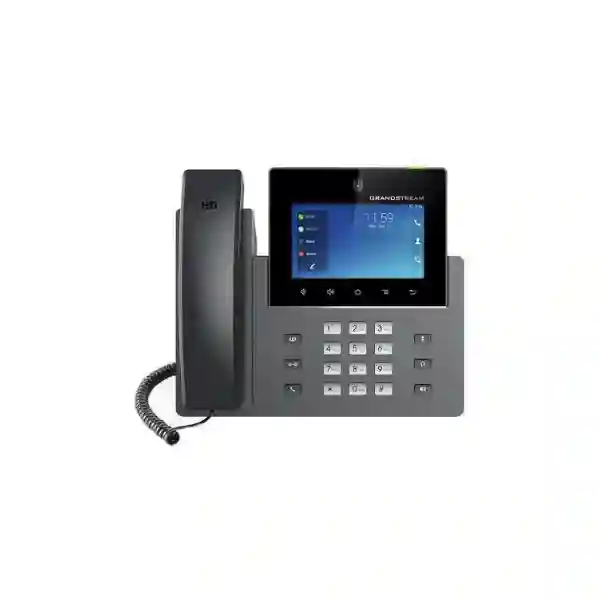
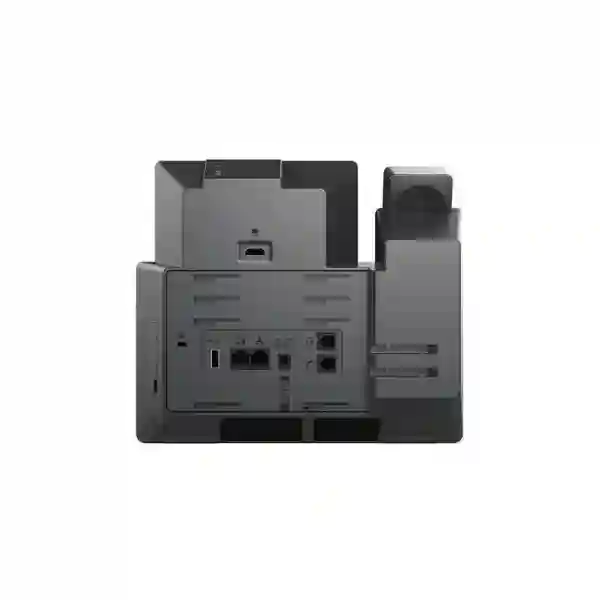
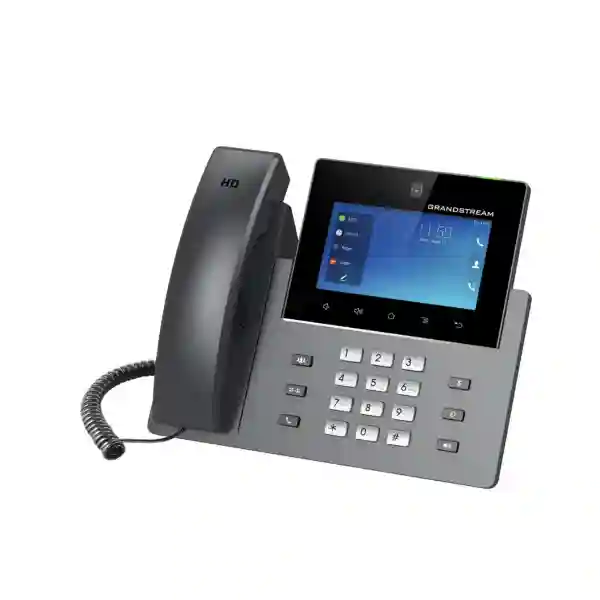
The Grandstream GXV3350 is a high-end Android-based SIP video phone designed for business users who want more than a conventional voice handset. It combines 16 lines with up to 16 SIP accounts, a 5-inch 1280×720 capacitive touch display, a tiltable 1-megapixel privacy-shutter camera, dual Gigabit Ethernet, PoE/PoE+, dual-band Wi-Fi, Bluetooth, USB and HDMI connectivity. It can host up to 6-way audio conferencing and 3-way 720p video conferencing, making it relevant for executive desks, reception areas, management offices, security desks and collaboration-focused users. For organizations evaluating the Grandstream GXV3350 in Dubai or elsewhere in the UAE, the key decision is not only whether the phone has enough features, but whether its Android 7.0 generation, PBX integration, network design and application requirements match the intended deployment.
5-inch 1280×720 touch display
720p camera & video
PoE / PoE+
Executives, managers, receptionists and operational desks that need rich call handling, video and multiple SIP identities.
Dual 10/100/1000 Mbps Ethernet ports with integrated PoE/PoE+ support simplify managed business deployments.
Up to 6-way audio and 3-way 720p video conferencing support richer desk-based communication workflows.
Application compatibility and lifecycle expectations should be checked if Android apps are central to the project.
The practical answer: what kind of phone is the GXV3350?
The GXV3350 sits between a conventional enterprise SIP phone and a compact desktop collaboration terminal. A standard business IP phone is primarily designed to register to a PBX, place and receive calls, provide programmable keys and support a headset. The GXV3350 adds a touchscreen Android interface, a camera, video calling, local applications, HDMI output and deeper multimedia functions. That makes it more appropriate when the desk itself is a communications control point rather than simply a place to answer voice calls.
For a manager, that may mean handling several SIP identities, joining a video conversation without moving to a meeting room, using a Bluetooth headset and viewing information on the touchscreen. For a receptionist, it may mean combining normal call transfer duties with a GBX20 expansion module and integration with compatible Grandstream door-access systems. For a security or front-office desk, video and GDS37xx integration can provide a more useful workflow than a voice-only endpoint. The exact value depends on the PBX, network, permissions and workflow built around the handset.
This distinction matters in Dubai and UAE procurement because many projects mix different phone classes. A company may not need a GXV3350 on every desk. General office users may be better served by simpler GRP or GXP endpoints, while executives, reception, security, operations and customer-facing teams receive higher-capability phones. A role-based endpoint strategy can reduce unnecessary cost and administration while preserving advanced functionality where it produces a real operational benefit.
Verified GXV3350 technical facts that matter to a buyer
Start with the customer requirement, not the feature list
A productive GXV3350 design begins by asking what the user must accomplish during a normal working day. A long specification can look impressive while still producing a poor deployment if the endpoint is assigned to the wrong role. The following requirement-to-capability matrix helps translate common business needs into practical design decisions.
| Customer requirement | Relevant GXV3350 capability | Buying or deployment consideration |
|---|---|---|
| One desk handles many identities or lines | Up to 16 SIP accounts and 16 lines | Map accounts and keys carefully so the interface stays usable. |
| Executive wants desk video without a room system | 5-inch touch display, 1 MP camera, 720p video and 3-way video conferencing | Confirm the far-end platform, bandwidth and actual meeting workflow. |
| Receptionist needs many monitored extensions | GBX20 expansion support plus programmable keys | Confirm key count, BLF behavior and external PSU requirement for multiple modules. |
| Security desk needs door interaction | Compatibility with GDS37xx access-control devices | Validate the exact GDS model, SIP design and access workflow. |
| Company wants centrally powered endpoints | PoE / PoE+ support | Calculate switch PoE budget and UPS strategy for all connected phones. |
| User needs wireless headset freedom | Bluetooth plus RJ9/EHS headset options | Confirm headset model compatibility and desired call-control functions. |
| Branch has limited data outlets | Dual Gigabit ports allow phone-plus-PC topology | Apply voice/data VLAN and security policy correctly rather than treating the phone as an unmanaged bridge. |
| Business wants Android applications on the phone | Android 7.0 application environment and Grandstream SDK support | Confirm the target app still supports Android 7.0 and test it before standardizing the endpoint. |
A better fit for executive and specialist desks than mass deployment
The strongest case for the GXV3350 is selective deployment. An executive may benefit from a touch interface, Bluetooth headset support, multiple accounts and occasional video calls. A branch manager may use multiple SIP identities for different business units or locations. A receptionist may need a visual phone with expansion capability and rapid call transfer. A facility or security desk may value integration with compatible Grandstream entrance devices. These roles justify the extra complexity of a smart video phone because the endpoint contributes directly to a richer workflow.
For general users who only need one or two SIP accounts, hold, transfer, voicemail and a headset, a simpler enterprise IP phone can be easier to deploy, manage and replace. This is especially relevant in projects with hundreds of endpoints. Standardizing every desk on a smart Android video phone may increase application-management, firmware and user-support responsibilities without generating a proportional business benefit.
A Fourteck design discussion should therefore separate users into functional profiles. A reception profile may prioritize BLF, transfer, headset and GBX20 expansion. An executive profile may prioritize Bluetooth, video and multiple identities. A security profile may prioritize GDS integration. A standard office profile may not need the GXV3350 at all. This role-based approach helps procurement teams compare cost, capability, support effort and lifecycle risk in a meaningful way rather than choosing one model solely because it has the longest feature list.
Voice, video and collaboration workflow
Grandstream positions the GXV3350 as an integrated video communications solution rather than only an IP handset. The 5-inch 1280×720 screen is large enough to provide a visual call interface and desk video without requiring a separate monitor for every interaction. The 1-megapixel tiltable CMOS camera includes a privacy shutter, an important physical control in offices where users want the camera to remain visibly closed when it is not required. Video capability reaches up to 720p at 30 fps, with H.264 support documented across baseline, main and high profiles.
The conferencing capability is also relevant to how the phone should be positioned. Grandstream lists up to 6-way audio conferencing and up to 3-way 720p video conferencing. That does not make the phone a replacement for every meeting-room system. Instead, it gives an individual user or small operational team the ability to collaborate directly from the desk. A private office, supervisor station or remote branch desk can gain useful video capability without dedicating a room endpoint to the user.
Audio remains central. The GXV3350 supports wideband codecs including Opus and G.722, along with G.711, G.729A/B, G.726-32 and iLBC. Grandstream documents dual microphones, HD handset and HD speakerphone operation, noise reduction, advanced echo cancellation and double-talk performance. In practice, voice quality still depends on the PBX, codec negotiation, LAN congestion, WAN path, headset choice, microphone environment and QoS configuration. A premium endpoint cannot compensate for a poorly designed voice network.
HDMI-out and USB connectivity extend the endpoint beyond ordinary handset usage, but these ports should be selected for a real use case rather than included in a bill of materials simply because they exist. If a user needs an external display or USB peripheral, confirm the exact workflow and supported behavior during testing. For standardized deployments, documenting accepted peripherals is preferable to allowing every user to attach untested accessories.
PBX and SIP integration: plan the endpoint as part of a system
The GXV3350 supports SIP and a wide set of networking and provisioning protocols. The correct deployment therefore starts with the PBX or hosted SIP platform. A system designer should confirm registration method, extensions, authentication, outbound proxy requirements, codec policy, DTMF method, transport, TLS/SRTP support, voicemail behavior, BLF subscriptions, directory integration, call recording policy, failover and emergency calling rules. Those decisions shape the user experience more than the product box alone.
Grandstream UCM environments are a natural pairing because the endpoint and PBX share a vendor ecosystem, but the phone is not limited to a single PBX brand. SIP interoperability should be validated against the exact platform and firmware in use. If the project depends on advanced features such as presence, remote provisioning, video, feature codes or failover, a pilot is more valuable than assuming every SIP feature behaves identically across platforms.
Grandstream also lists the GXV3350 among endpoints supported by UCM RemoteConnect for compatible UCM6300/A-series deployments. This can be relevant for branches and remote users, but RemoteConnect architecture, licensing or service conditions should be confirmed against the current UCM environment rather than inferred from the handset alone. The endpoint should be treated as one component of the full communications design.
For businesses planning a wider PBX project, Fourteck can align the endpoint choice with the voice platform rather than quoting phones in isolation. Customers can also review business telephony solutions through Fourteck IP PBX Dubai and broader infrastructure options at Fourteck UAE. These links are useful when a GXV3350 requirement is part of a new office, PBX refresh, branch rollout or migration rather than a single handset replacement.
Ethernet, PoE, VLAN and QoS design for a reliable deployment
The GXV3350 includes two switched 10/100/1000 Mbps Ethernet ports, allowing the phone to connect to the LAN while a nearby workstation connects through the second port. This topology can reduce the number of wall outlets required at a desk, but it must be incorporated into the network design. Voice VLAN assignment, 802.1Q tagging, 802.1p priority, DHCP options, LLDP-MED, port security and access-control policies should be planned rather than left at defaults.
Grandstream documents Layer 2 QoS with 802.1Q and 802.1p, along with Layer 3 QoS including ToS and DiffServ. These features help the endpoint participate in a broader QoS strategy, but QoS is end-to-end. Marking voice packets at the phone is useful only if switches, routers, firewalls and WAN services treat the traffic appropriately. Businesses with multiple Dubai branches, internet VPNs, MPLS or SD-WAN should evaluate the full path, especially if video is part of the expected workflow.
Power is another design input. The GXV3350 supports 802.3af PoE and 802.3at PoE+. Central PoE can simplify cabling and can keep phones operating through a UPS-backed switch during a local power event. However, the switch must have sufficient per-port and total PoE budget. Large projects should calculate the total endpoint power requirement alongside access points, cameras and other PoE devices instead of assuming the switch label alone guarantees enough capacity.
Where network resiliency is important, consider the relationship between phone power, switch redundancy, PBX resilience, internet connectivity and SIP trunk failover. A phone with PoE cannot make calls if the access switch is down; a redundant PBX does not help if the WAN path is unavailable; a secondary SIP server is useful only when failover behavior has been configured and tested. A deployment checklist should therefore validate the complete service chain.
Wi-Fi and Bluetooth are useful options, not substitutes for design discipline
Grandstream specifies dual-band 2.4 GHz and 5 GHz 802.11a/b/g/n Wi-Fi on the GXV3350. Wireless connectivity can be valuable in executive offices, temporary work areas, reception positions or locations where adding a data outlet is difficult. It can also provide deployment flexibility during office moves. However, business voice and video traffic remain sensitive to latency, jitter, packet loss, roaming behavior and radio interference. A Wi-Fi deployment should therefore be based on coverage and capacity planning rather than assuming the phone will behave like a casual consumer device anywhere within signal range.
For a fixed desk with structured cabling available, wired Gigabit Ethernet will usually provide the most predictable path. Wi-Fi becomes more compelling when the physical environment or user workflow requires it. If wireless is selected, confirm SSID security, VLAN mapping, signal quality, channel utilization and whether the device must roam. The 802.11 generation supported by the GXV3350 should also be compared with the standards used by the customer’s wireless environment.
Bluetooth can simplify headset use and connection of compatible accessories. The detailed Grandstream guide identifies Bluetooth 4.2+EDR for this model generation. Before standardizing a Bluetooth headset, test call answer/end behavior, audio routing, mute behavior, range and user expectations. Bluetooth support alone does not guarantee every vendor-specific control will behave identically.
For corded or EHS headset workflows, Grandstream documents an RJ9 headset jack and EHS support. Receptionists and contact-heavy users should be assigned headsets according to how they answer, transfer and monitor calls, not simply according to connector type. A short pilot with the actual headset and PBX configuration can prevent deployment-wide usability problems.
Security and provisioning considerations
Grandstream documents a range of security mechanisms for the GXV3350, including separate user and administrator passwords, TLS, SRTP, HTTPS, 802.1X and AES-encrypted configuration files. These capabilities are valuable only when the organization’s PBX, certificates, provisioning server and network policy use them correctly. The first security task is to avoid leaving factory-style credentials or unnecessary management exposure in place.
Provisioning can be performed through methods including HTTP, HTTPS, TFTP, TR-069 and encrypted XML configuration. In a multi-phone project, centralized provisioning is generally preferable to manual desk-by-desk configuration because it improves consistency and makes future changes easier to audit. A provisioning profile can standardize SIP accounts, dial plans, codecs, VLAN settings, time, LDAP, programmable keys and update behavior. Sensitive data should be protected in transit and at rest according to the organization’s security policy.
The Android element adds another dimension. If third-party applications are installed, organizations should define which apps are permitted, who can install them and how their lifecycle will be managed. The phone runs Android 7.0, so security and application compatibility should be reviewed against current business requirements. A project that depends on one specific Android app should test that app on the phone before bulk procurement.
Firmware management also matters. A controlled rollout normally includes checking the approved firmware version, testing it with the PBX and business applications, then deploying it according to a maintenance plan. Avoid changing firmware across a large fleet immediately before critical business periods unless the update addresses an urgent issue. For remote branches, confirm that upgrade bandwidth, failover and recovery procedures are understood.
GBX20 expansion: when the GXV3350 becomes an operator phone
The ability to add GBX20 expansion modules changes the role the GXV3350 can play. Grandstream states that the GXV3350 supports up to four GBX20 modules. Each GBX20 provides a 272×480 color display with 20 programmable buttons and navigation between key pages, allowing a large number of monitored or programmable functions to be presented beside the phone. This is particularly relevant to receptionists, executive assistants, dispatch desks, hotel operators and administrative users with a large extension list.
Expansion should be designed around workflow. A receptionist may need BLF keys for departments, management, meeting rooms and common destinations. A hotel operator may need frequently used service extensions. A clinic reception desk may need doctors, nurses, billing and appointment teams. The value comes from arranging keys so the user can identify and act quickly, not from filling every available slot because capacity exists.
Power planning is important with multiple modules. Grandstream notes that when two or more GBX20 modules are connected to the GXV3350, the second module requires a 12V/1A power supply. This should be reflected in the bill of materials and desktop power layout. The expansion modules are accessories rather than part of the standard GXV3350 package.
Before choosing four modules for maximum key count, consider whether the PBX, directory and screen-based programmable-key functions can provide a cleaner workflow with fewer physical panels. More keys are not automatically better. A user study of the actual call-handling role often leads to a simpler, more maintainable design.
Door access, reception and security workflows
Grandstream documents built-in support for GXV video surveillance cameras and GDS37xx access-control devices. That creates a useful reason to place a GXV3350 at a reception or security position. Instead of treating the phone only as a voice endpoint, the desk can become part of an entrance-communication workflow. A visitor presses a compatible door station, the call reaches the designated desk, the user can communicate and, depending on the wider configuration and device capability, participate in the access process.
This kind of integration should be tested end to end. Confirm SIP routing, video behavior, door device model, relay or access policy, failover destination and what happens when the primary reception desk is unanswered. Security-sensitive actions should follow the customer’s access-control policy; the existence of an integration feature does not replace proper authorization rules.
The same principle applies to video surveillance integration. A compatible camera view can be operationally useful, but the endpoint should not be treated as a substitute for a dedicated VMS workstation where continuous monitoring, recording, analytics or multi-camera management is required. The GXV3350 is best used as a communication endpoint with useful visual integration, not as a full security management platform.
For Dubai offices, warehouses, schools, clinics, serviced offices and hospitality environments, the practical question is whether combining telephony and entrance communication reduces response time for the user. If the answer is yes, the GXV3350 can be assigned selectively to those positions while ordinary desks remain on simpler voice endpoints.
Use-case map: where the GXV3350 can make sense
Executive office
Multiple SIP identities, Bluetooth headset support, touch navigation and desk video can suit directors and senior managers who handle varied communication channels.
Reception
Call transfer, programmable keys, GBX20 expansion and possible GDS integration make the phone useful for a reception role with high call and visitor traffic.
Security desk
Video calling and compatible access-control integration can support a desk responsible for communication with visitors and entrances.
Branch manager
A manager handling multiple departments or locations can benefit from several SIP accounts, video and a richer contact interface.
Hospitality operator
A hotel or serviced-apartment operator may value many monitored destinations and expansion keys, subject to PBX and property-system workflow.
Clinic administration
Reception and administration teams can use multiple lines, directory functions, headset support and programmable keys to coordinate patient-facing calls.
Education administration
School or training-center administration can combine internal extension handling, entrance communication and branch calling from one desk.
Operations / dispatch
Teams coordinating many internal users may benefit from SIP identities, speed dial, BLF and expansion modules when the PBX supports the required functions.
Dubai deployment considerations
Dubai businesses often operate across headquarters, free-zone offices, retail units, warehouses, hospitality properties and remote branches. A GXV3350 deployment should be matched to that topology. A single-site office with an on-premises UCM has different requirements from a company connecting Dubai, Abu Dhabi and overseas branches through VPN, SD-WAN or cloud connectivity. The endpoint choice is therefore only one part of the voice architecture.
For a new Dubai office, define the endpoint profiles before finalizing switching and cabling. Count PoE devices, determine voice VLANs, identify receptionist and executive positions, specify headsets and decide where video is genuinely required. This prevents a common procurement problem in which phones are ordered first and the network is adapted afterward. Where multiple floors or sites are involved, standardized configuration templates reduce setup differences and simplify future support.
Businesses migrating from analog or legacy digital PBX systems should also plan user behavior. A touchscreen Android video phone may introduce more capability than users had previously. Training should focus on the actual features they need: transfer, conference, directory, headset, voicemail, BLF, video and presence. A short role-based handover is usually more effective than giving every user a long feature manual.
For procurement, request a quotation based on quantity, PBX platform, accessories, headset requirements, PoE environment, expansion modules and installation scope. Fourteck should confirm commercial availability at quotation time rather than assuming that a web page proves live stock. That approach is particularly important for an Android 7.0 generation model, where organizations may also want to compare newer alternatives before standardizing a fresh rollout.
Abu Dhabi, Sharjah, Ajman and wider UAE projects
In Abu Dhabi, enterprise and institutional projects often require structured approvals, documented network standards and controlled endpoint configurations. The GXV3350 can fit management, reception and operational desks, but its role should be documented alongside PBX, security and provisioning requirements. For multi-building or campus environments, voice VLAN design and centralized provisioning are especially useful because they reduce variation between endpoints.
Sharjah businesses may combine offices, industrial facilities, schools, warehouses and trading operations. Reception and dispatch roles in these environments can benefit from high call-handling capacity, headset support and expansion keys. Where industrial or warehouse networks extend over multiple switches, QoS and power-resiliency planning should be validated so the phone does not become the visible symptom of an underlying network problem.
Ajman and Northern Emirates projects can include compact businesses as well as distributed retail, hospitality and warehouse locations. Here the GXV3350 may be best deployed only at the central operator or management desk while ordinary staff use simpler phones. This keeps the solution aligned with actual user requirements. The same principle applies to Ras Al Khaimah, Fujairah and Umm Al Quwain: choose endpoint capability according to role, not geography alone.
For organizations with operations beyond the UAE, Fourteck’s regional network can support broader planning discussions through Fourteck Uganda, Fourteck Kenya, Fourteck Tanzania, Fourteck Ghana and Fourteck Nigeria. Regional deployments should still account for local connectivity, PBX topology and product availability individually.
How the GXV3350 compares with larger or newer smart video phones
The GXV3350 belongs to Grandstream’s GXV smart video phone family. The most useful comparison is not simply “which model has more features?” but “which screen size, camera, conferencing capacity, wireless generation and Android generation fit the deployment?” Grandstream’s family material positions the GXV3350 as a 5-inch model with Android 7.0, 16 SIP accounts/lines and GBX20 support. Larger GXV33xx models provide more display area, while newer GXV34xx-generation products move to a newer Android platform and newer wireless capabilities.
A 5-inch phone can be attractive where desktop space matters or where video is occasional rather than the dominant daily activity. Users who spend substantial time viewing video or interacting with Android apps may prefer a larger display. Conversely, if the job is mostly voice plus programmable keys, an advanced video phone may be unnecessary regardless of screen size.
The Android generation is the most important lifecycle consideration. The GXV3350 is documented as Android 7.0. If the organization requires a particular third-party app, modern security baseline or long application support window, validate the app and compare newer models before ordering. A model can remain functional as a SIP phone while becoming unsuitable for an application-centric workflow. Treat telephony lifecycle and Android application lifecycle as related but distinct questions.
For an existing installed base, replacing like-for-like may reduce change. For a new project, it can be more useful to compare the GXV3350 with current-generation alternatives based on the required outcome. Fourteck can prepare that comparison around user roles, quantity, PBX, video requirement, headset, expansion and lifecycle rather than presenting a generic “best model” answer.
When you should avoid choosing the GXV3350
A useful product page should also explain when a model is not the best fit. Avoid choosing the GXV3350 solely because it is feature-rich. If users only need basic voice, voicemail, hold, transfer and one SIP account, a simpler endpoint may reduce cost and support effort. If the project depends on modern Android applications that no longer support Android 7.0, select a newer platform. If the primary task is full-time video meetings, a dedicated collaboration device or meeting-room solution may provide a more appropriate experience.
Likewise, do not use Wi-Fi as a workaround for an unresolved wireless problem. If the office has poor coverage, overloaded channels or unstable roaming, deploying voice and video endpoints onto that network can make the problem more visible. Fix the WLAN design first or use wired Ethernet. Do not rely on PoE until the switch power budget has been calculated. Do not assume every Bluetooth or EHS headset provides identical control without testing.
Finally, avoid ordering in bulk until the PBX, firmware, required apps, headset, video path and expansion workflow have been validated on a small pilot. A short proof of concept can reveal issues that product specification sheets cannot: user comfort, call-transfer behavior, directory usability, application compatibility, video quality and provisioning consistency.
Recommended deployment sequence for IT teams
Define user roles
Identify executives, reception, security, operations and standard users. Decide which roles genuinely need the GXV3350.
Confirm PBX design
Document SIP registration, accounts, codecs, transport, voicemail, BLF, video and failover requirements.
Validate network
Check switch ports, PoE capacity, VLANs, QoS, DHCP, DNS, NTP and wireless design if Wi-Fi will be used.
Test accessories
Validate the intended Bluetooth or EHS headset, GBX20 modules and any GDS or camera integrations.
Pilot applications
If Android apps are part of the project, confirm they work correctly on Android 7.0 before bulk rollout.
Build provisioning
Create standardized configuration templates and security settings instead of manually configuring every endpoint.
Run a controlled pilot
Use representative users to test transfer, conference, headset, directory, video, keys and remote-call behavior.
Roll out and hand over
Deploy in phases, document firmware/configuration and provide role-specific user guidance.
Procurement checklist for a GXV3350 quotation
A useful quotation request gives enough technical context to avoid back-and-forth. The following details help Fourteck identify whether the GXV3350 is suitable and what accessories or related infrastructure should be considered:
- Required quantity and whether the request is for replacement, expansion or a new system.
- Current PBX or hosted SIP platform, including Grandstream UCM model where applicable.
- Number of SIP accounts or line appearances required per user.
- Whether video calling and conferencing are required, and with which remote platforms.
- PoE switch model or available local power arrangement.
- Voice VLAN, QoS and network topology details for larger deployments.
- Required Bluetooth, EHS or corded headset model.
- GBX20 expansion module requirement and expected BLF/programmed key count.
- Any GDS door station or compatible camera integration requirement.
- Any Android applications that must run on the phone.
- Locations: Dubai, Abu Dhabi, Sharjah, other UAE emirates or multi-country rollout.
- Installation, configuration, migration, training and support scope if the request is broader than hardware supply.
Why organizations involve Fourteck in the endpoint decision
The most useful role for a supplier or solutions consultant is not to repeat a manufacturer specification sheet. It is to translate the customer’s requirements into a workable endpoint, PBX, network and support design. For the GXV3350, that means checking whether the phone’s video, SIP capacity, expansion support and Android features solve real problems and whether its platform generation fits the expected lifecycle.
A Fourteck discussion can begin with the user profile and existing voice system. If the customer already operates a Grandstream UCM, the task may focus on endpoint compatibility, provisioning, expansion and rollout. If the customer is replacing a legacy PBX, the scope may include switching, PoE, VLANs, SIP trunks, UCM sizing, migration and user training. If the project spans several offices, branch connectivity and standardized provisioning become more important.
This approach also helps avoid unsupported commercial assumptions. Pricing, stock, delivery timing, warranties and service scope can change and should be confirmed in the quotation. The technical page provides a decision framework; the quotation should reflect the actual quantity, location, accessories and project requirements at the time the order is being considered.
For broader Grandstream requirements in the UAE, customers can also review Grandstream UAE solutions from Fourteck. For other IP phone, PBX and business communications topics, IP Phone Fourteck provides related product and solution content.
Frequently asked questions about Grandstream GXV3350 Dubai
1. What is the Grandstream GXV3350?
The Grandstream GXV3350 is a high-end smart IP video phone for Android. It combines SIP telephony, a 5-inch 1280×720 capacitive touch display, a tiltable 1-megapixel camera, conferencing, Wi-Fi, Bluetooth, dual Gigabit Ethernet, PoE/PoE+, USB and HDMI connectivity in one desktop endpoint.
2. How many SIP accounts and lines does the GXV3350 support?
Grandstream documents 16 lines with up to 16 SIP accounts. This makes the phone suitable for users who need several identities, departments, line appearances or call-handling roles on one endpoint, subject to the PBX and account design.
3. Does the GXV3350 support video conferencing?
Yes. Grandstream specifies up to 3-way 720p video conferencing at up to 30 frames per second and up to 6-way audio conferencing. Actual experience also depends on network conditions, PBX design, codecs and the remote endpoints involved.
4. What display and camera are built into the GXV3350?
The phone uses a 5-inch 1280×720 capacitive five-point touch display and a tiltable 1-megapixel CMOS camera with a privacy shutter. Grandstream specifies video resolution up to 720p at 30 fps.
5. Can the GXV3350 use PoE?
Yes. The GXV3350 supports integrated 802.3af PoE and 802.3at PoE+. It also includes a power adapter in the documented package, so deployment can be planned around a compatible PoE switch or local power.
6. Does the GXV3350 have Wi-Fi and Bluetooth?
Yes. Grandstream documents integrated dual-band 2.4 GHz and 5 GHz Wi-Fi using 802.11a/b/g/n and integrated Bluetooth. The detailed user guide identifies Bluetooth 4.2+EDR for the GXV3350 generation.
7. Can I connect a headset to the GXV3350?
Yes. Grandstream provides an RJ9 headset interface with EHS support for compatible headset deployments, and Bluetooth can also be used for supported wireless accessories. Headset model and EHS compatibility should be checked before procurement.
8. Can the GXV3350 work with a Grandstream UCM IP PBX?
Yes. The GXV3350 is a SIP endpoint and can be used with suitable Grandstream UCM deployments. Grandstream also lists the GXV3350 among endpoints supported by UCM RemoteConnect for compatible UCM6300/A-series environments. Configuration and service requirements should be confirmed for the specific PBX.
9. Does the GXV3350 support the GBX20 expansion module?
Yes. Grandstream states that the GXV3350 can support up to four GBX20 extension modules. Each module provides additional programmable keys for functions such as BLF and speed dial. Grandstream notes that when two or more GBX20 modules are connected, the second GBX20 requires its own 12V/1A power supply.
10. Can the GXV3350 integrate with Grandstream door access or video devices?
Grandstream documents built-in support for GXV video surveillance cameras and GDS37xx access-control devices. This can be useful at reception and security desks where a user needs to answer SIP calls and interact with compatible entrance devices from one desktop endpoint.
11. Is the GXV3350 a current Android-generation phone?
The GXV3350 is documented as an Android 7.0 generation device. Buyers that depend on newer Android applications, newer wireless standards or a longer application lifecycle should compare it with newer Grandstream smart-video-phone models and verify application, firmware and lifecycle requirements before ordering.
12. What should a Dubai or UAE buyer confirm before ordering the GXV3350?
Confirm the PBX or SIP platform, number of SIP accounts, PoE switch capacity, VLAN and QoS design, required headset, Wi-Fi expectations, video-call requirements, application compatibility, GBX20 expansion needs, quantity and current product availability. Fourteck can use these details to prepare a configuration-focused quotation without assuming features that are not required.
Discuss your GXV3350 requirement with Fourteck
If you are evaluating the Grandstream GXV3350 in Dubai, Abu Dhabi, Sharjah or elsewhere in the UAE, share the required quantity, PBX platform, user roles, headset preference, PoE environment, video requirement and any GBX20 or GDS integration needs. Fourteck can use those details to confirm fit, identify important compatibility checks and prepare a requirement-based quotation. For new deployments, it is also worth comparing the GXV3350 with newer smart-video-phone alternatives where application lifecycle or newer wireless capability is important.

Reviews
There are no reviews yet.