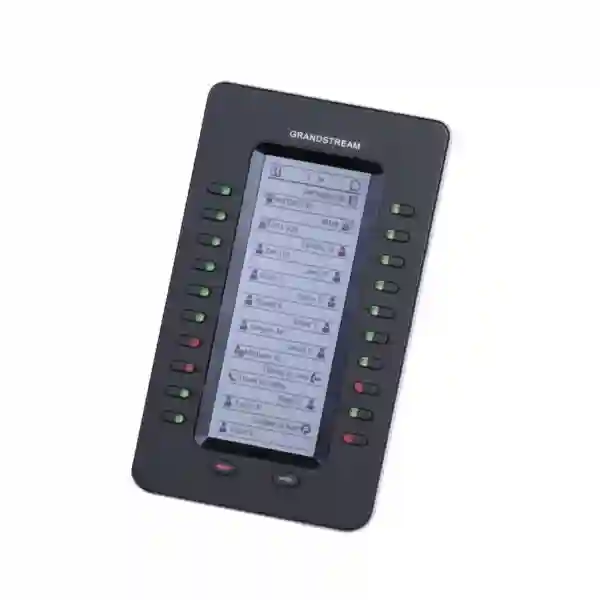
Grandstream GXP2200EXT Extension Module for High-Volume Call Control
The Grandstream GXP2200EXT is an expansion module designed for users who need more programmable call-control keys than a compatible desk phone can provide on its own. It is particularly useful at reception desks, operator positions, executive-assistant stations, customer-service counters and other environments where a user needs to see extension status, place calls quickly, park or pick up calls, transfer conversations and monitor multiple contacts without constantly navigating on-screen menus. Grandstream lists the GXP2200EXT as compatible with the GXP2140, GXP2170 and GXV3240. Each module provides 20 programmable dual-color keys and two pages, giving access to 40 contacts or extensions per module; up to four modules can be daisy-chained for as many as 160 contacts/extensions.
Up to 4 modules / 160 contacts
GXP2140 · GXP2170 · GXV3240
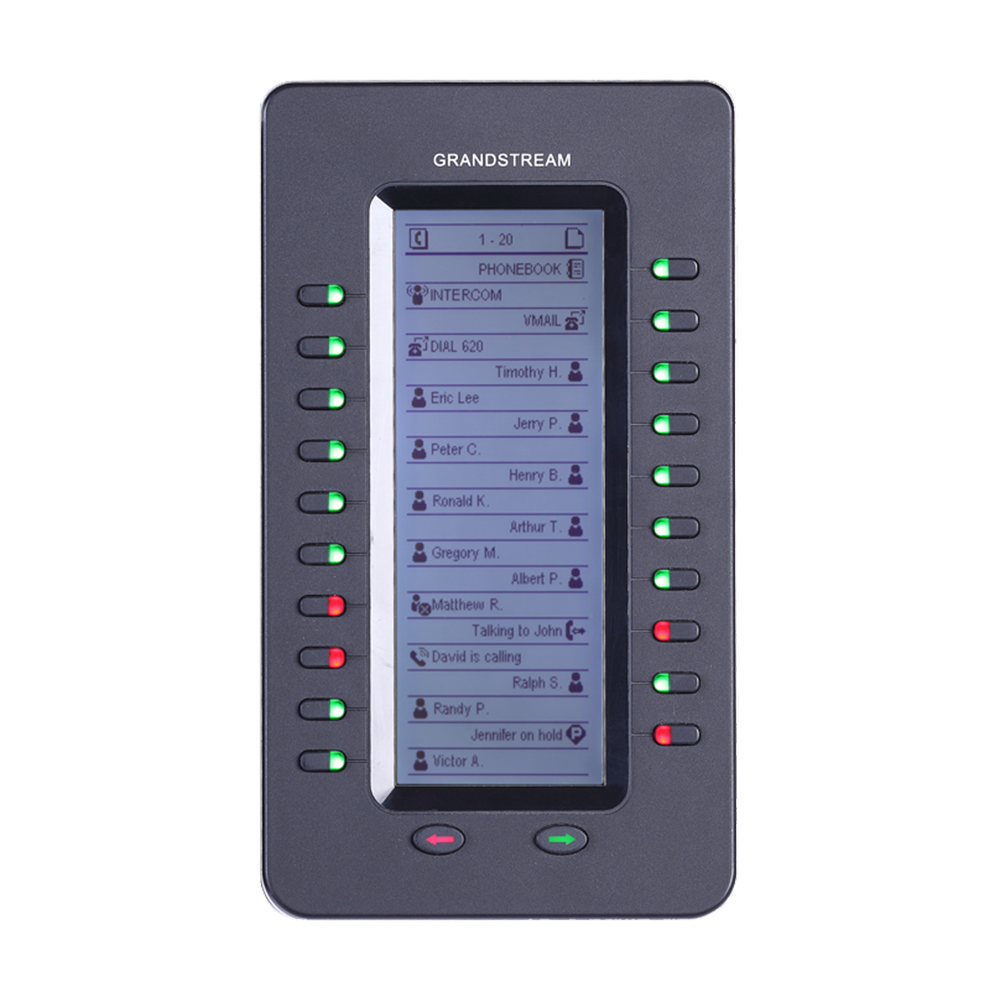
A dedicated display makes programmed contacts and functions easier to scan at a busy attendant position.
Twenty physical programmable keys plus page switching provide access to 40 contacts or extension assignments per module.
Compatible host phones can support up to four GXP2200EXT modules, expanding visibility to as many as 160 contacts/extensions.
The extension module is connected, powered and controlled by the compatible host phone, simplifying the attendant desktop.
The buying question: do you need more visible call-control keys?
A GXP2200EXT purchase makes most sense when the user’s work depends on repeated, fast interaction with many extensions. A receptionist may need to know whether a colleague is available before transferring a caller. An office administrator may repeatedly call the same departments. A supervisor may need quick access to call park, pickup or shared-line functions. In these situations, an expansion module can reduce menu navigation and place frequently used functions directly beside the phone.
The key decision is compatibility. Grandstream specifically identifies the GXP2140, GXP2170 and GXV3240 as compatible hosts for the GXP2200EXT. Buyers using newer GRP-series phones or certain newer GXV video phones should not assume compatibility simply because the product is also a Grandstream extension module. Those environments may instead require the GBX20, depending on the exact phone model. Fourteck can help confirm the phone model, required number of monitored extensions, PBX feature expectations and accessory compatibility before quotation.
Compatibility matrix before you order
| Host phone / family | GXP2200EXT fit | What the buyer should check |
|---|---|---|
| Grandstream GXP2140 | Supported by Grandstream | Required number of extension modules, PBX key functions, phone firmware and EXT-port setup. |
| Grandstream GXP2170 | Supported by Grandstream | Desk layout, required BLF/quick-dial capacity, extension-board provisioning and phone firmware. |
| Grandstream GXV3240 | Supported by Grandstream | Confirm the exact deployment and phone software because configuration paths can vary by host platform. |
| Newer GRP / newer compatible GXV models | Do not assume GXP2200EXT compatibility | Check whether the phone requires Grandstream GBX20 instead. Compatibility must be confirmed by exact model. |
What the programmable keys can do in a real office
Grandstream documents a broad set of call-control functions for the GXP2200EXT. The value is not simply the number of keys; it is the ability to assign a frequently used communication action to a visible, repeatable position. Actual behaviour depends on the host phone, provisioning and PBX support, so a deployment should be validated against the customer’s call flow.
BLF and presence
Use programmed keys to see monitored extension status where supported. This can help attendants avoid transferring a caller blindly to a busy or unavailable colleague.
Speed dial
Place frequent contacts, departments or service numbers on dedicated keys so staff can initiate common calls with less menu navigation.
Call park and pickup
Where the PBX is configured appropriately, operators can use programmed keys to park calls or retrieve ringing/parked calls as part of a shared office workflow.
Transfer and forwarding
A receptionist can combine monitored extension keys with transfer workflows, while call-forward actions can be assigned where supported by the phone and PBX configuration.
Intercom and shared-line use
The module supports functions including intercom and BLA/SCA, useful in environments with assistant/executive workflows or shared call appearances when the PBX supports them.
Conference-related shortcuts
Frequently used call functions can be placed on physical keys so experienced operators can execute routine call handling with a consistent button layout.
Capacity planning: one module or four?
A common procurement mistake is to order expansion hardware before mapping the number of people and functions the user actually needs to see. One GXP2200EXT can expose up to 40 contacts/extensions across its two pages. Four modules can provide up to 160 contacts/extensions. The correct quantity therefore depends on the attendant’s working set, not the total number of PBX users. A 200-user company may need only one module if reception routinely deals with 25 departments and key staff; a smaller organization may need more visible keys if one operator manages multiple departments, shared lines or service queues.
| Configuration | Maximum visible assignments | Typical planning use |
|---|---|---|
| 1 × GXP2200EXT | Up to 40 contacts/extensions | Small reception, executive assistant, department coordinator, focused support desk. |
| 2 × GXP2200EXT | Up to 80 contacts/extensions | Larger reception, multi-department operator, hotel/clinic front desk with broader monitoring needs. |
| 3 × GXP2200EXT | Up to 120 contacts/extensions | High-volume operator where broad extension visibility is useful and desk space supports the layout. |
| 4 × GXP2200EXT | Up to 160 contacts/extensions | Maximum documented expansion for compatible hosts; confirm ergonomics and actual call-flow need. |
Who benefits most from the GXP2200EXT?
Receptionists and switchboard-style attendants
The strongest use case is a receptionist who answers a central number, checks extension status, transfers callers, parks calls and retrieves calls repeatedly throughout the day. A stable key layout can reduce the time spent searching directories.
Executive assistants
Assistants supporting one or more executives can assign key contacts, shared-line functions and frequently used internal numbers to dedicated buttons for fast access.
Customer-service supervisors
Teams that coordinate calls across departments may benefit from monitored extensions, call pickup and one-touch access to internal groups, subject to the PBX configuration.
Hotels, clinics and education front desks
Front-desk teams often interact with many rooms, departments, clinicians, teachers or administrative contacts. A programmed extension board can make repeated routing tasks easier to perform consistently.
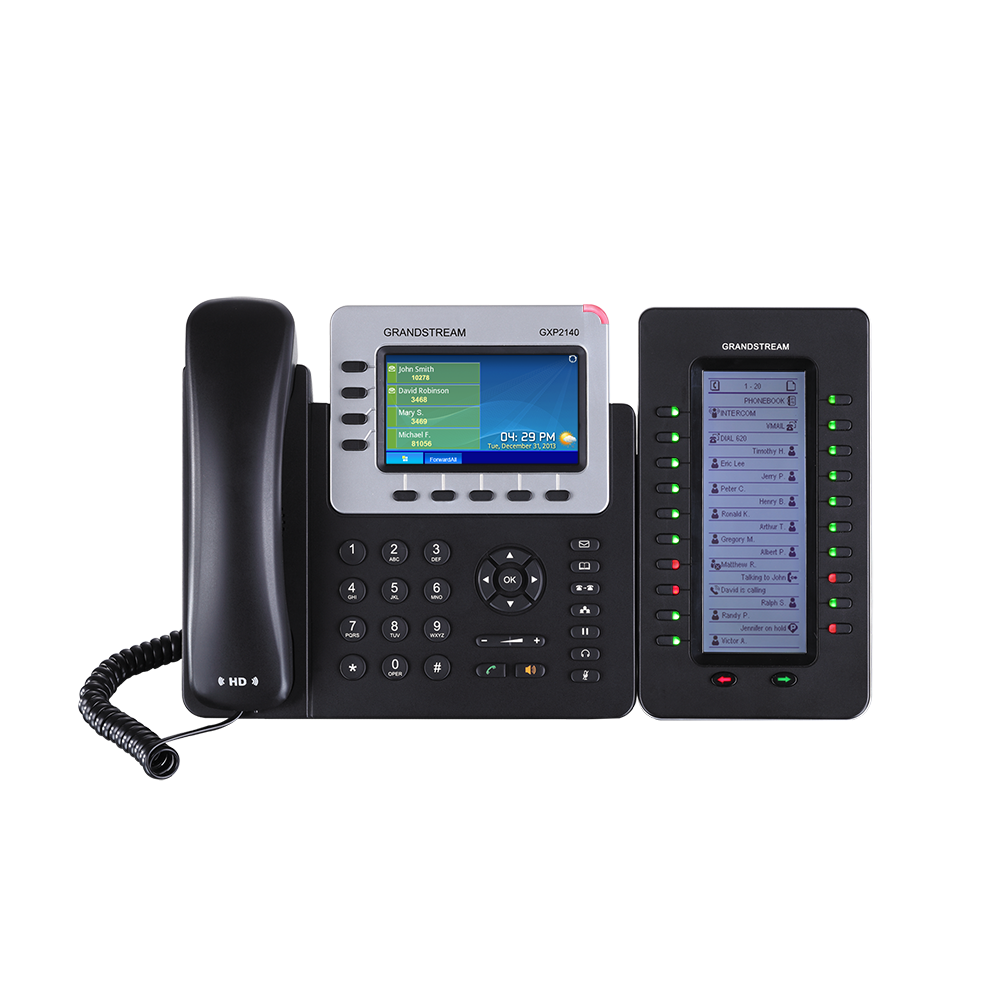
How the module connects to a compatible phone
Grandstream’s installation guidance for GXP2140/GXP2170 deployments uses the phone’s EXT port and an RJ11-to-RJ11 cable supplied with the extension-board package. The module is mechanically attached using the connector plate and screws, and the host phone powers and controls the module. The exact package and deployment should be checked at the time of purchase, especially when equipment is being sourced as replacement stock for an existing estate.
After boot, extension-board settings are managed from the host phone rather than as an independent SIP endpoint. Grandstream also explains that extension-module firmware is delivered through the host phone’s firmware package; there is no separate standalone firmware file for the extension board. This makes the host phone’s model and firmware state important parts of any support or troubleshooting conversation.
Technical specification snapshot
| Product type | Grandstream IP phone extension / expansion module |
|---|---|
| Compatible phones | GXP2140, GXP2170 and GXV3240 |
| Display | 128 × 384 backlit graphic LCD |
| Programmable keys | 20 programmable dual-color buttons per module, with two pages for up to 40 contacts/extensions |
| Maximum expansion | Up to 4 daisy-chained modules, providing up to 160 contacts/extensions |
| Key functions | BLA/SCA, BLF, call park/pick-up, speed dial, presence, intercom, conference, transfer and forward, subject to host/PBX support |
| Power/control | Powered and controlled by the compatible host phone |
| Connection | EXT-port connection; Grandstream installation guidance uses an RJ11-to-RJ11 cable |
| Dimensions | 206 mm × 117 mm × 32 mm |
| Weight | 0.38 kg |
| Operating environment | 0–40°C; 10–90% non-condensing humidity |
| Compliance listed in datasheet | FCC / CE / C-Tick |
Specifications above are based on Grandstream’s GXP2200EXT product documentation. Confirm the exact host phone, current firmware and project requirements before procurement.
GXP2200EXT versus GBX20: do not choose by appearance alone
Grandstream currently lists both GXP2200EXT and GBX20 within its extension-module portfolio, but they are intended for different compatible phone groups. This distinction matters in upgrade projects. A business replacing older GXP phones with newer GRP or GXV phones should not automatically move its existing extension module to the new handset. The correct module is determined by the host phone model.
| Decision point | GXP2200EXT | GBX20 |
|---|---|---|
| Compatible phone examples | GXP2140, GXP2170, GXV3240 | Grandstream lists models including GRP2615, GRP2624, GRP2650, GRP2670, GXV3350 and GXV3450 |
| Per-module assignments | Up to 40 contacts/extensions across two pages | Up to 40 contacts/extensions across two pages |
| Expansion | Up to four modules / 160 contacts/extensions | Up to four modules / 160 contacts/extensions |
| Primary buying rule | Choose only for a documented compatible host phone | Choose only for a documented compatible host phone |
PBX planning matters as much as the hardware
An extension module can expose call features, but it does not create PBX features by itself. BLF subscriptions, shared call appearance, pickup groups, call park slots, intercom behaviour, forwarding and transfer methods depend on the PBX and SIP configuration. For example, a button labelled for an extension can be highly useful only if the PBX publishes the status information the host phone expects and the extension is provisioned correctly. A successful deployment therefore starts with the call flow: who answers, who needs to be monitored, where calls should be parked, how transfers should work, and which departments should be reachable with one press.
For multi-site organizations, the network can also influence the user experience. Voice VLAN design, QoS, PBX reachability, SIP registration, firewall/NAT policy and branch connectivity should already be stable on the host phone. The GXP2200EXT does not replace these network requirements; it adds a more efficient control surface to an existing compatible phone deployment.
A practical deployment workflow
Record the exact model and confirm that Grandstream supports GXP2200EXT with that phone.
List the extensions, departments and call functions the user actually needs at hand.
Confirm BLF, pickup, park, shared-line or intercom requirements against the PBX and provisioning method.
Attach the module, connect the EXT interface, boot the host phone and configure extension-board keys.
Verify status lights, speed-dial targets, transfers, pickup/park and page switching with the actual users.
Buying for Dubai and the UAE
For UAE businesses, the GXP2200EXT is typically relevant in established Grandstream deployments where compatible GXP2140, GXP2170 or GXV3240 phones remain in active service. Before requesting a quote, identify the installed phone model, number of attendant positions, number of extensions to monitor and whether the request is for a new expansion, replacement module, office relocation or PBX refresh. This avoids ordering an accessory that does not match a newer handset introduced during an upgrade.
Organizations in Dubai, Abu Dhabi, Sharjah, Ajman, Deira and Bur Dubai may also need deployment assistance when reception workflows span multiple branches or shared numbers. Fourteck can help translate the operational requirement into a hardware and PBX checklist: compatible phone, required module count, BLF targets, call-park workflow, pickup groups, SIP/PBX support and installation scope. Availability and commercial terms should be confirmed at quotation time rather than assumed from historical listings.
Uganda and East Africa
In Kampala, Entebbe and expanding branch networks, a GXP2200EXT can be considered where compatible Grandstream phones are already deployed and a central receptionist needs broader extension visibility. Projects should account for the PBX topology, inter-branch connectivity and the exact phone estate. For regional Grandstream and IP telephony planning, Fourteck can help match accessories to the installed endpoints instead of assuming that one extension-board model fits every Grandstream phone.
Kenya and Tanzania
Businesses operating in Nairobi, Mombasa, Dar es Salaam, Arusha and multi-site environments can use extension modules to simplify call routing at front desks and administrative stations when the underlying Grandstream phone is compatible. When a project combines older GXP phones with newer GRP/GXV endpoints, treat accessory compatibility as a per-model decision and build a migration plan rather than standardizing blindly on GXP2200EXT.
Kuwait, Nigeria and Ghana
For procurement teams supporting Gulf and West African offices, the most important inputs are the host phone model, module quantity, call-control functions and replacement/upgrade context. A central specification can still be used across regions, but each site should verify that its installed handset is one of the supported GXP2200EXT hosts and that PBX provisioning delivers the expected BLF and call-control behaviour.
Procurement checklist for a clean quotation
A useful RFQ for the GXP2200EXT should contain more than the model name. The following details help prevent compatibility mistakes and allow the quotation to reflect the real deployment:
- Exact Grandstream host phone model at each attendant desk.
- Quantity of attendant desks and quantity of GXP2200EXT modules required per desk.
- Approximate number of extensions, departments or functions that must be assigned to keys.
- PBX platform and whether BLF, call park, pickup, shared-line appearance or intercom is required.
- Whether the request is new deployment, replacement, office move, expansion or migration.
- Whether installation, configuration and user handover are required in addition to hardware.
- Site/country and required delivery or deployment destination so availability can be checked at quotation time.
When the GXP2200EXT may not be the right choice
The module is not a universal accessory for every Grandstream desk phone. If the customer is deploying a GRP2615, GRP2624, GRP2650, GRP2670, GXV3350 or GXV3450, Grandstream’s extension-module guidance points to the GBX20 rather than the GXP2200EXT. Likewise, if an organization is planning a broader endpoint modernization, it can be better to evaluate the phone-and-module combination together rather than buying an accessory for an older host without considering the expected life of the handset estate.
It may also be unnecessary for users who only monitor a small number of colleagues or rarely transfer calls. In those cases, built-in programmable keys, on-screen contacts or PBX soft-client tools may already meet the requirement. The GXP2200EXT is most valuable when a user truly benefits from a larger, persistent set of physical call-control keys.
Support and troubleshooting considerations
If a module does not display programmed extensions or behaves unexpectedly, troubleshooting should begin with the host phone. Verify that the phone model is supported, that the module is connected through the EXT interface, that the connector and cable are secure, and that the host phone sees the extension board. Next, review the phone’s extension-board configuration and PBX-side feature provisioning. BLF or presence issues can be caused by PBX subscription/configuration rather than the physical module.
Firmware maintenance should also be handled through the compatible host phone. Grandstream documents that extension-board firmware is bundled with the phone firmware; administrators should therefore avoid treating the board as a separately upgraded SIP device. During boot or firmware upgrade, follow Grandstream’s guidance and avoid unnecessary power interruption.
Why engage Fourteck for an extension-module requirement?
The useful part of an accessory purchase is not the accessory name; it is making sure the device fits the phone, PBX and call flow. Fourteck can help customers identify whether the GXP2200EXT matches the installed Grandstream phone, estimate the number of modules required, review the intended BLF/speed-dial/call-park workflow and identify when a newer phone family calls for a different extension module. This is especially useful in mixed estates where different branches have different generations of Grandstream endpoints.
For broader communications planning, explore Fourteck IP phone solutions, Grandstream solutions in the UAE, and Fourteck UAE technology solutions. For manufacturer specifications and documentation, consult the official Grandstream GXP2200EXT product page.
Share the host phone model, number of monitored extensions, PBX platform, module quantity and deployment location. Fourteck can use those details to confirm the right accessory path and prepare a requirement-based quotation subject to current availability.
Request compatibility and quotation assistance
Frequently asked questions about Grandstream GXP2200EXT
What is the Grandstream GXP2200EXT?
The GXP2200EXT is an extension module for compatible Grandstream desk phones. It adds a backlit display and programmable dual-color keys so high-volume users can monitor contacts/extensions and access call-control functions more directly.
Which phones support the GXP2200EXT?
Grandstream lists the GXP2140, GXP2170 and GXV3240 as compatible with the GXP2200EXT. Buyers should confirm the exact phone model before ordering because newer Grandstream phone families may use a different extension module.
How many contacts or extensions can one GXP2200EXT handle?
One module has 20 programmable buttons and two pages, providing access to as many as 40 contacts/extensions. Up to four modules can be daisy-chained for a maximum of 160 contacts/extensions on supported hosts.
Does the GXP2200EXT need a separate power adapter?
Grandstream describes the GXP2200EXT as connected, powered and controlled by the compatible host phone. The deployment should still follow the host phone’s power and installation requirements, particularly when multiple modules are attached.
What functions can be assigned to the buttons?
Documented functions include BLA/SCA, BLF, call park/pick-up, speed dial, presence, intercom, conference, transfer and forward. Actual operation depends on the compatible host phone, firmware, provisioning and PBX support.
How is GXP2200EXT firmware updated?
Grandstream states that extension-module firmware is bundled with the host phone firmware. The module does not use a separate standalone firmware file; updates are delivered through the compatible phone.
Should I buy GXP2200EXT or GBX20?
Choose based on the host phone model. GXP2200EXT is documented for GXP2140, GXP2170 and GXV3240. Grandstream documents GBX20 for selected newer GRP and GXV models, so the phone model should be verified before purchase.
Can Fourteck quote the GXP2200EXT for Dubai or other regions?
Fourteck can review a requirement for the UAE and other supported regions. Provide the host phone model, quantity, module count per desk, PBX platform and deployment location so compatibility and current commercial availability can be checked before quotation.
Plan the attendant desk around the workflow, not just the key count
The GXP2200EXT is a focused accessory for compatible Grandstream phones that can make high-volume call handling faster and more visible. Its real value appears when the extension-board layout reflects the user’s daily workflow: the colleagues they monitor, the departments they call, the park/pickup functions they use and the transfer patterns they repeat. Confirm the phone model and PBX requirements first, then size the number of modules. That approach produces a cleaner deployment and reduces the risk of ordering an accessory that does not fit the current endpoint estate.
Reviews
There are no reviews yet.