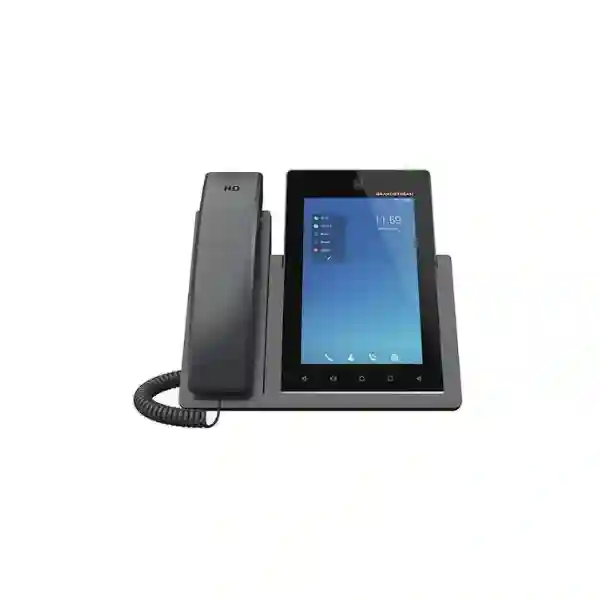
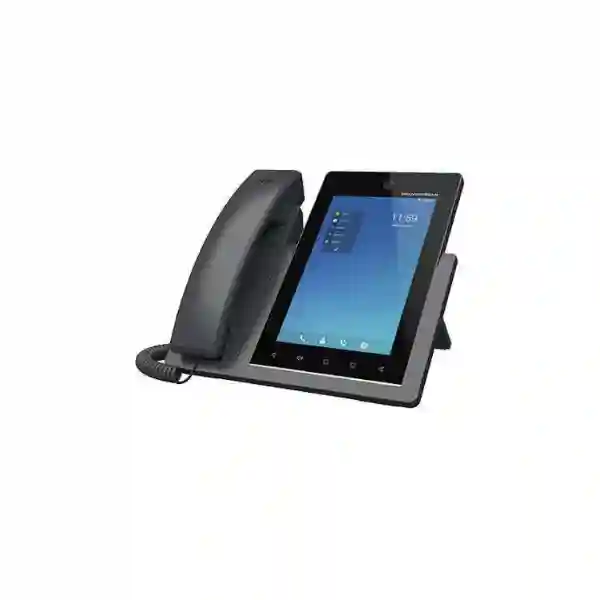
Grandstream GXV3470 Android 14 Video IP Phone for Business
The Grandstream GXV3470 is a 7-inch smart IP video phone that combines enterprise SIP telephony, HD voice and video, Android-based productivity, Wi-Fi 6, Bluetooth 5.0, dual Gigabit Ethernet and PoE/PoE+ in one desktop device. It is designed for users who need more than a conventional desk phone: executives, managers, reception teams, project leaders, customer-facing staff and collaboration-heavy employees can handle voice, video, applications and conferencing from a single endpoint. The GXV3470 supports 16 lines and up to 16 SIP accounts, a tiltable 2-megapixel camera with privacy shutter, 10-way audio conferencing and 3-way 720p video conferencing. For businesses in Dubai, Abu Dhabi, Sharjah and across the UAE, the right buying decision depends not only on the phone itself but also on PBX compatibility, network design, PoE budget, Wi-Fi planning, headset requirements, security policy and the applications that need to run on the endpoint.
16 SIP accounts
7-inch touch display
Wi-Fi 6 + Bluetooth 5.0
PoE / PoE+
GXV3470 at a glance: what problem does it solve?
Many business users now work across voice calls, video meetings, messaging, CRM screens, directories and web applications during the same day. A basic SIP phone can provide reliable calling, but it may force the user to shift constantly between a handset, laptop, mobile phone and meeting-room system. The GXV3470 is intended to reduce that fragmentation at the desk. It combines a 16-line SIP phone with a 7-inch capacitive touchscreen, Android 14, a built-in 2-megapixel camera, HD speakerphone, USB connectivity, HDMI output, Bluetooth 5.0 and dual-band Wi-Fi 6. The result is a communications endpoint that can serve as a traditional business phone while also supporting richer collaboration workflows.
This positioning matters when evaluating the Grandstream GXV3470 for a UAE office. It should not be selected only because it has a large screen or a camera. It makes the most sense where the user’s daily job genuinely benefits from video, multiple SIP identities, touch interaction, Bluetooth peripherals, Android applications or flexible wired and wireless connectivity. A finance clerk making straightforward internal calls may be better served by a simpler IP phone. An executive, branch manager, reception supervisor, project lead or customer-service manager who frequently switches between calls and collaboration tools can make much stronger use of the GXV3470’s capabilities.
Fourteck’s role in a GXV3470 project can include requirements assessment, PBX and SIP compatibility planning, VLAN and QoS guidance, PoE switching checks, endpoint configuration planning and selection of suitable deployment options. Final compatibility should always be confirmed against the target PBX, firmware level, applications, security requirements and accessories before procurement.
16 lines and 16 SIP accounts
Suitable for users who manage multiple extensions, departments, identities or SIP services from one desktop endpoint. Actual account design should follow the PBX architecture and organizational call-flow requirements.
2 MP tiltable camera
The integrated camera includes a privacy shutter and supports up to 1080p at 30 fps capture, while the endpoint supports 3-way 720p video conferencing at 30 fps.
Gigabit, Wi-Fi 6 and PoE
Dual Gigabit Ethernet ports, integrated PoE/PoE+ and dual-band Wi-Fi 6 provide flexible deployment choices for structured-cabling environments and approved wireless use cases.
Android 14 smart endpoint
Android 14 gives the phone a tablet-like operating environment for compatible applications, browser-based workflows and productivity tools, subject to enterprise security policy and application compatibility.
Verified GXV3470 technical specification
The following specification summary is based on current Grandstream product and documentation information. Specifications can be affected by firmware revisions or regional packaging, so final project validation should use the current vendor documentation at the time of deployment.
| Model | Grandstream GXV3470 |
|---|---|
| Product class | High-end smart IP video phone for Android |
| Lines / SIP accounts | 16 lines, up to 16 SIP accounts |
| Display | 7-inch 1280 × 800 capacitive 5-point touchscreen |
| Operating system | Android 14 |
| Processor / memory | Quad-core 2.0 GHz ARM Cortex-A55, 4 GB RAM, 16 GB eMMC flash |
| Camera | Tiltable 2 MP CMOS camera with privacy shutter; up to 1080p at 30 fps capture |
| Video conferencing | 3-way 720p at 30 fps capability |
| Audio conferencing | 10-way HD audio conferencing |
| Ethernet | Dual switched auto-sensing 10/100/1000 Mbps ports |
| Power over Ethernet | Integrated PoE / PoE+ |
| Wi-Fi | Integrated dual-band Wi-Fi 6, 2.4 GHz and 5 GHz, 802.11a/b/g/n/ac/ax |
| Bluetooth | Bluetooth 5.0 |
| Audio | HD handset and dual-microphone HD speakerphone with Noise Shield 2.0, echo cancellation and double-talk performance |
| Peripheral interfaces | HDMI-out, USB 3.0, USB 2.0, RJ9 headset jack and EHS support for compatible headsets |
| Device management | Grandstream Device Management System (GDMS) support |
Why a 7-inch Android video phone can be useful at the desk
The value of a smart video phone is not simply that it can display more information than a traditional desk phone. The larger 7-inch touch interface changes how the endpoint can be used during busy workflows. Users can move through contacts, call history, settings, applications and collaboration tasks with touch interaction rather than relying only on physical feature keys. For employees who frequently need visual context during a conversation, this can reduce dependence on a separate laptop window or mobile phone.
The Android 14 platform also makes the GXV3470 more flexible than a closed telephony appliance. Enterprises can assess compatible Android applications for communication and productivity, while IT teams can still treat the unit as a managed business endpoint. This flexibility should be governed carefully. A desktop phone connected to the corporate voice and data network is part of the enterprise security surface, so unrestricted application installation may not be appropriate. Organizations should define which applications are required, which sources are approved, whether users can install applications independently, and how firmware, credentials and device configuration are managed.
For an executive or department head, the screen can provide quick access to SIP calls, video communication and approved apps without making the desk more complicated. For reception or customer-facing users, the display can help with contacts, visual calling and multiple line handling. For branch managers, the combination of Ethernet, Wi-Fi 6 and Bluetooth can simplify endpoint placement while maintaining professional telephony capabilities. In all cases, the device should be selected because it improves a real workflow rather than because it has more features on paper.
A useful evaluation question is: what will the user do on the GXV3470 every day that cannot be handled efficiently by a conventional IP phone? If the answer includes frequent video calls, multiple SIP identities, touch-based application use, Bluetooth peripherals, HDMI output, collaborative calling or a desire to consolidate several communication tools, then the GXV3470 becomes a strong candidate for technical evaluation.
Voice, video and conferencing capabilities in practical use
SIP calling for complex users
With 16 lines and up to 16 SIP accounts, the GXV3470 can accommodate users who need several identities or call appearances. This may include an executive with a personal extension and departmental line, a receptionist managing multiple service numbers, a manager overseeing separate branch identities, or a support supervisor who needs access to several queues and call flows. The presence of many SIP accounts does not mean every deployment should use all of them. A clean PBX design is generally easier to support, so account assignments should reflect actual business roles and routing requirements.
HD audio and noise management
The GXV3470 includes an HD handset and dual-microphone HD speakerphone with Noise Shield 2.0, advanced echo cancellation and double-talk performance. This matters for open offices, manager cabins and collaboration-heavy desks where the user may switch between handset, speakerphone and headset during the day. Good audio performance depends not only on the endpoint but also on the LAN, WAN, SIP trunk, codec configuration, PBX, room acoustics and headset quality. Voice VLANs, QoS and proper switch configuration can therefore be as important as the phone specification itself.
Integrated camera with privacy control
The built-in 2-megapixel CMOS camera is tiltable and includes a physical privacy shutter. The camera supports up to 1080p at 30 fps capture, giving users a dedicated video endpoint for face-to-face communication. The privacy shutter is particularly useful in executive offices, healthcare administration, finance, government, education and other environments where users want a visible physical control over the camera. Organizations should still apply their normal privacy, meeting and access-control policies to video applications and account credentials.
Conferencing without leaving the desk
The phone supports 10-way HD audio conferencing and 3-way 720p video conferencing at 30 fps. This can be useful for small-group discussions, quick management calls, branch coordination and direct customer or vendor conversations. The GXV3470 should not automatically be treated as a replacement for a dedicated boardroom video system: room size, microphone coverage, camera framing, display size and meeting-platform requirements are different. Instead, it works best as a personal or small-space collaboration endpoint where the user wants strong desktop communication without reserving a meeting room.
Network and power planning for GXV3470 deployment
Smart IP video phones create more network-planning questions than basic voice-only endpoints. A conventional office handset may generate relatively predictable voice traffic, while the GXV3470 can also handle video, Android applications, Wi-Fi traffic, Bluetooth peripherals, firmware updates and potentially cloud-managed services. IT teams should therefore evaluate the endpoint as part of the wider LAN and security architecture rather than as an isolated telephone.
Dual Gigabit Ethernet
The dual switched auto-sensing 10/100/1000 Mbps Ethernet ports allow the phone to participate in a Gigabit desktop network. In common desk designs, one port can connect toward the network switch while the other can be used for a downstream workstation where policy permits. Whether this topology is appropriate depends on VLAN design, switchport policy, NAC controls and the organization’s preference for dedicated cabling. Business-critical users may benefit from a dedicated, managed wired connection even though the phone also includes Wi-Fi 6.
PoE and PoE+ considerations
Integrated PoE/PoE+ can reduce desk power clutter and simplify centralized power management. Before a roll-out, the switch should be checked for compatible PoE standards and total power budget. A switch may have enough physical PoE ports but insufficient available power to support every connected device at the planned load. This becomes important in offices that also power wireless access points, cameras, access-control devices and other PoE endpoints from the same switch stack. Project planning should therefore include both port count and power capacity.
Wi-Fi 6 as a deployment option
Integrated dual-band Wi-Fi 6 on 2.4 GHz and 5 GHz gives the GXV3470 flexibility where an approved wired port is unavailable or where a workspace changes frequently. Wireless deployment should still be engineered. The phone should have reliable coverage, suitable signal quality, secure authentication and sufficient airtime capacity. Video calling makes poor Wi-Fi design more visible than simple voice calling. For high-priority users, a wired Gigabit connection is often the most predictable choice, while Wi-Fi 6 can provide valuable flexibility in selected environments.
Voice VLANs, QoS and security
A managed deployment should consider VLAN separation, QoS, DHCP options where applicable, DNS, NTP, SIP security, TLS/SRTP configuration, access-control policy and provisioning security. The exact design depends on the PBX, switch environment and enterprise security model. In multi-branch UAE organizations, consistency across sites is especially valuable: standardized VLAN IDs, provisioning methods, naming conventions, firmware policies and extension templates can simplify support and reduce configuration drift.
Bluetooth, USB, HDMI and headset workflow
A high-end desktop communication device is most useful when it fits naturally with the user’s accessories and workspace. Bluetooth 5.0 allows the GXV3470 to connect with compatible Bluetooth headsets and other supported devices. This is valuable for executives who move around a private office, managers who spend long periods on calls, and reception or support personnel who need hands-free operation. Headset selection should still be validated for call control, comfort, microphone quality, charging method and the particular user environment.
The phone also provides an RJ9 headset interface with EHS support for compatible headsets. Electronic hook switch capability can allow supported headsets to answer or end calls remotely, but EHS functionality should always be checked against the exact headset model and accessory requirements before purchase. A headset described as compatible with Grandstream in general is not automatically guaranteed to provide every call-control function with every phone and firmware combination.
USB 2.0 and USB 3.0 expand the device’s peripheral options. The usefulness of USB depends on the application, supported accessory and firmware. For controlled enterprise deployments, IT teams should decide which peripheral classes are allowed and whether USB storage or accessories create any security concerns. HDMI output can extend visual content to an external display, which may be useful for a manager office, huddle space or small collaboration area. HDMI output does not transform the GXV3470 into a full room system, but it can make the smart-phone interface or supported visual workflow easier to share.
The best accessory plan starts with the user requirement. A receptionist may prioritize a comfortable wired or EHS headset. An executive may prefer Bluetooth. A huddle-space user may value HDMI output. A project lead may use the touchscreen and speakerphone most of the time. Selecting accessories by job role avoids unnecessary cost and creates a more consistent user experience.
Who should consider the Grandstream GXV3470?
Executives and senior managers
A single device can support SIP calling, video communication, Bluetooth accessories, touch interaction and approved Android tools. The 7-inch screen offers more workspace than a traditional phone without occupying as much desk space as a full room system.
Reception and front-office teams
Multiple SIP accounts, a large touch interface, contacts, call history, video and headset options can suit front-office users who handle varied communications. Call-flow and PBX design should be mapped carefully to the user’s real responsibilities.
Branch and operations managers
Managers coordinating between Dubai, Abu Dhabi, Sharjah or international branches can use the endpoint for daily voice, video and collaborative communication while IT retains a standardized SIP device strategy.
Customer-facing specialists
Sales, account management, professional services and support teams can benefit when frequent voice and video communication is combined with access to business applications and a professional desk-phone experience.
Small collaboration spaces
The 3-way video capability, 10-way audio conferencing, speakerphone and HDMI output can serve selected personal offices or small huddle use cases where a dedicated room system would be unnecessary.
Power users with multiple identities
The 16-account capacity can fit users who genuinely need several SIP identities, branch extensions or departmental lines. It should be designed intentionally rather than populated simply because capacity is available.
When the GXV3470 may be more than you need
A premium smart video phone is not automatically the right endpoint for every desk. Many employees mainly need reliable extension calling, transfer, hold, conferencing and a headset. In those roles, a simpler Grandstream desk phone can often deliver a cleaner user experience with lower deployment complexity. Choosing the same advanced model for every employee may also increase support effort because Android applications, camera settings, account permissions and touchscreen features need governance.
The GXV3470 should therefore be assigned based on workflow. It may be excessive for warehouse desks that make occasional internal calls, basic back-office extensions, hot-desking locations where users need only simple call functions, or deployments where cameras are not permitted by policy. It may also be the wrong choice if the organization already standardizes all video collaboration on laptops and users have no need for Android applications at the desk.
A tiered endpoint strategy can be more practical. Standard users receive a professional voice phone; managers receive a model with richer call handling; collaboration-heavy users receive the GXV3470 or another video endpoint. This role-based approach helps align features, cost, training and support with business value.
GXV3450, GXV3470 or GXV3480: choosing by workspace
Grandstream’s GXV34x0 family includes GXV3450, GXV3470 and GXV3480 models. Current Grandstream documentation identifies the GXV3450 with a 5-inch display, the GXV3470 with a 7-inch display and the GXV3480 with an 8-inch display, while the family shares the Android 14 smart-video-phone concept. Screen size is therefore one useful way to frame the choice, but it should not be the only criterion. Project teams should compare current vendor specifications, ports, form factor, accessories, user workflow and budget before standardizing a model.
| Decision factor | GXV3450 | GXV3470 | GXV3480 |
|---|---|---|---|
| Display size | 5-inch | 7-inch | 8-inch |
| Best starting point | Compact smart-phone workspace | Balanced screen size and desk footprint | Maximum display emphasis |
| Typical evaluation question | Is compactness the priority? | Do users need comfortable touch/video use without the largest footprint? | Is a larger visual workspace worth the desk space? |
| Recommendation | Validate current model specification | Strong middle option for many executive and collaboration desks | Validate current model specification |
The GXV3470 often sits naturally in the middle of the family because a 7-inch screen is large enough for comfortable touch interaction and video while remaining manageable on a conventional office desk. That said, the correct model is the one that best matches the user requirement and current vendor specification rather than a simple assumption that larger is always better.
PBX and SIP compatibility: what to confirm before ordering
The GXV3470 is a SIP endpoint, but successful deployment still depends on the PBX or hosted voice platform. Businesses may operate Grandstream UCM systems, 3CX, hosted SIP services or other SIP-based platforms, each with its own provisioning, supported features, codec preferences, TLS settings, BLF behavior, video capabilities and authentication model. Basic registration is only the first compatibility checkpoint.
Before procurement, confirm how many SIP accounts the user actually needs; whether the PBX supports required call features; how voicemail, BLF, transfer, pickup and directories are implemented; whether video calling is required between endpoints; whether the system supports the planned codecs; how TLS and SRTP are configured; and how phones will be provisioned. For large deployments, zero-touch or centralized provisioning can reduce manual work substantially compared with configuring each phone independently.
If the endpoint will run third-party Android collaboration applications, validate those applications separately from SIP registration. A SIP phone can be fully registered to the PBX while a specific Android application still has its own compatibility, authentication, update or licensing requirements. Treat each application as a separate integration layer. This is especially important where meeting platforms, CRM apps or business messaging tools are part of the requirement.
Fourteck can help translate a user requirement into a compatibility checklist covering PBX, SIP accounts, switching, PoE, VLANs, QoS, headsets, Wi-Fi and application use. For complex migrations, a pilot with representative users is often more valuable than relying entirely on feature lists.
A practical GXV3470 deployment checklist
- Define the user role. Identify whether the endpoint is for an executive, reception desk, manager, support lead, branch office, huddle space or another role.
- Map the call workflow. Document extensions, SIP accounts, queues, ring groups, transfer behavior, voicemail and any multi-line requirements.
- Confirm PBX compatibility. Validate registration, provisioning, feature behavior, codecs, video requirements and security settings with the target platform.
- Check switching and PoE. Confirm Gigabit switch ports, PoE/PoE+ compatibility, total switch power budget and any downstream-PC design.
- Plan VLAN and QoS. Define voice/data separation, DHCP, DNS, NTP, QoS and access-control policy.
- Decide wired versus Wi-Fi. Use wired Ethernet where predictable performance is the priority; use Wi-Fi 6 where mobility or cabling constraints justify it and wireless coverage is engineered.
- Select headset and peripherals. Confirm Bluetooth, RJ9/EHS, USB or HDMI requirements with exact accessory compatibility.
- Define Android application policy. List required apps, approved sources, user permissions and update ownership.
- Standardize firmware. Establish an approved firmware version and review release notes before mass deployment or major upgrades.
- Create a provisioning template. Standardize account naming, time zone, language, network, security, directory and feature settings.
- Pilot representative users. Test call quality, video, headset control, Wi-Fi or wired connectivity and application behavior before broader roll-out.
- Document handover. Provide administrators and users with the settings, support contacts, accessory information and operational guidance required for ongoing use.
Firmware, administration and lifecycle discipline
Firmware management is an important part of any smart endpoint deployment. Grandstream publishes GXV34xx firmware and release information, and administrators should review release notes before moving production devices between major firmware trains. Current vendor firmware notes for the GXV34xx family include specific upgrade-path cautions, including factory-reset behavior when moving from certain 1.0.3.x builds to 1.0.5.x and restrictions on downgrading after selected upgrades. These details illustrate why a controlled upgrade process is safer than ad-hoc updating.
For a business deployment, firmware should be tested on a small representative set of phones before a large roll-out. Verify SIP registration, inbound and outbound calls, transfer, hold, conferencing, voicemail, directories, headset control, Wi-Fi, Bluetooth, video functions and any installed Android applications. The more workflows the GXV3470 supports, the more important regression testing becomes.
The GXV3470 is also supported by Grandstream device-management tooling such as GDMS. Centralized management can help administrators organize devices and reduce manual configuration effort, but management architecture should be aligned with company policy. Confirm which management platform will be authoritative, who has administrative access, how credentials are protected and how changes are documented.
Lifecycle planning should include more than firmware. Keep an inventory of device serials and locations, PBX assignments, firmware baseline, headset model, switch port, VLAN, user role and any special configuration. This information reduces troubleshooting time when a device is moved, replaced or reassigned.
GXV3470 for Dubai and UAE business environments
Dubai offices often combine local teams, regional management, customer-facing roles and international collaboration. A smart video endpoint can fit environments where desk users regularly switch between telephone conversations, video communication and online business tools. The GXV3470 is especially relevant for executive desks, professional services, hospitality administration, branch coordination, technology companies, finance teams, logistics management and customer-service supervisors that want a richer endpoint than a standard SIP handset.
In Abu Dhabi, requirements may place more emphasis on controlled enterprise networks, formal procurement, standardized security policy and long-term support. The GXV3470 can be evaluated within these environments, but the project should define PBX interoperability, firmware governance, application permissions, VLANs, PoE and accessory standards before deployment. For government-related, energy, healthcare or large-enterprise environments, internal compliance policy may also determine whether camera-enabled endpoints or third-party Android applications are allowed.
Sharjah and Ajman businesses may use the GXV3470 for branch managers, reception points, service businesses and multi-site operations where reliable SIP calling and visual collaboration need to coexist. Deira and Bur Dubai include dense commercial environments with retail, trading, travel, logistics and service companies; here, requirements may focus on multiple business identities, front-office communication, compact desk usage and integration with an existing PBX.
Across the UAE, the most important design question is not the city name but the user and network requirement. Offices with structured cabling can take advantage of Gigabit Ethernet and PoE/PoE+. Locations with changing seating or limited cabling can evaluate Wi-Fi 6. Executives may prefer Bluetooth headsets, while reception users may prefer wired or EHS headsets. Organizations with several branches can benefit from standardized configuration and centralized management.
Fourteck can support requirement discussions for UAE deployments and help compare the GXV3470 with other endpoint options. Price, stock, delivery, warranty and exact commercial terms should be confirmed at the time of quotation rather than assumed from a static product page.
Regional and multi-country deployment considerations
Organizations operating from the UAE into Africa or other GCC markets often want one endpoint standard across multiple offices. A GXV3470 deployment can be evaluated for teams in Uganda, Kenya, Tanzania, Nigeria, Ghana or Kuwait where the same user profile requires advanced SIP and video communication. Multi-country standardization can simplify training and support, but it also introduces additional considerations around local network quality, SIP services, power infrastructure, import channels, PBX topology and application policy.
For a Kampala office, for example, the design may need to account for branch connectivity to a central PBX, internet resilience and backup power. A Nairobi or Dar es Salaam branch may have a different WAN design and may use a local SIP trunk rather than centralized call routing. A Kuwait office may share corporate standards with Dubai but operate through different telecom services and procurement processes. The endpoint can remain consistent while the surrounding architecture changes by country.
When video calling is part of the requirement, WAN quality deserves particular attention. Packet loss, jitter and unstable latency that might be tolerable for some web applications can become obvious during real-time communication. QoS within the LAN helps, but it cannot repair an underperforming WAN or internet link. Branch deployments should therefore test voice and video across the real network path before large-scale standardization.
Fourteck’s broader regional network includes resources for the UAE, Kenya, Uganda, Tanzania, Ghana, Nigeria, Kuwait and other markets. For a multi-country project, use a common technical baseline but validate local commercial and telecom conditions separately.
Security considerations for an Android-based SIP endpoint
The GXV3470 combines IP telephony with Android functionality, so security planning should cover both domains. On the SIP side, organizations should consider secure signaling and media where supported by the PBX design, strong account credentials, restricted administrative access, protected provisioning, network segmentation and disciplined firmware maintenance. On the Android side, application installation, permissions, web access and user privileges should align with enterprise endpoint policy.
The device should not become an unmanaged tablet simply because it runs Android. Business users may not need permission to install arbitrary applications. IT teams can define a small approved set, test those apps against the selected firmware version, and document what data they access. If an application stores credentials or customer information, its security model should be reviewed just as it would be on a smartphone or tablet.
Physical placement also matters. A video phone on a reception counter or shared desk has different privacy requirements from a phone in a private executive office. The camera privacy shutter provides a useful physical control, while account logout, screen-lock behavior and access to contacts or call history should be considered for shared-use scenarios.
For regulated or high-security environments, confirm policy before purchasing. A technically capable endpoint may still be unsuitable if cameras, Bluetooth, Wi-Fi or third-party applications are restricted. In such cases, a simpler model or a specifically controlled configuration may be more appropriate.
Procurement questions that improve the final quotation
A useful quotation request includes more than a model number and quantity. The following information helps determine whether the GXV3470 is the correct endpoint and what supporting components may be required:
- Number of GXV3470 units required and whether deployment is at one site or several branches.
- Current PBX or hosted voice platform and the number of SIP accounts expected per user.
- Requirement for voice only, voice plus video, Android applications or meeting-platform use.
- Wired Gigabit Ethernet availability at each desk and whether a downstream PC will share the phone connection.
- PoE switch model, available PoE budget and whether any ports are already allocated to cameras or access points.
- Wi-Fi 6 requirement and quality of 5 GHz coverage if wireless deployment is planned.
- Preferred headset type: Bluetooth, RJ9, EHS or another validated option.
- Need for HDMI output or USB peripherals.
- Need for centralized provisioning, GDMS or another management approach.
- Target countries or UAE emirates, because deployment logistics and telecom architecture may differ by location.
- Any security restrictions affecting camera, Bluetooth, Wi-Fi, USB or application installation.
Providing these details reduces the risk of purchasing a capable phone that does not fit the surrounding environment. It also makes it easier to identify whether a simpler phone, a larger GXV34x0 model or a dedicated conferencing device would be a better choice for some users.
Why businesses may choose Fourteck for GXV3470 planning
The most useful value in an IP phone project comes from matching the endpoint to the wider communication system. Fourteck approaches the GXV3470 as part of a complete business-communications design rather than as an isolated device. That means discussing user roles, PBX platform, SIP accounts, switching, PoE, VLANs, QoS, Wi-Fi, headsets, video requirements, management and regional deployment considerations before recommending a final configuration.
This consulting approach is particularly relevant to the GXV3470 because it has more capability than a basic desk phone. If Android applications, video collaboration or multiple accounts are not needed, a different endpoint may be more economical and easier to support. If those capabilities are central to the user’s work, then the network and PBX should be designed so the phone can use them effectively.
For UAE projects, Fourteck can discuss deployments in Dubai, Abu Dhabi, Sharjah, Ajman, Deira and Bur Dubai as well as multi-site requirements. For regional projects, organizations can also discuss requirements spanning markets such as Kuwait, Kenya, Uganda, Tanzania, Ghana and Nigeria. Exact availability, pricing and project timelines should be confirmed through a current quotation.
A strong project outcome is not defined by the number of features enabled. It is defined by whether users can communicate reliably, whether IT can manage the endpoint consistently and whether the design can be supported over time.
Frequently asked questions about the Grandstream GXV3470
Does the GXV3470 run Android 14?
Yes. Current Grandstream product information lists the GXV3470 with Android 14. When planning applications, confirm that each required app is compatible with the device, current firmware and enterprise security policy.
How many SIP accounts does the GXV3470 support?
The GXV3470 supports 16 lines and up to 16 SIP accounts. The practical number used should match the PBX design and the employee’s real communication requirements.
Does the GXV3470 support Wi-Fi 6?
Yes. It includes integrated dual-band Wi-Fi 6 on 2.4 GHz and 5 GHz. Wireless deployment should still be validated for coverage, security, capacity, latency and video-call performance.
Can the GXV3470 be powered by PoE?
Yes. The phone supports integrated PoE/PoE+. Confirm the switch supports the required standard and has sufficient total power budget for all connected devices.
What size screen does the GXV3470 have?
It has a 7-inch capacitive 5-point touchscreen with 1280 × 800 resolution, providing a comfortable interface for calls, contacts, applications and video workflows.
Does the GXV3470 have a camera privacy shutter?
Yes. The integrated 2-megapixel camera is tiltable and includes a physical privacy shutter. This is useful where users want a visible physical camera-control mechanism.
Can the GXV3470 connect to Bluetooth headsets?
Yes. It includes Bluetooth 5.0. Exact headset behavior and call-control functions should be checked with the chosen headset model before bulk procurement.
How many participants can the phone conference?
Grandstream specifies 10-way HD audio conferencing and 3-way 720p video conferencing at 30 fps for the GXV3470. External meeting services may have their own limits and licensing rules.
Is the GXV3470 suitable for a reception desk?
It can be suitable where reception staff benefit from multiple SIP accounts, a large touchscreen, headset support, video or business applications. For basic reception calling, a simpler model may be easier and more cost-effective.
Can the GXV3470 connect to an external display?
The phone includes HDMI output. The exact use case should be tested with the intended display and application workflow.
How do I get GXV3470 pricing in Dubai or the UAE?
Request a current quotation with quantity, deployment location, PBX platform and accessory requirements. Pricing, availability, warranty and delivery terms should be confirmed at the time of quotation rather than assumed from older online listings.
Plan the GXV3470 around your users, PBX and network
If your team is evaluating the Grandstream GXV3470 for Dubai, Abu Dhabi, Sharjah or a wider regional deployment, start with the user workflow and infrastructure rather than the model number alone. Fourteck can help review SIP accounts, PBX compatibility, PoE switching, VLANs, QoS, Wi-Fi, headsets, video requirements and management approach so the endpoint fits the way your team actually works.
Next step: request a current GXV3470 quotation or discuss your deployment requirement with Fourteck. Include quantity, locations, PBX platform, headset preference and whether video or Android applications are required.
Reviews
There are no reviews yet.