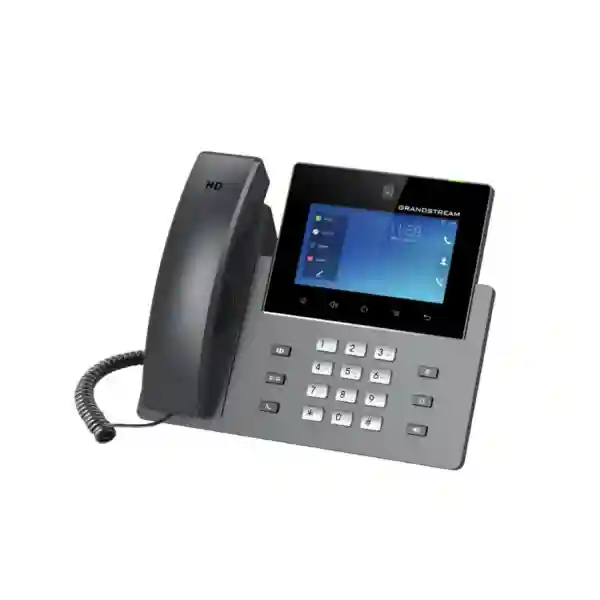
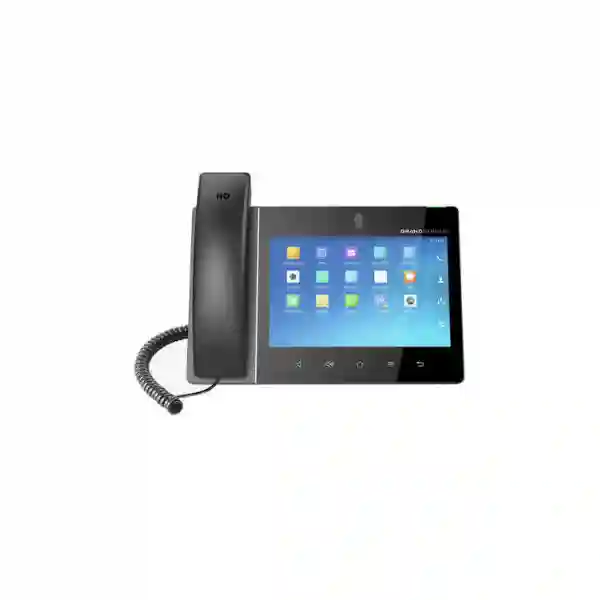
Grandstream GXV3380 Dubai: High-End Android Video IP Phone for Executive Desks and Collaboration
The Grandstream GXV3380 Dubai is designed for businesses that want more than a conventional SIP desk phone. It combines 16 lines and up to 16 SIP accounts with an 8-inch 1280×800 capacitive IPS touch display, a tiltable 2-megapixel camera with privacy shutter, dual Gigabit Ethernet with PoE/PoE+, dual-band Wi-Fi, Bluetooth, HDMI input/output and HD conferencing capabilities. For an executive office, reception desk, management room, branch office or collaboration workspace, that combination can reduce the need to place a separate desktop phone, small meeting endpoint and basic Android productivity terminal on the same desk. The important buying decision is not simply whether the device has a long feature list; it is whether its Android 7.x platform, SIP environment, network design, conferencing expectations and peripheral requirements are appropriate for the intended deployment.
8-inch 1280×800 IPS touch display
2MP camera · 1080p video
PoE / PoE+
Wi-Fi · Bluetooth · HDMI
What the GXV3380 is — and who should consider it
Grandstream positions the GXV3380 as an integrated video communications solution. In practical terms, it is a high-end SIP video phone that also provides an Android-based application interface and built-in collaboration hardware. It is therefore best evaluated as a communications endpoint rather than as a general-purpose tablet replacement. The phone can suit organizations that require visual calling, multiple SIP identities, frequent conferencing, a large touch interface, desk-side content sharing or advanced peripheral connectivity. Typical buyers include business owners, directors, department heads, front-office teams, project managers, remote branch managers, customer-facing specialists and operations teams that need more context than a voice-only desk phone can provide.
It may be excessive for users whose requirement is limited to one or two SIP extensions, occasional voice calls and a few programmable keys. In those cases, a simpler Grandstream desk phone can reduce cost and administration. It can also be the wrong choice when an organization requires a newer Android platform for a specific third-party application. Because the GXV3380 uses Android 7.x, application compatibility, security policy and any dependency on external Android services should be verified before purchase. For SIP calling, video, local collaboration and managed Grandstream deployments, however, the hardware remains feature-rich and should be assessed against the actual communication workflow rather than against consumer smartphone expectations.
Buyer-fit dashboard: requirement to capability
Executive video calling
The integrated 2MP camera, privacy shutter and support for 1080p video are relevant when face-to-face communication is part of daily work. The large display provides more usable visual space than a standard desk phone.
Multiple SIP identities
Up to 16 SIP accounts can support users who handle several departments, brands, branches, queues or hosted-PBX identities from one endpoint, subject to the PBX and provisioning design.
Desk-side conferencing
Grandstream specifies up to 7-way HD audio conferencing and 3-way 1080p 30fps video capability, making the phone useful for small collaborative sessions without moving to a meeting room.
Flexible network access
Dual Gigabit Ethernet, integrated PoE/PoE+, dual-band Wi-Fi and Bluetooth allow several practical deployment patterns, though wired Ethernet and PoE are normally preferable for predictable business telephony.
External display / content workflows
HDMI input and output, USB, Micro SD and headset connectivity give the GXV3380 more peripheral options than a typical SIP phone. The exact workflow should be tested against the intended room or desk setup.
Centralized administration
The phone supports Grandstream Device Management System (GDMS), alongside standard provisioning approaches, which can help IT teams manage configuration and firmware across multiple endpoints.
Verified GXV3380 technical specification matrix
The following specification summary is based on Grandstream product documentation. Where firmware or administration guides vary by revision, procurement should use the current Grandstream documentation and confirm the intended firmware build before rollout.
| Product type | High-end Android-based SIP video IP phone / integrated video communications endpoint |
|---|---|
| Lines / SIP accounts | 16 lines, up to 16 SIP accounts |
| Display | 8-inch, 1280×800 capacitive touch screen IPS LCD |
| Camera | Tiltable 2MP CMOS camera with privacy shutter; up to 1080p at 30fps |
| Audio conferencing | Up to 7-way HD audio conferencing as stated on the current Grandstream product page |
| Video conferencing | 3-way video capability, up to 1080p / 30fps as specified by Grandstream |
| Ethernet | Dual switched auto-sensing 10/100/1000 Mbps network ports |
| Power | Integrated PoE / PoE+ support; power requirements should be checked when USB peripherals are used |
| Wireless | Integrated dual-band Wi-Fi and Bluetooth |
| Processor / memory | 64-bit quad-core processor, 2GB RAM, 16GB Flash |
| Operating platform | Android 7.x |
| Peripheral connectivity | HDMI input/output, USB, Micro SD, headset jack and EHS support; current manual revision should be checked for exact port and accessory details |
| Voice codecs | Includes Opus, G.722, G.711, G.729A/B, G.726-32 and iLBC in Grandstream documentation |
| Management | Supports GDMS and standard provisioning/management mechanisms documented by Grandstream |
Why the 8-inch display changes the desk-phone experience
A large touch display is not valuable merely because it looks more modern. On a communications endpoint, screen size can improve the visibility of video participants, call controls, contact directories, calendars or approved Android applications. It can also reduce the friction of navigating settings and managing multiple active communication tasks. This matters most for users who spend a significant part of the day on calls and who need to switch between voice, video, contacts and collaboration functions without repeatedly moving to another device.
The GXV3380’s 1280×800 IPS panel also creates a more practical platform for three-way video communication than a small desk-phone display. However, buyers should distinguish between the built-in user interface and third-party Android applications. Android 7.x is an older platform, and modern application vendors may have raised their minimum OS requirements. A solution design should therefore confirm any required application by name and version rather than assuming that every current Android app will install or operate correctly.
For deployments centered on SIP, Grandstream management, supported codecs and built-in collaboration functions, the age of the Android base does not automatically disqualify the product. It simply makes compatibility validation a formal part of the procurement process. Fourteck can help customers define the required calling, PBX, network and peripheral functions before selecting the endpoint.
Deployment architecture: what should be planned before ordering
1. PBX and SIP registration
Start with the call platform. Confirm whether the GXV3380 will register directly to a Grandstream UCM, another standards-based SIP PBX, hosted VoIP service or a multi-site communications platform. The key checks include SIP registration parameters, transport method, extension count, outbound identity, voicemail, BLF/presence requirements, call transfer behavior, conferencing expectations and any server-side feature dependencies. Open SIP support is useful, but interoperability should still be tested for the exact PBX version and feature set.
2. LAN, VLAN and QoS
Voice and video quality depend on the network, not only on the endpoint. A business deployment should consider voice VLAN design, DHCP options, DNS/NTP reachability, switch capacity, uplink utilization, latency, jitter, packet loss and QoS policy. The dual Gigabit ports can simplify desk cabling when a PC shares the phone’s network path, but switch policy and VLAN behavior should be planned carefully. For video-heavy use, available bandwidth and WAN quality need more attention than in a voice-only rollout.
3. PoE and peripheral power budget
PoE/PoE+ can simplify installation by reducing desk power adapters, especially in structured office environments. Grandstream documentation notes that power requirements can change when USB devices are connected, so the switch port class and the chosen peripherals should be reviewed together. A PoE switch budget should be calculated across all phones, access points, cameras and other powered devices rather than per port in isolation.
4. Security and remote administration
Grandstream documentation lists support for technologies including TLS, SRTP, 802.1X, HTTPS and other enterprise networking protocols. The practical design should decide which of these are required and supported by the PBX, certificate infrastructure and LAN. Default credentials, admin access, provisioning transport and firmware policy should be controlled centrally. Where GDMS is used, the organization should define administrative roles and a lifecycle process for provisioning, updates and decommissioning.
5. Headsets, HDMI and USB workflow
The GXV3380 is attractive partly because it supports more peripheral types than a standard desk phone. That makes accessory planning important. Verify the exact headset model, EHS requirements, HDMI use case, USB device and display arrangement before buying at scale. Headset control, camera placement, cable routing and privacy can materially affect user experience even when the core SIP configuration is correct.
Audio, video and conferencing: what the specifications mean in real work
The GXV3380 includes a dual-microphone HD speakerphone, wideband audio support and echo-cancellation features intended for hands-free business conversations. This is useful for executive desks, small offices and occasional mini-meetings, but acoustic performance still depends on room size, background noise, placement and speaker volume. A desk phone should not automatically be treated as a replacement for a purpose-built conference-room audio system in a large room.
For video, Grandstream specifies a 2-megapixel tiltable camera with a physical privacy shutter and up to 1080p at 30 frames per second. The privacy shutter is particularly useful in offices where the device remains on the desk throughout the day. The camera can support direct video calling and multi-party collaboration where the connected platform supports the required SIP/video behavior. Grandstream lists three-way video capability and up to seven-way HD audio conferencing for the model.
Video quality is a complete-path issue. A 1080p-capable endpoint cannot deliver good results if the remote endpoint, PBX/media server, firewall, WAN or QoS configuration is constrained. The codec negotiation, bandwidth policy, NAT traversal and platform topology should therefore be validated as part of a pilot. This is especially important when branches connect over Internet links or SD-WAN paths with variable utilization.
HDMI input/output broadens possible desk and huddle-space workflows, including content/display integration scenarios supported by the phone. Because HDMI behavior and application workflows can be firmware-dependent, buyers should confirm the exact intended use during solution design rather than relying on the connector name alone.
Grandstream GXV3380 Dubai use cases
Executive office
A director or senior manager can use one device for multiple SIP identities, visual calls, contact access and hands-free conferencing. The large screen is useful when video is a routine part of supplier, branch or management communication.
Reception and front desk
A reception team that handles several departments or companies can benefit from multiple SIP accounts, touch navigation and video interactions. The actual fit depends on queue/BLF requirements and the PBX configuration.
Branch manager
A branch manager can have a richer communication endpoint for headquarters calls, internal SIP communication and small video meetings, while IT manages the endpoint through standardized provisioning or GDMS.
Small huddle point
For a compact collaboration corner, the phone can support small-group voice/video communication, subject to room acoustics and display requirements. Larger rooms should be evaluated for dedicated conferencing hardware.
Customer-facing specialist
Consultants, solution engineers and account managers may benefit when they need face-to-face calls, several SIP identities and a large touch interface at the same workstation.
Multi-site enterprise
Organizations can use the GXV3380 selectively for senior or collaboration-heavy roles while deploying simpler models at ordinary desks, reducing the need to use the most expensive endpoint for every user.
GXV3380 vs smaller GXV33xx video phones
Within the GXV33xx family, the buying question is often whether the user needs the GXV3380’s larger display and 1080p camera capability. Grandstream’s published family information shows that the GXV3370 uses a 7-inch display and 720p-class camera/video capability, while the GXV3350 uses a 5-inch display and 720p-class camera/video capability. All are positioned as Android-based SIP video phones, but the desk experience is different.
| Decision factor | GXV3380 | Smaller GXV33xx models |
|---|---|---|
| Screen priority | 8-inch 1280×800 IPS touch screen; best fit when screen real estate matters | Can reduce footprint where a smaller display is sufficient |
| Camera / video | 2MP camera, up to 1080p 30fps | GXV3350/GXV3370 are listed by Grandstream with 720p-class video capability |
| Best buyer profile | Executives, collaboration-heavy roles, larger visual interface requirements | Users who need Android/SIP video functions but can accept a smaller visual workspace |
| Procurement logic | Choose for requirement, not status; the extra screen/camera capability should solve a real workflow need | Often a more proportionate fit when desk space, budget or simpler usage matters more |
For a new deployment, the GXV3380 should also be compared with newer Grandstream video-phone options available in the target market. Newer models may offer platform or lifecycle advantages. Fourteck can compare models against the customer’s required screen size, camera quality, SIP account count, Android/application needs, connectivity and budget instead of recommending by model number alone.
Compatibility checklist for PBX, SIP and enterprise networks
- PBX platform: confirm SIP registration, supported transport, authentication method, dial plan, voicemail and advanced call features on the intended PBX version.
- Video interoperability: confirm codec negotiation, maximum resolution, media routing and any conferencing-server dependence for the remote endpoint.
- Provisioning: decide whether deployment will use GDMS, encrypted XML provisioning, TR-069 or another supported method documented by Grandstream.
- Security: align TLS/SRTP, certificates, web access, admin policy and VLAN segmentation with the organization’s network standard.
- Power: verify PoE class, switch power budget and any additional requirement created by connected USB peripherals.
- Headsets: verify the specific wired, Bluetooth or EHS headset model before bulk procurement.
- Android applications: validate each required application against Android 7.x and the organization’s security policy.
- Wi-Fi: use wired Ethernet where predictable voice/video behavior is critical; if Wi-Fi is required, validate coverage, roaming and RF conditions at the desk.
- WAN / branch connectivity: test video under real bandwidth, latency, jitter and packet-loss conditions rather than only on the local LAN.
Important buying consideration: Android 7.x and lifecycle planning
The GXV3380 remains listed on Grandstream’s product website, and its core SIP, video, networking and peripheral specifications remain well documented. At the same time, Android 7.x is an older operating-system generation. Businesses should therefore separate two questions: “Will the phone perform the required SIP/video job?” and “Will every third-party Android application we want remain supported for the expected deployment life?” The answer to the first can be positive even when the second requires caution.
For deployments where the primary requirement is SIP telephony, built-in video, supported conferencing and controlled endpoint management, the GXV3380 can still be a relevant candidate. For projects that depend on newly released Android applications, modern mobile-device-management controls or a long future application lifecycle, a newer endpoint may be more suitable. The safest procurement approach is to document the required features, identify any third-party application dependencies and run a pilot using the target PBX and network before standardizing on the model.
Availability, firmware status and commercial terms can change by region and date. Fourteck does not assume live stock, pricing or lifecycle status from a model name alone; customers should request a current quotation and compatibility confirmation.
Dubai and UAE deployment considerations
Dubai offices and multi-tenant buildings
In Dubai business towers and shared commercial environments, the IP phone design should account for managed switches, voice VLANs, structured cabling and Internet edge policies that may be maintained by different teams. The GXV3380’s wired Gigabit interface and PoE support fit conventional managed LAN designs, but video calling can expose WAN or firewall limitations that are less noticeable with voice-only phones.
Sharjah and Ajman branch deployments
For branch offices, standardization matters more than simply matching hardware at every desk. A useful design may place the GXV3380 with branch managers and collaboration-heavy roles while using simpler SIP phones for ordinary users. Central provisioning and consistent PBX templates reduce support complexity across sites.
Abu Dhabi enterprise environments
Larger organizations often require documented security controls, controlled firmware, certificate management, segmented networks and formal change procedures. The GXV3380 should be assessed within that operational framework, including its Android base, PBX interoperability and remote-management method.
Deira and Bur Dubai SMEs
Small and medium businesses may value an all-in-one video endpoint for owners, reception or key customer-facing desks. The strongest ROI comes when the video, multi-account or display features are actively used. Where the need is basic voice only, a simpler model is usually more sensible.
How Fourteck can help with GXV3380 selection and deployment
Fourteck can assist with requirement mapping before the product is ordered. That includes defining the number of users, roles that genuinely need video, SIP/PBX compatibility, call-flow requirements, network readiness, PoE capacity, VLAN/QoS design, headset needs and any Android application dependency. This is particularly useful when an organization is choosing between multiple Grandstream endpoints rather than replacing one phone with exactly the same model.
For multi-site projects, the deployment can also be planned by user profile. An executive or branch manager may justify a high-end video phone, while standard office staff may be better served by GRP or other desk-phone models. This profile-based approach reduces overspecification and keeps support consistent. Customers planning a broader Grandstream environment can also review related communications and networking solutions through Fourteck’s Grandstream UAE resource and the IP Phone Fourteck site.
A quotation should be based on the exact deployment requirement, requested quantity, power/accessory needs, PBX environment and any installation or configuration scope. Pricing and availability should be confirmed at the time of inquiry rather than inferred from third-party listings.
Procurement checklist: what to send with your GXV3380 inquiry
- Required quantity and delivery location.
- Current PBX or hosted SIP platform and version, if known.
- Number of SIP accounts required per user and any shared-line or queue requirements.
- Whether 1080p video calling is essential and which remote platforms/endpoints will be used.
- Whether Ethernet/PoE is available at each desk or Wi-Fi is required.
- Headset brand/model, EHS requirement and any Bluetooth accessory needs.
- HDMI, USB or Micro SD use cases.
- Any specific Android application that must run on the phone.
- Need for remote provisioning, GDMS onboarding or configuration templates.
- Whether installation, PBX configuration, VLAN/QoS work, user training or ongoing support is required.
Frequently asked questions
How many SIP accounts does the Grandstream GXV3380 support?
Grandstream specifies 16 lines with up to 16 SIP accounts. The way those accounts are used depends on the PBX, provisioning and user workflow.
Does the GXV3380 support 1080p video?
Yes. Grandstream specifies a tiltable 2-megapixel camera with privacy shutter and video capability up to 1080p at 30fps. End-to-end video quality also depends on the remote endpoint, network and communications platform.
Can the GXV3380 be powered by PoE?
Yes. The model supports PoE and PoE+. Grandstream documentation notes that power requirements should be reviewed when USB peripherals are used, so the switch PoE budget and accessory design should be checked before rollout.
Does the GXV3380 have Wi-Fi and Bluetooth?
Yes. Grandstream lists integrated dual-band Wi-Fi and built-in Bluetooth. For critical business voice/video, wired Ethernet is generally easier to make predictable, but Wi-Fi can be useful where cabling is not practical.
What size is the GXV3380 screen?
It has an 8-inch 1280×800 capacitive touch screen IPS LCD. The larger display is one of the main reasons to choose this model over smaller GXV33xx endpoints.
What Android version does the GXV3380 use?
Grandstream lists the GXV3380 as running Android 7.x. Because this is an older Android generation, any required third-party application should be checked for current compatibility before purchase.
Can the GXV3380 connect to a headset?
Yes. Grandstream documentation includes headset connectivity, EHS support and Bluetooth. Exact headset compatibility should be confirmed for the specific accessory model.
Does it support HDMI?
Yes. Grandstream lists HDMI input and output among the GXV3380 peripheral interfaces. The intended workflow should be checked against the current firmware and documentation.
Is the GXV3380 suitable for a conference room?
It can suit executive desks and compact huddle-style collaboration, but a larger room may need purpose-built microphones, speakers, camera framing and room conferencing equipment. Room size and acoustics should determine the design.
Can Fourteck provide a GXV3380 quote in Dubai?
Customers can request a current quotation and compatibility review from Fourteck. Price, stock and lead time should be confirmed at the time of inquiry because they can change by date, quantity and supply channel.
Request a Grandstream GXV3380 quotation and compatibility check
For a Grandstream GXV3380 Dubai project, share the quantity, PBX platform, required SIP accounts, video expectations, network/PoE environment and any headset or Android application requirement. Fourteck can help determine whether the GXV3380 is the right fit or whether another Grandstream model would better match the deployment.
Technical reference: Product facts on this page are based on Grandstream’s GXV3380 product page, datasheet and documentation resources. Features, firmware behavior, compatibility, availability and commercial terms can change; confirm current requirements before ordering.
Reviews
There are no reviews yet.