Grandstream UCM6302 IP PBX
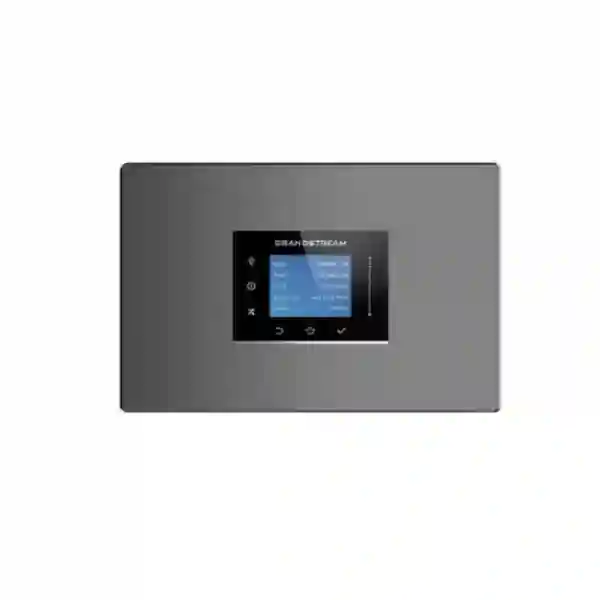
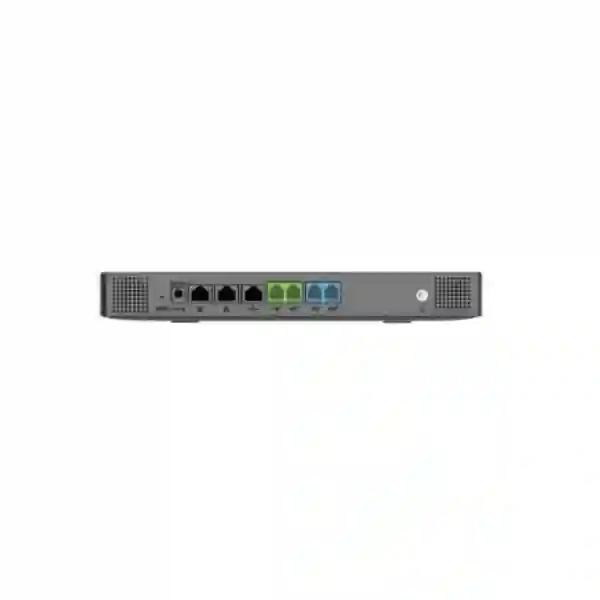
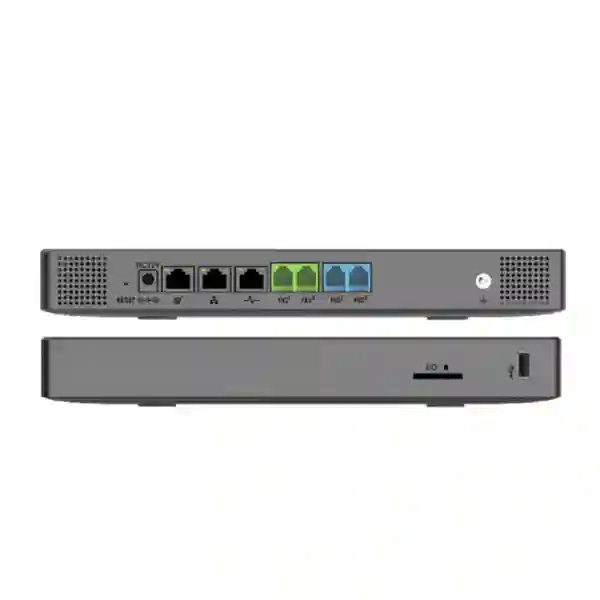
The Grandstream UCM6302 is a unified communications IP PBX designed for organizations that need a practical on-premises communications core with room for growth, remote-user support, analog connectivity, SIP trunking, conferencing, centralized administration, and Grandstream endpoint provisioning. Current Grandstream documentation positions the UCM6302 for up to 1,000 users and up to 150 concurrent calls, while providing two FXS ports, two FXO ports, three self-adaptive Gigabit network interfaces with PoE+, USB and SD storage interfaces, a color touchscreen, Wave client support, and compatibility with Grandstream Device Management System. For a buyer, the important question is not simply whether the UCM6302 has a long feature list. The better question is whether its capacity, analog interfaces, call-flow capabilities, collaboration tools, network requirements, and administration model fit the way your organization communicates today and how it is likely to expand.
Is the UCM6302 the right PBX for your organization?
The UCM6302 makes the most sense when a company wants to keep direct control of its core PBX while still supporting modern mobility and collaboration. It can be a strong fit for a single headquarters, a growing office, a multi-department business, a hotel or serviced-apartment operation, a school or training organization, a clinic, a professional-services company, a retail or restaurant group, a warehouse and office combination, or a multi-site company that needs one consistent extension plan and centralized call handling. The appliance is particularly relevant when the project includes a mixture of SIP phones, soft clients, SIP trunks and at least some legacy analog interfaces, because the two integrated FXS and two integrated FXO ports reduce the need for separate gateway hardware in modest analog scenarios.
The capacity numbers should be treated as design ceilings rather than a recommendation to build every installation to the maximum. A practical PBX design also considers peak simultaneous call demand, codec choices, call recording, conference usage, remote-user traffic, SIP trunk channels, failover requirements, storage strategy, WAN quality, security policy, and future expansion. A 250-user organization with intensive call-centre traffic may require more call capacity planning than an 800-user organization where most extensions make only occasional calls. Fourteck therefore treats model selection as a traffic and workflow decision, not only a user-count decision.
UCM6302 decision snapshot
Best fit
Organizations that want an on-premises IP PBX with up to 1,000 users, strong call routing, integrated analog ports, conferencing, remote clients and centralized Grandstream management.
Key sizing limit
Up to 150 concurrent calls. Busy-hour call traffic, SIP trunk channels, recordings and conferencing should be reviewed before choosing the appliance.
Hybrid advantage
Local PBX control can be combined with Wave clients and the UCM ecosystem for remote and browser-based communication, subject to the chosen deployment and current service terms.
When to size upward
Consider a higher-capacity UCM6300 model when expected concurrency, user growth, analog port count, conferencing demand or resilience requirements exceed the comfortable operating envelope of the UCM6302.
Verified UCM6302 technical baseline
The table below concentrates on the information that materially affects purchasing and deployment. It follows current Grandstream documentation rather than reseller listings that may contain older or conflicting figures. Feature availability can still depend on firmware, configuration and the wider network environment, so project-specific requirements should be validated before implementation.
| Area | UCM6302 | Why it matters |
|---|---|---|
| User capacity | Up to 1,000 users | Supports a substantial extension population while keeping one centralized communications platform. |
| Concurrent calls | Up to 150 | Busy-hour call traffic is one of the most important sizing metrics. |
| FXS ports | 2 RJ11 ports with lifeline capability | Useful for limited analog endpoint requirements such as selected phones, fax-related workflows or legacy devices where appropriate. |
| FXO ports | 2 RJ11 ports with lifeline capability | Allows integration of a small number of analog PSTN lines without a separate FXO gateway. |
| Network | 3 self-adaptive Gigabit ports, switched/routed/dual modes, PoE+ | Provides deployment flexibility for PBX connectivity and network segmentation designs. |
| Peripheral interfaces | 1 × USB 2.0, 1 × USB 3.0, 1 × SD card interface | Supports local storage and peripheral use cases supported by the platform. |
| Display | 320 × 240 color touchscreen | Provides direct appliance status and shortcut access for administrators. |
| Mounting | Desktop or wall mount | Suitable for communications rooms and offices where full rack-mount hardware is not required. |
| Dimensions | 270 × 175 × 36 mm | Compact compared with larger rack-format UCM models. |
| Management | Web administration and GDMS-supported management | Supports centralized provisioning, monitoring and troubleshooting workflows for Grandstream environments. |
What business problems can the UCM6302 solve?
A PBX project is usually triggered by a business problem rather than a specification. One company may be replacing an aging analog PBX because extension moves are difficult and remote work is poorly supported. Another may be opening branches and wants a consistent dial plan. A hotel may need structured call routing and integration options. A customer-service team may need queues, recordings, reports and defined escalation flows. A professional office may want reception, mobile and desktop users to operate as one communication environment. The UCM6302 brings those needs into a centralized system that can manage SIP extensions, trunks, call routing, voicemail, conferencing and collaboration features while retaining analog connection options for selected legacy requirements.
For organizations currently managing separate voice systems, independent meeting tools and disconnected remote extensions, the main operational improvement is consolidation. Administrators can define extension ranges, call permissions, inbound routes, outbound routes, schedules, IVRs, ring groups, queues, paging, voicemail policies and other communication functions from the PBX environment rather than treating every phone as a standalone device. This does not remove the need for good network design or security policy, but it creates a clearer operational model.
The UCM6302 is also valuable when a company wants to standardize endpoint deployment. Grandstream supports zero-configuration provisioning for supported Grandstream SIP endpoints, which can reduce manual per-phone setup in compatible environments. In a properly planned deployment, the administrator can organize device templates, extension settings and network policies centrally. The practical benefit is easier onboarding, moves, additions and changes as the organization grows.
Capacity planning: do not size a PBX by headcount alone
The UCM6302 supports up to 1,000 users, but the 150-concurrent-call ceiling is often the more important number. A company with a large number of extensions can still have low concurrency, while a contact centre or outbound sales organization can produce heavy call traffic with a much smaller user base. A sound design estimates busy-hour calling, inbound and outbound trunk channels, queue agents, conference use, remote users, codec requirements, recording volume and future growth. The resulting traffic profile tells you whether the UCM6302 has comfortable headroom or whether a larger UCM6300 appliance should be considered.
Call routing and everyday communications
The platform includes the call-handling functions expected from a modern business PBX: call forwarding, transfer, waiting, caller ID, call history, call recording, IVR, music on hold, inbound and outbound routes, DID and DOD handling, do-not-disturb, ring groups, schedules, call queues, pickup groups, paging and intercom, voicemail, voicemail-to-email, speed dial, dial-by-name and other enterprise telephony functions documented by Grandstream. The value of these functions depends on how they are arranged around the real customer journey.
For a reception environment, a useful design may combine a main DID, time-based routing, an IVR, operator overflow and departmental ring groups. For a service desk, the design may prioritize queues, agent availability, call recording where legally and operationally appropriate, escalation rules and reporting. For a multi-branch organization, outbound permissions, site-specific caller identity, branch ring groups and a consistent extension plan may matter more. For a warehouse, paging and intercom can be important. For an executive environment, follow-me logic, mobile access and delegated call handling may matter most. The PBX should therefore be configured around roles and processes rather than simply enabling every available feature.
Organizations with regulatory or internal policy requirements should define recording, retention, access control, privacy notices and data-handling policies before turning on recording or related functions. The appliance provides capabilities, but compliance depends on the complete operational design, local laws and company policy.
Wave for desktop, web and mobile users
Grandstream’s UCM6300 ecosystem includes Wave clients that extend the communication environment beyond desk phones. Depending on the supported client platform and current firmware, users can make and receive calls through their UCM accounts, participate in meetings, access communication functions and work away from a physical office extension. Grandstream’s current Wave documentation lists the UCM6302 for up to 1,000 concurrent user registrations within the model limits, with audio-conference and video-conference limits that should be checked against the planned meeting profile and current software version.
For remote work, the important design question is how users will authenticate, how traffic will traverse the internet, and what security controls apply. UCM RemoteConnect is part of the wider UCM6300 ecosystem and is designed to help remote users and devices connect without relying only on traditional manual NAT traversal. Service entitlements, limits and plan terms can change, so remote-access requirements should be confirmed for the intended deployment rather than assumed from an older reseller description.
A practical remote-user rollout should include account security, strong passwords, multi-factor capabilities where supported and appropriate, controlled administrative access, updated firmware, secure signaling and media settings where compatible, and clear device policies. Remote access is most effective when the PBX, firewall, WAN connection, DNS, user devices and identity controls are treated as one system.
Two FXS and two FXO ports: why analog connectivity still matters
The UCM6302 includes two FXS and two FXO RJ11 ports. FXS ports are used to connect supported analog endpoints, while FXO ports connect supported analog PSTN lines. In many modern installations, most users will be on SIP phones or software clients and most external calling will use SIP trunks. Even so, modest analog requirements remain common. A business may need to retain an analog line for a specific workflow, connect a legacy analog endpoint, preserve a transitional path during migration, or support a limited number of analog services while the rest of the organization moves to IP telephony.
The built-in ports make the UCM6302 particularly attractive when the analog requirement is small enough that an external gateway would add unnecessary cost and administration. If the requirement exceeds two FXS or two FXO ports, Grandstream documentation notes that capacity can be extended by peering with suitable gateways. The choice should be based on the actual number of analog circuits, line characteristics, fax or modem behavior where relevant, survivability requirements and local carrier conditions.
Both FXS and FXO interfaces are documented with lifeline capability in the event of a power outage. A project team should still review the complete power and carrier design, because business continuity depends on more than the appliance port itself. UPS runtime, network-switch power, internet service, SIP trunk availability and endpoint power all affect whether calls continue during an outage.
Network design for a reliable UCM6302 deployment
Voice quality problems are frequently network problems presented as phone problems. The UCM6302 provides three self-adaptive Gigabit network ports and can operate in supported switched, routed or dual-interface modes. The correct mode depends on the topology. Some organizations place voice services in a dedicated VLAN with controlled routing to data networks. Others use a simpler flat network for a smaller office. Multi-site deployments may route voice over VPN or SD-WAN infrastructure. The PBX can support flexible network designs, but the organization should define the topology deliberately.
At minimum, the network plan should consider IP addressing, DHCP, DNS, NTP, VLANs, QoS, switch capacity, PoE for endpoints, WAN bandwidth, firewall rules, SIP trunk requirements, NAT behavior, remote users, monitoring and failover. Voice traffic is sensitive to latency, packet loss and jitter. Grandstream highlights jitter resilience and modern codecs, but no codec can compensate indefinitely for a severely congested or unstable WAN. Good QoS policy should prioritize real-time traffic without starving business data, and the policy should be implemented consistently across switches, routers, firewalls and WAN edges.
Organizations using multiple internet circuits should define what happens when the primary circuit fails. The PBX may remain operational internally while external SIP services become unavailable if the trunk is bound to the failed WAN path. A resilient design may therefore require carrier redundancy, DNS planning, firewall failover, SIP trunk support for multiple source IPs or registration methods, and clear routing behavior. These details are specific to the carrier and network environment and should be confirmed before deployment.
A practical deployment workflow
Count users, simultaneous calls, sites, SIP trunks, analog lines, queues, meeting needs, remote workers, recording requirements and expected growth.
Review VLANs, QoS, PoE, WAN quality, firewall policy, DNS, NTP, public addressing and failover before moving live traffic.
Create extensions, trunks, inbound and outbound rules, IVRs, schedules, groups, queues, voicemail, security controls and backup policy.
Provision supported phones and clients, test feature keys, permissions, directory access, remote operation and emergency call processes.
Test inbound, outbound, internal, failover, voicemail, queues, recording, conference, analog ports and representative remote-user scenarios.
Maintain backups, firmware, monitoring, credential hygiene, documentation, change control and capacity reviews as the business evolves.
Security and administrative control
Business telephony systems are exposed to threats that differ from ordinary office applications. Toll fraud, credential theft, unauthorized SIP registration, exposed management interfaces, insecure remote access and unpatched software can all create operational and financial risk. Grandstream’s UCM6300 platform includes security-related capabilities such as secure boot, device certificates, randomized default credentials on relevant systems, TLS and SRTP support in compatible scenarios, HTTPS administration and firewall-related controls. These features are valuable, but they must be combined with disciplined administration.
The PBX administrative interface should not be left broadly exposed to the internet. Management access should be restricted to trusted networks or secure remote administration paths. Default or weak credentials should never be used. Extension passwords should be unique and sufficiently strong. International dialing permissions should be assigned according to business need rather than opened for every extension. Trunk and outbound rules should include practical restrictions. Failed-login and abnormal-call patterns should be monitored. Administrative accounts should be separated from ordinary user accounts.
Firmware lifecycle management is equally important. Grandstream publishes firmware and release notes for the UCM6300 family, and those notes can contain upgrade prerequisites or warnings. Current release documentation, for example, advises administrators to take full backups before certain upgrade paths. A production upgrade should therefore be treated as a controlled change with backup, rollback planning where supported, maintenance-window selection and post-upgrade testing rather than a casual button click.
GDMS and endpoint administration
Grandstream Device Management System is designed to provide centralized provisioning, monitoring and troubleshooting for supported Grandstream devices. In environments with many Grandstream phones, gateways or access devices, centralized management can significantly reduce the time required for onboarding, template changes, firmware management and diagnostics. The UCM6302 works within this broader ecosystem, making it attractive for organizations that prefer a unified Grandstream communications stack.
Centralized management does not eliminate the need for documentation. Administrators should maintain a structured extension inventory, device-to-user mapping, MAC address records where relevant, switch-port information, trunk settings, emergency routing, administrator accounts, backup locations and change history. This becomes especially important when staff change, offices move, or a support team needs to troubleshoot an issue months after the original installation.
For organizations with mixed-vendor SIP endpoints, interoperability should be checked model by model. SIP is a standard, but advanced keys, presence, provisioning methods and vendor-specific features can behave differently across manufacturers. Basic registration may work while certain advanced capabilities do not. A proof-of-concept is advisable when a project depends on a significant quantity of non-Grandstream phones or specialized SIP devices.
CRM, PMS and third-party integration planning
The UCM6300 platform provides API capabilities intended for integration with third-party systems, including CRM and PMS use cases. The business benefit can be substantial: customer records can be associated with calls, hospitality workflows can connect telephony events with guest processes, and operational systems can exchange information with the communications platform. However, “API available” should not be interpreted as “every application integrates automatically.”
A successful integration project starts by defining the exact business transaction. Does the CRM need click-to-call, screen pop, call logging, agent status or recording links? Does the hotel PMS need guest check-in/check-out events, room status, wake-up calls, billing information or extension-name updates? Which side initiates the transaction? Is middleware required? Which API methods and authentication controls are supported by the current firmware? Who owns error handling when one platform is unavailable? These details determine whether the integration is straightforward or requires custom work.
Fourteck recommends validating the target application, current UCM firmware, documented API capability and any middleware requirements before promising an integration outcome. This prevents a common procurement mistake: buying hardware based on a generic “CRM compatible” statement without confirming the actual CRM edition, connector, API access or desired workflow.
UCM6302 for reception, sales, support and operations teams
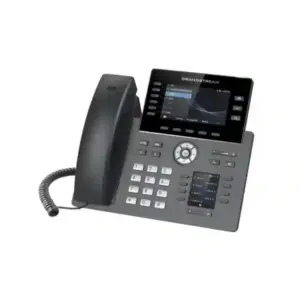
Reception: A receptionist often needs visibility of extension status, quick transfer, departmental routing, overflow rules, voicemail handling and after-hours behavior. The PBX can support the routing logic, while the selected phone model determines the number of programmable keys, display size and local user experience. Reception design should therefore select the PBX and endpoint together.
Sales: Sales teams may need direct numbers, outbound caller identity, mobile or desktop access, call recording where appropriate, follow-me behavior and CRM integration. The UCM6302 can provide the communications foundation, but trunk capacity should be sized around peak outbound campaigns rather than average daily use.
Customer support: Queues, ring strategies, agent membership, overflow, announcements, reporting and recording are usually more important than simple extension count. A support team should model the number of simultaneous callers and agents during peak periods. If the contact operation is very large or requires advanced omnichannel workforce-management functions, the broader contact-centre requirement should be evaluated separately rather than assuming an IP PBX alone will replace a specialized platform.
Operations and warehouse: Paging, intercom, common-area phones, cordless mobility and rugged network planning can be central. The UCM6302 can coordinate call control, while switches, Wi-Fi, DECT or Wi-Fi handsets, paging devices and VLAN design complete the solution.
Industry deployment examples
Hotels and serviced apartments
Use central reception, guest-service extensions, department groups, wake-up workflows, analog requirements where needed and PMS integration planning. Confirm the exact PMS connector and workflow before implementation.
Schools and training centres
Create administration, faculty and support extensions, paging/intercom workflows, time schedules, remote administrative access and branch connectivity while keeping role-based calling permissions.
Clinics and healthcare offices
Route appointment, reception, billing and internal calls with separate groups and schedules. Recording and patient-related workflows must follow applicable privacy and legal requirements.
Professional services
Support direct extensions, receptionist transfer, executive mobility, conference use, voicemail-to-email and remote work while maintaining clear outbound permissions and audit-friendly administration.
Retail and restaurant groups
Standardize branch dialing, central management and overflow routing. Multi-site WAN and internet-failover design are important where stores depend on centralized SIP services.
Distribution and logistics
Combine office phones, warehouse mobility, paging, remote branches and after-hours routing. Review Wi-Fi or cordless coverage as part of the voice design rather than after deployment.
UCM6302 vs UCM6301, UCM6304 and UCM6308
The UCM6302 sits in the middle of the standard UCM6300 family rather than at either extreme. Grandstream’s documented comparison figures place the UCM6301 at up to 500 users and 75 concurrent calls, the UCM6302 at up to 1,000 users and 150 concurrent calls, the UCM6304 at up to 2,000 users and 300 concurrent calls, and the UCM6308 at up to 3,000 users and 450 concurrent calls. Analog port counts scale in the same sequence from one pair on the UCM6301 to two pairs on the UCM6302, four pairs on the UCM6304 and eight pairs on the UCM6308.
| Model | Users | Concurrent calls | FXS | FXO | Typical decision |
|---|---|---|---|---|---|
| UCM6301 | Up to 500 | Up to 75 | 1 | 1 | Smaller user base or lower call concurrency. |
| UCM6302 | Up to 1,000 | Up to 150 | 2 | 2 | Balanced option for mid-size deployments and growing organizations. |
| UCM6304 | Up to 2,000 | Up to 300 | 4 | 4 | Higher call traffic, larger expansion plan or more analog interfaces. |
| UCM6308 | Up to 3,000 | Up to 450 | 8 | 8 | Large deployments, high concurrency or greater analog-port density. |
The correct selection should include a growth margin. If an organization already expects to approach the UCM6302’s concurrency or analog limits during the planned life of the system, choosing the next model may be more economical than replacing the PBX soon after deployment. Conversely, buying a much larger appliance without a realistic use case does not automatically improve voice quality or reliability. Capacity should match the design.
Migration from an older PBX
Replacing a PBX is not only a hardware swap. The existing system contains years of accumulated business logic: extension numbers, reception behavior, hunt groups, DIDs, analog devices, emergency dialing, after-hours rules, voicemail greetings, departmental permissions and undocumented exceptions. A successful migration begins by documenting those behaviors before building the new system. Anything that nobody understands on the old PBX becomes a risk during cutover.
A staged migration can reduce disruption. The project team can build the UCM6302 in parallel, create extensions, configure trunks, provision a pilot group and test inbound and outbound calls before moving the main numbers. Where the carrier allows it, temporary routing can direct selected DIDs to the new PBX first. Analog lines and devices should be tested individually. Remote users should be validated from external networks, not only from the office LAN.
Data migration also requires judgment. Old voicemail, call recordings, CDR records and configuration backups may need retention for business or compliance reasons, but they may not import directly into the new platform. Decide what must be archived, what can remain on the old system for a defined period and what should be recreated on the new PBX. A clean migration often benefits from rebuilding call logic rather than blindly copying years of outdated settings.
SIP trunk and carrier planning
The UCM6302 can connect to SIP trunk services, but carrier interoperability should be validated for the exact service. Important parameters include registration or IP-authentication method, codec support, DTMF mode, inbound number format, outbound caller identity, emergency calling, fax behavior, NAT requirements, session limits, failover destinations and the carrier’s rules for multiple sites or public IP addresses. A trunk can appear “registered” while still having problems with one-way audio, transfers, caller ID or inbound routing if these details are not aligned.
Channel quantity should follow expected concurrency. If the PBX can process up to 150 calls but the SIP trunk provides only 20 sessions, the trunk becomes the external capacity bottleneck. That may be perfectly appropriate for an organization with many internal extensions and light external traffic. It may be unacceptable for a call-intensive service operation. PBX and trunk sizing must therefore be considered together.
Organizations in regulated sectors or with emergency-calling obligations should confirm carrier-specific location, caller ID and emergency service requirements. Those obligations vary by jurisdiction and cannot be inferred from the PBX model alone.
Business continuity and backup strategy
A communications system should have a documented recovery plan. At a minimum, administrators should create scheduled configuration backups and store copies in a location that remains accessible if the appliance fails. Backup policy should reflect how often the PBX changes. A system with frequent staff onboarding, queue changes and new DIDs may require more frequent backups than a stable small office.
Power resilience is also important. The UCM6302, network switches, firewall, router, SIP gateway and critical endpoints may all need UPS protection. Protecting only the PBX does not preserve service if the switch powering every phone shuts down. Similarly, a dual-WAN firewall does not create carrier resilience unless the SIP trunk and DNS or registration design can operate across the alternate path.
Organizations with strict uptime targets should define recovery-time and recovery-point objectives before choosing architecture. The standard UCM6302 may be appropriate for many businesses, but a high-availability requirement could call for additional system design, redundant network components, alternate trunks or a different architecture. The objective is not to add complexity automatically; it is to match resilience investment to business impact.
UAE deployment considerations
For businesses in Dubai, Abu Dhabi, Sharjah, Ajman and the wider UAE, the UCM6302 can serve as the on-premises communications core while the project is tailored to the local carrier, branch topology and workforce model. UAE deployments frequently combine office-based SIP phones, mobile executives, reception users, warehouse or showroom extensions, meeting rooms and multi-site connectivity. The PBX model is only one part of that design. SIP trunk service, firewall policy, structured cabling, PoE switching, Wi-Fi quality and local support all affect the result.
Dubai organizations with multiple offices may need centralized numbering and secure inter-site communication. Abu Dhabi projects can include large facilities or distributed departments where call permissions and routing need careful documentation. Sharjah and Ajman businesses may prioritize practical migration from existing analog or hybrid systems while preserving selected PSTN lines during transition. Deira and Bur Dubai trading companies may have high inbound customer-call volumes and multilingual reception requirements. These are examples of design patterns rather than assumptions about every customer.
Fourteck can scope the UCM6302 together with compatible IP phones, PoE switches, network readiness, SIP trunk requirements, configuration, migration and user onboarding. For wider UAE IT infrastructure requirements, visit Fourteck UAE. For Grandstream-focused solutions, the Grandstream UAE property can support the broader buyer journey. Links are kept at verified domain level rather than inventing unconfirmed product URLs.
Regional use across GCC and Africa
The same appliance can support organizations in Kuwait, Uganda, Kenya, Tanzania, Ghana, Nigeria and other regional markets, but the connectivity and procurement context can differ substantially. Some deployments may rely on SIP trunks over business fibre, while others may combine internet telephony with analog lines. Some multi-site organizations may connect branches over managed VPN, while others depend on standard broadband with secure remote access. Local carrier rules, public IP availability, power quality, branch bandwidth, support logistics and import channels should be considered independently for each country.
For Uganda, Kenya and Tanzania, a key design concern in some projects is maintaining predictable communications despite variable WAN conditions or branch connectivity. That makes codec planning, QoS, link monitoring, local survivability and backup power important. For Kuwait and other GCC deployments, multi-site corporate networks and centralized IT standards may drive VLAN, firewall and identity requirements. Nigeria and Ghana deployments can range from single offices to distributed business groups, so the planning should start with traffic and topology rather than a generic regional template.
Fourteck’s regional network includes Uganda, Kenya, Tanzania, Ghana, Nigeria and Kuwait. Regional links should be used according to the actual project location and support requirement.
Before requesting a UCM6302 quotation
A useful quotation is easier to prepare when the technical scope is clear. The following information helps determine whether the UCM6302 is the correct model and what additional components or services may be required.
- Total users now and expected users within the planned system life.
- Estimated peak simultaneous internal and external calls.
- Number of offices, branches and remote workers.
- SIP trunk provider, channel quantity and authentication method if already selected.
- Number of analog PSTN lines and analog endpoints that must remain.
- Required IP phone models or user roles such as reception, executive, call centre and common area.
- Call queues, IVRs, office-hour schedules, recording and reporting expectations.
- CRM, PMS or third-party integration requirements.
- Existing firewall, PoE switch, VLAN and WAN environment.
- Remote-access, security, backup and business-continuity requirements.
- Migration date, acceptable downtime and whether the old PBX must run in parallel.
Common buying mistakes to avoid
Choosing only by user count. The 1,000-user figure is attractive, but concurrent calls, queues and trunk sessions may determine the true size. Always model traffic.
Assuming every SIP device is identical. Third-party SIP phones may register, but advanced provisioning, BLF, directories or vendor-specific features can differ. Validate critical devices.
Ignoring the LAN. A premium PBX on a congested network will still produce poor calls. Voice VLAN, QoS, switch capacity, cabling and WAN quality matter.
Buying before checking the carrier. SIP trunk authentication, number presentation, emergency calling, fax, failover and session limits should be confirmed before cutover.
Leaving security until after go-live. Credential policy, outbound restrictions, administrative access, firmware, remote access and monitoring should be part of the initial build.
Copying the old PBX exactly. Migration is a chance to remove obsolete extensions, simplify IVRs, clean permissions and redesign confusing call flows.
Assuming reseller specifications are always current. Online listings can preserve older capacity figures or mix specifications from related models. Use current Grandstream documentation for final design validation.
How Fourteck approaches a UCM6302 project
Fourteck’s role is not limited to supplying the appliance. A successful business communications project connects the PBX to the customer’s network, carrier, phones, user roles, security policy and operating processes. The project should begin with requirements, followed by model selection and a clear bill of materials. The build then moves through network preparation, PBX configuration, endpoint provisioning, trunk integration, testing, migration and handover.
During discovery, we focus on the customer’s real communications behavior: who receives the main number, how calls should overflow, which teams need queues, who works remotely, which users need direct numbers, which analog devices must remain, whether multiple branches share numbering, and how the business wants to manage after-hours calls. These questions are more useful than beginning with a long feature checklist.
During implementation, configuration should be documented so the organization is not dependent on memory. Extension plans, call routes, trunk settings, network addresses, administrator roles, backup procedures and support contacts should be recorded. The result is a PBX that can be maintained and expanded rather than a one-time installation that becomes difficult to understand later.
Frequently asked questions about the Grandstream UCM6302
How many users does the UCM6302 support?
Grandstream’s current documentation lists the UCM6302 for up to 1,000 users. The practical design should also consider the limit of up to 150 concurrent calls, because busy-hour call traffic can be more important than total extension count.
How many simultaneous calls can the UCM6302 handle?
The current Grandstream specification lists up to 150 concurrent calls. Actual project sizing should include trunk channels, codec choices, recording, conferencing and growth requirements.
Does the UCM6302 support analog phones and analog PSTN lines?
Yes. It includes two FXS ports for supported analog endpoints and two FXO ports for supported analog PSTN lines. Larger analog requirements can be addressed with suitable external gateways after compatibility and capacity are confirmed.
Can remote employees use the UCM6302?
Yes. The UCM6300 ecosystem supports Wave clients and remote-connectivity options. The remote-access design should still include secure authentication, firewall policy, current firmware and confirmation of any applicable RemoteConnect service terms.
Does it work with SIP trunks?
Yes, the UCM6302 is designed for SIP-based business telephony. The exact carrier service should be validated for authentication, codec, DTMF, caller ID, inbound number format, emergency calling, NAT and failover requirements.
Can the UCM6302 integrate with CRM or hotel PMS software?
Grandstream provides API capabilities for third-party integration, including CRM and PMS use cases. Compatibility must be checked for the exact application, required workflow, API method, firmware and any middleware or connector involved.
Does the UCM6302 support Grandstream device management?
Yes. Grandstream documents compatibility with GDMS for centralized cloud-based provisioning, management, monitoring and troubleshooting of supported Grandstream devices.
Is the UCM6302 rack mountable?
Grandstream documents the UCM6302 for desktop or wall mounting. The larger UCM6304 and UCM6308 use a rack-oriented form factor, so physical installation requirements can influence model selection.
Should I choose UCM6302 or UCM6304?
Choose based on required capacity and interfaces. The UCM6302 is listed for up to 1,000 users and 150 concurrent calls with two FXS and two FXO ports. The UCM6304 increases those figures to up to 2,000 users, 300 concurrent calls, four FXS and four FXO ports. Growth and peak traffic should guide the decision.
What is the UCM6302 price in Dubai or the UAE?
Pricing can vary by supplier, quantity, warranty channel, accessories, phones, gateways, licensing or service requirements, configuration and installation scope. Fourteck does not publish an invented fixed price; request a current quotation based on the required system design.
Plan a UCM6302 deployment with Fourteck
If your organization is evaluating the Grandstream UCM6302, share your user count, peak call estimate, branch locations, SIP trunk status, analog-line requirement, remote-user count, phone models and integration needs. Fourteck can help determine whether the UCM6302 is correctly sized, identify the supporting network and endpoint requirements, and prepare a project scope for supply, configuration, migration and support.
Next step: Request a UCM6302 quotation or discuss your communication requirements before finalizing the PBX model.
Reviews
There are no reviews yet.