

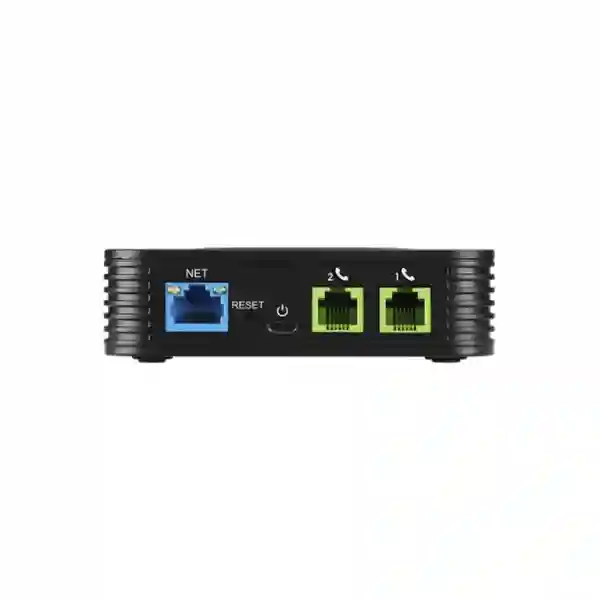
Grandstream HT802 v2 Dubai UAE – 2-Port Analog Telephone Adapter
The Grandstream HT802 v2 is a compact two-port analog telephone adapter designed to connect existing analog phones, cordless bases, fax equipment and other suitable analog endpoints to a SIP-based IP telephony environment. For businesses in Dubai and across the UAE, it is particularly useful when a migration to VoIP does not justify replacing every analog device at once. Two RJ11 FXS ports support two SIP profiles, while a single 10/100 Mbps Ethernet interface connects the ATA to the IP network. Grandstream also provides TLS and SRTP security capabilities, T.38 fax support, automated provisioning options, SIP server failover and integration with compatible Grandstream UCM IP PBX systems.
What problem does the HT802 v2 solve?
Many VoIP projects start with a simple objective: modernize the phone system without discarding analog devices that are still useful. A reception desk may have a familiar analog handset. A clinic may retain a fax machine. A warehouse may use a basic corded phone because it is durable and easy for staff to operate. A hospitality property may have legacy analog endpoints in back-office areas. A branch office may need only one or two analog connections while the rest of the organization uses IP phones. The HT802 v2 addresses exactly this type of requirement by acting as the bridge between the analog endpoint and a SIP service or IP PBX.
Instead of treating an analog-to-IP migration as a full replacement project, an IT team can evaluate which endpoints actually need to change and which can remain in service. The HT802 v2 gives two analog FXS interfaces in a small device, allowing two suitable analog endpoints to register through SIP profiles and participate in an IP communications environment. This can reduce unnecessary disruption, especially when the business process around the device matters more than the appearance of the endpoint itself.
The product is therefore best understood as a migration and integration component, not as an IP PBX and not as a router. The HT802 v2 connects to an existing Ethernet network through one 10/100 Mbps RJ45 interface. It does not provide the routing features associated with Grandstream models such as the HT812 v2. For a clean deployment, the network, SIP platform, credentials, dial plan, fax requirements and analog device characteristics should all be reviewed before installation.
Quick buyer-fit guide
| Requirement | HT802 v2 fit | Buying consideration |
|---|---|---|
| Connect two analog phones to SIP | Strong fit | Confirm PBX or SIP service compatibility and credentials. |
| Retain an analog fax workflow | Relevant because T.38 is supported | End-to-end fax success depends on the PBX, SIP trunk/provider and configuration. |
| Need built-in NAT routing | Not the intended choice | Evaluate an HT81x-class model or separate router according to the design. |
| Need four or more analog lines | Usually not the most efficient architecture | Compare a higher-port Grandstream ATA/gateway. |
| Grandstream UCM deployment | Good fit | Grandstream documents Zero Configuration support with its UCM series. |
| Central management of many units | Suitable | Plan provisioning, firmware policy and management method before rollout. |
Verified HT802 v2 capabilities that matter in real deployments
Grandstream specifies two RJ11 FXS telephone interfaces, two SIP profiles and one 10/100 Mbps auto-sensing Ethernet port. The device has POWER, NET, PHONE1 and PHONE2 LED indicators plus a factory reset control. These details are simple, but they determine the basic architecture: two analog endpoints can connect to the ATA, while the ATA itself connects to the IP network through Ethernet.
For call handling, Grandstream documents caller ID display or blocking, call waiting, flash, blind and attended transfer, forwarding, hold, do not disturb and three-way conferencing. The exact behavior seen by an end user can depend on the analog handset, dial plan, SIP platform and feature configuration. This is why an ATA should be configured as part of the communications system rather than treated as an isolated plug-and-play accessory.
The supported codec set documented for the HT80x v2 family includes G.711, G.722, G.723.1, G.729A/B, G.726-32, iLBC and OPUS, along with dynamic jitter buffering and line echo cancellation functions. Codec choice should be aligned with the PBX or service provider rather than changed arbitrarily. In most business environments, consistency between endpoint, PBX and SIP trunk codec policy simplifies troubleshooting and avoids unexpected transcoding.
For fax applications, Grandstream documents T.38 Group 3 fax relay up to 14.4 kbps with automatic switching to G.711 for fax pass-through. This makes the HT802 v2 relevant for offices that still need fax, but no ATA can guarantee fax success independently of the rest of the VoIP path. A deployment should confirm that the IP PBX or hosted platform, SIP trunk and any upstream carrier path support the chosen fax method. Where fax is business-critical, test with real documents in both directions before sign-off.
Two FXS ports: what can you connect?
FXS ports provide the analog telephone-side interface. In a typical deployment, a standard touch-tone analog telephone or compatible fax machine connects to an FXS port with an RJ11 cable. The purpose of the ATA is to translate the analog endpoint’s voice signaling into SIP-based IP communications. This is different from an FXO interface, which is designed to connect to an analog telephone line. The HT802 v2 is therefore the correct category when the requirement is to attach analog devices to VoIP, not to ingest a PSTN analog line.
Grandstream specifies a ring load of 2 REN for the HT802 v2 and documents support for up to 1 km on 24 AWG in its technical table. In practical projects, cable quality, local wiring, connected device requirements and installation conditions still matter. For structured building deployments, avoid assuming that every old analog cable run will behave identically; test long or unusual runs before the project is considered complete.
Two SIP profiles: practical planning
The HT802 v2 supports two SIP profiles through its two FXS ports. This provides flexibility for assigning analog endpoints within an IP telephony design. A business may register the two ports as separate extensions, use them under a hosted SIP service, or integrate them into a Grandstream UCM-based deployment. The exact extension mapping, authentication method and outbound route behavior are controlled by the communications platform and configuration.
Before deployment, define the extension numbers, authentication credentials, SIP server addresses, outbound dial patterns, emergency-call policy, caller ID requirements, voicemail behavior and any feature codes users will need. Doing this on paper first is particularly valuable when several ATAs are being installed across branches. It prevents inconsistent port naming and makes support easier months later when an analog handset needs to be traced back to a specific extension and physical FXS port.
Deployment architecture: where the HT802 v2 sits
A typical business deployment is straightforward: the analog telephone or fax connects to PHONE1 or PHONE2, the HT802 v2 NET port connects to the Ethernet network, and the ATA registers to a SIP service or IP PBX reachable through that network. If the PBX is on the same LAN, VLAN and routing design must allow the traffic needed for registration, signaling, media and management. If the SIP system is cloud-hosted or located in another site, firewall, NAT, DNS and WAN behavior become part of the design.
Voice quality depends on more than the ATA. Congested WAN links, poorly configured QoS, asymmetric routing, packet loss, high latency, jitter, NAT timeouts and SIP ALG behavior can all affect calls. A two-port ATA may be a small endpoint, but it participates in the same real-time voice network as IP phones. For business-critical installations, place voice equipment on a controlled network segment, define QoS where appropriate, maintain consistent DNS and NTP behavior, and document which firewall rules are required by the chosen SIP platform.
The HT802 v2 has a single 10/100 Mbps network interface and is not intended to function as a desktop pass-through switch for another device. Plan an Ethernet connection specifically for the ATA. Where switch ports are limited, solve that at the switching layer rather than assuming the ATA can provide additional LAN connectivity. The simplicity of one Ethernet port is often an advantage in small branch and analog-retention projects because it keeps the device’s role clear.
Fax migration without replacing the fax workflow
Fax remains surprisingly persistent in healthcare administration, legal offices, logistics, trading companies and organizations that exchange forms with external parties. When a PBX migration moves the voice platform to SIP, the fax machine can become the awkward endpoint that prevents a clean cutover. The HT802 v2 is relevant because one of its FXS ports can be used for a compatible analog fax device while T.38 provides a standards-based fax-over-IP option.
A successful fax-over-IP rollout should not be based only on the ATA datasheet. The complete path matters. Check whether the PBX supports T.38, whether the SIP trunk or hosted service allows T.38 negotiation, whether any SBC or firewall modifies the session, and whether the remote fax destination is reached through a carrier path that handles the chosen method reliably. If T.38 is not practical, G.711 pass-through can be evaluated, but that method is more sensitive to network impairment.
For Dubai and UAE businesses, a sensible commissioning checklist includes sending and receiving multi-page documents, testing with more than one remote destination, checking caller ID, confirming redial behavior after a failed call, and verifying that network changes or SIP failover do not silently alter fax performance. If fax is legally or operationally important, retain a written test record rather than relying on one successful transmission.
The second FXS port can simultaneously serve another analog endpoint where the system design allows it. This is useful when an office wants one port for a reception or back-office handset and another for fax, or when two analog devices must be retained during a broader IP migration. The value is not merely having two ports; it is consolidating two analog requirements into one manageable SIP endpoint.
Security: TLS, SRTP and sensible deployment controls
Grandstream lists TLS and SRTP security encryption technologies among the HT802 v2’s core capabilities. In a properly designed environment, TLS can be used to protect SIP signaling and SRTP can protect voice media when the surrounding SIP infrastructure supports the same features. Security should be configured end to end. Enabling a setting on the ATA does not help if the PBX, SBC or provider does not support the required mode or if certificates are not managed correctly.
A practical business deployment should also include strong administrative credentials, a controlled management network, restricted exposure to the public internet, a documented firmware process and removal of unnecessary access paths. Where remote provisioning is used, protect the provisioning server, configuration files and credentials. Avoid forwarding ATA management ports directly from the internet simply to make administration convenient. Remote support should be designed through secure management access, VPN, trusted cloud management, or another controlled method appropriate to the organization.
Firmware should be treated as part of the device lifecycle. Grandstream maintains a separate firmware stream for HT801 v2 and HT802 v2 devices. Its current documentation also carries a downgrade warning: once HT80x/HT81x v2 devices are upgraded to firmware 1.0.9.3 or later, downgrade to 1.0.7.5 or earlier is not supported. For this reason, test firmware in a representative environment before a large rollout and record the versions used at commissioning.
Provisioning for one unit versus provisioning for many units
A single HT802 v2 can be configured manually, but a manual approach becomes inefficient as the number of devices grows. Grandstream documents automated provisioning through TR-069 and XML configuration files, and it also positions the HT802 v2 for centralized management through Grandstream Device Management System. Organizations should choose a provisioning method based on the size of the rollout, ownership model, security policy and support process.
For a small office with one ATA, the priority is a clean record of the SIP accounts, device administration method and physical port assignments. For a multi-branch deployment, standardization becomes more important: use a consistent naming convention, keep site and device inventory, define firmware policy, maintain template ownership, document exceptions and establish who can change SIP credentials. This reduces the risk that each branch ends up with a slightly different dial plan or security configuration.
Service providers and large IT teams should pay particular attention to zero-touch objectives. The operational value of an ATA often comes from deploying and supporting it efficiently, not merely from its hardware price. A repeatable provisioning workflow can reduce technician time, eliminate transcription errors and make replacement easier if a unit fails. The specific platform and method should be selected according to the organization’s management model and the capabilities of the deployed PBX or service provider.
Grandstream UCM integration
Grandstream documents use of the HT802 v2 with the UCM series of IP PBXs for Zero Configuration provisioning. This makes the ATA a natural fit in a Grandstream-centric deployment where the organization wants the PBX, IP phones and analog adapters to follow a coordinated configuration process.
Zero Config is most valuable when it is part of a planned extension and device template strategy. Decide which extension belongs to each FXS port, what call permissions apply, which codec and fax policies are expected, and how replacements should be adopted. A well-organized UCM environment can make the analog portion of a migration feel like an integrated part of the same communications system instead of a collection of standalone adapters.
SIP server failover
The HT802 v2 supports a failover SIP server mechanism that can switch to a secondary server if the primary server loses connection. This is useful in hosted voice and resilient PBX designs, but the feature should be tested rather than assumed. Registration timers, DNS behavior, WAN routing and provider architecture influence how quickly a real failover happens and what users experience.
For critical analog endpoints, include failure scenarios during commissioning. Disconnect or make the primary SIP path unavailable in a controlled test, observe registration behavior and confirm that inbound and outbound calling works as expected after failover. If the analog device supports an operationally important process, document recovery behavior and any manual actions users or support staff may need.
HT802 v2 for Dubai office migrations
Dubai businesses often operate mixed telephony environments because office fit-outs, branch expansions and PBX replacements do not happen at the same time. A company may have SIP trunks and modern IP phones in its main office but still rely on analog devices at reception, in a warehouse, inside a workshop or at a remote branch. The Grandstream HT802 v2 Dubai use case is strongest where exactly one or two analog endpoints need to stay operational while the broader voice system moves to SIP.
In Business Bay and DIFC offices, the requirement may be a legacy fax workflow or a simple phone in a back-office area. In JLT and DMCC environments, the need may come from a tenant migration where the new IP PBX must coexist temporarily with familiar analog equipment. In Al Quoz, industrial and warehouse environments may retain basic analog handsets because they are easy to operate and replace. The ATA should be selected based on the endpoint and PBX requirement rather than the neighborhood, but local deployment context determines cabling, switch access, remote support and rollout sequence.
Fourteck can position the HT802 v2 within a wider communications project that includes IP PBX design, SIP planning, IP phones, LAN switching and structured migration. Customers looking for a broader UAE telecom solution can also review Fourteck IP PBX solutions in Dubai and the main Fourteck UAE technology portfolio. The correct project design depends on the existing PBX, number of analog endpoints, network condition and future expansion plan.
Abu Dhabi, Sharjah and Northern Emirates considerations
In Abu Dhabi, analog retention commonly appears in branch modernization, government-adjacent office environments, healthcare administration and established corporate facilities where replacing the entire endpoint estate is not desirable in one phase. The HT802 v2 can serve the limited analog requirement while the organization standardizes the rest of the voice platform. The important question is not whether the ATA will physically connect, but whether the SIP service, security policy and support model match the organization’s standards.
Sharjah and Ajman deployments often include warehouses, trading companies, workshops, education environments and smaller offices that want cost-conscious VoIP migration without unnecessary endpoint replacement. A two-port ATA can be especially appropriate when one analog desk phone and one fax device need to remain active. For Ras Al Khaimah, Fujairah and Umm Al Quwain, remote support design becomes important when technical staff are located elsewhere. Standardized provisioning and clear device labeling can reduce the need for repeated site visits.
Across all Emirates, stock position, pricing, delivery time and warranty terms should be confirmed at quotation time rather than assumed from a web page. The technical selection can be made from verified product capabilities, while commercial details should reflect current Fourteck supply conditions and the exact quantity required.
Regional deployment context beyond the UAE
A two-port ATA is also relevant to organizations that standardize voice infrastructure across GCC and African operations. The hardware requirement may stay the same, but local connectivity, SIP provider behavior, regulatory conditions, support logistics and procurement routes vary by country. For that reason, the HT802 v2 should be evaluated as one element of the site communications design rather than treated as universally identical across all markets.
In Kuwait and other GCC markets, multinational companies may need to retain analog devices while aligning branch offices to a common PBX standard. In Uganda, Kenya, Ghana, Nigeria and Tanzania, the same product may be useful for branch migration, hospitality back-office phones, small-business SIP adoption or analog fax retention. However, the SIP trunk or hosted voice service used at each location must be compatible with the configured signaling, codec and fax approach. Where internet quality differs substantially between sites, voice quality and failover design deserve more attention than the ATA hardware itself.
Fourteck’s regional properties can support country-specific requirements when a project spans more than one geography, including Uganda, Kenya, Kuwait, Ghana, Nigeria and Tanzania. These links are useful for broader regional project context; product availability and local commercial terms should still be confirmed for each destination.
HT802 v2 versus nearby Grandstream choices
| Model / approach | Analog ports | Network role | Best fit |
|---|---|---|---|
| HT801 v2 | 1 FXS | Single 10/100 Ethernet connection | One analog endpoint |
| HT802 v2 | 2 FXS | Single 10/100 Ethernet connection | Two analog endpoints without routing requirement |
| HT812 v2 | 2 FXS | Dual Gigabit interfaces with NAT routing functions | Two analog endpoints where built-in routing is also desired |
| Higher-port ATA/gateway | 4, 8 or more depending on model | Model dependent | Sites with larger analog endpoint counts |
The decision should start with the number and type of analog endpoints, then add network and routing requirements. If there is only one analog device, the HT801 v2 may be sufficient. If there are two, the HT802 v2 is the straightforward compact choice when routing is already handled elsewhere. If two analog endpoints are required and built-in NAT routing is also part of the design, compare the HT812 v2. When the site needs four, eight or many analog interfaces, a higher-density model usually gives a cleaner architecture than stacking multiple two-port adapters.
HT802 v2 versus the original HT802
The original HT802 and HT802 v2 share the same basic product purpose: both are two-port analog telephone adapters designed to connect analog endpoints to SIP environments. Grandstream maintains separate product pages and separate firmware/documentation tracks for the v2 family, so procurement teams should treat the model designation as important. A request for “HT802” should not automatically be fulfilled with “HT802 v2,” or vice versa, without confirming the required hardware generation and compatibility expectations.
From a buyer’s perspective, the safest method is to specify the full model name on the quotation and purchase order and confirm the exact product being supplied. This matters especially in projects where a configuration template, firmware standard or existing installed base is tied to a particular hardware revision. Avoid assuming that a configuration or firmware file intended for the legacy HT802 is interchangeable with the v2 model.
The HT802 v2 should therefore be selected as the defined project model, not merely described as a generic “two-port Grandstream ATA.” Clear model naming improves installation documentation, inventory control, troubleshooting and future replacement planning.
Network and voice commissioning checklist
- Identify each analog endpoint. Record whether the connected device is a telephone, cordless base, fax machine or another supported analog device, and note which FXS port it will use.
- Confirm the SIP platform. Document the PBX or hosted SIP service, extension numbers, authentication details and server addresses before connecting the device.
- Plan network access. Verify Ethernet connectivity, IP addressing, DNS, gateway, VLAN and firewall policies. Disable or tune SIP ALG if it conflicts with the selected platform.
- Set codec policy deliberately. Align the ATA with the PBX/provider rather than enabling every codec without a reason.
- Test inbound and outbound calls. Verify caller ID, DTMF, hold, transfer and other required functions using the actual analog handset.
- Test fax separately. When fax is required, validate the chosen T.38 or pass-through method with real multi-page documents and more than one destination.
- Validate failover. Where a secondary SIP server is configured, test the failure scenario rather than accepting configuration alone as proof.
- Apply security controls. Protect administration, use supported signaling/media security where required, and avoid unnecessary internet exposure.
- Record firmware and configuration. Keep a deployment record so support staff know the expected version and can identify unauthorized changes later.
- Label the device. Mark site, extension and FXS port details in a way that helps a technician troubleshoot quickly without tracing every cable.
Common configuration mistakes to avoid
Treating the ATA as a router
The HT802 v2 has one 10/100 Mbps Ethernet port and is intended as an analog telephone adapter, not as a replacement for the site router. If the project requires routing functionality, choose a network design or a Grandstream model that explicitly supports that role.
Assuming fax will work simply because T.38 is supported
T.38 support on the ATA is only one part of the path. The PBX, SIP service, trunk and network must also behave correctly. Fax should always be tested end to end.
Using undocumented firmware changes in production
Firmware can change behavior and Grandstream documents a downgrade restriction for later v2 firmware. Maintain a controlled update process and test first when the ATA supports important operational endpoints.
Leaving default or weak administration practices
An ATA participates in the voice network and stores SIP configuration. It should follow the same credential, access-control, firmware and inventory practices as other managed network devices.
Buying by port count alone
Two FXS ports do not automatically make every two-line ATA equivalent. Consider the PBX ecosystem, provisioning, security, fax requirements, network interfaces, support process and future analog port count. If a site will soon need more ports, a higher-density model may reduce cabling and management overhead.
Who should choose the Grandstream HT802 v2?
The HT802 v2 is a strong fit for IT managers and system integrators who need to preserve one or two analog endpoints during a SIP migration. It is also appropriate for small businesses that want to connect existing analog phones to a hosted or on-premises VoIP platform, and for branch offices where replacing a functional analog device would add cost or disruption without improving the business process.
Healthcare and professional offices may value the product for fax retention. Hospitality and facilities teams may use an ATA when a back-office analog handset must remain familiar to staff. Warehouses and industrial offices may prefer a simple analog phone at a specific desk while the core PBX is IP-based. Service providers can use standardized provisioning to deploy the same two-port analog-to-SIP function across many customer locations.
It is less appropriate when the project needs a large number of analog ports, requires integrated routing, demands a different interface such as FXO, or should replace legacy analog workflows entirely. The correct decision is based on the operational requirement, not on a preference for keeping old hardware. Fourteck can help map the endpoint requirement to an ATA, IP phone, gateway or PBX architecture before procurement.
Technical specification summary
| Product type | Two-port analog telephone adapter (ATA) |
|---|---|
| Telephone interfaces | Two RJ11 FXS ports |
| SIP profiles | 2 |
| Network interface | One 10/100 Mbps auto-sensing Ethernet port (RJ45) |
| LED indicators | POWER, NET, PHONE1, PHONE2 |
| Audio conferencing | 3-way voice conferencing |
| Telephony features | Caller ID display/block, call waiting, flash, blind/attended transfer, forward, hold, do not disturb and 3-way conference |
| Voice codecs | G.711, G.722, G.723.1, G.729A/B, G.726-32, iLBC, OPUS; dynamic jitter buffer and line echo cancellation are documented |
| Fax | T.38 Group 3 fax relay up to 14.4 kbps; automatic switch to G.711 for fax pass-through |
| Security technologies | TLS and SRTP support |
| Automated provisioning | TR-069 and XML configuration files |
| SIP resilience | Failover SIP server support |
| Grandstream PBX integration | UCM series Zero Configuration provisioning support |
| Ring load | 2 REN; Grandstream documents up to 1 km on 24 AWG |
Specifications and firmware behavior can change with product updates. Confirm current Grandstream documentation and project compatibility before final procurement or large-scale deployment.
Procurement questions to answer before requesting a quotation
A useful quotation starts with more than a model name. State the number of HT802 v2 units required, the number and type of analog endpoints, whether fax is involved, the current PBX or hosted SIP platform, project location, target deployment date and whether configuration assistance is needed. If the equipment is part of a multi-site project, list the number of units per site and any standardization requirements.
For an existing Grandstream UCM environment, identify the UCM model and current firmware policy so the provisioning approach can be planned. For a third-party PBX or hosted SIP service, provide the platform name and confirm that SIP endpoint registration is supported. When carrier-provided voice services are involved, clarify whether the ATA will register to an enterprise PBX, SBC, hosted platform or directly to the service, because the supported architecture can differ.
Do not rely on a generic online price as a permanent commercial reference. UAE pricing can vary with quantity, supply conditions and project scope. Stock and delivery should be confirmed at the time of quotation. Fourteck can prepare a product-only quotation or include configuration and deployment assistance according to the project requirement.
Frequently asked questions
What is the Grandstream HT802 v2?
It is a two-port analog telephone adapter that connects suitable analog phones or fax devices to a SIP-based IP telephony environment. It provides two RJ11 FXS ports, two SIP profiles and one 10/100 Mbps Ethernet network interface.
Can the HT802 v2 connect two analog phones?
Yes. The HT802 v2 has two RJ11 FXS ports and is designed for two analog endpoint connections. Each port should be mapped and configured according to the SIP or PBX design.
Does the HT802 v2 support fax?
Yes. Grandstream documents T.38 Group 3 fax relay support and G.711 fax pass-through. Successful fax operation still depends on end-to-end support from the PBX, SIP provider, trunk and network.
Does the HT802 v2 work with Grandstream UCM PBX systems?
Grandstream explicitly documents use with its UCM series for Zero Configuration provisioning. The exact setup should be matched to the UCM model, firmware and extension design.
Does it have Gigabit Ethernet?
No. Grandstream specifies one 10/100 Mbps auto-sensing Ethernet port for the HT802 v2. If your project needs dual Gigabit interfaces and routing functions, compare the HT812 v2.
Is the HT802 v2 a router?
No. The HT802 v2 is designed as an analog telephone adapter. It connects to an existing IP network and does not provide the routing role associated with Grandstream HT81x models that include NAT router functions.
What security features are available?
Grandstream lists TLS and SRTP encryption technologies for protecting calls and accounts. Their use depends on compatible configuration across the ATA, PBX or SIP platform and the rest of the voice path.
Can it use a backup SIP server?
Yes. Grandstream documents failover SIP server support so the device can switch to a secondary server if the primary server loses connection. Test failover behavior in the intended network environment before relying on it operationally.
What is the difference between HT801 v2 and HT802 v2?
The most direct difference is analog port capacity: HT801 v2 has one FXS port, while HT802 v2 has two. Both use a single 10/100 Mbps Ethernet network interface. Select based on how many analog endpoints you need.
What is the difference between HT802 v2 and HT812 v2?
Both provide two FXS ports, but the HT812 v2 adds dual Gigabit network interfaces and built-in NAT routing functionality. The HT802 v2 is the simpler choice when routing is already handled by the existing network.
Can Fourteck configure the HT802 v2 for a Dubai office?
Configuration assistance can be scoped according to the PBX or SIP platform, extension plan, network and project requirements. Compatibility and service scope should be confirmed before deployment, especially for fax, remote branches or carrier-specific environments.
Is price or stock guaranteed by this page?
No. Price, stock, delivery and commercial terms can change. Request a current Fourteck quotation with quantity and destination so availability and project pricing can be confirmed at that time.
Request a Grandstream HT802 v2 quotation from Fourteck
If your requirement is to connect one or two analog devices to an IP PBX, hosted SIP service or Grandstream UCM environment, share the endpoint type, PBX model, quantity and project location with Fourteck. We can help determine whether the HT802 v2 is the correct two-port ATA or whether another Grandstream ATA/gateway is a better fit for your analog port count, network architecture or expansion plan.
For fax or business-critical analog endpoints, include the SIP provider or trunk details so compatibility and testing requirements can be considered before rollout. Request current pricing and availability separately; this page intentionally does not publish unverified stock or commercial claims.




Reviews
There are no reviews yet.