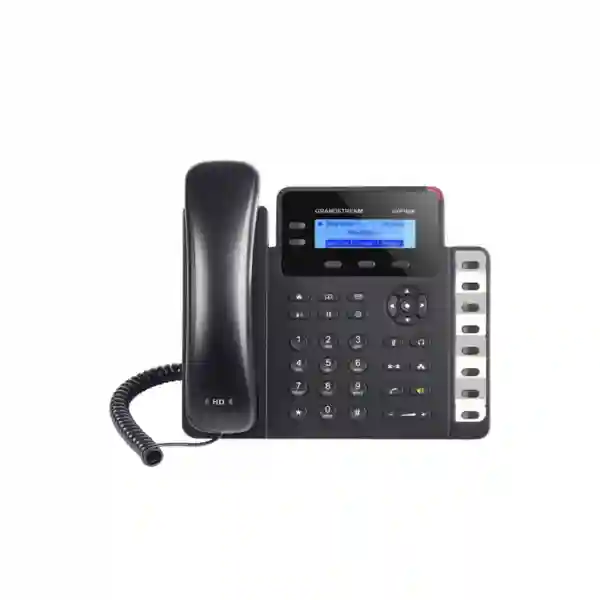
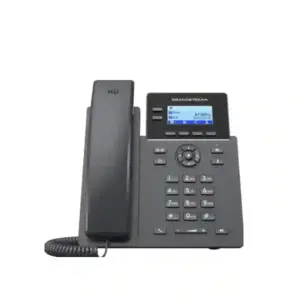
Grandstream GXP1628 Dubai – Gigabit PoE IP Phone with 8 BLF Keys
The Grandstream GXP1628 is designed for users who want the simplicity of a two-account SIP desk phone but do not want to give up Gigabit Ethernet, Power over Ethernet, HD voice, or dedicated extension-status keys. For a reception desk, administrator, small office, branch user, retail counter, school office, clinic, warehouse desk, or customer-service position in Dubai and across the UAE, its practical advantage is easy to understand: the phone can handle two SIP accounts while its eight dual-colour BLF/speed-dial keys give the user direct visibility of frequently used extensions. That makes the GXP1628 particularly useful when staff transfer calls often or need one-touch access to colleagues without moving up to a larger colour-screen executive phone.
Fourteck can help businesses evaluate the GXP1628 as part of a complete VoIP deployment, including SIP/PBX compatibility, PoE switching, VLAN and QoS planning, extension design, provisioning, headset requirements and migration from older desk phones. Availability, regional packaging, firmware level and accessories should be confirmed before ordering.
Two line keys and two SIP accounts for routine office calling.
Dual-colour keys for extension monitoring, transfer workflows and one-touch calling.
Dual auto-sensing 10/100/1000 Mbps ports with integrated PoE.
HD handset and full-duplex speakerphone with wideband audio support.
Why buyers choose the GXP1628 instead of a basic 10/100 desk phone
Many entry-level IP phones can register a SIP account and make reliable calls. The GXP1628 becomes more interesting when the desk position also acts as a small communication hub. Its dual Gigabit network ports are useful where the phone sits between the wall outlet and a desktop computer, because the phone does not force the attached workstation onto a 100 Mbps link. Integrated PoE can reduce local power-adapter clutter when the network switch provides compatible power, while the eight BLF keys help users see extension state and reach frequently used colleagues quickly.
This combination suits offices where the user is not an executive who needs a large colour display, but still performs more than basic calling. A receptionist in a small branch may need to watch several extensions. An accounts administrator may transfer calls to sales, logistics, management and service teams throughout the day. A warehouse coordinator may need direct speed-dial access to security, dispatch and purchasing. In those cases, the extra BLF keys can improve workflow more than a visually larger screen would.
The GXP1628 also supports 3-way conferencing, a 132 × 48 backlit graphical LCD, three XML programmable context-sensitive soft keys, an RJ9 headset connection with EHS support for compatible Plantronics headsets, a phonebook of up to 1,000 contacts, and call history of up to 200 records. These are practical features for daily desk use rather than decorative extras.
GXP1628 technical specification summary
| SIP / Lines | 2 SIP accounts, 2 line keys, up to 2 call appearances |
|---|---|
| Display | 132 × 48 (2.95-inch) backlit graphical LCD |
| Programmable / BLF Keys | 3 XML programmable context-sensitive soft keys and 8 BLF keys |
| Ethernet | Dual switched auto-sensing 10/100/1000 Mbps ports |
| Power | Integrated IEEE 802.3af Class 2 PoE; universal power supply listed in the manufacturer package specification |
| Audio | HD handset and speakerphone, G.722 wideband support, full-duplex hands-free operation |
| Conference | 3-way audio conferencing |
| Headset | RJ9 headset jack; EHS support for compatible Plantronics headsets |
| Directory | Downloadable XML/LDAP phonebook, up to 1,000 entries; call history up to 200 records |
| Security | TLS, SRTP, HTTPS, 802.1X and encrypted configuration-file support |
| Provisioning | TR-069, encrypted XML configuration, TFTP/HTTP/HTTPS/FTP/FTPS firmware or provisioning workflows, plus Grandstream UCM Zero Config support |
| Mounting | Two-position base stand and wall-mount capability |
| Dimensions / Weight | 220.5 × 192.5 × 76.0 mm with handset; unit weight approximately 0.8 kg |
Specifications are based on Grandstream product documentation available at the time of preparation. Firmware, regional package contents and supported features can change, so deployment-specific requirements should be verified before purchase or rollout.
The eight BLF keys are the feature that changes the user experience
BLF, or Busy Lamp Field, is often treated as a specification-sheet item, but in a working office it can directly affect how quickly calls are handled. The GXP1628 has eight dual-colour BLF/speed-dial keys. When the PBX and configuration support the required monitoring behaviour, those keys can be assigned to selected extensions so the user can see status and access common destinations without searching the directory or remembering every extension number.
For a small reception position, eight keys may be enough to monitor a manager, sales, finance, support, warehouse, meeting room, security desk and another branch extension. For a project office, the keys can represent team leads or frequently used external destinations. For a clinic, they can be mapped around the actual call flow rather than around job titles. The practical design question is not merely whether the phone has BLF; it is whether eight physical keys match the number of destinations the user needs to see at a glance.
If a user needs far more monitored extensions, a phone with a larger programmable-key capacity or expansion-module support may be more appropriate. If the user rarely transfers calls, BLF may have limited value and a simpler model could be sufficient. Fourteck can map the requirement before model selection so businesses do not pay for features that will not be used or deploy a phone that becomes restrictive after growth.
Gigabit Ethernet matters when the phone shares a network drop with a PC
A common office cabling design uses one network outlet at the desk. The cable connects to the IP phone, and the computer connects through the phone’s second Ethernet port. With a Fast Ethernet phone, that pass-through path may become a 100 Mbps segment. The GXP1628 avoids that limitation by providing dual auto-sensing 10/100/1000 Mbps Ethernet ports. This does not mean every application will run at Gigabit speed—the rest of the network still determines performance—but the phone itself is not limited to a 100 Mbps pass-through interface.
This can be useful for Dubai offices using cloud applications, file servers, CRM systems, Microsoft 365, browser-based ERP or other data-intensive services from the attached desktop. It is also useful during refresh projects where the switching infrastructure is already Gigabit-capable and the business wants desk phones that fit the network design rather than becoming the slowest link.
Network design still requires attention to VLANs, QoS, DHCP, DNS, NTP, switch-port configuration and PBX reachability. A Gigabit interface cannot correct congestion, poor internet service, asymmetric routing, SIP ALG problems or incorrect QoS. The right deployment treats the phone, switch, router/firewall and PBX as one communication path.
PoE deployment: cleaner desks and easier central power planning
The GXP1628 supports integrated Power over Ethernet. In a compatible PoE network, power and data can be delivered over the same Ethernet cable. This can reduce the number of individual power adapters under desks and make installation neater. More importantly for business continuity, phones connected to PoE switches can potentially remain powered from a centrally protected switch if the network rack is backed by an appropriate UPS.
PoE capacity should still be planned rather than assumed. The manufacturer’s technical specification identifies IEEE 802.3af Class 2 PoE. Before a multi-phone rollout, the switch model, available PoE budget, number of powered endpoints and any other PoE devices—access points, cameras, access-control readers or intercoms—should be reviewed together. A switch may have enough ports but an insufficient power budget for every connected device.
Where PoE is not available, the phone can be powered with the appropriate manufacturer-specified power supply. Businesses should verify package contents and regional supply details before ordering, particularly for bulk procurement or replacement projects.
Best fit
- Small and medium business users who need two SIP accounts.
- Reception or administrative desks that monitor a modest number of extensions.
- Desks where the PC connects through the phone and Gigabit pass-through is desirable.
- PoE-based office deployments that want fewer local power adapters.
- Branches using Grandstream UCM systems where Zero Config can simplify deployment.
Consider another model when
- The user needs more than two SIP accounts or a larger number of line appearances.
- A colour display, Bluetooth, Wi-Fi or modern app-oriented interface is required.
- The receptionist must monitor far more than eight extensions.
- The project requires expansion modules or much deeper programmable-key capacity.
- A newer GRP-series platform is preferred for a fresh fleet standardisation project.
GXP1628 vs GXP1625: when the upgrade is worth considering
The GXP1625 and GXP1628 are close enough that buyers often compare them directly. Both are two-account business IP phones with a backlit 132 × 48 display, HD audio, PoE support and 3-way conferencing. The GXP1628’s practical step up is its network and key layout: it adds dual Gigabit Ethernet and eight BLF keys, while the GXP1625 uses 10/100 Mbps network ports and does not provide the same dedicated eight-key BLF bank.
| Decision Point | GXP1625 | GXP1628 |
|---|---|---|
| SIP accounts | 2 | 2 |
| Display | 132 × 48 backlit LCD | 132 × 48 backlit LCD |
| Ethernet | Dual 10/100 Mbps | Dual 10/100/1000 Mbps |
| Integrated PoE | Yes | Yes |
| Dedicated BLF keys | No dedicated 8-key bank | 8 dual-colour BLF/speed-dial keys |
If the workstation behind the phone benefits from Gigabit connectivity or the user handles frequent transfers, the GXP1628 is generally the more capable fit. If neither requirement matters, the decision can shift toward availability, project standardisation and total deployment cost.
GXP1628 vs GXP1630: two-account simplicity or more call capacity?
The GXP1630 sits above the GXP1628 within the same general family. It supports three SIP accounts and three line keys, a 132 × 64 backlit display, eight BLF keys and 4-way conferencing. The GXP1628 stays focused on two SIP accounts and 3-way conferencing while retaining Gigabit Ethernet, PoE and eight BLF keys.
For a normal office user who needs two registrations, the GXP1628 can be sufficient and simpler to standardise. For a user who regularly handles a third SIP identity, more concurrent line activity or a four-party local conference requirement, the GXP1630 may be a better technical fit. Choosing between them should be based on call workflow rather than the assumption that the numerically higher model is automatically necessary.
For new deployments, businesses may also want to compare the GXP family with current Grandstream GRP models. The best choice depends on required features, fleet lifecycle, central provisioning, security policy, user interface expectations and existing PBX environment. Fourteck can help compare suitable models without forcing a one-model-fits-all approach.
SIP, PBX and provisioning compatibility planning
The GXP1628 uses SIP and supports a broad set of standard VoIP protocols. A SIP phone, however, should not be selected only because both the handset and PBX mention SIP. Successful deployment depends on registration settings, authentication, codec policy, NAT behaviour, DTMF method, transport, security settings, VLANs, QoS and PBX-side features such as BLF subscriptions. Some advanced phone features can be platform dependent.
With Grandstream UCM IP PBX systems, the GXP1628 supports Grandstream Zero Config provisioning, which can simplify initial setup and mass deployment. The manufacturer also documents provisioning through TR-069 and encrypted XML configuration files. These methods matter in multi-phone projects because consistent configuration is safer and faster than manually setting every handset one by one.
For third-party SIP platforms, compatibility should be confirmed against the actual PBX or hosted-VoIP service. Basic calling may work broadly while BLF, message-waiting indication, remote phonebook, transfer behaviour, call recording keys, hot desking or provisioning can vary. A pilot test with the intended firmware and PBX version is a sensible step before a large rollout.
Where the phone will be used remotely across the internet, security policy and SBC/VPN design should be reviewed. Exposing SIP devices directly to the public internet without appropriate controls can create avoidable risk. Deployment design should follow the PBX vendor’s recommended remote-extension architecture.
Voice quality depends on more than the handset
The GXP1628 supports HD audio on the handset and speakerphone, including the G.722 wideband codec, along with common narrowband codecs. That creates the capability for clearer voice, but end-to-end quality depends on the entire call path. The PBX, SIP provider, remote endpoint and network must support the selected codec and have enough consistent bandwidth with acceptable delay, jitter and packet loss.
In a business LAN, voice traffic can be separated with an 802.1Q VLAN and prioritised with appropriate QoS. The GXP1628 supports Layer 2 and Layer 3 QoS mechanisms, but switches and routers must also be configured correctly. Marking packets at the phone is only one part of the design. If a WAN link is saturated by cloud backup, file transfer or guest Wi-Fi traffic, the router must enforce a policy that protects real-time voice.
For call-quality troubleshooting, Fourteck can review endpoint configuration, PoE stability, switch counters, VLAN assignment, DHCP options, DNS, NTP, codec settings, NAT/firewall behaviour and WAN performance. This avoids replacing phones when the root cause sits elsewhere in the communication path.
Security features and deployment controls
Grandstream documents support for TLS, SRTP, HTTPS, 802.1X and encrypted configuration files on the GXP1628. These capabilities can support a more controlled VoIP environment, but they are not automatic guarantees of a secure deployment. Security depends on how the PBX, certificates, credentials, provisioning server, switch access controls and management interfaces are configured.
A practical business deployment should use strong unique credentials, restrict management access, maintain an approved firmware baseline, disable unused services where appropriate, avoid exposing the web interface unnecessarily, and protect provisioning data. If TLS and SRTP are required by policy, the PBX and calling environment must support them and certificates must be managed correctly.
For organisations with formal IT controls, the phone should be treated as a managed network endpoint, not as an appliance that can be installed and forgotten. Inventory, firmware tracking, configuration backup, user moves/adds/changes and decommissioning procedures should be part of the endpoint lifecycle.
Typical Dubai and UAE deployment scenarios
Reception in a small office
Eight BLF keys can provide a compact view of the people or departments most often receiving transferred calls. The user still has two SIP accounts without moving to a larger operator console.
Branch administrator
A branch administrator may use BLF for head-office contacts while Gigabit pass-through serves the same desk’s PC. PoE simplifies installation where the branch switch already supports powered endpoints.
Retail or service counter
The phone can handle routine incoming and outgoing calls while selected BLF keys give direct access to store management, accounts, stock room, security or service teams.
Warehouse or logistics desk
Dedicated keys can shorten the path to dispatch, purchasing, gate security or supervisors, while HD speakerphone capability helps with hands-free coordination in quieter desk zones.
School, clinic or professional office
Two SIP accounts and easy extension transfer can suit offices that need reliable desk telephony without advanced multimedia functions.
Multi-site organisation
A standard GXP1628 template can be provisioned across branches when the underlying PBX and network design are consistent, helping simplify training and support.
Regional planning beyond Dubai
Abu Dhabi and Sharjah: Organisations with headquarters and branch sites should standardise extension numbering, VLANs, QoS and provisioning before shipping phones to each location. The GXP1628’s UCM-oriented Zero Config capability can be useful where a Grandstream UCM architecture is already in place, while third-party PBX deployments should validate BLF subscriptions and remote provisioning in advance.
Uganda and Kenya: Branch deployments may place greater emphasis on bandwidth efficiency, WAN resilience and centrally managed configuration. The handset should be selected as one component of the branch design; internet quality, router policy, SIP-provider reachability and backup-power planning can have more effect on service continuity than the endpoint model alone.
Kuwait: For offices refreshing older Fast Ethernet phones, the GXP1628 can provide Gigabit pass-through without adding a second data outlet at the desk. Procurement teams should still compare current availability and lifecycle needs against newer Grandstream platforms before standardising a new fleet.
Nigeria, Ghana and Tanzania: Multi-site businesses should confirm local power, switch PoE budget, WAN latency and remote support procedures. Where many phones are deployed, templated provisioning and controlled firmware management become especially important to reduce onsite configuration effort.
Fourteck can support regional solution design while keeping the phone configuration aligned with the actual PBX, network and user requirement rather than applying the same template to every branch.
Procurement checklist before requesting a GXP1628 quotation
- Quantity: confirm the number of desks plus a sensible spare strategy for larger sites.
- PBX platform: identify the exact IP PBX, hosted SIP service or UCM model and software version where possible.
- SIP accounts: verify that two registrations are sufficient for the targeted user role.
- BLF plan: determine which eight extensions or functions the user should monitor or access.
- PoE: confirm switch support, available port count and remaining PoE power budget.
- PC pass-through: verify whether the workstation will connect through the phone and whether Gigabit is required.
- Headsets: confirm the exact headset model and EHS expectations before purchasing accessories.
- Remote sites: document WAN, firewall, SBC or VPN requirements before rollout.
- Provisioning: decide whether phones will use UCM Zero Config, XML, TR-069 or another supported mechanism.
- Availability and lifecycle: confirm current stock, regional package contents, firmware baseline and whether a newer platform is preferable for a new standardisation project.
Installation and configuration approach
A structured GXP1628 rollout starts with network readiness. The switch port should be checked for VLAN and PoE policy, and the data path to the PBX should be verified before endpoint configuration. DHCP, DNS and NTP need to work reliably because inaccurate time, failed name resolution or inconsistent addressing can create avoidable support issues.
The next step is PBX registration and dial-plan validation. Outbound calls, inbound calls, caller ID, transfer, hold, conference, voicemail indication, DTMF and emergency or service numbers should be tested according to the customer environment. BLF keys should then be assigned based on real call flow. A key plan designed with the receptionist or user usually works better than one created only by IT because the person handling calls knows which destinations matter most.
After functional testing, security settings, firmware, time zone, language, ringtone, volume and directory options can be standardised. For larger deployments, these settings should be placed in the provisioning template rather than manually applied phone by phone. A small pilot group should be tested before mass rollout so any PBX-specific behaviour is corrected once instead of repeated across every endpoint.
Finally, handover should include basic user guidance: placing calls, transferring, using BLF, conferencing, checking voicemail, adjusting volume and reporting faults. Clear support ownership reduces the chance that routine user questions become network incidents.
Support and troubleshooting considerations
Phone does not power on over PoE
Check that the switch port actually supports PoE, the port is enabled for power, the switch has available PoE budget, and the cable path is healthy. Test another known-good PoE port or cable before assuming the handset is faulty.
SIP account will not register
Verify username, authentication ID, password, SIP server, transport and port settings. Then check DNS, routing, firewall policy and PBX logs. For remote phones, review the intended SBC/VPN/NAT design instead of relying on automatic router behaviour.
BLF keys do not show the expected status
BLF depends on PBX subscription support and correct extension mapping. Confirm the monitored extension value, event-list or subscribe behaviour required by the PBX, and whether permissions or platform-specific settings are needed.
Calls connect but audio is one-way
One-way audio usually points beyond the handset itself. Check RTP routing, NAT, firewall rules, SIP ALG behaviour, SBC settings and VPN policy. Capture information from both the PBX and firewall if the fault persists.
Voice sounds delayed or broken
Measure latency, jitter and packet loss, then review WAN utilisation and QoS. Also confirm switch errors and duplex negotiation. Codec changes can affect bandwidth, but they should not be used to hide a fundamentally unstable network.
Frequently asked questions about the Grandstream GXP1628
How many SIP accounts does the GXP1628 support?
The GXP1628 supports two SIP accounts with two line keys. It is best suited to users whose workflow fits within that two-account capacity.
Does the GXP1628 support PoE?
Yes. Grandstream specifies integrated IEEE 802.3af Class 2 Power over Ethernet. The connected switch must provide compatible PoE and have sufficient power budget.
Does the GXP1628 have Gigabit Ethernet?
Yes. It has dual switched auto-sensing 10/100/1000 Mbps Ethernet ports, making it useful where a computer connects through the phone.
How many BLF keys are on the GXP1628?
The phone provides eight dual-colour BLF/speed-dial keys. Their exact behaviour depends on PBX configuration and feature support.
Can the GXP1628 be used with a Grandstream UCM IP PBX?
Yes. Grandstream documents compatibility with UCM features and Zero Config provisioning, which can simplify deployment on supported UCM systems.
Can the GXP1628 work with third-party SIP PBXs?
The phone is SIP based and can work with many SIP platforms, but advanced feature behaviour varies. Registration, BLF, voicemail, transfer, provisioning and security requirements should be tested against the exact PBX or hosted service.
Does the GXP1628 support HD voice?
Yes. It supports HD audio on the handset and speakerphone, including the G.722 wideband codec. End-to-end wideband quality also depends on the PBX, provider, remote endpoint and network path.
Does the GXP1628 support a headset?
Yes. It includes an RJ9 headset jack and Grandstream documents EHS support for compatible Plantronics headsets. Confirm the exact headset and adapter requirements before purchase.
Is the GXP1628 suitable for reception?
It can be a strong fit for a small reception role when eight BLF keys are enough. A larger reception environment may need more programmable keys, an expansion module or a higher-capacity phone.
What is the difference between GXP1625 and GXP1628?
Both are two-account business phones with HD audio and PoE, but the GXP1628 adds Gigabit Ethernet and a dedicated bank of eight BLF/speed-dial keys, making it better suited to transfer-heavy desks and PC pass-through environments.
Should a new project choose GXP1628 or a GRP-series model?
That depends on the project. Existing GXP standardisation, required BLF capacity, PBX environment, procurement availability, lifecycle policy and management requirements should all be considered. Fourteck can compare current alternatives before a new fleet decision.
Why work with Fourteck for GXP1628 deployment
A business phone should be selected as part of the communication system, not as an isolated piece of hardware. Fourteck can help customers review user roles, SIP account count, BLF requirements, PBX compatibility, PoE switching, VLAN and QoS design, headset requirements, remote-site connectivity and provisioning method before finalising the endpoint choice.
For customers comparing Grandstream models, the objective is to match capability to real work. A user who needs two SIP accounts, eight extension-status keys and Gigabit pass-through may fit the GXP1628 very well. A user who needs more accounts, more programmable capacity, wireless connectivity or a newer fleet platform may need another model. This requirement-first approach reduces avoidable replacements and makes future support simpler.
For quotations, bulk deployment, configuration assistance or model comparison in Dubai, Abu Dhabi, Sharjah and other supported regions, share the quantity, PBX platform, user type, PoE-switch details and required call features. Fourteck can then recommend the most suitable configuration and confirm current commercial availability.
Request a Grandstream GXP1628 quotation or compatibility check
Planning a new office, refreshing older IP phones or adding a reception/administrative handset? Send Fourteck your PBX model, required quantity, PoE environment and user requirements. We can help confirm whether the GXP1628 is the right fit or whether another Grandstream model better matches the project.
Reviews
There are no reviews yet.