Grandstream GRP2614 Dubai – Dual-Screen Professional IP Phone for Managed Business Deployments
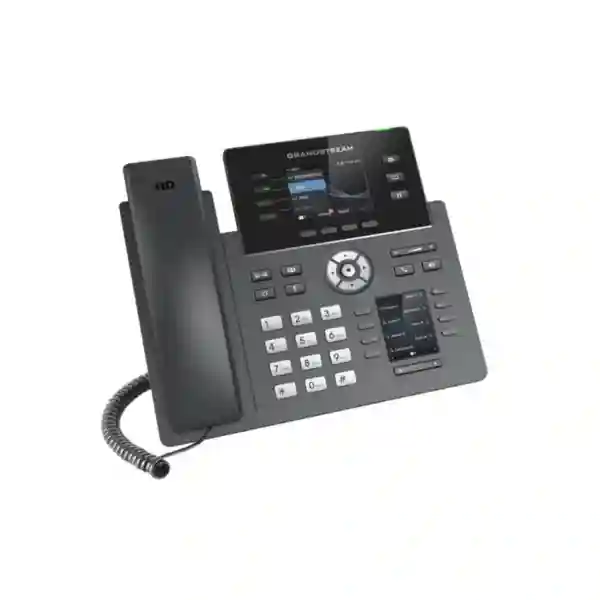
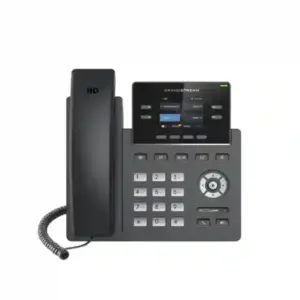
The Grandstream GRP2614 Dubai page is for organisations that need a professional SIP desk phone with more call visibility than an entry-level handset, without immediately moving to a large attendant console or touchscreen endpoint. Grandstream positions the GRP2614 as a four-line professional IP phone for mass deployment and easy management. Its current product information highlights dual colour displays, 40 virtual multi-purpose keys, HD audio, dual Gigabit Ethernet with PoE, integrated Bluetooth, cloud-oriented management through GDMS, and dual-band Wi-Fi; Grandstream’s latest datasheet further notes Wi-Fi 6 capability on hardware version 5.0 and above. That combination makes the model particularly relevant to managers, supervisors, experienced office users, customer-service desks, coordinators and multi-site businesses that want a centrally manageable desktop voice platform.
For Dubai and wider UAE projects, the real buying question is not simply whether the GRP2614 has more features than a basic IP phone. The useful question is whether its dual-screen workflow, SIP-account capacity, programmable keys, wired/wireless connectivity and central provisioning fit the way your teams handle calls. Fourteck can help buyers define that requirement before quotation, including the PBX platform, number of users, PoE availability, VLAN and QoS design, Wi-Fi hardware revision, headset needs, extension monitoring and rollout scale.
A 30-second fit check: is the GRP2614 the right desk phone for your users?
Good fit when
Users regularly monitor colleagues, lines or call states and benefit from a dedicated secondary key display. The phone’s virtual keys can reduce the need to navigate menus during routine call handling.
Good fit for deployment teams
You need a model suited to repeatable provisioning across many desks or sites. GDMS support, TR-069 options and encrypted XML provisioning make central administration part of the buying decision rather than an afterthought.
Good fit for mixed connectivity
Your standard design is wired Gigabit Ethernet with PoE, but some locations may benefit from Wi-Fi. Confirm the hardware revision when Wi-Fi 6 is a requirement because Grandstream ties that capability to hardware version 5.0 and above.
Consider another model when
The user needs a large external expansion module, a much larger main display, a touchscreen, or a higher-end attendant workflow. The GRP2614 itself does not support an extension module.
Verified GRP2614 quick facts that matter during procurement
| Product class | Grandstream GRP Series professional / carrier-grade SIP IP phone designed for mass deployment and easy management. |
|---|---|
| Lines and SIP accounts | 4 line keys with support for up to 12 SIP accounts according to Grandstream’s current product page and datasheet. |
| Displays | 2.8-inch 320×240 colour TFT main LCD plus a 2.4-inch 320×240 additional display. |
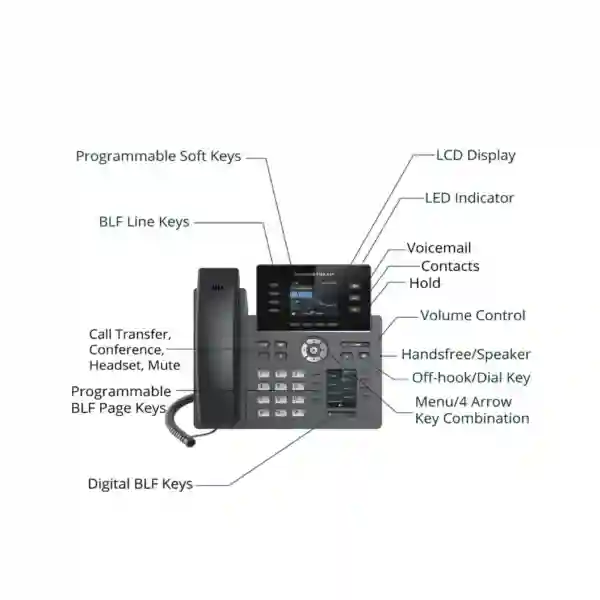
| Virtual / multi-purpose keys | 40 virtual multi-purpose keys, with 8 MPK extension keys and left/right page navigation described in Grandstream documentation. |
| Ethernet and PoE | Dual switched auto-sensing 10/100/1000 Mbps Gigabit Ethernet ports with integrated IEEE 802.3af PoE. |
| Wi-Fi | Integrated dual-band Wi-Fi; the latest datasheet identifies Wi-Fi 6 (802.11ax) on hardware version 5.0 and above. Confirm hardware revision for projects where 802.11ax is mandatory. |
| Bluetooth | Integrated Bluetooth. |
| Audio | HD handset and speakerphone with wideband audio; supported codecs listed by Grandstream include G.722 and Opus among other standard codecs. |
| Call handling | Functions include hold, transfer, forward, three-way conference, call park, call pickup, shared call appearance / bridged line appearance, call waiting, hot desking and failover-related functions where the SIP platform supports them. |
| Headset connection | RJ9 headset jack; Grandstream notes EHS support with compatible Plantronics headsets. |
| Security | Secure boot, dual firmware images, encrypted data storage, TLS, SRTP, 802.1X and encrypted configuration capabilities are among the documented protections. |
| Extension module | No external extension module support on the GRP2614. |
Technical note: Grandstream has revised GRP hardware over time. For exact Wi-Fi generation, accessory fit, firmware branch and package details, verify the hardware revision and current regional package before ordering a project quantity.
What makes the GRP2614 different from a basic office IP phone?
Many office phones can register to SIP and make clear calls. The GRP2614 is more interesting when the user has a busy desktop workflow. Its second colour LCD is not just cosmetic: it gives the programmable-key environment its own dedicated visual space. That matters to users who repeatedly check monitored extensions, speed dials, shared lines or other programmable functions while keeping the main display available for ordinary call information. In practical terms, this creates a more organised workstation than a basic single-screen phone with a small number of hard keys.
Grandstream describes 40 virtual multi-purpose keys and an 8-key MPK control area with page navigation. The final behaviour of those keys depends on the SIP service, PBX feature set and administrator configuration, so a purchasing team should define what the keys are intended to do before the phones arrive. A receptionist may want monitored extensions and transfer targets. A service coordinator may want departmental speed dials. A manager may want shared-line visibility and frequently used internal contacts. A multi-site business may use the same physical model but deploy different key templates by office, department or role.
This is one reason the model fits standardisation projects. Instead of choosing a different desk phone for every employee, a business can assign the GRP2614 to the mid-to-busy user tier, then use provisioning templates to tailor accounts, keys and policies. The value is therefore a combination of hardware capability and deployment discipline. A feature-rich phone that is not mapped to user roles can become unnecessarily complex; a well-planned GRP2614 rollout can make repetitive call handling noticeably easier.
Dual LCD design: where the second screen creates practical value
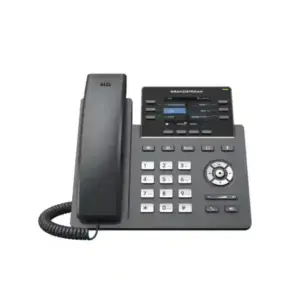
The GRP2614 uses a 2.8-inch colour main display together with a 2.4-inch colour secondary display. For a buyer, screen size should be judged against the intended task rather than treated as a specification contest. The main display is suitable for normal phone interaction such as caller information, menus, account status and call actions. The additional display supports the virtual-key workflow, which helps the user keep frequently accessed functions visible without giving up the primary call screen.
This arrangement can be useful in front-office positions where a person transfers calls to a defined group of colleagues throughout the day. It can also help team leaders who need rapid access to a smaller set of monitored staff rather than the very large button field associated with a dedicated attendant console. In a project specification, define how many monitored destinations each role actually needs. If the number is modest to medium and the user prefers a compact desktop phone, the GRP2614 can be a sensible fit. If the user routinely requires an exceptionally large extension field visible at once, consider a model with supported expansion modules instead.
The second display also helps keep the desk visually cleaner because electronic labels can replace improvised paper lists for many everyday shortcuts. However, the phone still requires thoughtful configuration. Naming conventions should be concise, extension labels should be consistent across departments, and key pages should be grouped logically. For example, a hotel back-office desk might place front office, housekeeping, security and duty management on the first page while keeping engineering, finance and stores on another. A school admin team might group admissions, principal office, transport, accounts and security. The hardware becomes most valuable when the key design reflects the real call flow.
Connectivity planning: Gigabit Ethernet, PoE, Wi-Fi and Bluetooth
For most permanent office desks, wired Ethernet with PoE remains the cleanest deployment pattern because one network cable can provide both connectivity and power. The GRP2614 has two switched Gigabit Ethernet ports and integrated PoE, which allows the phone to sit between the network outlet and a nearby workstation where that topology is appropriate. Gigabit connectivity also means the phone is less likely to become the speed bottleneck for a computer connected through its pass-through port, assuming the rest of the network path is Gigabit-capable.
Wi-Fi gives the project another option for desks where pulling a new cable is inconvenient or where layouts change more frequently. The important procurement detail is hardware revision. Grandstream’s current GRP2614 datasheet identifies integrated dual-band Wi-Fi 6 on hardware version 5.0 and above, while older product literature references earlier Wi-Fi generations. If 802.11ax is included in a tender or technical requirement, confirm the exact hardware revision on the units being quoted. Wi-Fi should also be planned like any business network service: validate coverage, SSID policy, authentication, roaming expectations, interference, VLAN design and voice QoS rather than assuming that the phone alone guarantees call quality.
Integrated Bluetooth adds flexibility for supported wireless accessories and can reduce cable clutter for users who prefer a headset workflow. Bluetooth is particularly useful for managers or staff who alternate between handset calls and hands-free movement around a desk. Accessory compatibility should still be checked against the intended headset model, firmware and deployment requirements. For wired headsets, the phone provides an RJ9 connection and Grandstream documentation refers to electronic hook switch support with compatible Plantronics headsets.
The strongest design is usually to treat wired and wireless options as part of a policy. Standard desks can use PoE Ethernet, selected movable or cable-constrained desks can use Wi-Fi after a site assessment, and approved Bluetooth or RJ9 headsets can be assigned by role. This keeps support simpler than letting every user improvise a different connection method.
HD audio and call handling for real office workflows
Grandstream specifies HD audio on the handset and speakerphone and lists wideband codecs such as G.722 and Opus. Codec support is only one part of call quality: the end-to-end result also depends on the PBX, SIP trunk or service, network latency and loss, QoS, handset or headset, remote endpoint and the codec negotiated for the call. Still, using a business phone with wideband capability gives the system a stronger foundation than treating audio quality as a PBX-only issue.
The GRP2614 also supports common business calling functions including hold, transfer, forward, three-way conference, call park, call pickup, shared call appearance and bridged line appearance, plus features such as hot desking, auto answer and server redundancy / failover mechanisms. Not every SIP environment exposes every function in exactly the same way. During a deployment, the administrator should test the actual call scenarios that matter: blind transfer, attended transfer, pickup groups, hunt groups, voicemail access, shared line keys, direct inward dialling, outbound caller ID, emergency-call policy and failover behaviour.
For customer-facing departments, the most important improvements often come from predictable call handling rather than exotic features. A sales coordinator wants to transfer a caller without losing the call. A reception user wants to see whether the target extension is busy before transferring. A manager wants quick access to recurring contacts and a reliable speakerphone for short internal discussions. A service desk wants consistent buttons across all agents. These workflows can be designed on the GRP2614 if the PBX and provisioning policy support them.
For conference-heavy users, remember that the phone is documented for three-way audio conferencing. If a role routinely needs larger ad-hoc conferences directly from the desk phone, a different endpoint or PBX-hosted conference method may be more suitable. This distinction is important because “conference support” by itself does not describe the number of parties or the way meetings are managed.
SIP, PBX and provisioning considerations before you standardise on the GRP2614
The GRP2614 supports SIP and is built for managed deployments, but procurement should begin with the communications architecture. Identify the PBX or hosted voice platform, the number of registrations per user, whether shared or departmental identities are required, the SIP transport and security policy, the extension-number plan, voicemail behaviour, caller-ID rules and the features expected from programmable keys. The phone can expose up to 12 SIP accounts according to Grandstream’s current documentation, but that capacity should not be confused with four physical line keys. Multiple SIP registrations are useful only when the user genuinely needs them and the administrator has a clear account strategy.
Provisioning matters even in a 20-phone office. Manual configuration may appear fast during the first installation, but it becomes expensive to maintain when passwords, SIP servers, BLF assignments, firmware policies, VLAN settings or security requirements change. Grandstream supports central management through GDMS and documents additional provisioning methods such as TR-069 and encrypted XML configuration. A project can therefore use templates to standardise settings across groups while still assigning user-specific accounts and key layouts.
For larger deployments, establish a lifecycle process: how a new phone is enrolled, how a device is reassigned when an employee changes desk, how credentials are rotated, how firmware is tested before broad rollout, how configuration changes are approved and how a returned or retired phone is cleared. This operational detail determines whether “zero-touch provisioning” translates into lower support effort or remains only a feature on a datasheet.
Compatibility should be verified against the actual PBX and service configuration, especially for advanced features such as BLF, shared call appearance, directories, EHS headsets and automated provisioning. SIP provides broad interoperability, but feature implementations can differ. A small pilot group is normally the safest way to validate the phone against the production call flow before committing to a large standardisation project.
GDMS and mass deployment: why management can matter more than the handset itself
Grandstream’s Device Management System is a core part of the GRP series value proposition. Grandstream describes GDMS as a central platform for provisioning, device configuration, firmware management, monitoring and troubleshooting of supported endpoints. That is relevant to UAE organisations with multiple branches, managed service providers, schools, hospitality groups, clinics, retail networks and companies that want one repeatable voice-device policy across many locations.
A centrally managed phone estate can reduce variation. Instead of ten branches using ten slightly different settings, administrators can define common templates for network behaviour, account configuration, security controls, time settings, language, key definitions and firmware policy, then apply site-specific adjustments where needed. The benefit is not just faster installation. Standardisation improves troubleshooting because support teams know what “normal” looks like.
For a Dubai head office with branches in Abu Dhabi, Sharjah or other emirates, a management strategy can also simplify moves and replacements. A spare device can be enrolled, assigned to the appropriate template and configured for the user without rebuilding every setting manually. For companies that operate across the GCC or Africa, the same principle becomes even more valuable because travel to each office for routine phone configuration is not practical.
Central management does not remove the need for change control. Businesses should still test firmware on a limited device group, document template changes, control administrator permissions and keep device inventories accurate. The best result comes from combining the GRP2614 hardware with a disciplined operational model rather than assuming the management platform automatically solves every support challenge.
Security capabilities and the configuration decisions behind them
Grandstream documents enterprise-oriented protections for the GRP2614, including secure boot, dual firmware images and encrypted data storage. The datasheet also lists controls and protocols such as TLS, SRTP, 802.1X, encrypted configuration files, user and administrator passwords, and secure provisioning options. These features give administrators tools to build a stronger endpoint policy, but actual security depends on how the phone, PBX, network and management platform are configured together.
For a business deployment, treat the phone as a network endpoint. Use dedicated voice VLANs where appropriate, strong administrator credentials, controlled provisioning access, secure signalling and media where supported end-to-end, firmware governance, switch-port security policies and restricted management exposure. If 802.1X is part of the corporate access-control design, validate the exact authentication workflow and certificate requirements during the pilot stage.
Security also includes decommissioning. When a phone is reassigned, returned to stock, moved to another site or retired, clear user-specific configuration and credentials according to the organisation’s process. Multi-site deployments should maintain an inventory that links device identity, location, user and configuration group. This makes it easier to identify lost, moved or outdated endpoints and reduces the chance that an old configuration survives indefinitely.
For regulated or security-sensitive environments, Fourteck can help frame the endpoint requirements, but final acceptance should follow the organisation’s internal security policy and the current documentation for the PBX, network access-control system and Grandstream firmware branch. Avoid treating a list of encryption acronyms as a substitute for an implementation review.
Network design for voice: VLAN, QoS and PoE checks that prevent avoidable problems
The GRP2614 supports Layer 2 and Layer 3 QoS mechanisms documented by Grandstream, including 802.1Q, 802.1P and IP-layer prioritisation methods. These capabilities are useful only when the switches, routers, Wi-Fi infrastructure and WAN policy are aligned. A phone cannot compensate for a congested network where QoS is inconsistently configured or where the WAN regularly drops packets.
For wired deployments, confirm switch PoE capacity at the project level rather than checking only whether the phone supports PoE. The datasheet lists integrated 802.3af PoE and modest endpoint power consumption, but a floor switch may be powering phones, access points, cameras and other devices simultaneously. Calculate the available PoE budget and allow operational headroom. Also verify that the switch ports are configured for the intended data and voice VLAN arrangement, especially when a computer will connect through the phone’s second Ethernet port.
For Wi-Fi deployments, perform a coverage and capacity review. Voice is sensitive to latency, jitter, packet loss and roaming behaviour. A strong signal indicator at one desk is not enough evidence for a stable office-wide voice design. Check channel utilisation, access-point placement, authentication, power-saving behaviour, roaming expectations and whether the endpoint will remain stationary or move. Where a reliable wired outlet already exists, Ethernet with PoE is normally the simpler baseline for a fixed desk.
A well-designed pilot should include real calls during busy network periods, transfers, hold/resume, speakerphone, headset use, internal and external calls, and branch-to-branch traffic if relevant. This catches network or PBX issues before hundreds of devices are installed. The cost of a short test is small compared with troubleshooting a large rollout after users are already depending on it.
Who should use the GRP2614 in a Dubai or UAE organisation?
Managers and team leaders
Useful when a manager handles multiple identities, needs quick access to key colleagues and prefers a traditional desk phone with a stronger programmable-key interface rather than a touchscreen.
Reception and coordination desks
A fit for moderately busy desks that need visible BLF-style shortcuts and frequent transfers but do not require a very large external button module. For very large attendant requirements, compare a model with expansion support.
Customer service and operations staff
The dual-screen layout can support fast access to shared queues, supervisors, departments or recurring destinations when the PBX exposes the required functions.
Multi-site office users
Standardisation becomes easier when central provisioning and consistent key templates are more important than choosing a different handset for every branch.
Hybrid fixed-desk users
Integrated Wi-Fi and Bluetooth can help selected users who need a flexible endpoint, subject to hardware revision, wireless design and headset compatibility checks.
Service providers and managed deployments
The GRP series is explicitly designed around mass deployment. A provider can use templates and central management to keep configuration more consistent across customer or branch environments.
When the GRP2614 may not be the best choice
A good product page should also identify the boundaries of the model. The GRP2614 is not the automatic answer for every business user. If the role requires a very large display, touchscreen interaction, extensive on-screen application workflows or video, move to a different endpoint category. If a reception position must monitor a much larger number of extensions at once and relies on external button modules, choose a model that explicitly supports expansion hardware. Grandstream documentation states that the GRP2614 does not support an extension module.
Likewise, if the user needs only one or two accounts and performs basic call handling, the GRP2614 may be more phone than necessary. A simpler GRP model could reduce cost and training effort while still meeting the requirement. Conversely, users who need significantly more line keys, larger screens or higher-end call handling should compare the GRP2615 or GRP2616 rather than buying the GRP2614 simply because it sits in the same family.
Wireless requirements also need care. If a project specifically calls for Wi-Fi 6, do not assume every GRP2614 unit in the market is the same hardware revision. Confirm version 5.0 or above as indicated by the current datasheet. If wired connectivity is mandatory and Wi-Fi is not needed, the wireless capability should not be treated as a purchasing advantage by itself.
Finally, avoid selecting a desk phone before confirming the PBX and licensing model. The handset can support many SIP features, but the communications platform determines what services are available and how they are administered. A requirement-led design almost always produces a better result than buying endpoints first and trying to fit the phone system around them later.
GRP2613W vs GRP2614 vs GRP2615 vs GRP2616: choosing by role, not by model number
Adjacent GRP models overlap, so the best comparison is based on user workflow. Grandstream’s current product information positions the GRP2614 around a compact dual-screen interface, up to 12 SIP accounts, integrated Bluetooth, Gigabit Ethernet with PoE and integrated Wi-Fi. The GRP2613W is a simpler single-screen alternative with Wi-Fi 6 and Bluetooth, while the GRP2615 and GRP2616 step up display and line-key capability in different ways. The table below is a decision aid; exact firmware and hardware-revision details should still be confirmed for the units being quoted.
| Model | Best-fit profile | Display / key direction | SIP accounts | Expansion module |
|---|---|---|---|---|
| GRP2613W | Mid-range user who wants Wi-Fi 6/Bluetooth and a simpler single-screen interface. | 2.8-inch colour LCD; up to 24 digital BLF keys in Grandstream’s family information. | Grandstream currently lists 4 accounts for GRP2613 and 6 for GRP2613W in family information; confirm the exact variant. | No |
| GRP2614 | Busy desktop user who benefits from a dedicated secondary key display without external expansion hardware. | 2.8-inch main + 2.4-inch additional colour LCD; 40 virtual MPKs. | Up to 12 | No |
| GRP2615 | High-volume user who wants a larger 4.3-inch display and the option to add GBX20 expansion modules. | 4.3-inch colour LCD; Grandstream lists built-in digital BLF capability and GBX20 support. | Up to 16 on Grandstream’s current product comparison. | Yes, GBX20 |
| GRP2616 | Higher-end user who wants a larger main display plus a secondary key display and more line-key capacity. | 4.3-inch main display plus 2.4-inch secondary display in Grandstream family documentation. | Up to 16 on Grandstream’s current family information. | No |
For a Dubai office, a practical tiering model might use a simpler phone for ordinary staff, the GRP2614 for supervisors and users with a denser call workflow, and a model with expansion support for a true attendant position. That approach is usually more cost-effective than giving every employee the highest-specification handset, and it simplifies user training because each phone tier corresponds to a clear role.
Deployment scenarios across Dubai and the UAE
Dubai head offices and professional services: firms in business districts such as Deira, Bur Dubai, JLT, Business Bay or other commercial areas often have mixed user profiles. Partners, managers, office administrators and client-service teams may handle more internal coordination than ordinary desk users. The GRP2614 can be assigned to these roles while simpler phones remain on low-call-volume desks. A centrally managed template can keep dial plans, time settings, directories and security policy consistent across departments.
Hospitality and serviced properties: the most natural use is generally in back-office or supervisory positions rather than every guest room. Front office, duty management, reservations, housekeeping coordination, engineering and security may benefit from programmed keys and extension visibility. The exact key plan should reflect the hotel’s PBX design, departmental extensions and escalation path. If reception requires hundreds of visible destinations, compare a model with expansion-module support.
Schools and training organisations: administration teams frequently transfer calls among admissions, accounts, transport, security, principal offices and academic departments. The second display and programmable keys can make those recurring call paths easier to operate. Network planning should also account for the school’s data and voice VLAN policies, PoE switching and any branch campuses.
Clinics and healthcare administration: reception, appointment coordination, billing and department desks can use programmable destinations to reduce the number of extensions staff have to remember. Healthcare environments should also apply stricter network and access-control policies according to internal requirements. The phone’s security capabilities can support that design, but they do not replace the organisation’s broader security controls.
Retail, logistics and warehouses: supervisors may need quick access to receiving, dispatch, finance, security and management. Fixed desks can use PoE Ethernet, while carefully planned Wi-Fi can support selected positions where cabling is impractical. In warehouses, wireless voice quality should be tested around racking, machinery and high-interference areas rather than assumed from office-style coverage.
Abu Dhabi, Sharjah, Ajman and other emirates: multi-site organisations can standardise one GRP2614 role profile across branches while applying site-specific SIP accounts and key layouts. Central management is especially helpful when IT staff are not physically present at every office. The project should still document local WAN connectivity, switch models, PoE budget and escalation procedures for each branch.
Planning a multi-country deployment from the UAE
Some UAE organisations operate offices or partner networks beyond the Emirates. In those projects, the value of a centrally manageable GRP endpoint is less about geography and more about consistency. A business can define standard account, security and key policies, then adjust the regional network settings and user assignments for each site. This is useful when Dubai acts as the technology or procurement hub but branch support is handled remotely.
For East Africa, organisations with operations in Kenya, Uganda or Tanzania should pay particular attention to branch WAN quality, power stability, local SIP service design and remote support processes. The GRP2614 can be centrally provisioned, but the user experience still depends on the network between the branch and the voice platform.
For GCC projects, including Kuwait, standard templates can help maintain common dialling, firmware and security policies while allowing country-specific numbering and SIP configuration. For West African deployments such as Nigeria or Ghana, the same principle applies: design the endpoint policy centrally, validate the local connectivity and support model, and do not assume that settings proven in one country should be copied unchanged to another.
Fourteck’s wider network can support conversations around IT, telephony, network and regional requirements, but availability, lead time, service scope and commercial terms should be confirmed for the specific country and project. This page does not make a stock or delivery-time claim.
A practical GRP2614 procurement checklist for IT and purchasing teams
- Define the user role. State whether the phone is for a manager, receptionist, coordinator, customer-service user, shared desk or general employee. This determines whether the dual-screen and virtual-key design will actually be used.
- Confirm the PBX or hosted SIP platform. Document server addresses, account requirements, feature expectations, provisioning method and any vendor-specific configuration needed for BLF, pickup, shared lines or directories.
- Count required SIP identities. The GRP2614 supports multiple accounts, but only assign what the user needs. Too many registrations can make the phone harder to operate and administer.
- Map the programmable keys. List the departments, colleagues or functions each role needs. Design the first key page around the highest-frequency actions and keep naming consistent.
- Decide wired versus Wi-Fi. Use PoE Ethernet as the default for fixed desks when available. If Wi-Fi is required, confirm the hardware revision and validate the wireless environment.
- Check Wi-Fi 6 requirements. Grandstream’s current datasheet ties Wi-Fi 6 to hardware version 5.0 and above. Put the required revision in the quotation or technical specification if 802.11ax is mandatory.
- Verify PoE budget. Confirm that the access switches can power the full planned endpoint count together with other PoE devices.
- Review VLAN and QoS policy. Document voice VLAN IDs, tagging behaviour, DHCP options where used, QoS markings, WAN prioritisation and switch-port templates.
- Confirm headset requirements. Identify wired or Bluetooth headset models and validate compatibility, EHS behaviour and user expectations.
- Plan central management. Decide whether GDMS, another provisioning method or a combined operational process will be used. Define administrator roles and template ownership.
- Set firmware policy. Do not push new firmware to every device without a test group. Define a validation and rollback process.
- Check desk and wall-mount needs. The phone includes a stand and is wall-mountable with the appropriate wall mount sold separately according to the datasheet.
- Confirm regional package content. Grandstream’s datasheet lists a 12V power adapter, handset, stand, network cable and guides, but package contents can vary by market or channel. Confirm the quoted bundle.
- Pilot before scale. Test the real call flow with a small group, including transfer, hold, BLF, voicemail, directory, headset, failover and remote provisioning.
- Request a role-based quotation. Provide user count, locations, PBX, switch information, headset needs and whether installation/configuration is required. This produces a more accurate project scope than asking only for a unit price.
Installation and configuration workflow for a cleaner rollout
1. Requirement discovery: identify departments, user tiers, extension ranges, SIP accounts, call groups, monitored extensions, branch locations, headset requirements and network constraints. This is where the GRP2614 is confirmed as the right role tier rather than chosen solely from a catalogue.
2. Network readiness: verify switch ports, VLANs, DHCP, DNS, NTP, PoE capacity, QoS and internet or WAN performance. For Wi-Fi deployments, validate SSID, authentication, coverage and the device hardware revision.
3. PBX and account template: create the SIP registration profile, dial plan, voicemail access, transfer behaviour, codecs, security transport and relevant server settings. Use a test extension before applying the profile broadly.
4. Key and user-experience template: program MPKs according to role. A sales supervisor should not receive the same layout as a receptionist simply because both use the same phone model. Keep frequently used destinations on the first page and document the meaning of shared keys.
5. Management enrolment: add the phone to the chosen provisioning or management workflow, assign the appropriate group and confirm that configuration can be updated centrally. Record device identity, location and assigned user.
6. Functional test: place internal and external calls, test inbound routing, transfer, hold, park/pickup where used, voicemail, BLF status, speakerphone and headset. If the site uses failover, test the defined failure scenario rather than assuming it works.
7. User handover: show the user the functions they will actually use. Avoid overwhelming staff with every menu option. A short role-specific quick guide is usually more effective than a generic feature list.
8. Post-deployment review: after the first week or agreed pilot period, collect issues, adjust key layouts where needed and only then expand the deployment. This step often identifies small workflow improvements that make the final rollout much smoother.
Technical details explained in buyer language
Up to 12 SIP accounts: this means the phone can be configured with multiple SIP identities. It does not mean every user needs 12 telephone numbers, and it does not turn four physical line keys into twelve permanent hard keys. Use additional registrations only where the role benefits from them.
40 virtual multi-purpose keys: these are useful for functions such as monitored extensions, speed dial or other programmable actions supported by the phone and PBX. Their practical value depends on how the administrator maps them and what the SIP system provides.
Dual Gigabit Ethernet: the phone can connect to the network and provide a downstream Ethernet connection for a PC. The actual throughput available to the workstation still depends on the switch, cabling, VLAN configuration and wider network.
PoE: Power over Ethernet can power the phone from a compatible network switch or injector, reducing the need for a local mains adapter at each desk. Verify switch power capacity for the complete project.
Wi-Fi 6 on hardware version 5.0+: this is an important revision-specific feature. If a buyer needs Wi-Fi 6 rather than simply “Wi-Fi,” the quotation should explicitly confirm the hardware revision.
Bluetooth: enables supported Bluetooth use cases such as compatible headsets. Accessory support should be checked against the intended device and firmware.
HD audio and wideband codecs: improve the endpoint’s ability to reproduce clearer voice when the rest of the call path also supports wideband audio. Network quality and codec negotiation remain important.
GDMS: centralises supported device provisioning and management tasks. The operational benefit increases as the number of phones, users and sites grows.
Secure boot and encrypted storage: these protections help establish a stronger endpoint security baseline. They work best as part of a wider policy that includes secure provisioning, access controls and firmware governance.
No extension module: the GRP2614’s built-in secondary display and virtual keys are the intended expansion mechanism. If the user requires an external button console, compare another model before ordering.
GRP2614 buying questions Fourteck recommends answering before quotation
A quotation becomes more useful when it is built around the deployment rather than a model number alone. Tell Fourteck how many users need the GRP2614, which offices or emirates are involved, whether the site already has a SIP PBX, and whether the endpoints will be wired, wireless or mixed. Also identify how many users require headsets, which departments need BLF keys, whether a voice VLAN already exists and whether configuration services are part of the scope.
For a new telephone-system project, include the expected user count, simultaneous call requirements, SIP trunk design, auto attendant or IVR needs, hunt groups, recording requirements, remote extensions, branch connectivity and failover expectations. The phone is only one layer in the solution. A correctly sized PBX and network design are equally important.
For an upgrade project, identify the existing PBX, current phone models and what is driving the change. Common reasons include more programmable keys, replacement of ageing endpoints, central management, Wi-Fi requirements, better security, or a move from one SIP platform to another. If old phones will remain in service, verify whether mixed-device provisioning and feature behaviour will be acceptable.
For a large procurement, ask for the hardware revision to be stated when Wi-Fi 6 is required, and request confirmation of the regional package, power-adapter inclusion, accessories and any wall-mount or headset items. Commercial details such as stock, price, warranty scope, lead time and installation coverage should be confirmed in the live quotation because they can change.
Frequently asked questions about Grandstream GRP2614 Dubai
Is the Grandstream GRP2614 a four-line phone?
Yes. Grandstream identifies the GRP2614 as a four-line professional / carrier-grade IP phone. Current Grandstream documentation states that it has four line keys and supports up to 12 SIP accounts.
How many SIP accounts does the GRP2614 support?
Grandstream’s current product page and latest datasheet list support for up to 12 SIP accounts. Earlier third-party pages may show older numbers, so use current manufacturer documentation when specifying a new project.
Does the GRP2614 support Wi-Fi 6?
Grandstream’s latest datasheet states that integrated dual-band Wi-Fi 6 is available on hardware version 5.0 and above. Because older hardware revisions exist, confirm the exact revision when Wi-Fi 6 is a mandatory requirement.
Does the GRP2614 have Bluetooth?
Yes. Integrated Bluetooth is listed by Grandstream. For a headset or other accessory, confirm model-specific compatibility and firmware requirements before standardising the accessory across a large deployment.
Does the GRP2614 support PoE?
Yes. It has integrated IEEE 802.3af Power over Ethernet and dual Gigabit Ethernet ports. The access switch must still have enough PoE budget for the complete device count.
What is the purpose of the second display?
The secondary colour display supports the phone’s virtual multi-purpose-key workflow. It is useful for visible programmable functions such as monitored extensions and speed dials, depending on PBX support and configuration.
Can the GRP2614 use an external extension module?
No. Grandstream’s current technical information lists no extension-module support for the GRP2614. If a receptionist or operator needs a large external key console, compare a compatible model such as the GRP2615.
Can the GRP2614 be centrally provisioned?
Yes. The GRP2614 is supported by Grandstream Device Management System, and Grandstream also documents mass-provisioning methods including TR-069 and encrypted XML configuration. The best method depends on the organisation’s management model.
Is the GRP2614 suitable for reception?
It can suit moderately busy reception or coordination desks that benefit from the dual-screen virtual-key layout. If the position must monitor a very large number of extensions at once, a model with expansion-module support may be a better fit.
Does the GRP2614 support HD audio?
Yes. Grandstream specifies HD audio on the handset and speakerphone with wideband support, including codecs such as G.722 and Opus. End-to-end call quality also depends on the PBX, network and remote endpoint.
What should I confirm before buying GRP2614 phones in Dubai?
Confirm the PBX, required SIP accounts, hardware revision if Wi-Fi 6 matters, PoE availability, VLAN/QoS design, headset compatibility, programmable-key plan, quantity, installation scope and current commercial terms such as price, stock and lead time.
Can Fourteck help with configuration as well as supply?
Fourteck can scope configuration and deployment requirements around the PBX, network and endpoint design. The exact service scope, availability and commercial terms should be confirmed for the requested UAE location and project.
Request a GRP2614 Dubai quotation based on the actual deployment
For a useful quotation, share the number of GRP2614 users, office locations, existing or planned PBX, network switch model, PoE availability, wired/Wi-Fi preference, headset requirement and the departments that need programmable keys. Fourteck can then help determine whether the GRP2614 is the right user tier or whether a mix of GRP models would produce a better technical and commercial fit.
You can also review the wider Fourteck technology portfolio at Fourteck UAE or explore IP-telephony content on IP Phone Fourteck. For Grandstream-focused UAE requirements, visit Grandstream UAE Fourteck. Product specification, price, stock, lead time, warranty scope and service coverage should be confirmed in the live quotation.
Specification basis: current Grandstream GRP2614 product information and current English datasheet reviewed for this page. Where manufacturer sources have changed across hardware generations, this page uses current documentation and explicitly flags revision-dependent Wi-Fi capability. No price, stock, delivery-time, rating, review count, authorisation status or warranty duration is asserted on this page.
Reviews
There are no reviews yet.