4 SIP Accounts
Dual-Band Wi-Fi 6*
GDMS
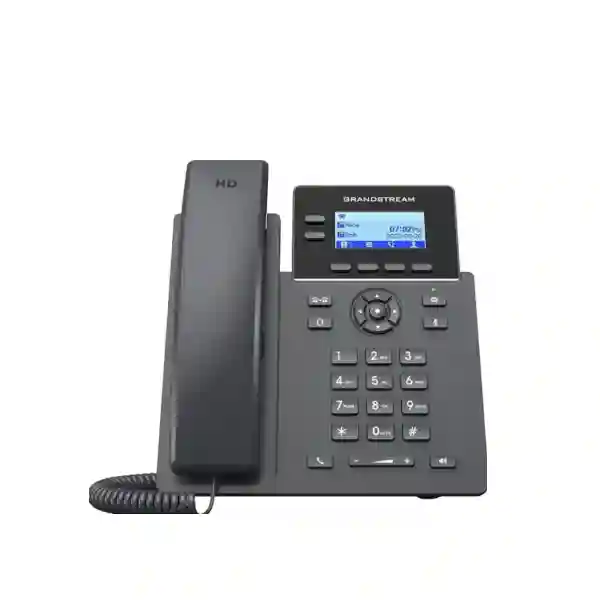
Grandstream GRP2602W Wi-Fi 6 IP Phone Dubai UAE
The Grandstream GRP2602W is a compact 2-line business SIP desk phone designed for users who need the flexibility of wireless network connectivity without moving to a cordless handset. It supports four SIP accounts, HD audio, 5-way audio conferencing, headset EHS integration, centralized GDMS provisioning and enterprise-oriented security features. For current hardware version 5.0 and above, Grandstream specifies integrated dual-band 2.4 GHz and 5 GHz Wi-Fi 6. The GRP2602W also includes dual 10/100 Mbps Ethernet ports, so buyers should distinguish it from the PoE-focused GRP2602P and the Gigabit/PoE GRP2602G before ordering.
For a Grandstream GRP2602W Dubai deployment, the important question is not simply whether Wi-Fi is available. The phone should be matched to the wireless design, PBX or hosted SIP platform, power arrangement, headset requirement, computer pass-through speed and management process at each desk. Fourteck can help customers evaluate those requirements and prepare a model-specific quotation. Pricing, stock, delivery, warranty route and service scope should be confirmed for the final order rather than assumed from general product information.
*Grandstream specifies dual-band Wi-Fi 6 for GRP2602W hardware version 5.0 and above. Confirm the hardware revision supplied when this capability is required.
The quickest way to decide whether GRP2602W fits your desk
Choose it when
The desk needs a fixed SIP phone, wireless network connectivity is genuinely useful, four SIP identities are enough, 10/100 Mbps Ethernet pass-through is acceptable, and a local power adapter can be used. It is especially relevant when adding cabling is difficult or when desks are occasionally relocated within a well-designed Wi-Fi environment.
Compare another variant when
A wired desk should receive power from the switch, a computer connected through the phone needs Gigabit Ethernet, or the office prefers wired voice for operational simplicity. In those cases, compare the GRP2602P or GRP2602G according to the exact power and network-speed requirement.
Do not treat it as
A battery-powered cordless phone, a PoE Wi-Fi phone, a Gigabit desktop switch, a complete PBX, or a guarantee of compatibility with every headset and hosted calling platform. Each of those assumptions can create an avoidable mismatch during procurement or installation.
Confirm before ordering
Hardware revision, quantity, PBX or SIP service, Wi-Fi coverage, power location, computer pass-through requirement, headset model, wall-mount requirement, deployment country and whether Fourteck is supplying only equipment or also configuration and rollout assistance.
What the Grandstream GRP2602W actually is
The GRP2602W belongs to Grandstream’s GRP Essential carrier-grade IP phone family. It uses SIP as the signaling foundation and is designed for ordinary business calling, service-provider deployment, multi-site standardization and other environments where a large number of endpoints may need to be configured consistently. The phone provides two line keys but supports up to four SIP accounts, a distinction that matters when a user has more than one extension identity or when an organization wants separate account registrations without moving to a larger desk-phone class.
The model should be thought of as a fixed desktop endpoint with wireless network capability. Its Wi-Fi feature removes the requirement for the phone itself to use Ethernet for its network connection, but it does not make the device cordless. The desk still needs suitable electrical power, and users do not carry the device between work areas like a Wi-Fi or DECT handset. This makes the GRP2602W useful for fixed workstations where wireless networking solves a cabling problem, while mobile workers should evaluate a handset category designed for movement and battery operation.
Grandstream positions the wider GRP2602 family around mass deployment and easy management. That matters because many buying decisions involve tens or hundreds of phones rather than one unit. The hardware is therefore only one part of the solution. A practical rollout also needs an extension plan, PBX configuration, firmware policy, provisioning ownership, security settings, Wi-Fi design, acceptance testing and a process for replacement devices. Fourteck’s role can be scoped around the customer’s actual requirement, from supply-only quotations to a defined implementation or migration discussion.
Verified GRP2602W specifications that matter to buyers
| Area | GRP2602W detail | Practical buying meaning |
|---|---|---|
| Lines / accounts | 2 lines, 4 SIP accounts | Suitable for ordinary desk users who need more account capacity than a basic two-account phone. |
| Wi-Fi | Dual-band 2.4/5 GHz Wi-Fi 6 on hardware v5.0+ | Confirm revision when Wi-Fi 6 is an explicit requirement; plan wireless coverage rather than assuming every desk will perform identically. |
| Ethernet | Dual switched 10/100 Mbps ports | A computer connected through the phone can be limited to Fast Ethernet, so a Gigabit requirement may justify another variant. |
| Power | Local power adapter; PoE is specified for P/G variants instead | The wireless network connection does not remove the need for electrical power at the desk. |
| Display | 132 × 48, 2.41-inch backlit graphical LCD | An essential business display rather than a large colour-screen interface. |
| Audio | HD handset and full-duplex HD speakerphone | Designed for clear everyday voice use when the network and calling platform are also configured correctly. |
| Conference | 5-way audio conferencing | Useful for ad-hoc collaboration without assuming it replaces a dedicated conferencing or meeting platform. |
| Headset | RJ9 headset jack with EHS support for compatible headsets | Verify the exact headset and EHS accessory combination before a bulk order. |
| Management | GDMS and mass-provisioning options | Helps standardize configuration and monitoring across multiple endpoints when governance is planned. |
| Security | Secure boot, dual firmware images, encrypted storage and supported secure signaling/media mechanisms | Use these capabilities as part of a wider security policy rather than treating the phone alone as the complete security solution. |
The hardware-revision question is important on this model
Grandstream’s current GRP2602 documentation specifies integrated dual-band Wi-Fi 6 for GRP2602W hardware version 5.0 and above. That detail should appear in the buying discussion whenever the customer specifically requires Wi-Fi 6. A quotation that lists only “GRP2602W” without confirming the relevant hardware revision may not give the buyer enough information to validate the exact wireless capability being supplied.
This is especially important for projects that are replacing an older installed base. A customer may already own earlier units and assume every device carrying the same model name has identical wireless capability. Procurement teams should record the revision expectation, and technical teams should verify the actual devices during staging. If a mixed revision fleet is acceptable, document which feature level is required at each site. If consistency is mandatory, state that requirement before the purchase order is finalized.
The broader lesson applies to other endpoint purchases as well: model-family names are not enough for a project specification. Exact suffixes, hardware revisions, firmware constraints and accessory combinations can matter. Fourteck can help customers turn a broad “GRP2602W” request into a clearer bill of materials that identifies the items requiring confirmation.
Wi-Fi 6 is useful, but wireless voice still needs proper design
A Wi-Fi desk phone can solve a real deployment problem. It can be appropriate in a renovated office where a desk does not have a convenient data outlet, a temporary project office where cabling changes are undesirable, a reception point that may be relocated, or a branch where a small number of extensions must be added before structured cabling work is completed. The phone can also reduce the need to use an Ethernet cable at the endpoint when the wireless network is already designed for business voice and the desk has reliable electrical power.
However, voice quality depends on more than the Wi-Fi standard printed on the datasheet. Signal level, interference, channel planning, access-point capacity, roaming behavior, upstream internet or WAN quality, QoS design and the PBX path all influence the experience. A desk located at the edge of coverage can perform poorly even when the phone itself supports a modern Wi-Fi technology. For multi-floor offices or dense environments, a wireless survey and real call testing are more useful than relying on a generic coverage assumption.
Where both 2.4 GHz and 5 GHz are available, the network design should determine how devices are steered and which bands are appropriate. The phone’s support for both bands does not guarantee that every access point, controller policy or authentication method is configured correctly. Organizations using enterprise wireless security should validate authentication and VLAN behavior as part of the deployment test. Changes to SSIDs, credentials or network policy should also be included in the endpoint-management process so a fleet does not unexpectedly lose connectivity.
If a desk already has good Ethernet cabling and PoE switching, a wired phone can still be the simpler operational choice. Wired voice reduces dependence on the RF environment and can centralize phone power through the network switch. The GRP2602W should therefore be selected because its wireless capability addresses a genuine requirement, not merely because “Wi-Fi” appears newer or more flexible on a product list.
Two lines and four SIP accounts: what that means in a real office
The GRP2602W has two line keys and supports up to four SIP accounts. A SIP account is an identity registered to a PBX or hosted voice platform; it is not the same thing as a physical public telephone line. A single employee may use one account, while a shared desk or specialized role may use multiple registrations. The exact workflow depends on the calling platform, account configuration and organizational policy.
For a typical office employee, one primary extension may be enough, and the extra account capacity leaves flexibility for a second identity, a branch account or another approved calling profile. A service desk might use separate identities for different business functions. A hotel administrative desk could have one general office extension and another operational identity. These are examples of how account capacity can be used; the PBX design should determine what is actually configured.
Buyers should not choose an endpoint only by counting SIP accounts. If a receptionist needs to monitor many colleagues, transfer calls rapidly and see a large number of programmable keys, a higher-class phone may be more suitable even if four SIP accounts are technically enough. Conversely, a standard user may not benefit from a more expensive model simply because it supports many accounts that will never be used. The right endpoint matches the daily call workflow.
HD audio, noise reduction and 5-way conferencing
Grandstream specifies HD audio for both the handset and the full-duplex speakerphone, along with noise-shield and AI noise-reduction capabilities in the current GRP2602 family documentation. In practical terms, the phone is designed to give ordinary business users a clear voice interface without requiring a premium executive handset. The experience still depends on codec negotiation, network quality, the far-end device and the external telephone service, so the endpoint should be tested in the real communication path rather than assessed in isolation.
The 5-way audio conference feature can help small teams combine several participants into an ad-hoc call. This is useful when a manager needs to bring a colleague, supplier and customer into the same discussion without scheduling a separate meeting service. For larger collaboration requirements, scheduled meetings, screen sharing, recordings or external participant management, a dedicated conferencing platform may be more appropriate. The phone’s local conference capability should therefore be seen as a convenient telephony feature rather than a substitute for every type of meeting technology.
When voice quality is a priority, Fourteck recommends testing the complete path during a pilot: handset call, speakerphone call, headset call, internal extension call and external call. If the business uses call recording or contact-center software, include those workflows in the test as well. A technically capable phone cannot compensate for a congested WAN, poorly configured QoS or a low-quality upstream voice service.
Headset use: verify the exact combination, not only the brand
The GRP2602W includes an RJ9 headset interface and supports electronic hook switch functionality for compatible headsets. Grandstream lists support across headset brands such as Plantronics, Jabra and Sennheiser in the product documentation. That statement is useful, but it should not be interpreted as universal compatibility with every headset made by those manufacturers. EHS operation can depend on the specific headset, cable, base station, firmware and phone configuration.
For call-center style users, customer-service staff and employees who spend long periods on calls, the headset should be treated as part of the endpoint solution. Test microphone level, receive volume, answer/end control, mute behavior, call transfer workflow and comfort. If a wireless headset is proposed, confirm how remote answer control is achieved. If a corded headset is used, confirm the physical connector and wearing style. These checks are inexpensive during a pilot and costly to fix after a large deployment.
A quotation request should therefore identify both the phone model and the headset requirement. If the customer already owns headsets, provide the exact model numbers so compatibility can be evaluated. If headsets will be purchased with the phones, request that the proposed accessory combination be clearly listed rather than described only as “compatible headset.”
GDMS turns a phone purchase into a manageable fleet
Grandstream’s Device Management System, or GDMS, is one of the reasons the GRP range is relevant for multi-device deployments. The platform can be used to provision, configure, manage and monitor supported Grandstream endpoints from a centralized interface. For a business with several branches or many standard desks, centralized management can reduce the amount of repetitive manual configuration required for each phone.
The operational benefit comes from the process around the platform. Decide who owns the management account, how administrator access is protected, how devices are named, how extension assignments are documented and which configuration parameters are standardized. A deployment should also define how changes move from test devices to production devices. For example, a new dial plan or network setting can be tested on a small group before being distributed to the broader fleet.
Replacement procedures also become important. If a desk phone fails, the organization should know whether a spare device can be assigned the same role through a known profile, which person approves the change and what acceptance tests are required. For remote branches, this can be much more efficient than relying on a technician to recreate every setting manually. The same discipline applies to firmware: track approved versions, review release implications and stage updates rather than changing a large fleet without a rollback or validation plan.
For broader guidance on centralized deployment, see the Grandstream Carrier-Grade SIP Phone Solutions page and the GRP Essential model guide.
Security capabilities need to be paired with secure operations
The GRP2602 family includes security features such as secure boot, dual firmware images and encrypted data storage. The current datasheet also lists secure signaling and media mechanisms, including TLS and SRTP-related capabilities, along with 802.1X support. These features are relevant when phones are deployed in managed business networks, particularly where organizations want endpoint configuration and communications to follow a defined security policy.
Security still depends on configuration. Default or weak administrative credentials, exposed management interfaces, unmanaged firmware, insecure provisioning and poorly controlled network access can undermine the value of built-in capabilities. A rollout should define who can administer the phone, whether web management is restricted, how credentials are generated and stored, how provisioning files are protected and which services are actually required.
Network segmentation may also be appropriate. Many organizations place voice endpoints in a dedicated VLAN with QoS and access-control policies. The exact design depends on the switch, wireless infrastructure, PBX and organizational standards. When the GRP2602W connects by Wi-Fi, confirm how the SSID maps to the intended voice network and whether enterprise authentication requirements are supported in the planned configuration.
For a security-sensitive environment, document the intended firmware baseline, credential ownership, remote-management rules and decommissioning process before the phones are distributed. When a unit is retired or reassigned, configuration and account data should be handled according to the organization’s endpoint policy.
PBX and hosted SIP compatibility should be validated in the real workflow
The GRP2602W is a SIP phone, but “SIP compatible” does not automatically mean that every feature will behave identically on every PBX or hosted service. Basic registration and calling may work while advanced behaviors such as BLF, shared line appearance, remote provisioning, voicemail integration, feature codes or failover depend on the platform and configuration. The safest approach is to validate the exact combination of phone firmware, PBX version and required features.
A pilot should begin with account registration, inbound and outbound calling, caller identification and voicemail. Then test hold, attended transfer, blind transfer, call pickup, forwarding, conferencing and any special feature that employees use regularly. If the business uses multiple SIP accounts, verify account selection and line behavior. If the phone is part of a queue-based customer-service workflow, test agent log-in, call delivery and transfer behavior through the chosen platform rather than assuming the endpoint alone controls those functions.
Remote extensions deserve additional testing. The business should use an approved architecture for remote connectivity, secure signaling and firewall traversal. Test from the actual remote network conditions whenever possible. A phone that works perfectly on the office LAN can behave differently through a home router, mobile hotspot or branch WAN. Document the supported remote-user method so helpdesk teams do not improvise inconsistent configurations later.
For system-level planning, review Grandstream IP Phone and PBX Installation and Grandstream IP Telephony Solutions.
Network planning: voice VLAN, QoS and the 10/100 Mbps pass-through decision
The GRP2602W provides dual switched 10/100 Mbps Ethernet ports. This can be useful if the phone is connected by Ethernet or if a computer is cabled through the phone, but buyers should understand the speed implication. When a desktop computer requires Gigabit connectivity, placing it behind a Fast Ethernet phone can create an unnecessary bottleneck. In that scenario, provide the computer with its own Gigabit connection or compare a phone variant designed with Gigabit ports.
For Wi-Fi operation, the Ethernet ports may not be central to the phone’s network path, but the wider voice network still matters. Businesses often separate voice traffic logically, prioritize real-time packets and restrict management access. The GRP2602W supports Layer 2 and Layer 3 QoS mechanisms documented by Grandstream, but the network equipment must also be configured consistently. Marking traffic on the endpoint does not create end-to-end QoS if the switch, access point, router or WAN provider ignores those markings.
When a new office is being designed, decide early whether each desk will use wired voice, wireless voice or a mixture. A mixed design can be sensible: wired PoE phones for permanent high-traffic desks, GRP2602W phones for a small number of locations where cabling is difficult, and cordless devices for truly mobile users. Matching the endpoint type to the work area is usually more reliable than choosing one connectivity method for every employee.
Ask the project team to document switch port availability, PoE budget, VLANs, wireless coverage, WAN capacity, internet failover and any firewall or NAT requirements. These inputs help prevent a phone purchase from being separated from the infrastructure that actually carries the calls.
GRP2602W vs GRP2602, GRP2602P and GRP2602G
| Variant | Network / power emphasis | Best fit | Main buying caution |
|---|---|---|---|
| GRP2602 | 10/100 Ethernet, local power | Basic wired desk where PoE is not required | Plan local power and avoid assuming PoE. |
| GRP2602P | 10/100 Ethernet with PoE | Wired office desks powered from a compatible PoE switch | Computer pass-through remains Fast Ethernet. |
| GRP2602W | Dual-band Wi-Fi 6 on hardware v5.0+, 10/100 Ethernet, local power | Fixed desks where wireless network connectivity solves a real cabling or placement requirement | It is not a PoE or cordless phone; confirm hardware revision and RF design. |
| GRP2602G | Gigabit Ethernet with PoE | Wired desks where PoE and Gigabit pass-through are useful | Wireless connectivity is not the selection reason; verify the wired network requirement. |
All four variants belong to the same GRP2602 family and share the core 2-line, 4-account role, but their network and power characteristics are materially different. This is why the suffix must appear on the purchase order. A request for “GRP2602” can be ambiguous when the customer actually expects Wi-Fi, PoE or Gigabit connectivity.
When GRP2602W is not the best choice
A good product page should explain the limits as clearly as the advantages. The GRP2602W is not the right endpoint for every desk. If a user needs many programmable keys, a large color display, advanced executive functions or expansion modules, compare a higher model in the GRP family. If a workstation computer must connect through the phone at Gigabit speed, evaluate a Gigabit variant or a separate network connection. If the user must walk around while talking, a cordless category is more appropriate than a fixed Wi-Fi desk phone.
It may also be unnecessary where wired PoE infrastructure is already available and stable. A PoE phone can simplify power protection because the switch and phones can be supported by centralized UPS capacity. A local-powered Wi-Fi phone depends on both the wireless network and the desk’s electrical supply. In a business-continuity plan, that distinction can matter.
Finally, the GRP2602W should not be selected simply because it is lower cost than a more capable model or because it appears on a supplier’s stock list. Start with the user role, network design and call workflow. The lowest-cost endpoint is poor value if it requires later replacement, and a more expensive phone is also poor value if its additional features are never used.
Typical business roles that can fit GRP2602W
General office employee
A staff member who needs reliable inbound and outbound calling, transfer, hold, voicemail access and occasional speakerphone use can fit the GRP2602W when four SIP accounts are sufficient. Wi-Fi may be useful if the desk is away from a structured cabling point.
Small branch user
A branch with a few fixed desks can use wireless endpoints where adding data outlets is inconvenient. The branch still needs stable Wi-Fi, suitable internet or WAN connectivity, local power and a documented remote-support method.
Shared administrative desk
Four SIP-account capacity can help a shared desk that needs multiple approved identities. Validate how the PBX presents calls and how employees sign in or select accounts so the phone remains easy to use during shift changes.
Temporary project office
A project site with reliable Wi-Fi and mains power may avoid temporary voice cabling at a small number of desks. Confirm network security, internet stability and the process for moving or decommissioning the phones when the project finishes.
How to stage and install a GRP2602W rollout
- Define the endpoint role. Record which users receive GRP2602W and why. Separate wireless fixed desks from PoE desks, Gigabit passthrough desks, reception users and mobile users.
- Confirm the hardware revision requirement. If dual-band Wi-Fi 6 is mandatory, specify the relevant current hardware revision requirement in the quotation and receiving checklist.
- Validate Wi-Fi readiness. Test signal quality, authentication, VLAN placement, DHCP, DNS and access to the required PBX or voice service from the actual desk location.
- Build a standard phone profile. Configure SIP accounts, time, language, dial plan, firmware policy, security settings and approved feature keys according to the organization’s communication design.
- Test real calling. Include internal calls, external calls, transfers, hold, voicemail, conference, speakerphone and headset operation. Test any branch or remote routing that the deployment depends on.
- Pilot with real employees. Give a small number of users the proposed configuration and collect feedback on audio, keys, display, Wi-Fi stability and call workflow before broad distribution.
- Roll out in controlled batches. Use centralized management where appropriate, maintain device-to-user records and keep a known-good configuration baseline.
- Document handover. Record administrator ownership, support contact, spare-device process, firmware policy and the steps used to verify a replacement phone.
Acceptance tests worth completing before a larger order
| Test | What to confirm | Why it matters |
|---|---|---|
| Wi-Fi registration | Stable association after restart and power cycle | Shows the endpoint can reconnect without manual intervention. |
| SIP registration | All required accounts register consistently | Validates PBX credentials, network path and account configuration. |
| Audio | Two-way audio on handset, speaker and headset | Identifies codec, NAT, network and accessory issues. |
| Transfers | Attended and blind transfer behavior | A core workflow for reception, admin and support users. |
| Headset controls | Answer, end, mute and audio levels | Confirms the exact accessory combination, not just brand-level compatibility. |
| Power recovery | Phone restores service after local power returns | Useful for branch continuity and unattended recovery. |
| Management | Provisioning and inventory workflow works as intended | Prevents manual configuration from becoming a fleet-management bottleneck. |
Grandstream GRP2602W Dubai: office and branch deployment considerations
Dubai buyers often encounter a mix of new offices with structured cabling, serviced offices with limited modification rights, retail locations, warehouses, clinics, schools and project sites. The same phone should not be specified blindly across all of them. In a serviced office, GRP2602W may be attractive where the tenant cannot add network outlets. In a permanent headquarters with managed PoE switching at every desk, a wired PoE model may be simpler to support. For a warehouse administration area, evaluate whether the fixed desk is inside reliable Wi-Fi coverage or whether a wired endpoint would be more predictable.
For a Grandstream GRP2602W Dubai quotation, share the number of desks, office location, PBX or hosted service, Wi-Fi infrastructure, headset requirements and whether computers share the phone’s network connection. If computers require Gigabit speed, that detail can change the endpoint choice. If the organization has multiple Dubai branches, identify whether phones will be centrally managed and whether the same configuration should follow users between sites.
Fourteck can help turn those inputs into a model schedule and implementation scope. Availability, delivery timing, installation coverage and commercial terms should be confirmed against the actual project and selected quantities.
Abu Dhabi, Sharjah, Ajman and wider UAE planning
Across Abu Dhabi and the wider UAE, multi-site organizations often have different network maturity at each location. A head office may have managed switching and enterprise Wi-Fi, while a small branch relies on a simpler router and access point. A standardized phone model can still be useful, but the network and power assumptions need to be checked site by site. The GRP2602W’s local-power requirement is particularly important when a project team expects all endpoints to remain operational from a centralized switch UPS.
Sharjah and Ajman businesses operating warehouses, workshops and mixed office/industrial premises should separate the fixed administration areas from mobile work zones. A desktop Wi-Fi phone is appropriate for a desk; employees who move across a facility need a mobility solution designed for roaming and battery operation. Voice over Wi-Fi also deserves coverage testing in buildings with metal shelving, machinery, thick walls or other RF obstacles.
For a UAE-wide rollout, create a consistent naming scheme, device inventory, extension plan and spare-phone procedure. Decide which settings are global and which are site-specific. This reduces the risk that each branch becomes a separate unmanaged configuration even when the same handset model is used everywhere.
Uganda deployment considerations
For an organization deploying GRP2602W phones in Uganda, start with the actual site network and support model. A Kampala office with centrally managed Wi-Fi may be able to use wireless desk phones effectively, while a smaller branch should first confirm access-point coverage, internet stability and how remote support will reach the endpoint environment. If calls are carried through a cloud or remote PBX, the WAN path and backup connectivity may be just as important as the phone itself.
Power planning also matters because the GRP2602W is locally powered. If the organization uses UPS backup, decide whether the desk power circuit, Wi-Fi access points, router and PBX path are all protected. Supporting the phone but not the network does not maintain voice service. For sites with frequent power interruptions, document the expected continuity design before selecting large quantities.
Customers can also use Fourteck Uganda for broader regional solution context. Provide destination, user count, PBX details and required services so the quotation can confirm the exact scope rather than assuming stock, delivery or installation coverage.
Kenya deployment considerations
A Kenya project may involve a head office in Nairobi, satellite offices, retail branches or distributed service teams. The GRP2602W can help when fixed desks need network flexibility, but project teams should avoid turning Wi-Fi into the default for every phone. Use wired PoE where it is already available and operationally preferable, and reserve wireless desk phones for locations where they solve a clear infrastructure or layout requirement.
For remote branches, consider how phones will be provisioned before shipment and how they will be supported after installation. A standardized profile, device inventory and acceptance checklist can reduce the need for branch staff to understand low-level SIP settings. If the phone must register to a central platform, test the branch’s actual connectivity, DNS, firewall and failover behavior before scaling the deployment.
For Kenya-specific enquiries, Fourteck Kenya provides a regional route for broader solution discussions. Quantities, destination, accessory requirements and implementation responsibilities should be included in the request for quotation.
Kuwait deployment considerations
Kuwait organizations evaluating wireless desk phones should consider office density, enterprise wireless design and central management. In a modern office with managed access points and strong 5 GHz coverage, the GRP2602W can provide flexible placement for fixed desks. In locations where RF performance is inconsistent or where voice continuity is tightly controlled, wired PoE endpoints may remain the preferred choice.
Procurement teams should also separate equipment requirements from service requirements. A phone order can include endpoint quantities, power accessories, headsets and mounting items, while configuration, PBX changes, site visits and support can be quoted separately if needed. This makes offers easier to compare and prevents the hardware price from being mistaken for the complete cost of a telephony project.
For regional enquiries, customers can reference Fourteck Kuwait and provide site details, user roles and system information for a configuration-specific discussion.
Tanzania deployment considerations
In Tanzania, organizations with several branches should decide whether endpoints will register to a centralized PBX, a hosted platform or a local system at each site. That architecture changes the importance of internet links, branch resilience and remote management. The GRP2602W’s wireless connectivity can help at desks where Ethernet is inconvenient, but a reliable Wi-Fi network and power supply remain prerequisites.
For a new office, include voice requirements in the network design before the furniture layout is finalized. Decide where wired outlets, PoE switching and wireless coverage are needed. A few GRP2602W phones can be part of a mixed design rather than an alternative to proper infrastructure planning. For an existing branch, test one or two phones at the intended locations before committing to a larger wireless endpoint count.
Customers planning projects in Tanzania can use Fourteck Tanzania for regional context and then confirm the exact equipment and service scope required for the selected deployment.
Nigeria deployment considerations
Nigeria deployments can range from a small professional office to a multi-city enterprise, call center or retail network. For the GRP2602W, the biggest design questions are where wireless fixed phones are genuinely useful, how each site reaches the PBX and what continuity is required when internet or power conditions change. A centralized management process becomes increasingly valuable as the number of sites grows.
When resilience matters, map every dependency: phone power, access point power, router, switch, ISP link, SIP trunk or hosted platform. A UPS at one layer does not protect the others. If a branch needs to continue internal calling during a WAN outage, that requirement should be discussed at the system architecture level rather than assumed to be provided by the endpoint.
For Nigeria-related enquiries, Fourteck Nigeria can be used for broader regional planning. Include quantities, city/site locations, PBX details, network information and required support so the final proposal can be built around the real deployment.
A procurement checklist for GRP2602W
Phone identity
Confirm model GRP2602W, expected hardware revision, quantity, destination and any requirement for consistent revision across the order.
Network
Document Wi-Fi bands, SSID/security method, VLAN, access-point coverage, WAN quality and whether the phone’s Ethernet ports will be used.
Power
Confirm the local power arrangement, plug requirements, UPS expectations and whether centralized PoE would be preferable for some desks.
Voice platform
Provide PBX or hosted service name, version where relevant, SIP account plan, external calling method and any special transfer, queue or voicemail workflow.
Accessories
List headset models, EHS requirements, wall-mount requirement and any other desk accessory that must be included or compatibility-checked.
Services
State whether you need supply only, preconfiguration, on-site installation, migration, user training, documentation, remote support or a defined maintenance arrangement.
What affects the quoted price
The price of a GRP2602W project is not only the handset price. Quantities, destination, accessories, required hardware revision, headset packages, mounting items, staging, configuration, installation and support can all affect the total. A customer who needs one phone for an existing compatible system has a different commercial requirement from a business deploying several hundred phones across branches.
Fourteck does not need to invent a public price to provide useful buying guidance. The better approach is to request the relevant details and prepare a quotation around the exact requirement. That also allows procurement teams to compare like-for-like proposals. One supplier may quote only the handset, while another includes accessories or services. Ask for itemized equipment and service lines so the differences are visible.
If budget is tight, compare alternatives according to the real need rather than choosing a different model only by list price. Removing a required capability can increase deployment cost later. Equally, paying for premium features that standard users will never use does not improve the outcome. Role-based endpoint selection is usually the most efficient approach.
GRP2602W and hybrid work
A GRP2602W can be considered for a fixed home-office or remote desk when the organization wants a dedicated business SIP phone and the approved remote voice architecture supports it. Wi-Fi connectivity can make placement easier when the employee’s router is not close to the desk. The phone still needs power, and the remote network should be tested for latency, packet loss, firewall behavior and available bandwidth.
Remote deployment also changes the support model. Decide whether the phone will be shipped preconfigured, how credentials are protected, how the device is associated with the correct user and how the helpdesk can recover from a failed configuration. If employees are allowed to move phones between networks, document the supported method rather than relying on each user to change network or SIP settings independently.
For hybrid staff who are frequently away from the desk, a fixed phone may only be one part of the communication solution. The organization may also need a softphone, mobile application or other approved endpoint. The PBX and licensing model should be checked so that the user’s office and remote identities work as intended.
Common specification mistakes Fourteck helps customers avoid
- Assuming the W variant has PoE. The GRP2602W is the Wi-Fi-focused version and uses local power; PoE is specified for the P/G variants.
- Ignoring the hardware revision. Current dual-band Wi-Fi 6 specification applies to hardware version 5.0 and above, so the requirement should be stated clearly.
- Using it as a Gigabit pass-through phone. The W model uses 10/100 Mbps Ethernet ports, which may not suit a PC that needs Gigabit through the phone.
- Calling it cordless. Wi-Fi removes the Ethernet network cable requirement, not the local power requirement, and the device is still a desk phone.
- Buying by headset brand only. Verify the exact headset, cable/EHS path and user workflow.
- Skipping the PBX pilot. SIP standards support is important, but platform-specific feature behavior should still be tested.
- Assuming Wi-Fi quality from the access-point label. Validate the actual desk location, RF environment and end-to-end call path.
How Fourteck can scope the requirement
A useful enquiry does not need to begin with a finalized bill of materials. Tell Fourteck what users need to do, where they work and what infrastructure already exists. For a GRP2602W enquiry, the most valuable details are the number of wireless fixed desks, existing PBX or hosted platform, Wi-Fi environment, extension count, headset use and any computer pass-through requirement. Those details make it possible to confirm whether the W variant is appropriate or whether a PoE or Gigabit sibling is a better fit.
For larger projects, separate user roles. Standard employees, reception, executives, customer-service agents and mobile staff often need different endpoints. One product may be ideal for a large percentage of users without being the right phone for every person. This role-based approach can improve usability while controlling cost and simplifying support.
Fourteck can then discuss supply, configuration, PBX integration, rollout planning and regional deployment requirements according to the requested scope. Any claims about stock, delivery, warranty route, support response or installation availability should be confirmed in the quotation for the specific project.
Frequently asked questions about Grandstream GRP2602W
Does the GRP2602W support Wi-Fi 6?
Yes, Grandstream’s current documentation specifies integrated dual-band 2.4 GHz and 5 GHz Wi-Fi 6 for GRP2602W hardware version 5.0 and above. Confirm the hardware revision being supplied when Wi-Fi 6 is a project requirement.
Is the GRP2602W a PoE phone?
No. In the GRP2602 family, PoE is specified for the GRP2602P and GRP2602G variants. The GRP2602W is designed around Wi-Fi connectivity and uses local power, so the desk needs an appropriate power source.
How many SIP accounts does GRP2602W support?
It supports four SIP accounts and provides two line keys. Account capacity is not the same as the number of public telephone lines; the PBX or hosted voice service determines how the identities and external calling are configured.
Can I connect a computer through the GRP2602W?
The phone has dual switched 10/100 Mbps Ethernet ports. A computer connected through the phone can therefore be limited to Fast Ethernet. If the computer requires Gigabit speed, consider a separate network outlet or a suitable Gigabit phone variant.
Is the GRP2602W cordless?
No. It is a fixed desktop IP phone with wireless network connectivity. It still needs electrical power and is not intended to be carried around like a battery-powered Wi-Fi or DECT handset.
Does GRP2602W support headsets?
Yes. It has an RJ9 headset interface and supports EHS with compatible headset solutions. Verify the exact headset and accessory combination because brand-level support does not mean every model and cable combination will provide full electronic answer control.
Can GRP2602W be centrally managed?
Yes. The GRP2602 family is supported by Grandstream’s GDMS for centralized provisioning, configuration, management and monitoring. The organization should still define administrator ownership, device naming, firmware policy and change control.
Does it support conference calls?
The phone supports 5-way audio conferencing. This is useful for small ad-hoc telephony conferences, while larger meetings or collaboration workflows may need a dedicated conferencing service.
Will it work with my existing PBX?
The GRP2602W is SIP-based, but the exact PBX or hosted platform, firmware and required features should be checked. Run a pilot covering registration, calling, transfers, voicemail and any special workflow before a larger purchase.
Is GRP2602W suitable for reception?
It can fit a small administrative or reception role with modest call-handling needs, but busy receptionists often benefit from more programmable keys, a larger interface or expansion options. Test the real transfer and monitoring workflow before deciding.
What should I provide for a Fourteck quotation?
Provide quantities, site locations, PBX or hosted service, Wi-Fi details, user roles, headset requirements, power arrangement, computer pass-through requirement and any installation or configuration services needed. Fourteck can then confirm the proposed model and commercial scope.
Where can I compare other Grandstream GRP phones?
Use Fourteck’s Grandstream GRP Series IP Phones Dubai page and the GRP Essential Carrier-Grade Series guide to compare the wider family before choosing a final model.
Discuss your GRP2602W requirement with Fourteck
If your requirement is specifically for Grandstream GRP2602W Dubai, send Fourteck the required quantity, site location, existing PBX or hosted voice platform, Wi-Fi environment and headset needs. If you are not sure whether the W variant is the right choice, include the reason you are considering wireless connectivity and whether the phone will share a network connection with a computer.
Fourteck can help compare the W, P and G variants, discuss PBX compatibility, plan configuration and identify the information needed for a project-specific quotation. Price, stock, delivery, warranty route and service availability will be confirmed for the selected scope rather than assumed.
Technical references: Grandstream GRP2602(P/W/G) official product page and current GRP2602 family datasheet. Feature availability can depend on hardware revision, firmware and deployment configuration. Always confirm the exact supplied model and revision before procurement.

Reviews
There are no reviews yet.