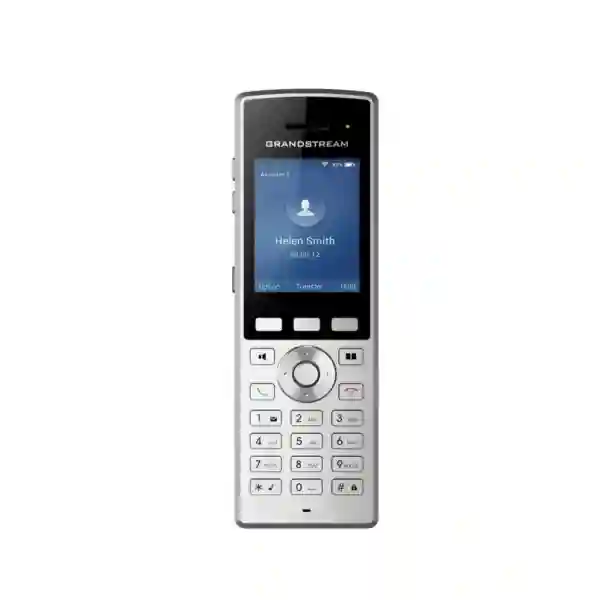
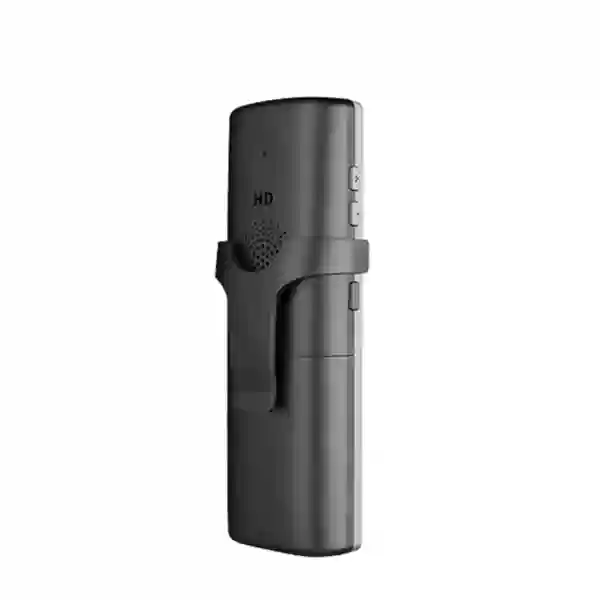
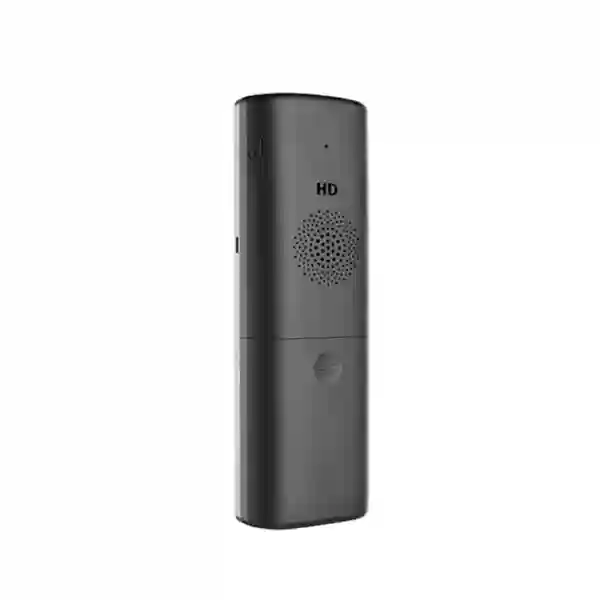
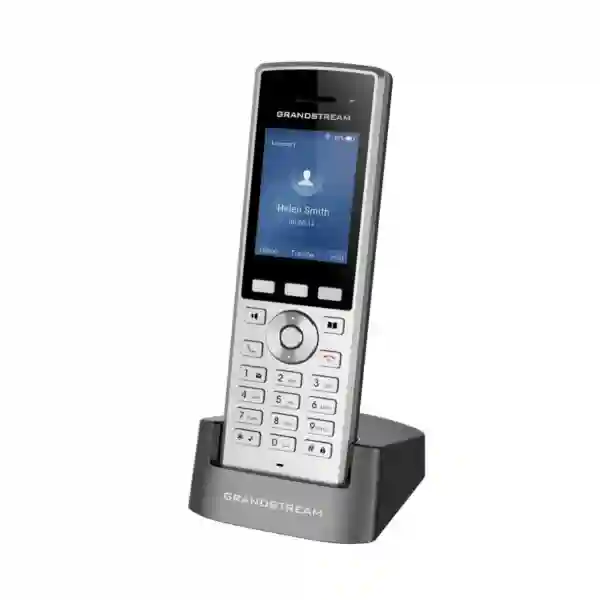
Grandstream WP822 Dubai – Cordless Wi‑Fi IP Phone for Mobile Business Teams
The Grandstream WP822 Dubai is a business-grade portable SIP handset for organizations that need staff to make and receive PBX calls while moving across a managed Wi‑Fi network. Grandstream specifies dual-band 802.11a/b/g/n/ac Wi‑Fi, advanced roaming support, two SIP accounts and two lines, HD voice with dual microphones, Noise Shield technology, Bluetooth, a configurable push-to-talk button, a 2000mAh rechargeable battery, up to eight hours of talk time and up to 200 hours of standby. Those capabilities make the WP822 relevant to offices, hospitality, healthcare, retail, logistics, warehouses, schools, service facilities and other environments where a fixed desk phone can restrict operations.
Grandstream currently lists the WP822 in its archived product area. Existing installations can still require replacement handsets, configuration assistance, Wi‑Fi optimization, batteries, accessories, PBX integration and lifecycle planning, but customers evaluating a new deployment should confirm current availability, firmware/support requirements and whether a newer Grandstream WP-series model is a better long-term fit. Fourteck can help compare the requirement before a quotation is prepared.
802.11a/b/g/n/ac with roaming support for managed wireless environments.
A practical fit for staff who need one or two business SIP identities on a mobile handset.
Grandstream rates up to 8 hours talk time and 200 hours standby.
AEC and Noise Shield support clearer calls in business environments.
When does a Wi‑Fi handset make more sense than a desk phone?
A cordless business phone is useful when the employee’s job is tied to a building or site but not to one desk. A warehouse supervisor may move between receiving, storage and dispatch. A hotel duty manager may move between reception, guest floors and back-office areas. A clinic coordinator may need an extension while moving between treatment zones. A retail floor manager may need to answer internal and external calls without returning to a counter. In each case, the communication requirement is not simply “wireless.” The organization needs a SIP endpoint that stays reachable while the user moves through areas served by the company Wi‑Fi network.
That is where WP822 fits. The handset can register to a compatible SIP PBX and carry the extension over managed Wi‑Fi. This can simplify extension reachability, internal dialing and call handling in locations where staff already rely on enterprise WLAN coverage. The value is highest when Wi‑Fi design is already strong or when the wireless network can be engineered for voice, with sufficient coverage, capacity, roaming behavior, QoS and security.
WP822 should not be selected purely because a site has Wi‑Fi. Voice over Wi‑Fi is sensitive to dead zones, congestion, channel design, roaming delays, interference and poorly placed access points. A good deployment starts with the communication workflow and wireless environment, not handset quantity alone. For new projects, lifecycle status is also part of the decision because WP822 is now in Grandstream’s archived product area.
Verified WP822 technical profile
| Area | WP822 capability | Deployment relevance |
|---|---|---|
| Wi‑Fi | Dual-band 802.11a/b/g/n/ac | Supports 2.4GHz and 5GHz WLANs; stable RF coverage and controlled roaming remain essential for voice. |
| SIP | 2 SIP accounts, 2 lines | Useful for employees who need one or two SIP identities without carrying multiple devices. |
| Display | 2.4-inch 240×320 TFT color LCD | Compact interface for calls, status, directory and device settings. |
| Audio | HD voice, dual MIC, AEC, Noise Shield | Designed to improve speech clarity in busy commercial areas, subject to network and acoustic conditions. |
| Bluetooth | Integrated Bluetooth | Allows compatible wireless headsets to be considered for hands-free workflows. |
| Battery | 2000mAh; up to 8h talk / 200h standby | Supports mobile shifts; real runtime varies with usage, signal, roaming, Bluetooth, screen activity and battery age. |
| Push-to-talk | Configurable PTT button | Can support faster team communication when compatible PTT/paging workflows are configured. |
| Ports | Micro-USB and 3.5mm headset jack | Supports charging and wired-headset use with compatible accessories. |
| Telephony | Hold, transfer, forward, 3-way conference, call waiting, logs, auto answer | Provides familiar PBX endpoint functions for business users on the move. |
| Protocols/security | SIP, TLS, SRTP, 802.1X, IPv6 and related network protocols | Supports integration into managed enterprise voice and network policies when properly configured. |
Specifications and feature behavior should be checked against the relevant Grandstream documentation and firmware branch before procurement or replacement.
Wi‑Fi roaming is the design issue that decides whether the experience feels truly cordless
Businesses often compare a Wi‑Fi handset with a DECT handset and focus only on range. The more useful question is how the endpoint behaves across the actual radio design. WP822 is intended for dual-band managed Wi‑Fi and supports advanced roaming. Even so, the handset cannot compensate for a weak WLAN. If an employee walks from one access point to another through an area with poor signal or excessive interference, a call can experience delay, clipping or a drop regardless of handset features.
A voice-ready design normally begins with an RF survey or at least a structured coverage review. Access-point power, channel width, channel reuse, signal thresholds, band design, 5GHz coverage, roaming parameters, VLAN architecture and QoS should be reviewed as one system. The goal is not maximum signal from every AP. The goal is predictable signal and clean handover as a user moves. Too many access points transmitting at excessive power can create sticky-client behavior; too few can create dead zones.
For a small office on one floor, existing business Wi‑Fi may already be sufficient. For a hospital, hotel, warehouse, school or multi-floor office, a voice mobility assessment is more important. Buyers should identify how many handsets will be active, where users walk, whether calls must survive roaming between floors or buildings, what AP platform is installed and whether voice traffic already has appropriate VLAN/QoS treatment.
Choose the handset and WLAN together. A WP822 project is strongest when the SIP platform, Wi‑Fi coverage, roaming policy, security configuration and user workflow are reviewed as one communication solution.
Voice quality, Bluetooth and day-to-day usability
WP822 includes HD voice, a dual-microphone design, acoustic echo cancellation and Grandstream Noise Shield technology. These capabilities are intended to improve speech quality and reduce distracting environmental noise. They are useful in retail floors, corridors, warehouses and busy offices where users may not be standing in a quiet room. Grandstream documentation also lists common codecs including G.711, G.729, G.722, iLBC and Opus.
Audio performance still depends on the complete call path. Codec policy on the PBX, WAN quality for external or branch calls, packet loss, jitter, Wi‑Fi retransmissions and QoS all affect the result. If a customer reports poor cordless audio, the right troubleshooting process is to identify whether the problem is the endpoint, access point, WLAN design, LAN, PBX or SIP service rather than replacing hardware blindly.
Integrated Bluetooth allows compatible wireless headsets to be considered for hands-free roles. A 3.5mm jack supports wired-headset options. Headset compatibility should be confirmed before bulk purchasing because connector type alone does not guarantee every control feature or user experience.
Battery planning for shifts and shared handsets
Grandstream rates the 2000mAh battery for up to eight hours of talk time and up to 200 hours of standby. These are planning figures rather than guaranteed shift duration under every condition. Call volume, display activity, roaming, Wi‑Fi signal quality, Bluetooth, paging activity and battery age can affect runtime. A handset constantly searching for better signal because coverage is weak can behave differently from one on a stable WLAN.
Shared-handset environments should define how devices return to charging stations, how units are labelled, whether users hand over a device between shifts and how ageing batteries are tracked. A small operational process can prevent a technically sound cordless solution from becoming unreliable because devices are left uncharged.
For customers replacing older WP822 handsets, Fourteck can review fleet age, firmware, battery condition and accessory requirements to determine whether like-for-like replacement or a broader lifecycle upgrade is more sensible.
SIP, PBX and provisioning considerations
WP822 is a standards-based SIP endpoint. It supports SIP RFC3261 and business telephony functions such as hold, transfer, forwarding, three-way audio conferencing, call waiting, call logs, auto answer, flexible dial plans and server redundancy/failover capabilities. It can therefore be evaluated for compatible Grandstream UCM systems and other standards-based SIP platforms, subject to the PBX vendor’s interoperability, provisioning and feature requirements.
Before ordering, confirm the PBX model, software version, authentication method, extension count, SIP transport, codec policy, directory needs and whether central provisioning is required. Small deployments may tolerate manual configuration. Larger fleets need consistent Wi‑Fi profiles, account settings, firmware and security policy across many devices.
Grandstream Device Management System (GDMS) provides centralized provisioning, management, monitoring and troubleshooting for supported Grandstream devices. Organizations already using Grandstream endpoints can consider it as part of fleet standardization, subject to current capabilities and internal security policy.
Information to include in a configuration or replacement request
- PBX or hosted SIP platform name and version where known.
- Quantity of WP822 handsets or replacement units required.
- Brand/model and approximate count of Wi‑Fi access points.
- Whether users roam between APs, floors or buildings during active calls.
- Required SIP accounts and shared-extension behavior.
- Headset, push-to-talk, paging, directory or auto-answer requirements.
- Current firmware if this is an installed WP822 fleet.
- Site location and any branch or export requirement.
Where WP822 has historically been a good fit
Retail
Floor supervisors and service staff can stay reachable while moving between counters, stock areas and customer zones. Back-room RF coverage should be tested rather than assumed.
Warehouses & logistics
Supervisors can carry a PBX extension between receiving, storage and dispatch. Metal racks, long aisles and loading zones make wireless design especially important.
Hotels
Duty managers, engineering and housekeeping supervisors can use internal mobility across guest floors and service areas where roaming is properly designed.
Healthcare
Mobile operational roles can use SIP calling without being tied to a workstation, subject to facility network segmentation, security and cleaning requirements.
Security & facilities
The configurable push-to-talk button and mobile extension concept can support operational workflows where compatible paging/PTT functions are configured.
Offices & campuses
Managers and support staff who move between meeting rooms, departments or floors can retain an internal extension. Multi-floor roaming should be tested on site.
WP822 lifecycle status: what “archived” means for a buyer
Grandstream’s current product page places WP822 in the archived section. An archived listing does not automatically mean every installed handset must be replaced, nor does it prove that no distributor has remaining inventory. It does mean buyers should treat lifecycle as a procurement factor and confirm the current commercial and support position before committing to a new fleet.
For an existing customer, the requirement may be straightforward: maintain a deployed WP822 environment, replace damaged units, keep consistent user training, preserve known PBX behavior or avoid changing accessories during an operational period. In that case, confirming compatible replacement availability may be reasonable.
For a greenfield project, a newer WP-series model can offer a longer lifecycle path and newer wireless capabilities. Fourteck can compare the site requirement, budget, WLAN generation, SIP-account requirement, ruggedness, battery needs and deployment scale before recommending a current alternative.
WP810 vs WP822 vs WP825
| Decision point | WP810 | WP822 | WP825 |
|---|---|---|---|
| SIP accounts / lines | 2 / 2 | 2 / 2 | 2 / 2 |
| Wi‑Fi | 802.11a/b/g/n/ac | 802.11a/b/g/n/ac | 802.11a/b/g/n/ac |
| Talk time | Up to 6 hours | Up to 8 hours | Up to 8 hours |
| Standby | Up to 120 hours | Up to 200 hours | Up to 200 hours |
| Bluetooth | No | Yes | Yes |
| Ruggedness | Standard | Standard | Ruggedized IP67 |
For a current new deployment, buyers should also review newer Grandstream WP-series handsets so wireless generation, lifecycle and feature set match the expected project horizon.
Grandstream WP822 Dubai and UAE planning
Dubai businesses deploy voice endpoints across office towers, warehouses, retail outlets, clinics, schools, hotels and multi-branch operations. Each creates a different wireless problem. A glass-partitioned office may have high AP density but roaming boundaries between meeting rooms. A warehouse may have long aisles, metal racks and loading areas. A hotel may require coverage across guest floors, lifts, service corridors and back-of-house spaces. A clinic may prioritize predictable roaming and network segmentation.
For Grandstream WP822 Dubai requirements, Fourteck can structure the request around the site rather than quote a handset in isolation. Useful inputs include user count, building size, AP platform, PBX model, number of extensions, roaming paths, coverage complaints, headset needs and expected replacement cycle. For Abu Dhabi, Sharjah, Ajman and other UAE deployments, the same technical approach applies: confirm endpoint lifecycle, network readiness and SIP compatibility before quantity procurement.
Organizations with branches outside the UAE may also need consistency across sites. A company can standardize extension behavior and user training while allowing local Wi‑Fi design to reflect each branch. If an installed base already uses WP822 in Dubai and another region, a lifecycle plan can identify where like-for-like replacement remains practical and where a newer handset should be introduced.
Regional buyer guidance
Uganda: Hotels, schools, healthcare facilities, warehouses and multi-building organizations may value Wi‑Fi calling when staff already operate across an established WLAN. Buyers should pay close attention to AP coverage, power continuity for network infrastructure and PBX reachability between buildings. An archived WP822 may be relevant for maintaining an installed fleet, while a current model may be preferable for a new rollout.
Kenya: Branch offices, hospitality and logistics environments can use cordless SIP handsets to keep operational users connected away from desks. Project planning should include WLAN generation, PoE capacity for access points, VLAN/QoS policy and whether remote branches connect to a centralized PBX or local call control.
Kuwait: Warehouses, retail facilities and service operations often require reliable indoor mobility. Coverage should be checked through storage and back-office areas rather than judging the network only from public spaces. For new procurement, compare WP822 lifecycle with current WP-series alternatives.
Nigeria, Ghana and Tanzania: Multi-site businesses can benefit from standardized SIP endpoint design, but network quality and support logistics vary by site. A phased rollout with handset, AP and PBX validation is usually safer than a bulk device-only purchase.
Procurement checklist before requesting a WP822 quote
- Confirm replacement versus new deployment. Existing WP822 sites have different priorities from greenfield projects.
- Confirm availability and lifecycle. WP822 is archived, so do not assume unrestricted current production or stock.
- Identify the PBX. Share whether the system is Grandstream UCM or another SIP platform and its software/version where possible.
- Review wireless coverage. Confirm AP models, floor plan and the routes users take during calls.
- Define account and line needs. WP822 supports two SIP accounts and two lines.
- Decide whether ruggedness is required. WP822 is not the rugged IP67 model.
- List accessories. Charging, batteries and headsets should be checked for compatibility and actual need.
- Plan management. Larger fleets benefit from consistent provisioning, firmware and security policy.
- Ask for an alternative comparison. For a new project, request a current WP-series option alongside WP822.
Common deployment mistakes to avoid
Buying by range alone: Wi‑Fi voice quality is not determined by one maximum-distance figure. Walls, shelving, interference, AP configuration and roaming design change the experience.
Using the same WLAN assumptions as laptops: A network that feels fine for web browsing may still show voice issues during roaming because calls are continuous and sensitive to latency, jitter and packet loss.
Ignoring lifecycle: A familiar model may still be the wrong choice for a long greenfield rollout. WP822’s archived status should be discussed before purchase.
Assuming ruggedness: WP822 is a business mobile handset, while WP825 is the ruggedized IP67 model in this legacy group.
Ordering headsets without validation: Bluetooth and 3.5mm interfaces provide options, but exact accessory compatibility and call controls vary.
Skipping a pilot: For large sites, test a small group of handsets on the real WLAN, walk actual roaming paths and confirm PBX behavior before scaling.
Why work with Fourteck on a WP822 requirement?
Fourteck approaches a cordless IP phone request as part of the communication system rather than as an isolated handset. For existing WP822 users, the requirement may involve replacement, SIP registration, firmware compatibility, WLAN roaming, battery condition, accessory matching or a staged transition to a newer model. For new projects, Fourteck can help compare whether WP822 still makes sense or whether a current Grandstream WP-series handset offers a stronger lifecycle path.
The quotation process can also include surrounding requirements such as Grandstream UCM PBX systems, Wi‑Fi access points, PoE switching, network segmentation, SIP extension planning and configuration support. Scope depends on the project and should be confirmed before ordering.
For a related UAE product reference, review Grandstream WP822 Dubai on Fourteck UAE. For broader communication projects, visit Fourteck IP Phone Solutions.
Grandstream WP822 FAQ
Is the Grandstream WP822 still a current model?
Grandstream currently lists WP822 in its archived product area. Existing deployments may still need replacement, configuration or support, but new projects should confirm availability and compare current WP-series alternatives before ordering.
How many SIP accounts and lines does WP822 support?
WP822 supports two SIP accounts and two lines. It is appropriate for users who need a small number of business SIP identities rather than a high-account-count mobile endpoint.
Does WP822 support 5GHz Wi‑Fi?
Yes. WP822 supports dual-band 802.11a/b/g/n/ac Wi‑Fi, covering both 2.4GHz and 5GHz operation. The best band and roaming design depend on the site’s AP layout and RF conditions.
Can WP822 roam between Wi‑Fi access points during a call?
WP822 is designed with advanced Wi‑Fi roaming support. Successful call continuity still depends on compatible AP configuration, RF coverage, roaming parameters, interference and the wider network design, so large sites should be tested before rollout.
What battery life does Grandstream specify for WP822?
Grandstream specifies a 2000mAh rechargeable battery with up to eight hours of talk time and up to 200 hours of standby. Actual runtime varies with call activity, signal conditions, roaming, Bluetooth use, screen activity and battery age.
Does WP822 support Bluetooth headsets?
Yes. WP822 includes integrated Bluetooth for compatible headsets. Exact headset interoperability and feature behavior should be checked before bulk purchasing accessories.
Is WP822 waterproof or ruggedized?
WP822 is not the rugged IP67 model in this legacy range. WP825 is the ruggedized option among WP810, WP822 and WP825. For new harsh-environment projects, current rugged WP-series models should also be evaluated.
Can WP822 work with a Grandstream UCM IP PBX?
WP822 is a SIP handset and can be used in compatible Grandstream UCM deployments. PBX version, firmware, provisioning, codec policy and network design should be checked as part of configuration planning.
Can WP822 work with third-party SIP PBX systems?
Because WP822 supports standard SIP, it can be evaluated with third-party SIP platforms. Compatibility should be confirmed for the exact PBX, required features, provisioning method and security policy rather than assumed.
Is WP822 suitable for a Dubai warehouse or hotel?
It can be suitable where the environment has well-designed Wi‑Fi coverage and the handset’s durability is sufficient. Warehouses and hotels should test roaming through actual work areas, including aisles, service corridors, floors and back-of-house spaces.
What information should I provide for a Fourteck quotation?
Share the quantity, site, whether the request is replacement or new deployment, PBX model, AP platform, SIP-account requirement, roaming needs, headset or PTT requirements and any existing WP822 firmware or battery concerns.
Should I buy WP822 or a newer WP-series handset?
Choose based on lifecycle, Wi‑Fi generation, SIP-account requirement, battery, ruggedness, compatibility and project horizon. WP822 can be relevant for maintaining an installed fleet, while a newer model may be more appropriate for a greenfield deployment.
Request a WP822 compatibility and procurement review
Tell Fourteck whether you are replacing existing WP822 handsets or planning a new cordless Wi‑Fi voice deployment. Include your PBX, Wi‑Fi platform, quantity, site and mobility requirement. Fourteck can help confirm the technical fit, review lifecycle considerations and compare suitable Grandstream alternatives before quotation.
Reviews
There are no reviews yet.