Grandstream GXP2140 Dubai – 4-Line Enterprise IP Phone for Busy Business Desks
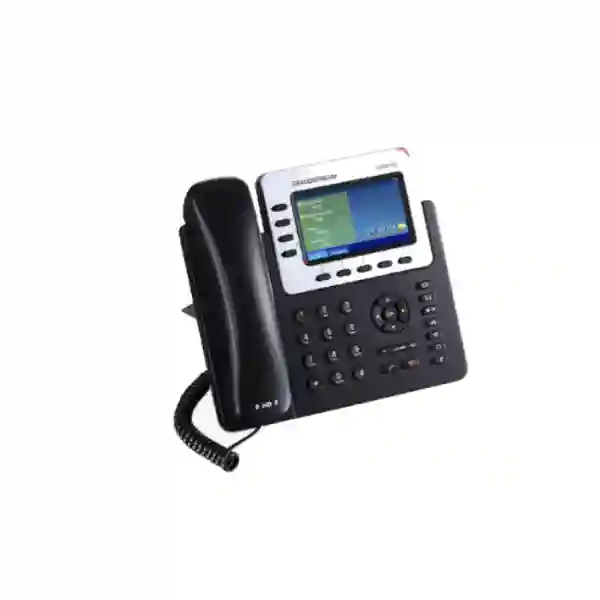
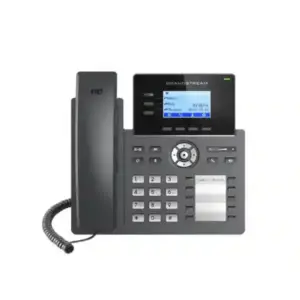
The Grandstream GXP2140 Dubai is a professional SIP desk phone for executives, managers, sales teams, customer-service staff, reception users and other employees who handle a moderate to high volume of calls and want a larger display, Gigabit networking, PoE, Bluetooth, HD audio and expandable call-control options. Grandstream specifies four lines and four SIP accounts, a 4.3-inch 480 × 272 colour LCD, five programmable context-sensitive soft keys, dual Gigabit Ethernet ports with integrated PoE, integrated Bluetooth, USB, EHS headset support and 5-way voice conferencing. The model can also work with GXP2200EXT expansion modules when a user needs more BLF or speed-dial visibility.
For UAE buyers, the main question is not simply whether the GXP2140 has more features than an entry-level IP phone. The better question is whether its combination of four SIP identities, large screen, desk-friendly call controls and expansion capability matches the actual user role, PBX platform, PoE network, headset requirement and long-term endpoint strategy. Fourteck can help businesses in Dubai, Abu Dhabi, Sharjah, Ajman and other UAE locations review those requirements before requesting a quotation.
Dual Gigabit + PoE
4.3” Colour LCD
Bluetooth + USB + EHS
5-Way Conferencing
Is the GXP2140 the right phone for your user?
The GXP2140 fits best when the user needs more than basic dial-and-answer functionality but does not require the maximum line capacity of larger executive endpoints. It is especially useful where a staff member must keep several SIP identities or line appearances visible, place frequent transfers, use a headset, monitor important extensions through an optional expansion module, and connect a workstation through the phone’s Gigabit pass-through network port.
Executive & management desks
A larger colour display, Bluetooth headset connectivity and multiple SIP accounts make the phone appropriate for managers who switch between internal extensions, client calls and department lines.
Sales & customer service
HD audio, call transfer controls, conferencing and headset support help staff who spend much of the day speaking with customers and coordinating with colleagues.
Reception & coordination
When reception or office coordinators need more BLF and speed-dial visibility, the GXP2200EXT expansion option can make the GXP2140 more practical than a standard four-line desk phone.
Branch offices
Gigabit Ethernet, PoE, SIP interoperability and automated provisioning options suit structured branch deployments where IT wants repeatable configuration and clean cabling.
GXP2140 quick decision snapshot
Why the 4.3-inch display matters in real business use
The GXP2140 uses a 4.3-inch 480 × 272 TFT colour LCD. Screen size matters because an enterprise phone is more than a dial pad: users may need to read caller information, navigate directories, review call history, manage soft-key options, check line status and interact with phone features without repeatedly opening a web interface. A larger display can reduce friction for users who manage several active call states during the day.
This does not mean every employee needs a large-screen phone. A low-call-volume back-office user may be better served by a simpler endpoint. The GXP2140 becomes more compelling when the visual interface is used regularly—especially for supervisors, executives, customer-facing teams and reception environments. When Fourteck scopes a deployment, user role should therefore influence model selection instead of assigning the same phone to every desk.
Four SIP accounts: practical ways businesses can use them
Grandstream specifies support for four lines and four SIP accounts. In practical terms, a business can use those identities to separate roles or call paths. For example, a manager may register a personal extension, a departmental line, a shared service number and a secondary PBX identity. A front desk may use separate registrations for reception, reservations, service coordination and an overflow function. The exact setup depends on the PBX and SIP platform, so the presence of four accounts should be matched to the call-flow design rather than treated as four independent public telephone numbers by default.
The model also provides programmable context-sensitive soft keys and dedicated call-control keys. This helps users handle common actions such as hold, transfer, conference, mute, speakerphone operation, redial and headset switching with less menu navigation. The benefit is most visible when staff receive and place calls continuously throughout the workday.
HD audio, conferencing and headset workflow
Grandstream lists HD audio support for both the handset and full-duplex speakerphone, making the GXP2140 suitable for business conversations where clarity matters. Audio quality in a deployed environment still depends on network performance, codec negotiation, PBX settings, SIP trunk conditions, WAN quality and the far-end device. For that reason, Fourteck recommends treating voice quality as an end-to-end design issue rather than assuming the phone alone determines call clarity.
The phone supports 5-way voice conferencing, which is useful for quick internal or client discussions without requiring every small conversation to be moved into a separate meeting platform. For users who spend extended periods on calls, integrated Bluetooth and EHS capability can support compatible headset workflows. Headset compatibility should be checked against the exact headset model, firmware and connection method before bulk procurement.
Bluetooth, USB and mobile-device interaction
Integrated Bluetooth is one of the reasons the GXP2140 remains attractive to users who want a wireless headset or selected mobile-device interaction. Grandstream describes support for Bluetooth headsets and Bluetooth-enabled mobile devices, including contact-book and call-transfer functions. These capabilities can improve desk mobility for executives, sales teams and support staff who do not want to hold the handset during long conversations.
The phone also includes USB connectivity. USB and Bluetooth should not be interpreted as a promise that every accessory will work automatically. For business deployment, IT teams should confirm accessory compatibility, preferred headset mode and expected user workflow during testing. A small pilot with the actual PBX, headset and network design is often more valuable than selecting endpoints from a feature list alone.
GXP2200EXT expansion: when four line keys are not enough
A major differentiator for the GXP2140 is compatibility with the GXP2200EXT LCD expansion module. Grandstream states that the phone can support up to four expansion modules, providing access to as many as 160 additional speed-dial/BLF contacts across the module pages. This can change the model’s role from a normal executive desk phone into a practical reception, operator or coordination endpoint.
The expansion option is valuable when a user needs to watch many extensions, transfer calls quickly or reach frequently dialled contacts without searching a directory. However, a sidecar-based design is not always the best answer. If a user requires much larger native key capacity, modern centralized management, Wi-Fi or a different executive experience, a GRP-series model or another endpoint may be a better fit. Fourteck can compare the GXP2140 with alternatives before a project is standardized around it.
Gigabit Ethernet and PoE for cleaner desk deployment
The GXP2140 provides two switched auto-sensing 10/100/1000 Mbps Ethernet ports with integrated Power over Ethernet. In a typical office design, one network connection can feed the phone while the second port can pass Ethernet to a desktop computer. Gigabit capability is useful where the workstation shares the phone’s network path and the business does not want the phone to become a 100 Mbps bottleneck.
Integrated PoE can reduce desk clutter by removing the need for a local power adapter when a compatible PoE switch is available. Before rollout, the network team should check switch PoE capacity, VLAN design, DHCP services, voice QoS, LLDP behaviour, cabling quality and UPS strategy. In larger Dubai offices, these infrastructure details often determine whether an IP phone project feels seamless or creates support tickets after installation.
SIP, PBX interoperability and provisioning
The GXP2140 is a SIP-based enterprise IP phone and supports standard network and telephony protocols used in business VoIP environments. Grandstream also describes broad interoperability with third-party SIP devices and leading SIP/NGN/IMS platforms. In practice, successful interoperability still depends on the PBX version, SIP profile, codec policy, provisioning method and features required by the customer.
Grandstream supports automated provisioning options including zero-configuration with compatible Grandstream UCM IP PBXs, encrypted XML configuration files and TR-069. These methods are important when dozens or hundreds of phones must be configured consistently. A controlled template can reduce manual entry, improve consistency and make replacement devices easier to introduce.
For companies using Grandstream UCM systems, the GXP2140 can be a natural endpoint to evaluate because Grandstream documents zero-config deployment within its UCM ecosystem. For third-party PBX platforms, Fourteck can help customers prepare the information required for compatibility testing: SIP server details, extension credentials, VLAN and QoS requirements, codec preferences, NAT behaviour, BLF implementation and any special dial-plan or provisioning requirements.
Security features for business voice deployments
Grandstream lists SRTP and TLS support for securing media and signalling, together with encrypted configuration options and 802.1X support. These capabilities are useful building blocks, but a secure voice deployment also requires correct PBX configuration, certificate handling, password policy, network segmentation, firmware management and administrator access controls.
Businesses should avoid exposing phone management interfaces unnecessarily to the public internet. Voice VLANs, controlled provisioning servers, firewall policy and restricted administrative access are often more important than any single checkbox on the handset. Where security requirements are high, Fourteck can discuss the phone as one component within a larger PBX, switching and firewall architecture.
Grandstream GXP2140 technical specifications
| Brand / Model | Grandstream GXP2140 |
|---|---|
| Product type | Enterprise SIP IP phone |
| Lines / SIP accounts | 4 lines / 4 SIP accounts |
| Display | 4.3-inch 480 × 272 TFT colour LCD |
| Network | Dual switched auto-sensing 10/100/1000 Mbps Gigabit Ethernet |
| Power | Integrated IEEE 802.3af PoE; power adapter support |
| Audio | HD audio on handset and full-duplex speakerphone |
| Conferencing | 5-way voice conferencing |
| Bluetooth | Integrated Bluetooth |
| Headset / auxiliary | RJ9 headset jack, EHS support, USB, extension-module port |
| Programmability | 5 programmable context-sensitive soft keys plus dedicated function keys |
| Expansion | Compatible with GXP2200EXT; up to four modules supported |
| Provisioning | Grandstream UCM zero-config, TR-069, encrypted XML and supported file-based provisioning methods |
| Security | TLS, SRTP, encrypted configuration and 802.1X support |
| Wi-Fi | No integrated Wi-Fi; use wired Ethernet |
Specification and compatibility details should be confirmed against the exact firmware, accessory and deployment environment before ordering or standardizing a large rollout.
How the GXP2140 compares with nearby Grandstream choices
Buyers commonly compare the GXP2140 with GXP2135, GXP2160, GXP2170 and newer GRP models. The choice should be based on user role rather than model number alone. The GXP2140’s strongest combination is its 4.3-inch screen, four SIP accounts, Gigabit PoE, Bluetooth and expansion-module capability.
| Model | Best-fit direction | Key reason to choose | When to look elsewhere |
|---|---|---|---|
| GXP2135 | Busy desks wanting a smaller screen with more visible programmable keys | Compact enterprise call handling | Choose GXP2140 when a larger 4.3-inch display or expansion-module workflow matters |
| GXP2140 | Executives, coordinators and call-intensive users | Large screen + 4 SIP accounts + Bluetooth + expansion support | Look higher if you need more native line capacity or more programmable keys without sidecars |
| GXP2160 | Managers or operators needing more SIP capacity and many built-in BLF keys | Six SIP accounts and a larger native key field | GXP2140 can be simpler where four accounts are enough and expansion is optional |
| GXP2170 | High-volume executives and reception users | Greater line capacity and extensive programmable control | May be more than a four-account user actually needs |
| GRP series | Newer standardized or centrally managed deployments | Modern carrier-grade design and centralized management options on supported GRP models | GXP2140 may still fit established GXP/UCM environments or users needing its specific expansion workflow |
When the GXP2140 is not the best choice
A useful product page should also explain when not to choose the model. The GXP2140 has no integrated Wi-Fi, so a desk that cannot be cabled may need a different endpoint. A user who requires only one or two SIP accounts may not benefit from the extra screen and feature depth. At the other end of the spectrum, an operator who needs a very large number of native programmable keys or more line capacity may prefer a higher model.
For a brand-new enterprise standardization project, buyers should also compare current GRP-series devices because the desired management platform, security policy and fleet lifecycle may matter more than direct feature parity. Fourteck can help compare the requirement instead of simply replacing an existing GXP phone with the closest-looking model.
Deployment planning for Dubai and UAE offices
Dubai offices often combine fast Ethernet infrastructure, PoE switching, SIP trunks, cloud or on-premise PBX platforms, meeting systems and remote or branch users. In this environment, the GXP2140 should be evaluated as part of the complete communication stack. A phone that is technically compatible can still deliver a poor experience if VLANs, DHCP, DNS, QoS, NAT or SIP routing are not designed correctly.
Dubai and Deira: trading firms, service companies, consultancies and reception-heavy businesses may value quick transfer handling and extension monitoring. Where desks are dense, PoE and a single shared network drop can simplify cabling. For reception users, the expansion module option may be more important than the raw number of SIP accounts.
Sharjah and Ajman: warehouses, education sites, clinics, branch offices and SMEs often need practical endpoints that can work with a centrally managed PBX at another location. The GXP2140 can suit supervisors and administration staff while simpler phones can be assigned to lower-call-volume desks.
Abu Dhabi: larger offices, project organizations, professional services and institutional environments may place more emphasis on structured network policy, voice VLANs, headset compatibility, provisioning and documentation. A pilot deployment is recommended when accessories, security policy or third-party PBX integration is important.
GCC and Africa procurement considerations
Fourteck also supports communication enquiries through regional channels serving markets such as Kuwait, Kenya, Uganda, Tanzania, Ghana and Nigeria. Requirements can differ by country: available SIP providers, PBX platforms, power standards, import timing, warranty routes, local support coverage and delivery options may vary. Buyers should therefore request a region-specific quotation instead of assuming a UAE price, bundle or availability applies everywhere.
For multi-country organizations, standardizing the configuration can be more valuable than standardizing every physical phone model. A company may deploy the GXP2140 for executive or reception roles while using simpler endpoints for normal desks. The important part is maintaining consistent extension plans, provisioning policy, security settings, firmware strategy and user training across offices.
A buyer’s checklist before requesting a GXP2140 quotation
- User role: Is the phone for an executive, receptionist, salesperson, support agent, administrator or general office user?
- SIP/PBX platform: Confirm whether the phone will connect to Grandstream UCM, 3CX, a hosted PBX, a SIP service or another compatible platform.
- Number of accounts: Determine whether four SIP accounts are actually required.
- BLF requirement: Count the extensions the user needs to monitor and decide whether a GXP2200EXT expansion module is needed.
- Headset: Share the exact headset model and preferred Bluetooth/EHS workflow so compatibility can be checked.
- Network: Confirm Gigabit switching, PoE capacity, voice VLAN, DHCP and QoS readiness.
- Quantity: Provide endpoint count and whether the deployment is single-site or multi-branch.
- Provisioning: Decide whether phones will be configured manually, via UCM zero-config, TR-069 or a file-based process.
- Deployment services: State whether you need supply only, configuration, migration, installation planning or user handover support.
- Alternative model review: For a new rollout, compare suitable GRP and higher GXP options before finalizing a standard.
How Fourteck can support a GXP2140 project
Fourteck can assist with model selection, quotation support, PBX compatibility discussion, network-readiness review, SIP endpoint planning, PoE requirements, configuration scope and deployment guidance. The objective is to match the phone to the user and infrastructure rather than sell a feature list. For customers replacing older devices, Fourteck can also compare the GXP2140 with suitable alternatives if the organization wants newer management capabilities or a different key layout.
Grandstream IP Phone Configuration UAEReview SIP registration, provisioning and configuration planning.
Grandstream IP PBX Solutions DubaiPlan endpoints together with UCM PBX, call routing and extension requirements.
Frequently asked questions about Grandstream GXP2140 Dubai
How many SIP accounts does the Grandstream GXP2140 support?
The GXP2140 supports four lines and four SIP accounts, making it suitable for users who need several identities, departmental registrations or call appearances on one desk phone.
Does the GXP2140 support PoE?
Yes. It has integrated Power over Ethernet and dual Gigabit Ethernet ports. A compatible PoE switch can power the phone through the network cable and reduce the need for a desk power adapter.
Does the GXP2140 have Wi-Fi?
No integrated Wi-Fi is specified for the GXP2140. It is designed for wired Ethernet deployment. If wireless LAN connectivity is mandatory, compare suitable Grandstream models that include Wi-Fi.
Can I use a Bluetooth headset with the GXP2140?
The GXP2140 includes integrated Bluetooth and is designed to support Bluetooth headset use. Confirm the exact headset model and required functions before a bulk deployment.
How large is the GXP2140 screen?
It uses a 4.3-inch colour TFT LCD with 480 × 272 resolution, giving users more display area for caller information, menus and call-control functions than smaller-screen desk phones.
Does the GXP2140 support an expansion module?
Yes. Grandstream lists compatibility with the GXP2200EXT LCD expansion module, and the GXP2140 can support up to four modules for additional BLF and speed-dial access.
Can the GXP2140 work with a Grandstream UCM IP PBX?
Yes, it can be used with compatible Grandstream UCM systems, and Grandstream documents zero-configuration provisioning support with the UCM series. Exact configuration depends on the PBX model and firmware.
Can the GXP2140 work with third-party SIP PBX systems?
Grandstream positions the GXP2140 for broad SIP interoperability, but PBX-specific features and provisioning should be tested against the exact platform, version and configuration required by your business.
Is the GXP2140 suitable for reception?
It can be suitable for reception or office coordination, particularly when used with GXP2200EXT expansion modules for additional BLF and speed-dial visibility. Very high-volume operators should also compare larger models.
What information should I provide for a Dubai quotation?
Share the required quantity, delivery location, PBX or SIP platform, headset requirement, expansion-module requirement and whether you need configuration or deployment assistance. Current price and availability should be confirmed at quotation time.
Request a Grandstream GXP2140 Dubai quotation
If your business needs a four-line enterprise SIP phone with a large colour screen, Gigabit PoE, Bluetooth, HD audio and optional BLF expansion, the GXP2140 is a practical model to evaluate. Send Fourteck your quantity, PBX platform, user role, headset requirement and UAE delivery location so the team can confirm current availability, compare suitable alternatives and prepare a requirement-based quotation.
Recommended next step: request a compatibility and quotation review rather than choosing only by online price. The correct phone should match the user’s call volume, PBX environment, LAN design and future management needs.
Reviews
There are no reviews yet.