GRANDSTREAM • DESKTOP VOICE, VIDEO & ANDROID
GXV Android IP Video Phone Series
Grandstream GXV Android IP video phones combine SIP desk calling, touchscreen video communication and compatible Android applications in a desktop device. This guide focuses on GXV3450, GXV3470 and GXV3480: three choices for businesses that need to see callers, handle visitor conversations or keep a dedicated communication device at the desk.
Choose by the work people do. A reception operator needs a clear transfer routine and suitable expansion options; an executive may value screen space; a visitor-answering desk needs tested intercom behaviour. Match those requirements before deciding on the largest screen.
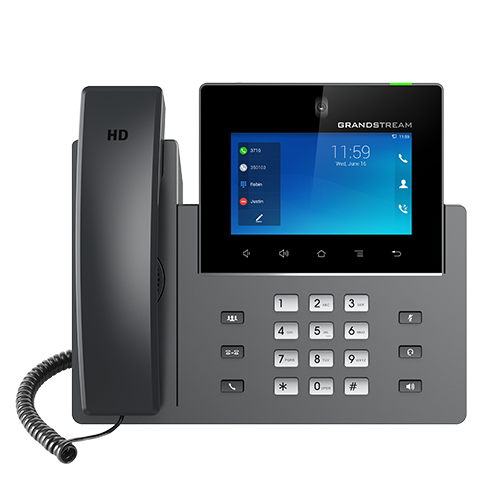
Compare the three desk experiences
| Selection point | GXV3450 | GXV3470 | GXV3480 |
|---|---|---|---|
| Display | 5-inch, 1280 × 720 | 7-inch, 1280 × 800 | 8-inch, 1280 × 800 |
| Touch input | 5-point | 5-point | 10-point |
| SIP capacity | 16 lines / up to 16 accounts | 16 lines / up to 16 accounts | 16 lines / up to 16 accounts |
| Built-in audio conference | Up to 10-way | Up to 10-way | Up to 12-way |
| Built-in video conference | 3-way, up to 720p at 30fps | 3-way, up to 720p at 30fps | 3-way, up to 1080p at 30fps |
| Wireless LAN | Dual-band Wi-Fi 5 | Dual-band Wi-Fi 6 | Dual-band Wi-Fi 6 |
| Display connections | No HDMI listed | HDMI output | HDMI input and output |
| Expansion module | GBX20 compatible | No extension module listed | No extension module listed |
Specifications above follow the model-specific GXV3450, GXV3470 and GXV3480 pages. These models also list a 2MP camera with privacy shutter, dual Gigabit Ethernet ports, PoE/PoE+ and Bluetooth 5.0. Camera capture specifications do not mean every call or conference runs at the camera’s maximum resolution.
Start with the role, then choose the model
Reception with frequent transfers
Consider GXV3450 when desk space matters and the operator needs a compatible GBX20 expansion module. Before adding an expansion module to an order, define the required monitored extensions, transfer workflow, PBX support and power arrangement. Test a busy-hour scenario: answer a new call, consult a colleague, complete a transfer and recover a call when the colleague is unavailable.
Managers and everyday video conversations
Consider GXV3470 when a 7-inch touchscreen provides a more useful working area for the intended user. A pilot should include camera positioning, screen visibility under office lighting and headset use during longer calls. The practical benefit depends on whether colleagues and the PBX support the same video workflow.
Larger visual workspace and display integration
Consider GXV3480 where an 8-inch display or HDMI input/output forms part of the requirement. Identify the intended source, destination and supported display workflow before treating HDMI as a replacement for a complete meeting-room system. For a shared conference room, assess room acoustics, camera coverage and participant distance separately.
For users who mainly dial and transfer audio calls, compare a conventional SIP desk phone as part of the same procurement exercise. For mobile staff, evaluate cordless or mobile options. A video desktop endpoint is most useful when the screen and camera have a defined daily purpose.
Android applications: make the pilot part of the purchase
Current product pages list Android 14. Grandstream’s GXV34x0 user guide records the operating-system upgrade in firmware 1.0.5.26. Confirm the installed firmware on supplied or existing units; older material may describe Android 11. Do not assume every unit arrives with the same software release.
Create a short application acceptance list before ordering: required app name and version, account sign-in, permissions, audio device selection, camera access, call notifications and behaviour after a reboot. Include any enterprise authentication or device policy that staff will use. A successful installation alone does not demonstrate a reliable meeting or calling experience.
Run the pilot with the actual service account type and subscription. Check incoming SIP calls while an application is open, headset switching, speaker volume and recovery after a network interruption. Record a working configuration so the deployment team can reproduce it. Avoid making fleet purchasing depend on an untested assumption about a familiar mobile app.
Plan the complete call path
A GXV phone is one component of a Grandstream business phone system. Establish the PBX or hosted platform, extension count, carrier connection and required call flows. Sixteen account slots do not establish the number of external calls your telephone service can carry.
- Account and routing: confirm registration, caller identity, extension dialling, transfers, voicemail and permissions on the selected platform.
- Media: agree audio and video settings across endpoints and PBX; test the actual path between branches and external services.
- Network and power: check switch power allocation, cabling, VLAN design and traffic prioritisation. Where Wi-Fi is proposed, validate coverage and provide a separate power plan.
- Remote sites: define secure connectivity and recovery behaviour with the network administrator. Include the branch internet connection in the pilot.
- Operations: assign responsibility for credentials, configuration backups, firmware approval, application changes and user support.
A reliable handover includes a successful test in each intended situation. For example, a reception phone may register correctly but still fail a video call across a branch connection. Include the staff member who will use the phone when signing off the daily workflow.
Visitor video calls need a separate integration check
For reception and facilities teams, review video intercom and access control integration alongside phone selection. Define which door calls which desk, what happens after hours and where unanswered calls go. The answering phone should fit the visitor workflow rather than determine the door hardware.
Test live video, two-way conversation and any configured door-release command using the actual door station and PBX. Confirm that authorised staff understand the release action and the fallback procedure when the desk is unattended. Door lock wiring, power and access permissions remain part of the access-control design.
For schools, clinics and shared offices, include screen placement and camera use in the site review. Position the desk so visitor images and caller information are visible to authorised staff. Agree whether a camera should remain shuttered between internal video calls and how shared-desk users sign in or identify themselves.
Deploy and maintain a repeatable configuration
Grandstream lists GDMS management for these models. Use the device management and provisioning guide to plan account ownership and rollout responsibilities. Confirm the exact management functions available for your model and approved firmware.
Start with a small group representing reception, management and any remote location. Keep a record of firmware, approved applications, headset models and PBX settings. Schedule wider deployment after users complete the real workflows, including transfer, voicemail and any visitor call.
Commissioning should cover a cold start, a network interruption, an incoming call during application use, a video call and a headset conversation. Confirm that settings survive restart, that time and directory information are correct, and that support staff know how to collect diagnostic information without exposing account passwords.
When replacing older GXV33xx phones, inventory the exact models and applications first. Transfer the business requirements into a new test plan instead of assuming an old configuration or accessory will behave identically on GXV34x0. Confirm lifecycle, firmware support and accessory compatibility for each retained device.
Regional purchasing: define the site requirements
Dubai, Sharjah, Ajman and Abu Dhabi
For a UAE office rollout, supply the floor plan, reception positions and existing PBX details. A Deira or Bur Dubai trading office may prioritise fast transfers between departments; a multi-floor office may need consistent configuration and centrally managed extension changes. These are planning examples, and the model choice should follow the actual call routine. Identify installation access, carrier coordination and the person authorised to approve the final configuration.
Uganda, Kenya and Tanzania
For branch projects, identify who will prepare devices, who will commission them locally and how remote support will reach the site. Check the actual branch connection, backup power plan and replacement-unit process. Include destination, quantities by branch and required documentation in the request so the quotation can distinguish equipment, logistics and on-site work.
Kuwait, Ghana and Nigeria
For distributed procurement, agree a single model schedule and acceptance procedure before separate sites order equipment. Confirm local power accessories, service-provider requirements, delivery terms and support responsibilities per destination. Request written confirmation of availability and any regional compliance requirements for the exact equipment; this guide does not establish local stock or a service presence.
Build an itemised GXV quotation
Send Fourteck the number of desks, preferred models or screen requirements, existing PBX and version, required Android apps, headset preference and any door-station integration. For a mixed deployment, provide a role list so reception, management and occasional video users can receive different models where appropriate.
Ask the quotation to separate phones, compatible expansion modules, power accessories, headsets, configuration, PBX or service subscriptions, delivery and training. Confirm tax treatment, commercial warranty terms, availability and support scope in the written offer. Hardware price alone does not describe the total deployment cost.
Ready to compare suitable models?
Share your desk count, location, current telephone system and required video or application workflow. Request a model-specific recommendation and a quotation with the integration checks and service scope clearly identified.
Questions buyers ask
Which GXV Android video phone should I choose?
Start with GXV3450 for a smaller screen and GBX20 expansion requirements, GXV3470 for a larger everyday video workspace, and GXV3480 for the largest display and HDMI input/output. Confirm the user’s calling routine, required applications and peripherals before selecting.
Does the GXV34x0 series run Android 14?
Current Grandstream product pages list Android 14. The user guide records the Android 14 upgrade under firmware 1.0.5.26. Older units and older documents may show Android 11, so verify the installed release and approved upgrade path.
Can a GXV phone replace my PBX?
It is an endpoint, not a replacement for a business PBX. Account registration, public telephone service, routing, queues, extension policies and system capacity depend on the selected PBX or service.
Will every Android meeting app work?
Do not assume universal compatibility. Validate the exact application, version, sign-in method, subscription, camera and microphone behaviour on the intended phone and firmware before buying a fleet.
Can reception answer a video door station?
A compatible SIP video intercom deployment can use a GXV phone as an answering endpoint. Test the door station, PBX, video negotiation and any door-release command together; the desk phone itself does not replace the lock controller.
Is Wi-Fi enough to power the phone?
No. Wi-Fi provides network connectivity. Plan a compatible power supply when Ethernet PoE is not used, and confirm the exact power arrangement and included accessories in the quotation.
How much does the GXV series cost?
Request an itemised quotation for the exact model and quantity. Include headsets, any compatible expansion modules, power accessories, PBX services, configuration, delivery destination and support scope. Price and availability require confirmation.