GRANDSTREAM • RECEPTION & CALL HANDLING
GXP and GBX Phone Expansion Modules
Match your reception phone to the correct expansion board, then design the keys around the calls your team handles every day. Grandstream’s GXP2200EXT and GBX20 provide additional programmable controls for compatible desk phones, helping attendants reach colleagues and manage transfers from a dedicated key layout.
Start with the phone model—not the module display
The host phone determines your choice. Use the GXP2200EXT with the supported GXP2140, GXP2170 or GXV3240. Choose the GBX20 for the supported GRP2615, GRP2624, GRP2650, GRP2670, GXV3350 or GXV3450. The two boards should not be treated as universal accessories for every Grandstream telephone.
For an existing reception desk, read the exact model from the phone label or administration interface before requesting a quote. For a new installation, choose the host phone and expansion module together. A phone with a similar name, screen or connector is not sufficient evidence of compatibility.
This page combines the two module families into one selection guide. For broader system planning, see Grandstream VoIP phone systems for business.
GXP2200EXT vs GBX20: the practical differences
| Selection point | GXP2200EXT | GBX20 |
|---|---|---|
| Compatible host phones | GXP2140, GXP2170, GXV3240 | GRP2615, GRP2624, GRP2650, GRP2670, GXV3350, GXV3450 |
| Display | 128 × 384 backlit LCD | 4.3-inch, 272 × 480 TFT colour LCD |
| Key layout | 20 programmable dual-colour keys; two pages | 20 programmable dual-colour keys; two pages |
| Contact positions | Up to 40 per module | Up to 40 per module |
| Expansion ceiling | Up to four modules; 160 contact positions | Up to four modules; 160 contact positions |
These figures describe key and contact capacity. They do not increase the phone’s SIP account capacity, create PBX users or add carrier call channels. Confirm the complete host, firmware and power arrangement for your planned number of boards.
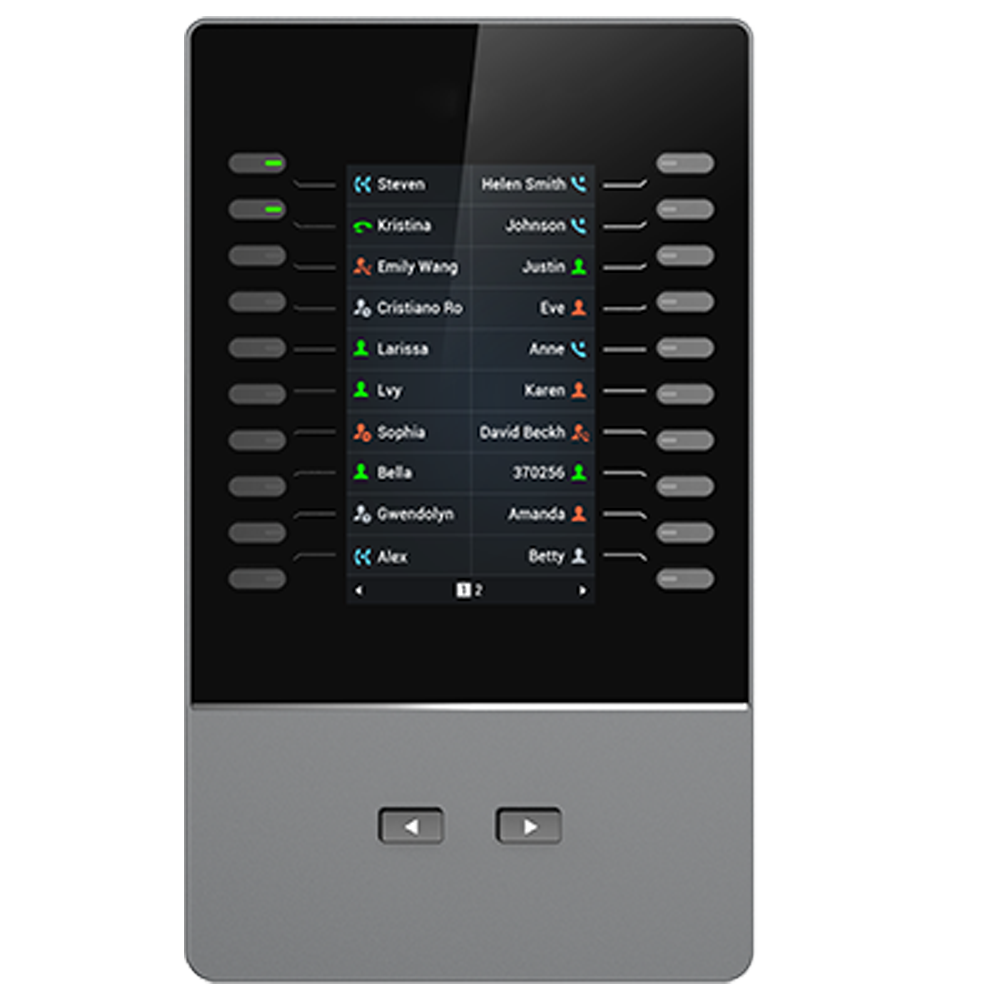
Build a reception layout people can use
Begin with the attendant’s workflow rather than filling every available position. Ask which colleagues receive most transfers, which departments need a shared destination and which calls require consultation before transfer. Put frequently used destinations on the first page and keep secondary contacts on the second.
For a professional office, the first group might cover reception cover, meeting rooms and department contacts. A clinic may prefer appointments, accounts and administration. A hotel front desk could group reservations, housekeeping and maintenance, provided the PBX supports the intended calling and pickup behaviour. These are proposed layouts to validate with users, not preconfigured industry packages.
Avoid giving one key several meanings in staff instructions. A speed-dial key places a call; a busy-lamp-field key can indicate an extension’s state when the PBX supplies the relevant information. Pickup, park and transfer should each have a clear purpose, documented permissions and a tested procedure.
Label destinations in language the team recognises. Agree who owns the contact list and how changes are approved when staff move or departments reorganise. A tidy layout loses its value if it continues to point to old extensions.
How many modules does a desk need?
Count the destinations that need dedicated keys, then distinguish total programmed positions from immediately visible keys. Both modules provide 20 key positions per page and two pages per board. If the attendant needs to see more destinations without changing pages, several boards may be more practical than relying on a single board’s total capacity.
For example, a proposed layout with 28 contacts fits within one module’s 40 positions, but some contacts will sit on the second page. Two boards may make sense if the operator needs quicker visibility across that group. This is a workflow decision; pilot it with the person answering calls before standardising every desk.
Grandstream lists a maximum of four modules, providing up to 160 positions. Treat this as an upper supported expansion figure, not a recommendation to fill every desk. Consider available desk space, reading distance, cable routing and the operator’s ability to find the correct destination under pressure.
Check the PBX behaviour before buying in quantity
A compatible physical connection is only part of the requirement. BLF subscriptions, monitored extension permissions, call pickup, park locations and shared appearances must align with your PBX or hosted service. A working SIP registration alone does not prove that all attendant functions will behave as expected.
Ask the PBX administrator to confirm which key modes are supported and whether the service restricts third-party endpoint configuration. Check how a monitored extension appears when idle, ringing, busy or unreachable, and confirm the actual procedure for attended and blind transfers. Where event-list BLF is proposed, verify its support in the selected phone and PBX configuration.
Use the existing VoIP PBX compatibility guide to frame the wider endpoint review. For changes involving several desks or call flows, include phone and PBX installation planning in the project brief.
Installation, provisioning and handover
Grandstream identifies different connection arrangements: GBX20 uses the provided USB Type-A to Micro-USB connection through the host arrangement, while GXP2200EXT uses the EXT connection with the supplied RJ11-to-RJ11 cable. Follow the exact host and module installation guide rather than substituting cables based on their appearance.
Before fitting the boards, record the existing phone configuration and the intended key map. Confirm mounting parts, cable contents, host power requirements and the required supply arrangement for the full chain. Keep firmware work within a planned maintenance window and do not interrupt the equipment during an upgrade.
Configuration is managed from the host phone, with module firmware delivered through the phone’s firmware. Administration paths vary by host, so use documentation for the exact model and software version. If a provisioning platform manages the phone, make key changes there where appropriate so a later synchronisation does not overwrite local work.
- Verify that every connected module is detected and both pages display the intended labels.
- Test calls to selected destinations and check BLF state changes against real calls.
- Test transfer, pickup and park only for the functions included in the project.
- Restart the host during an agreed test window and confirm that the settings persist.
- Give the attendant a final key map and demonstrate the daily calling procedure.
Procurement considerations for UAE and regional projects
For an office in Dubai, Sharjah or Abu Dhabi, include the reception counter layout and an agreed installation window in the enquiry. A busy visitor desk may need the work scheduled outside its main arrival period. State whether the request covers modules only, a replacement host phone or configuration and user handover.
For a Kuwait branch project, confirm whether the PBX is managed locally or by a central team and identify who can authorise endpoint changes. A module can be physically fitted while call-feature testing remains dependent on access to the hosted provider or corporate PBX administrator.
For deployments across Uganda, Kenya or Tanzania, prepare a separate list for each site’s host models, power arrangements and required key maps. If staging is proposed, agree how the configuration will be validated again after installation at the destination. Request explicit delivery, support and replacement terms rather than assuming they are identical across countries.
For Ghana or Nigeria enquiries involving several offices, distinguish common company contacts from site-specific destinations. This helps the project team define a consistent operating approach while keeping each reception desk useful. Equipment availability, service coverage and commercial terms must be confirmed in the quotation.
Common ordering mistakes to avoid
- Ordering a GBX20 for an unsupported GXP phone because both are Grandstream products.
- Using the 40-contact figure as a measure of simultaneous call capacity.
- Assuming all programmed contacts remain visible on one page.
- Requesting BLF without checking PBX subscription support and permissions.
- Adding boards without checking mounting, cables, desk space and the complete power arrangement.
- Changing keys locally when central provisioning will restore an older configuration.
If the existing host is being replaced, review the whole reception station. Retaining an expansion module should be weighed against the new host’s compatibility, intended service life and user requirements. Confirm current lifecycle and supply information for each quoted item rather than inferring it from the presence of online documentation.
Questions buyers ask
Which expansion module should I choose for a GXP2170?
Grandstream lists the GXP2200EXT for the GXP2170. Confirm the phone’s firmware, required module count and complete installation arrangement before ordering.
Does the GBX20 work with every GRP phone?
No. Grandstream lists GRP2615, GRP2624, GRP2650 and GRP2670, together with GXV3350 and GXV3450 video phones. Check the exact model rather than relying on the GRP family name.
Does 40 contacts mean 40 simultaneous calls?
No. It describes programmable contact or extension positions across two pages. SIP accounts, concurrent calls, trunks and PBX capacity are separate specifications.
Can the modules be mixed in one chain?
Plan a chain using the same module model and a supported host phone. Grandstream describes expansion using up to four modules of the same model; do not assume cross-model chaining is supported.
Will BLF and pickup work automatically?
These functions depend on the host phone configuration and PBX support, permissions and feature codes. Test the required functions with your actual PBX before approving a wider rollout.
What information is needed for a quotation?
Provide the exact host phone model, firmware, PBX or hosted provider, number of reception desks, contacts to display, requested functions, installation location and required equipment or service scope.
Request a compatibility-led Fourteck quotation
Send your exact phone model and firmware, PBX or hosted provider, number of attendant desks, required contact positions and project location. Include the key functions you need and whether the scope includes installation, provisioning, testing or staff handover.
Ask for an itemised proposal showing the selected module, quantity, any host phone or power accessories, configuration scope and acceptance tests. Confirm price, stock, delivery, warranty and support arrangements before placing an order.