GRANDSTREAM • CORDLESS BUSINESS CALLING
WP Wi-Fi IP Phone Series
Keep a business extension with the people who move. Grandstream WP cordless Wi-Fi IP phones connect mobile staff to a compatible SIP calling system through the wireless network. The range spans straightforward voice handsets, rugged devices and an Android model with barcode scanning.
Start with the job the handset must do
A shop supervisor answering customer queries, a warehouse coordinator moving between aisles and a worker scanning stock need different devices. Begin with the working environment, required applications and shift pattern. Then check whether the wireless network can carry conversations along the routes staff actually walk.
For compact Wi-Fi 6 voice use, shortlist WP816. Compare WP826 where a longer manufacturer-rated talk time and three SIP accounts are useful. Assess WP825 or WP836 for roles requiring rugged construction, and WP856 when scanning and Android applications belong in the same handheld workflow. These are selection starting points; confirm the exact hardware, firmware and deployment requirements before ordering.
Compare the WP handset range
The table separates wireless generation, SIP account capacity and published battery references. Account count is not a guarantee of simultaneous conversations, PBX capacity or carrier channels.
| Model | Wireless | SIP accounts | Talk / standby, up to | Selection focus |
|---|---|---|---|---|
| WP810 | Wi-Fi 5 | 2 | 6 / 120 hours | Basic mobile voice; no Bluetooth |
| WP816 | Wi-Fi 6 | 2 | 6 / 120 hours | Compact Wi-Fi 6 handset with Bluetooth and USB-C |
| WP820 | Wi-Fi 4 | 2 | 7.5 / 150 hours | Assess for existing deployments and specific application needs |
| WP822 | Wi-Fi 5 | 2 | 8 / 200 hours | General mobile calling with Bluetooth |
| WP825 | Wi-Fi 5 | 2 | 8 / 200 hours | Rugged alternative for handling-intensive environments |
| WP826 | Wi-Fi 6 | 3 | 12 / 240 hours | Longer rated talk time for mobile voice users |
| WP836 | Wi-Fi 6 | 3 | 10 / 240 hours | Rugged mobile voice and configurable alarm workflows |
| WP856 | Wi-Fi 6 | 6 | 20 / 200 hours | Android touchscreen, barcode scanning and calling |
Battery values are manufacturer references, with laboratory figures identified in the WP8x6 user guide. Actual runtime varies. The WP822 remains described on the official family page, but its individual product URL redirected to WP825 during research; confirm ordering and support status rather than assuming availability or discontinuation.
Technical references: Grandstream Wi-Fi cordless family, WP816/WP826/WP836 user guide and WP roaming guide.
Voice-first handsets or a scanning device?
Keep calling simple
For staff who mainly answer, transfer and place calls, choose a voice handset around handling, headset needs and charging. WP810 provides a basic entry point; WP816 adds Wi-Fi 6 and Bluetooth. WP822 and WP825 may be relevant where their features and existing accessories match the project. Confirm accessory compatibility by model rather than assuming chargers or batteries are interchangeable.
Combine scanning and communication
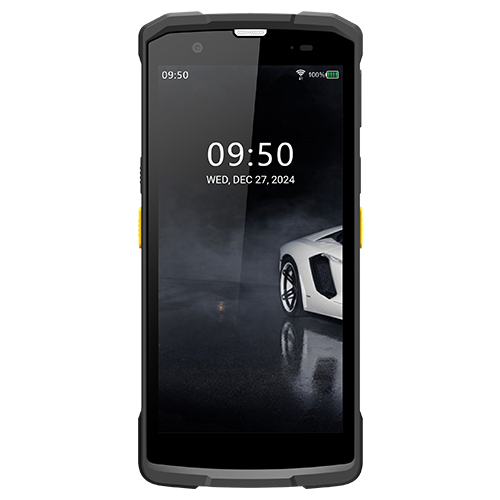
WP856 provides Wi-Fi 6, six SIP accounts, a 5.5-inch touchscreen, Android 13 and a built-in 1D/2D barcode scanner. Its published protection rating is IP65. Treat application integration as a separate workstream: verify the exact app, barcode formats, input handling, account access and device controls before committing to a fleet.
Ruggedness must match the actual environment
Select protection around expected drops, dust, cleaning and handling. WP825 is positioned as a rugged handset, with the vendor stating drop protection from 2.5 metres. WP836 combines rugged construction with Wi-Fi 6 and configurable alarm functions. WP856 serves a different need where a touchscreen and scanner are central to the task.
Grandstream’s WP836 product page currently contains differing protection descriptions: IP69K in the main feature section and IP67 in the comparison section; the WP8x6 user guide also states IP67. Obtain the current datasheet and written confirmation for the supplied variant if cleaning or ingress protection is a purchasing requirement. Do not use a family-level description as an acceptance certificate.
For healthcare or shared equipment, agree the permitted cleaning process with the manufacturer and your facility team. For security or lone-worker use, validate the complete alarm route and response procedure. Handset features alone do not establish clinical suitability or a certified emergency service.
A strong Wi-Fi signal is only the beginning
Plan the voice path from the handset through access points and the network to the PBX or hosted SIP service. A phone may show signal bars while a congested channel, authentication delay or coverage gap interrupts a conversation. Walk-test active calls through doors, corridors, stairs and working aisles.
- Map movement: record where staff place calls, move during calls and charge devices. Include loading areas and back rooms.
- Check wireless design: review access-point positions, channel planning, interference and expected concurrent voice devices. Verify roaming features with the handset and AP configuration.
- Check the calling platform: confirm SIP credentials, codecs, routing, voicemail, transfers and any hosted-service restrictions.
- Set security and management: use a supported authentication method, controlled administrator access and a documented provisioning and firmware process.
- Prove the result: test real call flows, busy periods, roaming and charging before issuing every handset.
For a network-led project, review Wi-Fi site survey and coverage planning. If the calling platform also needs attention, use the Grandstream IP PBX planning guide to define that scope.
Use Wi-Fi, DECT and desk phones where each fits
Wi-Fi handsets can suit an organisation that needs mobility across a wireless network designed for voice. DECT uses its own radio infrastructure and should be evaluated as a separate coverage design. A desk phone can still be appropriate for staff who spend most of the day at a fixed workstation and need convenient call handling.
Avoid replacing every endpoint with the same device simply to standardise a purchase. Reception may need a desk phone, supervisors may need Wi-Fi handsets and stock teams may need scanning devices. A mixed deployment can follow actual working roles, provided the PBX and operating procedures support it.
Plan around your site and region
Dubai, Sharjah and the wider UAE
In a multi-floor office, hotel or retail site, define movement between guest-facing areas, service corridors and back offices. For Dubai or Sharjah warehouse projects, include the racking layout and loading routes in coverage assessment. Confirm local service-provider requirements, the existing calling platform and the exact installation scope in the quotation.
Regional branches in GCC and African markets
For a Kuwait branch or sites in Uganda, Kenya, Ghana, Nigeria and Tanzania, specify each delivery destination and operating environment separately. Agree country-appropriate equipment variants, power accessories, battery transport arrangements and support responsibilities. A repeatable configuration can help branch rollouts, but wireless settings and network access still need site-specific validation.
Where local connectivity or power interruptions affect operations, assess backup power for access points, switches and the calling platform, alongside handset charging. A charged phone still depends on the systems carrying its calls. Confirm remote administration access and the person responsible for on-site recovery.
Build a quotation around a working deployment
Provide the handset count by role, number of sites, current PBX or hosted service, access-point models, floor plans, working shifts and required headsets or carrying accessories. For WP856 projects, include the business application and scanning workflow. For rugged devices, state the required protection and cleaning conditions explicitly.
Ask the proposal to identify exact model numbers, included charging equipment, spare batteries where supported, configuration work, coverage assessment, commissioning, user training and support terms. Request separate confirmation of price, taxes, stock, lead time, warranty and delivery arrangements. None should be inferred from a model appearing on this page.
Useful deployment context: warehouse cordless-phone planning, retail communication requirements and healthcare communication planning.
Questions buyers ask before choosing WP
What is a Grandstream WP Wi-Fi IP phone?
It is a cordless SIP telephone that connects through a compatible Wi-Fi network to a business calling platform. It lets staff carry an extension around covered areas. It requires suitable wireless coverage, network access and a configured SIP account.
Does the WP series need a DECT base station?
WP handsets use Wi-Fi access points rather than a DECT radio base. A DECT deployment uses a different wireless architecture. Compare the coverage design, roaming requirements and management approach before selecting either system.
Which WP models support Wi-Fi 6?
WP816, WP826, WP836 and WP856 support dual-band Wi-Fi 6. WP810, WP822 and WP825 use Wi-Fi 5, while WP820 uses Wi-Fi 4. Wi-Fi generation alone does not determine voice quality; the access points, coverage, traffic and configuration also matter.
Can a WP handset work with an existing SIP PBX?
Potentially, subject to the exact handset, PBX or hosted service, firmware, authentication and supported calling features. Test registration, incoming and outgoing calls, transfers, voicemail indications and roaming before a volume order.
Which WP phone includes a barcode scanner?
The WP856 includes a built-in scanner for 1D and 2D barcodes and an Android touchscreen interface. Confirm the required inventory or business application, scanner input method, permissions and management requirements with a pilot.
Are WP battery figures guaranteed for a full shift?
No. Published talk and standby figures are manufacturer reference values. Actual runtime depends on signal strength, roaming, calling, display use, applications, settings, battery age and charging habits. Validate runtime against a representative shift.
Can push-to-talk or alarm buttons be used immediately?
These functions require model-specific configuration and a compatible destination or system. Validate routing, permissions, coverage and staff procedures. An alarm feature should not be treated as a certified life-safety service without separate assessment.
How do I request a WP series quotation?
Send Fourteck the required quantities, staff roles, site locations, existing PBX, Wi-Fi access-point details, shift lengths and accessory needs. Ask for an itemised proposal covering the exact models, charging equipment, configuration, testing and any agreed support.
Choose the handset and prove the coverage
Share your staff roles, site layout and current phone system with Fourteck. Request a model comparison and an itemised quotation that includes the network and testing work your deployment needs. Confirm compatibility and service scope before ordering.