GRANDSTREAM • ANALOG TO SIP
HT Analog Telephone Adapter Series
Keep suitable analog phones and fax machines connected as your business moves to SIP calling. Grandstream’s HT series includes compact one- and two-port adapters, multiport FXS models and FXO-equipped options for analog line integration. The right choice starts with what you are connecting: a telephone, a fax machine or an existing carrier line.
Start at the socket: phone or carrier line?
FXS serves an analog endpoint. A compatible telephone or fax machine connects to the adapter’s FXS port. The adapter then connects to your IP network and registers with a suitable SIP service or PBX. Count independently used endpoints before choosing port capacity.
FXO accepts an analog line. If the requirement is to bring existing analog carrier lines into an IP calling system, select equipment with FXO ports. More FXS ports do not increase analog trunk capacity. Identify every cable’s source before planning connections; an analog PBX extension and a public analog line also need their interface and signalling checked.
An ATA supplies the bridge between analog equipment and SIP calling. Call queues, departmental routing, public telephone service and user permissions must still come from the appropriate PBX or provider. For the wider platform, review Grandstream IP PBX systems.
Compare the core HT v2 endpoint adapters
| Model | FXS ports | Ethernet | Selection starting point |
|---|---|---|---|
| HT801 v2 | 1 | 1 × 10/100 Mbps | One analog phone or fax |
| HT802 v2 | 2 | 1 × 10/100 Mbps | Two analog endpoints on an existing LAN |
| HT812 v2 | 2 | 2 × Gigabit | Two endpoints where dual network interfaces are useful |
| HT814 v2 | 4 | 2 × Gigabit | A small cluster of analog extensions |
| HT818 v2 | 8 | 2 × Gigabit | A larger group of retained analog endpoints |
The HT812 v2, HT814 v2 and HT818 v2 include NAT routing functionality. Dual Gigabit interfaces describe the Ethernet links; assess routing throughput separately if the ATA will sit in the routed traffic path. In an existing business network, agree the connection mode with the network administrator rather than adding another router without a plan.
These are endpoint counts, not a statement that every device can use every service without configuration. PBX capacity, account allocation, provider limits and simultaneous calling needs must be checked independently. Grandstream’s HT8xx v2 FAQ documents the interface differences.
When analog lines must stay in service
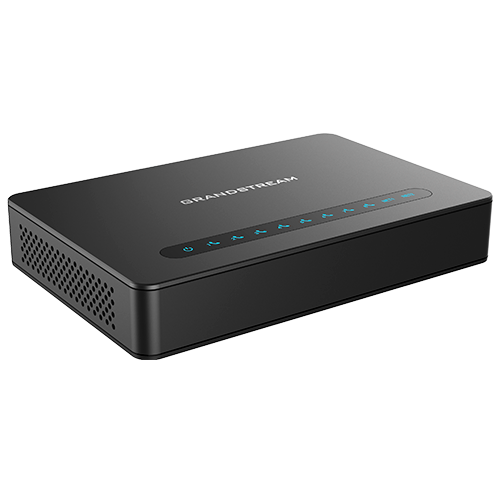
For one analog endpoint alongside one analog carrier line, the HT813 combines one FXS and one FXO port with dual 10/100 Mbps Ethernet interfaces. Its FXS-to-FXO power-outage relay is a specific analog lifeline feature. Confirm incoming routing, outgoing line selection and local line signalling during design.
For multiple analog lines, HT841 and HT881 provide four or eight FXO ports respectively, plus one FXS port. They address a different requirement from the HT814 v2 and HT818 v2: retaining analog lines rather than attaching four or eight analog phones.
A lifeline relay depends on an attached analog service remaining usable. It does not keep the PBX, broadband equipment or SIP service running during an outage. Define the expected failure behaviour, backup power needs and recovery tests before cutover.
Match the adapter to the job
A retained office fax
Start with the fax machine’s model, connection and current usage. A dedicated FXS port may fit, but fax must be tested across the complete provider path. Plan an alternative workflow if the business cannot tolerate failed transmissions.
A small branch with analog handsets
Choose one or two FXS ports for a small endpoint group, then check the branch’s network and SIP account requirements. Local adapter capacity does not remove the need for a working connection to the calling platform.
Several existing room or department phones
Four- or eight-port FXS models may suit a modest cluster. Map wiring, extension numbers and ringing requirements. For larger concentrations, compare a higher-density analog gateway with several small adapters.
A phased PBX migration
Retain only equipment that still meets the user’s needs. Staff who need directory search, headset integration or visible call handling may benefit from SIP phones. Use ATAs where preserving analog devices has a clear operational or wiring advantage.
For a staged transition, use the broader business phone system migration guide to coordinate number routing, user changes and cutover responsibilities.
Compatibility checks that prevent the wrong order
Record the full hardware identity. Grandstream lists original and v2 HT devices separately. Specify the revision in the purchase request and use its matching documentation and firmware. A similar model name is not enough to approve a replacement configuration.
Confirm the service policy. Ask whether the existing PBX or hosted provider permits the exact SIP adapter. Check credentials, registration method, transport, codec choices, DTMF handling and required calling features. A successful registration alone does not prove that inbound audio, transfers or fax will work.
Check the analog device. Standard analog telephones and fax machines are the normal starting point. Proprietary digital PBX handsets require separate assessment. Alarms, lift phones, payment terminals and other specialist devices need application-specific approval; a matching plug does not establish compatibility.
Account for wiring and power. Inspect cable condition, connected devices, ringing load, power accessories and the proposed installation position. Confirm the exact model’s power method rather than assuming that an Ethernet connection supplies power. Place equipment where it can be accessed for maintenance.
Plan security with the PBX. Supported TLS and SRTP features require compatible configuration at both ends. Use individual credentials, restrict administration access and define who can change provisioning. Keep management access controlled and review firmware against the manufacturer’s current guidance.
Commission the whole call path
Inventory: label each analog device, extension and cable. Record which equipment must remain available during the change.
Prepare: agree SIP accounts, dial plans, network addressing, routing mode and administrator ownership. Keep an approved configuration backup.
Pilot: connect a representative endpoint and test incoming and outgoing calls, two-way audio, caller ID, DTMF and the user’s transfer or voicemail workflow.
Validate fax separately: test multi-page sending and receiving with representative destinations. Match T.38 or G.711 settings to the provider’s requirements and review network loss or delay if results are inconsistent.
Test recovery: restart the adapter and check registration recovery. Where applicable, test the agreed analog lifeline or backup path under controlled conditions.
Handover: deliver the port map, account ownership details, configuration record and support route. Agree acceptance criteria before removing the former service.
Grandstream documents provisioning options including TR-069 and configuration files on relevant HT models, with UCM Zero Configuration support on selected combinations. Confirm the intended management method for your exact hardware and firmware. For wider implementation planning, see PBX setup and configuration.
Regional procurement: keep the brief specific
Dubai and the wider UAE: an office in Deira or Bur Dubai retaining a fax has a different scope from a multi-floor property in Sharjah, Ajman or Abu Dhabi retaining several analog extensions. Include a wiring schedule, existing provider information and building access requirements. Confirm whether the quotation includes configuration, site attendance and post-cutover testing.
Uganda, Kenya and Tanzania: for branch deployments, state where the adapters will be installed, which PBX they will reach and who will handle local cabling. Include power continuity and remote administration requirements in the design. Separate equipment delivery from installation responsibilities and acceptance testing.
Kuwait, Ghana and Nigeria: a purchasing team coordinating multiple sites should request one clear model and revision schedule with destination-specific power accessories, commercial terms and replacement arrangements. Ask for current availability and lead times rather than treating a family page as stock confirmation. Carrier acceptance and service compatibility require verification for each installation.
What changes the project price?
Port count is only one part of the cost. The final quotation may include adapters, suitable power accessories, cabling work, SIP or PBX services, configuration, testing and ongoing support. Compare quotations against the same hardware revision and service scope so a lower equipment line does not conceal missing installation work.
Send Fourteck the number of analog endpoints, any analog carrier lines, current PBX or provider, fax or specialist device models, site locations, quantities and required date. State whether you want equipment only or a scoped deployment. Request written confirmation of availability, warranty, delivery and support terms for the exact configuration.
Questions before choosing an HT adapter
What is the Grandstream HT series used for?
Grandstream HT analog telephone adapters connect compatible analog phones or fax machines to a SIP-based calling system. FXS models serve analog endpoints; FXO-equipped models address analog line integration.
Which HT model should I choose for two analog phones?
HT802 v2 provides two FXS ports with one 10/100 Mbps network connection. HT812 v2 also provides two FXS ports, with dual Gigabit network interfaces and NAT routing functionality. Choose according to network design and PBX requirements.
Can an HT818 v2 connect eight analog carrier lines?
HT818 v2 has eight FXS ports for analog endpoints. Analog carrier lines require FXO interfaces. HT841 and HT881 provide four and eight FXO ports respectively, each with one FXS port.
Will an HT adapter work with my existing PBX?
Compatibility depends on the PBX or provider accepting the selected SIP device and supporting the required registration, media and call features. Confirm the exact model, hardware revision, firmware and provider policy before ordering.
Does T.38 support guarantee that my fax machine will work?
No. Fax performance depends on the fax machine, ATA configuration, PBX, provider and network path. Confirm T.38 or G.711 requirements and test incoming and outgoing multi-page documents before migration.
Does every HT model provide a power-failure analog lifeline?
No. Grandstream specifies an FXS-to-FXO power-outage relay for models such as HT813 and HT841/HT881. That function requires a suitable working analog line and does not provide general backup for VoIP calling.
How can I request a quotation from Fourteck?
Send Fourteck your endpoint count, any analog carrier-line count, PBX or provider details, required hardware revision, destination and installation scope. Ask for an itemised quotation with availability, power accessories, warranty and service terms confirmed.