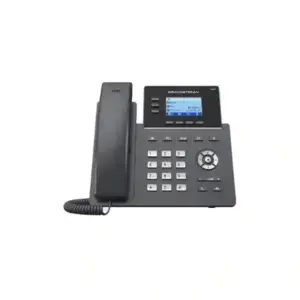
Grandstream GXP1780 Dubai – 8-Line Mid-Range HD IP Phone
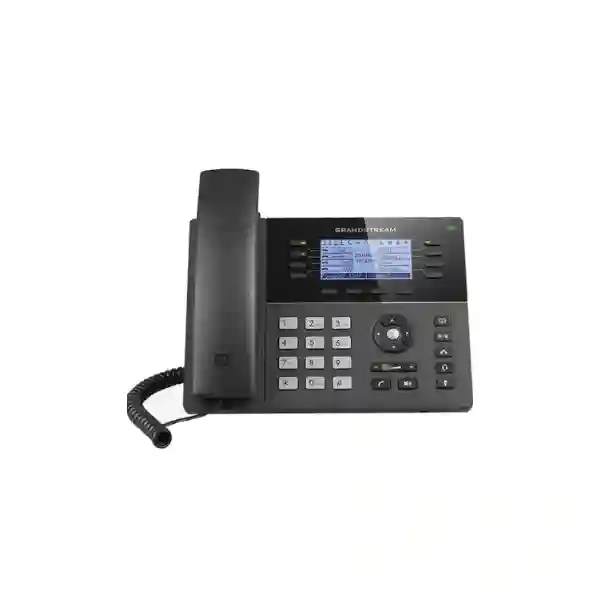
The Grandstream GXP1780 Dubai is a feature-rich SIP desk phone designed for users who need more line visibility, programmable call-control options and stronger day-to-day telephony capability than a basic office handset. Grandstream specifies eight lines, four SIP accounts, eight dual-colour line keys, four XML-programmable context-sensitive soft keys, 32 digitally programmable BLF/speed-dial positions, HD wideband audio, five-way audio conferencing, integrated Power over Ethernet, dual 10/100 Mbps Ethernet ports, a 200 × 80 pixel backlit LCD, a USB port for data import/export, and security capabilities including TLS and SRTP. For organizations in Dubai and the wider UAE, it can remain relevant when maintaining an installed GXP fleet, sourcing a matching replacement, standardizing an existing reception or branch environment, or supporting a SIP deployment already built around the GXP17xx platform. Grandstream currently lists the GXP1780/GXP1782 family in its Product Archive, so new purchases should be evaluated with lifecycle, availability, compatibility and newer-model alternatives in mind.
4 SIP Accounts
32 BLF / Speed Dial
PoE
5-Way Conference
HD Audio
Fast answer: who should consider the GXP1780?
The GXP1780 is best viewed today as a capable mid-range business SIP phone for environments where its exact feature set, firmware family or physical key layout matches an existing deployment. It is particularly relevant to reception desks, branch administrators, office coordinators, supervisors, customer-service staff, shared business desks, schools, clinics, hospitality back offices, retail management points, warehouses and small or medium enterprises that rely on visible line status and frequent call transfer. Its 32 programmable BLF/speed-dial positions can help users monitor extensions or reach common destinations quickly, while the eight line keys and four SIP accounts can support staff handling multiple identities or call flows.
For a completely new rollout, the decision should not be based only on feature count. Because Grandstream places this family in its Product Archive, buyers should compare the GXP1780 with current-generation Grandstream GRP endpoints and other supported models before standardizing a new fleet. Fourteck can help customers in Dubai, Sharjah, Abu Dhabi, Ajman and other UAE locations confirm PBX compatibility, power and switching requirements, provisioning expectations, headset needs, user count and whether a like-for-like GXP replacement or a planned migration is the better option.
Verified GXP1780 quick facts
| Product class | Mid-range SIP IP phone in Grandstream’s GXP1700 family |
|---|---|
| Lines / SIP accounts | 8 lines with up to 4 SIP accounts |
| Display | 200 × 80 pixel backlit LCD, approximately 3.3-inch class |
| Programmable controls | 8 dual-colour line keys, 4 XML-programmable soft keys and 32 digitally programmable BLF/speed-dial positions |
| Conference | 5-way audio conferencing |
| Audio | HD handset and full-duplex speakerphone with wideband audio support and acoustic echo cancellation |
| Ethernet | Dual switched auto-sensing 10/100 Mbps Ethernet ports |
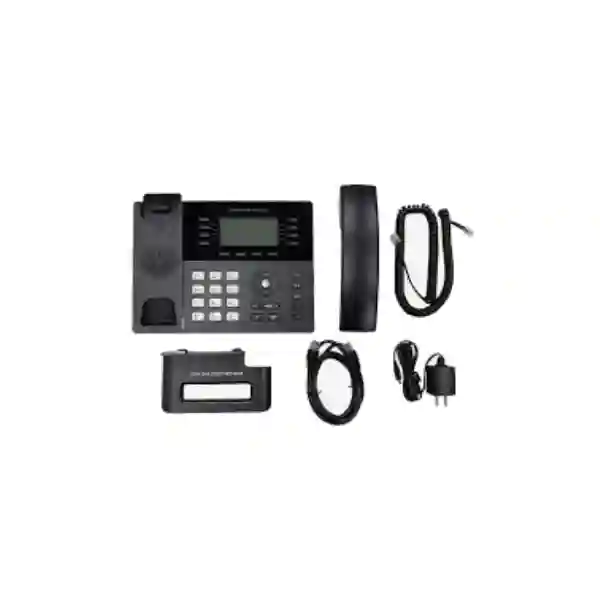
| Power | Integrated 802.3af Power over Ethernet; Grandstream documentation also lists a universal power adapter in the package |
| Headset | RJ9 headset jack with EHS support for compatible Plantronics headsets |
| Security | TLS, SRTP, 802.1X support and Kensington Security Slot |
| Provisioning | TR-069 and AES-encrypted XML configuration; Grandstream UCM Zero Config support |
| Lifecycle note | Grandstream lists GXP1780/GXP1782 under its Product Archive; availability should be confirmed before ordering |
Why businesses still search for the Grandstream GXP1780 in Dubai
An archived phone can still have practical value when an organization already owns many identical endpoints. A branch may need one replacement handset that matches existing user training, provisioning templates, screen behavior, key mappings, desk placement and support procedures. A hotel back office may prefer to replace one damaged unit without introducing a different user interface. A warehouse supervisor may depend on established BLF assignments and speed-dial positions. A school or clinic may have a tested SIP configuration and want to avoid unnecessary changes during a time-sensitive replacement.
This is why the buying conversation for GXP1780 is often different from the buying conversation for a brand-new office phone. The main question is not simply whether the handset has enough features. It is whether this exact model still makes sense for the installed environment, and what risks come with continuing to standardize on it. Fourteck therefore evaluates the endpoint as part of the wider communications system: PBX platform, SIP registration, switching, PoE budget, VLANs, QoS, remote management, firmware policy, headset compatibility, extension monitoring, replacement planning and long-term support strategy.
Reception and front desk
Reception users often need extension status, fast transfer, frequent destinations and several active calls. The GXP1780’s line keys and programmable BLF/speed-dial positions can fit that workflow when the PBX provides the required presence and call-control functions.
Branch administration
Branch managers may need separate SIP identities, direct access to headquarters, suppliers, security and logistics teams, plus quick conferencing. Four SIP accounts and five-way conferencing can suit many moderate-call-volume roles.
Customer service desk
Where a full contact-centre application is unnecessary, headset support, transfer controls, speakerphone capability and extension monitoring can improve everyday handling. Exact functionality depends on PBX features and provisioning.
Installed-fleet replacement
For an existing GXP1780 estate, a matching unit can reduce retraining and preserve configuration consistency. Because the model is archived, procurement should confirm source, condition, support expectations and the wider replacement strategy.
GXP1780 vs GXP1782: the network interface matters
The GXP1780 and GXP1782 share many telephony features, so their model names are sometimes treated as interchangeable in listings. They are not identical. Grandstream specifies dual 10/100 Mbps Ethernet ports for the GXP1780 and dual 10/100/1000 Mbps Gigabit Ethernet ports for the GXP1782. Both support integrated PoE. This distinction matters when a desktop computer is connected through the phone’s PC port, especially where the workstation requires higher wired throughput. A buyer who needs Gigabit pass-through should not assume the GXP1780 provides it. Confirm the exact model number on the device, label, packaging or procurement record.
| Decision point | GXP1780 | GXP1782 |
|---|---|---|
| Lines / SIP accounts | 8 / 4 | 8 / 4 |
| Programmable BLF/speed dial | 32 | 32 |
| Ethernet | 10/100 Mbps | 10/100/1000 Mbps |
| PoE | Integrated | Integrated |
| Display | 200 × 80 backlit LCD | 200 × 80 backlit LCD |
Call handling features that matter in a real office
A business phone is useful only when its controls match the work employees do. The GXP1780 gives users dedicated keys for phonebook, transfer, conference, headset, mute, send/redial, speakerphone and volume, along with navigation controls and programmable soft keys. In a moderately busy office, these physical controls can reduce the number of steps required for common actions. A user can move between calls, transfer a caller to another extension, place calls on hold, join conversations, access contacts and use a headset without relying on a touchscreen-first interface.
Grandstream’s technical documentation also lists common SIP telephony capabilities including hold, transfer, forward, call park, call pickup, call waiting, shared call appearance/bridged line appearance, auto answer, off-hook auto dial, click-to-dial, hot desking, flexible dial plans, server redundancy and failover. Not every feature becomes available simply because the handset supports it. The PBX, SIP platform, service-provider configuration, firmware and provisioning policy must support the intended behavior. A deployment review should map the user’s required call flow to the phone and PBX before equipment is rolled out.
What the 32 BLF / speed-dial positions can do for staff
Busy users often value the GXP1780 because it can expose up to 32 digitally programmable and customizable BLF/fast-dial positions. BLF, or Busy Lamp Field, is commonly used to show whether a monitored extension is idle, ringing or busy, depending on the PBX implementation. The same programmable area can be used for speed dial or other functions where supported. A front desk could assign positions to management, accounts, sales, warehouse, meeting rooms and support. A branch office could assign headquarters, security, reception, logistics and frequent external numbers. A clinic could map destinations to reception, nurse stations, pharmacy, administration and emergency coordination roles.
The practical design should be based on workflow rather than filling every available key. Too many monitored extensions can become visually noisy and can create unnecessary SIP subscription traffic. For a small business, a carefully organized set of important destinations may be more useful than 32 rarely used buttons. Larger deployments should also confirm how the PBX handles BLF subscriptions, permissions, extension privacy and failover.
HD audio, speakerphone and conference calling
Grandstream specifies HD audio on the handset and speakerphone with wideband codec support. The documented codec list includes G.722 for wideband audio along with commonly used narrowband codecs such as G.711 and G.729. Voice quality in practice depends on the complete path: handset or headset quality, PBX codec policy, SIP trunk support, LAN congestion, WAN latency, jitter, packet loss, QoS, NAT behavior and remote-site connectivity. The phone alone cannot guarantee HD voice across every call.
The built-in full-duplex speakerphone is useful for short collaborative conversations at a desk, while five-way audio conferencing can support small ad-hoc meetings without requiring a separate conference endpoint. Businesses planning frequent group calls should still consider room acoustics. A desk phone speaker is not a replacement for a purpose-built conference system in larger rooms, boardrooms or noisy open offices.
Network and PoE planning for GXP1780 deployments
The GXP1780 includes dual switched 10/100 Mbps Ethernet ports and integrated 802.3af PoE. In a typical business deployment, one Ethernet cable can deliver network connectivity and power from a compatible PoE switch. The second Ethernet port can connect a nearby PC through the phone, reducing the number of wall data outlets needed at a desk. Because the GXP1780 is Fast Ethernet rather than Gigabit, organizations should check whether connecting a PC through the handset could create a throughput limitation. Where users handle large files, high-speed cloud workloads or bandwidth-sensitive applications, separate network connections or a Gigabit-capable phone may be preferable.
PoE planning also requires more than checking a PoE logo. The network team should confirm the switch standard, available PoE power budget, number of powered endpoints, cable quality, switch uplink capacity, VLAN design, LLDP behavior, QoS and failover expectations. A switch can have enough physical ports while still lacking sufficient total PoE budget for phones, access points and cameras. Branch designs should also consider what happens during a power failure and whether the PoE switch, router, firewall, PBX and WAN device are protected by a UPS.
SIP, PBX and Grandstream UCM compatibility
The GXP1780 is a standards-based SIP endpoint. Grandstream documents SIP RFC3261 and a broad set of related IP protocols. The phone can be used with Grandstream UCM IP PBX systems and may also interoperate with third-party SIP platforms where registration, authentication, codecs, DTMF, network and feature behavior are compatible. Grandstream highlights Zero Config integration with its UCM series, which can simplify device discovery and provisioning in supported Grandstream environments.
For third-party PBX systems, compatibility should be checked at the feature level rather than assuming that successful registration guarantees full functionality. Basic calling may work while BLF, voicemail indication, directory integration, call recording controls, hot desking, shared line appearance, transfer behavior or failover require additional configuration. For cloud PBX deployments, the team should also verify whether the provider still supports this archived endpoint and whether a current certified device would offer easier remote management.
Provisioning at one desk or across many branches
Manual configuration can work for a single handset, but it becomes inefficient and error-prone as the fleet grows. Grandstream documents automated provisioning through TR-069 or AES-encrypted XML configuration files. The practical provisioning method depends on the PBX, device-management workflow and security policy. Administrators should define SIP credentials, server addresses, extension mapping, VLAN parameters, NTP, time zone, dial plan, codec priorities, feature keys, directory sources, firmware rules and security settings in a repeatable manner.
A good provisioning process separates common settings from user-specific settings. Common settings can include VLAN, language, date format, NTP, codec policy, firmware server and security controls, while device-specific profiles can contain extension credentials, labels and BLF assignments. The process should also include backup, rollback and change-control procedures. Grandstream’s current GXP17xx administration guide warns that after upgrading to firmware version 1.0.1.118, downgrading to firmware earlier than 1.0.1.116 is not supported. Administrators should therefore verify firmware guidance before fleet-wide changes.
Security considerations for an older SIP endpoint
Grandstream documents TLS and SRTP support for protecting SIP signaling and media where the PBX and deployment support them. It also lists 802.1X and includes a Kensington Security Slot for physical anti-theft protection. These capabilities are useful, but endpoint security depends on the complete operational environment. Administrators should use strong credentials, restrict management access, disable unused services where practical, separate voice traffic appropriately, keep firmware under controlled management, limit direct internet exposure, use secure provisioning and monitor registration anomalies.
Lifecycle matters. A product appearing in an archive should trigger a review of ongoing firmware, vulnerability, spare-part and vendor-support expectations rather than an assumption that the phone can be treated exactly like a current model. Organizations with compliance or security-sensitive requirements should evaluate whether retaining the GXP1780 remains appropriate. A staged inventory and migration plan can often reduce risk without forcing unnecessary all-at-once replacement.
Phonebook, call history and directory use
The GXP1780 datasheet highlights a phonebook capacity of up to 2,000 contacts and call history of up to 500 records. Grandstream documentation also references downloadable phonebook and LDAP functionality. Directory planning can save employees time when internal and external numbers are managed centrally. A business may organize contacts by department, supplier, customer, location or emergency role instead of expecting users to maintain personal lists.
Directory integration should be designed with data ownership and privacy in mind. The communications team should decide which contacts should be global, which should be restricted, how updates are distributed, how departed employees are removed and whether the PBX or a directory service is the source of truth. When replacing an existing phone, administrators should also consider whether locally stored contacts or call history need to be preserved or exported before the device is removed.
Headset use and desktop ergonomics
The GXP1780 includes an RJ9 headset jack and Grandstream documents EHS support for compatible Plantronics headsets. This can be useful for reception, telesales, customer service and users who spend long periods on calls. Headset purchasing should not be based only on connector shape. Confirm the exact headset model, required EHS cable or adapter, call-control functionality, microphone level and user preference. Modern Bluetooth or USB-first headset workflows may be better served by newer endpoints depending on the chosen phone and headset ecosystem.
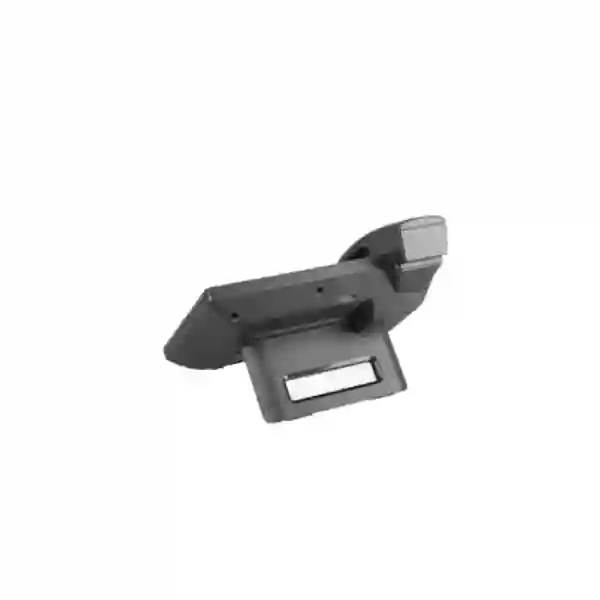
The phone’s two-position desk stand can help adjust viewing angle. Grandstream documentation states that a wall-mount stand is sold separately, so customers planning wall installation should confirm the accessory rather than assuming it is included. Desk layouts should also account for handset cable routing, network cable strain, power-adapter placement when PoE is not used and sufficient space for comfortable keypad operation.
Dubai and UAE deployment scenarios
Dubai offices and multi-tenant business centres
Dubai customers often operate from offices where network, internet and telephony services are tightly integrated. A GXP1780 deployment should therefore be coordinated with switch capacity, voice VLAN design, PBX location and internet resilience. Companies in business centres may have restrictions on cabling or shared infrastructure, making PoE and desk-side PC pass-through useful, but the 10/100 Mbps limitation should be considered before the handset is placed inline with a high-bandwidth workstation.
Deira and Bur Dubai trading businesses
Trading, wholesale and service businesses often depend on rapid call transfer between sales, accounts, stores, logistics and management. BLF/speed-dial assignments can be organized around these operational roles. The buying decision may focus on continuity: replacing a failed handset, retaining existing extension layouts and preserving a familiar interface for staff who handle frequent supplier and customer calls.
Sharjah and Ajman branches
Branch offices may connect to a central PBX or cloud SIP platform. Before deployment, verify WAN connectivity, NAT/firewall policies, SIP registration limits, QoS and failover. If an older phone is being added to a newer hosted environment, confirm provider support and provisioning compatibility rather than relying on generic SIP registration alone.
Abu Dhabi enterprise and institutional use
Larger organizations often require stronger lifecycle governance, standardized security controls and centralized device management. An archived model may still serve as a controlled replacement within an existing fleet, but a new standardization decision should consider active-generation devices, long-term firmware strategy and support policy. Procurement, IT security and telecom teams should evaluate the endpoint together.
Lifecycle and availability: what Product Archive means for a buyer
Grandstream currently includes GXP1780/GXP1782 in its Product Archive. For procurement teams, that status is an important decision signal. It does not mean that every existing phone must be removed immediately, and it does not prove that no unit can be sourced. It does mean buyers should avoid treating the model as if it were a current launch with unlimited future supply. Availability can vary by distributor, reseller, remaining inventory, region and condition. Fourteck therefore recommends confirming availability before ordering and clarifying whether the requirement is for a specific replacement unit, a small fleet extension, a spare stock strategy or a completely new deployment.
For an existing deployment, a limited number of matching replacements may be reasonable if they reduce disruption and the security/support position remains acceptable. For a greenfield office, branch expansion or long-term standardization, newer Grandstream GRP series phones may offer a more current lifecycle path. The best choice depends on line requirements, SIP accounts, display preferences, network speed, Wi-Fi or Bluetooth needs, headset ecosystem, centralized device management, PBX platform and budget.
When to keep GXP1780 and when to plan a migration
| Situation | Practical direction |
|---|---|
| One failed handset in a stable GXP1780 fleet | A like-for-like replacement can minimize retraining and provisioning changes if a suitable unit is available and support/security requirements are met. |
| New 50-seat office with no legacy dependency | Compare current-generation models before standardizing on an archived endpoint. |
| PC needs Gigabit Ethernet through the phone | GXP1780’s 10/100 ports may be a constraint; consider GXP1782 where appropriate or a current Gigabit-capable phone. |
| Existing PBX template and BLF map depend on GXP1780 | Document the dependency, keep controlled spares if justified and create a migration plan before supply becomes difficult. |
| Security policy requires current vendor lifecycle | Evaluate supported current models and migrate in phases rather than expanding the archived fleet. |
GXP1780 procurement checklist
Before requesting a quotation, provide enough information to avoid a mismatch. A useful GXP1780 procurement request should identify whether the phone is replacing an existing unit, the number of devices, PBX or cloud platform, current firmware family where relevant, power method, network speed requirement, headset model, wall-mount requirement, BLF expectations, location and whether the requirement can accept a current-generation alternative if GXP1780 availability is limited.
- Confirm the exact model: GXP1780, not GXP1782.
- Confirm whether 10/100 Ethernet is acceptable for the desk layout.
- Confirm PoE availability or power-adapter requirements.
- Identify the PBX, SIP platform or service provider.
- List required features such as BLF, hot desking, LDAP, conferencing and EHS headset control.
- For existing fleets, provide a sample working configuration if migration or reprovisioning support is required.
- Confirm whether the purchase is a spare, replacement, small extension or new fleet.
- Ask for a current alternative if long-term lifecycle is more important than exact model matching.
Why plan Grandstream IP phones with Fourteck?
Fourteck approaches IP phone projects as a communications-system decision rather than a single-box sale. For GXP1780 requirements, that means checking whether the requested model fits the customer’s installed base, PBX, SIP accounts, PoE switching, network speed, BLF layout, headset, provisioning workflow and lifecycle objective. This is particularly important for archived products because a technically compatible replacement can still be the wrong strategic choice if the organization is about to modernize its endpoint fleet.
Customers can also use Fourteck’s wider technology network when the phone project connects to switching, PBX, firewall, branch networking or regional deployment needs. Explore Fourteck UAE, IP PBX solutions in Dubai, and Grandstream UAE solutions for related planning. Compatibility, model availability, delivery and commercial terms should be confirmed for each live requirement.
Frequently asked questions about Grandstream GXP1780
Is the Grandstream GXP1780 still a current product?
Grandstream currently lists the GXP1780/GXP1782 family in its Product Archive. Customers should therefore confirm availability before ordering and consider whether the requirement is a like-for-like replacement or a new deployment that may be better served by a current model.
How many SIP accounts does the GXP1780 support?
The GXP1780 supports up to four SIP accounts and eight lines, according to Grandstream’s product documentation.
Does the GXP1780 support PoE?
Yes. Grandstream specifies integrated 802.3af Power over Ethernet, allowing a compatible PoE switch to provide network connectivity and power over the Ethernet cable.
Is the GXP1780 Gigabit?
No. The GXP1780 uses dual auto-sensing 10/100 Mbps Ethernet ports. The closely related GXP1782 is the model with Gigabit Ethernet ports.
How many BLF or speed-dial keys are available?
Grandstream specifies 32 digitally programmable and customizable BLF/fast-dial positions. The usefulness of BLF depends on the PBX configuration and monitored extensions.
Can the GXP1780 work with a Grandstream UCM PBX?
Yes. Grandstream documents use with its UCM series and highlights Zero Config provisioning. Exact behavior should still be verified against the UCM model, firmware and planned features.
Can it work with a third-party SIP PBX?
The GXP1780 is a standards-based SIP phone and may work with third-party SIP systems. Feature-level compatibility, provisioning and provider support should be confirmed, especially for BLF, shared lines, directories, hot desking and other advanced functions.
Does the GXP1780 support headset use?
Yes. It includes an RJ9 headset jack, and Grandstream documents EHS support for compatible Plantronics headsets. Confirm the exact headset and any required EHS cable before purchase.
Does the GXP1780 have Wi-Fi or Bluetooth?
Grandstream’s GXP1780 specifications emphasize wired Ethernet connectivity and do not list integrated Wi-Fi or Bluetooth for this model. Buyers who require native wireless connectivity should compare suitable current alternatives.
Can I buy GXP1780 for an existing Dubai office?
Fourteck can help evaluate a GXP1780 requirement for Dubai and UAE deployments, but availability should be confirmed because Grandstream lists the model family in its Product Archive. For existing fleets, a matching replacement may be practical; for a new fleet, current alternatives should also be reviewed.
Request a GXP1780 compatibility and availability check
Tell Fourteck whether you need one replacement GXP1780, a batch for an existing fleet, help reprovisioning phones, or a current-model migration recommendation. Include your PBX or SIP platform, quantity, location, PoE availability and any required BLF/headset features. Fourteck can then help you compare the practical options without assuming that an archived model is automatically the right or wrong choice.

Reviews
There are no reviews yet.