GWN7800 Pro Layer 2++ Managed Switch Series
The Grandstream GWN7800 Pro Layer 2++ Managed Switch Series is designed for businesses that need more switching performance, faster uplinks, stronger PoE options, deeper segmentation, and centralized management than a basic managed access switch can provide. The seven-model family covers 8, 16, 24, and 48 Gigabit Ethernet access-port requirements, with 2.5G SFP or 10G SFP+ uplinks depending on the model, PoE/PoE+/PoE++ options, advanced VLAN and QoS controls, multicast optimization, network security functions, and flexible management through the embedded Web UI, GDMS Networking, GWN Manager, supported GWN routers, and CLI. For Dubai and UAE projects, the key buying decision is not simply the number of ports: it is the combination of endpoint count, PoE wattage, uplink capacity, redundancy, segmentation, growth, and whether the switch will act as a compact access switch, a floor switch, or a high-density distribution point.
Fourteck can help business customers compare the GWN7801P Pro, GWN7802P Pro, GWN7803 Pro, GWN7803PL Pro, GWN7803PH Pro, GWN7806PL Pro, and GWN7806PH Pro against the actual network requirement before quotation. This is especially useful when one project must support IP phones, Wi-Fi access points, IP cameras, access-control devices, AV-over-IP endpoints, workstations, printers, servers, or mixed traffic on the same managed infrastructure.
From compact 8-port access switching to 48-port high-density PoE designs.
Most Pro models use SFP+ uplinks, while GWN7801P Pro uses 2.5G SFP.
Available on the 48-port GWN7806 Pro models for demanding access/distribution roles.
Selected PH/P models support IEEE 802.3bt and up to 60W per compatible PoE port.
What is the GWN7800 Pro Series?
GWN7800 Pro is Grandstream’s higher-performance Layer 2++ managed switch family for small-to-medium enterprise environments that need sophisticated access-layer control without moving every deployment to a full Layer 3 core switch. The series combines Gigabit Ethernet access ports with faster optical uplinks, static routing functions, VLAN segmentation, QoS, multicast control, authentication, security inspection, network monitoring, and centralized management. The Pro generation also increases processing and memory resources compared with the earlier GWN7800 Layer 2+ generation, which is useful when a switch must handle many endpoints, multiple VLANs, voice and video traffic, high-bandwidth uplinks, or more demanding management and security policies.
The term “Layer 2++” is best understood as an advanced managed access-switch role. The family is fundamentally designed for Ethernet switching and segmentation, but it also includes useful IP services and static-routing capabilities that allow it to do more than a simple Layer 2 switch. Depending on the model and firmware, the platform supports static IPv4/IPv6 routes, VLAN interfaces, DHCP client/server/relay functions, ACLs, link aggregation, spanning-tree features, multicast snooping, and other controls. That makes it suitable for many branch, office, hospitality, education, healthcare, retail, CCTV, Wi-Fi, and unified-communications designs where the access layer needs intelligence but the network does not necessarily require a large routing chassis.
Grandstream currently lists all seven Pro models as available. Model choice should still be confirmed against project quantities, regional availability, firmware requirements, PoE demand, transceiver choice, and the intended switch role before an order is finalized.
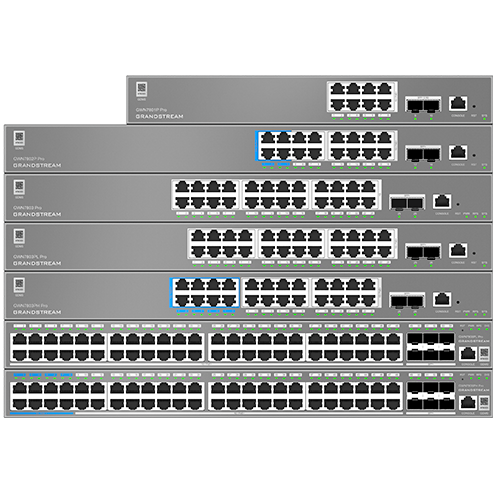
GWN7800 Pro family covers compact, mid-density, and 48-port managed-switch requirements with different PoE and uplink options.
GWN7800 Pro model selection: choose by ports, PoE and uplink design
A good switch selection starts with the devices that must connect today and the devices expected during the next expansion cycle. Count wired endpoints, reserve ports for growth, decide which endpoints need PoE, calculate the real PoE budget, confirm the required fiber or copper uplink speed, and identify whether redundancy or stacking is required. The table below summarizes the most important differences using Grandstream’s current technical documentation. For the GWN7801P Pro, the current user manual lists a 130W total PoE budget, superseding the earlier 120W figure found in older datasheet material.
| Model | GE ports | Optical uplinks | PoE | Per-port power | PoE budget | Switching | Best-fit role |
|---|---|---|---|---|---|---|---|
| GWN7801P Pro | 8 | 2 × 2.5G SFP | 8 × PoE/PoE+ | Up to 30W | 130W current manual | 26Gbps | Small office, branch, reception, compact rack |
| GWN7802P Pro | 16 | 2 × SFP+ | 16 × PoE/PoE+/PoE++ | Up to 60W | 250W | 72Gbps | Growing office, mixed high-power endpoints |
| GWN7803 Pro | 24 | 2 × SFP+ | No PoE | — | — | 88Gbps | Data-only access switching |
| GWN7803PL Pro | 24 | 2 × SFP+ | 24 × PoE/PoE+ | Up to 30W | 250W | 88Gbps | Office floors, voice, APs, standard PoE |
| GWN7803PH Pro | 24 | 2 × SFP+ | 24 × PoE/PoE+/PoE++ | Up to 60W | 400W | 88Gbps | High-power AP, camera and AV deployments |
| GWN7806PL Pro | 48 | 6 × SFP+ | 48 × PoE/PoE+ | Up to 30W | 400W | 216Gbps | High-density access, floor switch, stacking |
| GWN7806PH Pro | 48 | 6 × SFP+ | 48 × PoE/PoE+/PoE++ | Up to 60W | 800W current manual | 216Gbps | High-density high-power access/distribution |
Specification note: product documentation and firmware evolve. Confirm current hardware revision, firmware, PoE budget, supported transceivers, and feature status for the exact model before final procurement or implementation.
GWN7801P Pro: compact managed PoE
This model suits small offices, reception areas, small retail branches, clinics, meeting-room zones, and compact communications racks that need eight powered Gigabit ports without giving up managed security and segmentation. Its two 2.5G SFP uplinks provide more headroom than a basic 1G uplink design, while the current Grandstream manual lists a 130W PoE budget. It is a practical choice for a small number of IP phones, cameras, and access points when the device count and power profile are known.
GWN7802P Pro: 16-port PoE++ flexibility
The 16-port model is a useful middle ground for a growing SME, a larger retail branch, a restaurant or hospitality back office, a clinic, or a department that needs higher-power PoE endpoints. Its SFP+ uplinks help avoid an uplink bottleneck when several access points, cameras, and workstations share the same switch. With 802.3bt support on the platform and up to 60W per supported port, it gives project teams more power flexibility than standard PoE+ designs.
GWN7803 Pro / PL / PH: 24-port decision point
The 24-port family is where buyers should decide whether the network is data-only, standard-PoE, or high-power PoE. GWN7803 Pro removes PoE for workstation, server-edge, printer, and data-only use. GWN7803PL Pro adds PoE/PoE+ for common phones, cameras, and APs. GWN7803PH Pro is better when PoE++ and a larger power budget are needed for demanding wireless, video, or AV endpoints.
GWN7806PL / PH Pro: 48-port scale
The 48-port models are designed for high-density racks, large office floors, education blocks, hospitality floors, camera zones, Wi-Fi-heavy sites, and aggregation-like access roles where multiple fast uplinks matter. Six SFP+ ports, up to 216Gbps switching capability, larger MAC and routing resources, and stack support make these models more suitable when the access layer must scale beyond a single small switch.
Why faster uplinks matter in real business networks
A switch can have many Gigabit access ports and still become constrained if every user, phone, access point, camera, and application must share a narrow uplink. The GWN7800 Pro family addresses this with higher-speed SFP/SFP+ connectivity. The GWN7801P Pro uses two 2.5G SFP ports, while the GWN7802P Pro and 24-port models provide SFP+ connectivity capable of 10Gbps operation. The 48-port GWN7806PL Pro and GWN7806PH Pro provide six SFP+ ports, giving network designers more options for uplink aggregation, redundant paths, stacking, server-room connectivity, and fiber connections between cabinets or floors.
This is particularly important for Wi-Fi 6, Wi-Fi 6E, and Wi-Fi 7 deployments, camera networks with many simultaneous streams, centralized storage, cloud-heavy offices, conference rooms using video collaboration, and businesses that replicate data between servers or locations. A fast uplink does not automatically guarantee end-to-end application performance, because routing, internet bandwidth, server capacity, cabling, transceivers, and endpoint capabilities also matter. However, choosing sufficient switch-fabric and uplink capacity prevents the access switch from becoming an obvious architectural bottleneck.
PoE planning: do not choose a switch by port count alone
Power over Ethernet is one of the most common reasons a business chooses the PoE version of a managed switch, but the number of PoE ports and the total PoE budget are two different things. A 24-port or 48-port switch may physically provide PoE on every access port, while the combined power available across all active devices is governed by the switch’s total budget. The correct design therefore starts by listing each powered device, its required PoE class or maximum consumption, and whether the application needs standard PoE, PoE+, or PoE++. Add spare capacity for future endpoints and for devices that may draw more power during boot, heater operation, infrared illumination, PTZ movement, radio load, or accessory use.
For common desk phones, many deployments remain within 802.3af or 802.3at limits. Wi-Fi access points, multi-radio devices, PTZ cameras, video intercoms, AV endpoints, displays, and specialized building systems can require higher power. The PH and selected P models in the GWN7800 Pro family support 802.3bt, allowing up to 60W per supported port according to Grandstream’s current specifications. This makes them more appropriate when a project contains a mixture of conventional PoE devices and higher-power endpoints.
PoE planning should also consider UPS sizing. If a customer wants phones, cameras, access points, and door communication devices to remain online during a power event, the UPS must support the switch itself plus the active PoE load for the required runtime. A 48-port high-power switch can impose a very different UPS requirement from a compact 8-port switch even when both are in the same product family. Fourteck can help size the switch and the supporting power design based on the actual endpoint list rather than a generic maximum figure.
A practical segmentation design for voice, Wi-Fi, CCTV and business data
A major benefit of a managed switch is the ability to separate traffic logically even when many services share the same physical cabling infrastructure. For example, an office may use one VLAN for employee computers, one voice VLAN for IP phones, one VLAN for corporate Wi-Fi, another for guest Wi-Fi, one for CCTV cameras, one for access-control devices, and a dedicated management VLAN. This design can make policy enforcement, troubleshooting, security, broadcast control, and quality-of-service planning much easier than placing every device in one flat network.
Prioritize and logically separate IP phone traffic. LLDP/LLDP-MED, voice VLAN functions, QoS, and Grandstream OUI support can simplify consistent phone deployment.
Map business SSIDs to controlled VLANs and give access points fast uplinks without mixing guest traffic into internal user segments.
Keep guest access away from corporate systems and route it through the firewall policy intended for visitors or customer internet access.
Isolate camera and security-device traffic so video streams do not unnecessarily interact with user devices and are easier to monitor.
Restrict switch, AP, PBX, NVR, and infrastructure management interfaces to authorized administrators and approved source networks.
The switch does not replace a firewall. Inter-VLAN security policy, internet security, remote access, application inspection, and WAN protection normally belong on a suitable router or firewall. The GWN7800 Pro contributes the access-layer controls needed to keep traffic organized and to enforce port-level and Layer 2 security policies before traffic reaches the routing and security edge.
Layer 2++ functions that matter to administrators
The GWN7800 Pro platform goes beyond basic port management. It supports 4K VLANs and multiple VLAN methods, including IEEE 802.1Q tagging, port-based VLAN, MAC-based VLAN, protocol-based VLAN, QinQ, voice VLAN functions, and VLAN translation features in current documentation. Spanning-tree support helps prevent switching loops in redundant topologies, while link aggregation allows multiple physical links to operate as a logical group for capacity and resilience. The smaller Pro models support up to eight LAG groups, while the 48-port GWN7806 Pro models support a higher group count.
IP services include DHCP client, DHCP server, DHCP relay, DHCP snooping, DHCPv6 client and snooping, DNS, ARP/NDP handling, and VLAN IP interfaces. Static routing is available, with the larger GWN7806 Pro models offering more routing resources and policy-routing capability in current firmware documentation. This can simplify branch or segmented-network designs where limited local routing is useful, although a dedicated Layer 3 switch or firewall remains the better choice when dynamic routing, large route tables, advanced gateway functions, or sophisticated inter-VLAN policy are required.
Multicast features include IGMP Snooping and MLD Snooping, which are valuable in environments carrying multicast video, IPTV, conferencing, AV-over-IP, or service-discovery traffic. Rather than flooding multicast traffic to every port, snooping allows the switch to forward it more intelligently based on group membership. Correct multicast design still depends on the surrounding network, querier behavior, VLAN layout, endpoint requirements, and application architecture.
QoS for voice, video and business-critical traffic
Quality of Service becomes important when latency-sensitive traffic shares links with backups, file transfers, cloud synchronization, guest browsing, camera streams, and software downloads. The GWN7800 Pro Series supports port priority, priority mapping, queue scheduling, traffic shaping, and rate-limit functions. In a VoIP deployment, administrators can use VLAN and QoS policy to help protect call traffic from avoidable congestion. In a video-conferencing environment, the same principles can be applied to interactive media, while bulk or guest traffic receives lower priority.
QoS is not a substitute for adequate bandwidth. A congested internet circuit, overloaded firewall, poor WAN path, wireless interference, or badly sized uplink can still cause poor performance. Effective QoS requires a policy that is consistent across access switches, routers, firewalls, wireless infrastructure, and WAN devices. Fourteck can help align switch QoS with IP phone, PBX, Wi-Fi, and firewall requirements so the configuration reflects the actual application mix.
Security controls for the access layer
Access switches sit close to users and devices, so they need controls that reduce the risk created by unauthorized endpoints, spoofing, loops, rogue DHCP servers, and unmanaged physical access. The GWN7800 Pro family includes security functions such as 802.1X and MAC authentication, AAA integration with RADIUS and TACACS+, port security, sticky MAC behavior, DHCP Snooping, ARP Inspection, IP/IPv6 Source Guard, DoS protection, storm control, port isolation, loop protection, CPU protection, HTTPS/SSH management, firmware signature validation, and management access controls.
These controls should be planned rather than enabled randomly. For example, DHCP Snooping and Dynamic ARP Inspection depend on correctly identifying trusted and untrusted paths. Port-security limits need to account for phones with pass-through PCs, virtualization, hypervisors, or docking stations. 802.1X deployment may require a staged rollout because printers, cameras, access-control panels, and embedded devices often have different authentication capabilities from user laptops.
The strongest deployment combines physical security, switch controls, network access policy, a properly configured firewall, secure administrator accounts, firmware maintenance, monitored logs, backup configuration, and documented change control. A managed switch is one component of the security architecture, not a replacement for the rest of it.
Five management approaches for different IT teams
Grandstream provides several management paths so the same switch family can fit a single-site administrator, an MSP, a multi-branch business, or an engineering team that prefers command-line workflows. The best option depends on how many devices must be managed, whether internet-based cloud control is acceptable, and how the organization handles configuration backups and monitoring.
Useful for direct administration of one switch or a small site through a browser, with local configuration and monitoring.
Grandstream’s cloud-management option for centralized provisioning, visibility, monitoring, and remote administration of GWN networking devices.
An on-premise management approach for organizations that prefer to operate the management platform within their own environment.
Suitable where compatible Grandstream routing and switching products are deployed as part of one GWN network architecture.
Useful for administrators who need command-line access, automation-friendly workflows, standardized operations, or external monitoring tools.
Current Grandstream documentation also includes local, SSH, and Web CLI access, monitoring functions, logs, diagnostics, backup and restore, SNMP versions, RMON, LLDP/LLDP-MED, port mirroring, ping and traceroute tools, fiber-module information, copper testing, alerts, and other operational features. Management exposure should be restricted to trusted networks and administrators, and remote management should follow the organization’s security policy.
GWN7806 Pro stacking, resilience and larger-network design
The 48-port GWN7806PL Pro and GWN7806PH Pro are the most appropriate options in this family when a deployment needs a larger access layer and stronger resiliency features. Current Grandstream documentation supports stacking of up to eight compatible devices, allowing supported switches to operate as one logical unit for simplified management. A stack can reduce operational complexity in a large rack and can provide a clearer growth path than managing many independent 48-port devices.
Stacking requires deliberate design. Devices should use compatible models and firmware, stacking ports must be configured correctly, cabling should follow the prescribed topology, and failure domains should be understood. Redundant power-supply support on applicable models can add another layer of resilience, but the final solution should also account for UPS design, upstream-switch redundancy, firewall/router redundancy, link aggregation, and alternate fiber paths where business continuity matters.
For large Dubai offices, schools, hospitality properties, hospitals, warehouses, or multi-floor commercial buildings, the GWN7806 Pro models can function as high-density access switches or as powerful floor-distribution devices feeding multiple endpoint zones. Whether they should serve as the main core depends on the routing, redundancy, throughput, and future-growth requirements; larger enterprises may still benefit from a dedicated Layer 3 or aggregation core.

Pro AV and precision timing use cases
Grandstream has added Pro AV capabilities to the GWN780x Pro family, including templates and profiles intended to simplify common AV-over-IP requirements. Current documentation references scenarios such as AES67, Dante, and NDI templates, while IEEE 1588 PTP support is also documented in the Pro firmware line. These functions make the platform relevant beyond conventional office traffic where multicast behavior, timing, QoS, and consistent port configuration are important.
An AV network should still be validated against the exact AV vendor’s requirements. Multicast settings, PTP role, queueing, IGMP/MLD behavior, bandwidth per stream, endpoint compatibility, switch latency, redundancy, and uplink architecture can differ significantly between applications. For conference facilities, control rooms, digital signage environments, auditoriums, hospitality AV, classrooms, or production spaces, Fourteck can help check whether the selected GWN7800 Pro model fits the actual AV topology rather than assuming that every Pro AV feature is universally interchangeable.
Business deployment scenarios
Corporate office
Segment users, IP phones, guest Wi-Fi, corporate Wi-Fi, printers, meeting rooms, cameras, and management devices. Select the model by floor port density and PoE demand, then use SFP/SFP+ uplinks back to the server room or distribution layer.
Hotel and hospitality
Use managed PoE switching per floor or zone to connect wireless access points, phones, cameras, door devices, staff systems, and guest services. VLAN design separates operational, guest, security, and voice traffic while fast uplinks carry aggregated traffic.
School and training centre
Provide PoE to classroom APs, IP phones, cameras, paging or AV devices, and administrative endpoints. Managed segmentation can separate students, staff, guest access, CCTV, AV, and network management across the same physical switching infrastructure.
Healthcare and clinic
Keep clinical, administration, voice, guest, camera, and facility traffic organized. PoE supports compatible phones, APs, intercoms, and cameras, while port security and authentication can strengthen the access layer.
Retail and branch network
Connect POS-related infrastructure, phones, APs, cameras, signage, office PCs, and back-office systems with controlled VLANs and centralized visibility. Compact and 16-port Pro models fit smaller branches, while larger sites can use 24- or 48-port designs.
Warehouse and logistics
Power wireless coverage, cameras, phones, access control, scanners, workstations, and operational devices. High port density and faster uplinks are useful when video and wireless traffic must traverse the same structured-cabling environment.
CCTV and physical security
PoE models can supply compatible IP cameras while VLAN and multicast controls organize video traffic. PTZ, high-resolution, heater-equipped, or accessory-heavy cameras may require PoE+ or PoE++; calculate actual power before choosing PL versus PH.
Unified communications
Use voice VLAN, LLDP/LLDP-MED, QoS, PoE, and managed uplinks to support IP phone deployments alongside PBX, Wi-Fi, video conferencing, and user data. The network design should prioritize predictable latency and correct VLAN provisioning.
Dubai and UAE project planning
Dubai businesses often deploy switching in a mixture of tower offices, retail units, warehouses, hotels, clinics, schools, villas converted to commercial use, industrial premises, and multi-floor facilities. These environments create different physical and operational requirements. A compact branch in JLT may need only eight or sixteen PoE ports, while a large office in Business Bay or Sheikh Zayed Road may need multiple 24- or 48-port switches with fiber uplinks to a central communications room. Warehouses in Jebel Ali, Dubai Investment Park, Al Quoz, or Ras Al Khor may prioritize long cable runs, camera density, wireless coverage, rack placement, environmental conditions, and resilient fiber backhaul.
For Abu Dhabi, Sharjah, Ajman, Ras Al Khaimah, Fujairah, and Umm Al Quwain deployments, the same design process applies: document the endpoint count, cabling, PoE demand, rack layout, uplink media, internet/WAN architecture, VLAN policy, security requirements, management method, and expansion horizon. Selecting a 48-port switch simply because the site is “large” can waste budget if the real requirement is multiple smaller fault domains; selecting a small switch to reduce initial cost can create an early replacement when the business adds phones, cameras, access points, meeting rooms, or additional user desks.
Fourteck can assist UAE customers with model comparison, quotation, switch sizing, VLAN planning, PoE assessment, fiber-uplink planning, rack and UPS considerations, IP phone integration, Wi-Fi integration, and broader network design. Stock, lead time, warranty conditions, regional model availability, and final pricing should always be confirmed at quotation stage rather than assumed from a generic product page.
GCC and Africa deployment considerations
Organizations operating across the GCC and Africa often benefit from standardizing on a manageable switch family because branch support becomes easier when administrators see the same interface, VLAN concepts, management platform, and operational procedures across locations. A business with offices in the UAE and Kuwait, or regional operations in Kenya, Uganda, Tanzania, Ghana, and Nigeria, can use a common GWN architecture while still selecting different port counts and PoE budgets for each site.
Regional standardization should not ignore local realities. Power stability, UPS runtime, rack cooling, fiber availability, internet reliability, remote-support capability, spare-unit strategy, branch staff skill level, security policy, and procurement lead time can differ from country to country. A site that is difficult to reach may justify redundant uplinks, spare transceivers, configuration backups, and a larger switch with extra ports. A small urban branch with easy support access may be better served by a compact GWN7801P Pro or GWN7802P Pro.
Fourteck’s regional network can support customer discussions across Kuwait, Kenya, Uganda, Tanzania, Ghana, Nigeria, and broader Africa requirements. The right approach is to keep the architecture standardized where possible while adapting port density, power, uplinks, and resiliency to each site.
GWN7800 Pro vs standard GWN7800 vs Layer 3 and unmanaged alternatives
The Pro Series is not automatically the right answer for every network. Grandstream has several switching families that address different levels of control and performance. Choosing the correct category avoids overbuying features that will never be used or underbuying a switch that becomes a constraint during the next upgrade.
| Family | Primary role | When it makes sense | Main buying question |
|---|---|---|---|
| GWN7700 | Unmanaged switching | Simple plug-and-play port expansion where VLANs, monitoring, QoS policy, authentication, and centralized control are not required. | Do you actually need management? |
| GWN7800 | Layer 2+ managed access | Good for many SME networks that need VLANs, QoS, security, management, and optional PoE without the higher Pro uplink/performance requirement. | Is standard Layer 2+ capacity enough? |
| GWN7800 Pro | Higher-performance Layer 2++ access | Best where faster SFP/SFP+ uplinks, stronger processing, PoE++ options, Pro AV, larger 48-port capabilities, or advanced access-layer features matter. | Will the network benefit from the Pro performance and power options? |
| GWN7810 / Layer 3 | Managed switching with broader Layer 3 role | More appropriate when the switch must perform a stronger routing role in a larger or more complex network. | Is static Layer 2++ routing sufficient? |
| GWN7830 aggregation | High-capacity aggregation/core | Use when the design requires a higher-capacity backbone to aggregate multiple access switches and high-speed links. | Is this an access layer or an aggregation/core requirement? |
For customers already comparing the earlier series, see Fourteck’s Grandstream GWN7800 Dubai page. A Pro upgrade is most justified when the deployment can use its faster uplinks, higher switching capacity, additional PoE capability, advanced software features, or larger-scale 48-port design rather than simply because “Pro” is a newer label.
How to size a GWN7800 Pro switch before requesting a quote
List every phone, PC, AP, camera, printer, NVR connection, server, access-control device, AV endpoint, uplink, and spare port. Include expansion rather than designing at 100% utilization on day one.
Mark which endpoints require PoE and identify their actual standard and maximum power draw. This immediately narrows the choice between non-PoE, PL, PH, and compact P models.
Add expected maximum loads, include sensible reserve, and account for future devices. Do not assume that every PoE port can simultaneously deliver its maximum per-port wattage.
Choose 2.5G or 10G uplinks based on aggregate traffic, server-room connectivity, distance, fiber availability, redundancy, and the upstream device’s compatible optics and port speeds.
Plan voice, data, Wi-Fi, guest, CCTV, management, AV, or building-system VLANs. Decide where inter-VLAN routing and security enforcement will occur.
Confirm whether the IT team prefers local Web UI, GDMS Networking, GWN Manager, router-integrated management, CLI, SNMP monitoring, or a combination.
Review UPS, redundant uplinks, RPS support, link aggregation, stacking, spare switch strategy, configuration backups, and the acceptable impact of a single switch failure.
Check rack space, depth, airflow, grounding, temperature, patch-panel layout, power outlets, cable management, fiber path, and maintenance access before final hardware selection.
Implementation checklist for a clean managed-switch deployment
A properly selected switch can still perform poorly if implementation is rushed. Before installation, create a port map that identifies the purpose of each port, the access or trunk VLAN assignment, expected endpoint, PoE requirement, uplink role, LAG membership, and any special QoS or security policy. Label patch panels and switch ports consistently so future technicians can understand the network without reverse engineering the cabling.
During configuration, establish secure administrator credentials, management VLAN and access rules, correct system time, firmware policy, configuration backup, SNMP or monitoring settings, logging, VLAN definitions, trunk/access ports, voice VLAN, spanning tree, LACP, DHCP Snooping trust, ARP/security controls, PoE limits, LLDP/LLDP-MED, and QoS. Apply changes in a controlled sequence and test each service after migration rather than changing the entire network at once without a rollback plan.
After deployment, validate phone registration and call quality, Wi-Fi AP connectivity, camera recording, client DHCP, gateway reachability, guest isolation, application access, multicast behavior where applicable, uplink utilization, error counters, PoE consumption, device temperature, and logs. Save the final configuration and document the firmware version, optical modules, VLAN numbers, switch management address, stack arrangement, UPS circuit, and support contacts.
For multi-site deployments, create a standard baseline but allow controlled site-specific variation. A template that assumes identical port numbers, uplink paths, VLAN IDs, or ISP topology at every branch can create avoidable errors. The goal is consistent policy with accurate local documentation.
Common buying mistakes to avoid
Two 24-port switches can have very different PoE budgets, uplinks, routing resources, redundancy, and performance. Match the complete requirement.
Having 24 or 48 PoE-capable ports does not mean every port can simultaneously deliver maximum wattage. Calculate the total load.
A high-density switch serving APs and cameras can overwhelm a single slow uplink. Size the backbone for aggregate traffic and growth.
VLAN and ACL functions help segmentation, but internet security and advanced inter-zone policy still require suitable routing and firewall architecture.
A switch filled on installation day has no room for a new AP, phone, camera, printer, desk, or uplink without immediate redesign.
Advanced capabilities can evolve through firmware. Confirm the required feature against the intended model and approved firmware before design sign-off.
When should you choose the Pro Series?
Choose GWN7800 Pro when you need faster optical uplinks than the standard access-switch design, a higher-performance switch fabric, PoE++ on selected models, a larger high-power PoE budget, strong access-layer segmentation, Pro AV functionality, 48-port stacking, or a more scalable platform for a demanding SME network. It is particularly compelling where Wi-Fi, video surveillance, voice, user data, AV, and building systems converge on the same managed infrastructure.
Choose a standard GWN7800 model when the customer needs managed Layer 2+ switching, VLANs, QoS, security and optional PoE but does not need the Pro uplink, power, processing, or advanced scale. Standard GWN7800 can remain a cost-effective fit for many offices and branches.
Choose a Layer 3 or aggregation switch when the switch must serve a larger routing or backbone role, aggregate multiple high-speed access switches, or support an architecture beyond the intended access/distribution scope of the GWN7800 Pro family.
Choose unmanaged switching only when the network truly does not need segmentation, visibility, QoS policy, authentication, managed PoE behavior, remote configuration, or structured troubleshooting. For business voice, Wi-Fi, security and multi-service networks, managed switching is generally the safer long-term design.
GWN7800 Pro Series FAQ
How many models are in the GWN7800 Pro Series?
There are seven current models: GWN7801P Pro, GWN7802P Pro, GWN7803 Pro, GWN7803PL Pro, GWN7803PH Pro, GWN7806PL Pro, and GWN7806PH Pro. They cover 8, 16, 24, and 48 Gigabit Ethernet port requirements with different uplink and PoE capabilities.
What is the difference between PL and PH models?
PL models are designed for standard PoE/PoE+ requirements with up to 30W per supported port, while PH models add 802.3bt capability and up to 60W per supported port along with a larger total PoE budget. Choose PH when the network includes higher-power access points, cameras, AV devices, or other compatible PoE++ endpoints.
Does the GWN7800 Pro Series support 10G uplinks?
Yes, most models in the family use SFP+ uplinks capable of 10Gbps operation. GWN7801P Pro is the exception, using two 2.5G SFP ports. The 48-port GWN7806PL Pro and GWN7806PH Pro provide six SFP+ ports.
Can GWN7800 Pro switches power Grandstream IP phones and Wi-Fi access points?
PoE-capable models can power compatible IP phones, Wi-Fi access points, cameras, and other standards-based PoE devices. The exact model should be selected according to PoE standard, maximum power per port, total PoE budget, and the number of endpoints.
Can the GWN7800 Pro Series be managed from the cloud?
Yes. Grandstream supports GDMS Networking for cloud management. Other options include GWN Manager for on-premise management, the switch’s embedded Web UI, supported GWN routers, and CLI/SNMP-based administration.
Does GWN7800 Pro support VLANs and voice VLAN?
Yes. The platform supports extensive VLAN functionality including IEEE 802.1Q tagging and voice-VLAN features. This is useful for separating IP phone, user, guest Wi-Fi, CCTV, management, AV, and other traffic classes.
Is the GWN7800 Pro Series a Layer 3 switch?
Grandstream positions the family as Layer 2++ managed switching. It includes useful IP services and static-routing capabilities, and the larger models have more routing resources, but customers requiring a broader Layer 3 or core-routing role should compare Grandstream’s Layer 3 and aggregation families.
Which GWN7800 Pro model is best for a 24-port office?
Use GWN7803 Pro when PoE is not required, GWN7803PL Pro when normal PoE/PoE+ endpoints dominate, and GWN7803PH Pro when the office needs PoE++ or a larger 400W PoE budget. Also compare spare-port requirements, uplink design, UPS capacity, and growth.
Can the 48-port GWN7806 Pro models be stacked?
Yes. Current Grandstream documentation supports stacking on GWN7806PL Pro and GWN7806PH Pro, with up to eight supported switches in a stack. Model, firmware, stacking-port configuration, cabling, and topology requirements should be followed carefully.
How do I get GWN7800 Pro pricing in Dubai or the UAE?
Request a project quotation from Fourteck with the preferred model, quantity, endpoint list, PoE requirements, transceiver needs, installation location, and any configuration or support requirement. Price, stock, lead time, warranty conditions, and regional availability should be confirmed at quotation stage.
Plan the GWN7800 Pro deployment around your real network requirement
The GWN7800 Pro Layer 2++ Managed Switch Series gives businesses a clear path from compact eight-port PoE switching to 48-port high-density, high-power managed access with fast optical uplinks. The best model is the one that matches endpoint count, PoE standard, total power budget, uplink traffic, VLAN architecture, security policy, management method, rack and UPS design, and the expected growth of the site.
Fourteck supports Dubai, UAE, GCC, and Africa business customers with requirement assessment, switch selection, quotation, network planning, Grandstream IP phone and PBX integration, Wi-Fi design, VLAN/QoS planning, PoE sizing, and deployment guidance. Share the number of users, phones, access points, cameras, wired devices, floors or branches, and expected uplink design to receive a more accurate recommendation.