GRANDSTREAM CONVERGENCE • MODEL SELECTION
GCC6020 UC and Networking Series
Bring business calling, network routing, security and switching into a single platform. Grandstream’s GCC6020 Series comprises GCC6020 and GCC6021, giving businesses two hardware options for a converged office or branch design.
The buying decision starts with your site: how many powered devices need connections, how busy the telephone system becomes, which applications cross the internet connection, and how the business will recover from an outage. Fourteck can discuss these requirements and prepare a configuration-specific quotation.
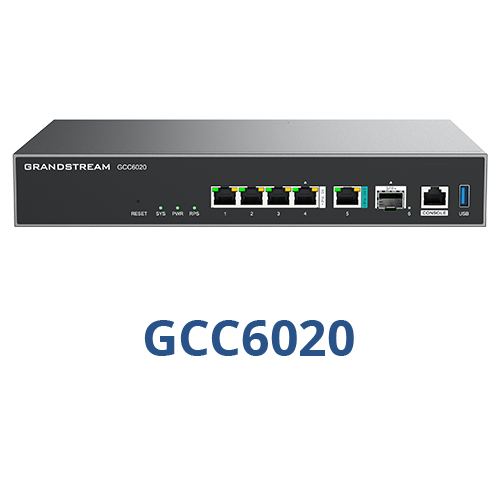
Choose the hardware around the network
Use the comparison below to establish a shortlist. The specifications are vendor-published reference figures, not a promise of application performance at your premises. Enabled inspection, traffic patterns, packet sizes, VPN use and configuration influence real results.
| Selection point | GCC6020 | GCC6021 |
|---|---|---|
| Copper network interfaces | 4 × Gigabit + 1 × 2.5 Gigabit | 16 × Gigabit + 8 × 2.5 Gigabit |
| Fibre/uplink interfaces | 1 × 10 Gigabit SFP+ | 4 × 10 Gigabit SFP+ |
| Maximum WAN connections | Up to 3 | Up to 5 |
| PoE output | 5 ports; IEEE 802.3af/at | 24 ports: 8 support af/at/bt; 16 support af/at |
| Total PoE budget | 120 W | 370 W |
| Published routing rate | 6.5 Gbps | 10 Gbps |
| Included PBX baseline | 50 users / 16 concurrent calls | 50 users / 16 concurrent calls |
GCC6020 is a candidate where a modest set of local powered connections is sufficient or additional access switching already exists. GCC6021 deserves consideration where a larger group of phones, access points or other powered endpoints will connect at the appliance. Confirm port roles against the intended firmware and reserve interfaces for WAN links before counting available LAN connections.
One appliance, four design responsibilities
Convergence can simplify a new office build by reducing separate platforms to configure. It also places more business functions within one maintenance boundary. Agree who owns the complete design, who approves changes and which services are affected during a restart or upgrade.
Business communications
The embedded PBX provides the calling platform. Define reception transfers, business hours, call distribution and remote-user needs before selecting capacity or endpoint quantities.
Routing and connectivity
Multi-WAN load balancing and failover can support a resilient connectivity design. Record each ISP handoff, addressing requirement and intended traffic path before assigning interfaces.
Network security
The firewall includes inspection and protection capabilities. Specify which policies and security services the deployment needs, then confirm licensing, updates and renewal terms for that scope.
Powered access
Integrated PoE can supply compatible endpoints over Ethernet. Check the power requirement of every device, the per-port standard and the total budget before removing separate power supplies from the equipment list.
Size the PBX separately from the switch
A switch port count is not a telephone-user licence count. Both appliances start with the same published PBX baseline, while purchased upgrades can expand the PBX module. Ask the quotation to state the included entitlement, selected upgrade and any remote-collaboration add-ons explicitly.
Count people who need extensions and estimate the busiest simultaneous calling period. A reception team, sales desk and service department can create a different calling pattern from an office where most staff rarely use desk phones. Document internal calling, external trunks and conferencing requirements so the proposed capacity matches actual use.
Carrier trunk capacity is another separate constraint. Confirm the number of external channels, number migration arrangements and supported connection method with your provider. A larger PBX entitlement does not automatically increase the channels purchased from a carrier.
For a detailed implementation scope, review Grandstream PBX setup and configuration. If retaining equipment, use the existing VoIP PBX compatibility guide to frame endpoint checks.
Turn a device list into a power and port plan
Start with a room-by-room inventory of phones, access points, computers, cameras and other equipment. Mark each device’s required link speed and power standard. Then allocate WAN ports, uplinks and growth capacity before choosing the appliance.
As an illustrative calculation, eight devices drawing a planned maximum of 10 W each require 80 W before any additional reserve. This example is a sizing method, not a specification for Grandstream phones. Replace the assumed wattage with the actual maximum requirements of the selected endpoints. Having sufficient total wattage also does not solve a shortage of physical ports.
Access points with higher power requirements need suitable ports, while fibre uplinks need compatible optics or cables. List these accessories explicitly. If the site requires more edge connections than the appliance supplies, include separate managed switching and check the uplink design.
The Grandstream switch selection guide explains how endpoint counts, PoE and network policies influence expansion.
Design the office before configuring the appliance
Map the traffic. Separate staff, voice, guest and infrastructure needs in the proposed network. Define which systems need to communicate across these boundaries.
Build the connectivity plan. Confirm ISP handoffs, WAN priorities, addressing and remote-site access. VLANs and policy routing need to align with the wider network and provider requirements.
Prepare the calling plan. Record extensions, trunks, incoming destinations, outbound permissions and emergency calling requirements with the relevant provider.
Assign management ownership. Agree administrator roles, account custody, backups and change procedures. The platform supports GDMS and local management options; choose the arrangement that matches operational responsibility.
Commission against business tasks. Verify voice quality under expected traffic, transfers, incoming routes, guest isolation, device power and recovery after interruptions. Save the final configuration and handover records.
For a broader network scope, see Grandstream business networking solutions. For rollout administration, see device management and provisioning planning.
Resilience needs more than a second internet link
Grandstream lists hot-standby high availability for the series. Treat this as a design capability to assess, rather than an automatic property of a single purchased appliance. Confirm the supported pairing, firmware, cabling, power arrangement, configuration synchronisation and service-specific recovery behaviour before specifying a resilient system.
A second WAN connection and an appliance standby address different failure cases. Shared electrical power, the same upstream provider infrastructure or a single access switch can still interrupt the business. Define acceptable downtime first, then choose which failure paths the project needs to cover.
Test real outcomes: whether a user can place a new call after an uplink fails, whether remote users can reconnect and how administrators restore access. Record any interrupted sessions. Give the business a clear recovery procedure rather than assuming every session survives a failover.
Where this approach fits—and when to compare alternatives
A new professional office or branch can be a good candidate when the buyer wants coordinated calling and network management. An existing site may also benefit, but retaining a capable firewall, hosted PBX or recently installed switching can change the economics.
Compare a separate PBX and networking architecture if different teams require independent upgrade schedules, a security policy mandates another firewall platform or the application workload exceeds the validated design. The right comparison is the complete operational system: equipment, licences, deployment effort, support ownership and outage impact.
For a reception-led office, test incoming call handling and transfer workflows first. For a retail branch, prioritise application separation and connectivity recovery. For a training centre, assess wireless coverage and busy-period traffic alongside telephone requirements. These are planning scenarios, not fixed capacity promises.
UAE, GCC and African project considerations
Dubai and the wider UAE: For an office move or fit-out in Dubai, Sharjah, Ajman or Abu Dhabi, coordinate the circuit handover, structured cabling and telephone-number transition with the premises schedule. Confirm the provider’s trunk requirements before finalising the configuration. A technically suitable appliance still needs a ready connection and an agreed cutover window.
Kuwait and other GCC enquiries: State the destination country, local provider, purchasing entity and whether the project needs equipment supply, remote assistance or site attendance. Request written confirmation of the offered services, country-specific terms and accessory requirements.
Uganda, Kenya and Tanzania: For branches managed across cities, document who will perform local cabling checks, restore power and assist with recovery. Include backup power and a handover process appropriate to the site rather than relying on remote management alone.
Ghana and Nigeria: For a staged rollout, identify which equipment is needed at each location and whether internet links, local support and commissioning windows differ. Ask for destination-specific delivery, availability and service arrangements in the quotation. These details are project-dependent.
Request a GCC6020 Series configuration and quotation
Send Fourteck your destination country, number of sites, required extensions, busiest calling estimate, ISP details and endpoint inventory. Include existing phones, switches, access points and any equipment that must remain in service.
Ask for an itemised proposal covering the exact GCC model, PBX upgrades, security services and renewals, phones, wireless equipment, optics, storage if needed, backup power and implementation scope. Confirm stock, delivery, warranty and support terms in writing; no price or availability is implied by this page.
Questions buyers ask
What is the Grandstream GCC6020 Series?
It is a family of convergence appliances that brings a VPN router, next-generation firewall, IP PBX and network switch into one platform. The two models are GCC6020 and GCC6021.
How do GCC6020 and GCC6021 differ?
GCC6021 offers more network interfaces, a larger PoE power budget and a higher published routing rate. Select around the required ports, powered devices, traffic and resilience design rather than model number alone.
Does the included PBX support every employee automatically?
Both models include a baseline of 50 users and 16 concurrent calls according to the vendor datasheet. Additional PBX capacity requires an appropriate purchased upgrade. Confirm capacity and add-ons in the quotation.
Does it replace wireless access points?
No. Plan separate access points for wireless coverage. Central management of compatible access points does not mean the appliance itself provides room-by-room Wi-Fi coverage.
Can existing phones and carrier services be retained?
Potentially, but each handset model, firmware version, SIP service and required calling feature needs compatibility checks. Existing analogue equipment may need separate gateways or adapters.
Does WAN failover keep every active call connected?
Do not assume that it does. Link failover, carrier registration, addressing and media paths can affect ongoing calls. Test both active calls and new calls during the agreed failure scenarios.
What determines the complete project price?
The selected appliance, PBX upgrades, security service terms, phones, access points, switches, optics, storage, backup power and implementation scope all contribute. Request an itemised quotation with availability and support terms confirmed.
Vendor references
Technical facts checked against the GCC6020/GCC6021 datasheet, official series page, system manual, PBX manual and networking manual. Verify current firmware, upgrade entitlements and service terms for the final order.