GRANDSTREAM CORDLESS COMMUNICATIONS
DP DECT Cordless Phone Series
Grandstream’s DP series combines cordless DECT handsets with network-connected VoIP base stations, allowing staff to make and receive business calls while moving within validated radio coverage. Choose the handset for the user’s working conditions, then choose the base for registration capacity, simultaneous calls and compatibility.
For a shop floor, office, hospitality team or warehouse, a complete specification includes more than a handset count. Fourteck can discuss suitable combinations, your existing PBX and a project-specific quotation.
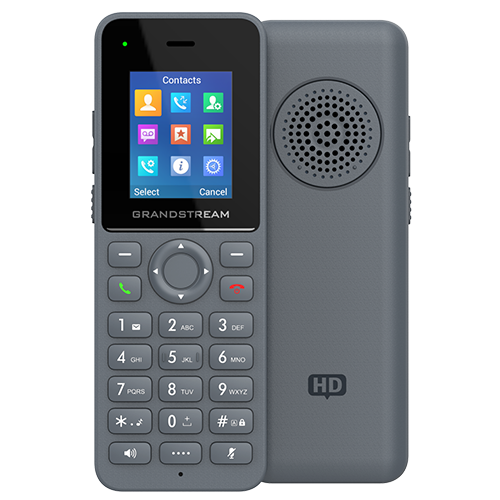
Start with the job the phone must do
A manager moving between an office and reception has different priorities from a warehouse supervisor handling equipment. Start with the tasks: answering a shared number, transferring callers, making internal calls, using a headset or carrying the phone through a full shift. Then identify where those calls must remain usable.
| Requirement | Selection direction | Check before ordering |
|---|---|---|
| Everyday indoor mobility | Compare DP720, DP722 and DP725 | Base support, display, charging and expected shift usage |
| Larger screen and mobile supervision | Compare DP730 and DP735 | Handling, controls and required handset features |
| More demanding handling conditions | Assess rugged DP735 | Exact environmental requirements and vendor operating limits |
| A growing team | Compare DP752 and DP755 base capacity | Peak calls as well as registered handset count |
| Coverage around obstructions | Plan a measured radio assessment | Base position, construction and supported extension options |
DP is a DECT family, so a strong office Wi-Fi signal does not establish DP coverage. The handset-to-base radio link and the base-to-PBX network path need separate checks. For a wider operational comparison, see Fourteck’s warehouse Wi-Fi and cordless phone guidance.
Compare the DP handset choices
The following guide highlights useful selection differences rather than treating every DP handset as interchangeable. Published battery figures are maxima under vendor test conditions; actual results vary with use, settings, signal conditions and battery age.
| Handset | Verified distinction | Practical buying consideration |
|---|---|---|
| DP720 | 1.8-inch colour display; HD voice; 3.5 mm headset connection | Assess for basic cordless calling or a compatible installed system. |
| DP722 | 1.8-inch colour display; up to 20 hours talk time and 250 hours standby | Compare for everyday staff mobility; verify the intended base combination. |
| DP725 | 1.8-inch colour display; dedicated push-to-talk button; up to 50 hours talk time and 500 hours standby | Useful to assess when charging patterns and shift duration influence selection. |
| DP730 | 2.4-inch colour display; dedicated push-to-talk button; up to 40 hours talk time and 500 hours standby | Compare where screen size and mobile call handling matter. |
| DP735 | 2.4-inch colour display; IP67 rugged design; up to 65 hours talk time and 650 hours standby | Assess for demanding handling conditions; review cleaning and environmental instructions. |
Do not extend DP735’s rugged claims to the other models. Likewise, a push-to-talk button is a handset capability, not proof that every proposed paging or group communication workflow is supported. Confirm the required behaviour with the selected base, firmware and PBX.
Choose the base by capacity, not its model number
The base connects cordless users to the SIP environment. Registered handsets, configured SIP accounts and simultaneous calls describe different limits. A system may have spare account capacity while its radio call capacity is fully occupied.
| Base | Registered handsets | SIP accounts per system | Concurrent calls |
|---|---|---|---|
| DP750 | Up to 5 | Up to 10 | Up to 5 |
| DP752 | Up to 5 | Up to 10 | Up to 5 |
| DP755 | Up to 10 | Up to 20 | Up to 8 |
Example: eight staff may each need a handset, while only four normally speak at once. DP755 is a candidate on registration and call counts, subject to coverage and compatibility. If all ten registered users must speak simultaneously, a single DP755 does not meet that requirement. PBX capacity and carrier channels must also support the expected traffic.
Grandstream’s current DP755 administration guide lists DP720, DP722, DP725, DP730 and DP735 handsets. For an existing DP750 or DP752 deployment, verify the exact handset against current documentation and firmware before purchasing an expansion. A family name alone is insufficient evidence of every feature being available on every pairing.
Treat range as a planning input
Grandstream quotes outdoor maxima up to 400 metres for specified longer-range handset/base combinations and indoor coverage up to 50 metres. DP722 and DP720 combinations with DP752 or DP755 have different outdoor limits from the longer-range handsets. DP750 product information quotes up to 300 metres outdoors. None of these figures guarantees coverage through a particular building.
Walk the routes that matter: reception to stockroom, between warehouse aisles, behind a fire door and across working areas where calls are routinely taken. Repeat testing with doors closed and the site in normal use. Coverage measured in an empty warehouse can change when racks and stock are present.
Do not assume that installing several independent bases creates seamless multicell roaming. If staff must retain active calls across floors or buildings, specify that requirement explicitly and verify an architecture that supports it. A successful call beside each base is not an acceptance test for roaming.
DP760 is a DECT repeater option with up to two concurrent HD calls. Confirm the supported base, firmware and repeater topology before including it. A repeater can extend usable radio coverage in an appropriate design, but it does not turn a base into a higher-capacity phone system.
Connect cordless users to the right call flow
The handset is one part of the calling service. The selected base needs network connectivity, suitable power and SIP registration. Confirm the PBX or hosted provider’s endpoint policy, supported authentication and provisioning approach. Discuss platform choices through Fourteck’s Grandstream IP PBX systems guide.
For a shared shop number, decide who rings first, what happens when someone is busy and where unanswered calls go. For named staff extensions, define outbound identity, transfer behaviour, directory entries and voicemail. Test these behaviours rather than assuming that registration alone proves compatibility.
Compatible UCM deployments offer Zero Config provisioning options. Other SIP platforms may require a different supported provisioning process. Agree who owns configuration files, administrator credentials, backups and future firmware changes. See device management and provisioning planning for related project considerations.
Use supported secure management and calling settings appropriate to the base and provider. Restrict administrative access, replace default credentials and verify time synchronisation. Include the switch, base, router and PBX in power-continuity planning if calls are expected during a mains interruption; a charged handset alone cannot sustain the complete service.
Plan around the premises and the team
Dubai and UAE projects
For a compact Dubai retail unit, test the shop floor and rear store separately. In a Sharjah warehouse or Abu Dhabi office spanning several floors, identify metal shelving, reinforced construction and movement routes before choosing quantities. Confirm the correct regional hardware, existing provider arrangements and any installation access constraints.
Regional and distributed rollouts
For deployments in Uganda, Kenya, Ghana, Nigeria or Tanzania, specify the destination country and power arrangements in the procurement brief. Agree who performs local testing, how spare handsets are paired and who supports the system after handover. Separate local extension calling from provider-dependent external calling when planning continuity.
Hotel teams should assess charging handovers between shifts and distinguish staff mobility from guest-room requirements. Healthcare buyers should confirm approved cleaning practices and any specialist integrations. Warehouse buyers should assess handling and coverage together rather than selecting a rugged handset without checking the radio design.
Build an itemised quotation and acceptance plan
Send Fourteck a floor plan, the total handset quantity, expected busy-hour calls, base and PBX models, country and required call flows. If you already own equipment, include hardware and firmware details. Identify headsets, chargers, spare batteries where supported, power arrangements and any planned growth.
Ask the quotation to separate base stations, handsets, accessories, network changes, configuration and professional services. Confirm what is included in each package, current availability, delivery arrangements, warranty terms and support scope. There is no single meaningful series price without an exact bill of materials.
- Confirm model pairings and regional variants before procurement.
- Test registration, internal and external calling, transfers and voicemail.
- Walk the agreed coverage routes during active calls.
- Test the agreed peak call load and busy behaviour.
- Check charging, restart recovery and configuration handover.
For projects involving installation, align this checklist with the scope in Grandstream phone and PBX installation planning. Record any coverage exclusions and who resolves them before signing off.
DP DECT questions buyers ask
Does a DP handset connect directly to Wi-Fi?
No. DP handsets use DECT radio to a compatible DP base station. The base connects to the IP network and registers with the selected SIP service or PBX.
Can I buy only a replacement handset?
Yes, if the exact handset is supported by your existing base and firmware. Confirm the base model, regional version, spare registration capacity and required accessories before ordering.
Does DP755 support ten simultaneous calls?
DP755 supports up to ten registered handsets, but Grandstream documents eight concurrent calls. Twenty SIP accounts do not mean twenty simultaneous conversations.
Will the advertised 400-metre range cover my warehouse?
That figure is an outdoor maximum for specified combinations. Warehouse racks, stock, walls and construction affect radio coverage. Validate actual calling routes before approving the deployment.
Can several handsets answer one business number?
Shared-account and ring-group arrangements are possible with appropriate base and PBX settings. Test ringing, busy behaviour, outbound caller identity and voicemail for the intended configuration.
Is DP735 suitable for clinical alarms or emergency calling?
Its rugged handset features do not establish certification for a clinical alarm, lone-worker or life-safety system. Verify any specialist integration separately and test emergency routing with the responsible service provider.
What should I send Fourteck for a quotation?
Send handset quantities, peak simultaneous calls, floor plans, site country, PBX details, existing base models and required accessories. Include installation, testing, training and support needs so the quotation can identify its scope.
Discuss a suitable DP series configuration
Share where staff work, how many calls they need and what phone system is already installed. Fourteck can discuss a handset-and-base shortlist and the information needed for a configuration-specific quotation. Confirm compatibility and commercial terms for the exact equipment and destination.
Official technical references
Model features and limits should be checked against the documentation for the exact hardware and firmware. References reviewed for this guide: